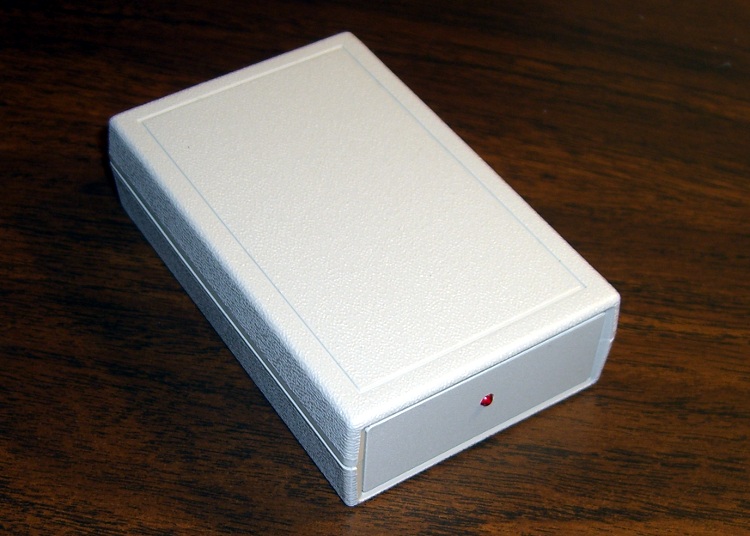
OK, I had to do it. The Alpha-Geek Clock WWVB receiver circuitry, such as it is, now resides in a nice Pactec enclosure, with a bright red LED.
All time, all the time, and nothing but the time.
I should put it up on etsy.com for fifty bucks…
The Smell of Molten Projects in the Morning
Ed Nisley's Blog: Shop notes, electronics, firmware, machinery, 3D printing, laser cuttery, and curiosities. Contents: 100% human thinking, 0% AI slop.
OK, I had to do it. The Alpha-Geek Clock WWVB receiver circuitry, such as it is, now resides in a nice Pactec enclosure, with a bright red LED.
All time, all the time, and nothing but the time.
I should put it up on etsy.com for fifty bucks…
The AAA cells I mentioned there bubbled to the top of the heap on my desk again, so I charged them, let them sit around for a few days to stabilize, then ran a discharge test.
The top (black) trace is all four AAA cells in series; the two steps correspond to the two weakest cells failing. The red trace is the surviving two cells. The green trace is the strongest cell, which supplied current during all three traces.
They’re nominally 900 mAh, but the results are pretty much what you’d expect.
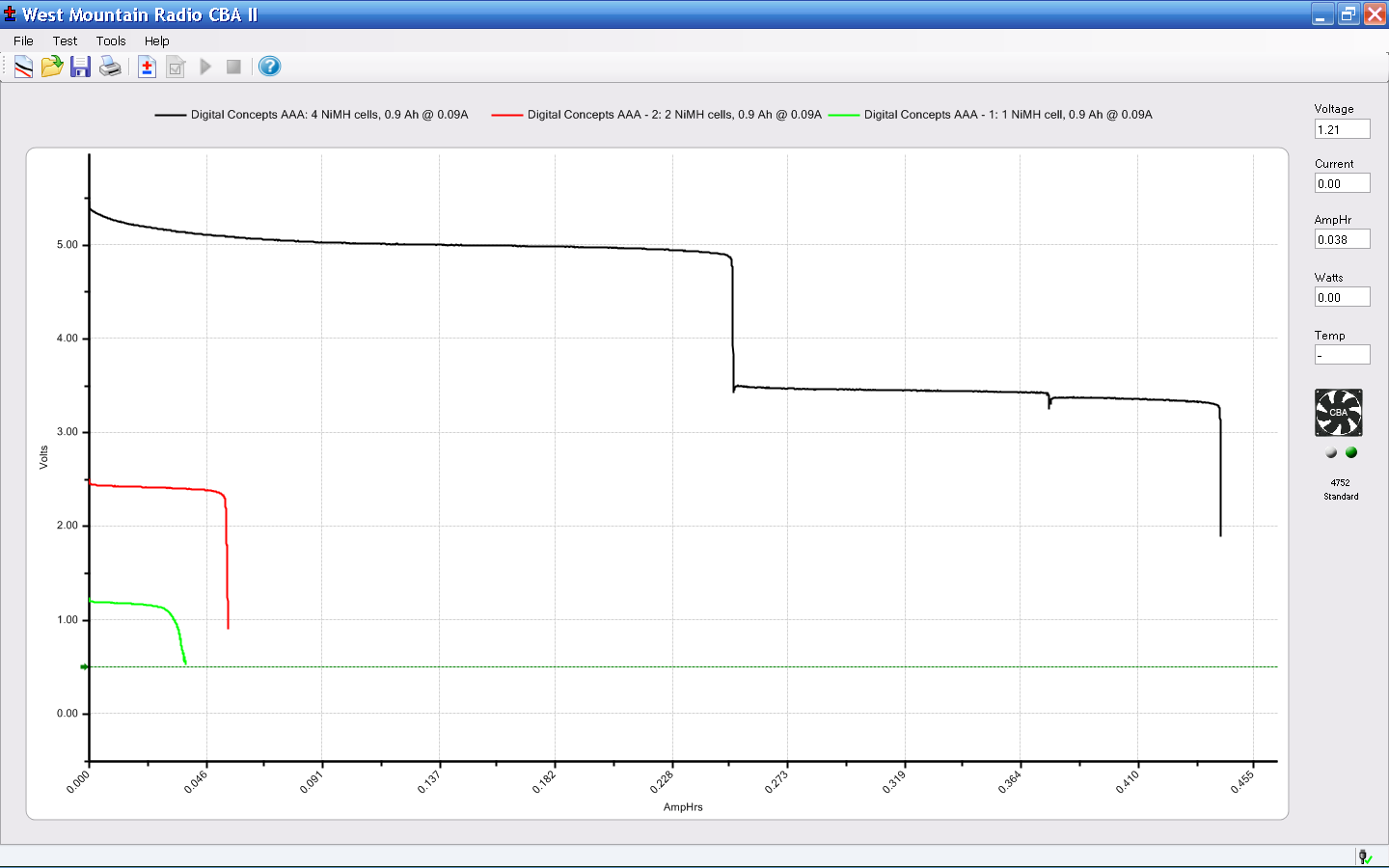
The most durable cell, the last one to fail with the green trace, had a capacity of a bit over 500 mAh: slightly over half the rating. The weakest cell (the first step on the black trace) failed after a mere 250 mAh.
Junk. Pure junk. I’ll give ’em another charge just to see what happens, but don’t hold your breath anticipating a resurrection.
Over the years I’ve accumulated a bunch of obsolete ICs; all I can say is they weren’t obsolete at the time. Sometimes I need one, so here’s a list of the jelly-bean collection where I can find & update it as parts emerge from their hidey-holes in the Heap.
All hulking through-hole
Memo to Self: What horror lurks in the box labeled “Old ICs”?

We took down the deer netting around the garden yesterday, which involves pulling a zillion staples out of the wood posts. I put some salvaged hard-drive head motor magnets to good use: one magnet inside my jacket sleeve to hold the other magnet in place, then just drop staples near them.
Shazam… no staples in the ground!
You can actually buy such things, with cute Velcro straps and all, but why? You’ve been saving those magnets for years: put ’em to use!
Two years ago I converted a $20 Thinkpad 560Z (they’re more expensive now, oddly enough) into a digital picture frame for Mary’s parents, a process documented in two of my late, lamented DDJ columns there and there. It runs a stripped-down Slackware installation that boots directly into a picture viewer, so when you turn it on you get pictures and nothing else. Well, after you get a few screens of the usual white-on-black Linux boot messages, which I think adds a certain geeky charm to a digital picture frame.
Anyhow, the thing failed just before Thanksgiving with BIOS error messages 161 and 163: its way of telling you that the lithium cell powering the clock chip has gone dead. I hadn’t replaced that cell when I did the conversion and it lasted just about exactly a decade; it was evidently the right size for the job.
Not being constrained by the confines of the original laptop case, I replaced the coin cell with a grossly oversized CR123A cylindrical lithium cell (having a bunch of them on the shelf and some holders for another project). The connector is in an awkward location, below the IDE socket’s flex-PCB cable, and both wires popped out of the connector shell when I pulled on them. So it goes.
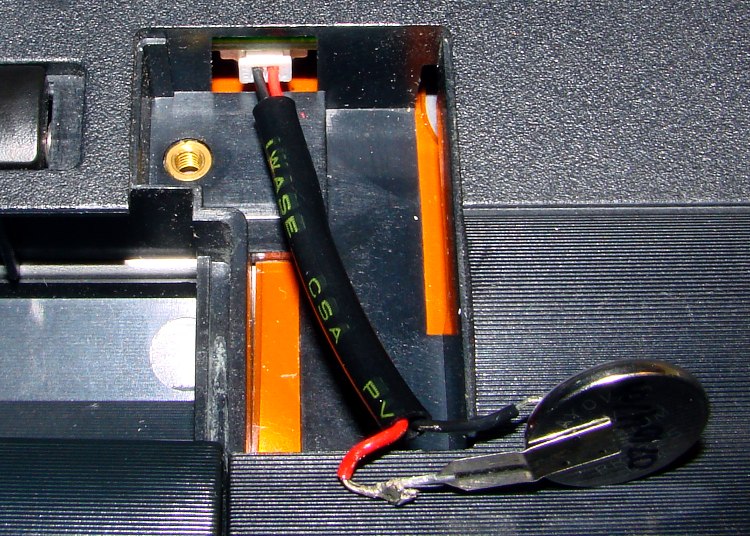
The top picture shows the proper polarity, as seen inside another 560Z’s lithium cell compartment: red-for-positive on the right, with the circuit board positioned component side down (toward the keyboard). Our daughter did the soldering; she’s since learned about heatshrink tubing and cold joints; it’s good enough.
This picture shows the CR123A all wired up and ready to go in the picture frame. The circuit board here is component side up, so the connector wires go the other way. Notice the small trace from the red-side pin on the circuit board; that’s your clue that it’s the positive battery connection. Measure the voltage at the backside of the connector to be sure you have those miniature pins properly seated in the connector, too.

FWIW, I bought three 560Zs while they were cheap; our young lady installed Puppy Linux on the one in the top picture (hence her soldering) and seems reasonably content. They’re old & slow & cramped by contemporary standards, but just fine for most of the things you’d probably buy a fancy new netbook for.
Hmmm…
I’m using hardware-assisted SPI for a project, copied in my own boilerplate code, assigned the bits, and… it didn’t work.
Jammed hard with mysterious symptoms. Looked like a stack crash, looked like the hardware was broken, looked like a lot of things.
The final hint, found by stuffing Serial.print() statements in all the usual spots, was that the SPCR register mysteriously changed from the desired 0x71 to 0x61, without any of my code doing the writing.
Turns out that the Fine Manual has this to say:
Bit 4 – MSTR: Master/Slave Select
[snippage] If -SS is configured as an input and is driven low while MSTR is set, MSTR will be cleared, and SPIF in SPSR will become set. The user will then have to set MSTR to re-enable SPI Master mode.
I planned to use Arduino Pin 10 (PWM10) as the signal to latch the output shift registers, but because I’m developing the code on an Arduino Pro before making the circuit board, I hadn’t gotten around to initializing that pin… which, as you might expect, is also the -SS pin.
With the pin not set up as an output, it defaults to an input. My cut-n-paste code blipped the pin high and left it low to simulate latching the ‘595 shift registers… but, for input pins, writing a value simulates what would happen when an external signal drives the pin.
Soooo, I had inadvertently set -SS low, which turned off Master mode, which meant the hardware wasn’t going to send the next byte, which means SPIF wasn’t going to automatically go high when I dropped a byte in SPDR. The code, of course, waited until SPIF was clear before loading SPDR, then hung waiting for it to go high again.
As always, stupid errors are easy to fix after figuring things out, but ouch did it take a while…
Moral of the story: always initialize all the I/O pins! (But you knew that, right?)

Because nearly all of my printed circuit boards are for one-off homebrew projects, I tend to not obsess over getting the last air wire down on the copper. Instead, I route those pesky all-the-way-across-the-board stragglers on Layer 15 with big fat vias on each end, then solder a jumper wire across the board.
In effect, my Layer 15 is outside the board.
The screen shot shows a chunk of a board with some Layer 15 wires. I make ’em fat and use swooping semicircular arcs on the ends: they’re easily visible.
I don’t worry about actually routing the traces; they’re just straight lines and arcs. This generates all manner of overlaps with the rest of the components & wiring, but after I go down through the DRC list and approve ’em all one time, that’s the end of that hassle.
Two key advantages:
I make the vias fairly large (here, 100 mils) and a unique shape (octagonal) so that I know each one should get a wire.
I usually wind up doing the power connections the same way; those vias are square. Conversely, ground vias stitching the top & bottom planes together are round; they get a short Z-wire through the board.
This probably won’t work if you’re having the boards built by an actual PCB vendor, as they’ll try to make a three-layer board or kick the board out on layout rule violations… but, on the other hand, if you can afford a four-layer board, then most likely you won’t have any trouble routing the wires.
 The Smell of Molten Projects in the Morning