Ed Nisley's Blog: Shop notes, electronics, firmware, machinery, 3D printing, laser cuttery, and curiosities. Contents: 100% human thinking, 0% AI slop.
The pgm_read_whatever() functions/macros require the address of the variable stored in PROGMEM (the program Flash ROM), not the variable’s value. More on that in the Arduino doc there.
So, for example, this does not work, no matter how easy it might be to type:
Having cooked up a simpleminded 12.000 MHz crystal oscillator for the WWVB simulator and gotten something close-to-but-not-spot-on the right frequency, I thought it’d be interesting to measure some of my 12 MHz crystal grab-bag collection.
This is in the nature of exploratory surgery to see if anything more complex is warranted.
The general procedure is covered in excellent detail by K8IQY there. His method includes building a precision oscillator and a very nice test fixture, plus a bit of straightforward commercial instrumentation. Well worth perusing.
I have the good fortune to own an HP8591E spectrum analyzer (hereinafter, the SA) with a tracking generator (ditto, TG) that can calibrate itself to a fare-thee-well. I had to let it warm up for a few hours, as the Basement Laboratory is a wee bit colder than it really likes. Heck, it’s a lot colder than I really like, for whatever that’s worth.
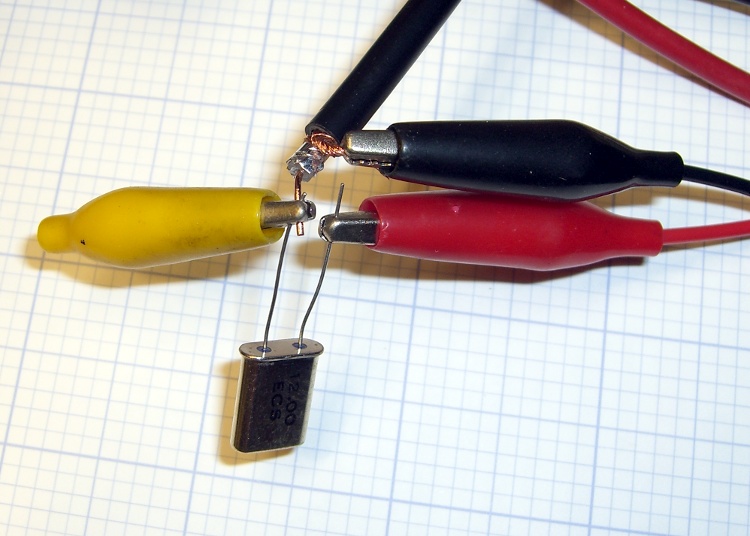
Alligator-clip crystal connections
I bodged up some random coax and a few clip leads into a fur-ball circuit in front of the SA. This is not the right way to do it; a fixture with mechanical stability is the first step toward solid numbers.
The tracking generator & analyzer present 50 Ω impedances to the outside world, which is much too high for the expected crystal series resistance, but it’ll do for a start. You want to measure the crystal in an environment that’s pretty close to what it’ll be built into, so as to get meaningful numbers.
The crystal sits in series between the TG and the SA, looking a lot like a simpleminded (and badly terminated) crystal filter. Write down the sum of the crystal’s source (TG) and load (SA) termination resistances: 50+50 = 100.
12 MHz Crystal – Fs and Fp
Center frequency to 12 MHz (or whatever the crystal’s nominal frequency might be), span to 200 kHz, TG at -10 dBm, get a display of the series resonance peak and the parallel resonance dip, poke the Auto Tracking Adjust button to get the TG lined up with the SA. Span to 100 kHz, tune center frequency for best picture.
That shows the series resonant peak and parallel resonance notch, but it’s way too broad for any decent resolution in the measurements.
Soooo…
Poke marker peak search to find the series peak, poke marker to center frequency to slap the peak to the middle of the screen.
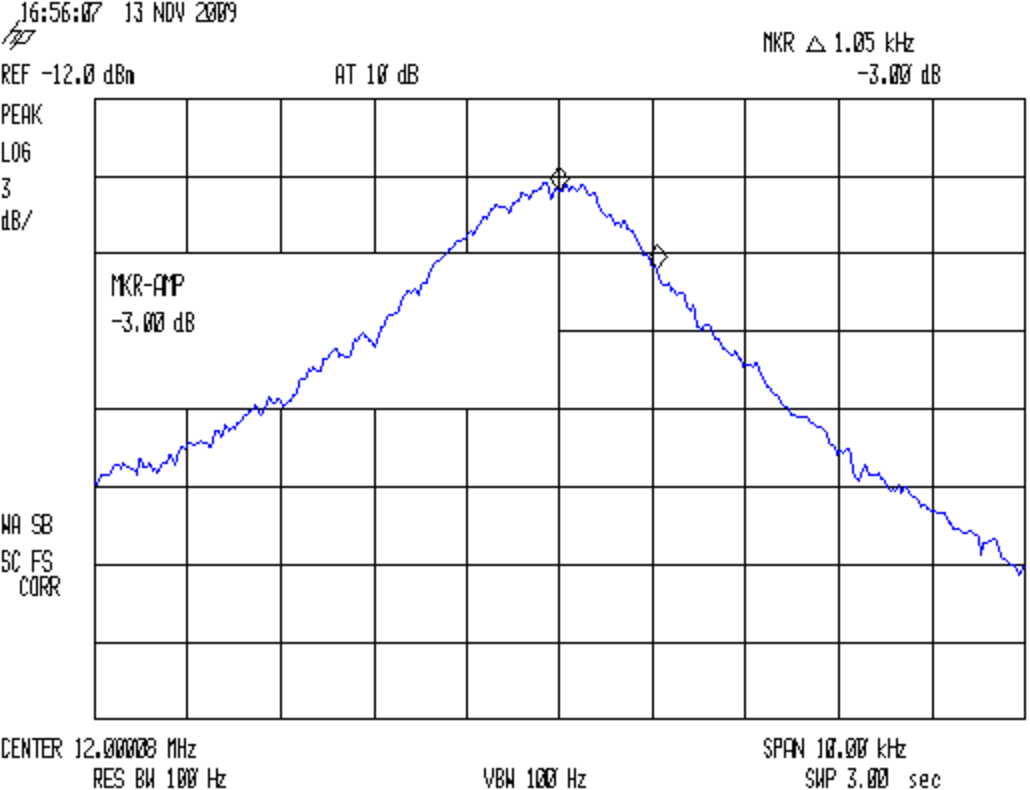
12 MHz Crystal – Fs Bandwidth
Span down to 5 kHz, which sets the resolution bandwidth to 100 Hz. Poke auto tracking adjust again, because it’ll be way off. Manual adjust moves in too-large steps.
Marker peak search, marker to center frequency. Tick the reference level down enough to get the peak near the top of the graticule, set 3 dB/div to get enough vertical resolution. Another peak search, to center, then write down the peak frequency Fs. Single sweep to freeze the display.
Marker delta, dial up the marker frequency, poke marker amplitude, set -3 dB, read off the marker delta frequency. Dial the marker frequency down to the other side of the peak, set amplitude -3 dB again, read off the frequency again. Compute the crystal’s 3-dB bandwidth BW as the sum of those two values.
Marker normal, auto-sweep to get a live trace again, auto tracking adjust again as needed. Display line on, set to peak for amplitude reference.
Replace the crystal with a 50-Ω (or so) non-inductive twiddlepot, twiddle to set level to the display line. Measure twiddlepot resistance, which will be equal to the crystal’s series resistance. Write down Rs (a.k.a, the ESR).
Measure crystal capacitance: short both leads, measure to case. Write down C0. I used an Autek RF-1 with a homebrew fixture, which has 1 pF resolution at RF frequencies; obviously, you pick a frequency well below Fs.
With all those numbers in hand, compute the crystal’s motional parameters…
Lm = (100 + Rs) / (2π BW)
Cm = 1 / ( (2π Fs)^2 Lm)
Q = (2π Fs Lm) / Rs
The three crystals from the grab bag are all reasonably close to what you’d expect.
12 MHz Crystal Parameters
50
Ohm Term
Marking
Fs
-3 dB Lo
-3 dB Hi
Fp-Fs
Rs
C0
BW
Lm
Cm
Q
MHz
Hz
Hz
kHz
Ω
pF
Hz
mH
fF
TEW 5C
11.996962
1030
920
24.8
8.9
3
1950
8.16
21.56
69133
HCI 1200
11.997500
1087
1025
26.8
5.0
2
2112
7.54
23.35
113618
ECS 12.00
11.999975
1162
1125
26.3
6.2
2
2287
6.96
25.28
84635
Memo to Self:
The Lm equation shows why you really need lower termination resistances. The K8IQY fixture involves 4:1 matching transformers on each side of the crystal to get the generator down to 12.5-ish Ω and the output back up to 50 Ω. Time to rummage through my pile of ferrite toroids.
An accurate BW with excellent (1 Hz) resolution feeds directly into better Lm values. I’m not convinced I have the SA set up for that much resolution.
Absolute Fs accuracy isn’t needed, but high resolution is. With that many digits, thermal drift is a real issue, hence the repeated TG tweakage.
I also need better resolution for Rs and C0. The former needs a smaller twiddlepot. Both could use a better meter with more resolution and zero-offset for low values. Measuring pF caps requires a good fixture.
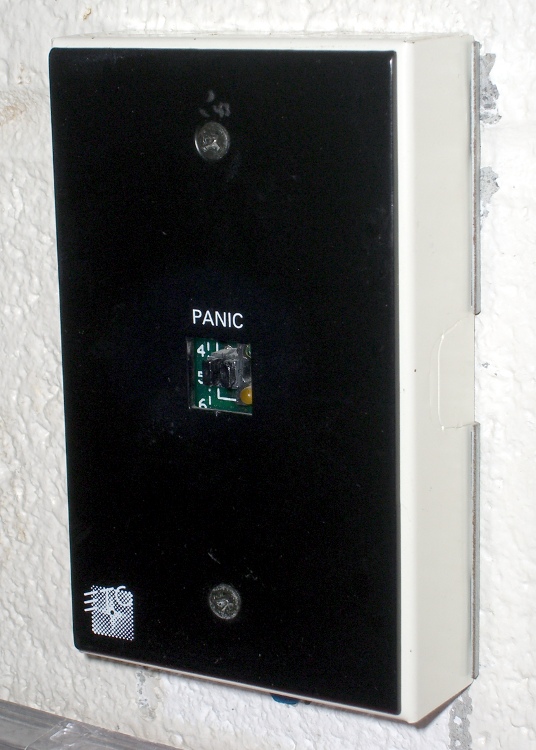
I can understand why it no longer has a button, but in which parallel universe does it make sense to put a clearly labeled Panic Button inside a high-school cafeteria, right next to the door?
Come on, now, really?
I managed to squelch the temptation to poke the remains of the switch stem with a pencil…
A few days ago I rode off to an eye doctor appointment and my ladies rode off later to meet me at the grocery store after they stopped in the garden to harvest root crops. This sort of thing is easy enough to synchronize with amateur radio, but this morning I didn’t hear a thing until they rolled up beside me in the store parking lot.
It seemed they could hear each other and me, but I couldn’t hear either of them. We’re all on 144.39 MHz, the APRS data frequency, with 100 Hz tone squelch to keep the robots out of our ears. Our daughter has the GPS APRS tracker feeding data into the mic input, which is why we’re using a data channel for tactical comm.
This has happened once or twice before, but it’s very intermittent. I now had sufficient motivation to disconnect the radio, an ancient ICOM IC-Z1A, from the bike and pith it on the Electronics Workbench for examination. The UT-93 Tone Squelch board is unplugged & flipped over, resting on the front half of the radio body at the lower-left of the photo.
Turns out that there’s nothing visibly wrong in there. I suspect it’s a molecule or two of oxidation on the (gold-plated!) connector between the UT-93 and the main board, because the UT-93’s held firmly in position by the black foam square you can see in the lower-left of the photo. The small white plug near the top of the UT-93 mates with the equally small socket on the main board, just to the left of the lithium secondary cell in the middle.
It’s all CMOS logic, of course, and there’s no actual load current involved. That’s the worst condition for contacts, as a dry connection simply doesn’t produce enough energy to burn through the least hint of oxidation. That’s why they use gold plating on connectors, but it’s been a long time since that board has moved at all; the foam square is deeply indented.
So I wiggled & jiggled all the ribbon-cable connectors while I was in there, buttoned everything back up, and the tone decoding works again. I hope this will continue…
Memo to Self: remove only the four black corner screws on the upper case, plus the two silver screws near the very bottom inside the battery compartment, and the two halves pop apart. No need to remove the mic and earphone plugs, whew!
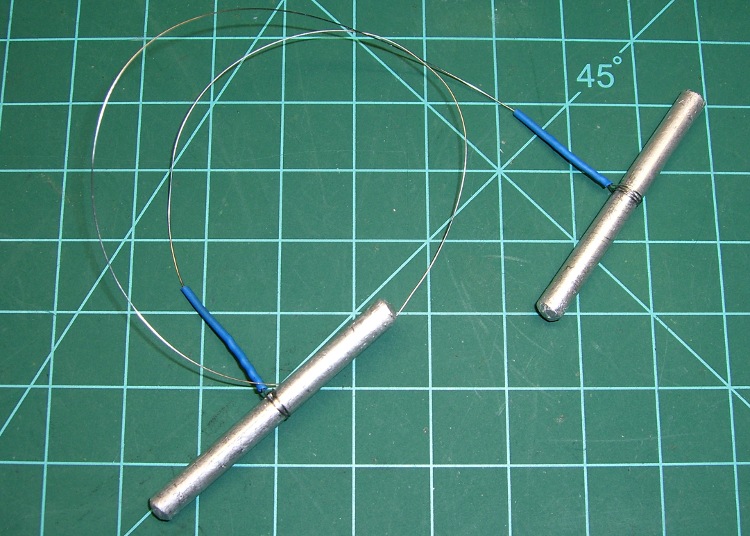
Just chopped up a 5-lb lump of Provolone into 2-oz chunks for pizza, which brings this simple shop project to mind: a cheese garrotte.
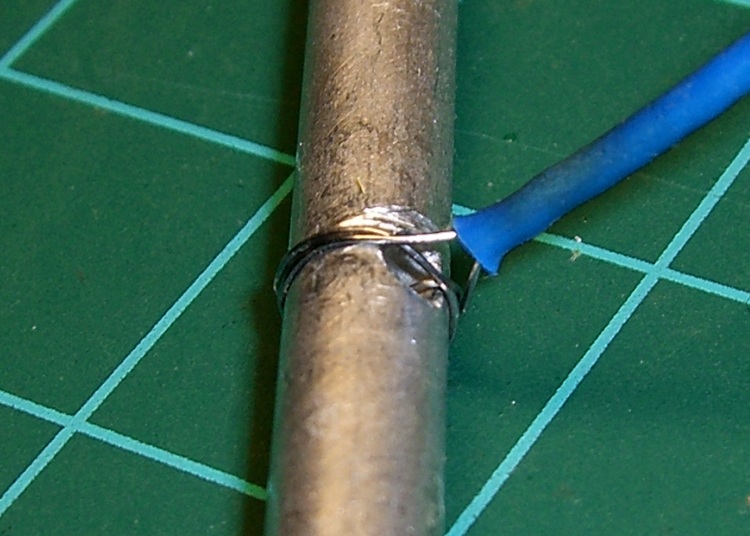
It’s about a foot of 0.011-inch (call it 0.25 mm) stainless steel wire with the ends wrapped around some aluminum rod, neatly tied off with heatshrink tubing.
Usage is about what you’d expect: it cuts cheese like nothing else on earth. The only trick is maintaining a straight line, which is easier (for me, at least) when I cut vertically downward.
It’s difficult to cut all the way to the bottom and that wire is rough on the fingertips, so I tend to flip the cheese over and pull sideways for the last inch or two. Maybe not a perfect cut, but good enough.
Cheese Garrotte Handle Detail
Construction nuance: loop the wire around the handle once or twice, pass it through the hole, then do another loop before twisting the end. If you run the wire directly through the hole, it’ll break on the far-side sharp edge after a while, even when you countersink the hole.
I put a shallow groove around the handle, but that’s likely not needed. You can certainly get fancier with the handles if you like. This one is dishwasher safe, which makes up for a lot.
You really, really need heatshrink tubing over the bare wire ends, as the tip of a 11-mil stainless wire is indistinguishable from a needle.
For about the last week I’ve noticed a soft clicking-buzzing sound somewhere near the dashboard / center console of our 2000 Toyota Sienna. I tried some on-the-fly isolation, but it wasn’t related to motion, engine on/off, CD or tape player, fan, or anything else. Finally Mary noticed it, too, and we spent half an hour in the garage yanking fuses and wiggling things until we tracked it down to below the passenger seat.
Now, in the good old days, that was empty space, but in the Sienna it’s where the rear-area heater lives. Shoving the seat forward to the stop exposed the heater and, sure enough, it’s buzzing and clicking. Intermittently, somewhat randomly, but very steadily.
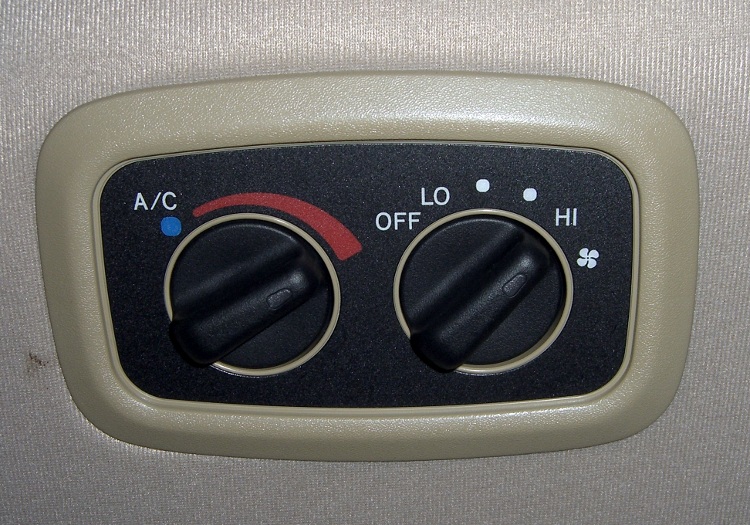
Rear Temperature Control
With that as a hint, I twisted the rear-area temperature control (on the headliner behind the driver seat) and shazam the noise stopped. The control has detents and when moving the control to each detent the heater makes a faint buzzing. I suspect the control adjusts a valve that regulates engine coolant flow inside the heater.
It’s not obvious whether the control is a pure-digital rotary encoder or a potentiometer, so I decided to investigate: it’s already sorta busted, what’s to lose? The bezel comes off by prying its door-side edge outward. The white plastic frame has two screws into the metal structure under the roof. The two electrical connectors are, of course, the positive-latching kind that you pull the little tab until you break your fingernail and then realize that you should push it instead.
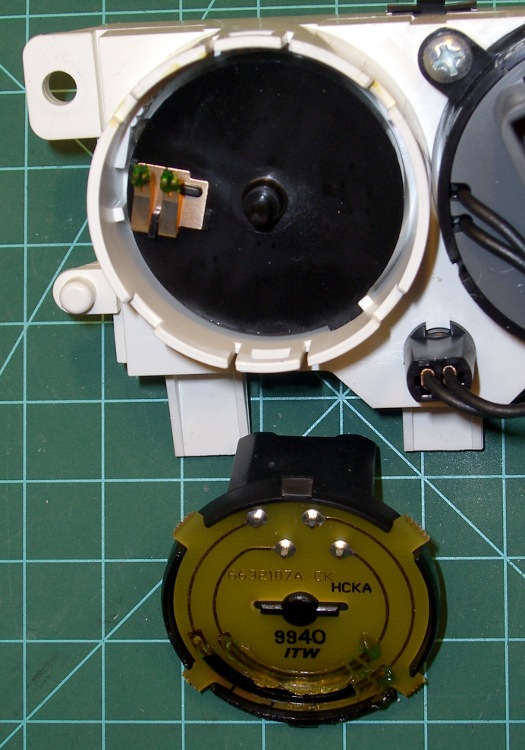
Temperature Control – Interior View
Taking the control apart reveals that it’s a potentiometer with some switching contacts. The two bifurcated spring-finger contacts on the black plastic disk short the resistive element to the inner metallic track.
Resistive Element
The metal contacts appeared slightly grody, but with no major corrosion. The resistive track looked just fine.
The offending control position would be to the left side of the element as shown in the pictures here: there’s nothing obviously wrong at that spot. I think the maximum-heat position is off the resistive element entirely, resting on the far left end of the metal traces, but the control wasn’t quite set to that spot. Perhaps the problem was that the contacts became intermittent at the exact edge of the element.
I smoothed the collection of anti-oxidation grease over the tracks, covered the contacts with their own blobs, put everything back together, and it works fine.
We tend to put the control at A/C during the summer and at maximum heat during the winter. I suppose the poor thing got frustrated after we moved it a month or so ago…
The money saved with this repair might just pay to have the Toyota dealer replace the spark plugs. The shop manual says that task starts by removing the windshield bezel and all the stuff above the engine intake manifold; the job costs upwards of 300 bucks. I can barely see the rear plugs with a looong inspection mirror angled just so while lying on the floor under the van, so it’s truly a nontrivial operation.
Setting up a new (well, new to me, it’s that old GX270) PC gave me reason to rummage in the Video Cable box and come up with this VGA-class cable. Half the connector shell had worked its way off, giving a nice view of the handiwork. Easily snapped back on with no permanent damage.
The cable works OK at 1280×1024, although the image seems a bit soft, and higher screen resolutions are out of its reach. There are no obvious signal reflections visible on the screen, so the impedance bumps are not as bad as you might think.
The VGA connector includes common returns for the Red, Green, and Blue signals, and the two wires for each color should be twisted together. That obviously hasn’t happened here, but crosstalk doesn’t seem to be much of a problem.
To their credit, they did solder the cable shield to the connector shell, which is a really nice touch. Alas, the impedance of a one-inch pigtail pretty much chokes off the high-frequency stuff you really want to drain to the shell.
Memo to Self: One of these days, run a bandwidth check with the spectrum analyzer. Use 6-dB pads to get nice 75-Ω terminations.





 The Smell of Molten Projects in the Morning