The Smell of Molten Projects in the Morning

Ed Nisley's Blog: Shop notes, electronics, firmware, machinery, 3D printing, laser cuttery, and curiosities. Contents: 100% human thinking, 0% AI slop.

Author: Ed

  • Measuring Photoresistor Voltage vs Resistance

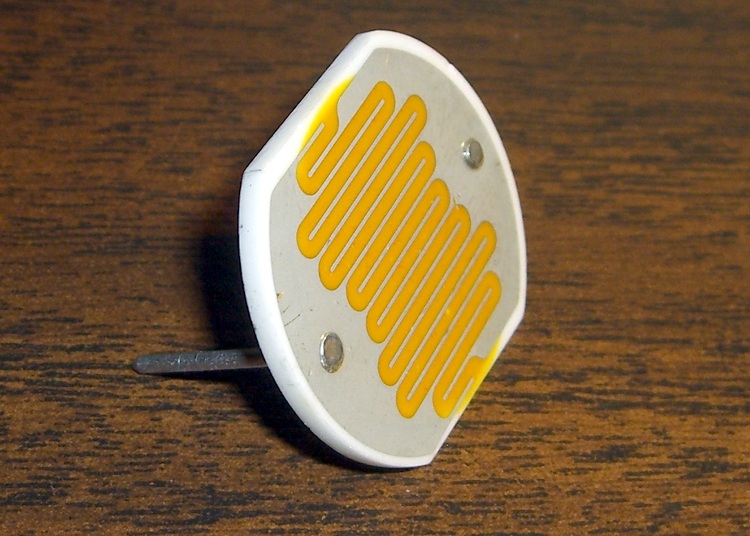
    Cadmium sulfide photoresistor
    Cadmium sulfide photoresistor

    A friend wants a digital clock that’s dim when the house lights are low; standard clocks aren’t nearly dim enough. I know how she feels, having added a primary-red filter in front of a blue vacuum-fluorescent clock display to get rid of those garish digits in the middle of the night.

    This job calls for a photosensor of some kind, as you can’t figure it out by time alone.

    After a brief struggle, the parts heap disgorged a 1-inch diameter CdS (cadmium sulfide) photoresistor with a dark resistance over 500 kΩ and a full-sunlight resistance around 50 Ω. Ordinary room light, at least around here, is in the 1-10 kΩ range, more or less, kinda sorta. Down the Basement Laboratory, it’s tens of kΩ.
    Photoresistor circuit and equation
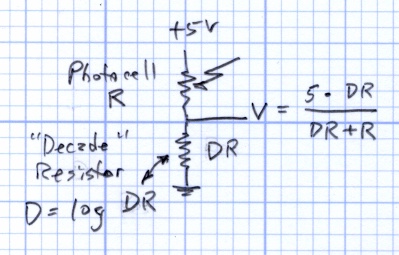
    Photoresistor circuit and equation

    The canonical sensing circuit is a simple voltage divider, with the photoresistor either on the top or the bottom. Putting it on the top means the voltage increases as the light gets brighter, which has a lot to recommend it.

    The resistance varies more or less linearly with the light intensity, to the extent that you can make a very nice linearly variable isolated resistor by bottling up an LED (which has linear intensity with current) with a CdS photoresistor in a light-tight enclosure.

    Anyhow, although the resistance R varies linearly, having the R in the denominator means that the voltage V varies inversely. Worse, because the value of R spans about four decades, there’s a serious range & resolution problem.

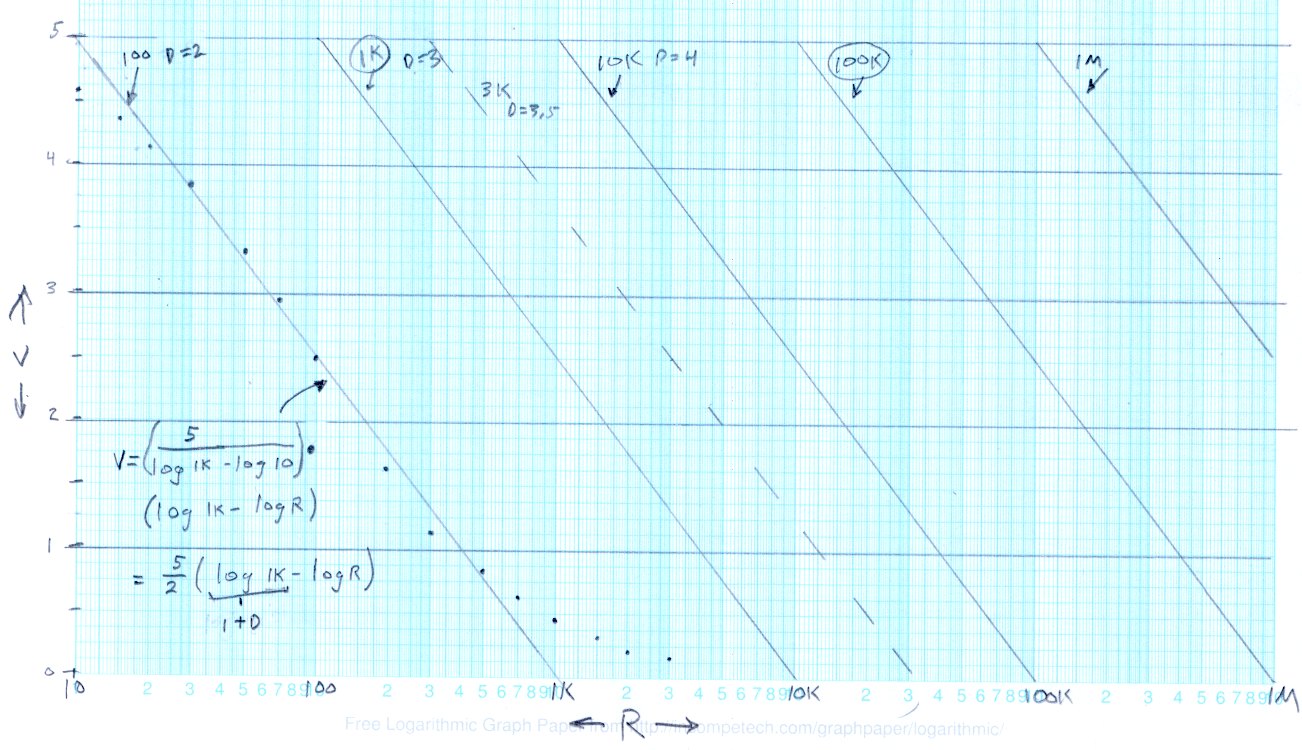
    This graph of V against log R shows the situation.
    Output voltage vs log resistance
    Output voltage vs log resistance

    The dots between R=10 Ω and R=1 kΩ are what the circuit spits out, with the “decade resistor” DR = 100 Ω and R values chosen for nice dot spacing. The long tail beyond 1 kΩ shows that for R greater than 1 kΩ, V doesn’t change by very much at all. Ditto for R less than 20 Ω or so, which is beyond the limit for this photocell.

    The straight line through those points is an eyeballometric curve fit to the range from about 20 to 700 and (most crucially) passing through (10 Ω,5 V) and (1000 Ω,0 V). The equation for that line is the usual y = mx + b, albeit with (log R) where you’d expect x. The equation in the lower-left corner is pretty  close to what you want, with D = log DR

    V = (5/2) * ((1+D) – log R)

    Running the photosensor circuit with DR = 1 kΩ would produce an identical series of dots snuggled up along the second line as R varies from 100 Ω to 10 kΩ. Each factor-of-10 change in DR handles another chunk of R’s range, with identical output voltages: when the voltage gets above about 4.5 or below 0.5, just switch to the next value of DR and continue merrily along.

    So that’s a low-budget (if you have cheap relays, like MOSFET analog switches), high-dynamic-range (if you have a good buffer amplifier) light sensor.

    More on how to turn this into a brightness control tomorrow…

    Memo to Self: Can we correlate a digital camera’s exposure at a known ISO with the cell resistance, so I can get some remote light level values?
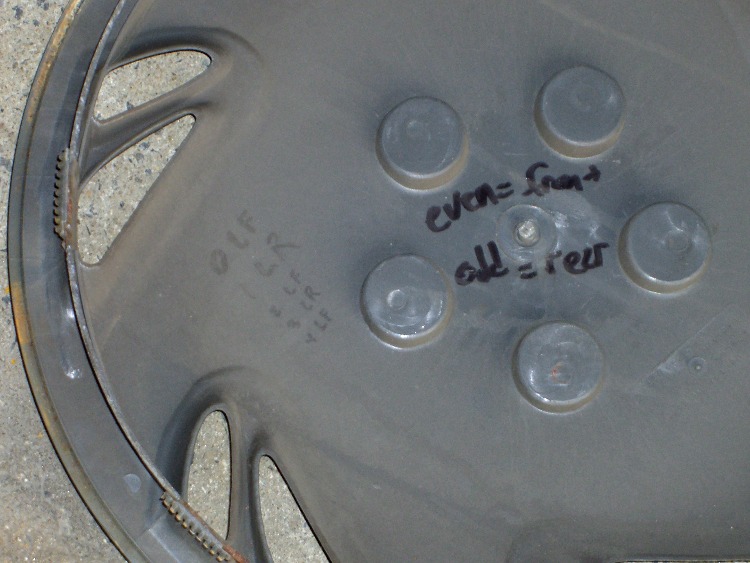
  • Write Down What You Learn Where You’ll Need It

    A discussion there reminded me to mention a good habit taught by my buddy Eks: when you must look something up, write the information where you’ll see it the next time you need it.

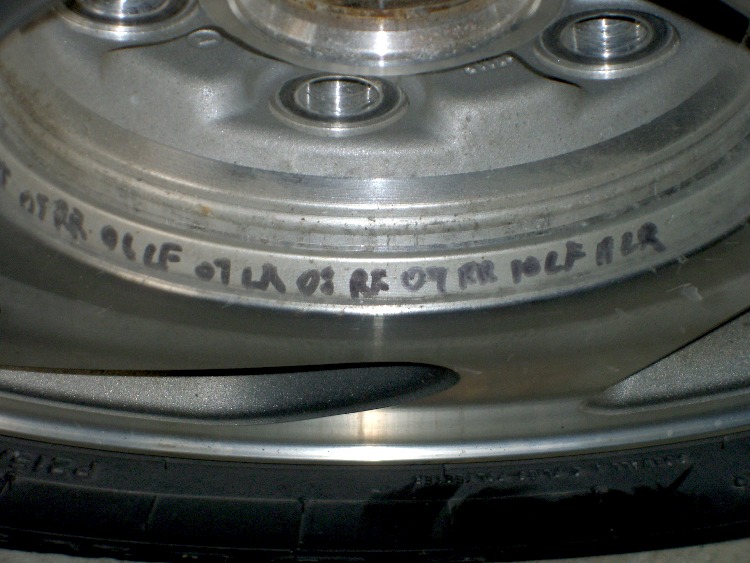
    So, for example, each of the van wheels sports its own tire-rotation schedule inside the cover. When it’s time to swap tires in early spring and late autumn, I pry the cover off, read where the tire should go, and do the deed. I write ’em down four or five years at a time, so there’s not much thinking involved.

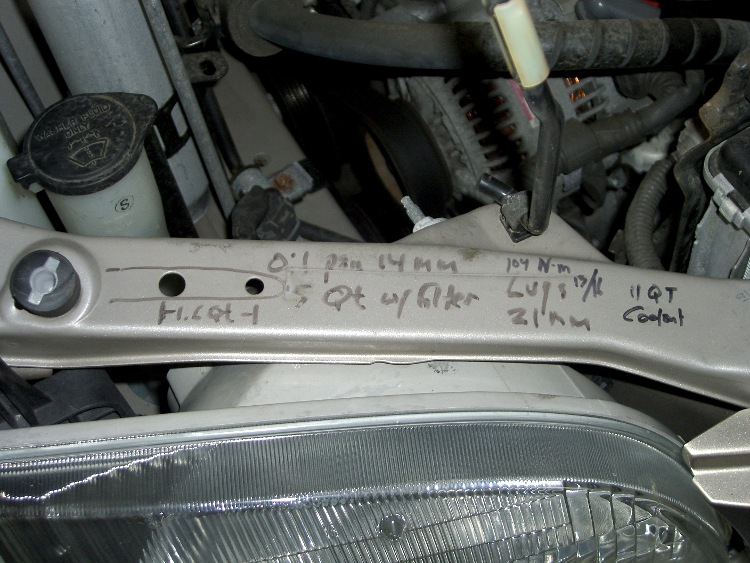
    The engine compartment has all the most-often-used wrench sizes and capacities.

    I write the oil change & inspection info in the maintenance schedule booklet that came with the van, although after a decade that’s pretty much full up.

    Sharpies FTW!

  • Alcohol Mist Flamethrower

    Alcohol hand sanitizer pump spray
    Alcohol hand sanitizer pump spray

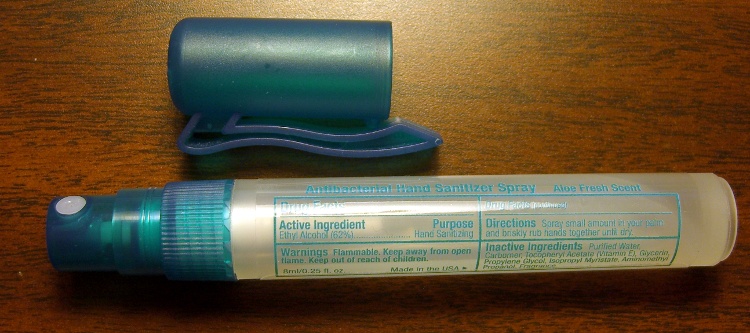
    Our daughter snagged some tchotchkes from a high-school career fair, including one that she instantly recognized as a flamethrower: Antibacterial Hand Sanitizer Spray, 62% Ethyl Alcohol plus some other junk, in a handy pump-spray container. Heck, it even says

    Warnings Flammable. Keep away from open flame. Keep out of reach of children.

    I was so proud of her…

    Flare3.gif
    Flare3.gif

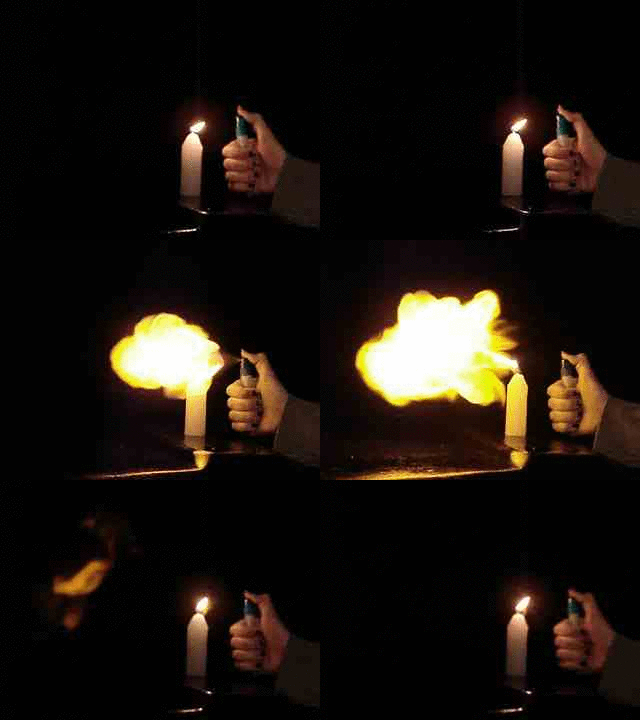
    After homework, she stuck a candle atop the garbage can by the garage and fired off a few shots while I ran the camera. Here’s the best one, converted to a low-speed animated GIF.

    We’re pretty sure that’s Sweet Babby Jeebus™ in the next-to-last frame of the flare. Maybe Madonna. Could go either way.

    Much as with the “movies” I made for trebuchets and tree frogs, I used ffmpeg to shred the camera’s mpg movie into separate jpg images, some bash to select the frames, then convert to stitch them back together into a gif.

    The general outline:

    mkdir Frames
    ffmpeg -i mov04990.mpg -f image2 Frames/frame-%03d.jpg
    cd Frames
    mkdir flare3
    for f in `seq 760 780` ; do cp frame-${f}.jpg flare3 ; done
    cd flare3
    convert -delay 50 frame-* Flare3.gif
    

    If my bash-fu was stronger, I could feed the proper file names directly into convert without the copy step.

    Now, kids, don’t try this at home. At least not without responsible adult supervision…

  • Eagle Polygon Rank Separates Pours

    Shield Amid Ground Plane
    Shield Amid Ground Plane

    Had to look this up again…

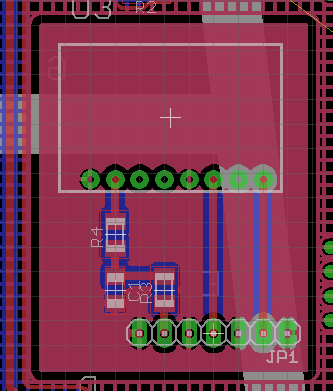
    Problem: I needed a shielding plane under a sensitive gizmo that was separated from the ground plane covering the rest of the board. EAGLE poured the ground plane atop the smaller shield polygon, despite the two signals having different names.

    Solution: set the ground plane’s Rank to 2, which means it’s less “important” than the smaller plane. Thus, the smaller plane gets drawn first and the ground plane surrounds it.

    A good ground-plane tutorial is there.

    [Update: That’s a new link location, per the comment below.]

    Memo to Self: The default Rank is, of course, 1 for all polygons.

  • Arduino: Bit Fields Start Low

    The first bit in an Arduino bit field is the lowest-order bit.

    Set up a bit field to hold, oh, say, the data bits from the WWVB radio time code:

    struct WWVB_bits_ {
     unsigned char Minute_10:3;
     unsigned char Minute_1:4;
     unsigned char Hour_10:2;
     unsigned char Hour_1:4;
     unsigned char DOY_100:2;
     unsigned char DOY_10:4;
     unsigned char DOY_1:4;
    // unsigned char UT1_SIGN:3;
    // unsigned char UT1_CORR:4;
    // unsigned char Year_10:4;
    // unsigned char Year_1:4;
     unsigned char LY:1;
     unsigned char LS:1;
     unsigned char DST57:1;
     unsigned char DST58:1;
    };
    

    [Update: Remember, that struct is bass-ackwards. You want the most-significant fields on the bottom, rather than the top, so the bits fill them in properly. This is how I found out that’s true…]

    Coerce the bits into an unnatural union with an unsigned long int and create a variable:

    union WWVB_code_ {
     uint32_t WWVB_ul;
     struct WWVB_bits_ WWVB_bits;
    };
    
    union WWVB_code_ ReceivedBits;
    

    Then set a few bits to find out how the compiler arranges things:

     ReceivedBits.WWVB_bits.DST57 = 1;
     ReceivedBits.WWVB_bits.DST58 = 1;
     ReceivedBits.WWVB_bits.Hour_1 = 9;
     ReceivedBits.WWVB_bits.Minute_1 = 4;
    
     sprintf(PrintBuffer,"Bit field: %08lX",ReceivedBits.WWVB_ul);
     Serial.println(PrintBuffer);
    

    Which produces this informative line:

    Bit field: 03001220


    Soooo, rats, the DST bits are on the left and the Minute bits are on the right. That doesn’t tell you how they’re actually laid out in memory, but if you’re doing the interrupt handler in C, then you just stuff the incoming MSB-first bits from the radio directly into the right side of the int and let them slide leftward.

    If you count ’em up, you’ll find that the commented-out bits allow the remainder to fit into an unsigned long int, which is all of 32 bits on the Arduino. You can actually use an unsigned long long int to get 64 bits, but it seems Arduino bit fields can’t extend beyond 32 bits.

    There are ways around that, particularly seeing as how I’m using a simpleminded interpreter to parse the incoming bits, but I’ll doodle about that later.

    Insert the usual caveats about portability and interoperability and maintainability and … well, you know why bits fields are such a bad idea.

  • C-Max CMMR-6P-60 Receiver Polarity

    It goes without saying: the positive receiver output (TCO: Time Code Output) on the CMMR-6P-60 WWVB receiver board tracks the received RF amplitude. In fact, it does go without saying: nowhere does the (rather skimpy) board doc mention that fact.

    Receiver Delay
    Receiver Delay

    Here’s the output, driven from my WWVB simulator in the Basement Lab. Note that reduced RF corresponds to the active part of the bit, so the output goes low when the bit starts. Conversely, the inverted output (TCON: Time Code Output Negative) goes high, which may be more useful for some purposes.

    Of interest: there’s maybe 12 ms of delay on the leading edge and 5 ms on the trailing edge. The received pulse duration is therefore different than the transmitted pulse by some amount. The doc says less than ±35 ms, so it can be longer than what you expect.

    I can’t measure the actual RF amplitude at the receiver, but it’s barely above the rather high ambient noise level near all the test equipment. The receiver gives up a few feet away from the simulator’s bar antenna, which means I’m (probably) not corrupting WWVB receivers for miles around.

  • Calculating the Current Setting Resistor for a TLC5916 LED Driver

    The Official TI TLC5916 Datasheet is far more confusing on the subject of calculating the external current-setting resistor than it really needs to be.

    The basic relations appear on page 17, but the detailed discussion on page 22 will make your head explode. Here’s how I see it …

    VRext, the voltage across Rext, the reference resistor, is controlled by a 1.26 V band gap reference multiplied by VG, the voltage gain of a 7-bit DAC.

    VRext = 1.26 V * VG
    

    The DAC produces VG from the HC (High Current) bit and the six CC0..CC5 (Configuration Code register) bits. HC selects a range and CC0..CC5 are a binary multiplier.

    VG = ((1 + HC) * (1 + CC/64) ) / 4

    The minimum VG value for HC = 0 is 1/4 and the max is 1/4 + 63/256 = 127/256:

    VG = (1 + CC/64)/4 = 1/4 + CC/256

    The minimum VG value for HC = 1 is 1/2 and the max is 1/2 + 63/128 = 127/128:

    VG = (1 + CC/64)/2 = 1/2 + CC/128

    The  absolute minimum VG = 0.25 happens when HG and CC0..5 are all zero. Conversely, absolute maximum VG = 0.992 happens when they’re all one.

    That means VRext varies from

    VRext (min) = 1.26 * 0.25 = 0.315 V

    to

    VRext (max) = 1.26 * 0.992 = 1.25 V

    There’s a kink in the middle of that range, as shown in the graph on page 23, where HC shifts gears to the high range.

    Rext then converts that voltage into Iref, the LED reference current:

    Iref = VRext / Rext
    

    The CG (Current Gain) multiplies Iref to set the actual LED current. The CM bit controls CG. You can either use the weird exponential formula in the datasheet or just remember:

    • CM = 0 selects CG = 5
    • CM = 1 selects CG = 15

    Sooo, finally, Iout (LED current) is just:

    Iout = CG * Iref

    Knowing all that, you can choose Rext so that the absolute maximum current doesn’t exceed the LED rating:

    Iout (max) = 20 mA = 15 * (1.25 V / Rext)

    Which tells you that Rext must be no less than

    Rext = (15 * 1.25 V) / (0.02 A) = 938 Ω

    Then you can find the minimum current through the LEDs:

    Iout (min) = 5 * (0.315 V / 938 Ω) = 1.68 mA

    Now, given that the chip’s specs seem to indicate that the minimum regulated current is 5 mA, I suspect that all bets are off as regards linearity and matching and all that. Given that my friend wants a really dim clock, I think this will work out just fine…

    Memo to Self: For whatever reason (and it must be a real stinker), TI numbers the CC bits backwards. CC0 is the Most Significant Bit, CC5 is the Least Significant Bit.

    And because CC5 is the first bit shifted into the TLC5916’s shift register, you must run the Arduino hardware-assisted SPI in LSB-first mode.