The Smell of Molten Projects in the Morning

Ed Nisley's Blog: Shop notes, electronics, firmware, machinery, 3D printing, laser cuttery, and curiosities. Contents: 100% human thinking, 0% AI slop.

Author: Ed

  • A Christmas Season Poem

    Twas the Night…
    By Mary Nisley

    ‘Twas the night before September, when outside the house
    Many creatures were stirring, not just a mouse;
    The garden was fenced all ‘round with care,
    In hopes that deer would never come there;
    My daughter was nestled all snug in her bed,
    While replays of band practice ran through her head;
    My husband was sleeping, and hoped for much more,
    As I settled down for a short summer snore.
    When out in the yard there arose such a clatter,
    I sprang from the bed to see what was the matter.
    Away to the window I flew like a flash,
    But saw nothing on the deck; what was that crash?
    Then off to the kitchen to flip on the lights,
    To better reveal the outermost sights.
    When, what to my wondering eyes should appear,
    But an eight pointed buck: a powerful male deer!
    His head, it was lowered; his mouth, it was red,
    He looked mean and angry, a monster to dread.
    When he moved I saw a most terrible sight,
    His antler was tangled in the fence very tight.
    I ran for my husband, to wake him from sleep,
    He groggily blinked, then from the bed he did leap.
    We dashed to the doorway, but the buck, he was gone,
    One glimpse of my motion made him quite strong.
    We surveyed the garden with the help of a light,
    What destruction was done before the buck’s flight?
    Alas! My poor garden, damage lay all around,
    Two heavy steel fence posts he’d bent to the ground.
    The ruin was total in two veggie beds:
    Stalks twisted and broken, big leaves lay in shreds.
    We pushed the posts upright, unsnarled all the net,
    As we patched the fence up, we felt it was wet.
    Shining flashlight on hands revealed blood on our fingers,
    But it was not ours: could deer blood still linger?
    Sunshine the next morning revealed all of the damage,
    Plus an antler tip broken in the buck’s desperate rampage.
    The rabbits and woodchuck say “Thanks Mr. Buck!
    You’ve opened the garden, it’s our great luck!
    We’re feasting on beet greens, parsley and chard,
    To fatten for winter is no longer hard.”
    We wish you happy holidays, filled with warmth and good cheer,
    And may your next growing season have gardens without deer.

    Folks: I couldn’t make this one up; that is exactly what happened. I believe the buck was grazing on fallen apples from my neighbor’s tree when, in the dark, his antlers tangled in my fence netting. They were velvety, still soft and growing, so when he broke a tip trying to escape, there was blood all over. At 2:00AM I was outside, stringing up twine and drenching it with deer repellent, hoping to keep the rest of his herd from testing my jury-rigged fence.

    Acknowledgments: Thanks to Clement Clarke Moore and his “The Night Before Christmas” for the shape of this poem and for my lines 9-11. His words fit the situation so well that I couldn’t resist using them.

    Ed says: It’s Christmas: we can take the day off from tech, right?
  • Failed LED

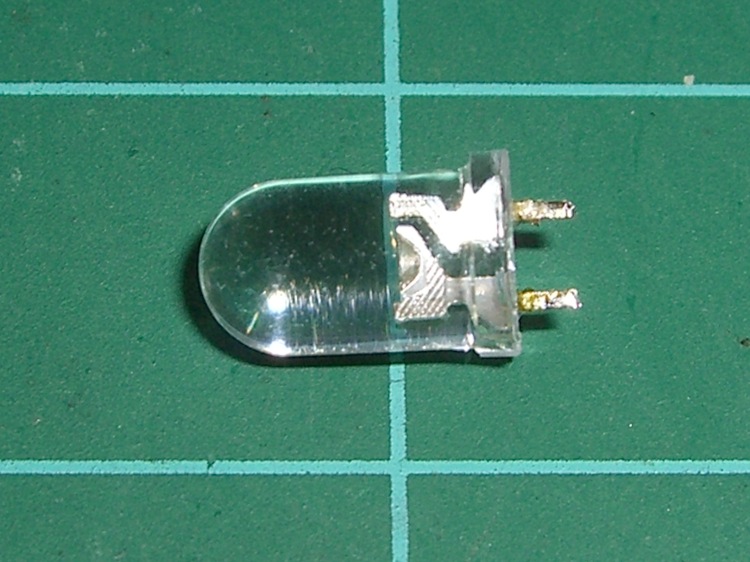
    Dead LED
    Dead LED

    Doesn’t look like much, does it? It’s an ordinary blue LED that I used for the upper colon dot in a clock. Worked fine for a few dozen power-on hours, then it turned off a bit after 6:00 pm one day. Back on an hour later, more or less, then off again by the next morning, back on again, off again.

    Might be a software error, as each colon LED is a separate TLC5916 display driver output. Might be a soldering problem, as my board doesn’t have plated-through holes. Might be (shudder) a burned-out transistor inside the TLC5916.

    When it’s off, VCC appears on both sides, within a few tens of millivolts.

    Resoldered the joints, after which it worked for a while. When it’s on, voltage measurements look normal: about 3.5 V drop across the diode and 1.5 V across the driver transistor.

    No obvious code problems, but, then, code problems are never obvious.

    Finally the thing stopped working for a few hours. I unsoldered it and there’s no continuity: it failed open. Peering deeply inside with a microscope shows nothing unusual: the flying gold wires look OK, the bonds look flat, and the chip has no burn marks.

    Just a bad LED, I suppose. It’s surplus, of course, but that doesn’t mean much these days; there’s a lot of surplus going around.

    Soldered in a replacement from the same batch and it’s all good.

    So far, anyway.

  • Whirlpool Refrigerator Shelf: Drawer Slide Repair

    Refrigerator shelf bracket - inside
    Refrigerator shelf bracket – inside

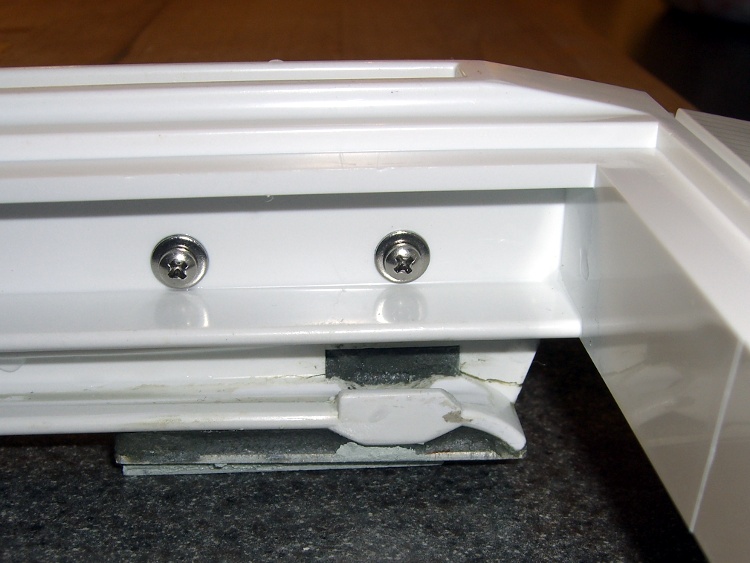
    The bottom glass shelf in our Whirlpool refrigerator (the “Crisper Cover”) rests on an elaborate plastic structure that includes slides for the two Crisper drawers. Perhaps we store far more veggies than they anticipated, we’re rough on our toys, or the drawer slides came out a whole lot weaker than the designers expected. I’m betting on the latter, but whatever the cause, the two outside slides broke some years ago.

    I don’t know what function the rectangular hole above the flattened part of the slide might serve, but it acted as a stress raiser that fractured the column toward the front. With that end broken loose, another crack propagated toward the rear, so the entire front end of the slide drooped when the drawer slid forward.

    The minimum FRU (Field Replacement Unit) is the entire plastic shelf assembly, a giant plastic thing that fills the entire bottom of the refrigerator. You could, of course, buy a whole new shelf assembly, perhaps from www.appliancepartspros.com, but it’s no longer available. Back when it was, I recall it being something on the far side of $100, which made what you see here look downright attractive.

    My first attempt at a repair was an aluminum bracket epoxied to the outside of the slide, filling the rectangular opening with JB Industro-Weld epoxy to encourage things to stay put. The plastic cannot be solvent-bonded with anything in my armory, so I depended on epoxy’s griptivity to lock the aluminum into the shelf. That worked for maybe five years for the right side (shown above) and is still working fine on the left side.

    Refrigerator shelf bracket - bottom
    Refrigerator shelf bracket – bottom

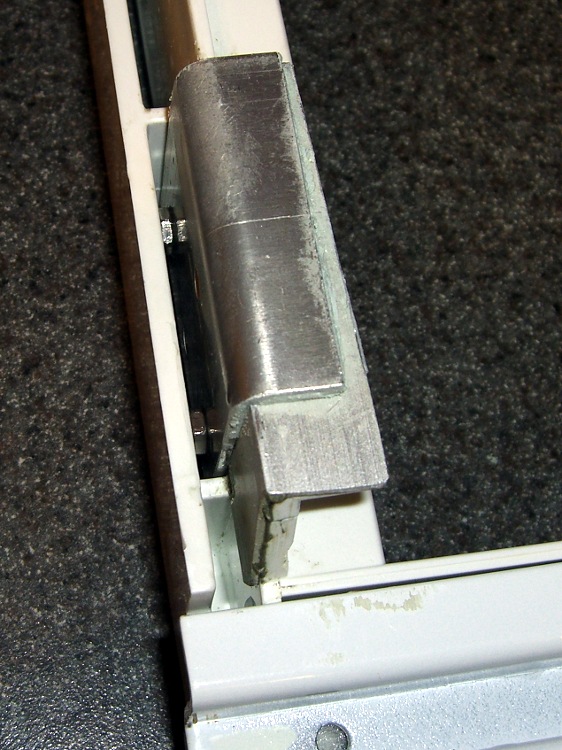
    The right-side bracket eventually broke loose, so I did what I should have done in the first place: screw the bracket to the shelf. Alas, my original bracket remained firmly bonded to the bottom part of the shelf and secured to the block of epoxy in the rectangular hole. Remember, the broken piece didn’t completely separate from the shelf.

    So I cut another angle bracket to fit around the first, drilled holes in the shelf, transfer-punched the bracket, and match-drilled the holes. Some short(ened) stainless-steel screws and nuts held the new bracket in place and a few dabs of epoxy putty filled the gaps to make everything rigid.

    That’s been working for the last few years. The refrigerator is going on 16 years with only one major repair (a jammed-open defrost switch), so I’ll call it good enough.

  • TLC5916 Configuration Code Setting

    TLC5916 Writing Config Code
    TLC5916 Writing Config Code

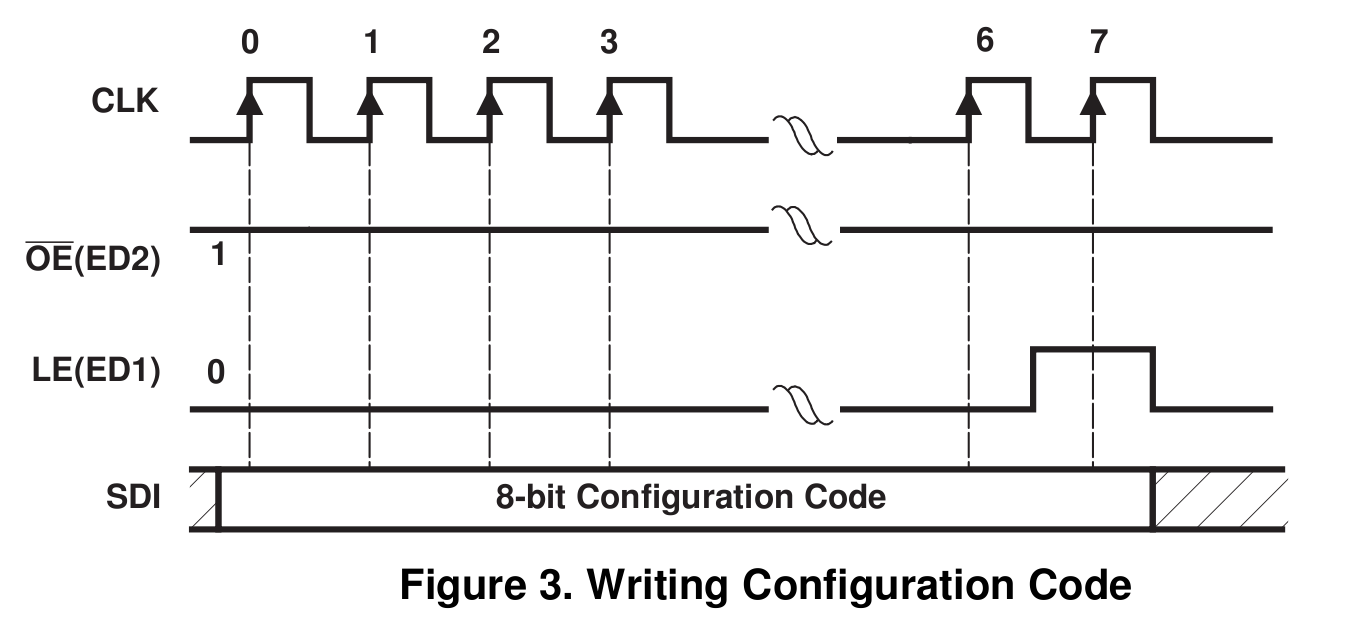
    The TLC5916 data sheet clearly shows that you write the configuration code (which controls the LED current) by shifting seven bits in, then raising LE during the 8th SCK pulse while simultaneously shifting the 8th bit.

    That makes no sense whatsoever: you couldn’t use standard SPI hardware in a chained configuration, because you’d have to blip LE while shifting.

    In fact, the chip doesn’t work that way. You set the config code in Special Mode just like you set the LED driver bits in Normal Mode: shift ’em all in, then blip LE to latch ’em into the parallel holding register.

    Here’s the code to make it happen…

    DisableSPI();                               // manual SPI control
    
     digitalWrite(PIN_DISABLE_DISPLAY,HIGH);    // initial condition
     digitalWrite(PIN_LATCH_DO,LOW);
    
     PulsePin(PIN_SCK);                         // 1
     digitalWrite(PIN_DISABLE_DISPLAY,LOW);
     PulsePin(PIN_SCK);                         // 2
     digitalWrite(PIN_DISABLE_DISPLAY,HIGH);
     PulsePin(PIN_SCK);                         // 3
     digitalWrite(PIN_LATCH_DO,HIGH);           //   sets Special Mode
     PulsePin(PIN_SCK);                         // 4
     digitalWrite(PIN_LATCH_DO,LOW);
     PulsePin(PIN_SCK);                         // 5
    
    //-- Send brightness level
    
     EnableSPI();                               // turn on SPI hardware
    
     SendRecSPI(Brightness);
     SendRecSPI(Brightness);
     SendRecSPI(Brightness);
     SendRecSPI(Brightness);
     SendRecSPI(Brightness);
    
     PulsePin(PIN_LATCH_DO);                    // latch new shift reg contents into drivers
    
    //-- put LED drivers back in Normal Mode
    
     DisableSPI();
    
     digitalWrite(PIN_DISABLE_DISPLAY,HIGH);     // initial condition
     digitalWrite(PIN_LATCH_DO,LOW);
    
     PulsePin(PIN_SCK);                          // 1
     digitalWrite(PIN_DISABLE_DISPLAY,LOW);
     PulsePin(PIN_SCK);                          // 2
     digitalWrite(PIN_DISABLE_DISPLAY,HIGH);
     PulsePin(PIN_SCK);                          // 3
     digitalWrite(PIN_LATCH_DO,LOW);             //   sets Normal Mode
     PulsePin(PIN_SCK);                          // 4
     digitalWrite(PIN_LATCH_DO,LOW);
     PulsePin(PIN_SCK);                          // 5
    
     digitalWrite(PIN_DISABLE_DISPLAY,LOW);      // turn the LEDs on again
    

    The SendRecSPI() function does exactly what you’d expect:

    byte SendRecSPI(byte Dbyte) {                // send one byte, get another in exchange
    
     SPDR = Dbyte;                      // assume it's OK to send a new byte
    
     while (! (SPSR & (1 << SPIF))) {   // wait for shift to finish
      continue;
     }
    
     return SPDR;                       // SPIF will be cleared
    }
    

    I don’t know. Maybe the chip also works the way they show in the datasheet, but I doubt it’s worth finding out.

  • TLC5916 LED Driver Current Monotonicity Hack

    TLC5916 Current Gain vs Config Code
    TLC5916 Current Gain vs Config Code

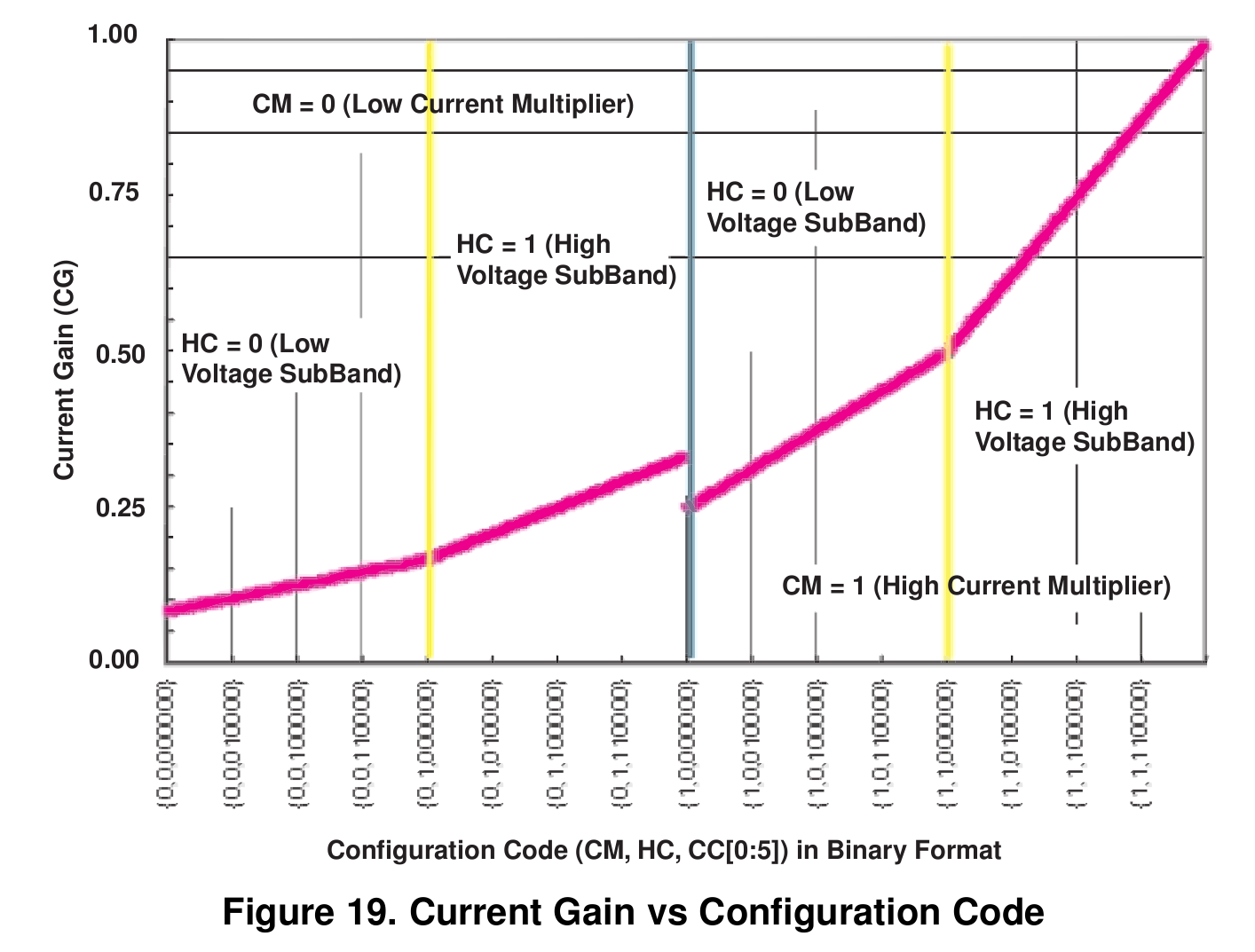
    I’m using Texas Instruments TLC5916 constant-current LED driver chips for my my friend’s Totally Featureless Clock. An 8-bit configuration value sets the output current, with the external resistor defining the maximum value as described there.

    The problem is that the current-versus-config-value curve has a non-monotonic discontinuity in the middle, where the Current Multiplier bit switches from 0 to 1. I don’t know in which alternate universe this design decision made sense, but right here and now…

    It. Does. Not.

    Why it’s a problem: the LED brightness tracks room illumination as seen by a CdS photoresistor, averaged over maybe half a minute. The brightness changes very slowly, so the jump when it goes from 0x7f to 0x80 is really eyecatching. At least to me, anyway.

    Eyeballometric measurement of the curve shows the current at 0x80 pretty much matches the current at 0x60, soooo let’s just shove the second quarter of the curve (between 0x40 and 0x7f) downward until it meets the high-current value at 0x80.

    This code does the trick:

    if ((Brightness >= 0x40) && (Brightness <= 0x7f)) {
     Brightness = 0x40 + ((Brightness & 0x3f) >> 1);
    }
    

    Basically, that maps 0x7f to 0x5f. The output current for 0x5f is pretty close to the current for 0x80, making the step pretty much a non-issue.

    You could, if you were fussy enough, work out the actual current mapping values from the data sheet equations and make the ends match up perfectly.

  • Photoresistors Aren’t Indestructable

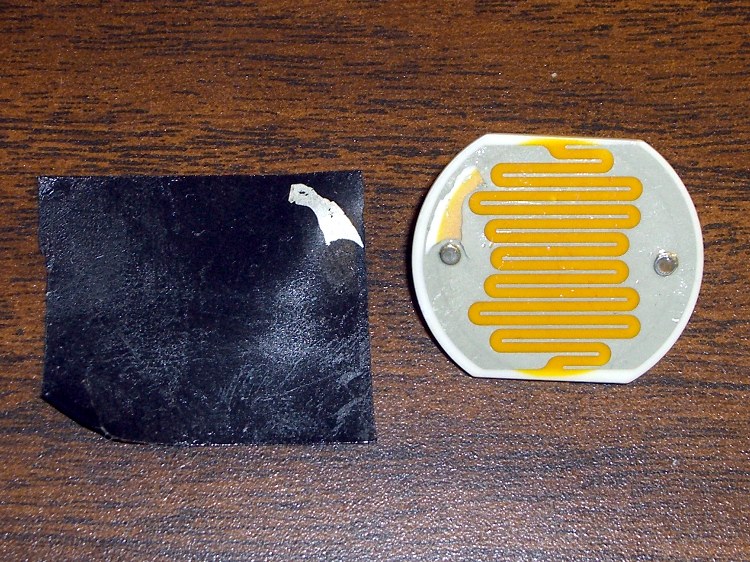
    Delaminated photoresistor
    Delaminated photoresistor

    So while testing the routine that measures light intensity using the technique described there, I discovered that:

    • The conductive layer atop the photoresistor doesn’t bond well to the base layer
    • The transparent top coating isn’t armor plating

    I wanted to verify the extreme dark end of the response curve, where the resistance is the highest and the input voltage correspondingly the lowest. The fastest way to do that is to put a piece of black electrical tape across the photoresistor’s face; it worked perfectly.

    Unfortunately, peeling the tape off the photoresistor also peeled the coatings apart. The resistance was unchanged, but I suspect moisture inside the layers isn’t going to do them the least little bit of good.

    Drat & similar remarks…

  • Arduino Pro: Securing the Serial Connecor

    Epoxy backfill on Arduino Pro serial connector
    Epoxy backfill on Arduino Pro serial connector

    The surface-mount serial connector on an Arduino Pro board isn’t the most robust of devices; the FTDI USB interface and USB cable can apply far too much torque to those little pins. Even before the situation described yesterday, the pins were getting wobbly.

    The connector shell is a big part of the problem, as it doesn’t mechanically lock the pins in place. Installing and removing the FTDI USB board pushes and pulls the pins against their pads, which means the adhesive bonding the pads must handle all that stress.

    Eventually, the Reset and TX pin pads tore loose from the circuit board. At that point, they have no mechanical stability at all; you can bridge a solder blob from the pin to its trace, but the adhesive holding the copper pad in place has lost all strength.

    The fix is straightforward, if ugly.

    • Repair the pin-to-pad/trace connections with something better than a solder blob. I used small snippets of component leads.
    • Apply denatured alcohol and scrub away all the solder flux around the pads.
    • Apply enough epoxy to the back of the connector to bond it, the pins, and the circuit board into one mechanically stable unit. I worked the epoxy between the pins and slightly under the connector shell with a small screwdriver and toothpick.

    Even with this repair in place, the connector is not particularly robust. It’s much better than it was, so we’ll count it as a win.

    This Arduino Pro has survived several projects, hence the hideous solder blobs here & there. I suppose I should just throw the poor thing away, but … that’s not my nature.