The Smell of Molten Projects in the Morning

Ed Nisley's Blog: Shop notes, electronics, firmware, machinery, 3D printing, laser cuttery, and curiosities. Contents: 100% human thinking, 0% AI slop.

Author: Ed

  • Arduino Pro: Ceramic Resonator Frequency Compensation

    The Arduino Pro gets its 16-MHz CPU clock from a ceramic resonator, rather than a quartz crystal, which means the frequency accuracy is ±0.5% rather than pretty much spot on. I’m building one into a WWVB-based clock, so it knows the exact elapsed time between synch events.

    My clock uses a 20-ms timebase: 16 MHz prescaled by 8, then divided by (nominally) 40000 using Timer1.

    Knowing the exact time between WWVB updates, the firmware compares that with the local time interval to find the offset, finds the fractional error, and then tweaks the Timer1 period to make the answer come out right the next time.

    Here’s what three days in the life of that algorithm look like:

    Drift: TS   5268489 UTC 10006.040959 Elapsed 13920 Offset 0 Corr +0 ICR1 39840
    Drift: TS   5268805 UTC 10006.092559 Elapsed 18960 Offset 1 Corr +2 ICR1 39842
    Drift: TS   5269711 UTC 10007.003159 Elapsed 54360 Offset 0 Corr +0 ICR1 39842
    Drift: TS   5269966 UTC 10007.044659 Elapsed 15300 Offset 0 Corr +0 ICR1 39842
    Drift: TS   5270079 UTC 10007.063959 Elapsed  4920 Offset -1 Corr -8 ICR1 39834
    Drift: TS   5271157 UTC 10008.003759 Elapsed 61440 Offset 12 Corr +7 ICR1 39841
    Drift: TS   5271833 UTC 10008.115359 Elapsed 39780 Offset 1 Corr +1 ICR1 39842
    

    The UTC field is YYDDD.HHMMSS. The TS value is a simple monotonic timestamp: UTC brutally converted to minutes assuming a year is 365.25 days.

    I set ICR1 to 39840 when the program starts, having already determined the actual oscillator frequency for this particular Arduino Pro. That’s not necessary, because the firmware will adjust it automatically, but it does eliminate the first big step that would compensate the resonator’s -0.4% initial frequency error.

    As nearly as I can tell, the corrections are tracking room temperature changes, as it’s been really cold around here lately and the clock is atop a bookcase in an outside corner of the room.

    After the first +2 change, it ran for 19 hours with less than one second of error: 14 ppm. The -8 change was probably an overcorrection, as the synch interval was just over an hour, but so it goes. That caused 195 ppm error over the next 17 hours, then it’s back on track.

    There’s an obvious conflict between getting quick updates as conditions change and minimizing long-term free-run drift. The firmware currently insists on a minimum of 60 minutes between synchs, but (given an initial preset) I think I can dramatically increase that without losing anything.

    This code does the Timer1 setup:

    #define TIMER1COUNTS            39841l
    
    TCCR1B    = B00011000;            // Timer1: CTC mode = 12 high bits, TOP=ICR1, stopped with no clock source
    TCNT1 = 0;            // force count to start from scratch, CTC mode low bits
    TCCR1A = 0;            // no compare outputs to OC1A OC1B, WGM1 1:0 = 00
    TCCR1C = 0;            // no forced compares
    TIMSK1 = 1 << ICIE1;            // allow interrupt on capture event (TCNT == ICF)
    SetICR1(TIMER1COUNTS - 1);            // total counts - 1, start running
    

    The SetICR1 function makes sure the new ICR1 isn’t below the current TCNT1 value, which would cause a horrible timekeeping blip. As it is, there’s a microsecond (more or less) glitch during the update.

    
    void SetICR1(word NewICR1) {
    TCCR1B &= ~B00000111;     // turn off Timer1 by removing the clock source
    ICR1 = NewICR1;
     if (TCNT1 > NewICR1) {     // force counter below new TOP value
     TCNT1 = NewICR1 - 1;
     }
    TCCR1B |= B00000010;     // turn on clock with prescaler
    }
    

    When the firmware does a WWVB synch, it then checks to see if enough time has passed since the last synch and, if so, tweaks ICR1. The variables hold what you’d expect and are all long ints to hold the expected values…

    if ((UTCRightNow.SyncAge != SYNC_UNSYNC) && (UTCRightNow.SyncAge > SYNC_MINDRIFT)) {
     WWVB_Elapsed = 60l * (WWVBToMinutes(&WWVB_Time_Predicted) - WWVBToMinutes(&WWVB_Time_Sync));
     TimeOffset = (60l * (long int)(UTCRightNow.SyncAge - 1)) + (long int)UTCRightNow.Second - WWVB_Elapsed;
     DriftTicks = (int)((FetchICR1() * TimeOffset) / WWVB_Elapsed);
     if (DriftTicks) {
      SetICR1(FetchICR1() + DriftTicks);
     }
    }
    

    The FetchICR1 function reads ICR1 without disabling interrupts, doing it twice to be sure nothing’s whacked the magic hardware that allows atomic two-byte register reads.

    One failure mode: if something goes badly wrong, ICR1 can become so far off the correct value that the clock will never synch again. I must add a bit of defensive code to SetICR1 that ensures the new value is never more than, say, 1% off the nominal value.

    All in all, this works a whole lot better than I expected…

    The catch is that most Arduino applications don’t know the exact time interval and, without that, there’s no way to tweak the oscillator on an ongoing basis. However, for any particular Arduino Pro, I think you could very accurately compensate the initial frequency error by measuring the actual oscillator frequency and then hardcoding the adjustment value.

  • Printing from QCAD in Xubuntu

    Went to print up a bunch of cards & pocket stationery again. Alas, QCAD wasn’t showing any of the printers. The obligatory search unearthed a discussion that solved some of the problem. The hack:

    sudo ln -s /var/run/cups/printcap /etc/printcap

    That’s recommended for KDE printing in Gnome, which is close enough to the situation: a QT app in Xubuntu. Maybe that’s solved in 9.10; I’m still using 8.10.

    The print dialog now shows all three CUPS printers on the file server downstairs.

    Can’t select Borderless paper, which means the crop lines don’t all appear.

    The Copies field doesn’t work: only one copy prints. That’s not a killer flaw, but it’s annoying when you need half a dozen copies of the biz card sheet.

    But it’s close enough for something I do once in a blue moon.

    Why print biz cards? One year they changed our house number and street name, changed the street name back, changed the area code, and then tweaked the ZIP code. I swore a mighty oath on the bones of my ancestors to never ever buy a commercial card again.

    Memo to Self: Trim the stationery in this order…

    • vertical edges
    • horizontal edges
    • vertical cuts
    • horizontal cut
  • Hobo Data Logger Battery Life

    Another data point…

    I just replaced an Energizer lithium cell that I installed on 19 March 2008. The logger runs full-time, taking data points every few minutes.

    That’s nigh onto two years of life!

    I must conclude the battery life problems mentioned there (admittedly, in a different logger) were due to craptastic Renata cells, rather than the Hobo logger itself.

    Lesson learned…

  • The CD That Wouldn’t Play

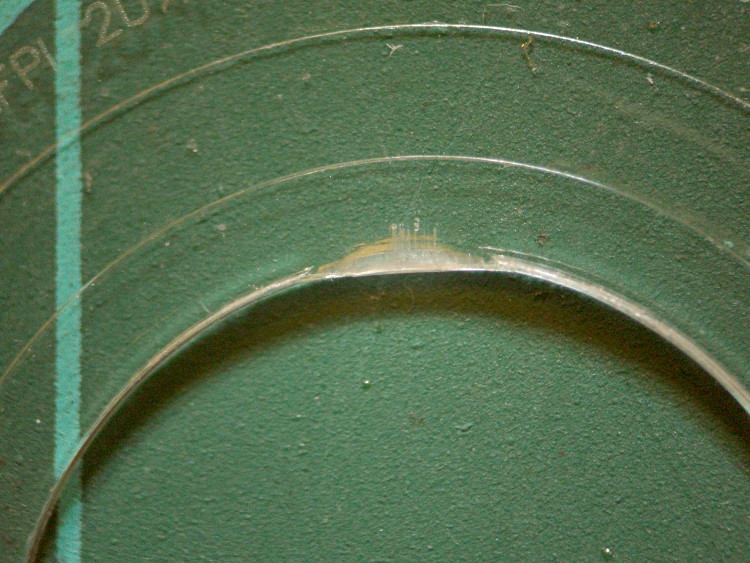
    Misshapen CD Hole
    Misshapen CD Hole

    Mary popped a CD into the boom box, poked the Go button, and the display read “No Disc”… which was odd, as the larger player in the living room had gotten halfway through it with no trouble.

    A bit of diagnostic winnowing revealed a ding on one side of the CD’s hole, as though it had been mashed by a heavy object. These CDs (it’s 13 of 16 in an audio book) aren’t new, but they’ve been reasonably well treated by all parties. It looks like it might have been crunched in a player, which you’d think would be impossible.

    The disc seemed to seat firmly on the player’s hub, so I suspect the ding put the CD far enough off-center to defeat the player’s track acquisition and following algorithm.

    A long time ago I wrote exactly that firmware for a prototype video disk player: find a one-micron track with a one-micron beam while the track wobbulates a few hundred microns as the disk spins at 3600 rpm. After that, mapping the track eccentricity and following it around the disk was a simple matter of software…

    In this case, a bit of razor-knife surgery removed the plastic intruding into the hole and set everything to rights.

  • KMyMoney Exports: Don’t Use Double-Quote Marks

    So when I entered that impact socket in KMyMoney 0.9, which is how I do my exceedingly simple bookkeeping, I entered it just like that: 1-1/16″.

    That worked fine, right up to the point where I exported the summary of transactions report in CSV (comma-separated-values) format and tried to open it as an OpenOffice spreadsheet: only the first third of the file made it into the spreadsheet.

    Having screwed up exactly like this before, I knew where to look: CSV format wraps fields with double-quote marks and KMyMoney isn’t bright enough to escape the double-quote mark, resulting in a broken file. That may be fixed in the current version (1.0.2 right now), but I’m still running Xubuntu 8.10 with some KDE-based programs spliced in because KDE 4.x still has problems with rotated dual monitors.

    That escape mechanism is actually part of the CSV standard, such as it is:

    Fields with embedded double-quote characters must be enclosed within double-quote characters, and each of the embedded double-quote characters must be represented by a pair of double-quote characters.

    I knew better than that, but it’s an easy mistake to make.

    What really ticked me off, though, is that KMyMoney breaks the transaction into two parts (it’s a double-entry bookkeeping system, after all) and, even after I changed the double-quote to the word inch, refused to update the other half of the transaction. Furthermore, I couldn’t get access to that half; the only description I could find had inch.

    Had to delete the whole entry and add it back to get it right… which was better, long term, than hand-editing the CSV file every time.

  • Money for Nothing: Nielsen TV Survey

    Just got a check for twenty bucks in the mail:

    Nielsen Survey Thanks
    Nielsen Survey Thanks

    That’s in addition to the ten dollars folding cash money enclosed with the survey as, I suppose, a motivation to not chuck the whole thing in the trash.

    The survey told us that our household had been “scientifically selected” to ensure a valid sampling of the TV viewing population, so it was very important to return the survey. I was astonished that they’d pay thirty bucks for a survey, but that’s probably a good indication of their desperation.

    OK, sez I, I’ll play along; every man has his price.

    It took ’em until Question 4 to get to the heart of the matter: how many television sets does our family own? Surprisingly, the first choice was “None” and, because that best describes our situation, that’s what I picked. Most of the other questions didn’t have a “Hell, no!” response, but I picked the smallest numbers, hours, and viewers they allowed.

    While there is, in fact, a TV in our house, it’s parked on a basement shelf with its cord wrapped around it and hasn’t been turned on in years. Sort of like the “iron phone” I keep in a box nearby; it comes out when I must verify that the phone company’s problem is upstream of the jack on the side of the house.

    And, besides, it’s an analog TV and we all know what that means: ain’t none of those signals on the air these days. Yes, we have a cable connection, but the only thing crossing the jack is Internet data and, IIRC, the Cablevision diagnostic channel.

    We have a lot of time for interesting & productive projects. They didn’t ask about that sort of thing, though.

    Our results were, most likely, something of a disappointment.

    [Update: OK, three times is enemy action. I will delete further comments asking to be signed up for the survey. ‘Nuff said.]

  • Thinkpad 560Z Configuration

    Turns out the ancient $20 Thinkpad 560Z I’d been using to capture WWVB receiver data didn’t have the IBM configuration utility on it, which made it tough to tweak the LCD timeout. The key parameter for this laptop is that it runs at about 8 W with the LCD turned off, which is just what you want for long-term data collection.

    The thing runs from a 2 GB CompactFlash card stuck in a CF-to-IDE adapter, so it has a (rather slow) solid-state hard drive. The nice part is being able to just jam the CF into the card reader on my desktop box, make appropriate changes, and pop it back in the 560Z.

    Xubuntu automagically mounts all the partitions, so that part is easy. It has a FreeDOS partition that runs the DOS-only config program, a swap partition (not heavily used), and an Ubuntu 8.04 command-line-only installation.

    The IBM config stuff is in a directory on a hard-drive image (saved from the picture frame project), so mount that and copy it over:

    sudo mount -o loop,uid=ed,ro,offset=$((63*512)) develop.hd /mnt/loop
    cp -a /mnt/loop/ThinkPad/ /media/FreeDOS/
    

    While figuring out what to change, it occurred to me that I should just make a batch file with all the proper settings. Here’s a cheat sheet for the available settings:

    Refer to ps2.msg for raw help file
     some commands/options do not apply to 560Z
    
    1. Power Management
    DEFAULT     suspend time, screen off, HD off, standby time, proc speed
    DISK        power-down timeout
    SAfe        safe suspend
    S2H         suspend to hibernate time
    PMode       power mode
    ON          auto-on date/time from suspend
    RI          resume on Ring Detect from serial port
    HSWITCH     hibernate on power off
    SErial      serial port enable
    HFile       create hibernation file
    HTimer      time to hibernate
    CPUPower    stop clock when idle
    POwer       time to suspend
    Cover       suspend with closed cover
    TImer       Power command = suspend or hibernate
    PCIBUSPower PCI power saving
    LCd         time to display power off
    DOCK        suspend when docked
    LBattery    suspend / hibernate with low battery
    SPeed       CPU speed selection
    
    2. Display Device
    SCreen      select LCD / CRT
    HVEXPansion expand 640x480 to 800x600
    F8          F8 selects LCD expansion
    
    3. Alarm Related
    BEEP        beep settings
    
    4. Thinkpad Setup
    IRQ         interrupt assignments
    JStick      joystick config
    PCIIRQ      PCI IRQ assignment
    DMA         DMA channel assignment
    PARallel    parallel port config
    IR          IR port config
    KRate       keyboard repeat rate
    SERA        serial port config
    AUdio       sound system config
    FNSticky    sticky Fn key
    STARTup     display startup screen
    MIDIport    MIDI config
    TPOint      Trackpoint enable / disable
    PRESENtation  disable screen, standby, suspend
    AUDIOCTRL   audio control port config
    
    5. Others
    SUSpend     suspend NOW
    FDD         diskette drive int / ext
    OFF         turn off NOW
    HIBernation hibernate NOW
    TURN        turn off NOW
    BRightness  LCD brightness on battery
    

    And then the batch file:

    ps2 default
    ps2 disk 0 ac
    ps2 pmode custom ac
    ps2 serial off
    ps2 hfile c
    ps2 htimer 0 ac
    ps2 power 0 ac
    ps2 cover disable
    ps2 lcd 5 ac
    ps2 speed auto medium ac
    ps2 hvexpansion off
    ps2 jstick disable
    ps2 parallel disable
    ps2 ir disable
    ps2 krate fast
    ps2 sera disable
    ps2 audio disable
    ps2 midi disable
    ps2 audioctrl disable
    

    The time-of-day clock drifts with breathtaking speed, which may have something to do with the CPUPower option that shuts the processor clock off when there’s nothing useful going on.