The Smell of Molten Projects in the Morning

Ed Nisley's Blog: Shop notes, electronics, firmware, machinery, 3D printing, laser cuttery, and curiosities. Contents: 100% human thinking, 0% AI slop.

Author: Ed

  • Crystal Properties

    Spent some Quality Shop Time measuring an assortment of crystals, some data from which will make up a Circuit Cellar column.

    And the raw numbers will come in handy one of these days, so here they are…

    12 MHz Asst HC-49/U Co+Cc/2 2Cc Fs BW Rs
    ECS 1 4.85 1.47 12.000162 787.5 40.1
    ECS 2 4.50 1.42 12.000150 725.0 40.1
    ECS 3 4.70 1.42 12.000325 1100.0 50.0 Rs out of range
    HC1 4 4.34 1.11 11.999000 600.0 36.0
    HC1 5 4.24 1.06 12.000137 537.5 36.9
    Sentry 6 5.14 0.96 12.000250 625.0 31.8 many spurs
    11.0592 MHz HC-49/U
    1 4.90 1.42 11.059275 562.5 9.3
    2 4.99 1.46 11.059112 575.0 14.7
    3 4.87 1.42 11.059275 512.5 9.6
    4 4.87 1.41 11.059125 550.0 10.0
    5 4.29 1.43 11.058935 750.0 18.1
    6 4.93 1.47 11.059000 537.5 10.7
    7 4.95 1.47 11.059200 525.0 8.1
    8 5.03 1.45 11.059037 575.0 11.1
    10 MHz HC-49/U spur +150 kHz
    1 2.57 1.36 9.997888 200.0 14.2
    2 2.61 1.30 9.997738 225.0 16.7
    3 2.75 1.30 9.997788 225.0 20.0
    4 2.67 1.30 9.997750 225.0 16.1
    5 2.75 1.26 9.997725 250.0 22.7
    6 2.69 1.27 9.997788 225.0 21.0
    7 2.69 1.26 9.997825 212.5 16.5 Circuit Cellar example
    8 2.69 1.22 9.997832 212.5 18.4
    9 2.72 1.24 9.997788 250.0 23.4
    10 2.68 1.20 9.997738 225.0 18.0
    18.43 MHz HC-49/US many spurs +10 +76 kHz
    1 3.86 1.33 18.432425 1.56 24.1
    2 3.79 1.22 18.432987 1.21 10.9
    3 3.93 1.39 18.432050 2.44 46.3
    4 3.97 1.40 18.431175 1.90 27.7
    5 3.89 1.33 18.431888 2.11 32.2
    6 3.92 1.39 18.430888 1.39 16.5
    7 3.99 1.35 18.431500 1.36 11.8
    8 3.97 1.35 18.431675 2.18 38.4
    9 3.95 1.31 18.430512 1.30 10.1
    10 4.04 1.50 18.431427 1.36 11.8

    The 18.43 MHz crystals are in the short /US cans with surprisingly high stray capacitance. Their bandwidths are in kHz and all over the map, as are the series resistances. Weird. Bad crystals? Bad technique?

    Capacitance measured with that fixture.

    Frequency & bandwidth from HP8591 spectrum analyzer with a fixture similar to the K8IQY design; the bandwidths seem to come in 12.5 Hz increments despite a (very narrow) 2 kHz span. The general process is there. Resistance measured from a cermet trimpot using a multimeter good for 0.1 Ω around 10 Ω.
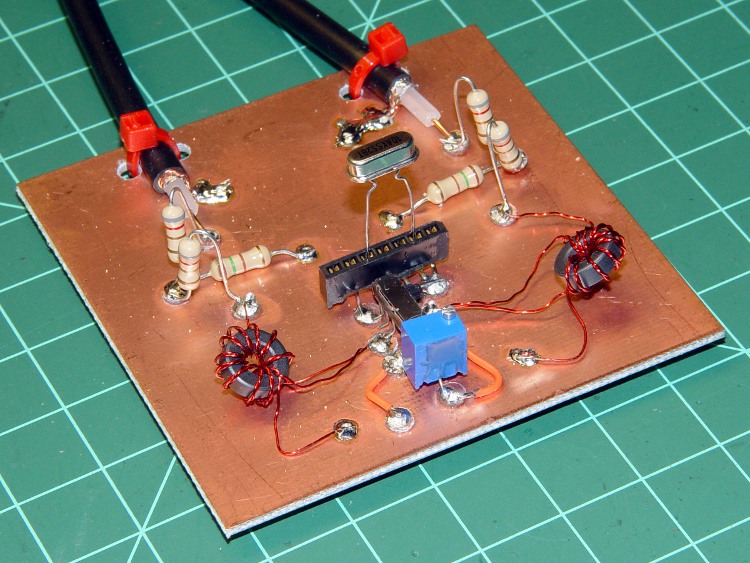
    Crystal Test Fixture
    Crystal Test Fixture

    Useful equations, with column headings in boldface:

    • Lead-to-can capacitance for each lead: Cc = 2Cc / 2
    • Lead-to-lead capacitance: Co = Co+Cc/2 – Cc/2
    • Circuit Q: Q = Fs/BW
    • Circuit resistance: R = Rs + 25 (assuming 4:1 transformers)
    • Reactance XL = XC at series resonance: X = Q R
    • Motional inductance: Lm = X / (2 π Fs)
    • Motional capacitance: Cm = 1 / (2 π Fs X)
    • Parallel resonance Fp = Fs √(1 + (Cm / Co))

    More equations there.

    Memo to Self: Zero the capacitance fixture before critical measurements!

  • Just Another Bicycle Trip

    Mary & I did the weekly grocery run today, with a few add-on errands.

    I’m (finally) shipping the Totally Featureless Clock to my friend and hauling a bag of shredded leaves (the first of a dozen) with which Mary mulches the plants in her remote garden plot. We dropped off the leaves and some garden gate fencing (from her bike), then continued on for groceries.

    Trailer with Package and Shredded Leaves
    Trailer with Package and Shredded Leaves

    Mary returned to the garden to spend the afternoon coaxing the plants to grow nicely, while I hauled the TFC (and the groceries) to the UPS inlet.

    Trailer with Groceries and Package
    Trailer with Groceries and Package

    And then I hauled the groceries home. Most of the four bags of chow fit in the trailer, with squishable fruit & veggies in the bike panniers. A whopping 13 miles, all told, but a good time was had by all.

    The trouble with bicycles is that they have approximately the cargo capacity of your car’s glove box. Panniers help, but for bulk capacity you need a trailer. Think of it this way: these days, a good trailer costs maybe three or four tanks of gasoline.

    If you keep coming up with reasons why you can’t get your butt on your bike and “I can’t haul X!” is one reason, a trailer might be the answer for reasonable values of X. It’s no good for plywood sheets and water heaters, but I’ve hauled plenty of other X that would ordinarily call for a car trip.

    It’s an old B.O.B Yak. Works fine, tracks well, doesn’t wobble, carries more than you think possible.. Just do it!

    We each put about 2000 miles a year on our bikes, most of it on errands just like this. That’s not many miles by bicycle fanatic standards, but we do lots of other stuff in addition to biking…

    Search the blog for “trailer” and you’ll find a few other hints & tips.

  • Sherline CNC Mill: Defining Home Switches

    Having mounted & wired the switches, the next step involves defining the homing sequence & configuration for each axis. All this goes in Sherline.ini and is adapted from the doc there.

    The travel limits are somewhat empirical and I think the Y axis will require some adjustment due to the tooling plate switch extender gadget.

    The HOME_SEARCH_VEL values may be a bit too high, given the rather lethargic 5.0 in/sec^2 acceleration I’m using for X & Y, with just 3.0 for Z. I’ve heard the occasional thwack as the switch trips, so maybe 20 mils of overtravel isn’t quite enough.

    For the X-Axis:

    [AXIS_0]
    ... snippage ...
    MIN_LIMIT = -1.0
    MAX_LIMIT = 9.5
    HOME_IS_SHARED = 1
    HOME_SEQUENCE = 2
    HOME_SEARCH_VEL = 4.75
    HOME_LATCH_VEL = 0.016
    HOME_FINAL_VEL = 0.25
    HOME_OFFSET = 9.1
    HOME = 4.5
    

    For the Y-axis:

    [AXIS_1]
    ... snippage ...
    MIN_LIMIT = -0.5
    MAX_LIMIT = 4.95
    HOME_IS_SHARED = 1
    HOME_SEQUENCE = 1
    HOME_SEARCH_VEL = -4.75
    HOME_LATCH_VEL = -0.016
    HOME_FINAL_VEL = 0.25
    HOME_OFFSET = 0.0
    HOME = 4.5
    

    For the Z-axis:

    [AXIS_2]
    MIN_LIMIT = -0.1
    MAX_LIMIT = 6.9
    HOME_IS_SHARED = 1
    HOME_SEQUENCE = 0
    HOME_SEARCH_VEL = 0.333
    HOME_LATCH_VEL = 0.016
    HOME_FINAL_VEL = 0.25
    HOME_OFFSET = 6.9
    HOME = 6.5
    

    The A axis doesn’t get a home switch because I can’t imagine needing one for a rotary table:

    [AXIS_3]
    ... snippage ...
    MIN_LIMIT = -9999.0
    MAX_LIMIT = 9999.0
    HOME_SEARCH_VEL = 0
    HOME_LATCH_VEL = 0
    HOME = 0.0
    
  • Sherline CNC Mill: Adding Home Switches

    Real men have real CNC milling machines and real CNC milling machines have home switches. I have an itsy Sherline CNC mill, but now my mill has home switches just like a Real Man’s mill.

    Sorta, kinda.

    Truth is, I really don’t need home switches for the Sherline. I haven’t done any “production” milling with fancy fixtures, so zeroing the coordinate system to the lower-left vertex of the part-to-be-milled works reasonably well. But I figured it’d be fun to see what I was missing…

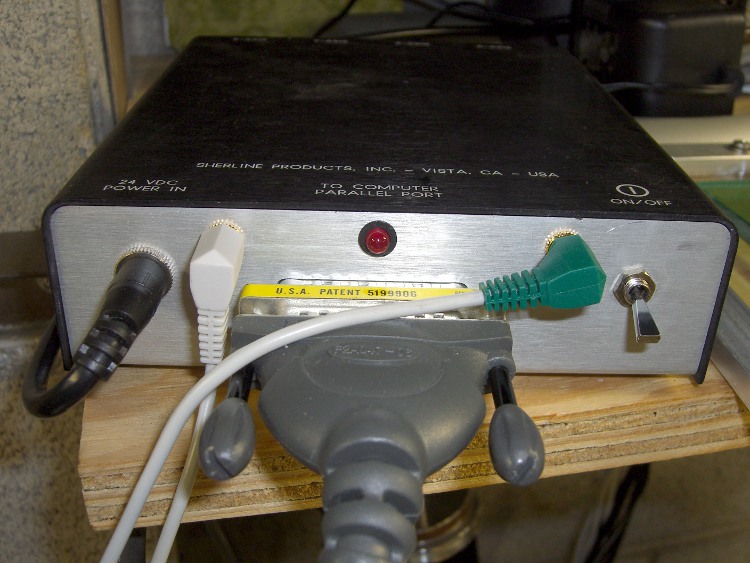
    The first step was to hack another jack on the Sherline controller box and connect it to parallel port bit 10. The process is pretty much the same as I used for the probe switch jack documented there. I actually put the jack in the hole used for the power LED and drilled a new hole for the LED smack in the middle above the connector.

    Sherline Controller with Probe and Home Jacks
    Sherline Controller with Probe and Home Jacks

    The simplest way to do home switches is to wire them all in parallel using a single port pin. You can even wire the probe switch in parallel with home switches, too, but I figured it’d be nice to have separate jacks… and, besides, the controller still has a few port pins left.

    Adding the home switches requires a few lines (adapted from there) in custom.hal that connect the sense inputs in parallel:

    net homeswitches <= parport.0.pin-10-in-not
    net homeswitches => axis.0.home-sw-in
    net homeswitches => axis.1.home-sw-in
    net homeswitches => axis.2.home-sw-in
    

    Using the -not suffix flips the sense of the input so the signal is True when the buttons get pushed. I don’t know of any algorithmic way to determine the actual logic states for a given button configuration, so just try it, use Halmeter to see what happens, then flip as needed.

    The catch with adding home (or limit) switches is that Sherline mills have an attentuated mechanical structure with no good places to affix switches. I figured a trio of microswitches and a few dollops of JB Quik epoxy would suffice; if I must remove the switches, a quick shot with a chisel should pop the epoxy right off the metal.

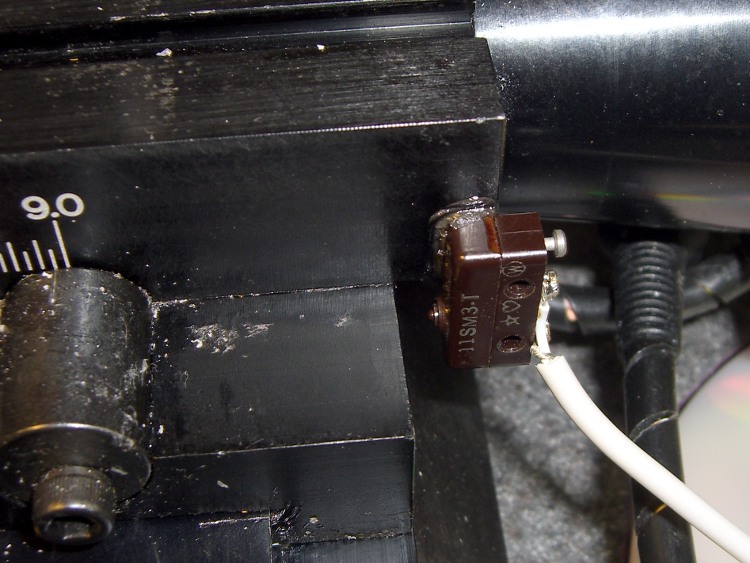
    The microswitches have about 20 mils of overtravel. I located the switches so the actuator buttons are bottomed out against the cases with the axes at the far limits of their travels. The steppers are puny enough to stall when the mechanical bits hit their hard limits, so there’s no risk of wrecking the machinery or knocking the switches off.

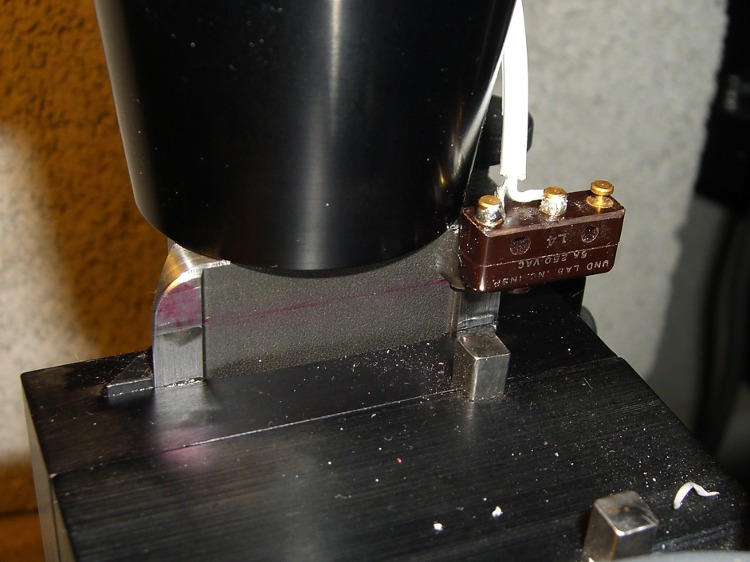
    The X-axis home switch goes on the right side of the table, where it contacts the Y-axis slide at the end of travel. Putting it there also means I can remove the table by simply running the leadscrew out of the nut and pulling the whole affair off to the right. I lashed the switch cable to the motor cable with (wait for it) cable ties, which is probably a Bad Idea for larger machines, but seems to be OK in this situation.

    X Axis Home Switch
    X Axis Home Switch

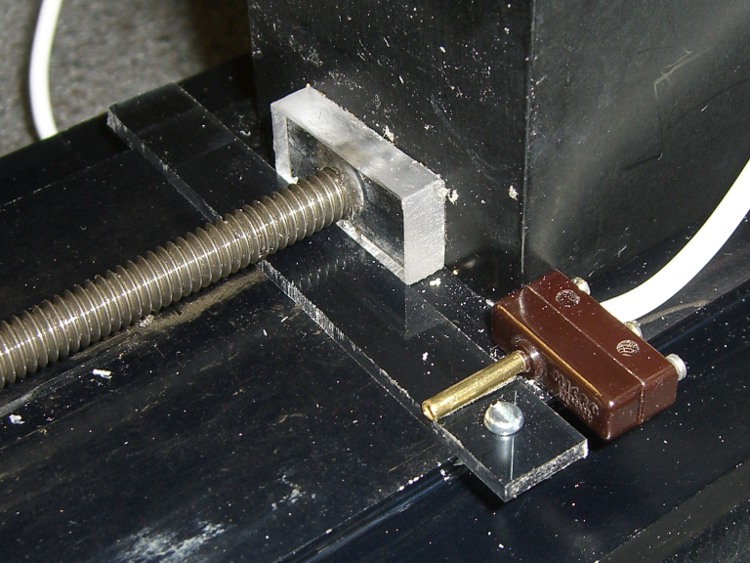
    The Y-axis home switch goes at the rear of the machine base, aligned with the plastic bushing I put there to capture the end of the leadscrew. That’s the travel limit for the bare table, but the Sherline tooling plate sticks out another half-inch: the plate hits the column before the table hits the bushing. Alas, I use the plate a lot.

    Rather than futz with an adjustable switch position, I made a removable extender. The 3 mm (1/8″ nominal) thick plastic strip has 1 mm milled off the bottom, leaving a tab on the left side that snaps over the dovetail. The screw extends down past the dovetail on the right, so the whole affair slides back & forth just enough to connect the Y-axis slide with the button. The brass tubing exactly fits the tit on the switch actuator and is urethane-glued to the strip.

    It’s removable by lifting the left end and sliding the whole affair out under the leadscrew.

    Y Axis Home Switch with Extender
    Y Axis Home Switch with Extender

    The alternative, putting the Y-axis home switch on the very front of the base, would expose the switch & cable to all the slings & arrows of outrageous fortune to be found around the area of the countertop I use most. That may still prove to be a better location: if the back doesn’t work out, it’s easy to move.

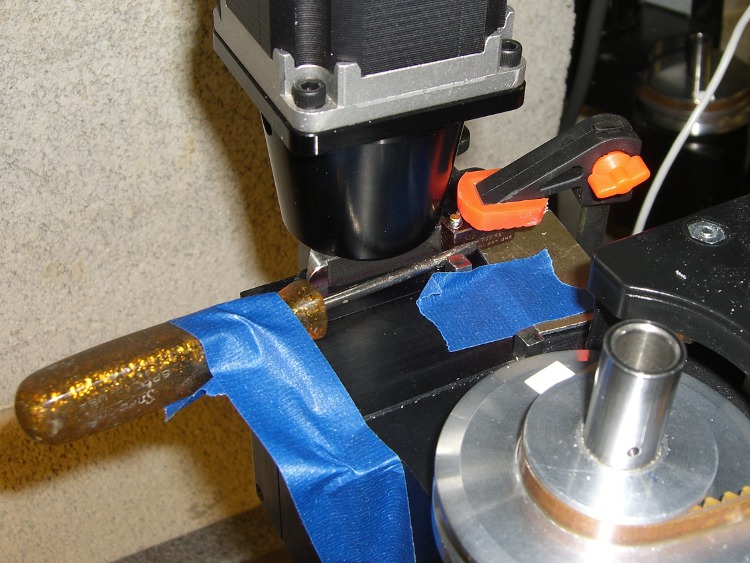
    The Z-axis switch had to go at the top-of-column mechanical limit, as homing to the downward limit of travel seemed fraught with peril. I epoxied the switch in place by clamping it to a shim atop the Z-axis slide to align the switch body, then applying gentle sideways pressure with a small screwdriver.

    Epoxying the Z Axis Switch
    Epoxying the Z Axis Switch

    This is what it looks like after the epoxy cured. The square key bar sticking out of the extender block clears the switch with plenty of room to spare, no matter what it looks like.

    Z Axis Home Switch
    Z Axis Home Switch

    The cables from all three switches go to a common junction where they’re connected in parallel to the cable leading to the green plug in the top picture.

    Tomorrow, the configuration file that makes all this work…

  • Generic Sony NP-FS11 Li-Ion Packs: Rebuild FTW!

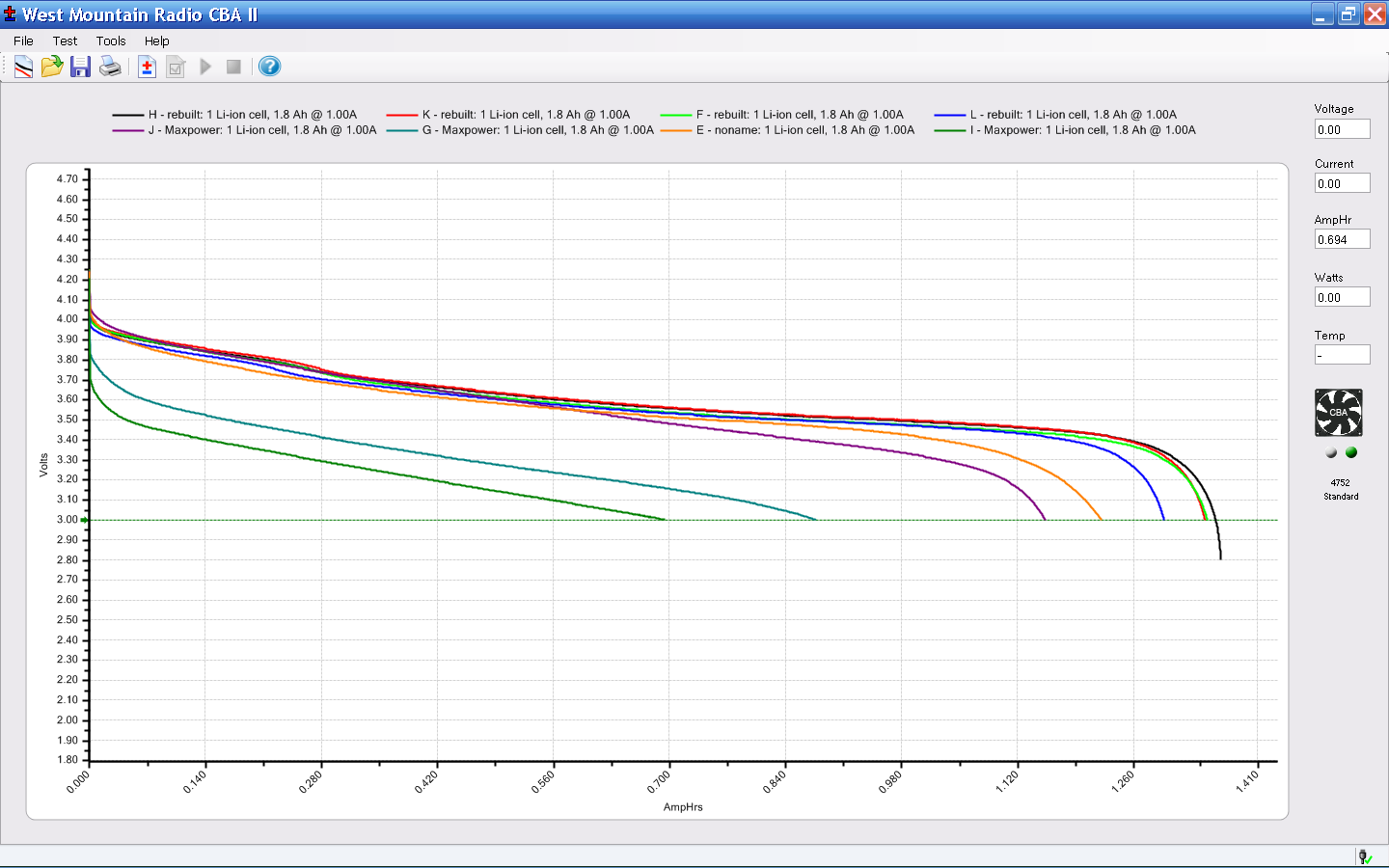
    Herewith, the discharge test results for all the generic Sony NP-FS11 battery packs I have (click for a bigger image).

    Sony NP-FS11 Status - 2010-04
    Sony NP-FS11 Status – 2010-04

    The five mostly overlapping upper traces consist of:

    • Three packs (H, K, and L) rebuilt from the eBay junkers
    • F rebuilt from a deader in my collection
    • E is an older, no-name pack that just continues to work

    The rebuilt packs now have cells from batteryspace.com that are working fine: nominal capacity 600 mAh, actual around 1200 to 1400 for a parallel pair. It’s surprising to see a cell producing its rated capacity…

    The two lowest traces (G & I), plus the purple trace (J) are from the eBay source. The first two are obvious junk, but pack J is actually pretty good. The fact that it’s the best of six packs from that vendor tells you all you need to know about their QC.

    For those of you joining us via search engines, the rest of the story:

  • Li-Ion Battery Pack for the Bike Radios

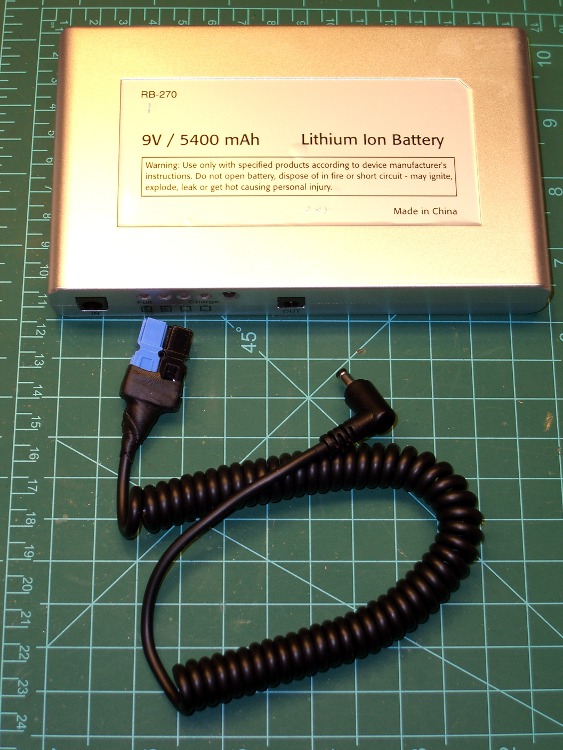
    Battery Pack and Hacked Cable
    Battery Pack and Hacked Cable

    Finally got around to hacking PowerPoles into the coily cable from those Li-Ion packs, suitable for powering the amateur radio HT on my Tour Easy. The cable has surprisingly fat conductors, on the order of 22 AWG, that (when doubled over) half-filled the 30 A PowerPole terminals. I remembered to use the blue-and-black color code for 9 volt power on the second and third cables…

    The right-angle connector activates a switch that turns on the pack’s voltage regulator, which means that leaving the cable plugged in slowly discharges the battery. They self-discharge by about half in two weeks, which means that it’s not absolutely urgent to unplug the battery at every stop, but … I’d rather have an actual power switch.

    I also want to bypass that regulator, so as to get more voltage out of the pack. That may not be feasible, as I suspect they’re using the pass transistor as part of the over-current shutdown circuit, but it’ll be interesting to find out. So this is in the nature of a test to find out how well the lashup works before cracking the case.

    This view of the installed pack is looking down on the butt end of the bike, which is leaning against the Shelf O’ Crap in the garage.

    Battery on Tour Easy Rack
    Battery on Tour Easy Rack

    A four-inch length of adhesive-backed Genuine Velcro mates the battery to the rack, although I stuck both Velcro strips to some carpet tape in the hopes that’ll stick better than the OEM goo. Hooks on the bike and loops on the battery, which means the battery won’t affix itself to everything else in the universe while off the bike.

  • Generic Sony NP-FS11 Battery Packs: Surprising Contents Thereof

    So I dismantled the three junk packs I got from halfway around the world and rebuilt them with better-quality cells. Search for NP-FS11 and you’ll find the rest of the story.

    Some observations…

    These cases are the thinnest plastic that doesn’t actually break when you pick it up: to crack the case seam, you must push firmly. Two of the three packs were already cracked and the third yielded to a slight squeeze.

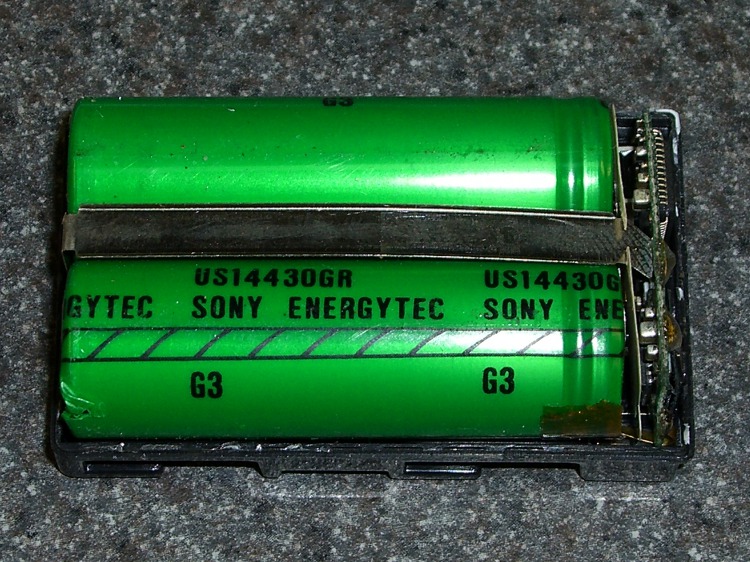
    What’s inside? Welly, welly, welly, what do we have here?

    DOA Battery Contents
    DOA Battery Contents

    The cells are labeled Sony Energytec, which ought to be a reputable brand name. Some possibilities:

    • Counterfeit cells
    • Quality test rejects

    I don’t know why you’d bother putting counterfeit cells inside a generic case; it’d be more profitable to sell a completely counterfeit battery with a fancy Sony label. So I’m guessing these came from a batch of cells that failed inspection and were miraculously saved from destruction.

    Battery Protection Circuit Board
    Battery Protection Circuit Board

    They have the usual protection circuit board on the top. What’s a bit tricky is that you must unsolder the three leads connecting to the case terminals before you can extract the cells. I unsoldered the strap from the negative terminal while I was at it; the positive lead is inaccessible beyond the black IC on the left.

    After that, it’s a straightforward rebuild.