The Smell of Molten Projects in the Morning

Ed Nisley's Blog: Shop notes, electronics, firmware, machinery, 3D printing, laser cuttery, and curiosities. Contents: 100% human thinking, 0% AI slop.

Author: Ed

  • Epson R380 Printer: Resetting the Waste Ink Counters

    So a few days after topping off the continuous ink tanks on my Epson R380 printer, we had a series of thunderstorms that prompted me to turn everything off. Upon turning the printer back on, its fancy LCD panel showed a message along the lines of

    Service is required. Contact Epson Customer Service.

    Oddly, it continued to print perfectly with no further complaints. The error message appeared only at power-on, then politely went away when I pressed the OK button.

    Well, that puppy is long out of warranty, even if I wasn’t using a continuous ink system, soooo… what to do? The printer produces absolutely no diagnostic codes other than that error message.

    A bit of searching gave me the Maintenance Manual for that family of printers. That message isn’t among the ones listed.

    Further searching suggests that at least one of the two waste ink pads / tanks is nearly full and that ignoring the problem will cause the printer to shut itself down, lest it dribble ink. The listed messages warn that the printer is approaching the “end of its service life”, which isn’t the message I saw, but it’s close enough.

    The Maintenance Manual suggests that it’ll be cheaper and better to simply buy a new printer, as replacing the waste ink tanks may cost more than the printer is worth. The website points out that providing a customer-replaceable tank would drive up the cost of the printer, because most customers would buy a new printer before filling the tank.

    In order to get to the waste ink tank, you must remove:

    • Paper Support
    • Printer Cover
    • Front Cover
    • Right Housing
    • Left Housing
    • USB Housing
    • Upper Housing
    • Panel Unit
    • EMI Frame

    I can see why it might take a trained tech a few hours to get all that done… and then reassemble in reverse order.

    The Epson website has a link to a program that will reset the waste ink counters for one of the tanks. Downloaded & ran it on the Token Windows Laptop; it tells me there’s no problem.

    Hmmm

    So I ordered an external waste ink tank from the usual eBay supplier. The hardware is grossly overpriced ($20 delivered) for what it is (large tube with sealed endcaps, some tubing & barb fittings, a syringe), but the deal includes links to programs that will reset the counters. I found several of those programs by myself, so it’s not as if you must actually spend money to reset the printer’s counters. I figured this was in the nature of a learning experience.

    Turns out that the programs are provided by parties having, shall we say, long-term interests that may not coincide with mine. To wit, I’d be batshit crazy to run those programs on a PC I cared about.

    [Update: Something like that.]

    The various program files all passed a ClamAV virus scan, but that doesn’t mean anything these days.

    So, during the next hour:

    • Boot System Rescue CD on my oldest Token Windows Laptop
    • Run partimage to back up the Windows partition to another partition
    • Disconnect from the house LAN
    • Reboot in Windows, which evidently hasn’t seen the light of day in about a year
    • Stifle bleating requests for updates
    • Copy the programs from a USB stick, install as needed
    • Reset one of the ink counters (more on this below)
    • Reboot in SRC
    • Restore the partition from the backup

    All that is straightforward and I’ve written about it earlier. Search the blog for more info using the obvious keywords.

    I attempted to restore the drive’s Master Boot Record from the partition backup file, but partimage complained that the drive size in the backed-up MBR did not match the existing drive size, which suggests something tinkered with the drive’s MBR between the backup and the restore.

    Hmmm….

    You might want to do a bit of reading on Boot Sector Viruses at this point. I have no other evidence to suggest that’s what’s going on, other than to remind you that programs need not do only what they say they’ll do.

    Given all that, I figured this was a great time to update the Token Windows Laptop to Xubuntu 10.04, which installed Grub2 in the MBR and wiped away anything placed therein. The box is heavily multi-booted: Dell Diags, XP, Puppy, and now Xubuntu 10.04.

    Without naming names or providing links:

    • The Russian program seems to not include the R380, but it does include others in that family. I elected to not reset the counters using that program.
    • The Chinese program seems to be a bootleg copy of the Official Epson Adjustment Program, although it’s rife with misspellings and grammatical errors. I told it to reset the “Main Pad” counter and give me a dump of the EEPROM.

    The Main Pad had 16008 counts of the maximum 16200, while the Platen Pad had only 3019 of 54513. Those names do not correspond to anything in the Maintenance Manual, but I suspect the Main Pad is the Waste Ink Tray at the head-cleaning station and the Platen Pad is the Waste Ink Pad running across the printer to catch the overspray from borderless prints.

    Resetting the Main Pad counter to zero cleared the error message; the printer is perfectly happy now. I’ll install the external waste ink tank when I clear the workbench after building the next GPS interface for our HTs.

    The program reported 9922 pages printed. Figuring 7 bottles of ink at 250 ml each, that’s 0.18 ml per page. That’s a slight overestimate because the ≈50 ml tanks were just topped off, but it’s close enough. I’m guessing head cleaning consumed much of that ink, as the printer does plenty of that, and the number of pages seems close to half the number of counts.

    Perhaps it performs a cleaning when more than X minutes has elapsed since the previous print job? That would account for the high number of cleanings; most print jobs are a few pages, at most.

    En passant, I found some totally unofficial ink cartridge capacity numbers:

    • Standard T078x: 7 ml @ $13 = $1857 / liter
    • Large T077x: 11 ml @ $20 = $1818 / liter

    [Update: corrected typo from ml to liter]

    Ain’t that impressive? I love the savings they give you with higher-capacity cartridges …

  • Another Circumferential Seat-Frame Clamp

    This is another step along the way to getting our daughter’s radio firmly mounted to her Tour Easy, not tucked into one of the panniers. The general idea is to use a water bottle holder for the radio, with a seat wedge pack from an upright bike cushioning the radio. The secret ingredient is a circumferential clamp that mounts the holder to the lower rail of the bike’s seat frame.

    This clamp is basically the same as the ones on our bikes, but I doodled up a sketch with some illegible dimensions that almost matches the actual clamp; we may both find it useful the next time.

    Clamp layout sketch
    Clamp layout sketch

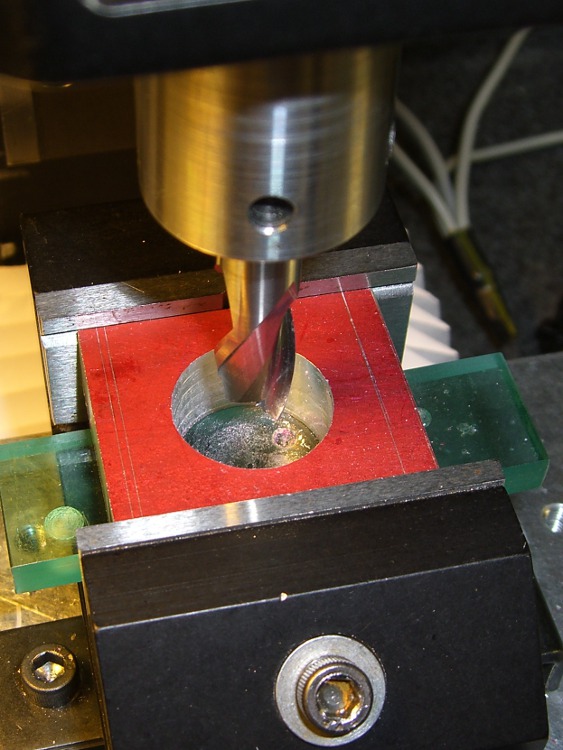
    Machining the clamp is straightforward: bandsaw a block of about the right size, square it up in the mill, helix-mill the clamp hole …

    Helix-milling the clamp hole
    Helix-milling the clamp hole

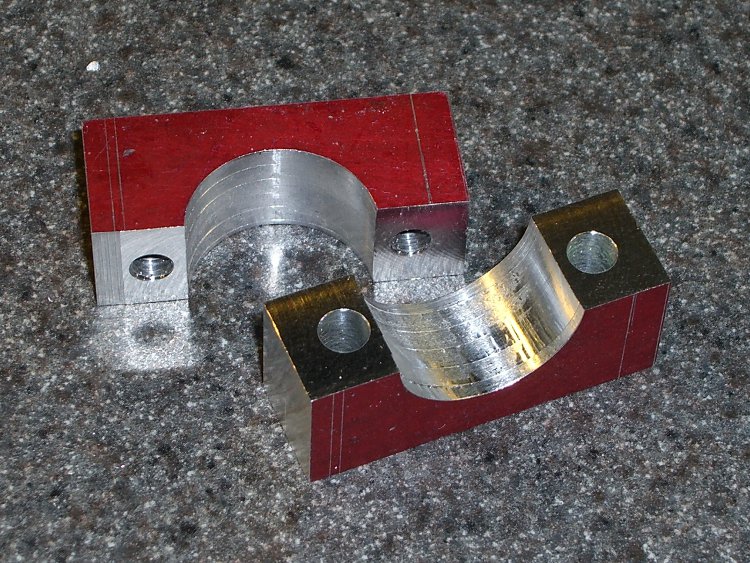
    Drill the clearance and tapping holes for the screw, bandsaw it in half, clean up the cut edges …

    Finished clamp parts
    Finished clamp parts

    Obviously, I didn’t put those nice bevels on the front side.

    Both previous water bottle holders required a spreader plate between the clamp screws and the holder’s screws, but this time the holder had a nice aluminum plate all by itself. It just fit on the Sherline and a bit of manual CNC center-drilled the curved plate and poked a jobber-length drill through the holes …

    Drilling holder for clamp screws
    Drilling holder for clamp screws

    And then it fit perfectly on the bike …

    Mounted holder
    Mounted holder

    A side view …

    Mounted holder - side view
    Mounted holder – side view

    Now, to find a wedge pack big enough for the HT and small enough to fit in the holder!

  • Casting Machinable Wax: Oops!

    Remelted machinable wax
    Remelted machinable wax

    I put a new bag in the vacuum cleaner while machining the prototype case for the bike radio adapters, which was a Good Thing: the swarf from those two halves filled the entire bag!

    I gutted the bag and dumped the swarf in a pot to melt down for another use. It started as a brick, but I figured having some rounds might come in handy. A bit of rummaging turned up some pill bottles of just about the right size.

    Unfortunately, I didn’t think quite far enough ahead: notice the shoulder around the right-hand end of the shorter cylinder? Yeah, the bottom of the bottle was bigger than the top…

    Fortunately, I don’t have a deep emotional attachment to the bottles, so carving it off the wax wasn’t a traumatic experience. Things would be different if I’d made a nice custom mold…

    Of course, the vacuum cleaner also sucked up the odd screw, paper snippet, older swarf left in nooks and crannies, and some of this and a bit of that. Most of the junk either floats to the top or sinks to the bottom, leaving the rest of the wax in good shape. I suppose I could filter the melt, but it’s pretty thick & gooey, even at 300 °F, and I doubt my cheesecloth is up to the task.

    Memo to Self: Do a better job of cleaning up before machining the wax, OK?

  • Adapting an Earbud for Bicycle Use

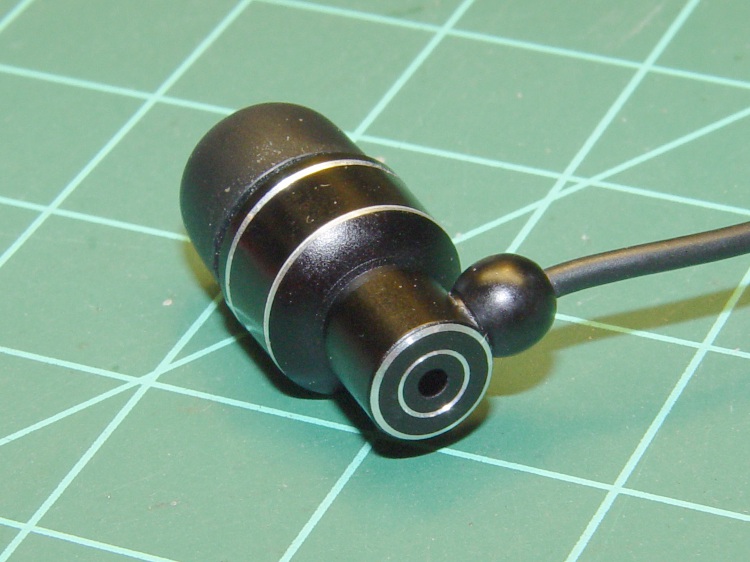
    I favor a small cylindrical earbud with a good seal inside my ear for use with the amateur radio on my bike. These things come with back vents that allegedly improve their bass response; that’s not a concern for communications-grade audio and, worse, the vent produces a tremendous amount of wind noise.

    Earbud with back vent
    Earbud with back vent

    The solution is straightforward: put some tape over the vent!

    Kapton tape over vent
    Kapton tape over vent

    I used Kapton tape, because I have it, but in point of fact the snippet of duct tape I applied on the first ride (having forgotten to do it on the bench) worked just fine. A drop of epoxy would be fine, too, if you were a bit careful about not letting it ooze down inside the case while it cured.

    Despite the fancy appearance, this is a random pick from the assortment of earbuds I’ve bought at $10 or less over the last few years. According to my golden-eared assistant, the audio quality varies dramatically among the assortment, but they all work reasonably well between 300-3000 Hz. I suspect the insanely cheap ones on eBay are essentially the same things, although IMO they’re intended to collect large quantities of high positive ratings: caveat emptor.

    Speaking of caveats, insert the usual safety caveats here.

    Note that we’re using one earbud for tactical comm, not boppin’ to the music, and the audio level is low enough we (well, I) can’t hear diddly at speeds over 15 mph. Your jurisdiction may prohibit “headphones” or “earphones” or some such, so behave accordingly.

    All the officers I’ve met think the radios are a great idea, if that means anything.

  • Machinable Wax: First Cuts

    This is a prototype for the case that will eventually hold a TinyTrak3 GPS-to-APRS encoder, along with a homebrew circuit board that combines the APRS data with voice from the helmet mic. The case slides into the back of our ICOM IC-Z1A and W-32A HTs, replacing the battery case.

    It’s the most complex CNC machining I’ve done so far and I figured that was the perfect reason to carve up a block of machinable wax that’s been sitting on the shelf for far too long.

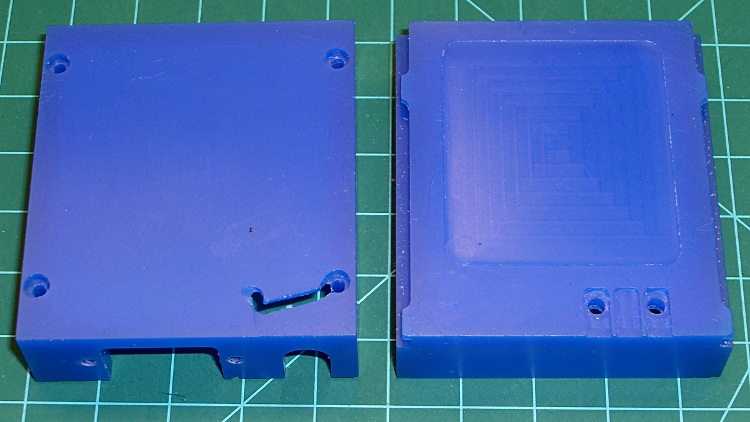
    The exterior view shows why you use wax for the first pass… the ugly gash came from not retracting the end mill before the final G30, combined with trying to clamp a bendy shell in the vise. That was, of course, the final operation on that part!

    Machinable wax case - exterior
    Machinable wax case – exterior

    The inside view shows the TinyTrak serial connector cutout (left half), as well as the shoulder to support the audio interface circuit board (right half). The two holes at the upper-right are 4-40 clearance for screws that serve as contacts for the HT’s battery connection and hold the board in place.

    Machinable wax case - interior
    Machinable wax case – interior

    These survived far too many setups and takedowns as I figured out how to get all the cuts laid out and in what sequence to do everything. Now that I know a bit more about what to do, the plastic version should come out better; I’m sure I’ll also make better mistakes.

  • Bell Bicycle Helmet Teardown

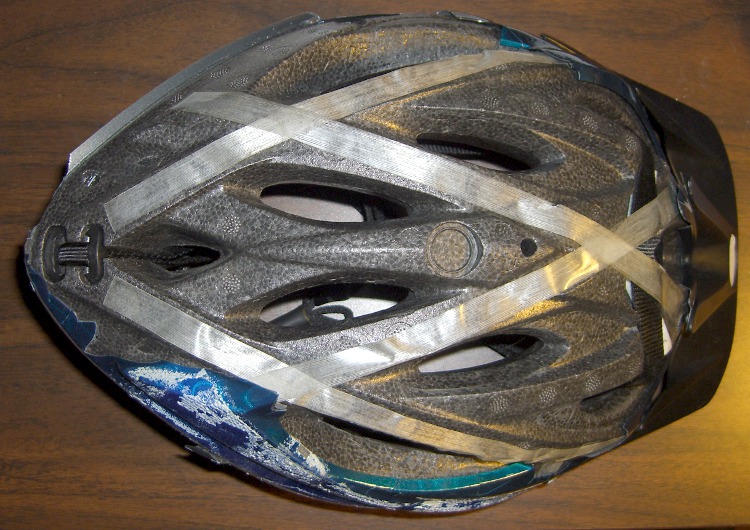
    Having gotten our new helmets up & running, I decided to tear down my old helmet to see what’s inside. The thin plastic shell was already cracked (and probably brittle from years of sun), so it tore off very easily. The foam structure was in good shape, but I was surprised to see that everything’s held in place by glass filament tape!

    Peeled bike helmet
    Peeled bike helmet

    The straps pass through an H-shaped locking clip tucked into a recess in the rear apex (to the left in the picture). The front strap simply loops over the foam shell (to the right of the tape crossing on the right), where it’s held in place on double-sided adhesive foam tape by the glass filament tape.

    All in all, a low-cost, low-weight design that works just fine.

  • Visor-mounting a Third Eye Hardshell Mirror

    Tweaked Third Eye Mirror
    Tweaked Third Eye Mirror

    The Third Eye Hardshell Mirror was designed back in the day when Bell Helmets had actual hard plastic shells over a foam core, with a lip around the shell’s edge. These days, helmets consist of an elaborate foam structure with a paper-thin plastic covering. Mary’s helmet is like that, but it has a visor and I figured the mounting clamp might grab onto that.

    It almost worked, but the edge of the clamp tapered the wrong way: tightening the screw tipped the clamp away from the visor lip.

    Solution: chop off the offending part of the clamp, file off the sharp edges, and screw it in place. Works like a champ.

    I’m not convinced this mount will survive the test of time, though. We already know that the clever ball joint will eventually lose its griptivity, but that’s fixable.