Ed Nisley's Blog: Shop notes, electronics, firmware, machinery, 3D printing, laser cuttery, and curiosities. Contents: 100% human thinking, 0% AI slop.
The Walkway Over the Hudson has been a resounding success, at least measured by the number of people using it. The Parker Avenue parking lot has about 80 spaces and, during most days, is jammed full.
The NYS park system now owns the Walkway and, in their infinite wisdom, decided that the parking facilities should have a fee just like the rest of their lots: $5 / 4 hours.
Here’s what the Walkway lot looked like on the day the fee went into effect…
Walkway Parking Lot With Parking Fee In Full Effect
State officials hope there will be no decline in visitors with the new parking fee, said State Parks spokesman Kristen Davidson.
Basically, there’s enough free on-street parking in the area that most folks park nearby and hike in, which makes sense for a park consisting of about two miles of walking path. The parking fee amounts to a tax on handicapped and elderly visitors who find it difficult to navigate streets and ramps.
On the bright side, it’ll be a lot easier to bike across the bridge…
The case for this gadget slides into the back of the ICOM IC-Z1A HT and powers the radio through its usual battery contacts. I reshaped 5/16″ 4-40 brass machine screws into flat-top studs, then soldered 8-mil tin strips to their tops.
Grab a screw in a pin vise, brace it on the bench vise, and file off everything that doesn’t fit:
Reshaped 4-40 screws
The result should fit neatly into the flatted recess, with the top flush in the rectangular slot:
Studs in their recesses
Cut an oversized strip of 8-mil tin and solder it to the stud. I tinned both pieces to get nice solder coverage, although the notion of tinning a piece of pure tin with silver-tin solder did give me pause. It’s all in the flux, I suppose.
Anyhow, put the two tinned sides together and hit the combo with a half-second pulse at 100% duty cycle from my resistance soldering gadget. Perfect:
Tin strip soldered in place
Then snip off whatever doesn’t fit into the slot with an ordinary (albeit shop-only) scissors, making it just slightly shorter than the slot so the end doesn’t snag on anything. File the sides and corners so they’re easy on the fingers, flatten the strip so it fits neatly into the slot, buff it up a bit, and it’s all good.
Contacts in place
Takes longer to describe than to do it, at least the second time you do it…
The plastic-ball-in-plastic-socket joint found in bicycle mirrors seems to fail after a year or two of constant use. These are some doodles & thoughts about building a small, robust, adjustable joint.
A bike mirror needs two ball joints:
at the helmet mount to put the mirror in the proper spot
at the mirror to align the image
A flexy boom can replace the helmet joint, although rotation around X (pitch) is still handy.
A flexy mirror mount can replace the mirror joint, but it must also be compact.
Without heroic measures, the range of travel for a ball joint isn’t all that much.
How to make a ball? Anneal & drill a standard ball bearing for a wire shaft? Solder onto chrome steel? CNC mill the end of a bar in a rotary table?
How to make a socket? Some of that low-temperature themoplastic might be useful. Mold it around the ball, slit radially, and squash it in a circ clamp?
How to adjust? Circumferential clamp around the socket or pull the whole socket into a wedge? Radial cuts through the socket to allow compression or depend on plastic/elastic deformation?
How much friction? You want it stiff enough to hold position in a strong wind and easy enough to reposition. You definitely don’t want grub screws or fiddly knobs!
The doodles are all far too complex, some are absurd, one can’t be built (at least by me), and I’ll probably end up using some bendy wire anyway.
Something of this may be useful in another project … and now I can throw out that scrap of paper.
I cleaned the compost out of the gutters yesterday and this critter came by to help with whatever missed the wheelbarrow.
Squirrels and chipmunks show how far you can get with a snappy color scheme and a good PR agent. These things are rodents, pure and simple, but those large eyespots trip your protect-the-baby response every time.
They’re not particularly well-behaved, either: the chipmunks and gray squirrels have had running battles with them this spring. We think the area’s chipmunks had a population explosion and are shoving into traditional red-squirrel territory. Could get ugly out there.
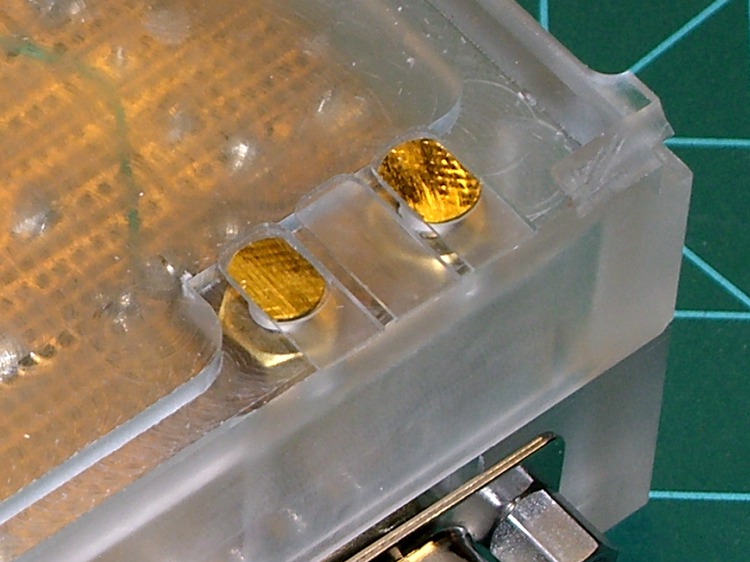
As described there, I made a fixture and a small plate to hold 2.5 mm and 3.5 mm plugs in the proper alignment for the mic & speaker jacks on our ICOM IC-Z1A HTs. Knowing I was going to rebuild the interface boxes, I made several spare plates and tucked them into a small bag against future need.
Jack Plates – Oblique
Time passes.
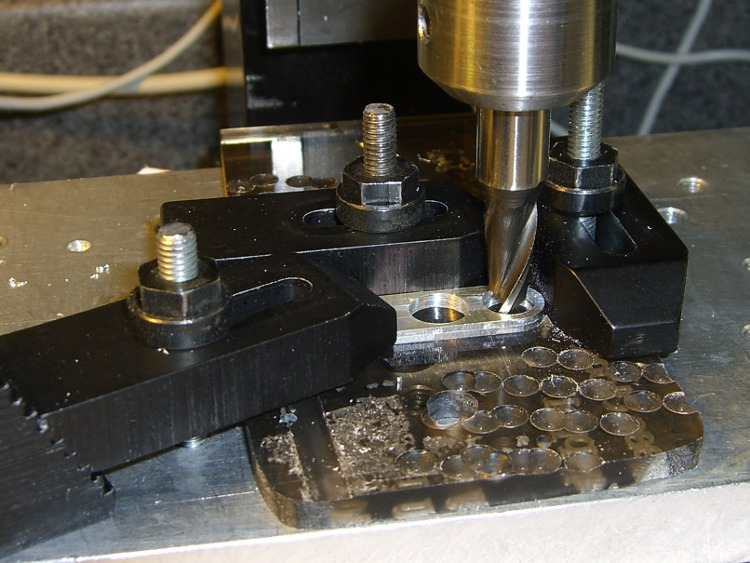
Come to find out that the new gratuitously gold-plated 2.5 mm plugs in my stash have a slightly thicker front plate that doesn’t quite fit into the recess I milled in the plates for the old nickel-plated plugs. So I set up a little nest in on the Sherline’s table, snuggled each plate into the corner, and poked a 9/32-inch end mill 1 mm down into the plate. The net change was a 0.5 mm deeper recess. Sheesh.
Milling the plug plate recess
I’d originally create the recess with helical milling, but I recently uncovered a stash of shiny-new end mills in a box: 9/32 is 7.31 mm, just about exactly what you want for a 7-mm dia plug front plate surrounded by a blob of fast-curing epoxy.
Plugs epoxied into plate
This epoxy just holds the plugs in the right position for wiring and initial testing. After the cable checks out, I’ll smoosh a blob of epoxy putty around the whole thing as before.
The circuit board is 30-mil, double-sided, half-ounce (I think) copper on glass-fiber stock, direct-etched by rubbing ferric chloride solution onto it with a sponge.
The top copper image (on the left) is reversed so it comes out correctly when you’re doing toner-transfer etching.
I didn’t bother with a silkscreen, because I don’t have a soldermask and there’s no room for text around the parts anyway.
The four vias at the corners mark the edge of the board. Trim it with tinsnips (or a shear if you have one), then introduce it to Mr Belt Sander until the edges pass directly through the middle of those via holes. Round the corners a bit so they fit into the case recess atop the mounting shoulder.
Put Z-wires in the small round vias (the ones that don’t have any other traces) to connect the top and bottom ground planes.
Put Z-wires in the other round vias to connect a top-side signal to the corresponding bottom-side trace.
There are three jumper wires across the bottom; with only two layers I don’t get all bothered about embedding the last few. Those vias are square.
I don’t have any way to do plated-through holes, so solder the wires to both sides of any vias with traces on both planes. I admit I missed two of them on the TT3 ribbon cable.
The big empty space around the positive power terminal prevents the ring-lug connector from shorting to the ground plane. Now that I think of it, there’s no need for an empty space on the bottom copper, but it doesn’t do any harm.
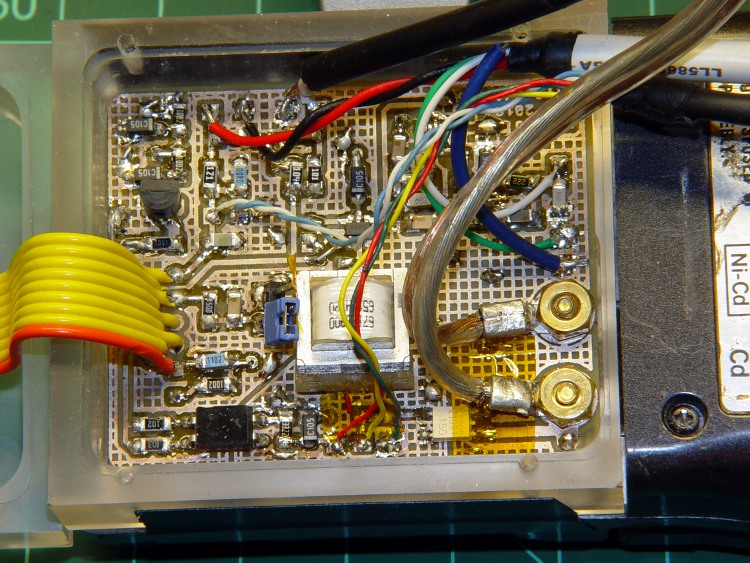
This board drives the helmet mic & earbud, combines the TinyTrak3+ AFSK audio with the mic audio, and interfaces with the radio’s mic & speaker jacks.
GPS + Audio circuit board
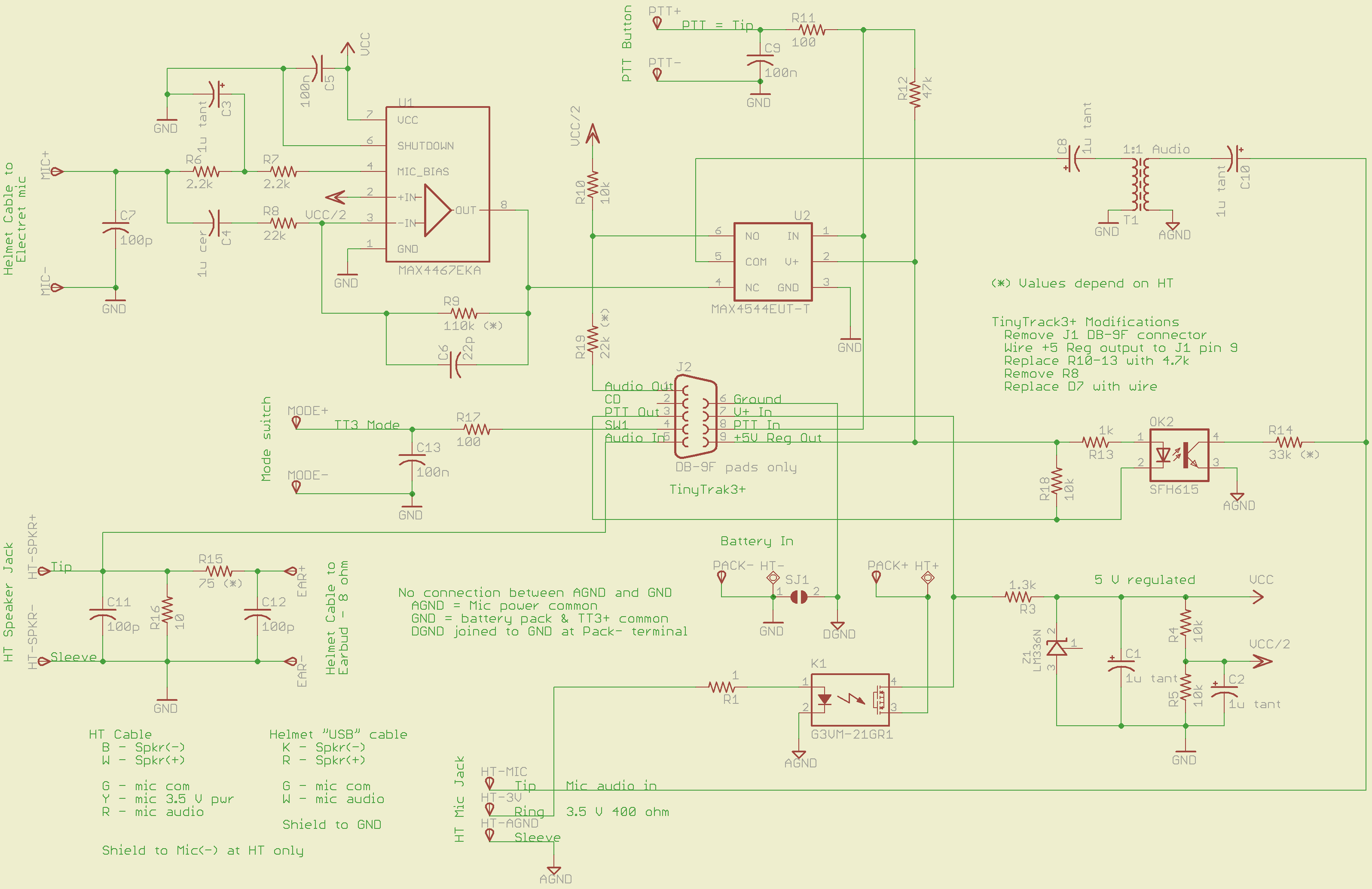
The schematic (click for more dots):
GPS + Voice HT Interface schematic
The ICOM IC-Z1A provides a 3.5 V power supply (on the ring terminal of the mic jack) that normally drives an electret mic. I use it to turn on a MOSFET relay that powers all the circuitry directly from the external battery pack. The relay has about 1 Ω of resistance, so there’s not much voltage drop. Note that the radio’s power does not go through the relay: it connects directly to the external battery.
An earlier version used an optocoupler to drive a 2N2907 PNP transistor for power switching. That worked fine and might actually be better; I think the MOSFET relay needs slightly more drive current than the HT’s 3.5 V supply can provide. More on that later if the problems continue.
The TinyTrak3 includes a 5 V regulator that I wired through the normally unused pin 9 of the DB-9 connector (no connector, just a ribbon cable). It powers the PTT button, analog switch, and the PTT optocoupler.
The MAX4467 handles the electret mic, with power from a separate 5 V shunt regulator built around an LM336. That keeps much of the TT3’s digital noise out of the audio. You can use a MAX4468 if the voltage gain required for your electret mic capsule is greater than Av=5; the ’67 is unity-gain stable.
A MAX4544 analog switch (basically, a low-power MOSFET relay) selects either voice or AFSK data. I originally tried adding the two with an op-amp, but there’s just too much noise from the TT3. The external PTT selects audio data; the rest of the time the radio gets the TT3.
The HT’s mic input is galvanically isolated from the rest of the circuit board. That eliminates ground loops, circulating RF, and all manner of hassle. Bulky, awkward, expensive, and highly worthwhile.
An optocoupler isolates the TT3 PTT-out signal from the HT’s audio input, while switching the 33 kΩ resistor that activates the HT PTT. R18 bypasses any leakage current from the TT3’s driver transistor around the coupler’s LED; the PTT current to the HT is so small that the leakage on a hot day can tease it.
A small 1:1 audio transformer couples the voice + data into the HT’s mic input jack. The 1 μF caps are certainly overkill, but they’re small and work well.
The HT’s external speaker goes into a simple L attenuator that reduces the volume. The HT expects an 8 Ω speaker, but most of the earbuds these days are 30 Ω and way loud; the volume control doesn’t have much resolution when there’s only two or three clicks between inaudible and ouch.
All the external inputs have a 100 pF bypass cap and a 100 Ω series resistor to cut down on RF and tamp down static discharges. Might be overkill, but the previous units withstood years of abuse with that sort of circuitry and I’ll stand by it.
Required tweakage for your HT’s preferences:
R9: MAX4467 gain gets the electret capsule output up to whatever your HT expects.
R15/R16: Earbud attenuator cuts the HT’s speaker output down to something reasonable for your ear
R14: PTT resistor must suit your radio
R19: TT3 output may be too hot for your HT audio, even with R6 on the TT3 turned way down.
All the wires go to top-layer solder pads, rather than physical connectors. I didn’t have any “front panel” space for connectors, anyway, so that’s as good as it gets.
I’ll eventually gather all the files into one lump and put ’em up here.









 The Smell of Molten Projects in the Morning