The Smell of Molten Projects in the Morning

Ed Nisley's Blog: Shop notes, electronics, firmware, machinery, 3D printing, laser cuttery, and curiosities. Contents: 100% human thinking, 0% AI slop.

Author: Ed

  • Wind Turbine on the Move

    Pulled into an I-90 rest stop west of Albany NY and saw what appeared to be a large water tank on a flatbed, parked next to … an airplane wing?

    Wind turbine blade and tower section
    Wind turbine blade and tower section

    Nah, this can’t be.

    Turns out that the “tank” (in the distance of the picture) was part of the mast for a wind turbine, with three airfoil blades on separate trailers scattered around the edges of the truck parking area.

    This being a Marching Band trip (returning from the NYSFBC Dome contest in Syracuse: 4th place), I deployed two bandies as measuring instruments. They put on their drill face, stepped 8-to-5 along the blade, and reported it as 120 feet, which agreed well with my uncalibrated 125-foot pace.

    Wind turbine blade - side view
    Wind turbine blade – side view
    Wind turbine blade - end view
    Wind turbine blade – end view

    Seen end-on, a blade doesn’t present much to see. The plastic-foam endcap is a nice touch, though.

    The hub and generator nacelle (and, most likely, many more tower sections) were missing from the collection, which leads me to think they’re marshalling all the pieces before delivery to a wind farm site. It’s also possible these came from a decommissioned installation, as they seemed somewhat weathered.

    A semitruck driver said they’d been parked in the lot since late last week.

    The placard on the back of the trailer reads, in both English and French (due to a Quebec license plate):

    CAUTION THIS TRAILER OFFSETS

    A bit of Google-fu (try searching for offsetting steering semitrailer -carbon) indicates that the trailer has self-steering wheels, which makes sense given that it’s a single unit rather than a double-bottom semitrailer rig.

    The tower section had a bogie wheel assembly strapped to one end (labeled “TOP” on the canvas cover) and a semitrailer tongue strapped to the other: no need for a trailer between the two, as a cylindrical turbine tower is certainly stronger than anything you’d find on the road.
  • Trust Multimedia Mouse vs xorg.conf

    This is the xorg.conf stanza required for a Trust MI-7700R multimedia mouse to set default left-hand use:

    Section "InputClass"
        Identifier      "Trust MM Mouse"
        MatchProduct    "Trust Mouse 15206"
        Option          "SendCoreEvents" "True"
        Option          "ButtonMapping" "3 2 1 4 5 6 7 8 9 10"
    EndSection
    

    And then it Just Worked, including horizontal scrolling.

    I can’t vouch for the multimedia functions, though.

    Memo to Self: Weirdly, the AA cells are in parallel, not series. Put them in “normally” and you get a dead short across a 3-V battery!

    Maybe that’s why it’s obsolete?

  • Refurb HP w2408h Monitor Factory Menu

    A year or so ago I picked up a refurbished HP w2408h monitor that’s been entirely satisfactory, although the backlight now seems to flicker occasionally. In the course of enabling the backlight sensor to see if that changes anything, I came across this useful bit of information about enabling the Factory Mode menu (lightly edited for clarity):

    1. Make sure you have video on your current input.
    2. Then turn off monitor.
    3. Hold down the “Menu”  and  ” +” keys while turning OFF/ON REAR Power switch. If monitor does not have rear power switch (ex. w2408) then just do with front power switch.
    4. Bring up OSD and scroll up/down to “F” letter at one corner of the OSD window.
    5. Press Menu/select button to enter Factory menu.
    6. Scroll down and turn off BurnIn.
    7. Scroll back up to “Exit” menu.
    8. Cycle power with front power button.

    The menu isn’t particularly useful to mere mortals, although it does show total power-on hours (3700, IIRC) and some other settings. It seems the refurb shop shipped some of the monitors with Burn-In mode enabled, much to the confusion of purchasers.

    Makes you wonder what other Easter Eggs lie in wait, doesn’t it?

  • Conversation With a Scraper

    Several trackbacks along the lines of “Click for the original post” recently arrived in the comment queue; I have moderation turned on for well and good reason. Their common URL resolved to a blog containing half a dozen posts ripped in their entirety from here.

    Huh. How about that…

    The IP address resolved to [mumble].com, a dedicated server provider, and the blog actually had a contact page with what looked like a non-bogus email address. Here’s the exchange, with me doggedly CC-ing abuse@[mumble].com:

    Me

    Much of the content at [scraper URL].info has been ripped directly from my blog at softsolder.com, in direct violation of the Creative Commons copyright given in the About page.

    Remove all of the content taken from my blog and notify me when you have done so.

    You may post links to my blog, but you may not re-use the text or pictures without following the applicable Creative Commons copyright rules.

    Thank you.

    Scraper

    Thanks for your email.  This was generated by a sofware program and has been removed as requested. Regards,  David

    Me

    OK, I’m puzzled: you imply that your site uses content that a program automatically rips from other blogs.

    What’s the point of that?

    Scraper

    FYI there are alot of different software programs out there that create autoblogs in much the same manner. These are being actively promoted to internet marketers.  All that is required is subscribing to your rss feed and the software does the rest. It populates the blog, and publishes the content.  I’m sure that you will run into this some more as these type programs become used by more and more marketers.  David

    Me

    Ah, now it makes sense: the lure of money for nothin’!

    I suppose I should be flattered that you considered my blog worth stealing.

    Frankly, I doubt you’ll get very far with second-hand content, at least based on the readership I’ve built up over the past two years by creating an original post every single day.

    I’ve always wondered at the financial reward from a scraper blog. Let me know how that business model works out for you in, say, late January of next year.

    OK?

    Thanks…

    Something tells me I’m not going to get a reply.

    There are many “bloggers” like David who think there’s money to be made by pretending they’re competent. Many of the comments you never see lead to spam and malware blogs that link back here, evidently to boost their clickiness.

    My RSS post feed has teaser excerpts, not the entire blog post, which seems to discourage scrapers: copy-and-pasting a URL Is so much more difficult than just clicking an RSS button. I suppose that makes David one of the more enterprising “internet marketers” in his field of non-expertise…

  • Monthly Aphorism: Fundamental Principles of Rope

    Two fundamental Principles of Rope:

    1. You cannot push a rope.
    2. If a tangle of rope has one end, it must have at least one other.

    The First Principle should be obvious, but all too often I find myself trying to thread a wire through a structure… and eventually realize I’m attempting something that’s isomorphic to pushing a rope. Doesn’t work, never has, never will.

    The Second Principle comes in handy with hoses and cables. If you separate the tangle into two parts, any part without an end is topologically either a knot or a loop, but won’t contribute much to the untangling. Conversely, any part with an end can be reduced to a straight section (possibly leading to a tangle in the other part) by fiddling around for a while.

  • Dehumidifier Performance

    Having ever so many books & papers in the Basement Shop & Office, I must run a dehumidifier to fight the mildew to a standstill. It’s actually under 55% most of the time, but humid summer days are killers.

    Being the sort of bear who owns a Kill-A-Watt meter, I jotted down dates, runtime hours, and kWh when I filled each 5-gallon bucket. Eventually, we acquired a cheap scale that found its way under the buckets to weigh the outgoing water.

    My data collection foundered on errors of omission, power failures, and general forgetfulness, but, nonetheless, a few interesting numbers emerged.

    Outside weather:

    • Dry weather = 0.14 kWh/elapsed hour
    • Wet weather = 0.37 kWh/elapsed hour

    It draws about 485 W, so the duty cycle works out to

    • 0.14 kWh/hour -> 140 W -> 29%
    • 0.37 kWh/elapsed hour -> 370 W -> 76%

    If I were more industrious, I’d grab a plot of daily humidity from the NWS and rub those numbers against it, but … maybe next year.

    The thing requires somewhere between 2.0 and 3.5 kWh to extract each pound of water. It’s rated at 1.6 liter / kWh = 3.5 lb / kWh, undoubtedly under standard conditions, so the actual efficiency is in the right ballpark.

  • Microsoft Comfort Curve Keyboard Cleanout

    Pin punch in keycap stem
    Pin punch in keycap stem

    Comes a time in the life of every keyboard when you must simply tear it apart to clean out the crud. I’ve been using a Microsoft Comfort Curve keyboard for several years and it’s worked well, but the grunge finally exceeded even my lax standards.

    A handful of screws secures the bottom cover; the shortest screws run down the middle. Surprisingly, the giant HEALTH WARNING label doesn’t cover any screws. A row of gentle snap latches along the edges holds the covers together; ease them apart with a small screwdriver or your fingernails.

    The lower cover holds the crosspoint matrix under a giant silicone rubber spring mat, with the USB interface board to the upper left. I left those in place, as the top cover captured nearly all the crud.

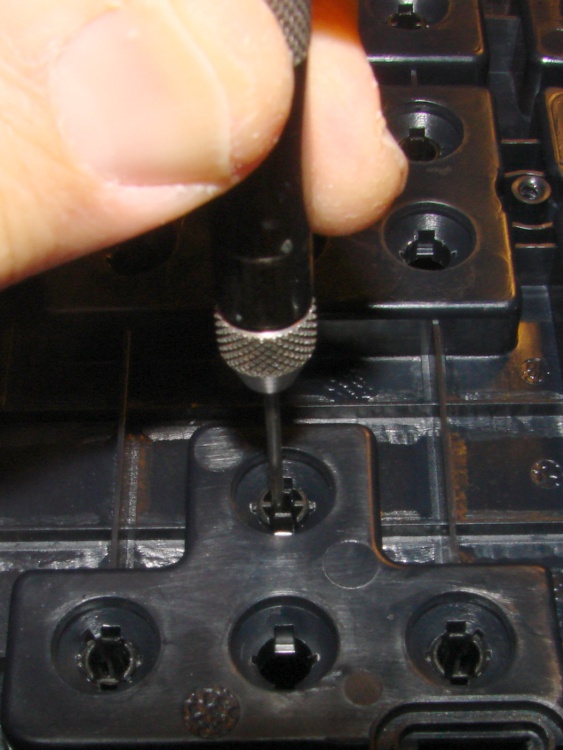
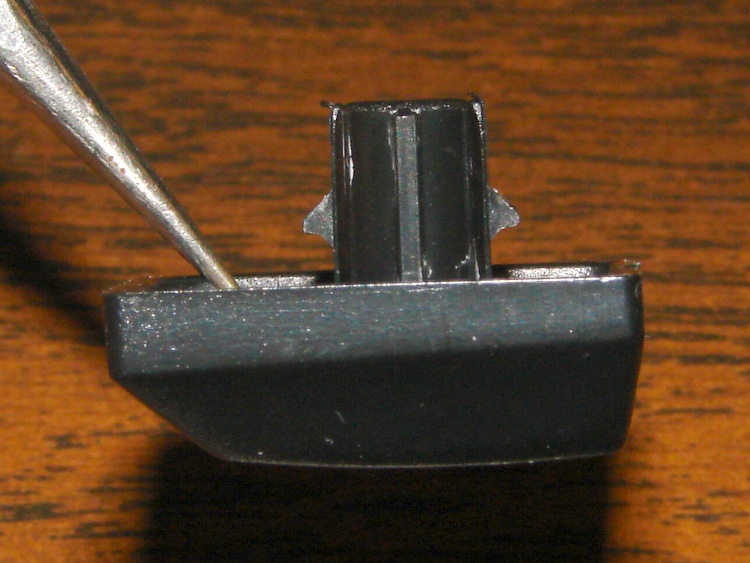
    The keycaps have stems that slide in guide tubes molded into the top cover, with triangular latches that both secure the stem and prevent it from rotating. I used a small pin punch to push the keycaps out, as shown in the top picture; the punch much be small enough to allow the latches to bend inward as they clear the notches.

    Keycap retaining latches
    Keycap retaining latches

    The larger keys have equalizing wire bails that latch under guides molded into the top cover. They’ll slide right out, but don’t shove the pin punch too far too fast.

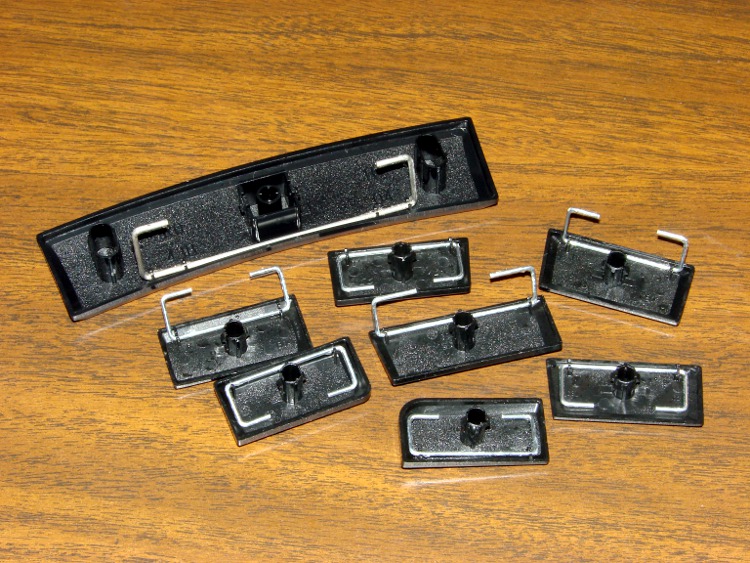
    Keycaps with equalizing wires
    Keycaps with equalizing wires

    Many of the keycap stems have ridges along their length to ensure each one fits only in its proper position; the triangular latches also have different orientations. This view shows the numeric pad (from the “screen” side of the keyboard) with a variety of coded guide tubes, wire bail guides, and the surprisingly deep tub underneath the keycaps that may capture much of the inevitable liquid spill and route it out the drain hole near the far edge.

    Keyboard top panel
    Keyboard top panel

    I tossed the keycaps and top cover in the dishwasher, which did a wonderful job of cleaning them out. A dab of silicone grease on the wire bail contact points should keep them sliding freely.

    Reassembly is in reverse order, although I defy you to put all the keycaps back in their proper places without referring to another keyboard…