Ed Nisley's Blog: Shop notes, electronics, firmware, machinery, 3D printing, laser cuttery, and curiosities. Contents: 100% human thinking, 0% AI slop.
A friend mutters that every time something goes wrong with her house, which (to be fair) isn’t all that often.
However, if you’ve got the itch to fix things, a house will certainly keep you scratching: nearly everything we own has a part or patch from the Basement Laboratory Repair Division!
She has similar sayings about cars, cats, bicycles …
This is a quick-and-dirty test to see how hot the neighborhood around a cartridge heater equipped MK5 might get, with the intent of determining where to put an overtemperature cutout switch.
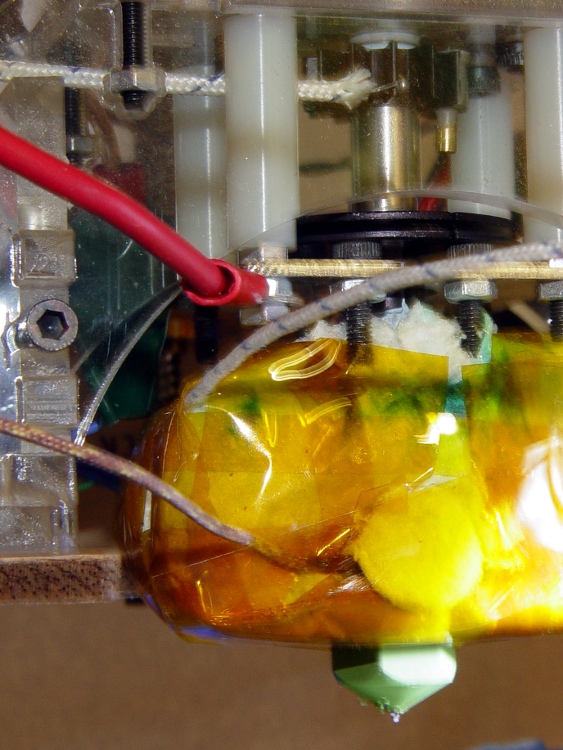
I stuck one thermocouple inside the Kapton tape wrap, outside the ceramic wool insulation above the left-hand heater block, to get an idea of the actual surface temperature. Another thermocouple rests against the small heatsink at the top of the Thermal Riser, where it’s probably measuring a bit of the heatsink and some air temperature; it should be inside the small brass tube epoxied to the heatsink, but I was not going to tear the head apart for that.
As before, a pair of 25 W cartridge heaters raised the internal Thermal Core temperature to 225 °C in a bit under 15 minutes, according to the TOM’s usual thermocouple. I think baking the water out of the insulation wrap had a lot to do with the decrease, but the difference wasn’t more than a minute or two.
After cooking at 225 °C for 15 minutes, the outside of the insulation stabilized at 133 °C. Opening the front window of the build area let enough of a draft inside to affect the temperature, even under the tape wrap, so that’s definitely not a solid temperature.
The thermocouple at the top of the Riser Tube reached 83 °C and was also affected by drafts.
So.
The thermal cutout must be solidly mounted to either the Core itself or the Riser Tube, in order to prevent irrelevant temperature readings. I’m beginning to favor the Riser: it’s out of the way, shouldn’t get too hot in normal operation (because it’ll melt the filament), and has a solid thermal connection to the Core. A pain to get access in there, but you only need that occasionally.
The only question now is how to determine the actual temperature seen by a thermal switch in there. I think a clamp around the tube with a tab sticking out beyond the support structure is in order.
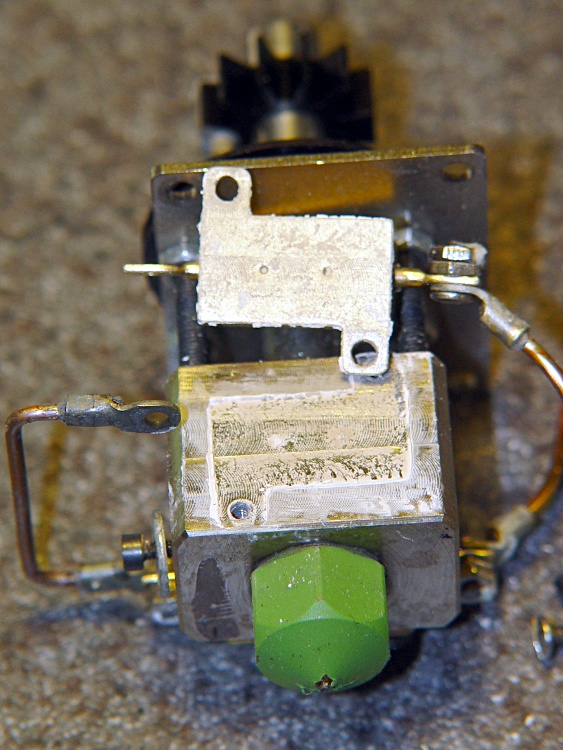
While I had the Thermal Core out and everything disconnected, I drilled a mounting hole in the tombstone of epoxy around the thermocouple bead, hand-twisting a small drill gripped in a pin vise.
Thermocouple shield with mounting hole
That makes mounting the thermocouple much easier when the MK5 head gets tucked in place inside the Thing-O-Matic case. The washer is smaller than I’d used before, too. There’s no thermal compound under the brick, but I’ll probably add some the next time it comes out.
Thermocouple mount in place
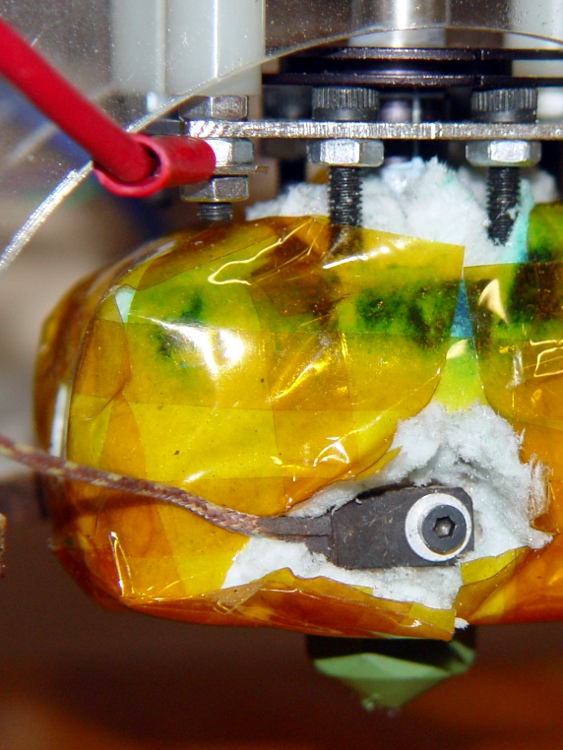
I pushed the insulating blanket back around the thermocouple and wire, then added a fuzzy button (punched out for the nozzle) atop the mess and taped it all in place. The thermocouple certainly runs a bit cooler than the Thermal Core, but I have no way of measuring the difference.
In any event, I think consistency is more important than absolute accuracy, because you’re tuning the whole affair for best printing at a given temperature, rather than picking an absolute temperature and adjusting everything else to suit.
It’s worth noting that the J-B Industro Weld epoxy in that block was in fine shape, despite roasting at nearly its maximum rated temperature for a few tens of hours. That’s not a lifetime test, but it’s encouraging.
All that steel makes for a longer thermal time constant, which (as it turns out) may not be such a Bad Thing in an extruder.
I applied some of the same ceramic-wool oil burner combustion chamber lining insulation that I used before. The stuff is hygroscopic and goes on as a moist sheet, then bakes to a solid shell after a few hours at high temperature. I used a half-thickness layer all around and snugged it in place with Kapton tape, which gives enough clearance on the bottom to avoid snagging the print or the nozzle wiping brush/pad.
Heater-block core with insulation in place
In principle, the cartridge heater elements are embedded in solid ceramic insulation and cannot short against the shell, but you still need a static drain line on the Extruder head to prevent charge buildup from the filament. That’s the heavy red wire heading off to the upper left.
The coil of blue wire in the middle left comes from the cartridge heaters: it’s actually long enough to snake up and down and all around to the Extruder Controller, but I already had a wire to the Z stage and an LED that monitors power to the heaters.
With everything in place, I fired it up and recorded the temperature rise…
In round numbers:
A pair of 25 W elements heats the Core from 14 °C to 225 °C in 15 minutes, then cycles off-and-on with < 2 minute period. I don’t have a good number for the duty cycle yet.
The Kapton tape around the insulation seems to run at 150+ °C, but that’s not a good number. I must add some probes around the insulation after it hardens.
With P=100, I=0, D=0 to get bang-bang control (more on this later), the temperature stabilizes just fine. The heater turns on at -1 °C from the setpoint and turns off exactly at the setpoint, with the temperature varying ±2 °C around the setpoint.
The insulated Core heats at an average 20 °C/min (80 °C from 1 to 5 minutes), about 4.5 °C/minute around 200 °C and cools at 5.6 °C/minute from 150 °C. Those numbers can go into the appropriate Skeinforge slots, with the usual caveats on reliability.
All the numbers have rubbery tolerances, because the ceramic insulation sweats water as it heats and that certainly affects the temperature rise. The stuff goes on flexy and hardens like a rock after the water departs; I left it steaming at 120 °C for a few hours after making those measurements.
In comparison with 36 W from a pair of 2 Ω resistors in series: those heated more slowly and ran at 50-75% duty cycle. The new setup has more thermal mass, 40% more power, and thinner insulation, so it’s something of a wash. I expect the duty cycle to settle around 50% when all is said and done.
Important Warning!
Before you deploy cartridge heaters “for real”, remember that this is a test lashup, not a production system.
With the stock MK5 aluminum-case power resistors, you could be fairly certain they would burn out before melting the extruder support arches into slag or igniting a fire. Verily: resistor failure is why we’re here, eh?
In contrast, cartridge heaters will happily run at white heat, a lethal situation inside a plywood & plastic box. They will not burn out before causing further damage.
Guesstimating that the mounting blocks triple the 11-minute time constant for the resistor-heated Thermal Core, figure a 30-minute time constant. The temperature rises 58 °C in the first 3 minutes, so the steady-state temperature would be around 600 °C if nothing changed. I expect the actual temperature to be somewhat lower, but even 500 °C = 930 °F seems risky to me: it’s up in the red heat range..
A firmware error, a random glitch, a failed-short MOSFET switch, a stuck relay, or any random problem with a TOM that results in a stuck-on cartridge heater will cause a fire.
You must install a thermal cutoff that:
Does not depend on firmware or the existing thermocouple
Positively disables both the heater and the Extruder motor
Requires a manual reset after a fault
Indicates the fault condition
A simple thermal fuse gets you the first three points, although you need one that can handle 5 amperes and is mounted in a known-good spot so it will cut out before the acrylic slumps. Adding an LED indicator across the fuse gets you point 4.
You must also turn off the Extruder Motor, because trying to extrude solid plastic won’t end well. Some of the hyperthyroid extruder designs will likely break something before they rip a slot in the filament and a simple thermal fuse won’t prevent that. It’s a step in the right direction, though.
To repeat: the thermal cutoff must not depend on software. All of your instincts to piggyback this on the existing firmware, add a PIC to measure the temperature, or trip a solid-state relay from the PC are wrong. You must assume that any event capable of glitching the TOM will also glitch your code.
The only absolutely certain way to shut off the Extruder motor is to kill the power. Yanking the Power Enable line (from the ATX supply) high should do that; this will require a mod to the ATX connector at the Motherboard to insert a mechanical relay. Killing the power also shuts down the Extruder motor, which may justify doing it that way.
Musings:
I think a thermal switch and DPDT relay can separate the sensing and current problems: relay held on until the thermal switch opens, then it’s locked out. That will require a push-to-heat button, which isn’t terribly bad in the overall scheme of things. The TOM desperately needs more indicators anyway.
Putting a thermal cutoff above the extruder, against the inside of the acrylic base under the filament frame, seems reasonable, but really, really awkward.
Put it against the insulation outside the Thermal Core? I’m using much thicker insulation than the stock ceramic tape, so my measurements aren’t relevant for stock MK5 heads, but it’s certainly a promising location.
Monitor the Thermal Riser tube temperature at the heatsink? The numbers suggest there’s a 5 °C/W thermal coefficient between the heatsink and the Core, but better measurements are certainly in order. A quick-and-dirty test says the heatsink exceeds 90 °C with the Core at 230 °C; maybe that’s too hot for acrylic in the first place.
Tucking a switch inside the Core insulation would be much better, but you need one that operates reliably at 250 °C and trips at, say, 300 °C.
Bottom line:
Don’t install cartridge heaters without a thermal cutout: your insuranceagent should not be given an opportunity to die laughing.
Having built cartridge heater mounting blocks, I autopsied the two aluminum-case power resistors I’d been using on the MK5 Thermal Core. They weren’t dead yet, but I have some spares in case the cartridge heaters don’t work out as expected.
First observation: the blue-tinted thermal compound I’d put under the resistors turned white! It has a 200 °C maximum rating, so it’s been cooked well beyond any reasonable limit. On the other paw, it was still soft and didn’t have any air bubbles; the resistors were pretty firmly glued in place.
Based on those thermal measurements, I had replaced the original parallel-connected 5 Ω resistors with series-connected 2 Ω resistors, thus reducing the power dissipation in each resistor from 28.8 W to 18 W. While that’s still far beyond the specification, every little bit of reduction helps.
In round numbers, the resistors ran at 50-75% duty cycle to maintain Thermal Core temperatures in the 200-230 °C range. I guesstimate I had 10-15 power-on hours on the resistors, but that may be a lowball estimate: time passes quickly when you’re having fun.
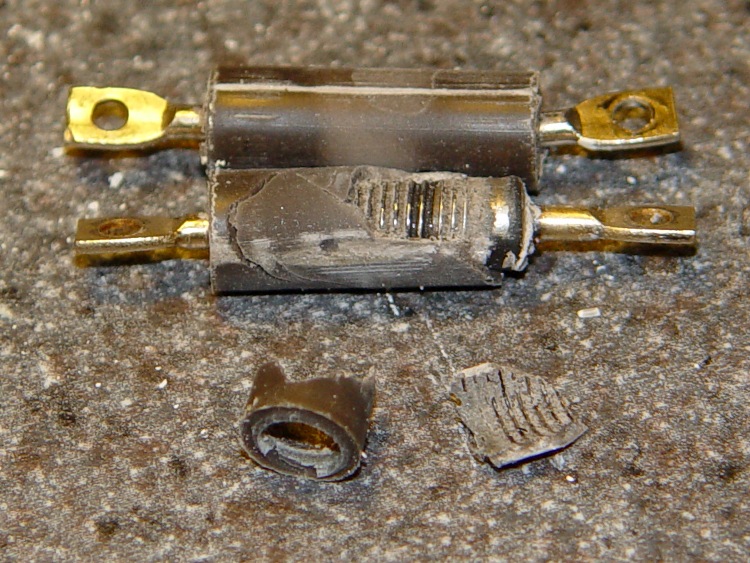
Anyhow, I slipped a brass tube around one resistor terminal, braced the other end on the drill press vise, and pressed the cores out.
Resistor elements
The top core literally fell out without any urging, which means that it had shrunk and separated from the housing. That means the resistor was well on its way to failing: a loose core gets hotter and deteriorates faster.
The bottom core was still firmly attached and disintegrated as I forced it out, which means it was in good condition. Paradoxically, the crumbled resistor core in the picture came from the resistor in the best shape.
Given that I ran these resistors at 63% of the original power level, the fact that one was well on its way to heat death after only (at most) a few tens of hours suggests that you shouldn’t expect much life from the stock MK5 resistors. If you haven’t already done so, electrically isolate the thermocouple bead from the Thermal Core to protect the Extruder Controller.
I’m unwilling to sacrifice a new resistor to see if that discoloration is normal, but I suspect it’s not. The ends should be the coolest part of the resistor, which means the middle is discolored, but that picture suggests the opposite, so I really don’t know.
I’d hoped the ID of the resistor bodies would match the OD of the cartridge heaters. That didn’t work out: 0.275 vs 0.250. They’re also a bit too short. If the match was closer, I could see slipping a shim in there, but having two air gaps around the heater just doesn’t make any sense at all.
MBI sent me a selection of 1/4-inch cartridge heaters to evaluate, seeing as how I’ve been such a pest on the subject of those poor aluminum-case power resistor heaters. Thanks, Zach!
I initially thought I could punch the cores out of the resistors and slip the cartridge heaters into the holes, but it turns out the resistor bodies aren’t quite the right size: slightly too short with slightly too large holes. So it goes. Some earlier thoughts live there.
This is a first pass at building mounting blocks to attach cartridge heaters to a stock MK5 Thermal Core. Ideally, you want a solid Thermal Core with a hole or two for the heaters next to the filament extrusion nozzle, but that requires fancier machining that I’m ready for right now. The fabled nophead shows how that looks for a ceramic power resistor.
The obvious question is whether you want a single high-wattage cartridge heater or a pair of low(er)-wattage units. I think a core-with-hole can get away with a single heater, which is also the lower-cost option. My thermal measurements suggest the Core is pretty much isothermal, so there’s no problem with distributing the heat evenly from one side to the other.
However, adding two lower-wattage heaters to a stock MK5 Thermal Core makes more sense, because the interface between the blocks and the Core seems to run a bit under 1 °C/W. A single 40 W heater would thus run 30-40 °C higher than the Core: call it 260 °C. IMO, that’s much too high for something an inch away from a plywood frame and an acrylic support structure.
A pair of 25 W heaters would run at 245 °C-ish. That’s still pretty hot, but every little bit helps. I’ll start with that arrangement and see how it works.
Block top and bottom
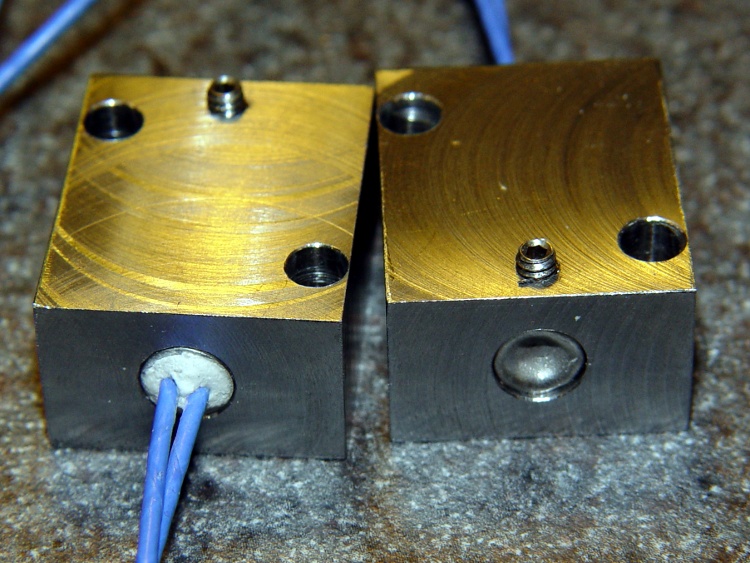
The blocks are ordinary steel from the Scrap Box: a convenient length of 1×1-inch bar stock that somebody else had made into something else a long time ago. I bandsawed off four 1×1-inch slabs, each about 5/8″ thick. A second bandsaw cut turned the square slabs into rectangles. I finished two blocks; the other two slabs await more experience with how these work.
I squared up the blocks with a flycutter in the Sherline, then sanded down the bottom surface a bit. The thermal tests suggest the contact is Good Enough with a reasonably flat surface, so I settled for a used-car finish: high shine and deep scratches. They’re actually smoother than the pictures would have you believe.
The Thermal Core has hard inch dimensions (minus cleanup cuts): 1 inch front-to-back and 13/16 inch tall. I generally work in metric, so the sketch at the bottom has everything in millimeters.
The mounting blocks have holes matching the resistor footprint. I drilled clearance holes for the heads of the original M2 socket head cap screws, ran an end mill down the hole to flatten the bottom, then drilled clearance holes for the threads. Those holes are perilously close to the edge, but the blocks really don’t want to be any taller. Perhaps use a less-generous clearance?
The alternative would be to mill a flange along the edge to match the resistor mounts and put the SHCS heads in free air, but that seemed like more work and it would cramp the thermal path from cartridge to block.
I also thought about chamfering the edges to make the blocks look less, well, blocky, but that’s in the nature of fine tuning.
The cartridge heaters slip-fit into a nominal 0.250 hole; the samples are 0.247 to 0.248 and (from what I read) the diameter tolerance stays on the minus side of 0.250. I don’t have a 0.250 reamer, which is how you get a precise hole ID, so I’ll go with drilled holes. Fortunately, I have a set of letter-size drills in nearly new condition:
A drill = 0.234 to poke a hole in the block
E drill = 0.250 to get the final diameter
The final holes worked out to be exactly 0.250 inch, to the limits of my measurement ability, which I will declare to be Good Enough. The cartridges have a loose slip fit with no side-to-side play.
The cartridges expand when heated and squeeze against the hole to make good thermal contact. While cool, however, they can slide out without much urging, so I added a 4-40 setscrew. It’s on the butt end of the cartridge heater shell, away from the leads, so if a cartridge becomes one with the block I can drive it out with a pin punch. Putting the setscrew at the end with the wire leads makes more sense (it’s cooler there), but then you’d be beating the entire length of the cartridge out past the setscrew hole.
The setscrew and the M2 SHCSs get a liberal dose of anti-seize grease before assembly.
Here’s what the holders looked like, just before bolting them in place:
Cartridge heaters in blocks
Doodles with the more-or-less as-built dimensions:
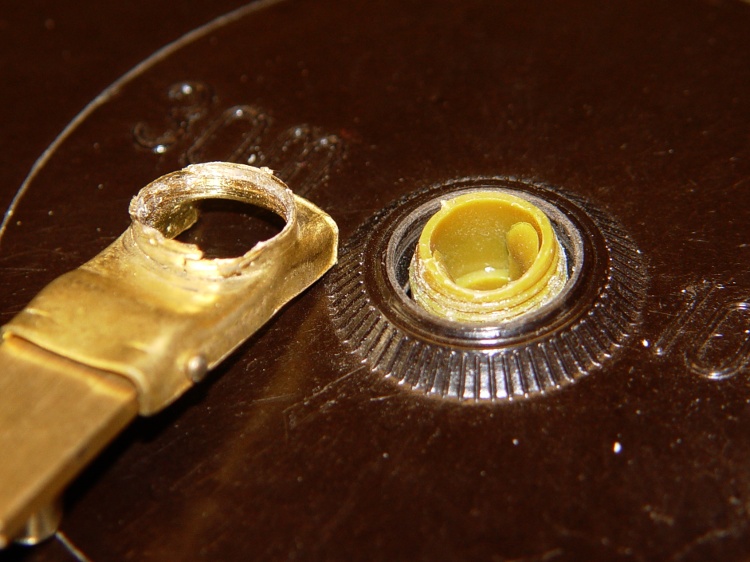
My Shop Assistant (who now merits a Proper Name) returned a fairly new measuring tape to the Basement Laboratory, reporting that the retracting crank handle fell off in “normal use”.
Stripped handle threads
Admittedly, this was a surplus find, but you’d think the build quality would be a bit higher. I’m sure I paid a minute fraction of list price: you could have bought it for much more in a reputable store.
Maybe this is why the whole lot got scrapped out:
Handle detail
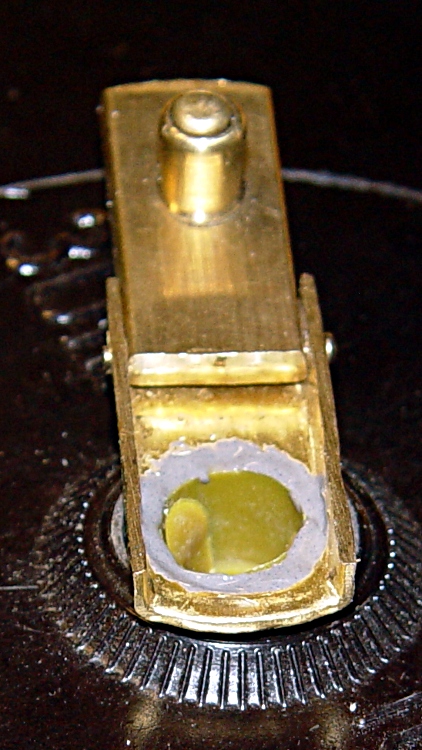
I applied a bit of JB Industro Weld to the plastic (?) threads on the spool, twisted the handle in place, squared it up, then eased more epoxy around the top of the threads and let it cure flat on the bench.
Remounted handle
I’d say the original design wasn’t particularly good and the implementation left a lot to be desired. If the interior fittings have similar flaws, I’ll eventually regret applying JB Weld in such a cavalier manner…







 The Smell of Molten Projects in the Morning