The Smell of Molten Projects in the Morning

Ed Nisley's Blog: Shop notes, electronics, firmware, machinery, 3D printing, laser cuttery, and curiosities. Contents: 100% human thinking, 0% AI slop.

Author: Ed

  • Thing-O-Matic: Manual Wipe and Splodge

    The first step of a good print requires nailing the extrusion to the build platform. The Skeinforge Splodge plugin seems to thicken the first part of each filament on the first layer, which is not helpful. So I turned that off and added a few lines to start.gcode that do a much better job.

    I also disabled the Wipe plugin, because you really can’t wipe the nozzle after the first few layers without having some part of the Z stage clobber the object. Rather than enable Wipe for just the first layer, I put a manual wipe in start.gcode, too.

    The relevant sections look like this; they fit after the homing sequence at the end of the file:

    (--- manual wipe ---)
    G0 X54 Y-57.0 Z15	(move above wipe start)
    G0 Z8   			(down to wipe level)
    M6 T0				(wait for temperature settling)
    M101				(Extruder on, forward)
    G4 P4000			(take up slack, get pressure)
    M103				(Extruder off)
    G4 P4000			(Wait for filament to stop oozing)
    G0 Y-40				(wipe nozzle)
    (--- manual splodge)
    G0 X-50 Y-55		(to front left corner)
    G1 Z0.50			(just over surface)
    M108 R2.0			(set stepper extruder speed)
    M101				(start extruder)
    G4 P2000			(build up a turd)
    

    Depending on a myriad imponderable factors, the manual wipe sequence flips off either a huge tangle or a tiny strand. That’s why I used a 4 second delay: it’s long enough to leave the extruder pressure in a consistent state no matter how it starts.

    The manual splodge location depends on your platform layout; I’m thinking of putting it entirely outside the build area. It must be somewhere near the front left corner, because Skeinforge starts each new layer from that direction. Two seconds of extrusion at 2 rev/min forms a blob with a generous contact patch, although the nozzle must plow through the side on its way out.

    Note that I leave the extruder running at the end of start.gcode, which means that it’s printing all the way to the outline. That won’t interfere with any part of the object, because (by definition) the first layer of the object lies entirely within the outline.

    The Outline plugin puts a single filament around the entire object, allowing me to measure the actual nozzle height and extrusion width on the first layer. More on that later.

    The final result looks like this:

    Manual Splodge with Companion Cube
    Manual Splodge with Companion Cube

    Notice that the splodge turd isn’t firmly glued to the platform, but the thread leading to the outline sticks like it was glued and the outline comes out perfectly formed. That’s the whole idea in a nutshell: paste the thread down from a stationary nozzle, then start moving with the turd acting as an anchor.

    Trying to start pasting the filament with the nozzle moving doesn’t work well, as witness the left edge of the outline around these test pieces:

    ABS coating on aluminum build plate
    ABS coating on aluminum build plate

    Admittedly, that was with a DC extruder, but the same principle applies to stepper extruders.

  • MK5 Extruder: Thermal Riser Temperatures – Operating

    Thermal Switches in place
    Thermal Switches in place

    My Parts Heap disgorged a somewhat larger TO-5 heatsink (a Thermalloy 228B, which they no longer make) with three fins and a collar having enough spring to fit tightly around the Thermal Riser Tube. It was intended for transistors on PCBs with horizontal air flow, but I hoped it would be more effective than the smaller heatsink that comes stock with the TOM.

    There’s certainly some air flow through the heatsink at the top of the arches, but I have no way of measuring that. The picture there shows another, much flatter, heatsink that I’d been using to cool the Thermal Riser after I found out how hot it was getting near the top.

    This heatsink didn’t get a thermocouple mount epoxied to it and, given my experience with the first set of measurements, I didn’t bother stuffing a thermocouple between the fins.

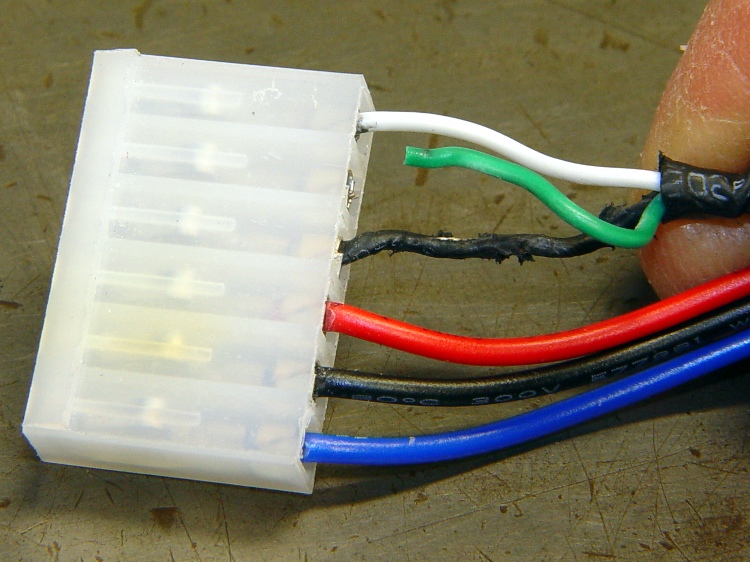
    The Thermal Switch Block now has a 100 °C NC Thermal Switch epoxied to it and, barely visible to the lower right, a 40 °C NO Switch is taped to the Z stage in the corner of the acrylic support base. The switch cable looks like this:

    Themal Switches - prepped and mounted
    Themal Switches – prepped and mounted

    With the meter’s T1 thermocouple bead behind the 40 °C switch and T2 tucked into the Thermal Switch Block, the results look thusly:

    Thermal Riser and Z stage Temperature Graph - block top
    Thermal Riser and Z stage Temperature Graph – block top

    The core went to 220 °C this time, with the ABP at 120 °C, and I started extruding at 20 minutes when the temperature had stabilized. The Switch Block temperature promptly dropped 6 °C as room-temperature filament entered the top of the Thermal Riser Tube at 2 rev/min × 10 cm drive dia × π = 63 mm/min ≈ 1 mm/sec.

    The previous test showed that the Thermal Switch Block stabilized at 90 °C and I think this one will be about the same, despite the larger heatsink, although the while-extruding temperature hovers around 70 °C. That’s better than 90 °C, so I’ll keep monitoring it and see how it plays in warmer weather inside a cozy build chamber. Obviously, having the Extruder ram cool filament into the Thermal Core holds the temperature down.

    Given those numbers, a 110 to 120 °C NC switch would be better; I’m sure one will eventually appear in my usual surplus sources. With a 30 °C margin and an assumed rise of 7 °C per 25 °C Thermal Core increase, the switch will trip when the Core passes 225 + (4 × 25) = 325 °C. That’s rather toasty, but the alternative seems to be having a switch that kicks out on a hot day.

    As expected, the Z stage temperature passed 40 °C at 10 minutes and the (yellow) Low Overtemperature LED blinked on. I wasn’t too surprised at that; the previous test had a cold ABP. I’ll move that switch to the top of the acrylic arch, taped against the base of the Filament Drive frame where it can measure the effect of the Thermal Riser on the plastic base. That picture shows the potential for high temperatures at that spot.

    The original data:

    Thermal Riser and Z stage Temperatures - block at top
    Thermal Riser and Z stage Temperatures – block at top
  • MK5 Extruder: Thermal Riser Temperatures 2

    Switch block - top
    Switch block – top

    Using pretty much the same setup as before, I put the Thermal Switch Block at the top of the MK5 Thermal Riser Tube and the little heatsink at the bottom. The heatsink sat between the bolt head and left just enough room that I could snake the thermocouple bead into the brass tube, so these temperatures should be much more representative of the actual Thermal Riser.

    After getting everything stuck together, I discovered that I’d interchanged the thermocouple leads. Rather than fixing that, take note that the T1 and T2 datasets represent different objects, but the same physical position: T1 on the bottom, T2 on the top.

    I skipped the staged warmup, cried “Fire the Thing-O-Matic!” and ran it to 225 °C while recording temperatures every 5 minutes along the way. The graph looks like this:

    Thermal Riser Tube Temperature Graph - block on top
    Thermal Riser Tube Temperature Graph – block on top

    They’re not quite exponentials, because the Core temperature gets flattened at the top, but they’re still pretty.

    The top-to-bottom temperature differential has increased to 35 °C, although the top temperature still hits 90 °C. I think there are countervailing forces at work:

    • The thermocouple is in better contact with the Heatsink: the bottom of the tube really is hotter with the Heatsink at that end.
    • The Thermal Block gives a better measure of the top-of-Tube temperature, because that thermocouple is intimately connected to the Block. The Tube top is about the same temperature, but the previous Heatsink temperatures were lower.

    In short, I trust these readings a bit more than the previous ones.

    But, as before, the Switch Block is still too hot for a 100 °C Thermal Switch. The next step is to add a somewhat larger heatsink from my Parts Heap and see what happens.

    The original data:

    Thermal Riser Temperatures - block at top
    Thermal Riser Temperatures – block at top
  • MK5 Extruder: Thermal Riser Temperatures 1

    Switch block - bottom
    Switch block – bottom

    The general idea: measure the Thermal Riser Tube temperatures, so as to figure out where to put the Thermal Cutout Switch that will kill the Thing-O-Matic if the cartridge heater drive circuitry gets stuck on. Ideally, there will be a location suitable for the 100 °C NC switch I have on hand, but you’d use the same technique to make sure any switch would work.

    So, to begin.

    With the Thermal Switch Block just over the bolt heads and the small heatsink just under the acrylic sheet at the top, a pair of thermocouples attached to my old Fluke 52 meter reported temperatures.

    The top thermocouple (T2 data) touches, ever so gently, the small heatsink, so it’s reporting mostly heatsink temperature and bit of the surrounding air. It moved slightly after the first measurement, despite the masking tape visible in the upper right corner of the picture.

    The bottom thermocouple (T1 data) is tucked into the small hole in the Switch Block, so it’s reporting the real block temperature that the Thermal Switch will eventually experience.

    A third thermocouple is taped in the corner of the Z axis stage against the acrylic arch, directly beside a cartridge heater inside the insulation wrap. During these proceedings that temperature rose from 25 °C ambient (due, most likely, to hand warmth while positioning all this stuff) to about 35 °C.

    And, of course, the standard thermocouple on the MK5 Core reports the actual temperature inside the insulation wrap.

    I raised the MK5 temperature in 50 °C steps, then 25 °C to 225 °C, waiting until the Block temperature more-or-less stabilized, while recording temperatures every 5 minutes. On this time scale, the Thermal Core temperature stabilized over the course of a single measurement.

    With at that in mind, the results look like this:

    Thermal Riser Tube Temperature Graph - block on bottom
    Thermal Riser Tube Temperature Graph – block on bottom

    At normal extruding temperatures above 200 °C, the red trace shows the Switch Block running about 15°C above green Heatsink trace and topping out at 91 °C. The top of the Riser Tube is somewhat cooler with that big Block hanging on the bottom, too: 70 to 74 °C, rather than the 83 °C I measured there.

    The Block temperature increases by 7 °C when the Core increases by 25 °C, obviously depending on a bunch of nonlinear effects. A rash extrapolation suggests a 100 °C switch would trip before the Core hit 275 °C.

    However, that Block gets uncomfortably close to 100 °C, which is the point where the Thermal Switch will go click and kill the whole show. I’d rather have a bit more headroom to allow for warm summer weather and a heated build chamber.

    So the next experiment puts the Thermal Switch Block at the top of the Thermal Riser Tube…

    The original data:

    Thermal Riser Temperatures - block at bottom
    Thermal Riser Temperatures – block at bottom
  • Thing-O-Matic / MK5 Extruder: Thermal Switch Block

    Thermal Switch Block on Thermal Riser
    Thermal Switch Block on Thermal Riser

    The best place to mount a thermal switch (or a thermal sensor, depending on how much you trust your circuitry) is on the MK5 Thermal Core, but that’s far too hot for the switches I have in hand. As a compromise, I decided to mount the switch on the Thermal Riser tube leading vertically upward to the Filament Drive gear: good thermal contact, a solid mount, and out of harm’s way.

    All the alternative locations seem worse. Tucking it inside the insulation wrap doesn’t provide a solid mechanical mount, so you don’t get a repeatable position and the leads get bent every time you move something. Bolting it to the plate over the Core looks solid, but that’s just a flat sheet of metal with four screws connecting it to the Core: no real thermal contact surrounded by lots of cooling air.

    One good omen: with an operating temperature well under 100 °C, JB Industro Weld epoxy will work fine and eliminate any need for fussy clamps and fittings.

    So I sawed off a random chunk of aluminum plate, squared it up in the Sherline mill, and poked a few holes in it. This doodle has dimensions roughly equivalent to the final object, but absolutely nothing is critical other than the 5/16 inch central hole:

    Switch block sketch
    Switch block sketch

    The 4-40 setscrew secures the block to the Thermal Riser. Aluminum expands considerably more than stainless steel, so I dropped a snippet of PTFE wire insulation into the hole as a rubberdraulic plunger.

    The lug on the top provides strain relief for the wires; it’s not an electrical connection. The modular phone cable trailing off to the Thermal Cutout box has wires insulated with low-temperature plastic, so a few inches of Teflon hookup wire keep them out of the Danger Zone.

    The small hole is just big enough for a thermocouple bead.

    This is what the thing eventually looked like, but I made some measurements before sticking that switch in place:

    Themal Switches - prepped and mounted
    Themal Switches – prepped and mounted

    Up next: measurements!

  • Tire Liner Abrasion

    Just fixed a flat on my bike which, like that one, came from the tire liner chewing through the tube. The holes are above the raised 28″ molded into the tube, at the upper-left corner of the tire liner impression.

    Schwalbe tube with tire liner abrasion
    Schwalbe tube with tire liner abrasion

    In this case, the tire liner (which, judging from the color, was a Slime) was too short by maybe 50 mm. This view inside the tire shows a 10 mm gap where the ends didn’t overlap as they should:

    Schwalbe Maration tire with liner abrasion
    Schwalbe Maration tire with liner abrasion

    I don’t trim the rear-tire  liners, but comparing a handful in the drawer shows that the as-sold lengths differ by a few tens of millimeters. The Marathons are husky tires, but the tread OD isn’t all that much different from stock tires: that’s the definition of a 700-series tire.

    That we’re getting repeated flats from tire liners intended to eliminate flats is, mmmm, disturbing. Looking at the condition of the tire treads, however, shows we’re not getting an order of magnitude more flats from road debris, so it’s a net win. I doubt we could get through a month of riding without a flat; I replace tires when the carcasses accumulate enough gashes that the tire liners begin extruding through the tread.

    Also, remember that these samples come from three bikes that travel upwards of 2000 miles a year (each!), not just one bike ridden along a nice rail trail on weekends…

  • Thing-O-Matic Stepper Extruder: First Steps

    Over the past few weeks I’ve printed the gears and plate from TheRuttmeister’s Coloso-Gear MK5 extruder Thing and flatted the shaft on a moderately husky (but not hyperthyroid) NEMA 17 stepper motor. While tearing the Thing-O-Matic down to add thermal switches to the Extruder Head, I converted the MK5 Filament Drive into a stepper extruder. Much to my astonishment, when I plugged the cable in and fired up ReplicatorG … It Just Worked!

    Even more amazing: the first pinout arrangement turned the motor in the correct direction!

    Coloso-Gear Stepper Extruder
    Coloso-Gear Stepper Extruder

    Some nasty pincushion distortion makes the larger gear look misaligned, but it’s parallel to the mounting plate and correctly engaged with the drive gear.

    The motors arrived with short stubs of thin yellow wire on the IDC motor connectors, which I soldered directly to a much longer cable. The Parts Heap disgorged a chubby 8-conductor signal cable; I used pairs of wires for each motor connection, although one conductor would have entirely enough copper. The two cable ties around the motor prevent flexing those delicate wires as the Z stage moves.

    Two tweaks to the MK6 Stepstruder profile in thingomatic.xml produced the right answers:

    • Set motor_steps = 1456
    • Set stepspermm = 48.2

    Running the motor at 2.0 rpm for 30 sec should produce exactly 1 revolution of the big gear. I marked and counted the teeth on the larger gear as it rotated, and came up with 56 teeth. It’s a 51 tooth gear, so reducing the default 1600 steps/rev by 51/56 produces 1457. A defunct MBI stepper driver board that now only does full steps provides power; I resoldered all the chip pins and the fault isn’t due to external causes like no-lead solder.

    Then run it for 60 seconds at 2.0 rpm and it’s under by maybe 1/10 of the tooth-to-tooth spacing. Adjust 1457 x 101.9/102 = 1456. Run it for another minute and it’s spot on.

    I measured 60.45 mm for two revolutions of the big gear, so it’s 30.23 for one rev, which requires the aforementioned 1456 steps. Averaging more revolutions would yield more digits, but given the rubbery nature of molten filament, three significant figures seems entirely sufficient. I suspect this depends greatly on how deeply the extruder drive embosses the filament, so it’ll require some fine tuning.

    Back of the envelope for the DC extruder at 255 PWM: feed = 45 mm/s, 0.35 mm thickness, w/t = 1.7 = 0.56 mm width gives 6.9 mm3/s. The filament is about 2.9 mm dia = 6.6 mm3, so it passed through the extruder at a bit over 1 mm/sec. There’s some windage involved in all those numbers and the extruding rate obviously depends on the temperature.

    The stepper (from the usual eBay seller) is a Minebea 17PM-K150, which doesn’t appear in their catalog listing, so it’s likely one of their many custom motors. The stack length resembles the 17PM-K3xx series, which means roughly 1 A rated current. Setting the driver current to 500 mA (VREF = 1 V) produces enough torque that I cannot pull the filament back hard enough to stop it.

    The step rate at 2 rpm is:

    48.6 step/s = (2 rev/min) x (51/7) x (1 min/60 s) x (200 step/rev)
    

    At that lethargic pace, the K3xx motors have something like 0.250-0.300 N·m of torque at rated current. At half current, call it 0.100 N·m and multiply by 51/7 to get 0.700 N·m = 100 oz·in.

    The effective drive diameter is 30.23/π = 9.6 mm, so the available force on the filament is 0.7 N·m / 0.01 m = 70 N ≈ 7 kgf = 15 lb. Yeah, but that little 7-tooth gear will snap right off …

    The reversal plugin cranks the big gear backwards at 35 rpm, which works out to 850.5 step/s. That ought to work, particularly seeing as how it’s not actually pushing anything.