The Smell of Molten Projects in the Morning

Ed Nisley's Blog: Shop notes, electronics, firmware, machinery, 3D printing, laser cuttery, and curiosities. Contents: 100% human thinking, 0% AI slop.

Author: Ed

  • Thing-O-Matic: Aluminum Build Plate

    This is a variation of Thing 6384: an aluminum plate sitting atop the Automated Build Platform’s bare heat spreader, minus the belt. HIs truly ingenious idea was to cover the plate with a thin layer of ABS to ensure adhesion: an ABS filament bonds very well to ABS!

    Aluminum build plate in action
    Aluminum build plate in action

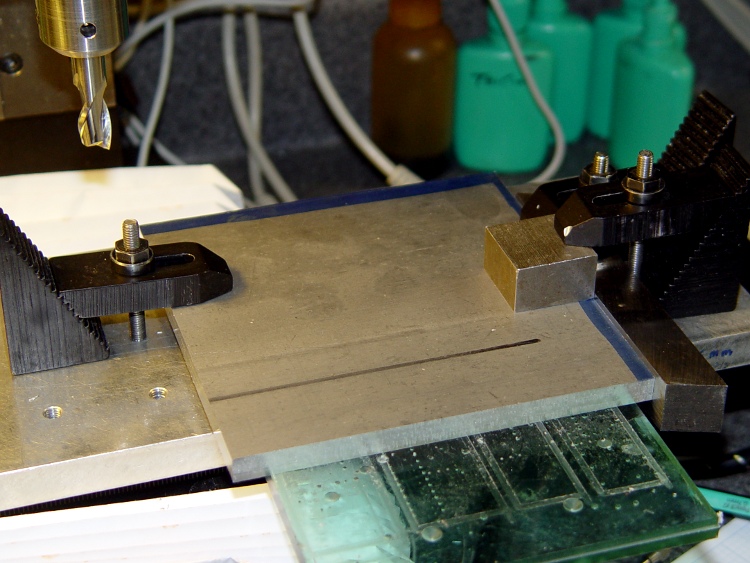
    I started with a big sheet of 3/32 inch aluminum, a bit thinner than the 1/8 inch sheet he used, which is what I had in the Parts Heap. Bandsawed three chunks to rough shape, squared up the edges on the Sherline with manual CNC:
    Squaring the sheets
    Squaring the sheets

    That was complicated by the Sherline’s cramped work envelope. The 5/8 inch lathe bit on the right sits at exactly right angles to the X axis and serves as the reference plane. To make it happen:

    • Stack the three plates, clamp to table aligned against lathe bit
    • Whack off the far edge
    • Put clean edge against lathe bit
    • Whack off another edge
    • Measure / scribe 120 mm from each new edge (thus the blue stripes)
    • Align & cut

    That actually worked quite well, although you’d think the angular error would build up as I rotated the plates. I checked and tweaked the angle after the first cut and it was all good.
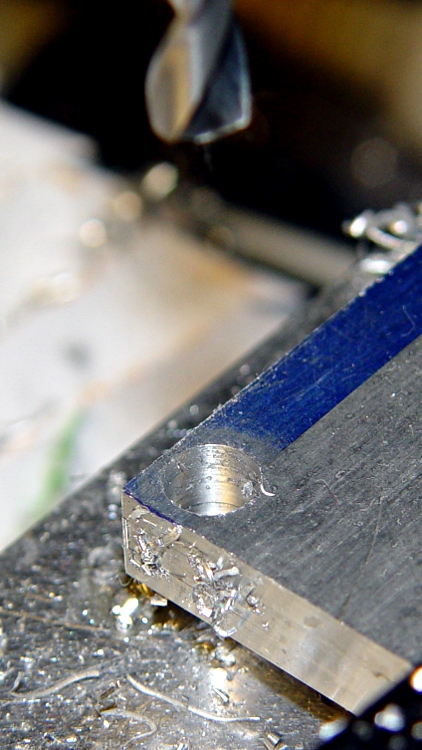
    Tight hole clearance
    Tight hole clearance

    Then drill six clearance holes for the socket head cap screws holding the heater plate to the ABP; a #1 drill gave a few mils clearance, which is all it needs. The holes are 4 mm in from the edges of the 120 mm square, with the two middle ones at, yes, 60 mm.

    However, there’s not much meat between the edge of the plate and the holes: call it 1.1 mm. If you do this, using 122 mm plates would produce less scary-close results. That’s why I like manual CNC for this stuff: no need to lay it out, tap in the numbers and it just Works.

    My APB heater has a static drain connected to the heat spreader, so I milled a 2 mm recess around the right-hand screws to clear the lugs, wires, and Wire Glue blob. The silicone wiper gets its own cutout, which I made a snug fit so that the rubber would push the plate against the screw heads and hold it in place.

    Milled recesses
    Milled recesses

    I machined recesses on only one plate, so I could incorporate any changes in the other two. The initial setup was atop a scrap plastic sheet which, as it turned out, wasn’t particularly flat. The edges of that not-quite-complete hole on the left were nasty-sharp.

    Thin-shaved plate edge
    Thin-shaved plate edge

    Then clean off the ink with xylene, scrub the plate with a 220-grit sanding sponge, and it looks really nice. Impossible to photograph a uniform gray surface, though: the autofocus goes nuts.

    While all that was going on, I’d dumped some MEK into a polyethylene jar along with a handful of calibration cubes and similar debris. I used MEK, rather than acetone, because it’s somewhat less aggressively flammable while still being a good solvent for ABS. Right now, the gunk has the consistency of thin honey, which may be too thick to spread easily; I’m still figuring this out. I apply the gunk with a folded coffee filter: scrape the puddle around to cover the whole plate, then let it dry. This is best done outdoors, except that right now it’s well below freezing out there.

    Here’s what the film looks like under the start of a quartet of dodecahedrons I ran off to see if they stuck properly:
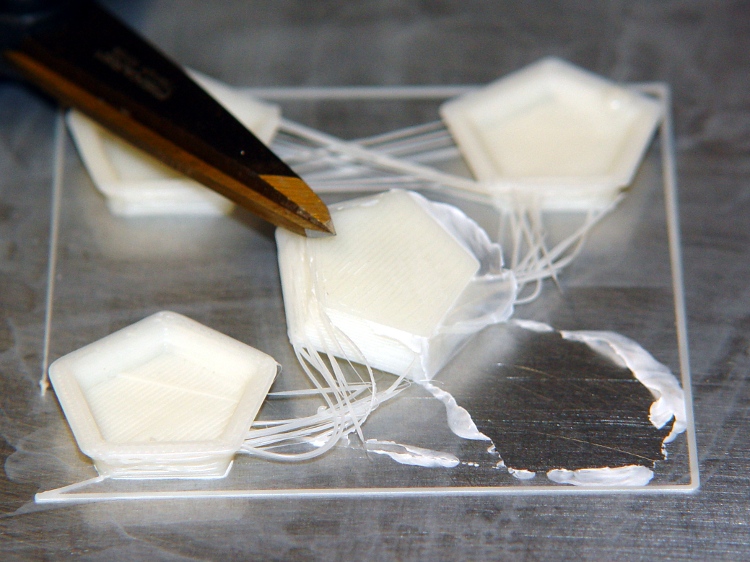
    ABS coating on aluminum build plate
    ABS coating on aluminum build plate

    The bottom surface looks like it was machined: dead flat,nice edges, good thread definition. The parts stick like they were glued to the surface, with no tendency to pull up at the corners.

    The Outline thread shows some adhesion trouble for the first 10 mm or so. After that, it’s nailed right to the ABS film. That’s why I use Outline, at least until I figure out a better way to start the thread.

    After I finish the next two plates, I’ll have a somewhat quick-change build platform: pull the hot plate off (holding it with pliers!) and slap a new one on. Not as convenient as the ABP, but much better for building precision parts like gears and extruder motor mounts.

  • Thing-O-Matic: APB Roller Supports

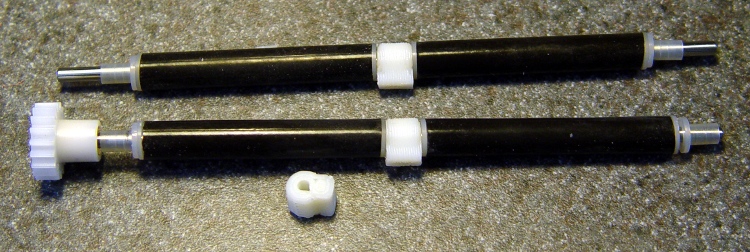
    The Automatic Build Platform rollers have a small gap in the middle where pegs on the platform support the shaft. The belt must be sufficiently taut that it’s flat across the entire length & width of the platform, which means it’s so tight that it collapses into the gap and forms wrinkles in the most critical area.

    Prior to installing an aluminum plate build surface, I wondered if adding a support in the gap would reduce the wrinkling, so I cooked up a small OpenSCAD script to print these things out:

    ABP Roller Support
    ABP Roller Support

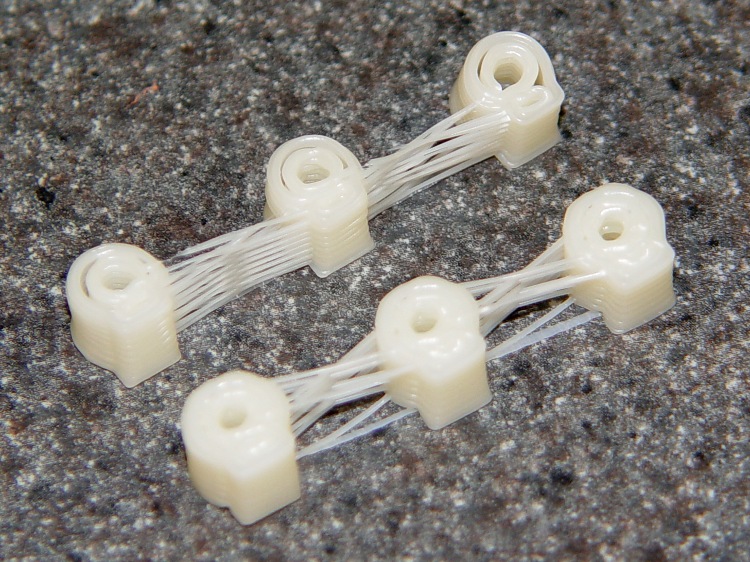
    They’re at about the finest resolution the printer can produce; getting the fill between the walls seems iffy at best. The top set has obvious gaps that come from having walls too close together.

    I finally printed them at 0.4 mm thickness and a width of 0.5 mm (w/t = 1.2) and that produced the lower set with adequate fill:

    ABP roller center supports
    ABP roller center supports

    Unsurprisingly, the holes are too small, but that’s easily fixed with a drill just slightly over 1/8 inch. The length of the stem also required a bit of fine-tuning; you can always make it shorter with a file:

    Supports on rollers
    Supports on rollers

    Some preliminary testing says that the motionless supports might produce too much friction on the belt, but that was with a paper backing. Running slick tape around the middle of the belt’s inside surface might help, plus it would add a bit of stiffening. Adding some ridges to reduce the surface area in contact with the belt would probably just score the belt.

    I’ve been experimenting with Kapton-on-paper belts, which remain much flatter than the endless belt, but are much more sensitive to the gaps. More fiddling is in order, after I get some one-off parts built on the aluminum plates.

    The OpenSCAD script:

    // ABP Central Shaft Spacers
    // Ed Nisley - KE4ZNU - Feb 2011
    
    //--- Extrusion dimensions
    //		Must be tall and skinny to get fill around the hole
    
    ExtThickness = 0.50;		// extrusion thickness
    WTRatio = 1.20;				// width-over-thickness
    
    //--- Spacer dimensions
    
    ShaftDia = 3.175;			// metal rod = hard 1/8 inch = 0.125 inch
    ShaftRad = ShaftDia/2;
    
    RollerDia = 8.0;			// approximate OD of in-situ rubber rollers
    RollerRad = RollerDia/2;
    
    OverAllLen = 7.6;			// length along shaft = hard 0.300 inch
    
    TaperLen = 2 * ExtThickness;	// make it a few layers thick
    
    Faces = 10;					// polygonal shape for outside cylinders
    
    //--- APB Interface
    
    PlatformZ = 5.0;			// thickness of ABP support under heater
    PlatformGap = 2.0;			// distance from roller to APB
    
    //--- nophead's polygonal hole correction
    //		http://hydraraptor.blogspot.com/2011/02/polyholes.html
    //		Adapted to center the resulting cylinder
    
    module polyhole(h, d, c) {
        n = max(round(2 * d),3);
        cylinder(h = h, r = (d / 2) / cos (180 / n), $fn = n, center=c);
    }
    
    //--- Odds & ends
    
    FinagleLen = 1.0;			// enough to make holes obvious
    
    //-----------------------
    // The Spacer!
    
    difference() {
    	union() {
    		translate([0, 0, OverAllLen/2-TaperLen/2])
    			cylinder(r1=RollerRad, r2=RollerRad-TaperLen, h=TaperLen,
    					  center=true, $fn=Faces);
    		cylinder(r=RollerRad, h=OverAllLen-2*TaperLen,
    				  center=true, $fn=Faces);
    		translate([0, 0, -(OverAllLen/2-TaperLen/2)])
    			cylinder(r1=RollerRad-TaperLen, r2=RollerRad, h=TaperLen,
    					  center=true, $fn=Faces);
    		translate([(RollerRad+PlatformGap)/2, 0, 0])
    			cube(size=[RollerRad+PlatformGap, PlatformZ, OverAllLen],
    				  center=true);
    	}
    	polyhole(OverAllLen+2*FinagleLen, ShaftDia, true);
    }
    
    
  • Cartridge Heaters: Thermal Cutout Doodles

    Having harrumphed at length on the need for thermal protection for cartridge heaters used in a MK5 Extruder Head, these are some preliminary doodles that might turn into something useful…

    The general idea: a thermal switch detects an overtemperature condition and shuts off the power supply for the heaters and the extruder motor.

    A sketch that should accomplish that goal:

    Thermal Cutout Doodle
    Thermal Cutout Doodle

    The -Power On pin is 14 in the 20-pin Motherboard connector and 16 in the default ATX 20+4-pin connector.

    The thermal switches in my heap have their case connected to one lead, so it makes more sense to put ’em on the low side of the circuit, with the case grounded. That way you can attach ’em directly to, say, the Thermal Core… or at least not worry about inadvertent shorts.

    How it works

    When you turn the ATX supply’s AC power switch on, the +5VSB supply goes active and the AC On LED lights up. Nothing else happens: the relay remains open and the Thing-O-Matic appears to be dead. This is how it should work!

    The +5VSB supply provides initial power to this circuit; all other ATX power outputs are disabled and all Thing-O-Matic boards are inactive. The AC On LED indicates that the standby supply is active.

    The Test/Fault LED is lit in this condition to indicate that the relay is inactive; there seems to be no way to unambiguously indicate a thermal fault without at least one more relay. On the upside, you know the LED works.

    Pressing the Power On pushbutton closes the DPST relay, assuming the Normally Closed (NC) 65 °C Thermal Switch is closed and the Estop button is not pressed. I happen to have such a thermal switch in my Parts Heap, but a higher temperature may be desirable; they’re stock items at Digikey / Mouser. See below for a discussion of the sensor location.

    You can use a DPDT relay, which may be easier to find.

    One pole of the relay bridges the Power On pushbutton switch, holding the relay active when you release the button. The other pole pulls the ATX -Power On input low to enable the ATX supply voltages to the rest of the Thing-O-Matic, which lights up and begins working as usual.

    The +Power Good signal eventually goes high and turns on the Power OK LED.

    If the temperature exceeds 50 °C, the Normally Open (NO) 50 °C Thermal Switch closes and the Heat Alert LED goes on. That temperature may be too low.

    If the temperature exceeds 65 °C, the Normally Closed (NC) 65 °C Thermal Switch opens and releases the relay. That releases the -Power On input and immediately turns off all the ATX supply voltages: the Thing-O-Matic hardstops. Because the other relay pole no longer bridges the Power On switch, the relay remains off.

    As suggested there, putting a high-temperature thermal fuse directly on the Thermal Core insulation blanket would be a Good Thing. That fuse goes directly in series with the 65 °C Thermal Switch as a deadman cutout: when it blows, you cannot turn the Thing-O-Matic on until you replace it.

    The Test/Fault LED goes on when the 65 °C Thermal Switch cools off enough to close. That’s suboptimal, although the 50 °C Heat Alert LED will be on while it’s cooling.

    Pressing the Estop pushbutton switch also releases the relay. That switch is Normally Closed (NC) because most wiring faults involve a wire not making contact. A Normally Open (NO) switch wouldn’t give any indication of the wiring problem, while an NC circuit simply won’t allow the TOM to power up.

    As nearly as I can tell, the Motherboard ignores its own Estop switch input.

    Important: don’t get clever by replacing the relay with a semiconductor. You want something dead simple that won’t suffer from static discharge damage or software failures. Relays, buttons, and switches tend to be very simple, easy to test, easy to verify, and not prone to weird failures.

    Thermal Switch Locations

    The ideal location has a physical attachment to the Thermal Core, rather than an air gap. The top of the Thermal Riser Tube seems ideal, but I measured the heatsink temperature as exceeding 90 °C with the Core at 220 °C.

    What’s worrisome about that: the glass transition temperature for acrylic plastic is in the 85-165 °C range. The top of that tube is much hotter than it really should be, given the stresses imposed on the Filament Drive frame.

    I’m thinking of adding a heatsink across the top, extending out of the openings under the top of the support structure. That should cool the Tube, make the acrylic happier, and provide a location where the temperature remains below 50 °C in normal operation. When the Core exceeds, say, 300 °C, the switches would trip.

    I think that’s messy, but putting higher temperature switches on the existing Tube doesn’t avoid that problem. Obviously, running the TOM in a hot room will produce different results; there’s a tradeoff between false trips and burning the house down.

    More study is needed…

    ATX Power Supply Signals

    These must be hijacked from the ATX power connector at the Thing-O-Matic Motherboard, maybe using square pins & heatshrink to fake a connector. You could repurpose the 4-pin +12 V / Ground CPU power connector, but then you’d be forced to come up with a mating cable connector.

    Or just solder a cable to the Motherboard, cut the -Power On, splice in the wires, and be done with it.

    The +5VSB (9 Purple) supply is active with the AC line switch turned on. This supplies power to bootstrap the protection circuit, much as it does in an ordinary PC.

    The -Power On (14/16 Green) signal has an internal (and unspecified) pullup resistor. The Motherboard pulls that line to ground, so the new connection must be spliced into the middle of the existing ATX wire. The pin number is 14 in the 20-pin block and 16 in the 24-pin block.

    The +Power Good (8 Gray) signal remains low until all output voltages get within the tolerance limits, then it goes high. There’s no spec for output current, but we assume it can drive an LED. Presumably this goes low when any voltage goes out of spec, so a glitch catcher should be instructive.

    A Common or Ground (7 Black) line provides the circuit ground. The Motherboard has very low current requirements, so stealing any of the Ground wires will be OK.

  • MK5 Extruder: Cartridge Heater Time Constant

    So I recorded more temperatures from that modified MK5 Thermal Core to get better numbers.

    Warming it up to 230 °C:

    Cartridge Heater 2x25W Warm-up Graph
    Cartridge Heater 2x25W Warm-up Graph

    A pair of 25 W cartridge heaters can get from (a cold!) room temperature to 230 °C in about 16 minutes, after which the Extruder Controller begins cycling the heater power. The bump at 4 minutes comes from a momentary lapse of attention.

    The PID constants were P=100, I=0, D=0, which forces the Extruder Controller to run in bang-bang mode: heater on below the setpoint, heater off above it. The firmware uses a built-in hysteresis of 2 °C, so there’s a built-in ripple of a bit more than that.

    Cooling it down from 230 °C to (almost) room temperature:

    Cartridge Heater 2x25W - Cooldown
    Cartridge Heater 2x25W – Cooldown

    Now, isn’t that just the cutest little exponential you’ve ever seen? Here’s the same data in a semilog plot, which shows that it really is suspiciously exponential:

    Cartridge Heater 2x25W - Cooldown - log scale
    Cartridge Heater 2x25W – Cooldown – log scale

    For some reason, OpenOffice figures the trend line in the form y=m^x + c, which isn’t helpful. The first part looks to be the most closely exponential part of the curve, so let’s pick a couple of points and see how they fare.

    The equation we want is of the form:

    temp(t) = (room temp) + (temp rise) • e-t/τ

    Room temperature was 14 °C and the temperature rise was 216 °C = 230 – 14. The Basement Laboratory gets entirely too cold during this part of the year!

    Solving for the time constant τ:

    τ = (-t)/loge((temp - room temp)/(temp rise))

    That’s the natural logarithm, of course, not the decimal logarithm.

    At t=5:

    τ = (-5)/(-0.222) = 22.5

    At t=15:

    τ = (-15)/(-0.712) = 21.1

    At t=30:

    τ = (-30)/(-1.42) = 21.1

    So the time constant looks to be a bit over 21 minutes, almost exactly twice that of the unmodified MK5 Thermal Core with resistors. The additional steel around those cartridge heaters basically doubles the heated mass and, thus, the time constant. I’d guesstimated a 30 minute time constant.

    That gives a better estimate of the worst-case temperature with the cartridge heaters jammed on. The temperature rise at t = (0.1 • τ) is 9% of the total temperature rise. A bit of interpolation says the initial rise was 34 °C (= 48 – 14), so the final rise is 378 °C and the Core would top out just shy of 400 °C = 750 °F.

    That’s lower than I originally estimated, based on the First Light data, but it’s still plenty hot enough for some serious damage. Don’t install cartridge heaters without a dead-simple thermal cutout to prevent runaway!

    The raw data:

    Cartridge Heater 2x25 W Heat and Cool Data
    Cartridge Heater 2×25 W Heat and Cool Data
  • Monthly Aphorism: On Houses

    • Houses are trouble

    A friend mutters that every time something goes wrong with her house, which (to be fair) isn’t all that often.

    However, if you’ve got the itch to fix things, a house will certainly keep you scratching: nearly everything we own has a part or patch from the Basement Laboratory Repair Division!

    She has similar sayings about cars, cats, bicycles …

  • MK5 Extruder Head: External Temperatures

    MK5 thermocouple locations
    MK5 thermocouple locations

    This is a quick-and-dirty test to see how hot the neighborhood around a cartridge heater equipped MK5 might get, with the intent of determining where to put an overtemperature cutout switch.

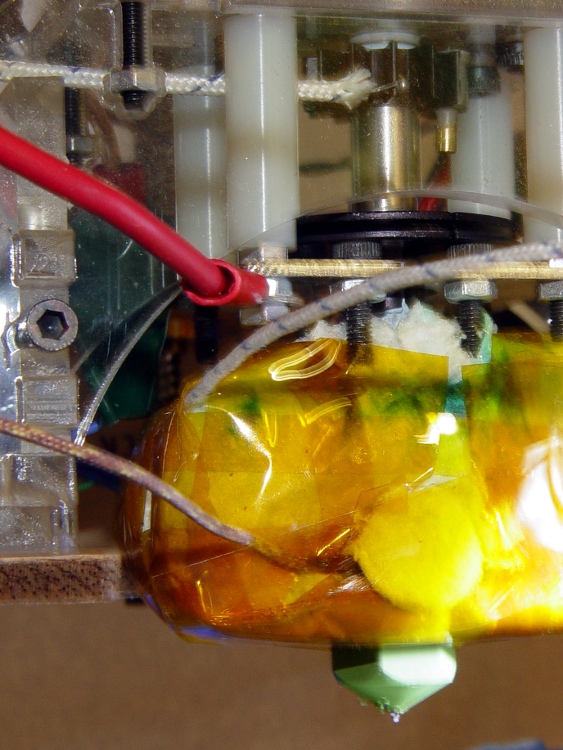
    I stuck one thermocouple inside the Kapton tape wrap, outside the ceramic wool insulation above the left-hand heater block, to get an idea of the actual surface temperature. Another thermocouple rests against the small heatsink at the top of the Thermal Riser, where it’s probably measuring a bit of the heatsink and some air temperature; it should be inside the small brass tube epoxied to the heatsink, but I was not going to tear the head apart for that.

    As before, a pair of 25 W cartridge heaters raised the internal Thermal Core temperature to 225 °C in a bit under 15 minutes, according to the TOM’s usual thermocouple. I think baking the water out of the insulation wrap had a lot to do with the decrease, but the difference wasn’t more than a minute or two.

    After cooking at 225 °C for 15 minutes, the outside of the insulation stabilized at 133 °C. Opening the front window of the build area let enough of a draft inside to affect the temperature, even under the tape wrap, so that’s definitely not a solid temperature.

    The thermocouple at the top of the Riser Tube reached 83 °C and was also affected by drafts.

    So.

    The thermal cutout must be solidly mounted to either the Core itself or the Riser Tube, in order to prevent irrelevant temperature readings. I’m beginning to favor the Riser: it’s out of the way, shouldn’t get too hot in normal operation (because it’ll melt the filament), and has a solid thermal connection to the Core. A pain to get access in there, but you only need that occasionally.

    The only question now is how to determine the actual temperature seen by a thermal switch in there. I think a clamp around the tube with a tab sticking out beyond the support structure is in order.

  • Thing-O-Matic / MK5 Extruder: Better Thermocouple Mount

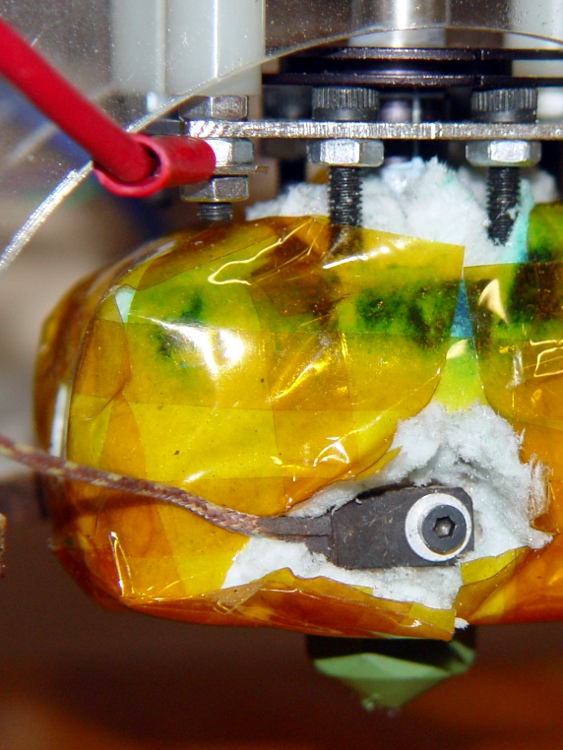
    While I had the Thermal Core out and everything disconnected, I drilled a mounting hole in the tombstone of epoxy around the thermocouple bead, hand-twisting a small drill gripped in a pin vise.

    Thermocouple shield with mounting hole
    Thermocouple shield with mounting hole

    That makes mounting the thermocouple much easier when the MK5 head gets tucked in place inside the Thing-O-Matic case. The washer is smaller than I’d used before, too. There’s no thermal compound under the brick, but I’ll probably add some the next time it comes out.

    Thermocouple mount in place
    Thermocouple mount in place

    I pushed the insulating blanket back around the thermocouple and wire, then added a fuzzy button (punched out for the nozzle) atop the mess and taped it all in place. The thermocouple certainly runs a bit cooler than the Thermal Core, but I have no way of measuring the difference.

    In any event, I think consistency is more important than absolute accuracy, because you’re tuning the whole affair for best printing at a given temperature, rather than picking an absolute temperature and adjusting everything else to suit.

    It’s worth noting that the J-B Industro Weld epoxy in that block was in fine shape, despite roasting at nearly its maximum rated temperature for a few tens of hours. That’s not a lifetime test, but it’s encouraging.