Ed Nisley's Blog: Shop notes, electronics, firmware, machinery, 3D printing, laser cuttery, and curiosities. Contents: 100% human thinking, 0% AI slop.
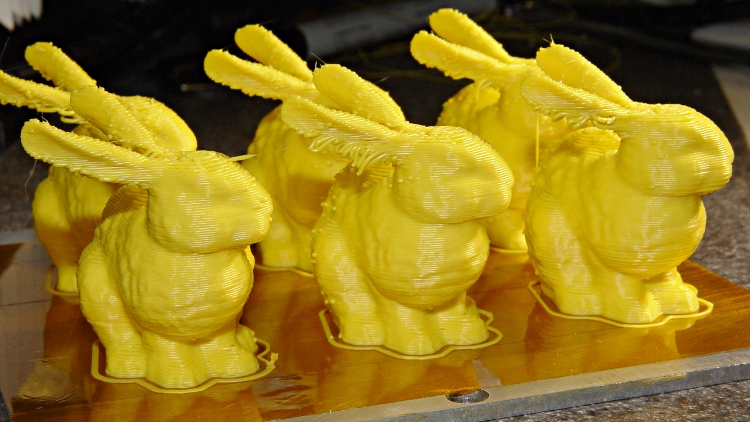
What’s more fun than one Stanford Bunny? A few litters!
These at 50 mm/s feed came out a bit jittery. The ear overhangs were particularly messy:
Small bunnies – ragged edges – 50-100
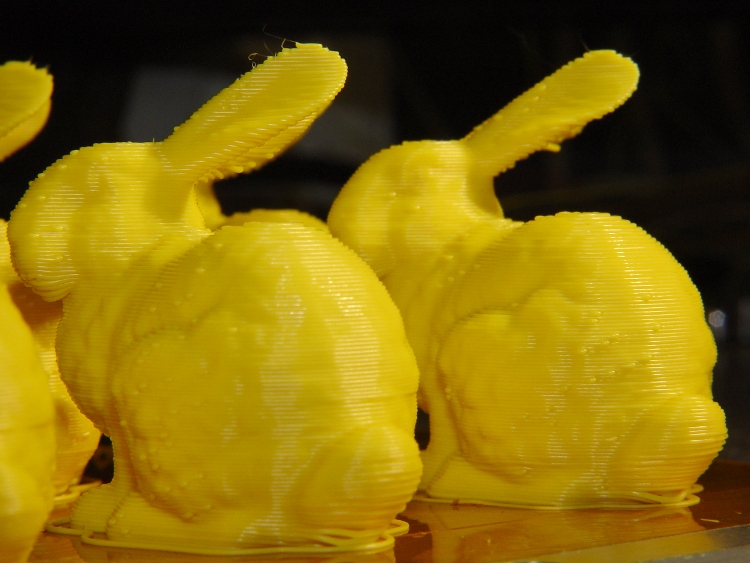
Another litter at 20 mms/s had better ear overhangs and much smoother coats with less overall jitter:
Small bunnies – ragged ears – 20-100
The obvious shear line across their tummies came from my messing around with the HBP cabling, jerking the X stage while preventing the cables from snagging on the Y stage. Moral of the story: don’t mess around with anything inside the box while it’s printing!
They have little droopy tails:
Small bunnies – droopy tails – 20-100
I think 25 or 30 mm/s would be better all around, as it’d move the extruder away from the Z stage’s mechanical resonance at 1.10 rpm.
The Judges at the Trinity College Home Firefighting Robot contest use butane grill igniters to light the candles in the arenas, but the gadgets seem to have terrible reliability problems: very often, they simply don’t work. I brought a few deaders back to the Basement Laboratory this April and finally got around to tearing them apart.
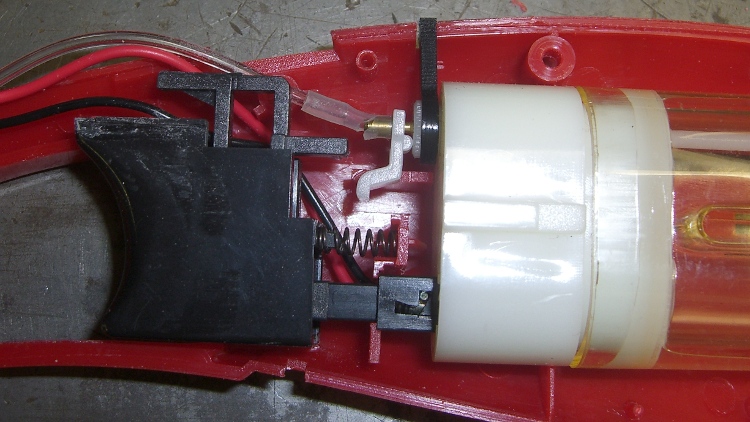
It seems they don’t ignite because the trigger’s safety interlock mechanism shears the plastic gas hose against the fuel tank’s brass outlet tube:
Grill igniter with sheared gas tube
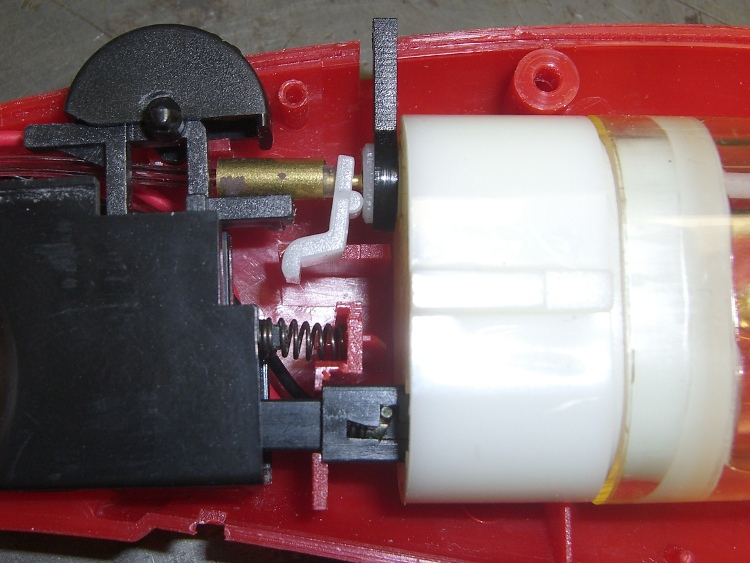
I tried putting a small brass tube around the (shortened and re-seated) hose, but it turns out the trigger interlock slides into that space and depends on the hose bending out of the way:
Grill igniter with brass tubing
So there’s no easy way to fix these things.
It seems to me that a device using flammable gas should not abrade its gas hose, but what do I know?
Those cute little Pololu stepper driver boards using the Allegro A4988 chip have one conspicuous problem: there’s no good way to heatsink the chip. The doc recommends heatsinking for currents around 1 A and some informal testing shows it will trip out on thermal protect around 800 mA, so heatsinking really isn’t optional.
A thermal pad from the chip bonds to vias that conduct heat through the PCB to the bottom surface copper layer: putting a heatsink on the top doesn’t help as much as one on the bottom. What I’m doing here is a first pass at a bulk heatsink that would work with several of the driver chips lined up in a row; this one is ugly and doesn’t work well, but it should let me do some further electrical tests.
The general idea is to clamp the heatsink around the board, with the chip as the top-side pressure point. The catch: no room for an actual heatsink underneath, because that’s where the connector pins live. You could mount the board upside-down, but then there’s no good way to tweak the stepper current trimpot. That may not be a problem after you get things set up, although I’d hate to unplug and replug the board for each adjustment.
So I think a reasonable solution involves a metal strip to conduct the heat out the ends and up to the heatsink. What I’ve done here does not accomplish that; I’m just feeling around the parameter space.
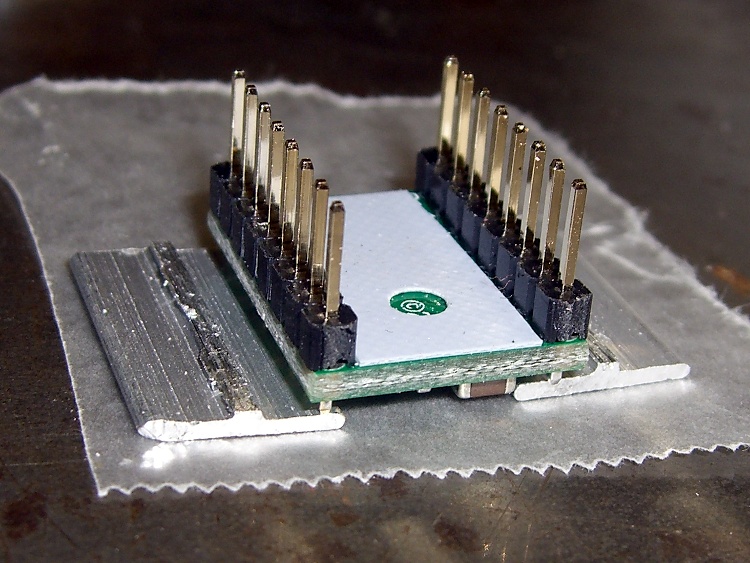
You can’t get too enthusiastic with the clamping force, lest you crush the chip, so moderate pressure is the rule of the day. However, the chip sits low on the board, surrounded by taller components, so I put a drop of epoxy on top and flipped it over to produce a short thermally conductive column that’s higher than everything else:
Pololu stepper board – epoxy curing
The blue sheet comes from a trimmed-down TO-220 transistor heatsink pad; it’s thermally conductive silicone, provides a bit of compliance against the PCB, and insulates the REF trimpot test point from the heatsink.
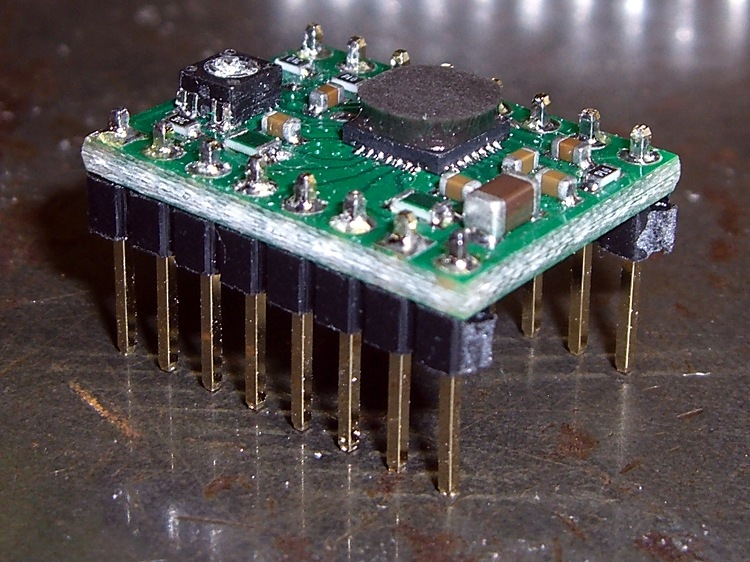
The result looks OK, but it would be better to embed a small metal block between thinner epoxy layers to get better thermal conductivity:
Pololu stepper board – epoxy blob on driver chip
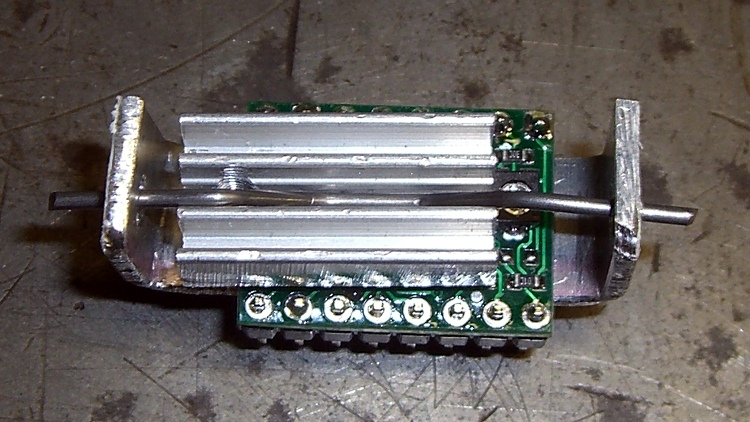
Although most of the heat goes out the bottom, you still need something on the top to take the spring pressure. I trimmed down the TO-220 heatsink that came with that silicone pad; it must mount off-center to permit access to the trimpot but, alas, blocks the voltage monitoring pad and both sense resistors. A length of 45-mil music wire bent into a flat M provides the spring:
Pololu stepper board – heatsink top view
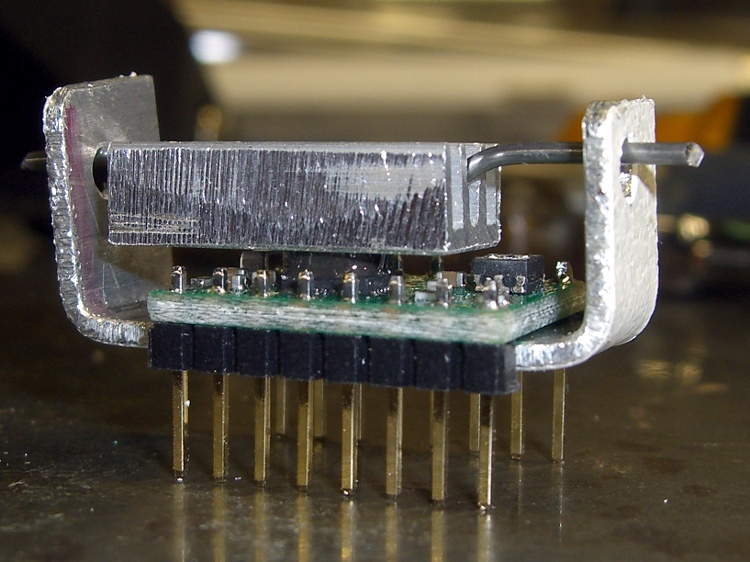
The side view show how the kludge fits together:
Pololu stepper board – crude heatsink
The final result is truly ugly. The epoxy column didn’t turn out nearly as parallel to the PCB as I’d like, so some filing and finishing will be in order.
Now, to find out if it’ll allow the chip to run above 1 A for at least a while.
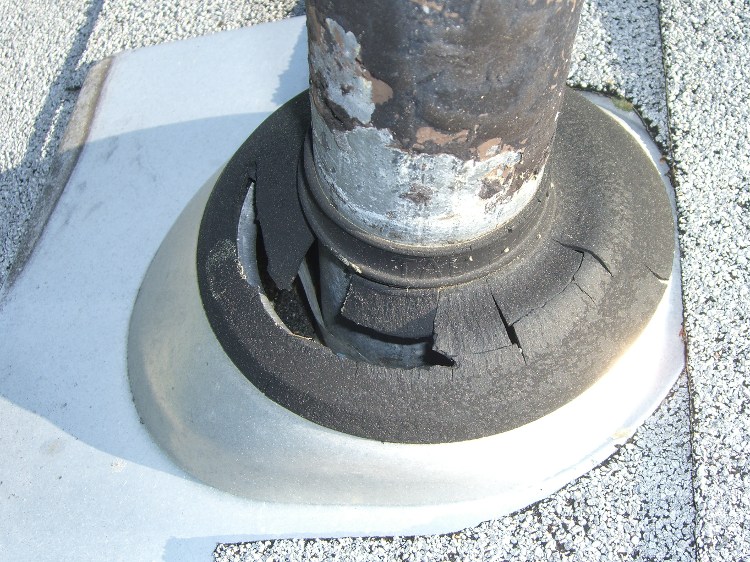
Part of the spring ritual involves cleaning the maple seeds out of the gutters, which also gives me an opportunity to inspect things up there. This year brought a revolting discovery:
Rotted vent stack gasket
It seems the rubber (?) seals around all three vent stack pipes have disintegrated. Now, the contractor installed these as part of the re-roofing project late in the last millennium, so it’s not like they came with the house. They’re an exact match for what’s currently available at Home Depot and I have no reason to believe new ones will last any longer. Sheesh.
The correct fix involves removing the shingles around the existing aluminum plates, installing new plates, and then replacing the shingles. That seems unwarranted, seeing as how the aluminum remains nicely bonded to everything, so I slipped some solid polyethylene shields around the vent stacks, tucked them under the uphill shingles, and hope that’ll suffice.
The discoloration on the roof is getting worse, except downhill from the chimney’s copper flashing. You can see one of the ugly new black plastic vent seals over on the right:
Copper effect on roof discoloration
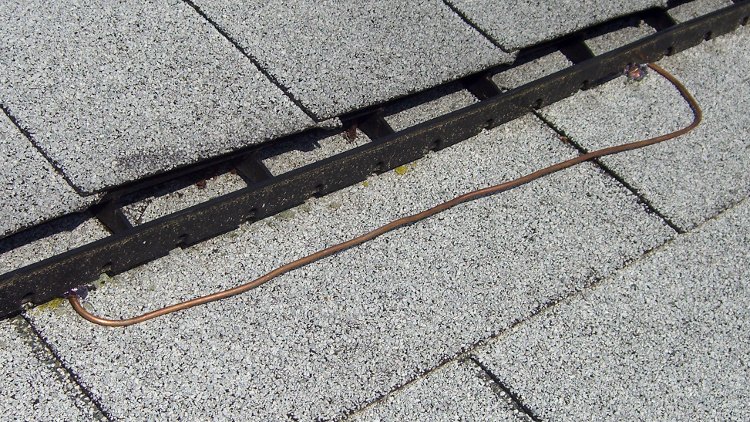
I suspect the copper ions kill off the fungus, so, invoking Science, I tucked a foot of copper wire under the ridge vent uphill from a patch of fungus:
Anti-fungal copper wire test
We’ll see if that makes any difference. I suppose the next time I’m up there I should tuck a strip of copper flashing under the shingle on the other side of the chimney to see if a bit more surface area will have more effect.
The switch on that screwdriver failed again, this time by having the internal switch mounting bosses disintegrate:
Cordless screwdriver – broken switch mounts
Not being one to worry about outside appearances, I simply drilled out the bosses to fit a pair of 4-40 screws, put the nuts inside, and it was all good:
Cordless screwdriver – switch with screws
Except that the switch now required an unseemly amount of force to operate in the forward direction. The switch is the cheapest possible collection of bent metal strips and injection molded plastic bits you can imagine, but with some bending and re-staking and general futzing around, it works fine again.
A gust of wind blew Mary’s bike helmet off the seat and, by the conservation of perversity, it landed on the mirror with predictable results:
Broken helmet mirror mount
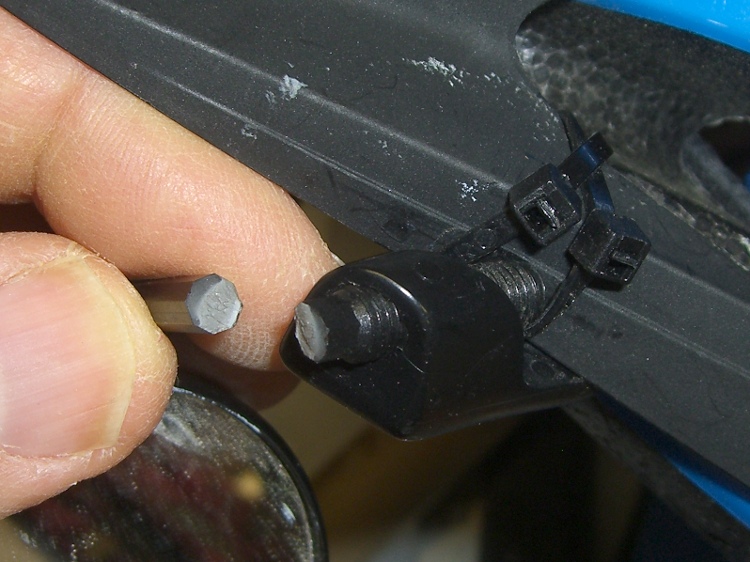
I affixed the two ends with solvent glue, then epoxied a brass tube around them to stiffen it up. While I had the epoxy and brass out, I added a splint over a previous repair near the mirror ball:
Re-repaired mirror mount
After taking that picture, I heated and bent the remaining shaft just slightly to put the ball near the middle of its range. There’s no possible way this can survive this year’s cycling, so I must get cracking on building some durable mirrors. A 3-D printer should come in handy for something in that project!
In order to get good scope pictures of the winding current in a stepper motor, the scope must sync to the step pulses. However, it must also sync to the groups of 32 step pulses that make up a single set of four full steps, because the winding current repeats for each of those groups. Triggering once per revolution and delaying for a fixed amount will get you where you need to be.
The sync wheel provides a once-per-revolution pulse, but there’s some jitter in the edge for all the usual reasons and you’d be better off with a sync based on the stepper driver’s step input. The general idea is to find the leading edge of the optical pulse, find the next step pulse, then produce output pulses based on the step signal. Assuming a regular step pulse stream (from a pulse generator, for example), the output will be both locked to the wheel rotation and to the step pulses.
Normally this calls for a tedious wiring session involving logic gates and counters, but an Arduino has all the requisite machinery built in. The trick is to generate the pulses using the ATmega’s hardware, rather than program instructions, thus eliminating the usual jitter caused by instruction execution time.
I set up Timer 1 in Mode 4 (CTC with OCR1A controlling the matches) to count step pulse inputs on its T1 external clock input pin and produce a once-per-revolution output pulse on the OC1A pin. Because the output changes on the rising edge of the input clock, its rising and falling edges will provide rock-solid stable scope synchronization.
The big picture goes a little something like this:
Tell the counter to set the output on match, load the duration of the output pulse
Wait for the once-per-revolution signal, then enable the external clock input
Wait for the comparison to happen and reset the match flag
Set a one-pulse delay and tell set the counter to clear the output on match
Wait for the compare, clear the flag, turn off the counter
Wait until the once-per-rev signal goes low
And then do it all over again
Which produces this:
Sync Wheel
Top trace = optical signal from interrupter, middle = 1/rev sync from Arduino OC1A pin, bottom = step pulses. The motor is turning 3.5 rev/s = 210 rev/min. The top half of the screen is at 2 ms/div, the bottom half at 200 μs/div.
You could synchronize the counter to the 1/rev input exactly once, then produce the output pulse just by counting stepper pulses. It’d also be nice to have a pulse that repeats for each group of 32 microsteps within each set of four full steps, perhaps settable to a particular microstep within the group. All that’s in the nature of fine tuning.
Of course, devoting an Arduino to this project would be absurd, but for a one-off effort it makes a lot of sense.
The Arduino source code:
// Stepper motor driver synchronization
// Ed Nisley KE4ZNU June 2011

//-- Pin definitions, all of which depend on internal hardware: do *not* change

#define PIN_REV	2					// INT0 = positive 1/rev pulse from optical switch
#define PIN_STEP 5					// T1 = positive 1/step pulse from stepper driver
#define PIN_TRIGGER 9				// OC1A = positive trigger pulse to scope

#define SYNC_OFFSET	15				// steps from 1/rev puse to start of first 4-full-step group

#define PIN_TRACE_A    10
#define PIN_TRACE_B    11
#define PIN_TRACE_C    12

#define PIN_LED		13

//---------------------
// Useful routines

//--- Input & output pins

void TogglePin(char bitpin) {
	digitalWrite(bitpin,!digitalRead(bitpin));    // toggle the bit based on previous output
}

//----------------
// Initializations

void setup() {

  pinMode(PIN_REV,INPUT);		// INT0 1/rev pulse from wheel

  pinMode(PIN_STEP,INPUT);		// T1 step pulse from stepper driver

  pinMode(PIN_LED,OUTPUT);
  digitalWrite(PIN_LED,LOW);

  pinMode(PIN_TRACE_A,OUTPUT);
  pinMode(PIN_TRACE_B,OUTPUT);
  pinMode(PIN_TRACE_C,OUTPUT);

//--- Prepare Timer1 to count external stepper drive pulses

  TCCR1B = B00001000;				// Timer1: Mode 4 = CTC, TOP = OCR1A, clock stopped

  pinMode(PIN_TRIGGER,OUTPUT);		// OC1A to scope trigger

}

//----------------
// The main event

void loop() {

//-- Wait for rising edge of 1/rev pulse from optical switch

  TCCR1A = B11000000;						// COM1A set on compare
  TCNT1 = 0;								// ensure we start from zero
  OCR1A = SYNC_OFFSET;						// set step counter

  while(!digitalRead(PIN_REV)) {			// stall until 1/rev input rises
	TogglePin(PIN_TRACE_A);
  }

//-- Got it, fire up the timer to count stepper driver pulses

  TCCR1B |= B00000111;						// enable clock from T1 pin, rising edge

  digitalWrite(PIN_LED,HIGH);				// show we got here
  digitalWrite(PIN_TRACE_A,LOW);

  while(!(TIFR1 & _BV(OCF1A))) {			// wait for compare
	digitalWrite(PIN_TRACE_B,digitalRead(PIN_STEP));
	continue;
  }
  TIFR1 |= _BV(OCF1A);						// clear match flag

//-- Scope sync pulse now active

  digitalWrite(PIN_LED,LOW);				// show we got here
  digitalWrite(PIN_TRACE_B,LOW);

//-- Wait for another step pulse to clear scope sync

  TCCR1A = B10000000;						// COM1A clear on compare
  OCR1A = 1;								// wait for another pulse

  while(!(TIFR1 & _BV(OCF1A))) {			// wait for compare
	digitalWrite(PIN_TRACE_B,digitalRead(PIN_STEP));
	continue;
  }
  TIFR1 |= _BV(OCF1A);						// clear match flag
  digitalWrite(PIN_TRACE_B,LOW);

//-- Shut down counter and wait for end of 1/rev pulse

  TCCR1B &= ~B00000111;						// turn off timer clock

  while(digitalRead(PIN_REV)) {				// stall until 1/rev pulse goes low again
	TogglePin(PIN_TRACE_C);
  }
  digitalWrite(PIN_TRACE_B,LOW);

}






 The Smell of Molten Projects in the Morning