Ed Nisley's Blog: Shop notes, electronics, firmware, machinery, 3D printing, laser cuttery, and curiosities. Contents: 100% human thinking, 0% AI slop.
I built a quartet of very small knots to see how they’d stick to the ABS film and whether Reversal could cope with tiny things.
Multiple knots on platform
The left rear knot lost its footings and I removed the rubble while the nozzle was busy with another knot. The top grew surprisingly well out of a tangle deposited in mid-air.
The ABS film peeled neatly off the aluminum plate and shows what the adhesion looks like from below. The tangle is now in the right front.
Bottom view of ABS coating with knots
Reversal at 20 rpm, 75 ms, no early start. Still some blobbing during travel, so the reverse parameter isn’t quite large enough.
My Shop Assistant prettied one up by cleaning off the snots, dunking it in the jar of pink goo, and applying several layers of bronze acrylic paint. Next time, we’ll use thinner goo and scuff the knot a bit before painting.
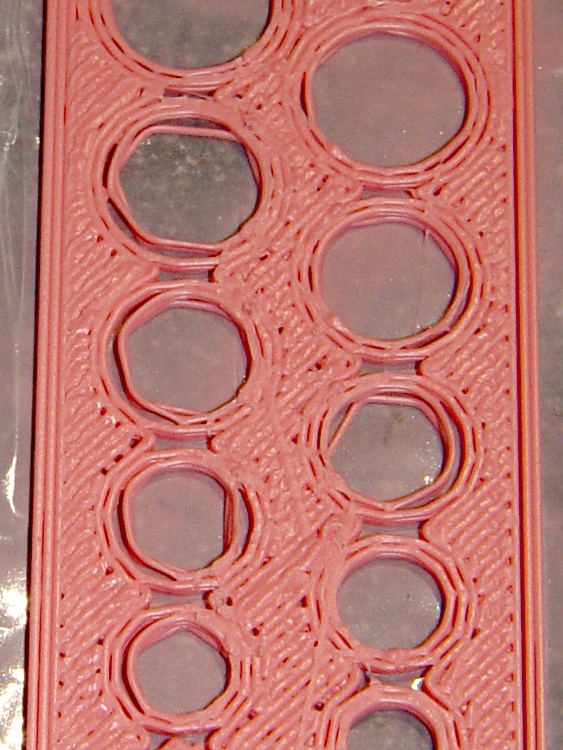
This polyholes test piece started with the nozzle 0.45 to 0.50 mm above the build plate. The threads around the holes didn’t bond well to the plate, dragged slightly inward of their intended position, and didn’t join to their neighbors or the infill.
Polyholes 0.33 mm layer – 0.5 mm starting height
Adjusting the nozzle downward to start at 0.28 to 0.39 above the plate produced this result:
Polyholes 0.33 mm layer – 0.3 mm starting height
So, in round numbers, changing the nozzle’s height by 0.2 mm makes all the difference for an object printed with 0.33 mm layer thickness. That’s why I’ve been so focused on getting a flat, level build platform: a mere 0.2 mm is 60% of the layer thickness!
The perimeter and additional threads around the holes are now where they should be, plus they’re all bonded to each other and the infill.
I think Skeinforge positions the center of the perimeter thread at the very outside edge of the object, which means objects are one thread width larger than they should be and holes are one thread width smaller. The HoleWindage parameter I added to nophead’s code compensates for that, although you must manually add it to / subtract it from the critical dimensions.
[Update: SF does the right thing. See the comments.]
The larger holes in the second test piece (printed with the correct starting height) came out just about spot on, the mid-size holes are 0.25 mm too large, and the smaller holes are pretty close in absolute terms (and awful in relative terms). There’s no way to get perfect holes, but these are certainly good enough for most purposes and repeatable enough to not require much in the way of tweakage.
The polyholes sheet is three layers thick. It presents quite an infill challenge, because there’s not much room around the holes (witness the open areas where the available space drops below one thread width) and the Fill plugin doesn’t lay the infill down from one end to the other. The myriad stops, starts, and movements presents many opportunities for blobs, of which you’ll see quite a few.
Feed 40 mm/s, flow 2 rpm, 210 °C / 120 °C. First layer at 25% feed & flow. Reversal set for 20 rpm, 90 ms in & out, and no early action.
I measured the thickness of the Outline thread around the actual objects, as described there, to get the first layer thickness. The starting heights for the first piece are the middle array there. These are the heights for the second piece, in units of 0.01 mm:
33
28
29
31
28
31
31
32
39
28
32
37
The OpenSCAD source, which is pretty much directly from nophead:
// nophead polyholes
// Modified to use parameters and add diameter Finagle Constant

HoleWindage = 0.6;

NumHoles = 9;

PlateZ = 1.0;
Protrusion = 0.1;
HoleZ = PlateZ + 2*Protrusion;

module polyhole(h, d) {
    n = max(round(2 * d),3);
    rotate([0,0,180])
        cylinder(h = h, r = (d / 2) / cos (180 / n), $fn = n);
}

difference() {
	cube(size = [NumHoles*10,27,PlateZ]);
    union() {
    	for(i = [1:NumHoles]) {
            translate([(i * i + i)/2 + 3 * i , 8,-Protrusion])
                polyhole(h = HoleZ, d = (i + HoleWindage));

            assign(d = i + 0.5)
                translate([(d * d + d)/2 + 3 * d, 19,-Protrusion])
                    polyhole(h = HoleZ, d = (d + HoleWindage));
    	}
    }
}
The three removable build plates came from the same sheet of aluminum, albeit with different histories and somewhat different construction details, so they’re pretty much the same thickness. After leveling the sub-platform, I built three objects in one session with a single maximum Z height setting in start.gcode to see how things changed.
These measurements are from the Outline extrusion around the objects, with the number of data points (units of 0.01 mm) depending on the actual length of the side. Of course, I should have built three identical objects, but there’s only so much I’m willing to do for Science…
A 45 mm Companion Cube on Plate 1:
30
26
31
27
32
29
27
30
A pair of slightly tweaked nophead Polyhole test plates on Plate 2:
45
38
47
38
47
45
48
48
49
51
A completely failed 3D Knot (too large = too much overhang) with a very small Outline on Plate 3:
46
48
49
50
Things went quite literally downhill after the first object, but only by 0.2 mm. Unfortunately, a 0.50 mm first-layer height (when you expect 0.33 mm) is entirely enough to prevent adhesion to the ABS build surface and ruin at least the first few layers.
On the good side, the platform remains level within 0.05 mm, which is down around my measurement resolution.
Installing the X Rod Follower required realigning the aluminum sub-plate to get a level build platform. I got a crude initial setting by standing a 3 mm nut on edge under each adjusting bolt, then lowering the platform until it just touched each nut. Doing that procedure again with the height set to 119.5 mm produced these values:
1.6
1.3
1
1.3
1.1
0.9
0.9
0.8
0.7
I removed the silicone wiper to keep the Thermal Core insulation from landing atop it during the probing. A single wipe at the beginning is a Good Thing, but the wiper is just too tall.
The rear left corner seems to be too low by about 0.7 mm, which is a bit more than one turn of the M3×0.5 bolt. Remember: larger numbers = lower platform, so you loosen the bolt to raise the platform. I almost got that right the first time. After doing that:
1.1
0.9
0.8
1
1
0.9
0.9
0.9
0.8
A final quarter-turn got the platform to this happy state:
0.9
0.8
0.9
0.9
0.9
0.9
0.9
0.9
0.9
That’s just the sub-platform at room temperature, but it looks pretty good. The platform returns to the same position after pushing it down against the springs, so that seem stable enough.
The next step is to run up the temperature and build something.
Various numbers that I’ve either measured or collected, scraped into one untidy heap, with the intent of figuring out the stepper motor torques. One significant figure will be entirely enough for what we’re doing; kg & g are really kg-force and g-force; you know what I mean.
Weights
X stage wood structure = 120 g
Aluminum build plate = 100 g
XY stage with plates & c =1.1 kg
Forces
Guide rod in two bushings = nil
X stage with four bushings = 0.8 lb = 0.4 kg
X stage with X rod follower = nil
X stage with X follower and motor = 1 lb = 0.5 kg
Y stage = 2 ounces = nil
Y stage with motor = 1.5 kg static, 1 kg moving
Distances
The ReplicatorG/machines/thingomatic.xml file lists the X and Y pulleys as 10.82 mm diameter. I measure 12.5 mm over the belt and the belt is 0.78 mm thick, sooo that makes it 10.9 at the pulley surface (which I can’t get to without taking everything apart again). Let’s call them 11 mm.
X and Y = 47.069852 step/mm. Let’s call that 47 step/mm → 0.021 mm/step
Z = 200 step/mm → 0.005 mm/step
[Update: see nophead’s comment for the right way to compute the X & Y distances. The answer is 47.0588 step/mm = 0.02125 mm/step, which is 0.1% off what I’d been using.]
The XML file lists the MK6 extruder at 50.235478806907409 step/mm. Measuring the results on my geared extruder, using the same filament drive doodad as they do, works out to 48.2 step/mm and 1456 step/rev.
The A3977 uses a pair of current-sense resistors (RS) to control the winding current. The REF trimpot sets a voltage level that the A3977 compares with the voltage (VREF) on the sense resistor, so the maximum current is directly proportional to the REF setting:
Max current = VREF / (8 * RS)
The MBI boards use 0.25 Ω resistors, so the equation reduces to
Max current = VREF / 2
So you can determine the maximum winding current by simply dividing the REF voltage in half.
However, keep in mind that the supply voltage and motor winding resistance also limit the current; additional voltage drops in the drivers and resistance in the wiring count against the maximum. The REF trimpot has no magic ability to force more current into the motor than Ohm’s Law will permit.
Having improved my Thing-O-Matic mechanics about as much as can be cough reasonably expected, the stepper motors driving the X and Y axes still seem to be running at about the limit of their ability. It’s time for some doodling on that subject; let’s start by collecting all the data in one spot.
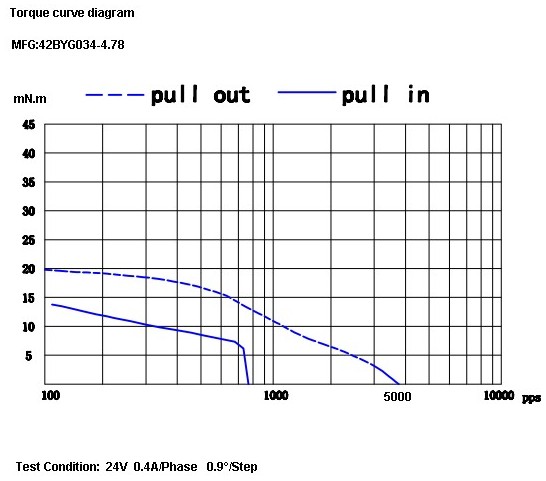
The X and Y motors are, as far as I can tell, inherited directly from the MBI Cupcake CNC. They seem to be Kysan 42BYG034-4.78 (aka SKU 1123029) described on that Kysan store product page as:
Note that, unlike most NEMA 17 steppers, this puppy does not have a 5 mm shaft (unlike the electrically identical Kysan 42BYG034, which does). A 5 mm pulley is a poor fit on a 4.78 mm shaft and, conversely, you must drill / bore MBI pulleys to fit other steppers.
If one was to buy a replacement pulley with a 5 mm bore, the A 6D51M018DF0605 from SDP might do the trick. Or you could apply a 0.199 inch (#8) drill to the bore and save twenty bucks.
The Z stepper has an integrated 4-start leadscrew, so it’s not suitable for a drop-in replacement without some Quality Shop Time. That comment leads to that Kysan store product page for Kysan 17HD011-200N (aka SKU 1040104), with this data:
12V
0.4A
200MM LEAD SCREW
1.8 DEGREE
30 OHM
37MH
260mN.m HOLDING TORQUE
The Kysan Electronics product page has more data (although the proffered PDF datasheet is empty), including a low-res torque curve:
Thing-O-Matic Z Axis torque curve
The Z axis motor on my TOM is labeled “PN 1040103”, which leads to that Kysan Electronics product page for 17HD-8X150MM0.4A, with just a mechanical drawing. The electrical properties seem identical.
The MK6 Extruder (MBI assembly and setup doc there) stepper motor evidently arrives without ID, but that comment suggests it’s an Anaheim Automation 17Y402S-LW4-01 or something similar. That discussion indicates the motor has a 5 mm shaft, not the 6 mm that would match the standard MK5/MK6 filament drive gear, and that MBI did another custom order.
Following various links leads us to the data table there, wherein we find:
Coil resistance = 12 Ω
Coil inductance = 29 mH
Rated current = 850 mA
Rated voltage = 10.2 V
The torque curve:
Anaheim 17Y402S Torque Curve
One observation: these motors have extremely high winding resistance. That makes them suitable for low-speed H-bridge drivers without current control, not contemporary stepper drivers with chopper current control.




 The Smell of Molten Projects in the Morning