Ed Nisley's Blog: Shop notes, electronics, firmware, machinery, 3D printing, laser cuttery, and curiosities. Contents: 100% human thinking, 0% AI slop.
After printing the Barbie Pistol, I discovered that moving the Z stage to anything less than the absolute maximum was a Bad Idea, so I changed end.gcode to simply home the Z axis to the top. That worked fine in RepG 24, but after printing a few things with RepG 25, I discovered that the Z axis now has uncommanded motion after that homing step: a G0 F4000 X0 causes the Z stage to drop by anywhere from a few millimeters to half the total travel.
Of course, the uncommanded Z motion depends on something imponderable, but it’s consistent for any given setup. This chunk of G-Code causes about 10 mm of downward Z motion:
G21 (set units to mm)
G90 (set positioning to absolute)
(- coarse home axes -)
G162 Z F1000 (home Z to get nozzle out of danger zone)
G161 Y F4000 (retract Y to get X out of front opening)
G161 X F4000 (now safe to home X)
M132 X Y Z A B (fetch home offsets from EEPROM)
G0 F4000 X0 Y0 Z30 (pause at center to build confidence)
(- draw square)
G0 F4000 X-45 Y-45 Z10 (to front left corner)
G1 Y45 F4000
G1 X45
G1 Y-45
G1 X-45 (return to front left)
(- move to eject position)
G162 Z F1500 (home Z to get nozzle away from object)
(G0 F4000 Z113) (this would work fine)
G0 F4000 X0 (center X axis)
G0 F4000 Y40 (move Y stage forward)
As nearly as I can tell, homing an axis trashes its coordinate value, so the only thing you can do next is set the axis coordinate value with G92 or M132. Given that those values are now stored in EEPROM, maybe it’s be a good idea to simply use them, without requiring another command after each homing command?
You’d want home offset values for both the maximum and minimum limits, to accommodate printers with limits on both ends of the axis, rather than the single offset now stored. The two homing commands (G161 and G162) could pick the appropriate offset, if a valid one was stored, and leave the coordinate unchanged (but not trashed!) otherwise.
It would be handy, while doing the fast / coarse home stuff, to switch to G91 relative positioning mode and back off the switches by 2 mm by using a simple G0 X2 Y2 Z-2 that doesn’t depend on knowing the exact coordinates of the endpoint, but it seems relative positioning doesn’t work for any but the most trivial cases.
After some fiddling, this short routine produces a very fast, very long, fully coordinated XY move to some position in the +X +Y direction at the G1 X2 F100 command after the G91 command sets relative motions; it should move 2 mm away from the X switch. When the machine arrives at the new (unexpected) position, it then does the expected slow 2 mm Y and Z moves:
G21 (set units to mm)
G90 (set positioning to absolute)
(- coarse home axes)
G162 Z F1000 (home Z to get nozzle out of danger zone)
G161 Y F4000 (retract Y to get X out of front opening)
G161 X F4000 (now safe to home X)
(- back off switches)
G91
G1 X2 F100
G1 Y2 F100
G1 Z-2 F100
G90
I gave up and used an absolute move with hardcoded XYZ coordinates that should be pretty close to the stored values.
After adding F feed speed parameters to all the G0 commands in my start.gcode (to work around that bug), I decided to use the new-with-firmware-2.8 feature that stores the home offsets in the Thing-O-Matic’s EEPROM. That turned out to be, one might say, a thinly documented feature, so this may be a useful summary…
The Official Way to set the EEPROM, which you can find in ReplicatorG/scripts/calibration/Thing-O-Matic calibration.gcode, goes a little something like this:
Manually position the nozzle dead center on the build plate, just touching the surface
Use G92 to set all axes to 0.0
Home the axes to the switches
Use M131 X Y Z A B to store the current values in EEPROM
Having already found good values for those offsets as part of the aluminum build plate adventure, I jammed them into EEPROM using RepG’s Machine→Motherboard Onboard Preferences. The values I’m using are:
X = -53.0
Y = -59.0
Z = 116.0
For some unknown reason that has nothing to do with floating point representation (I mean sheesh even the 32-bit version of IEEE 754 floating point has at least 10 decimal digits of precsion), RepG modifies only the negative values sufficiently to be bothersome:
X = -52.964
Y = -58.976
Having stored the offsets, I wondered how to fetch them. That is also, of course, completely undocumented, but I eventually traced down the answer in (deep breath)
That’s not true for all the start.gcode files you might find, though, and there are many such in far more obvious places.
So, OK, I fetch the EEPROM coordinates using M132 after doing both the coarse home (they’ll be pretty close) and the fine home (they’ll be dead on, modulo the changes), then wipe the nozzle and poke the Z-minimum height switch (which is why I really really care about random changes in the stored values) to find the actual height above the aluminum build surface.
At exactly this position it would be nice to set only the Z height to the actual switch thickness, but G92 sets all un-mentioned axes to zero, so you can’t set just one axis. I have no idea how M131 and M132 behaves in that regard; none of this stuff is documented anywhere that I can find and this stopped being funny a while ago.
So, knowing the XYZ coordinates of the switch, I reset the XYZAB axes using G92.
The current working start.gcode that I devoutly hope will continue to work for a while:
(---- start.gcode begins ----)
(MakerBot Thing-O-Matic with aluminum HBP and Z-min platform switch)
(Tweaked for TOM 286 - Ruttmeister MK5 stepper extruder mod)
(Ed Nisley - KE4ZNU - July 2011)
(Hack to work around bad G0 speed)
(- set initial conditions)
G21		(set units to mm)
G90		(set positioning to absolute)
(- begin heating)
M104 S210 T0	(extruder head)
M109 S110 T0	(HBP)
(- coarse home axes)
G162 Z F1000	(home Z to get nozzle out of danger zone)
G161 Y F4000	(retract Y to get X out of front opening)
G161 X F4000	(now safe to home X)
M132 X Y Z A B	(fetch home offsets from EEPROM)
(- fine home axes)
G0 X-51 Y-55 Z114 F400	(back off switches)
G161 Y F200
G161 X F200
G162 Z F200
M132 X Y Z A B	(fetch home offsets from EEPROM)
(- manual nozzle wipe)
G0 F6000 X0 Y0 Z10	(pause at center to build confidence)
G4 P500
G0 X40 Y-57.0 Z10	(move to front, avoid wiper blade)
G0 X56				(to wipe station)
G0 Z6.0				(down to wipe level)
M6 T0				(wait for temperature settling)
G1 Y-45	F1000		(slowly wipe nozzle)
(-----------------------------------------------)
(- Make sure the XY position matches the G92    )
(- home Z downward to platform switch)
G0 F6000 X56.4 Y7.6 Z3		(get over build platform switch)
G161 Z0 F50					(home downward very slowly)
G92 X56.4 Y7.6 Z1.60		(set Z height)
G0 F6000 Z6.0				(back off switch to wipe level)
(-----------------------------------------------)
(- start extruder and re-wipe)
G0 X56 Y-45     (set up for wipe from rear)
G1 Y-57.0 F1000 (wipe to front)
M108 R2.0		(set stepper extruder speed)
M101			(Extruder on, forward)
G4 P4000  	    (take up slack, get pressure)
M103			(Extruder off)
G4 P4000  	    (Wait for filament to stop oozing)
G1 Y-45	F1000	(slowly wipe nozzle again)
G0 F6000 X0		(get away from wiper blade)
(- build some pressure)
M108 R2.0		(set stepper extruder speed)
M101			(start extruder)
G4 P100			(run for a bit)
(---- start.gcode ends ----)
For what it’s worth, I put that file in the sf_40_alterations directory, blew away the previous versions in all the profiles, and replaced them with symlinks to that single file. When the next change comes along, I can modify one file and all the profiles will pick up the change at once.
I upgraded to ReplicatorG 25 and the Thing-O-Matic promptly got weird: the initialization code slowed to a crawl. The motors ran fine, the motion was properly coordinated, but the thing moved at a minute fraction of its normal 100 mm/s.
This was most obvious on the first move to the center of the stage after homing the axes. If you peer into the source code, that instruction looks like this:
G0 X0 Y0 Z10 (pause at center to build confidence)
The comment tells you exactly why I put that move in there when I first started tinkering with start.gcode: I long ago discovered that automation doesn’t always do what you want, so having a simple verification at the first opportunity sometimes pays off big.
Anyhow.
A bit of rummaging showed that RepG 25 has changed the semantics of G0, which is supposed to be a fast move to the programmed coordinates. Now G0 moves at the feed rate set by the most recent G1 and also accepts an F parameter, which it shouldn’t. I suspect somebody refactored the code and didn’t notice that G0 isn’t supposed to work exactly like G1.
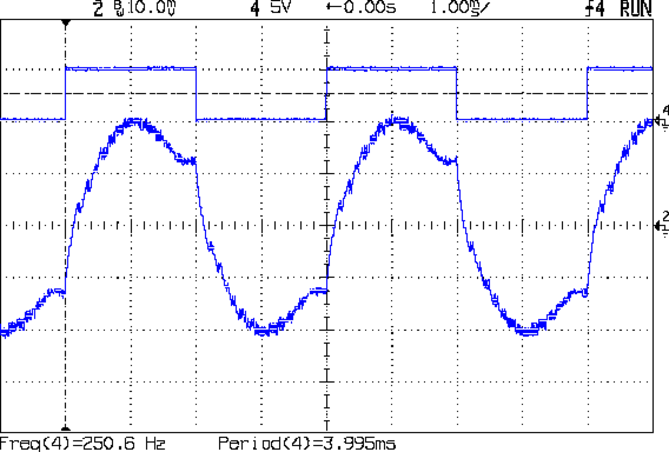
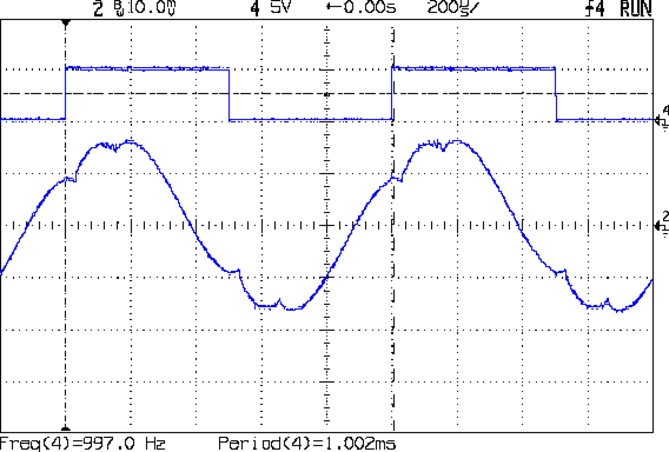
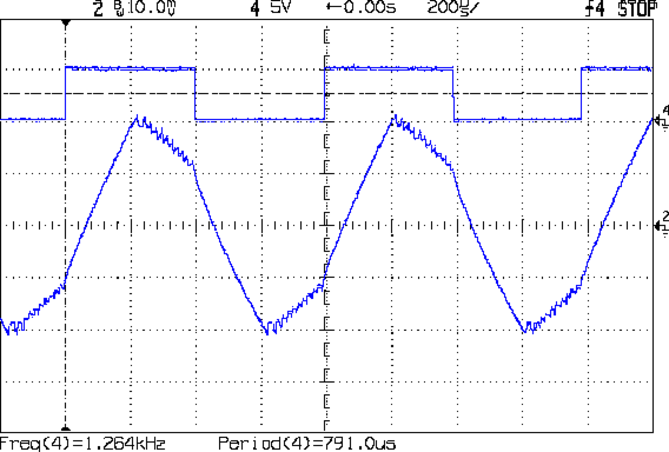
Some simple measurements using that Pololu driver in its default mixed decay mode and that Arduino sync generator. The captions give the operating conditions; basically, I’m varying the rotation speed by cranking the signal generator driving the Pololu board.
At 1 rev/s, it’s about as good as it gets:
Back EMF – 9V 400mA 1 RPS
At 5 rev/s, the driver has trouble getting current out of the winding:
Back EMF – 9V 400mA 5 RPS
At 10 rev/s, things are getting ugly:
Back EMF – 9V 400mA 10 RPS
At 20 rev/s, the back EMF has pretty much taken control of the current and the driver is going along for the ride:
Back EMF – 9V 400mA 20 RPS
At 25 rev/s, the driver produces only occasional dents in the waveform:
Back EMF – 9V 400mA 25 RPS
At 25.3 rev/s, the motor stalled. Even with no back EMF (what with the rotor being stopped and buzzing in frustration), the driver can’t force the current to behave:
Back EMF – 9V 400mA 25.3 RPS
I don’t have any way to measure the motor’s output torque, but at 1500 RPM there won’t be any worth mentioning.
For what it’s worth, 25 rev/s means the driver is handling 40 k steps/sec = 25 µs/step. The motors in a Thing-O-Matic run at 3 rev/s to move the XY stages at 100 mm/s, so scale what you see here accordingly.






 The Smell of Molten Projects in the Morning