Ed Nisley's Blog: Shop notes, electronics, firmware, machinery, 3D printing, laser cuttery, and curiosities. Contents: 100% human thinking, 0% AI slop.
If you pick up consumer-grade UPS units during closeout sales, they cost little more than replacing the batteries in older units… so we now have a new UPS replacing an old Waber box.
Just for completeness, I pulled the 25 A internal fuses:
Waber UPS battery fuses
And then measured the remaining battery capacity:
Waber UPS
The pair of sealed lead-acid batteries claim 5 Ah each, so the 6 A load far exceeds the usual C/20 SLA test current. The fact that the better one hit 1.6 Ah under that load says it’s in surprisingly good shape.
In fact, the label I put on that battery in January 2008 says it hit 1.4 Ah at 2.5 A, so it’s doing much better than you’d expect.
However, the UPS claims to support 650 VA = 450 W at 0.7 power factor. The batteries must supply the real power while the inverter drives the reactive load; giving Waber the benefit of the doubt at 90% efficiency says the batteries must provide 500 W = 21 A at 24 V under full load.
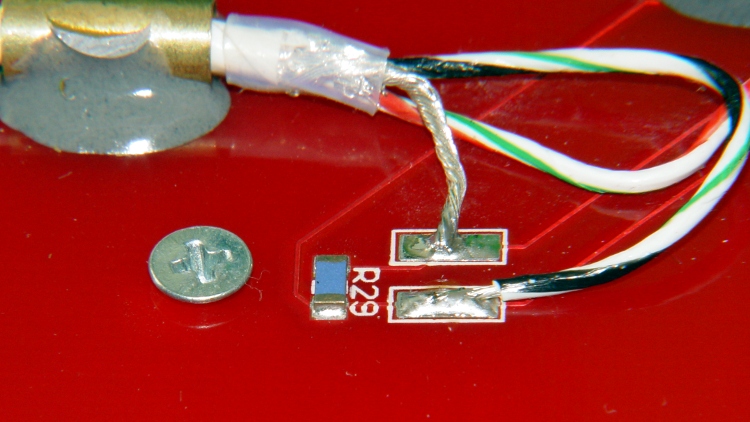
The basic problem with the heater on the Heated Build Platform is that the SMD pads must both make electrical contact to the Molex-style connector and withstand mechanical stress from the dangling wires & cables as the platform moves along the X and Y axes. Rather than replace the entire heater, I attached pigtail leads to the PCB, anchored those leads to the wood platform under the heater, and routed the cables through the deck under the Y axis stage a bit differently.
However, attaching pigtail leads to the PCB poses a problem, because ordinary electronic hookup wire has thermoplastic insulation that melts or deforms at temperatures well under my usual 110 °C platform heat setting; shorting the heater wires would be a Very Bad Thing.
Some concerted rummaging in the Big Box o’ Multiconductor Cable turned up a hank of Teflon-insulated shielded two-wire cable that, as nearly as I can tell, has pure silver conductors and shield braid: the ends were tarnished like silver and there’s nary a trace of copper in the fresh cuts. It must be military surplus and, based on a vague recollection, was most likely cough salvaged by my father, who worked as an avionics tech at Olmstead AFB in the mid-60s. Ya gotta have stuff, right?
[Update: Alas, it’s not pure silver, as shown in the comments.]
The general idea is to scuff up the shiny PCB surface enough to anchor blobs of JB Industro Weld epoxy that surround brass tubes holding the cables. A pair of tubes secure each cable and provide strain relief; the cable is free to move, but not by very much. The thermistor cable has a long arch that will, I hope, keep the cable at the platform temperature and reduce its cooling effect on the thermistor:
Thermistor rewiring – heat cure
The alligator clips connect to a bench power supply that delivered 4 V @ 2 A = 8 W that heated the PCB to about 40 °C in the rather chilly Basement Laboratory and encouraged the epoxy to cure in less time than forever.
The final result looked like this, with Anderson Powerpoles now attached to the heater cable:
Rewired HBP
The 24 AWG conductors in the cable may seem scanty for 6 A of heater current, but, hey, they’re silver.
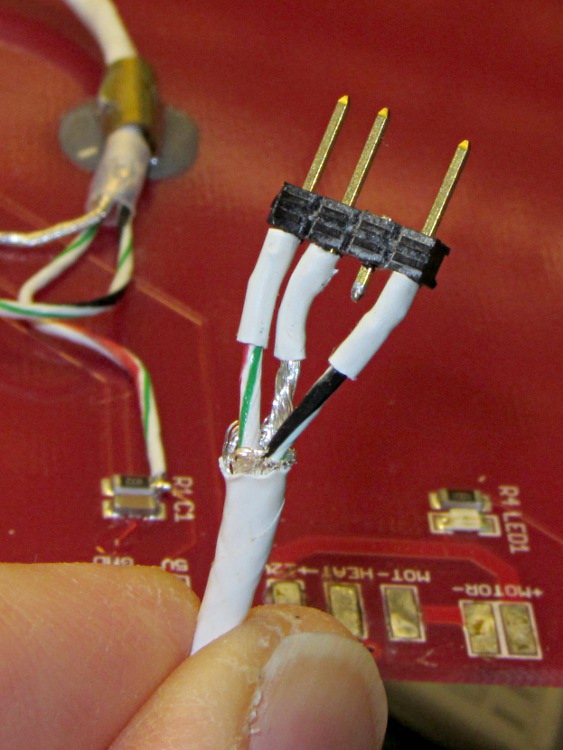
The three-pin connector on the end of the thermistor cable is a pure kludge, built from a 4-pin header to match the CD-ROM audio pinout on the new cable from the Extruder Controller. I kept the default pinout on this end to provide some protection against plugging it in backwards:
Kludged HBP thermistor connector
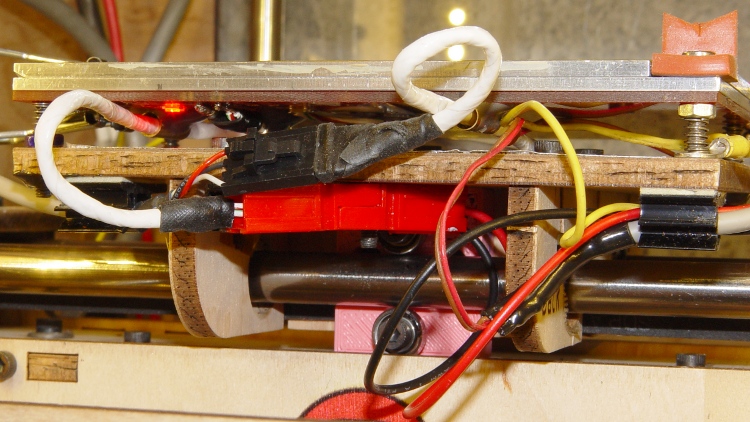
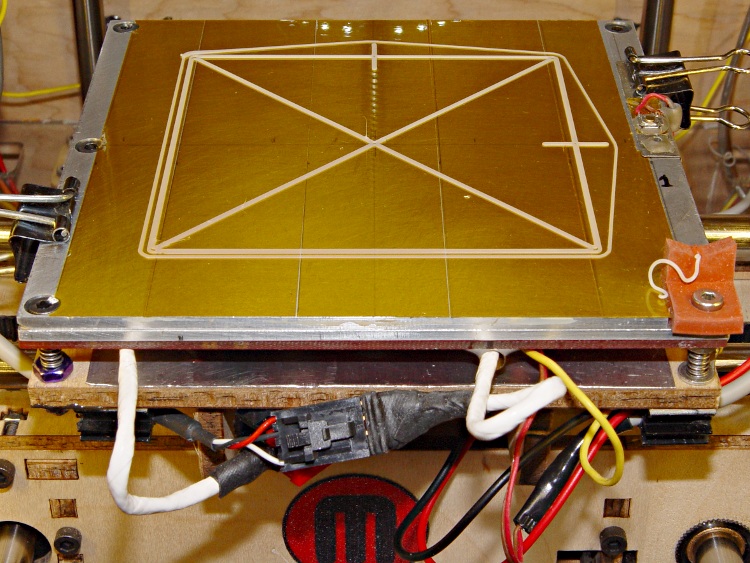
With all that in hand, I screwed the PCB to the aluminum sub-plate, bolted it to the plywood platform, and stuck the cables onto the platform with adhesive clamps:
Rewired HBP – front
Reaming out the hole between the red and black Powerpole shells provided just enough room for an M3 screw to anchor them to the HBP: they won’t flop around under acceleration.
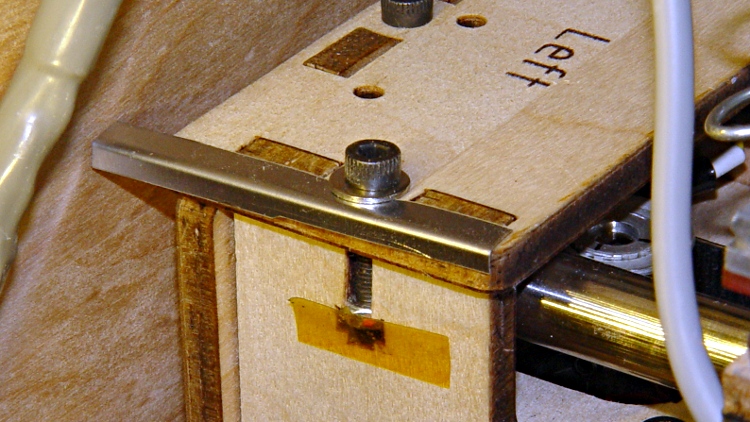
The thermistor cable exits to the left, the rest to the right, and I’m unhappy with the overall routing. I added a small bumper (made from bent steel shim stock) to keep the thermistor cable out of the gap between the Y axis stage and the left side wall:
The platform is holding level within ±0.05 mm across build plates 1 and 2, somewhat better than before. On the other paw, the whole thing doesn’t have many hours on it…
With the heater off for repair, I added a strip of self-adhesive stainless steel tape to the top of the plywood platform, directly under the heater. This should reduce the wood temperature and maybe, just maybe, reduce the thermal expansion that shifts the X axis location of the Z-minimum platform height switch.
HBP heat shield
It’s stainless steel because that’s what was in the Tape Lookaside Buffer; a hunk of aluminum tape, even a pair of 2 inch / 50 mm strips would work just fine.
Not shown here is the M3 screw through the front-center hole (invisible under the tape) that will eventually anchor the new heater connector.
While I was rebuilding the HPB heater wiring, I drilled / countersunk / tapped a 4-40 hole in the middle of the aluminum sub-plate for a screw to secure the middle of the heater PCB:
HBP center attachement screw – top
Remember: this plate is firmly secured to the plywood build platform with three leveling screws over springs. Another aluminum plate, with Kapton tape as the build surface, sits on top, providing an absolutely flat build platform. If you’re using a single plate, you could backfill the hole with a dab of JB Industro Weld epoxy atop a lightly greased screw, then file the top flush with the plate.
A flat-head screw harvested from a chunk of electronic junk came from the Drawer o’ Short 4-40 Screws and fit perfectly:
HBP center attachment screw – bottom
Mirabile dictu, the screw was short enough that it didn’t require any trimming to stay below the top surface.
Securing the center of the PCB to the aluminum plate cuts the heater’s free span in half: the PCB originally had screws only along the left and right edges. Its thermal expansion visibly bowed it away from the plate and I hope this will reduce that problem. Of course, now the PCB’s expansion has nowhere to go and those thermal stresses will probably begin chewing up the mounting holes.
While I was at it, I removed the MBI “heat spreader” tape from the PCB. I’d been reluctant to do that, for fear of peeling the traces right off the board, but the surface was in fine shape. Whew!
More on the wiring and epoxy blobbed brass tube later…
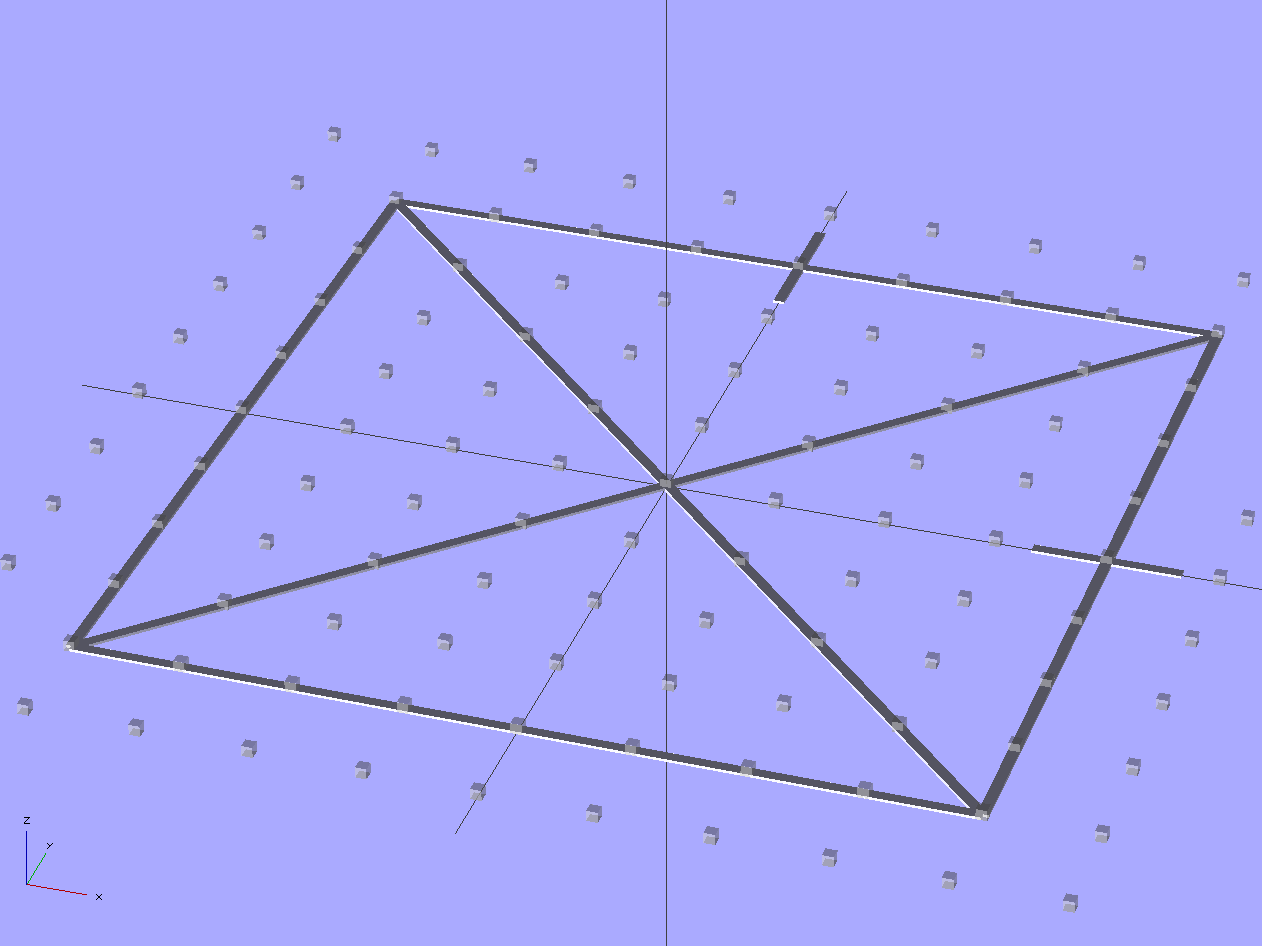
Unlike that pattern, this OpenSCAD program produces an STL file that gets sliced in the usual manner, so that the end result shows exactly how the first layer of all other objects gets laid down.
Thread Thickness Test – solid model
It’s two threads wide and one thread thick: customize the OpenSCAD code to match the settings in Skeinforge (or Slic3r or whatever you’re using) to make it build properly.
The two tabs mark the +X and +Y directions. The bottom surface will be wonderfully shiny from the build plate, so the symmetry along the diagonal shouldn’t pose a problem.
Should the thickness vary more-or-less linearly along any of the bars, then you know which way to level the platform. If it varies non-uniformly, then either the build plate isn’t flat or the printer has other problems.
The actual width depends on the actual thickness, of course: a too-low nozzle will create a too-wide pattern regardless of the extrusion settings. The thickness should be uniform across the entire pattern, so you can still adjust the platform leveling screws.
If you’re using a Z-minimum platform height sensor, now’s the time to adjust the switch touch-off height to make the thread thickness come out right.
When the thread thickness comes out right, then the width should match the extrusion settings: the bottom layer will be exactly like all the others. That’s the ideal situation, anyway.
Although Thanksgiving is Update Your Parents’ Browser Day, I ended up rebuilding their old Dell Dimension 2350 PC over their New Year visit: it had succumbed to a nasty case of bit rot. It may have had the odd malware infestation, although booting with the invaluable System Rescue CD and unleashing a ClamAV scan didn’t turn up anything exciting.
I had full partition backups from August 2010, so I set up a new hard drive (well, an old drive from my heap, but new to them) with the restored partitions before they arrived, swapped it into the PC, then attempted to boot the Windows Recovery Console from their Windows CD to restore the MBR. Alas, I didn’t set the Dell Utility partition to type DE, thus throwing off the drive letter sequence, and the subsequent thrashing (including a steel-cage death match with fixboot and chkdsk) wrecked the Windows partition.
Figuring that situation out from a simple NTLDR missing boot message took a while.
But after restoring the partition again and doing the WRC dance, we had a perfectly serviceable Windows XP installation that inhaled a year’s worth of Windows updates in a surprisingly short process that required only a single (!) reboot. I tossed a bunch of obsolete & unused software over the side, emptied the Recycle bin, manually deleted a bunch of files in the various temporary directories, updated Firefox, installed LibreOffice, imported the Outlook Express address book from the rotted drive, did not import the email messages, and away they drove.
I had suggested it was time for a new PC, but … maybe next time.
Notes:
My USB-to-SATA adapter cable injected occasional read errors (which partimage caught), but a klunky drop-in-the-slot vertical desktop adapter worked OK.
A CHKDSK fixed one or more files message doesn’t really prepare you for the discovery that it obliterated the entire directory structure and left a vacant drive behind.
The PC had 512 MB of DDR RAM in two 256 MB sticks. I swapped in a 512 MB stick (harvested from an old PC on its way to the recycler) and, as you’d expect, 768 MB of RAM dramatically improved the poor thing’s attitude.
System Rescue CD is invaluable for this sort of thing.
What is it with Firefox being stuck at V3 forever, then ratcheting instantly to V9? Version envy?




 The Smell of Molten Projects in the Morning