The Smell of Molten Projects in the Morning

Ed Nisley's Blog: Shop notes, electronics, firmware, machinery, 3D printing, laser cuttery, and curiosities. Contents: 100% human thinking, 0% AI slop.

Author: Ed

  • HP8591 Spectrum Analyzer Screen Dump Sizes

    The script I use to fetch screen dumps from my HP8591 spectrum analyzer works fine, but it turns out that the screen images have (at least) two sizes.

    The hp2xx program converts the screen dumps from HP-GL text files to PNG bitmaps:

    for f in *hgl ; do hp2xx -m png -c 1436 "$f" ; done
    

    The usual size is 593x414 pixels:
    SMD 470 pF - Comm Spec
    SMD 470 pF – Comm Spec

    The other size is 593x395 pixels:

    SMD 470 pF - Surplus
    SMD 470 pF – Surplus

    As nearly as I can tell, the spectrum analyzer mashes the Y coordinate when any of the soft keys along the right edge have reverse-video highlights, which print as outlined boxes. There may be other sizes; those are the two I’ve stumbled over so far. This doesn’t much matter unless I’m using the images in a column, in which case it’s awkward to have two sizes: a one-size-fits-all script to trim off the soft keys doesn’t produce the proper results.

    Musing on how to figure this programmatically…

    The file command gives the pixel dimensions, with the file name (which may contain blanks: so sue me) set off  with a colon:

    file "SMD 470 pF - Surplus.png"
    SMD 470 pF - Surplus.png: PNG image, 593 x 395, 8-bit colormap, non-interlaced
    

    Judicious application of cut extracts the relevant numbers, albeit with a trailing comma that requires another pass through the grinder:

    file "SMD 470 pF - Surplus.png" | cut -d\: -f2 | cut -d\  -f4,6
    593 395,
    

    Although I think a sed script might be better, that requires more skull sweat than I have available right now.

    Given that, then an appropriate mogrify would crop off the softkey labels; the first one is what’s in the script right now:

    mogrify -crop "540x414+0+0" SMD\ 470\ pF\ -\ Comm\ Spec.png
    mogrify -crop "515x395+0+0" SMD\ 470\ pF\ -\ Surplus.png
    

    Which looks like this:
    SMD 470 pF - Comm Spec cropped
    SMD 470 pF – Comm Spec cropped

    The two sizes come out pretty close to the same 1.3 aspect ratio, but resizing the smaller one to match the larger doesn’t work well:

    convert -resize '540x414+0+0!' SMD\ 470\ pF\ -\ Surplus.png SMD\ 470\ pF\ -\ Surplus\ resized.png
    

    You need single quotes around the geometry parameter to prevent Bash (or Dash or whatever) from gnawing on the bang character (yes, that’s how you pronounce “!”).

    The images are lossless PNGs because they consist entirely of single-pixel lines and characters; alas, resizing by non-integer factors close to 1.0 introduces nasty picket-fence aliasing artifacts:

    Resize x 1.049
    Resize x 1.049

    I resize the pix by a nice, even factor of two (which also adds aliasing artifacts, but in small and very regular doses) and set the dots/inch value so the images print at about the right size without further hassle along the production pipeline:

    mogrify -density 300 -resize 200% whatever.png
    

    Which looks like this:

    Resize 2.00
    Resize 2.00

    Resizing from the smaller images to (roughly) the final size in one step doesn’t look quite so awful:

    convert -density 300 -resize 209% "SMD 470 pF - Surplus.png" "SMD 470 pF - Surplus large.png"
    

    Like this, still with a distinctly garbled dBm:
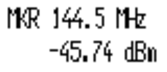
    Resize 2.09
    Resize 2.09

    But it’s decidedly better than this result from a two-step enlargement, although not as wonderful as one might like:

    Resize x 1.049 x 2.00
    Resize x 1.049 x 2.00

    So the script needs a tweak for the file sizes, but …

    Memo to Self: It’d be simpler to not have highlighted softkeys when doing screen dumps!

  • Credit Card Services: More Details

    Just fielded a call from Credit Card Services that got all the way to 6:35 before the final disconnection!

    Based on the conversation, we have a few more details:

    The slimeball outfit identifying itself as Credit Card Services turns out to be a wholesale demon-dialing operation, which leads one to wonder why the FTC can’t figure this out and take some action. I mean, sheesh, CCS must represent a substantial fraction of the total voice phone call traffic; a few honeytrap numbers should be productive.

    Anyhow, when you answer the phone and “press 1 to speak with an associate”, CCS farms the call out to a variety of back-end operations that evidently pay for live prospects (i.e., suckers). In this case, I was talking with someone working for “Client Services”; she was remarkably friendly and patient, which suggests she’s very new to this game.

    The minimum balance they’re interested in has dropped to $3k. Used to be $4k; must be a sign of the times.

    She wasn’t representing a loan operation, but was quite hazy about the details of how her organization would reduce my loan rates, other than that they “worked with the lenders” to that end. I pointed out that, while I wasn’t mad at her, she should understand that I’m reluctant to discuss my financial affairs with someone who really couldn’t describe the proposition in any detail.

    She said that she could “do her best” to get me off the Client Services calling list, but that would have no effect on further calls from Credit Card Services, as other companies would be paying for those calls. She had no idea why “pressing 3 to discontinue further calls” didn’t work, of course.

    So I asked if she had a supervisor that might be able to explain how the whole operation worked, she said she’d try to find one, and the next minute produced the usual clunks and tinks that presage a dropped call.

    Perhaps the pleasant voices are “make money at home” suckers fronting for the loan sharks?

  • Capacitor Self-resonance: The Madness

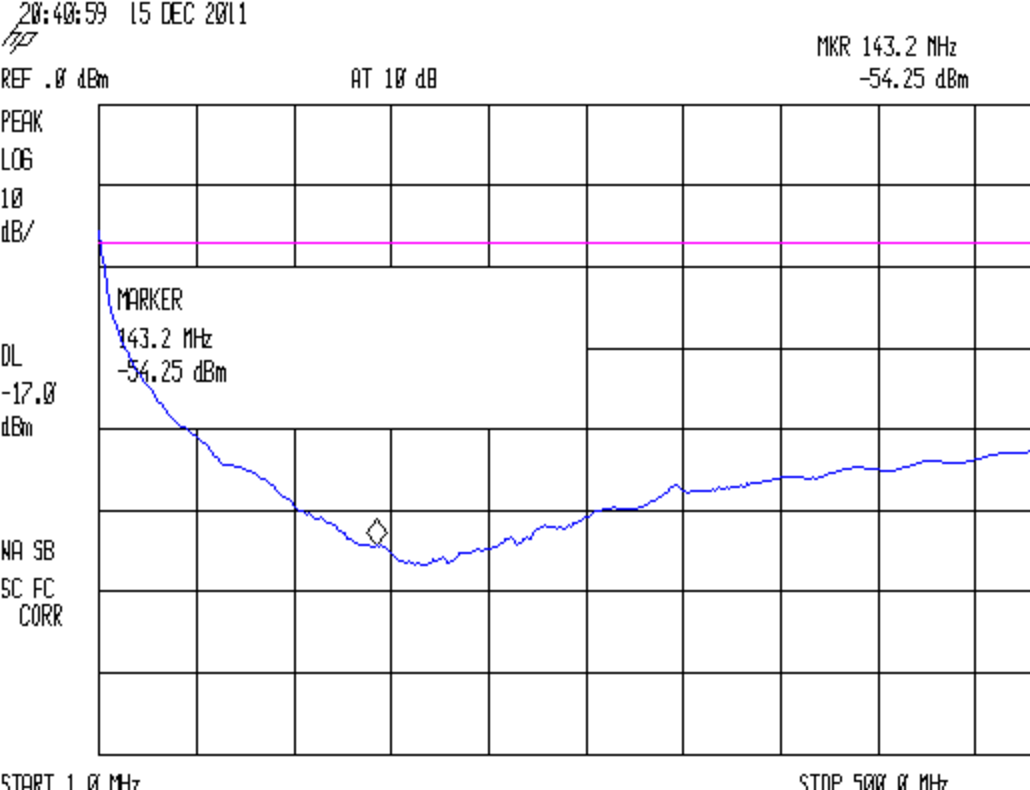
    I’d wondered whether suppressing RFI by picking capacitors by their self-resonant frequency, so that each cap would suppress a known input signal. Turns out that’s entirely possible, even for the amateur VHF and UHF bands:

    Wouxun PCB - 100 nF 680 80 pF AVX - PTT
    Wouxun PCB – 100 nF 680 80 pF AVX – PTT

    The three caps producing that trace look like this on the brassboard PCB for the Wouxun GPS+voice interface,  with spectrum analyzer input & output through RG-174 coax with 22 Ω and 470 Ω SMD resistors tombstoned on the pads at the end of the string:

    GPS voice PCB - SMD caps on PTT input
    GPS voice PCB – SMD caps on PTT input

    The scattered solder blobs cover Z-wires connecting the top ground plane to the continuous ground pour on the bottom surface. The solder strip along the edge joins the copper tape bonding the surfaces together around the perimeter. Basically, this is as well-controlled a layout as one can rationally get, without full RF matched-impedance zaniness.

    However, the whack-a-mole RFI suppression concept makes absolutely no sense whatsoever for anything other than a mass-production board with rigidly controlled component parameters, which isn’t what you see here. Basically, ceramic caps have poor tolerances, bad thermal stability, and standard values too far apart to make fine tuning practical: lining up the self-resonance with a desired frequency requires trial-and-error selection for every capacitor.

    Those peaks between the self-resonances can be much higher than you’d expect, too, because they represent parallel resonances where the total impedance can approach an open circuit. Remember that caps above resonance look like inductors and caps below resonance look like caps, so two parallel caps form a nice RL tank circuit for signals between their self-resonant frequencies. The caps have very low ESR, making the Q unreasonably high.

    If you were hoping for / requiring broad-spectrum RFI suppression, paralleling caps will definitely make things worse, which is probably not what you expected, either.

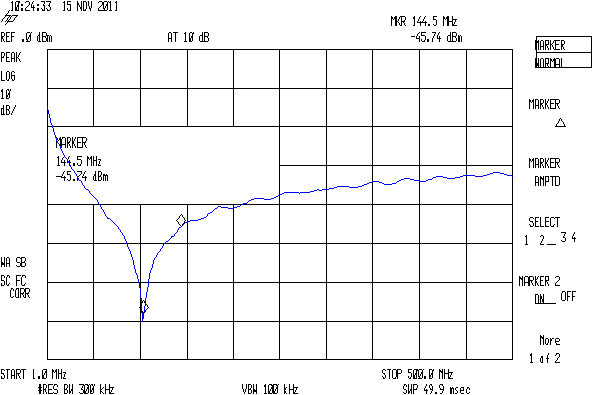
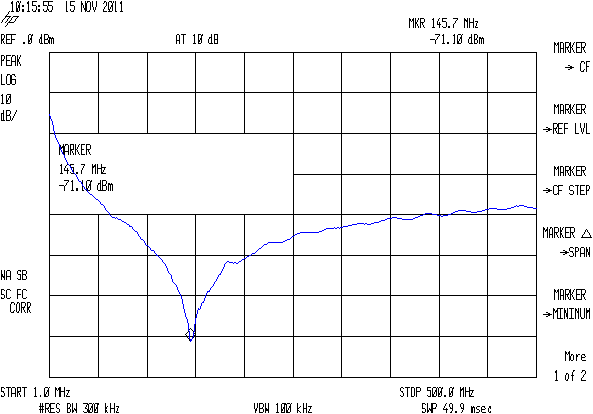
    The whole scheme also suffers from measurement error due to parasitic inductance from the position of the SA and TG “probes”. Compare this trace:

    Wouxun PCB - 330 pF - HTPTT near
    Wouxun PCB – 330 pF – HTPTT near

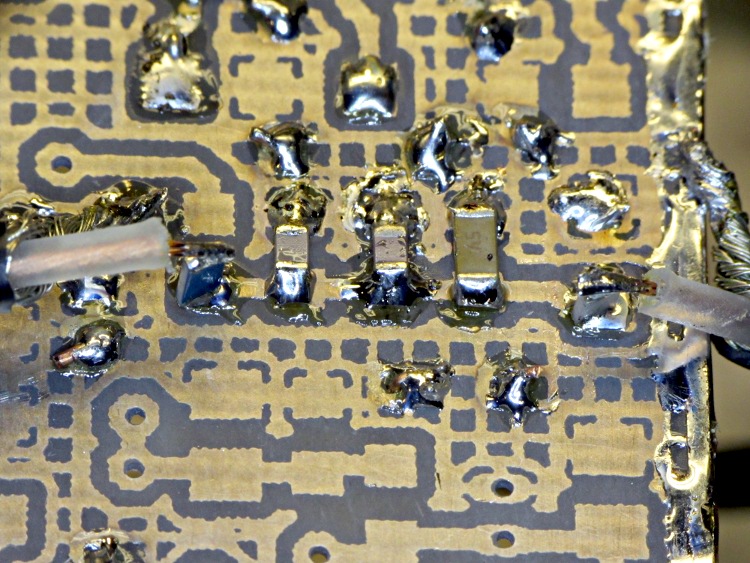
    Made with the SA and TG connected to the same pad:

    SA and TG - same pad
    SA and TG – same pad

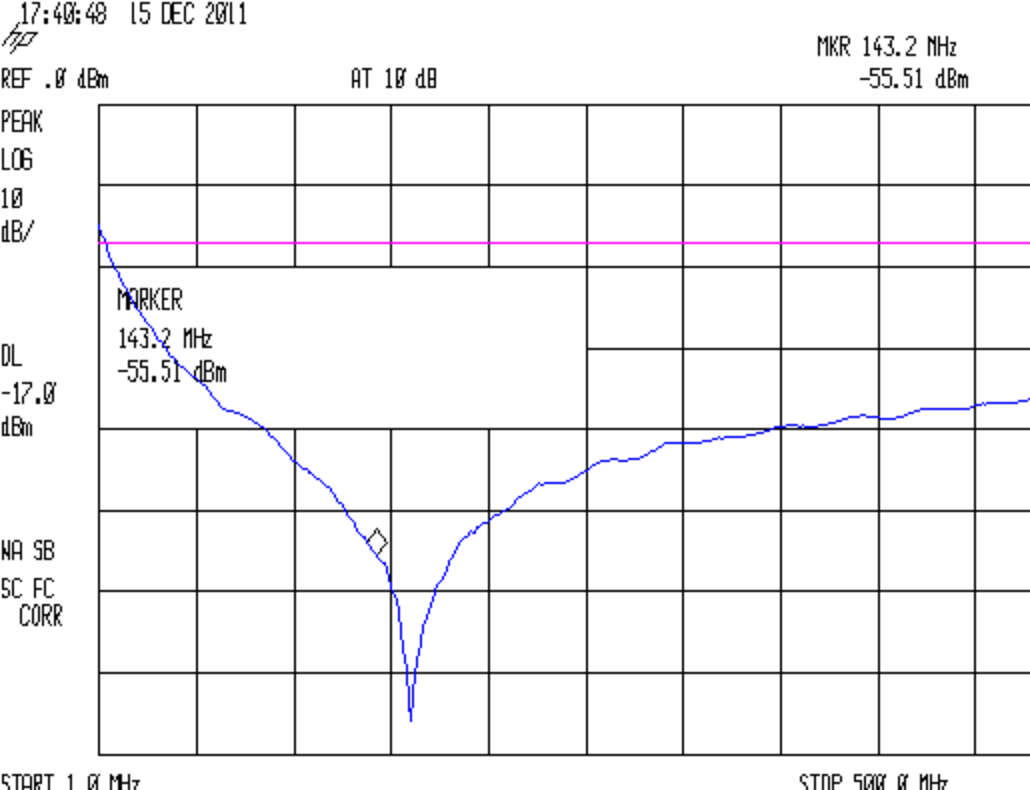
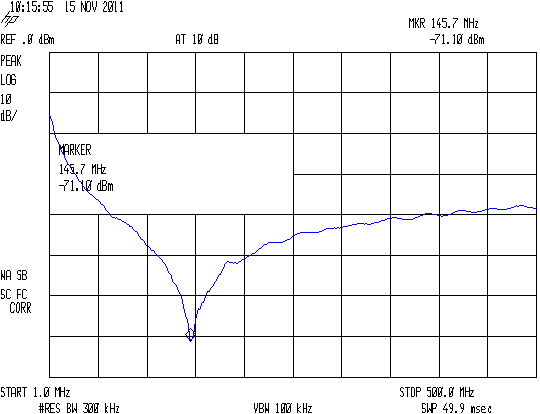
    With this trace:

    Wouxun PCB - 330 pF - HTPTT far
    Wouxun PCB – 330 pF – HTPTT far

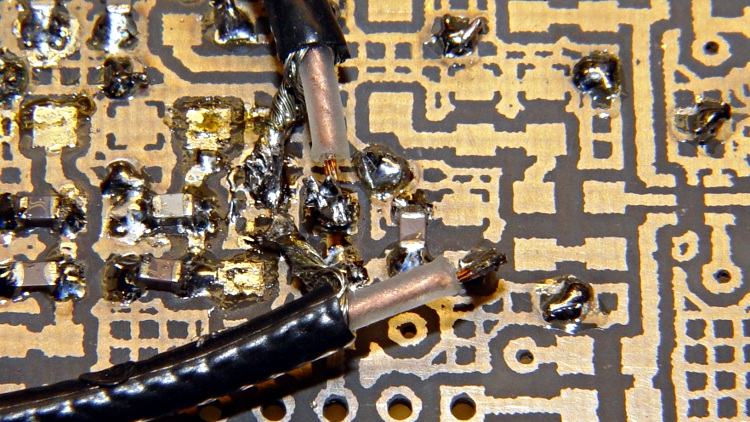
    Which involves moving the SA input to a pad on the other end of the trace, the better part of 8 mm away:

    SA and TG - different pads
    SA and TG – different pads

    Yes, those layouts are identical when you’re talking about signals near DC.

    The pigtail leads certainly contribute some inductance, as does the the PCB trace itself. I suspect you could model that effect, but I’m not sure you could generate a predictive model without a 3D field solver and a whole bunch of calibration measurements. If you really care about the location of that self-resonant peak, I’m not sure which trace / layout you’d trust.

    Of course, if you use a cap with a very broad self-resonant peak, then it’s all good. Except, equally of course, that I have no idea how you’d specify one of these to your purchasing agent:

    Wouxun PCB - 992 pF - HTMIC
    Wouxun PCB – 992 pF – HTMIC

    That’s a 1 nF cap from the same assortment (made by AVX, a nominally reputable manufacturer, if the eBay vendor is to be believed) that produced the other peaks. Obviously there’s something different about those caps (and the 1.5 nF caps in the next compartment of the assortment, too): it’s not a measurement error! Notice that it has the expected high impedance at low frequencies, so you’d probably want a larger cap in parallel, which would give you at least a moderate parallel-resonant peak in between.

    So if there’s a single frequency that needs squelching you can probably find a suitable cap by rummaging around in your assortment. More than that, though, just isn’t practical.

    Just about the only other discussion I’ve seen about this comes from the folks at Ultracad Designs, who have run the numbers much further than may seem be reasonable, even by my standards.

  • Enabling Remote Desktop Sharing in Xubuntu

    I set up Xubuntu 11.10 on the Dell 531S driving the Thing-O-Matic, as the Unity UI seems surprisingly like crippleware: every feature that isn’t mandatory is prohibited. However, Xubuntu’s XFCE UI also has a long list of things that should be easy and aren’t, such as enabling remote desktop sharing. Gotta have that so I can fire up the printer and monitor progress from upstairs.

    It turns out that the Vino server is installed, but not enabled, so you must start by firing up vino-preferences in a terminal to set some preferences:

    This is a local machine behind a firewall, so a moderately secure password with no confirmation will suffice. Your paranoia may vary.

    Then drill down through the menu from Settings Settings ManagerSession and Startup to the Application Autostart tab, then Add the Vino VNC Server to the list: /usr/lib/vino/vino-server. You can start it manually if you have the hots for immediate sharing.

    This seems to be impossible in Unity, trivially easy in GNOME, and unduly mysterious in XFCE.

  • Thing-O-Matic: Filament Melt Zone

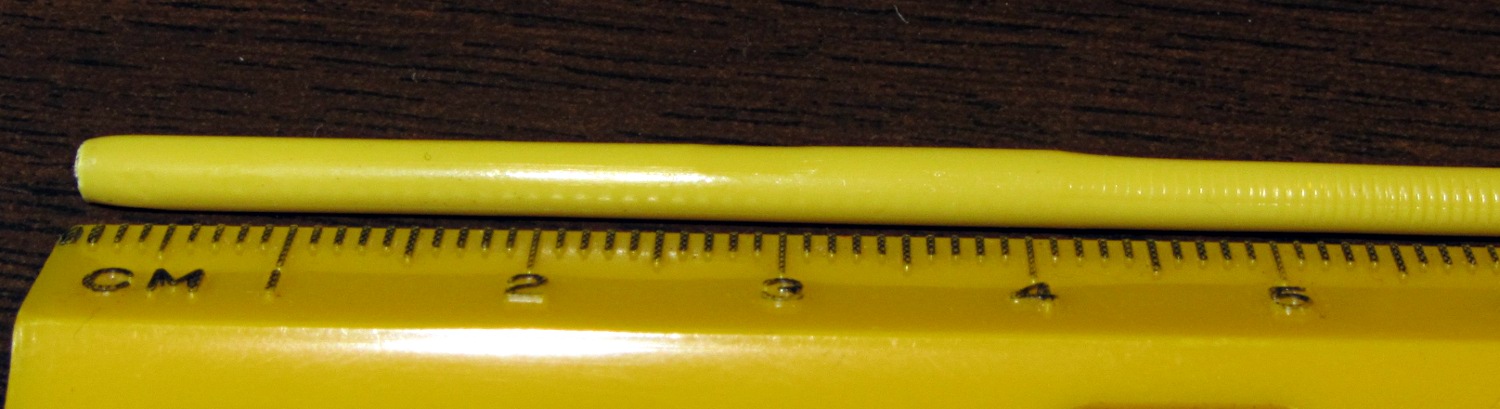
    The 0.5 mm nozzle came off the hot end with surprisingly little effort; the high-temperature lube did its job! I dismantled the tensioner, clipped the filament at the top of the drive wheel, and extracted it (with the red PTFE insulation / guide tube) through the bottom of the Thermal Core. Getting the filament out of the tube required the gentle suasion of a pin punch, but eventually I found this:

    Filament melt zone - overview
    Filament melt zone – overview

    Although you can’t tell from the picture, the filament seems completely melted for about 20 mm, well-softened for another 20 mm, and soft for about 10 mm. Here’s a detail of the transition from well-softened to soft to hard:

    Filament melt zone - detail
    Filament melt zone – detail

    Notice how the notches from the drive wheel gradually fade out over about 10 mm, whereupon the filament expands to fill the PTFE tube. You can’t see the shallow depression from an air pocket offscreen at about 30 mm, but it suggests the filament isn’t quite molten from 20 mm onward. Given that the distance from the nozzle tip to the top of the Thermal Core is about 40 mm, all this makes sense, particularly when you figure the filament was stationary as the Core cooled off after the last print: the melted-to-melty sections are inside the Core and the softened section is just above the Core.

    In round numbers, the Thermal Core supplies enough heat through the PTFE tube to fully melt the filament for about 20 mm above the nozzle when printing at 2 rev/min. The effective drive diameter is 9.6 mm, so 1 rev = 9.6 π = 30 mm and the Core must melt 60 mm/min = 1 mm/s. This is obviously a grossly nonlinear situation, but if you get only 20 mm of molten filament at 1 mm/s, the maximum speed can’t be much more than 4 mm/s or so.

    The rest of the Thing-O-Matic’s mechanics set an upper limit for, say, printed octopi at 80 mm/s and 4 rev/min = 2 mm/s, but the extruder will definitely be the limiting factor for speeds over, say, 150 mm/s. Not much risk of that happening here, I’d say.

    I’ve settled on Reversal for 125 ms at 25 rev/min, so the retraction distance is:

    1.6 mm = (30 mm/rev) (0.125 s) (25 rev/min) / (60 s/min)

    That’s somewhat smaller than the 3 mm of pushback I’ve seen when swapping filaments in mid-print, but it’s in the right ballpark.

    Now, to install the 0.4 mm nozzle and recalibrate the software yet again…

  • Credit Card Services: Payback

    If you have a landline telephone number, you’ve probably been robo-called by “Rachael” from “Credit Card Services” with an offer to lower your credit card rates. She gives you two options:

    • Press 1 to speak with a live operator
    • Press 3 (or, sometimes, 2) to prevent further calls

    I presume you’ve discovered that pressing 3 has no effect.

    Credit Card Services is obviously a scam:

    • We’re on the FTC Do-Not-Call Registry
    • We don’t have a pre-existing business relationship with CCS
    • They use a robo-dialer
    • Pressing 3 (or whatever) doesn’t discontinue the calls
    • Their caller ID is spoofed

    Rather than get mad, play along. CCS obviously preys on suckers willing to read off their credit card information to total strangers, so you can retaliate by stringing them along as far as possible, thus increasing their cost-per-sucker. Admittedly, their “agents” are (at best) minimum-wage slaves, which means you’re messing with their income stream, but after the first few months it becomes pretty obvious that the calls will never stop and you may as well roll with the punch.

    Suggested topics, all presented in a slow monotone with long pauses:

    • Making sure they’re not associated with any of your credit cards (they aren’t)
    • Understanding whether they’re offering a loan to pay off your cards (they lie)
    • Asking for a callback number in case the call gets dropped (it’ll be a junk number)

    They expect a minimum $4k account balance with the usual usurious credit card rates. Getting them to admit any of that requires carefully paced inquiry, because their script requires getting my balance before they devote any more time to me. I haven’t fed them any (totally bogus) numbers yet, but that may be the only way to get beyond the preliminaries.

    Topics I’ll investigate in upcoming calls:

    • Their current interest rate
    • The repayment schedule
    • What they hold as collateral
    • How’s the weather where they are (it’ll be terrible here, for sure)

    Thus far, I’ve discovered that any mention of these topics produces an instant disconnect:

    • Why pressing 3 does not discontinue further calls
    • Inquiring about their company mailing address
    • Asking to speak with a supervisor
    • Whether lying to strangers all day affects their personal relationships

    My record so far is 3:05 from picking up the phone, which includes the recorded message and a bit of hold music.

  • Roof Shingle Fungus Redux

    Cleaned the gutters a while ago and the shingle fungus is getting worse: more sites and more stains. I sprized some general-purpose fungicide on the area over the kitchen:

    Shingle fungus - east slope
    Shingle fungus – east slope

    And down the valley between the north and east slopes:

    Shingle fungus - north and east slopes
    Shingle fungus – north and east slopes

    We’ll see what happens by next spring; I hope the larger moss clumps will take the hint.

    However, that short length of copper wire seems to be improving things. Here’s the before:

    Copper effect on roof discoloration
    Copper effect on roof discoloration

    Compared with the current state, from a different spot:

    Shingle fungus - below Cu wire
    Shingle fungus – below Cu wire

    The intense streaks have vanished, leaving a uniform lighter gray layer, and the upper area near the wire looks, mmm, less awful than the lower areas. I think running copper wire or zinc strips (which I have not found at the big box stores) along the ridge vent will do wonders, although I’m not sure how to anchor either one along the hip joints between the other slopes.