Ed Nisley's Blog: Shop notes, electronics, firmware, machinery, 3D printing, laser cuttery, and curiosities. Contents: 100% human thinking, 0% AI slop.
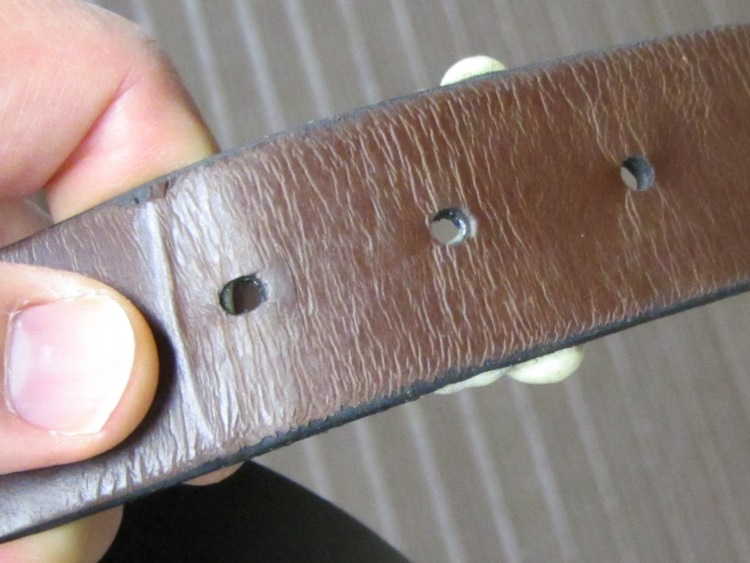
When I bought a new belt some months ago, I thought the lack of stitching meant it was made from a single strip of leather. Come to find out that it’s actually two strips glued together with something sticky that came un-done at the point where the belt passes through the buckle.
So I peeled a bit more apart, smoothed a thin layer of urethane glue (aka Gorilla Glue) inside, laid waxed paper on both side just in case the foam expanded beyond my wildest imagination, and clamped it together:
Belt clamping
The glue layer turned out just about perfect, with only a few blobs sticking out the sides:
Belt with urethane glue blobs
Those blobs snapped off easily enough and the belt works fine again. We’ll see how long this one lasts…
It was decided, in that place where what is decided must be, that the time had come to hack back the giant forsythia stand encroaching from the neighbor’s yard. The stuff tip-roots, so anything that stands in its way gets assimilated, and the only way to make headway is to tear it out by the roots.
We eventually clearcut a section about 15 feet wide and 40 feet long by the simple expedient of lopping off everything that stuck up:
Cleared Forsythia
Removing the roots required prying with a 7 foot length of 1.5 inch octagonal steel bar braced on a chunk of 4×4 inch lumber rammed up against the roots. With my full weight on a 6 foot lever arm, the roots would just barely break free.
A dozen wheelbarrow loads like this went atop the branches on the heap:
Forsythia root balls
That’s my kind of outdoor work: kill them all…
Mary raked and seeded the debris field just before the next rainfall. It ought to be good for another few years.
Actually, that NIC didn’t slip right into place, because its backpanel plate was sized for a full-height PC case. Unlike the cheap stamped steel you find these days, NetGear used much thicker metal that required an attack with the bandsaw, a hammer, and some files to clean up the raw edges.
But it fit pretty well after all that:
Shortened NIC backplate
You can just barely see the NetGear logo wrapped around the right-angle bend…
In the process of figuring out how to set up the isolated WiFi Internet link on the file server, I discovered that the /etc/rc.local file runs before the eth0 interface that connects to the outside world comes up. As a result, my DynDNS host address hadn’t been updated in quite some time.
Worse, trying to set up eth1 failed, apparently because there’s a bunch of other network infrastructure that doesn’t start until eth0 comes online. Part of that infrastructure involves iptables; the added rules simply vanished.
The solution seems to require writing an upstart script that waits for whatever events it needs, does what needs to be done, and then goes away. The whole upstart mechanism and its event list seems, um, lightly documented, as I discovered there, but the custom setup formerly in /etc/rc.local now lives in /etc/init/local.conf:
description "Stuff that used to be in /etc/rc.local"
author "Ed Nisley - KE4ZNU"

start on (local-filesystems and net-device-up IFACE=eth0)
stop on shutdown

script

logger Starting local init...

logger Updating dyndns
ddclient -force

logger Bringing up eth1
ifconfig eth1 192.168.3.1 netmask 255.255.255.0 up

logger Setting iptables
iptables -A FORWARD -i eth1 --destination 192.168.0.0/16 -j REJECT
iptables -A INPUT -i eth1 --destination 192.168.0.0/16 -j REJECT
iptables -A POSTROUTING -t nat -j MASQUERADE

logger Ending local init

end script
That code assumes the outbound network interface will be eth0, which won’t work on a system using a pure wireless connection on, say, wlan0 or anything more exotic. I haven’t a clue how to parameterize that selection. Most likely, one would write another upstart script that would emit a custom signal based on the usual suspect …
It also assumes the networking infrastructure triggered by eth0 lighting up has hauled itself to its feet and is ready to roll. That seems to be true, although I’ll admit the script is, at best, lightly tested.
With the eth1 NIC up and iptables rules added, I think this script will restart eth1 when it goes down, but it’s not clear where the requisite network-device-down event comes from (certainly not from any script in /etc/init/*conf):
description "Restart eth1 when it dies"
author "Ed Nisley - KE4ZNU"

start on net-device-down IFACE=eth1
stop on net-device-up IFACE=eth1

script

logger Restarting eth1...
ifconfig eth1 192.168.3.1 netmask 255.255.255.0 up

logger Ending eth1 setup

end script
But, eh, at least the isolated interface comes up and packets go where they should (and not where they shouldn’t). Early results are encouraging…
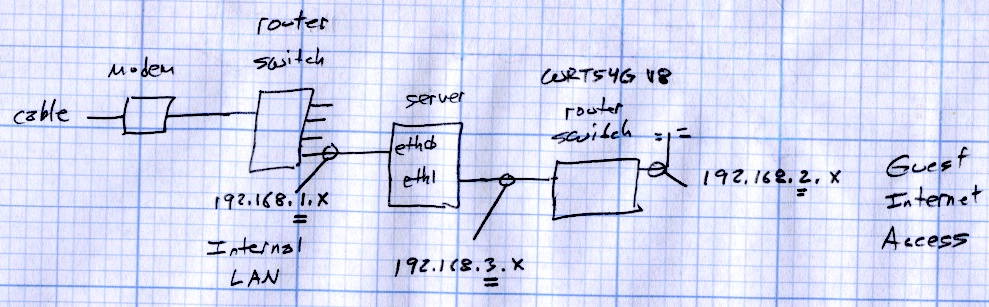
We provide a camping spot for touring bicyclists riding through the Hudson Valley and, as you’d expect, most of them arrive toting netbooks, tablets, and other net-enabled doodads. While I’m a nice guy and they’re uniformly nice folks, I’d rather not hand them the keys to our house network, so I recently set up a WiFi Internet-only access point that’s firewalled from the LAN.
The general idea:
Use a stock WiFi router to handle DHCP / DNS / WiFi for guests (192.168.2.x)
Add a second NIC to the file server as eth1 (192.168.3.1), connected to the router’s WAN port (192.168.3.2)
Forward packets between eth0 (house network 192.168.1.x) and eth1, except …
Use iptables to prevent router clients from seeing the house network
The NIC Just Worked: the drivers come along with the kernel. Because it’s not a general-purpose network interface from the server side, eth1 setup doesn’t require much effort:
ifconfig eth1 192.168.3.1 netmask 255.255.255.0
I discovered the hard way that trying to define the eth1 interface with Network Manager caused no end of heartache & confusion, not least of which is that having two NICs somehow activates Ubuntu’s internal firewalling & port forwarding. Suffice it to say, just set the NM’s GUI to Ignore the eth1 NIC and do what needs to be done manually.
With one NIC, Ubuntu runs iptables in “let it be” mode: everything’s allowed, nothing’s blocked, and all packets get forwarded. The tables are empty and the default ACCEPT policy passes everything.
Adding a rule to the FORWARD chain prevents the router from sending packets to the house network:
iptables -A FORWARD -i eth1 --destination 192.168.0.0/16 -j REJECT
That still allows a ping response from the file server’s eth0 NIC at 192.168.1.2 back to the WiFi clients, because packets addressed to the server pass through the INPUT chain. This rule squelches those packets:
iptables -A INPUT -i eth1 --destination 192.168.0.0/16 -j REJECT
Although packet forwarding is enabled by default, another rule turns on the NAT machinery required to shuttle packets between the 192.168.3.x network and the outside world:
iptables -A POSTROUTING -t nat -j MASQUERADE
While fiddling with iptables rules that involve packet state tracking (which these do, at least implicitly, I think), you must reset the packet state memories to ensure new packets aren’t regarded as part of an established connection. Install the conntrack utilities, then reset the state as needed:
sudo conntrack -F
And then it Just Worked.
Now, back in the day, you’d just put those configuration lines in /etc/rc.local and be done with it. Unfortunately, nowadays the upstart process kicks off rc.local well before the system is in a usable state: somewhat before eth0 is active, which means any automagic network-related activity falls flat on its face.
So an upstart configuration script is in order… more on that later.
Some useful, albeit occasionally befuddling references:
One could, of course, buy dedicated hardware to do all that and more, but it’s nothing you couldn’t accomplish with a bit more configuration on a stock Linux box. Heck, you could even serve an Upside-Down-Ternet to anyone who deserves it; the original has some other suggestions that made the big time.
A tip o’ the cycling helmet to Dragorn of Kismet for getting me started…
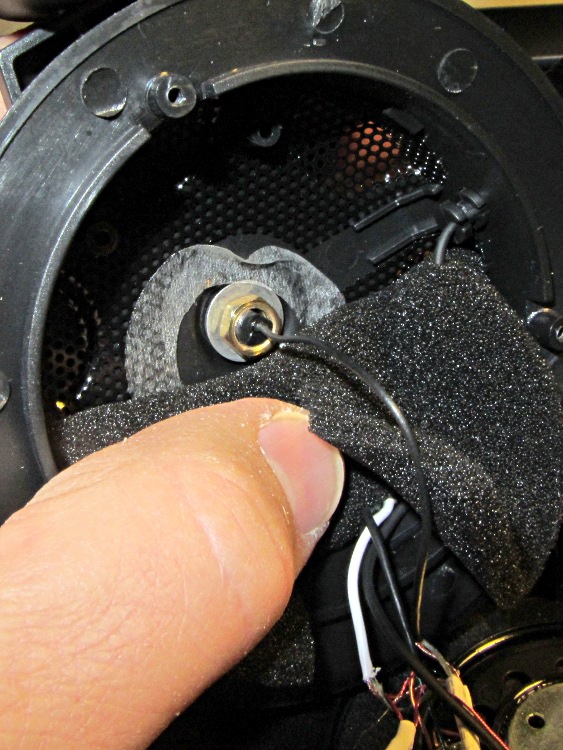
I picked up a Lenovo headset on sale and over the course of a few weeks the mic boom pivot worked itself loose, until I finally dismantled the left ear cup to see what was inside. Come to find out that the mic boom has a molded threaded section held into the cup with a simple nut and no locking mechanism at all:
Lenovo headset – OEM mic boom pivot nut
I think the metal washer was intended as a low-friction pivot atop the compliant silicone (?) washer underneath, but the net effect was that the nut unscrewed a little bit more every time the mic boom moved. By the time I got in there, the nut was completely off the threads.
The original nut left a thread or two showing, so I found a thicker replacement nut with a better grip. The obvious solution involves a dab of Loctite to jam the nut in position, but we all know that some plastics, most notably acrylic, react badly to threadlocker and tend to disintegrate. Although I considered just epoxying the nut in place, that seems so, well, permanent.
So I dutifully tested a dab of Loctite on an inconspicuous spot inside the ear cup, got no reaction at all, put a drop on the boom pivot threads, and reassembled everything:
Lenovo headset – replacement mic boom pivot nut
Alas, by the time I got back upstairs and hung the mic on the rack, the boom fell completely out of the earcup! Back in the Basement Laboratory, I dismantled the thing again and confronted this mess:
Lenovo headset- Acrylic plastic vs. threadlock
Huh. The ear cup isn’t made of the same plastic as the mic boom: one shrugs off threadlock, the other disintegrates.
That’s obvious in retrospect, eh?
The only threads that aren’t ruined lie completely within the ear cup frame, with just a stub sticking up around the wire. So I cleaned things up and did what I should have done originally: put a dab of epoxy inside the nut to bind the pivot firmly in place. A snippet of unshrunk heatshrink tubing around the wire provides a bit of strain relief:
Lenovo headset – boom pivot nut with epoxy
There’s no longer any space for the compliant washer in that stack, so we’ll see how long this lasts. The next repair will certainly venture far inside non-economical territory. I like the headphones, though.
Memo to Self: Check in an inconspicuous spot on the same material.






 The Smell of Molten Projects in the Morning