The Smell of Molten Projects in the Morning

Ed Nisley's Blog: Shop notes, electronics, firmware, machinery, 3D printing, laser cuttery, and curiosities. Contents: 100% human thinking, 0% AI slop.

Author: Ed

  • Eyeglass Temple Re-Repair

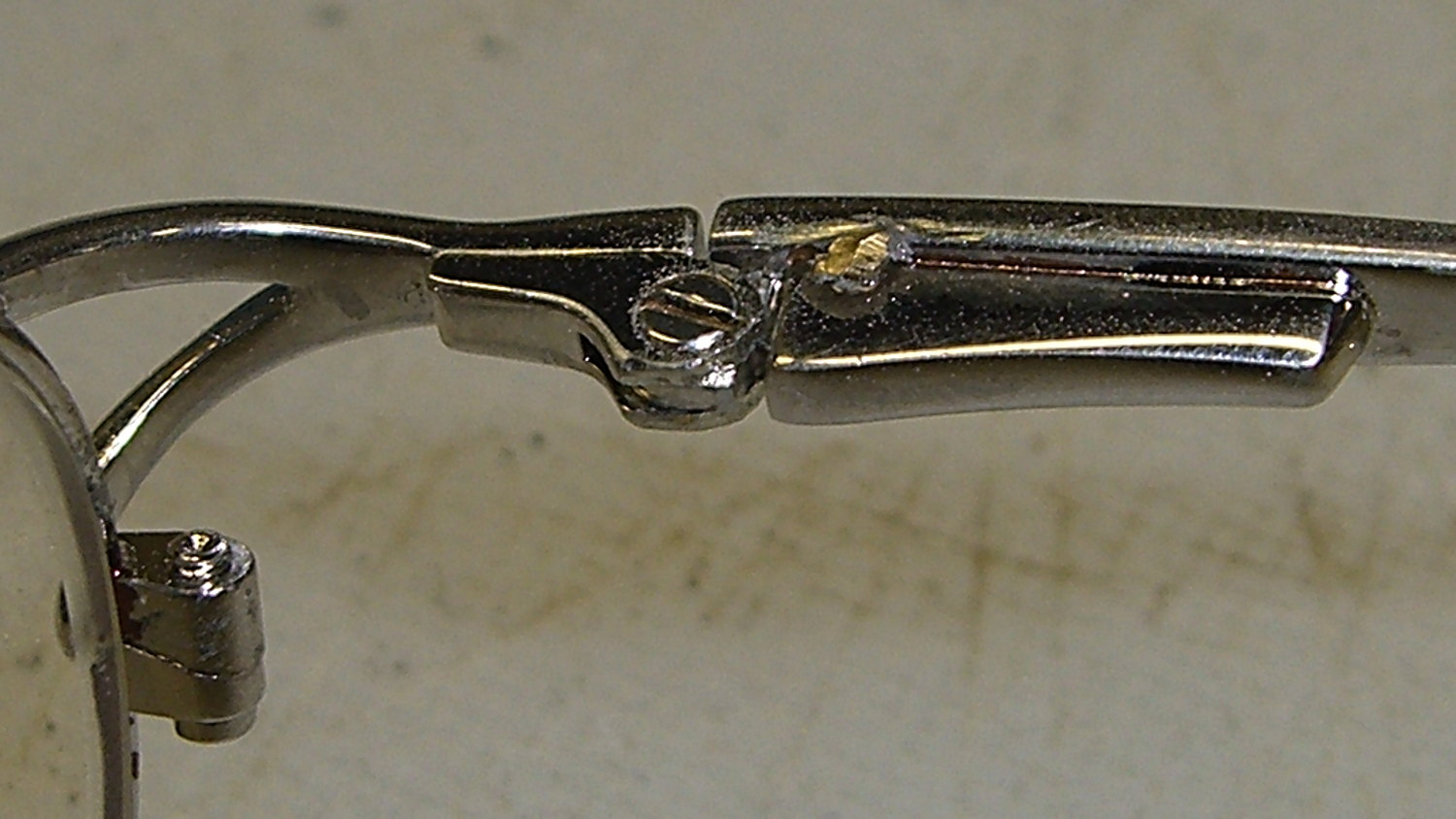
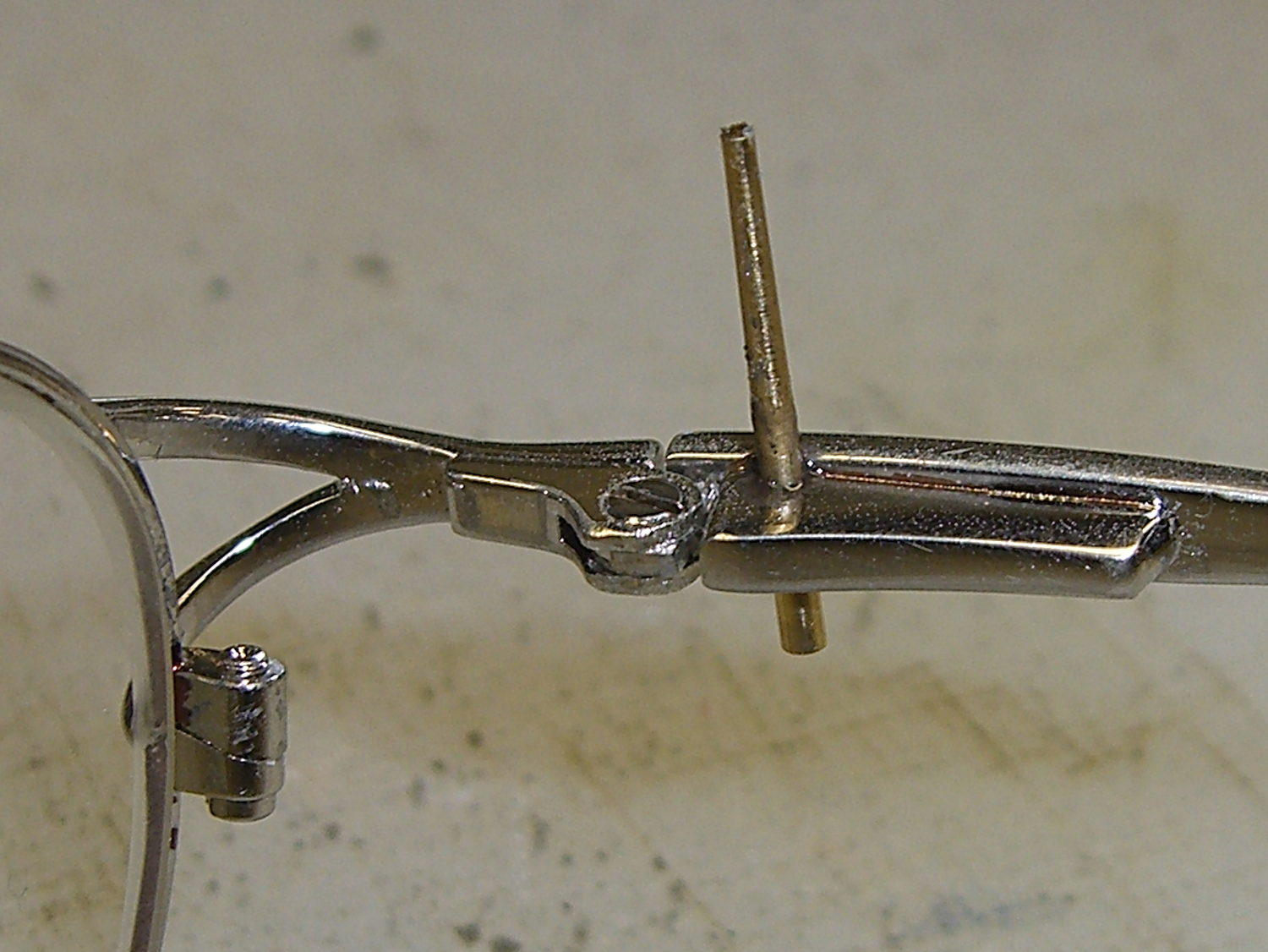
    Unfortunately, the smooth interior of the temple spring pocket and the smooth exterior of the hinge plate didn’t provide enough mechanical lock for the epoxy; the pieces pulled apart after a week.

    So I put a stake in its heart:

    Eyeglass temple - tapered pin
    Eyeglass temple – tapered pin

    That’s a tapered brass pin from the Box o’ Clock Parts, buttered up with a dab of epoxy, then shoved firmly into a 41 mil (#59) hole drilled through the pocket and the edge of the hinge plate.

    Fast-forward overnight, apply a Dremel grinding bit, and it looks passable:

    Eyeglass temple - ground tapered pin
    Eyeglass temple – ground tapered pin

    If that doesn’t hold, those glasses are gone.

  • Iomega 500 GB NAS Drive for Helmet Camera Storage

    I recently exhumed an Iomega 500 GB Home Network Hard Drive (model MDHD-500-N) from the Big Box o’ Drives, with the intent of dumping video files from the Sony HDR-AS30 helmet camera thereupon.

    Remember Iomega of ZIP Drive fame? Seems EMC Borged ’em a while back, collided with Lenovo, discarded all the old hardware support, and that’s the end of that story.

    Exhuming the setup password from my backup stash wasn’t worth the effort, so I experimentally determined that holding the Reset switch closed while turning the drive on blows away the existing configuration. It woke up, asked for an IP address, got 192.168.1.52 from the DHCP server (you can find that by checking the router’s tables), and popped up the administration console at 192.168.1.52:80 as you’d expect.

    The userid will always be admin, but you can change the password from admin to whatever you like; you may safely assume I have done somewhat better than what you see below.

    Twiddling the configuration through the IOmega web-based console:

    • Device name: IOMEGA-500MB (for lack of anything more creative)
    • Group name: WHATSMYNET
    • Password: not-admin
    • Drag the date/time into the current millennium
    • Time Zone: GMT-5:00
    • Time Server: 0.us.pool.ntp.org
    • Static IP: 192.168.1.10 (suitable for my network)
    • Gateway & DNS as appropriate
    • Windows File Sharing enabled for the PUBLIC directory
    • FTP turned off
    • Sleep time: 10 minutes

    Changing either the IP address or the password requires logging in again, of course.

    I reformatted the drive, just to be sure.

    Then, after a bit of Googling to remember how all this works…

    A line in /etc/hosts (left over from the last time I did this) gives the new static IP address:

    192.168.1.10 nasty
    

    Install the cifs-utils package to enable mounting the drive.

    Create a mount point:

    sudo mkdir /mnt/video
    

    Create a file (/root/.nas-id) holding the super-secret credentials used to gain access to the drive:

    domain=WHATSMYNET
    username=ed
    password=not-admin
    

    Then restrict the file to the eyes of the root user:

    sudo chmod 700 /root/.nas-id
    

    It’s not clear that the username or domain really make any difference in this situation, but there they are.

    Define where and how to mount the network drive with a new line at the bottom of /etc/fstab, which refers to the aforementioned super-secret credentials file:

    //nasty/PUBLIC  /mnt/video      cifs    noauto,uid=ed,credentials=/root/.nas-id 0 0
    

    Mounting it with my userid gives the shared directories & files proper permissions for me (and nobody else, not that anybody else around here cares).

    So the manual mounting process looks like this:

    sudo mount /mnt/video
    

    Adding the user mount option would eliminate the sudo, but manual mounting won’t be necessary after a normal boot when the automagic startup script does the deed.

    The drive must have the noauto attribute to prevent the upstart Pachinko machine from trying to mount the network drives before the network comes up. Actually mounting the drive at the proper time requires an additional line in /etc/init/local.conf:

    description "Stuff that should be in /etc/rc.local"
    author "Ed Nisley - KE4ZNU"
    
    start on (local-filesystems and net-device-up IFACE=em1)
    stop on shutdown
    
    emits nfs-mounted
    
    script
    
    logger Starting local init...
    
    logger Mounting NFS (and CIFS) filesystems
    mount /mnt/bulkdata
    mount /mnt/userfiles
    mount /mnt/diskimages
    mount /mnt/music
    mount /mnt/video
    initctl emit nfs-mounted
    logger Ending local init
    
    end script
    

    The reason the drive wound up in the Big Box o’ Hard Drives was its lethargic transfer speed; copying a 4 GB video file from either the MicroSDXC card (via an SD adapter) or the previous 750 GB USB-attached hard drive to the IOmega NAS trundles along at a little over 6 MB/s. The camera stores 25 Mb/s = 3 MB/s of data in 1080p @ 60 fps, so figure 1/2 hour of copying per hour of riding. The USB drive can write data from the aforementioned MicroSDXC card at 18 MB/s, so the card and USB interface aren’t the limiting factors.

    I’m not (generally) in a big hurry while copying files from the camera’s SD card, because that’s now automated:

    #!/bin/sh
    thisdate=$(date --rfc-3339=date)
    echo Date is [$thisdate]
    # IOmega NASalready mounted as /mnt/video in fstab
    mkdir /mnt/video/$thisdate
    sudo mount -o uid=ed /dev/sdb1 /mnt/part
    rsync -ahu --progress /mnt/part/MP_ROOT/100ANV01/ /mnt/video/$thisdate
    if [ $? -eq 0 ] ; then
     rm /mnt/part/MP_ROOT/100ANV01/*
     sudo umount /mnt/part
    fi
    

    I’ve been discarding the oldest month of videos as the USB hard drive fills up, which will happen a bit more often than before: the drive’s 466 GB can hold barely 35 hours of ride video.
  • Kenmore 158: Relay Transient Simulation

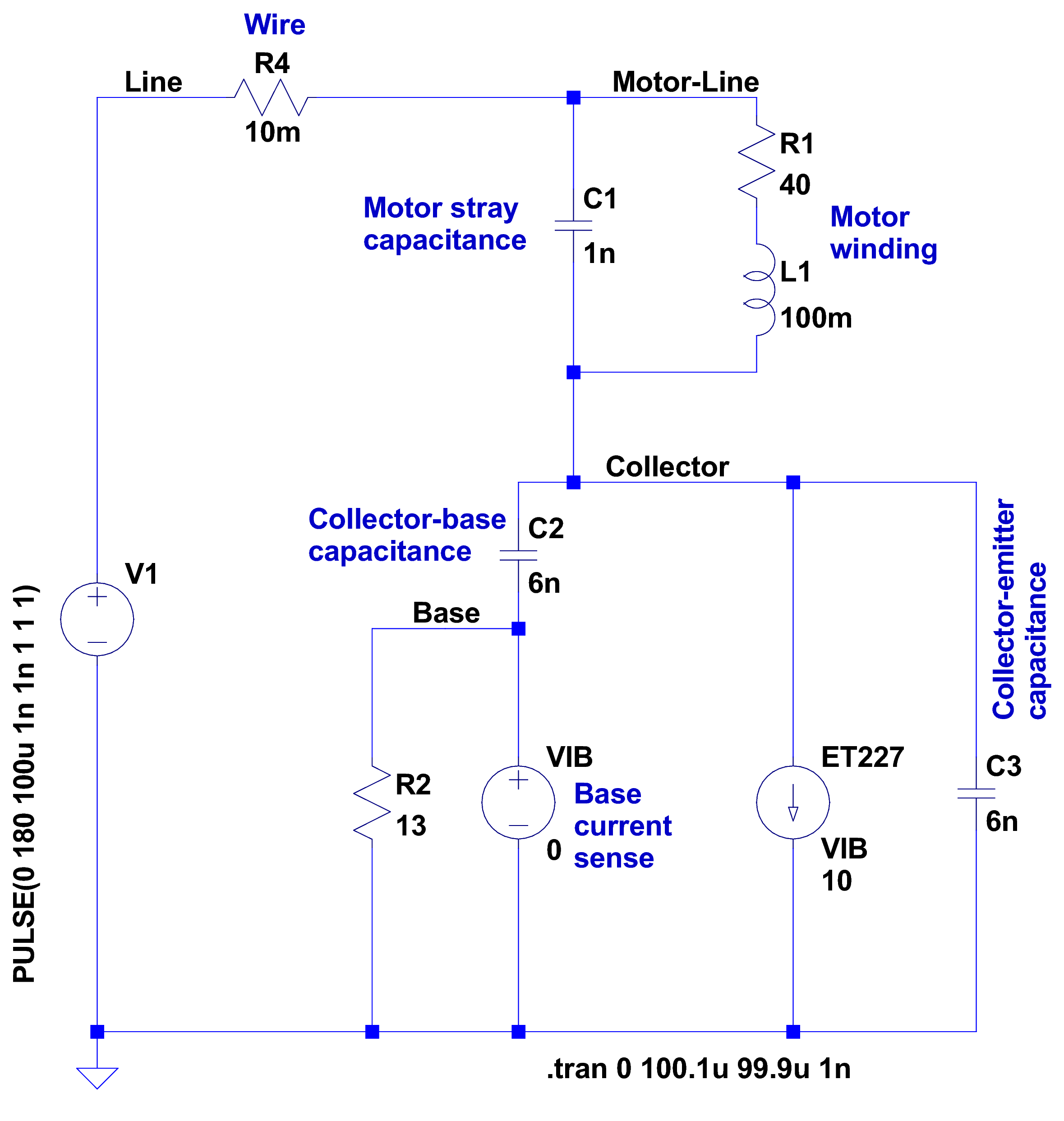
    After having blown two ET227 transistors, I fiddled with some SPICE models to explore the ahem problem space. This seems to be the simplest model with all the relevant details:

    Motor Transient - no NTC - schematic
    Motor Transient – no NTC – schematic

    A step change in the voltage source simulates the relay clicking closed with the AC line at a peak. R4 might resemble the total wiring resistance, but is more of a placeholder.

    I measured 1 nF from each motor wire to the motor shell, so I assume a similar value from wire to wire across the winding. I can’t measure that, because, as far as my capacitance meters are concerned, the 40 Ω motor winding looks exactly like a resistor. R1 and L1 model the winding / commutator, but on the time scale we’re interested in, that branch remains an open circuit.

    There’s no transistor model even faintly resembling a hulking ET227, so a current controlled current source must suffice. The 0 V VIB “source” in the base lead measures the base current for the CCCS labeled ET227, which applies a gain of 10 to that value and pulls that current from the collector node. R2 is the internal base-emitter resistor built into the ET227.

    C2 is the 6 nF (!) collector-base capacitance I measured at zero DC bias on a good ET227. That’s much more than you’ll find on any normal transistor and I’m basically assuming it’s vaguely related to the Miller capacitance of small-signal fame. C3 is a similar collector-emitter capacitor; I can’t tell what’s going on under the hood without a whole lot of measurement equipment I don’t have.

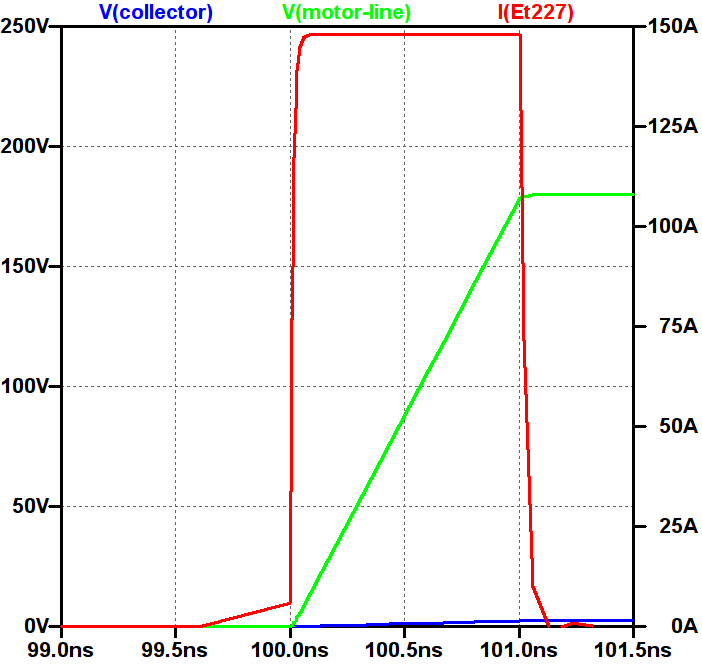
    So, without further ado:

    Simple Transient Model - current pulse
    Simple Transient Model – current pulse

    Whenever you see a simulation result like that, grab your hat in both hands and hunker down; the breeze from the handwaving will blow you right off your seat.

    The key unknown: the rise time of the voltage step as the relay contacts snap closed. Old-school mercury-wetted relay contacts have rise times in the low tens of picoseconds. Figuring dry high-power contacts might be 100 times slower gives a 1 ns rise time that I can’t defend very strongly; it seems to be in the right ballpark. The green trace shows the input voltage ramping to 180 V in 1 ns, which is pretty much an irresistible force.

    The motor shunt capacitance forms a voltage divider with the parallel base and collector capacitors, so the collector voltage shouldn’t exceed 180 * (1/(1+3)) = 45 V. In fact, the blue trace shows the collector voltage remains very low, on the order of 10 V, during the whole pulse.

    The red trace shows the collector current hitting 150 A during the entire input ramp, which is exactly what you’d expect from the basic capacitor equation: I = C dv/dt. The current depends entirely on the absurdly fast 180 V / 1 ns rate: if the relay rise time is actually smaller, the current gets absurdly higher.

    The ET227 datasheet remains mute on things like junction capacitance, damage done by nanosecond-scale high-current pulses, and the like.

    Absolutely none of those numbers have even one significant figure of accuracy, but I think the overall conclusion that I’m blowing junctions based on transient startup currents through the collector holds water.

    Adding four of those NTC power thermistors seems in order. This picture also shows the snubber hanging from the back of the ET227, but I eventually took that off because the simulations show it’s not doing anything useful and it does resonate with the 120 Hz halfwave supply:

    HV Interface - snubber and thermistors
    HV Interface – snubber and thermistors

    The thermistors get comfortably warm after a few minutes and settle out around 1 Ω apiece. Adding 4 Ω to the simulation reduces the current to 30 A during a 1 ns ramp, which number obviously depends on all the assumptions mentioned above.

    I’ve been running it like that for a few hours of start-stop operation and the ET227 lives on, so maybe I can declare victory.

  • Taylor 1478 Kitchen Thermometer: New Probe

    The replacement probe has a woven metal jacket that’s allegedly more rugged than the original plastic, but I think the main difference comes from the additional strain relief at the end of the probe:

    Kitchen thermometer - new probe
    Kitchen thermometer – new probe

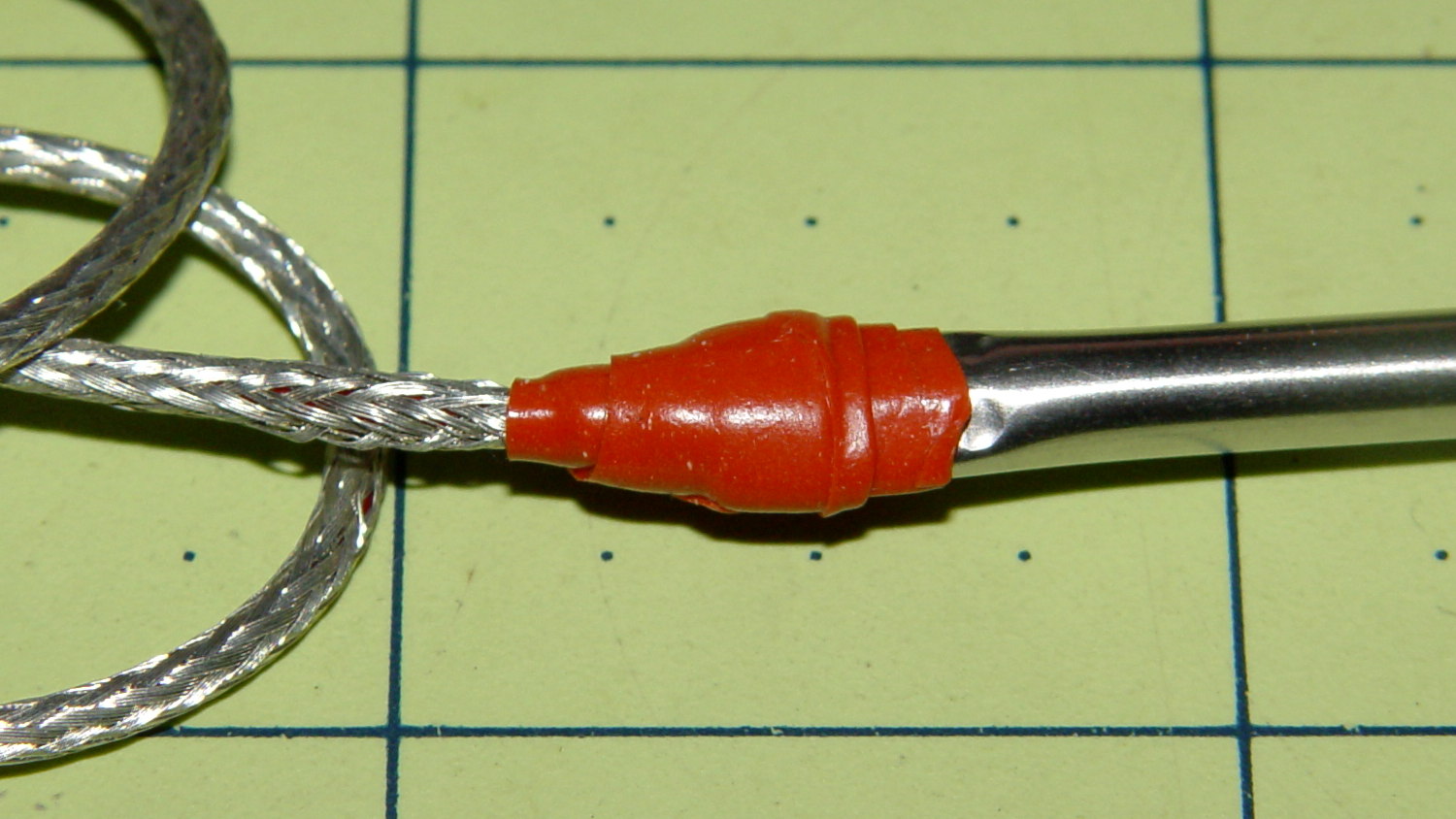
    That still looks abrupt to me, so I wrapped a silicone tape snippet around the joint:

    Kitchen thermometer - new strain relief
    Kitchen thermometer – new strain relief

    Probably not food-safe, definitely butt-ugly, but I don’t want to replace the probe again for a long time.

    FWIW, although the probe description says it’s compatible with Taylor 1970N thermometers and doesn’t mention the 1478 we have, the 2.5 mm plug fits (no suprise there) and the display shows appropriate temperatures; it seems no less accurate than the original probe.

  • Monthly Image: Ice Crystals

    Two mornings after a heavy, wet snowfall, the meltwater atop the concrete patio puckered up into ice crystals:

    Ice crystals on patio
    Ice crystals on patio

    It seems the liquid water collects into the crystals as they freeze, leaving the concrete between the ice patches nearly dry. They seem surprisingly linear, with only a few hexagonal flourishes here and there.

    That’s almost as picturesque as the window crystals

  • Cooper’s Hawk: Digesting

    This Cooper’s Hawk (*) kept an eye on us as we walked down the driveway:

    Coopers Hawk - keeping an eye on us
    Coopers Hawk – keeping an eye on us

    We obviously pose no threat, so he let us pass unmolested.

    I think the real reason had more to do with the dark brown-red stains on his (?) claws: that hawk just ate a fine meal and wanted time for quiet digestion and contemplation…

    Hand-held Canon SX230HS, plenty of zoom, lots of purple fringing, and a cooperative bird.

    (*) A juvenile, obviously, who could be either a Cooper’s or a Sharp-Shinned Hawk.

  • Too Many Deer: Maple Leaf Samplers

    An early snowfall brought down a big branch from a back yard maple:

    Deer nibbling downed maple branch
    Deer nibbling downed maple branch

    The split showed signs of rot from the top down, so it wouldn’t have lasted much longer anyway.

    Shortly after we pulled it off the driveway, three deer stopped by to see if this new thing might be edible. Deer do not normally eat maple leaves, but there’s not much left for them to eat around here.

    Searching for deer will pull up far too many posts on the subject…