The Smell of Molten Projects in the Morning

Ed Nisley's Blog: Shop notes, electronics, firmware, machinery, 3D printing, laser cuttery, and curiosities. Contents: 100% human thinking, 0% AI slop.

Author: Ed

  • Hawk vs. Praying Mantis

    A young Coopers Hawk swooped across the yard, landed on a branch, and proceeded to dismantle something yummy, scattering little bits on the driveway below. One piece fluttered down like a feather, but, after the hawk flew off, we found this:

    Praying Mantis - wing
    Praying Mantis – wing

    It wasn’t a feather, it was an entire wing!

    A few feet away, we found another:

    Praying Mantis - wing parts
    Praying Mantis – wing parts

    Not that there was any doubt, but these parts clinched the identification:

    Praying Mantis - foreleg and wing parts
    Praying Mantis – foreleg and wing parts

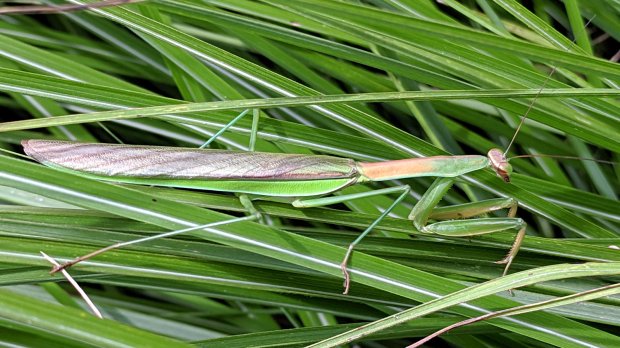
    Some days earlier, we admired eight Praying Mantises on the decorative grasses and bushes out front. Perhaps it was this one:

    Praying Mantis - brown wing covers - in grass
    Praying Mantis – brown wing covers – in grass

    Or this one, a few feet away:

    Praying Mantis - brown wing covers - on bush
    Praying Mantis – brown wing covers – on bush

    We don’t know what, if any, the difference between brown and green wing covers might indicate. Age? Gender? Attitude? Skill level?

    It’s a food chain out there!

  • Walnut Husk Fly Damage

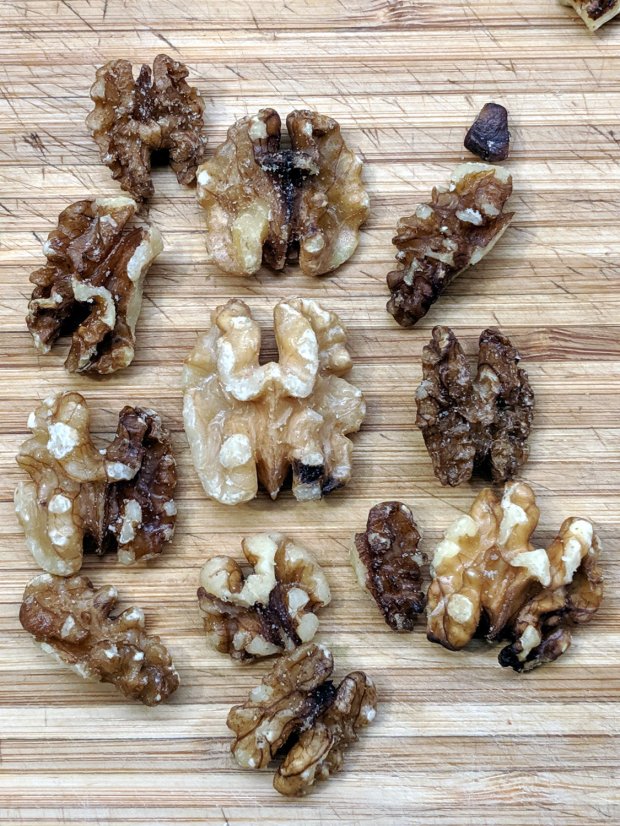
    A recent Amazon purchase of three 3 lb bags of walnuts from a known-good seller arrived with many damaged nuts:

    Damaged walnuts - detail
    Damaged walnuts – detail

    The damage matches what I read about Walnut Husk Fly infestations: shriveled kernels and terrible taste.

    In round numbers, I found 8 oz of damaged nuts in each 3 lb bag, enough to ruin the entire batch. The seller immediately refunded the purchase price for all three bags, so there’s that.

    It’s definitely not one of the counterfeit products plaguing Amazon, but I wonder why that lot didn’t fail incoming inspection.

    I’m loathe to buy more walnuts for a while, though.

    Memo to Self: Always inspect incoming purchases, even from reputable sellers!

  • Monthly Image: Praying Mantis vs. Monarch Butterfly

    The Butterfly Bush in front of the house attracts all kinds of insects, including Monarch Butterflies (shown here on the Goldenrod planted in the garden):

    Monarch on Goldenrod - left
    Monarch on Goldenrod – left

    This year, the bush also attracted a Praying Mantis:

    Praying Mantis in Butterfly Bush - 2019-09-05
    Praying Mantis in Butterfly Bush – 2019-09-05

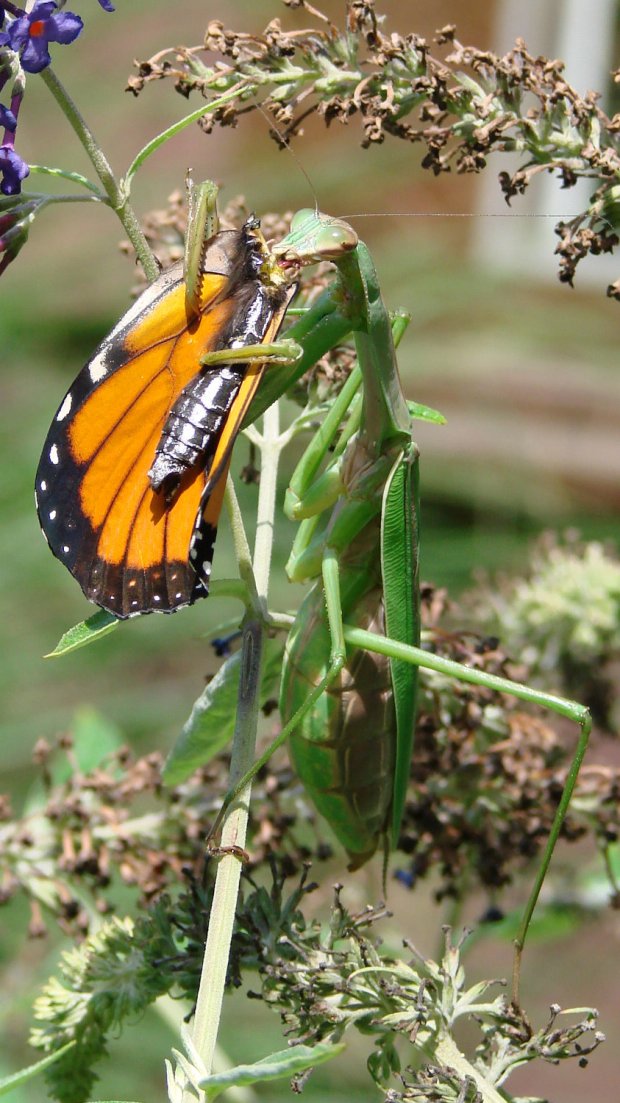
    Then lunchtime happened:

    Praying Mantis vs Monarch - 2019-09-11
    Praying Mantis vs Monarch – 2019-09-11

    A closer look:

    Praying Mantis vs Monarch - detail - 2019-09-11
    Praying Mantis vs Monarch – detail – 2019-09-11

    Now, if that isn’t enough nightmare fuel for you, find some in your own neighborhood.

  • Schwalbe Marathon Plus and Michelin Protek vs. Glass Chip

    The rear tire of my bike was flat before our morning ride and pumping it up produced a hissing sound with a spray of tube sealant:

    Marathon tire puncture - tread gash
    Marathon tire puncture – tread gash

    We run Schwalbe Marathon Plus tires on the rear of our Tour Easy ‘bents, because otherwise I’d be spending far too many hours repairing flats by the side of the road. Searching the blog for the obvious keywords will produce many examples of what it’s like to ride a bike in Dutchess County NY.

    Schwalbe says the tires have 5 mm of “highly elastic special rubber” and claims “Even thumbtacks can’t puncture it.” They use the term “Flat-Less” in the sense of “flat less often”, rather than “not flatting”, which seems disingenuous at best.

    Flatting less often may be true, but they obviously haven’t tested against Dutchess County road debris:

    Marathon tire puncture - glass chip
    Marathon tire puncture – glass chip

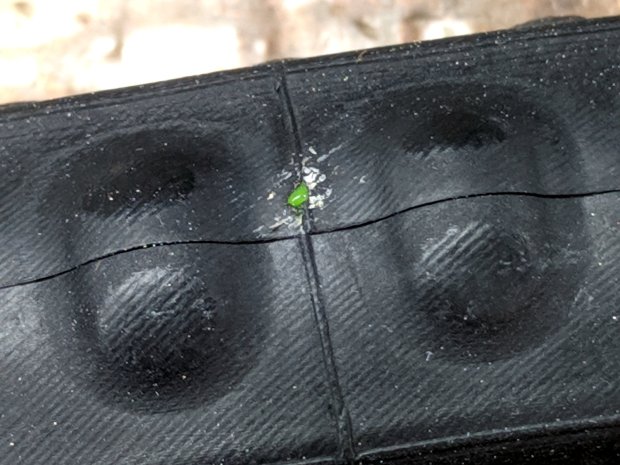
    It’s not quite 5 mm in the longest dimension, but it was embedded deep enough in the tire tread to cut through the armor belt and nick the Michelin Protek tube:

    Marathon tire puncture - tube damage
    Marathon tire puncture – tube damage

    Of course, the hole is dead-center between the two bumps that are supposed to compress around the puncture while the goo fills and seals the void.

    Before taking everything apart, I tried gently inflating the tire and putting the puncture at the bottom to let the sealant fill the hole overnight. In the morning, the tire was once again flat, although the floor wasn’t covered in goo. Pumping the tire up produced another spray of sealant.

    It’s likely the Protek tube got me home with a slow leak on the previous day’s ride, but it definitely didn’t solve the problem and, frankly, I’ve had ordinary tubes do the same thing. Given the trivial size of the puncture and the complete lack of permanent self-repair, I don’t know what kind of damage it’s supposed to cure.

    I’ve already discarded two Protek tubes with slow leaks through the valve stem and no punctures, so they’re definitely not worth the hassle. Michelin no longer lists the tubes on their bike tire site, so it seems they agree.

    I made up a boot by punching a 5 mm polypropylene disk, sticking it to a small tire patch, then sticking the patch over the puncture on the tire. With a bit of luck, nothing will line up with the gash and punch through the boot.

    I recently replaced all four tires on the Forester, slightly ahead of schedule for reasons not relevant here, and it’s worth noting that a Marathon Plus tire costs about a third of what I paid for a car tire; they’re not to be discarded lightly.

  • CNC 3018-Pro: Milling the CD Fixture

    It turns out that the outer diameter of CD platters isn’t quite as perfectly controlled as you (well, I) might imagine, although the differences between CDs from different sources amounts to perhaps ±0.1 mm. Of course, instantly after putting the tape-down fixture into use, the next few discs atop my stack of scrap CDs were just large enough to not quite fit.

    The Sherline’s workspace can’t maneuver the holder’s perimeter around the spindle, so embiggening the OD calls for the rotary table. The general idea is to clamp the center of the fixture to the rotary table, run a small end mill about 0.1 mm into the fixture’s OD, spin the table one revolution, and be done with it.

    Of course, the rotary table’s 3/8-16 threaded center hole doesn’t match the fixture’s 6 mm center hole: we need an adapter. Start with a 1 inch long 3/8-16 stainless steel hex bolt, center drill the end, peel off the hex head, then turn to 6 mm OD, going down far enough so the threads don’t stick up out of the table too much:

    CNC 3018-Pro - CD fixture milling - bolt turning
    CNC 3018-Pro – CD fixture milling – bolt turning

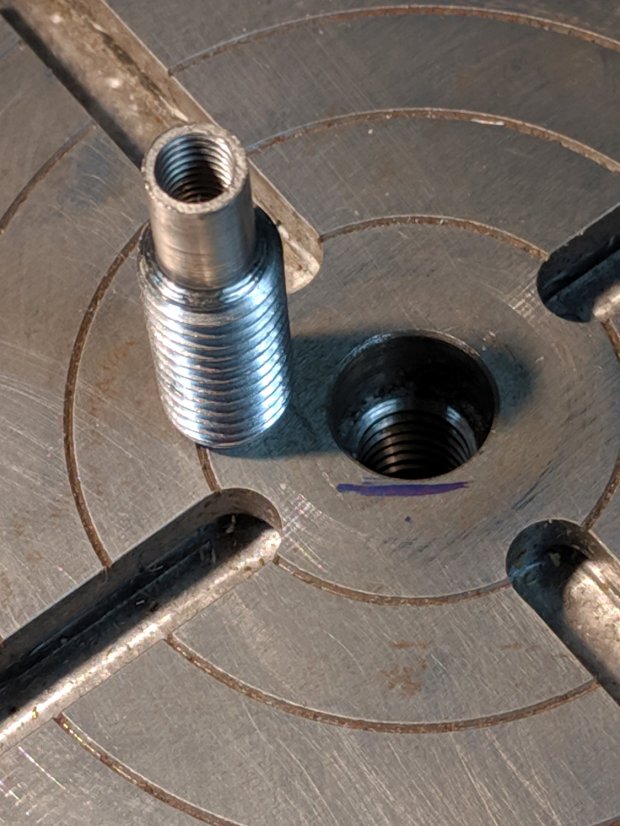
    The Sherline uses 10-32 screws, so poke a #16 drill 15 mm into the bolt to get maybe 25% thread depth (because it’s a blind hole into stainless steel for an application requiring minimal strength and I hate breaking taps), tap 10-32, clean out the hole, and call it All Good:

    CNC 3018-Pro - CD fixture milling - rotary table adapter
    CNC 3018-Pro – CD fixture milling – rotary table adapter

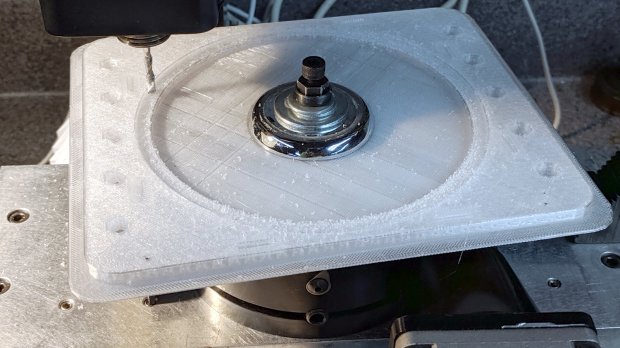
    Find the trim plate from an old faucet to reach around the central boss, stack up enough flat washers to meet the nut, snug a Sherline spherical nut + washer set (because it’s within reach), chuck up a 1/8 inch mill, and have at it:

    CNC 3018-Pro - CD fixture milling
    CNC 3018-Pro – CD fixture milling

    The fixture sits atop an aluminum plate cut to fit a smaller version of the table riser, but this requires zero fancy alignment. The 6 mm adapter centers the fixture on the rotary table and the cutter sits at a fixed radius from the center wherever it contacts the fixture rim; just spin the table and it cuts a neatly centered circle.

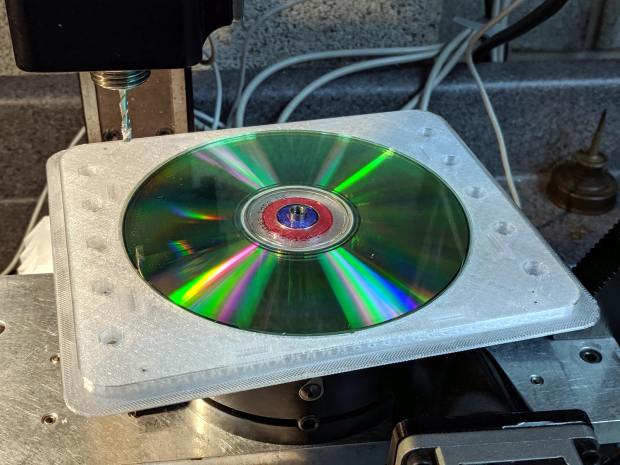
    A test fit showed the oversize discs fit perfectly:

    CNC 3018-Pro - CD fixture milling - test fit
    CNC 3018-Pro – CD fixture milling – test fit

    Bonus: a nice new adapter for the rotary table!

  • CNC 3018-Pro: Tape-Down Platter Fixture

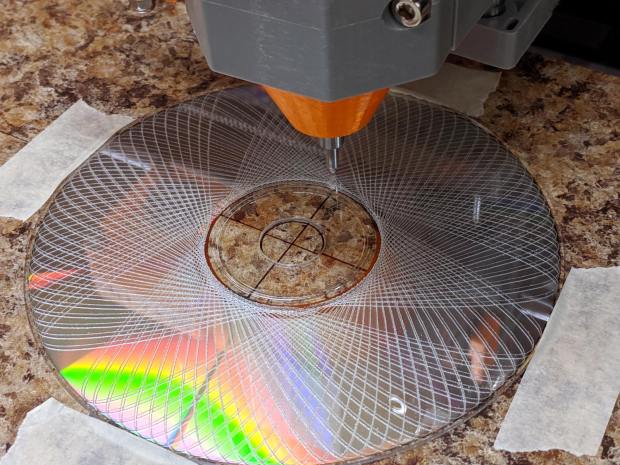
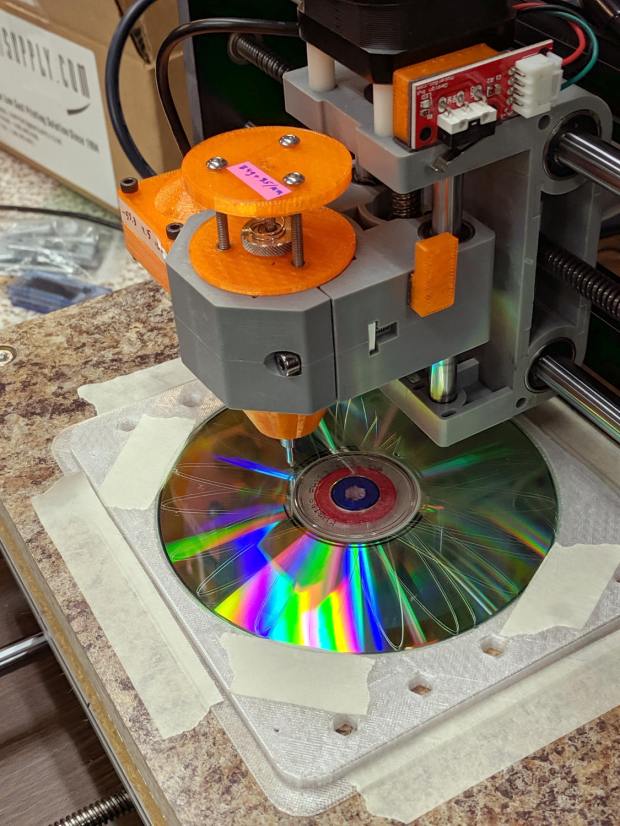
    Diamond drag engraving doesn’t put much sideways force on the platters, so taping the CD in place suffices to hold it:

    CNC 3018-Pro - CD taped to platform
    CNC 3018-Pro – CD taped to platform

    Wrapping a flange around the screw-down platter fixture provides plenty of surface area for tape:

    Platter Fixtures - CD on 3018 - tape flange
    Platter Fixtures – CD on 3018 – tape flange

    Which looks exactly as you think it would in real life:

    CNC 3018-Pro - CD fixture - taped
    CNC 3018-Pro – CD fixture – taped

    Admittedly, masking tape doesn’t look professional, but it’s low-profile, cheap and works perfectly. Blue painter’s tape for the “permanent” hold-down strips on the platform would be a colorful upgrade.

    It’s centered on the platform at the XY=0 origin in the middle of the XY travel limits, with edges aligned parallel to the axes. Homing the 3018 and moving to XY=0 puts the tool point directly over the center of the CD without any fussy alignment.

    The blue-and-red rings around the center hole assist probe camera alignment, whenever that’s necessary.

    The OpenSCAD source code as a GitHub Gist:

    // Machining fixtures for CD and hard drive platters
    // Ed Nisley KE4ZNU February … September 2016
    // 2019-08 split from tube base models
    PlatterName = "CD"; // [3.5inch,CD]
    CNCName = "3018"; // [3018,Sherline]
    TapeFlange = true; // Generate tape attachment
    PlateThick = 5.0; // [3.0,5.0,10.0,15.0]
    RecessDepth = 4.0; // [0.0,2.0,4.0]
    //- Extrusion parameters must match reality!
    /* [Hidden] */
    ThreadThick = 0.25;
    ThreadWidth = 0.40;
    HoleWindage = 0.2;
    Protrusion = 0.1; // make holes end cleanly
    inch = 25.4;
    function IntegerMultiple(Size,Unit) = Unit * ceil(Size / Unit);
    module PolyCyl(Dia,Height,ForceSides=0) { // based on nophead's polyholes
    Sides = (ForceSides != 0) ? ForceSides : (ceil(Dia) + 2);
    FixDia = Dia / cos(180/Sides);
    cylinder(d=(FixDia + HoleWindage),h=Height,$fn=Sides);
    }
    ID = 0;
    OD = 1;
    LENGTH = 2;
    //———————-
    // Dimensions
    P_NAME = 0; // platter name
    P_ID = 1; // … inner diameter
    P_OD = 2; // … outer diameter
    P_THICK = 3; // … thickness
    PlatterData = [
    ["3.5inch", 25.0, 95.0, 1.75],
    ["CD", 15.0, 120.0, 1.20],
    ];
    PlatterSides = 3*4*5; // polygon approximation
    B_NAME = 0; // machine name
    B_OC = 1; // … platform screw OC, use small integer for slot
    B_STUD = 2; // … screw OD clearance
    BaseData = [
    ["3018", [5.0, 45.0], 6.0], // slots along X axis
    ["Sherline", [1.16*inch,1.16*inch], 5.0], // tooling plate
    ];
    PlateRound = 10.0; // corner radius
    FlangeSize = [5.0,5.0,3*ThreadThick]; // all-around tape flange
    //– calculate values based on input parameters
    PI = search([PlatterName],PlatterData,1,0)[P_NAME]; // get platter index
    echo(str("Platter: ",PlatterName));
    Platter = [PlatterData[PI][P_ID],
    PlatterData[PI][P_OD],
    PlatterData[PI][P_THICK]];
    BI = search([CNCName],BaseData,1,0)[B_NAME]; // get base index
    echo(str("Machine: ",CNCName));
    AlignOC = IntegerMultiple(Platter[OD],10);
    echo(str("Alignment pip offset: ±",AlignOC/2));
    AlignSlot = [3*ThreadWidth,10.0,3*ThreadThick];
    StudClear = BaseData[BI][B_STUD]; // … clearance
    StudOC = [IntegerMultiple(AlignOC + 2*StudClear,BaseData[BI][B_OC].x), // … screw spacing
    BaseData[BI][B_OC].y];
    echo(str("Stud spacing: ",StudOC));
    NumStuds = [2,1 + 2*floor(Platter[OD] / StudOC.y)]; // holes only along ±X edges
    echo(str("Stud holes: ",NumStuds));
    BasePlate = [(20 + StudOC.x*ceil(Platter[OD] / StudOC.x)),
    (10 + AlignOC),
    PlateThick];
    echo(str("Plate: ",BasePlate));
    Flange = [BasePlate.x + 2*FlangeSize.x,BasePlate.y + 2*FlangeSize.y,FlangeSize.z];
    echo(str("Flange: ",Flange));
    //———————-
    // Drilling fixture for disk platters
    module PlatterFixture() {
    difference() {
    union() {
    hull() // basic plate shape
    for (i=[-1,1], j=[-1,1])
    translate([i*(BasePlate.x/2 – PlateRound),j*(BasePlate.y/2 – PlateRound),0])
    cylinder(r=PlateRound,h=BasePlate.z,$fn=4*4);
    if (TapeFlange)
    hull()
    for (i=[-1,1], j=[-1,1])
    translate([i*(Flange.x/2 – PlateRound),
    j*(Flange.y/2 – PlateRound),
    0])
    cylinder(r=PlateRound,h=FlangeSize.z,$fn=4*4);
    }
    for (i=[-1,0,1], j=[-1,0,1]) // origin pips
    translate([i*AlignOC/2,j*AlignOC/2,BasePlate.z – 2*ThreadThick])
    cylinder(d=4*ThreadWidth,h=1,$fn=6);
    for (i=[-1,1], j=[-1,1]) { // alignment slots
    translate([i*(AlignOC + AlignSlot.x)/2,
    j*Platter[OD]/4,
    (BasePlate.z – AlignSlot.z/2 + Protrusion/2)])
    cube(AlignSlot + [0,0,Protrusion],center=true);
    translate([i*Platter[OD]/4,
    j*(AlignOC + AlignSlot.x)/2,
    (BasePlate.z – AlignSlot.z/2 + Protrusion/2)])
    rotate(90)
    cube(AlignSlot + [0,0,Protrusion],center=true);
    }
    for (i=[-1,1], j=[-floor(NumStuds.y/2):floor(NumStuds.y/2)]) // mounting stud holes
    translate([i*StudOC.x/2,j*StudOC.y/2,-Protrusion])
    rotate(180/6)
    PolyCyl(StudClear,BasePlate.z + 2*Protrusion,6);
    translate([0,0,-Protrusion]) // center clamp hole
    rotate(180/6)
    PolyCyl(StudClear,BasePlate.z + 2*Protrusion,6);
    translate([0,0,BasePlate.z – Platter[LENGTH]]) // disk locating recess
    rotate(180/PlatterSides)
    linear_extrude(height=(Platter[LENGTH] + Protrusion),convexity=2)
    difference() {
    circle(d=(Platter[OD] + 2*HoleWindage),$fn=PlatterSides);
    circle(d=Platter[ID] – HoleWindage,$fn=PlatterSides);
    }
    translate([0,0,BasePlate.z – RecessDepth]) // drilling recess
    rotate(180/PlatterSides)
    linear_extrude(height=(RecessDepth + Protrusion),convexity=2)
    difference() {
    circle(d=(Platter[OD] – 10),$fn=PlatterSides);
    circle(d=(Platter[ID] + 10),$fn=PlatterSides);
    }
    }
    }
    //———————-
    // Build it
    PlatterFixture();

  • DRV8825 Stepper Driver: Adding a Home Output

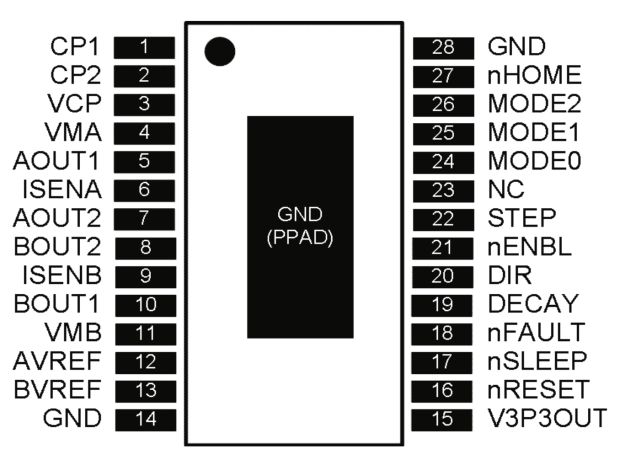
    The DRV8825 stepper driver chip has a -Home output going active during the (micro)step corresponding to 45°, where both winding currents equal 71% of the peak value:

    DRV8825 pinout
    DRV8825 pinout

    Unfortunately, pin 27 is another unconnected pin on the DRV8825 PCB, without even a hint of a pad for E-Z soldering.

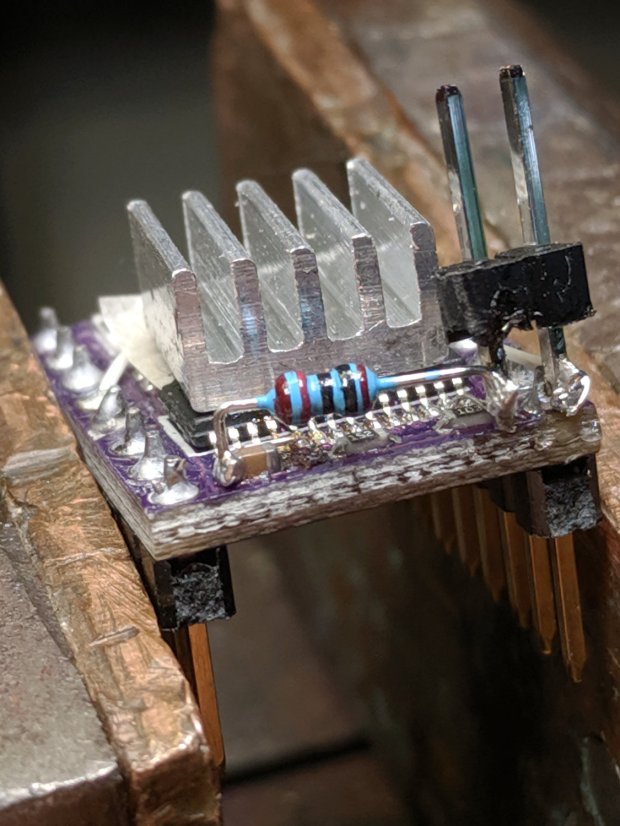
    It’s also an open-drain output in need of a pullup, so I globbed on a 1/8 W 10 kΩ resistor in addition to the tiny wire from the IC pad to the left header pin:

    DRV8825 PCB - Home signal output
    DRV8825 PCB – Home signal output

    Read it from the right: brown black black red gold. Even in person, the colors don’t look like that, not even a little bit: always measure before installation!

    The right header pin is firmly soldered to the PCB ground pin I also used for the 1:8 microstep hack. The whole affair received a generous layer of hot melt glue in the hope of some mechanical stabilization, although hanging a scope probe off those pins can’t possibly end well.

    The general idea is to provide a scope sync output independent of the motor speed, so I can look at the current waveforms:

    3018 X - Fast - 12V - 140mm-min 1A-div
    3018 X – Fast – 12V – 140mm-min 1A-div

    The alert reader will note the pulse occurs on the down-going side of the waveforms, which means I have the current probes clipped on backwards or, equivalently, on the wrong wire. The point is to get a stable sync, so it’s all good no matter which way the current goes.