The Smell of Molten Projects in the Morning

Ed Nisley's Blog: Shop notes, electronics, firmware, machinery, 3D printing, laser cuttery, and curiosities. Contents: 100% human thinking, 0% AI slop.

Author: Ed

  • Laser Imaging: Glass vs. Titanium Dioxide

    Laser Imaging: Glass vs. Titanium Dioxide

    A stack of glass shelves has long awaited this fate:

    Glass engraving - front overview
    Glass engraving – front overview

    As with the paving tile, the image came from a grayscale photo run through a halftone filter. The leftmost four images were burned through a titanium dioxide layer poured / spread over the glass surface. The rightmost two were burned directly into the glass, serving as a reminder that glass absorbs infrared radiation. The power levels varied from 15% to 60%, although I wasn’t taking notes, with a 400 mm/s scan speed.

    It looks much the same when viewed from the rear:

    Glass engraving - back overview
    Glass engraving – back overview

    Although the process is often described as blasting chips out of the glass, there’s definitely melting going on. A closer look at the middle image in the top row, with darker gray patches from titanium fused into the glass:

    Glass engraving - partial TiO2 fusion
    Glass engraving – partial TiO2 fusion

    Some pits have only a tiny dot of titanium, almost invisible against the glare from the glass around the rim:

    Glass engraving - plain detail
    Glass engraving – plain detail

    A very close look shows damaged glass, with titanium in some of the pits:

    Glass engraving - TiO2 detail
    Glass engraving – TiO2 detail

    Higher laser power fuses more titanium into contiguous areas that appear much darker, as in the middle bottom image:

    Glass engraving - full TiO2 fusion
    Glass engraving – full TiO2 fusion

    This is loosely based on commentary in two LightBurn forum threads about variations on what’s known as the Norton White Tile Method, with more examples on the V1 Engineering forum. Just applying TiO₂ seems less awful than various paints / primers / whatever, with the additional benefit of eliminating the overhead of spraying / cleaning up.

    The secret seems to be having enough power to chip the glass and decompose the TiO₂ into darker titanium, while not blasting the result entirely off the surface. Fairly obviously, this will require more experimentation than I’ve done so far.

    Minimal assist air protects the laser focus lens from the debris and plenty of ventilation air carries the abrasive result out of the cabinet.

    Not something I foresee doing a lot of, but at least I know what happens.

  • Laser Imaging: Paving Tile vs. Titanium Dioxide

    Laser Imaging: Paving Tile vs. Titanium Dioxide

    Dump enough titanium dioxide powder into denatured alcohol to make a thin slurry, bloosh it onto a reasonably clean paving / floor / whatever tile, spread it out with a chip brush, let the alcohol evaporate, then try a few images with various laser power settings scanned at 400 mm/s:

    Paving tile - TiO2 prep and engrave
    Paving tile – TiO2 prep and engrave

    Wash off the TiO₂ powder to leave the fused titanium behind:

    Paving tile - TiO2 images
    Paving tile – TiO2 images

    A closer look at the middle eye:

    Paving tile - TiO2 images - detail
    Paving tile – TiO2 images – detail

    The small granules spread across the surface are glass chips that probably improve traction, so this must have been a paving or floor tile intended for wet areas. A small stack of whole tiles and fragments Came With The House™, they’ve come in handy over the years, and that’s all we know.

    The darkest image was at 40% power (maybe 24 W) and the lightest at 15%, although my notes are a bit fuzzy, and it started as a grayscale image dithered into on/off dots.

    Obviously, my imaging hand is weak, but it does verify that TiO₂ powder will produce some sort of image without all the bother and solvents associated with paints / primers and the removal thereof.

  • Homage Tektronix Circuit Computer: Laser-Engraved Hairline Improvement

    Homage Tektronix Circuit Computer: Laser-Engraved Hairline Improvement

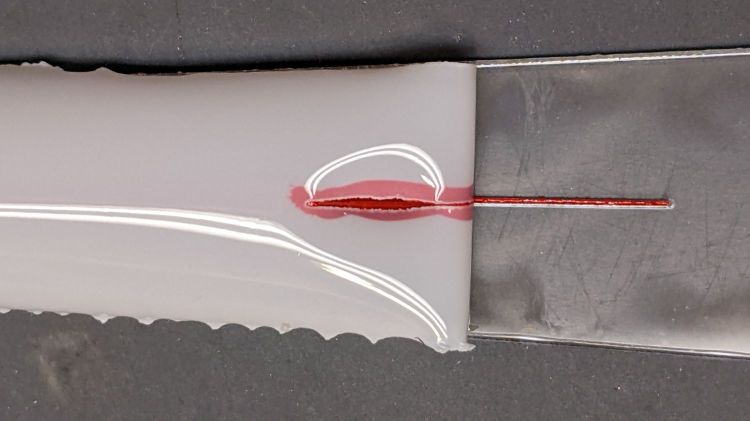
    Entirely by accident, I discovered that engraving a hairline with LightBurn’s Dot Mode using 1 ms burns and 0.1 mm spacing produces a continuous trench, rather than the series of dots at 0.25 mm:

    Tek CC - Cursor Hairline - 30pct 100u - oblique view
    Tek CC – Cursor Hairline – 30pct 100u – oblique view

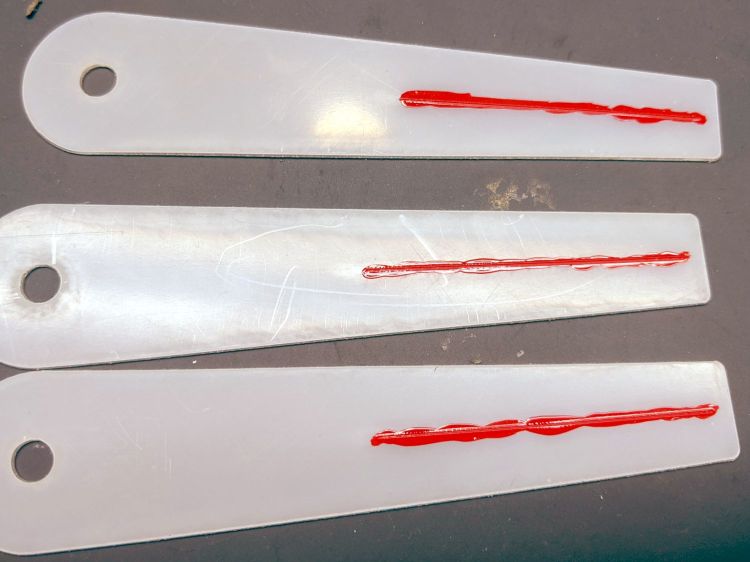
    The left is at 20% power (12-ish W) and the right is at 30% (18-ish W), both filled with Pro Sharpie red ink.

    The V-shaped groove is even more obvious when seen end-on:

    Tek CC - Cursor Hairline - 30pct 100u - end view
    Tek CC – Cursor Hairline – 30pct 100u – end view

    In both cases, the travel speed seems to be about 10 mm/s regardless of the speed set in the cut layer parameters. The higher power level produces a slightly wider cut that doesn’t seem deeper, which I cannot explain.

    Filled with red lacquer crayon, the hairline looks absolutely gorgeous:

    Tek CC - Cursor Hairline - 30pct 100u - in place
    Tek CC – Cursor Hairline – 30pct 100u – in place

    Engraving the PETG sheet with the protective film in place produces a neat cut with the film edges fused to the plastic.

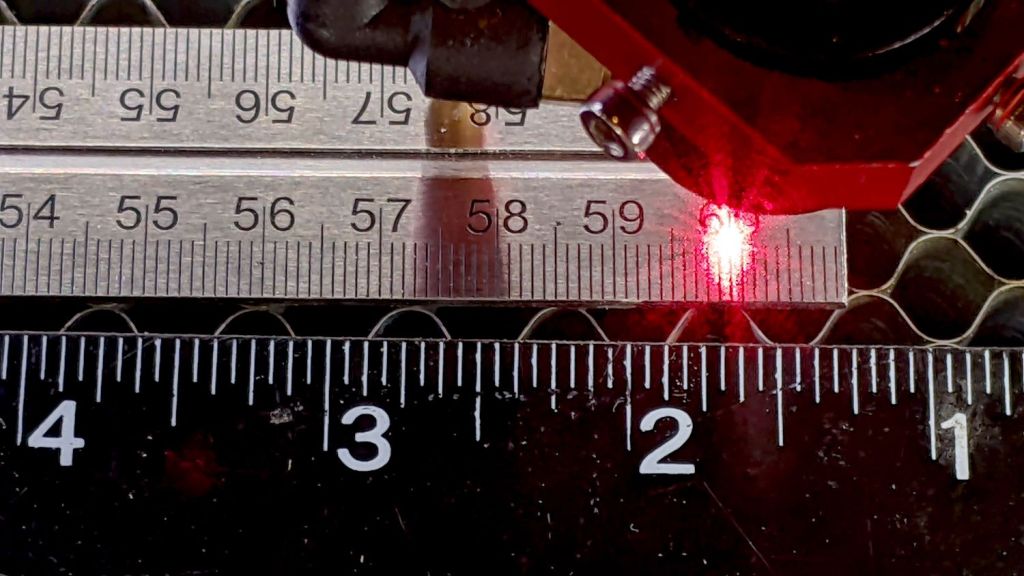
    Cutting the outline and pivot hole in the same operation ensures everything remains perfectly aligned:

    Tek CC - Cursor Laser Cutting
    Tek CC – Cursor Laser Cutting

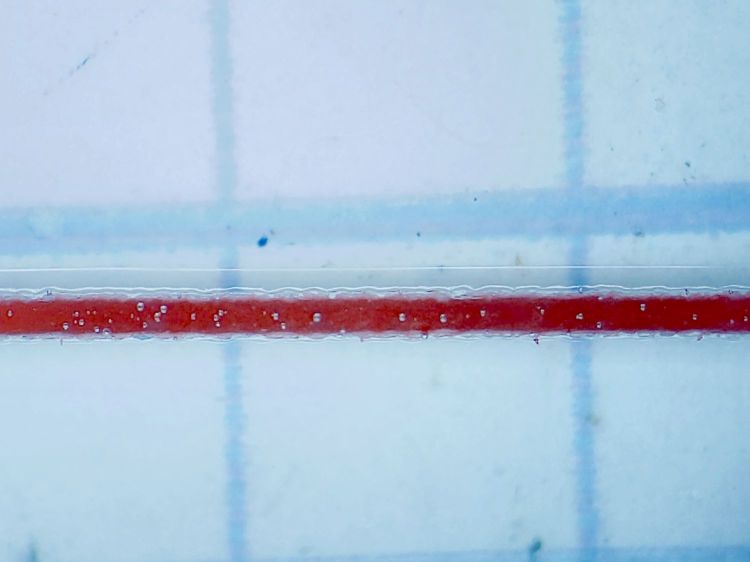
    Scribble red crayon over the film, make sure the trench is completely filled, peel the film off with some attention to not smearing the pigment, and it’s about as good a hairline as you (well, I) could ask for:

    Tek CC - Cursor Hairline - 30pct 100u - Width
    Tek CC – Cursor Hairline – 30pct 100u – Width

    The pigment in the trench is about 0.2 mm wide, with slight heat distortion along each side, and I’ll call it Plenty Good Enough.

    Totally did not expect this!

    Getting a good-looking hairline on a good-looking cursor turns out to be a major challenge, because there’s nowhere to hide the blunders. A few of the many dead ends along the way shows what’s involved:

    https://softsolder.com/2020/05/06/tek-circuit-computer-cursor-hairline-scraping/

    https://softsolder.com/2021/01/26/tek-circuit-computer-cursor-hairline/

    https://softsolder.com/2021/02/16/tek-circuit-computer-sawed-hairline-fixture/

    https://softsolder.com/2021/04/13/tek-cc-milled-cursor-vs-speed-vs-coolant/

    https://softsolder.com/2021/04/15/tek-cc-milled-cursor-mvp/

    Plenty of Quality Shop Time™ along the way, though …

  • Paracord Hot Knife

    Paracord Hot Knife

    An upcoming project calls for cutting dozens of lengths from a spool of 550 (pound tensile strength) all-nylon paracord, which means I must also heat-seal the ends. Cold-cutting paracord always produces wildly fraying ends, so I got primal on an old soldering iron tip:

    Paracord cutting - flattened soldering iron tip
    Paracord cutting – flattened soldering iron tip

    Bashed into a flattish blade, it does a Good Enough job of hot-cutting paracord and sealing the end in one operation:

    Paracord cutting - results
    Paracord cutting – results

    Setting the iron to 425 °C = 800 °F quickly produces reasonably clean and thoroughly sealed cut ends.

    Obviously, I need more practice.

    Yes, I tried laser cutting the paracord. Yes, it works great, makes a perfectly flat cut, and heat-seals both ends, but it also makes no sense whatsoever without a fixture holding a dozen or so premeasured lengths in a straight line. No, I’m not doing that.

  • OMTech 60 W Laser: Kerf Sizing

    OMTech 60 W Laser: Kerf Sizing

    The nominal 5.5 mm OD of the eyelet turns out to be 5.45 mm and fits neatly into a nominal 5.3 mm hole laser-cut into either PETG or laminated paper:

    Laser cutter - hole size test
    Laser cutter – hole size test

    The holes are 5.1 mm on one end and increase by 0.1 mm.

    The eyelet fits loosely into the 5.4 mm hole, snugly into 5.3 mm, and only into the 5.2 mm paper hole.

    So the nominal 5.3 mm hole is really 5.45 mm, which means the beam adds 0.15 mm to the hole diameter, about 0.08 mm to each side.

    Given that the eyelet isn’t quite round and the holes aren’t exactly glass-smooth, figuring a 0.2 mm kerf seems both reasonable and easier to remember.

    Obviously, the results will differ depending on what’s being cut, how thick it is, and probably the phase of the moon.

    Those are the easiest holes I’ve ever made …

  • Kenmore Gas Range Control: Solder Joint Failure

    Kenmore Gas Range Control: Solder Joint Failure

    The entire control panel of our longsuffering Kenmore gas range became increasingly erratic, eventually reaching the condition where touching the upper right corner would blank the display, touching the lower right corner would restore it, and gently touching the temperature knob might elicit an F2 or F4 error code on the display. Given the symptoms, the old adage “It’s always the connectors” sprang unbidden to mind; I was pretty sure the oven temperature sensor had nothing to do with it.

    Pulling the thing apart reveals the PCB across the back of the control panel:

    Kenmore oven control - PCB overview
    Kenmore oven control – PCB overview

    Note that all of the external connections arrive on the white power supply PCB attached over the main PCB.

    A closer look shows one of the two groups of wire interconnects between the two boards:

    Kenmore gas range - rear PCB
    Kenmore gas range – rear PCB

    There’s a similar group hidden behind the hulking transformer.

    Removing the two obvious screws and easing the PCB out of the red plastic latches made the problem instantly obvious:

    Kenmore gas range - failed solder joint
    Kenmore gas range – failed solder joint

    Yeah, that broken solder joint would definitely be touch-sensitive!

    The solder joints in the other group also show signs of fatigue:

    Kenmore gas range - broken solder joints
    Kenmore gas range – broken solder joints

    It’s of interest only the upper joints on the power supply PCB have fractured. Perhaps those ends of the wires were hand-soldered separately from the other ends in the main PCB?

    Resoldering both ends of all the wires restored perfect operation:

    Kenmore gas range - resoldered joints
    Kenmore gas range – resoldered joints

    For the record, the Kapton tape I laid over the entire control panel 2-½ years ago continues to protect the slightly cracked membrane over the pushbutton switches:

    Kenmore oven control - Kapton tape cover
    Kenmore oven control – Kapton tape cover

    Gotta love yet another zero-dollar appliance repair …

  • Laser-cut Pole Bean Ties

    Laser-cut Pole Bean Ties

    This is the season for erecting the structures upon which the pole beans will climb:

    Garden Bean Poles - overview
    Garden Bean Poles – overview

    They’re made from a dozen small trees and branches of larger trees harvested around the yard. They last for a few years, just long enough for the next crop to reach useful lengths.

    We lash them together with fabric strips:

    Garden Bean Poles - joint detail
    Garden Bean Poles – joint detail

    My knot hand is weak, but seems sufficient to the task.

    Mary formerly tore the strips from old jeans / pants / whatever, which required considerable effort, produced ragged edges, and filled the air with fabric dust. This year, I proposed an alternative:

    Garden Bean Poles - laser cutting ties
    Garden Bean Poles – laser cutting ties

    The weird thing in the middle is a reflection of an overhead can light in the laser cabinet’s polycarb lid.

    From starting the LightBurn layout to presenting the strips for final inspection required the better part of ten minutes. I scissors-cut along the main seams to get single fabric layers, with everything above the crotch seam wadded off the platform to the left.

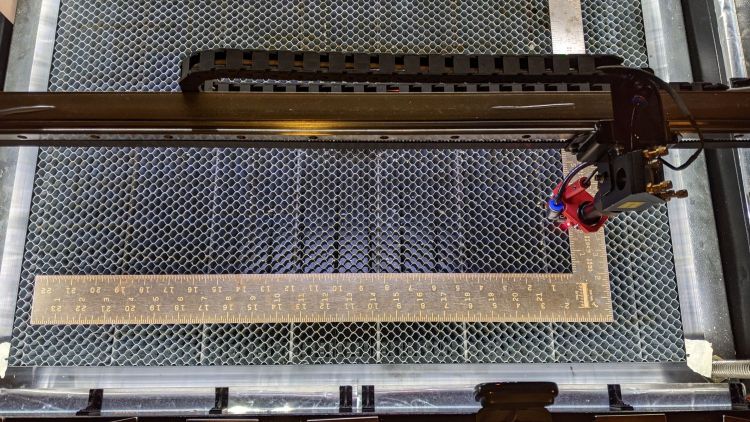
    As with my shop raglets, the layout depends on LightBurn’s overhead camera view to align the cuts with the fabric on the platform:

    Bean Pole Ties - LightBurn layout
    Bean Pole Ties – LightBurn layout

    It’d be easier to see with lighter fabric, but that’s what came to hand in the scrap box and the beans won’t care. We do not anticipate complaints about the odor of charred fabric when they reach the top of the poles, either.

    The strips must align with the fabric’s grain to put the warp threads along their length, which makes the main side seam parallel to the X-axis. Even I can handle that layout!

    Yes, the strips have rounded corners and, no, it doesn’t matter.