Ed Nisley's Blog: Shop notes, electronics, firmware, machinery, 3D printing, laser cuttery, and curiosities. Contents: 100% human thinking, 0% AI slop.
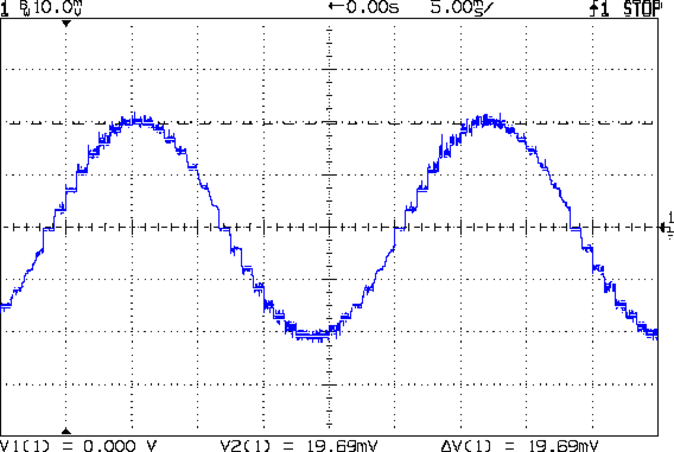
As you saw earlier the low-speed waveform looked reasonably good, although the HB-415M driver produces only 71% of its rated current (so it’s actually 1 A peak, not the 1.5 A in the caption):
HB-415M 8-step 1.5A 20V
The driver runs in 1/8 microstep mode, which means 1 revolution = 8 × 200 step = 1600 steps. Each cycle of that stepped sine wave has 32 microsteps = 4 full steps/cycle × 8 microsteps. One cycle is about 27 ms, so 1 step = 840 µs → 1200 step/s → 0.74 rev/s → 44 rpm. The Thing-O-Matic runs at 47 step/mm → 34 mm/rev, so this speed corresponds to travel at 25 mm/s, roughly the usual printing pace.
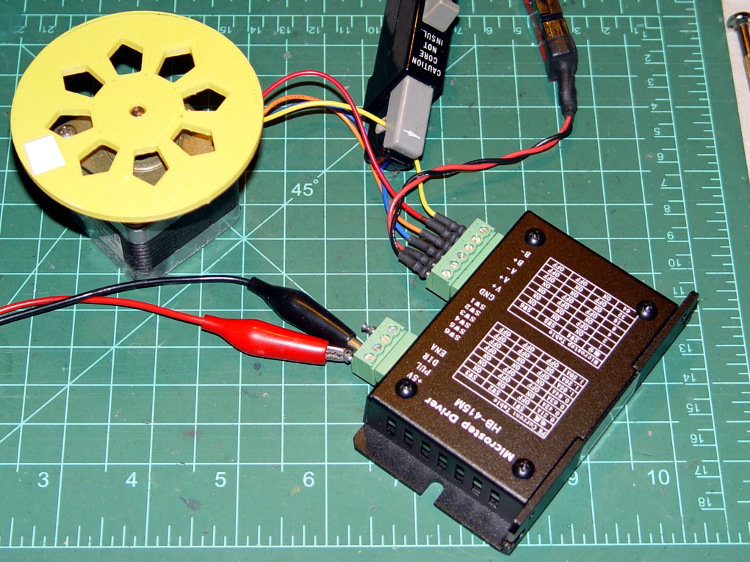
Admittedly, that hairball on the bench isn’t a realistic arrangement, because the motor runs with no load. On the other paw, assuming you’ve done a good job eliminating mechanical binding, then it’s probably pretty close to what you’d see during constant-speed travel.
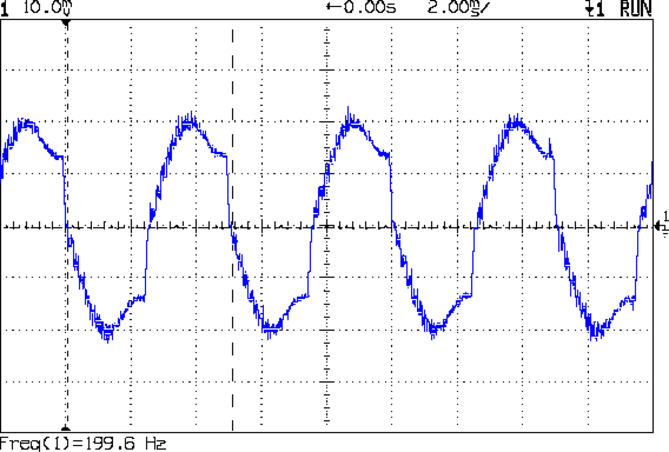
Cranking the pulse generator to 6400 step/s = 133 mm/s produces this waveform:
HB-415M 1A 8step 24V
The power supply was 24 V, but there was no visible difference at 20 V. The driver evidently can’t control the winding current on the downward side of the waveform. Adding some frictional torque by grabbing the yellow interrupter wheel improved the situation, but not by much.
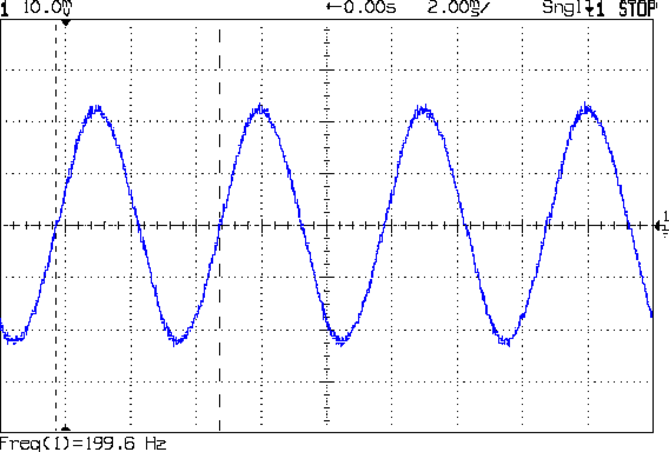
A box of 2M542 drivers just arrived from a nominally reputable supplier, although they were actually labeled M542ES. Under the same conditions, they produce this waveform:
M542ES 1A 8step 24V
So there’s something to be said for larger drivers; the HB-415M drivers were operating at their upper limit and the M542ES at their lower limit, both producing close to 1 A peak.
I’ve always wondered what the LinuxCNC HAL pin names would be for an ordinary mouse, particularly nowadays when an Arduino Leonardo can become a USB HID gadget without much effort at all. If one had a Leonardo and l337 programming skillz, one might receive far more interesting data than just fast-twitch muscle movement…
Bus 005 Device 001: ID 1d6b:0001 Linux Foundation 1.1 root hub
Bus 004 Device 006: ID 06f2:0011 Emine Technology Co. KVM Switch Keyboard
Bus 004 Device 005: ID 046d:c401 Logitech, Inc. TrackMan Marble Wheel
Bus 004 Device 004: ID 04d9:1203 Holtek Semiconductor, Inc. MC Industries Keyboard
Bus 004 Device 003: ID 046d:c216 Logitech, Inc. Dual Action Gamepad
Bus 004 Device 002: ID 0451:2046 Texas Instruments, Inc. TUSB2046 Hub
Bus 004 Device 001: ID 1d6b:0001 Linux Foundation 1.1 root hub
Bus 003 Device 001: ID 1d6b:0001 Linux Foundation 1.1 root hub
Bus 002 Device 002: ID 046d:c077 Logitech, Inc.
Bus 002 Device 001: ID 1d6b:0001 Linux Foundation 1.1 root hub
Bus 001 Device 001: ID 1d6b:0002 Linux Foundation 2.0 root hub
Fire up halrun, load hal_input, and dump the pins:
halrun
halcmd: loadusr -W hal_input -KRAL Optical
halcmd: show all
Loaded HAL Components:
ID      Type  Name                                      PID   State
     5  User  hal_input                                  1693 ready
     3  User  halcmd1692                                 1692 ready

Component Pins:
Owner   Type  Dir         Value  Name
     5  bit   OUT         FALSE  input.0.btn-back
     5  bit   OUT          TRUE  input.0.btn-back-not
     5  bit   OUT         FALSE  input.0.btn-extra
     5  bit   OUT          TRUE  input.0.btn-extra-not
     5  bit   OUT         FALSE  input.0.btn-forward
     5  bit   OUT          TRUE  input.0.btn-forward-not
     5  bit   OUT         FALSE  input.0.btn-middle
     5  bit   OUT          TRUE  input.0.btn-middle-not
     5  bit   OUT         FALSE  input.0.btn-mouse
     5  bit   OUT          TRUE  input.0.btn-mouse-not
     5  bit   OUT         FALSE  input.0.btn-right
     5  bit   OUT          TRUE  input.0.btn-right-not
     5  bit   OUT         FALSE  input.0.btn-side
     5  bit   OUT          TRUE  input.0.btn-side-not
     5  bit   OUT         FALSE  input.0.btn-task
     5  bit   OUT          TRUE  input.0.btn-task-not
     5  s32   OUT             0  input.0.rel-hwheel-counts
     5  float OUT             0  input.0.rel-hwheel-position
     5  bit   IN          FALSE  input.0.rel-hwheel-reset
     5  float IN              1  input.0.rel-hwheel-scale
     5  s32   OUT             0  input.0.rel-wheel-counts
     5  float OUT             0  input.0.rel-wheel-position
     5  bit   IN          FALSE  input.0.rel-wheel-reset
     5  float IN              1  input.0.rel-wheel-scale
     5  s32   OUT             0  input.0.rel-x-counts
     5  float OUT             0  input.0.rel-x-position
     5  bit   IN          FALSE  input.0.rel-x-reset
     5  float IN              1  input.0.rel-x-scale
     5  s32   OUT             0  input.0.rel-y-counts
     5  float OUT             0  input.0.rel-y-position
     5  bit   IN          FALSE  input.0.rel-y-reset
     5  float IN              1  input.0.rel-y-scale
... snippage ...
A wannabe spammer inadvertently sent me a nice comment-spam template:
{{You must|You need to|You have to|You should} {take advantage of|make the most of|benefit from|take full advantage of} {all the|all of the|each of the|every one of the} software advancements that {happen to be|are actually|are|are generally} {a successful|an effective|an excellent|a prosperous} {Internet marketer|Online marketer|Internet entrepreneur|Affiliate marketer}. {If your|In case your|Should your|When your} work {begins to|starts to|actually starts to} suffer, {the competition|your competition|competition|your competitors} could {leave you|make you|create} {in the|within the|inside the|from the} dust. Show {that you are|that you will be|that you are currently|you are} always {on the|around the|in the|about the} {cutting edge|innovative|leading edge|really advanced}, {and they will|and they can} {learn to|learn how to|figure out how to|discover how to} trust {you and your|both you and your|you and the|your} products.
Multiplying the number of choices together gives a tidy 4.8×10⁹ different comments, each one heartbreakingly close to making sense.
The hack I added to the lightdm startup script occasionally causes it to hang, which suggests a timing problem. The result leaves the default text-mode login screen active on VT1, after which I can log in and issue sudo lightdm start to produce the usual GUI screen. Using startx doesn’t (seem to) start the display manager, resulting in all manner of weird behavior.
start on ((filesystem
           and runlevel [!06]
           and started dbus
           and (drm-device-added card0 PRIMARY_DEVICE_FOR_DISPLAY=1
                or stopped udev-fallback-graphics)
           and mounted MOUNTPOINT=/mnt/bulkdata)
          or runlevel PREVLEVEL=S)
According to the timing diagram in section 10.1.8, the filesystem event should happen after all the remote filesystems have been mounted, which seems like that stanza might produce a race condition. So just waiting for the filesystem event should suffice, but it doesn’t; that’s why I had to add the mounted event.
According to the example in section 11.14, that stanza should probably look like:
start on ((filesystem
           and (runlevel [!06]
           and (started dbus
           and (drm-device-added card0 PRIMARY_DEVICE_FOR_DISPLAY=1
                or stopped udev-fallback-graphics))))
          or runlevel PREVLEVEL=S)
The additional parentheses around successive conditions seem to serialize them, so that they need not all occur at the same time.
At least I think that’s how it should work…
Unfortunately, it doesn’t. The good news is that it’s converted the intermittent failure into a hard fault, which is generally a step in the right direction.
Changing the stanza to:
#start on ((filesystem
start on ((mounted MOUNTPOINT=/mnt/bulkdata
           and runlevel [!06]
           and started dbus
           and (drm-device-added card0 PRIMARY_DEVICE_FOR_DISPLAY=1
                or stopped udev-fallback-graphics))
#           and mounted MOUNTPOINT=/mnt/bulkdata))
          or runlevel PREVLEVEL=S)
… also fails hard.
At this point, I have no idea what to do, so I’ve restored the original stanza.
More hal-config.lbr tweakage produced enough HAL blocks to completely define the Sherline CNC mill’s HAL connections, all wired up in a multi-page schematic (Eagle-LinuxCNC-Sherline.zip.odt) that completely replaces all the disparate *.hal files I’d been using, plus a new iteration of the hal-write-2.5.ulp Eagle-to-HAL conversion script.
The first sheet (clicky for more dots) defines the manually configured userspace and realtime modules:
Sherline Schematic – 1
That sheet has three types of Eagle devices:
Generalized LoadRT – devices like trivkins that require only a loadrt line
Dedicated LoadRT – devices like motion that require functions connected to a realtime thread
Generalized LoadUsr – devices like hal_input with a HAL device, but no function pins
The device’s NAME field contains either the module name (for the specialized devices with functions) or a generic MODULE for everything else, preceded by an optional index that imposes an ordering on the output lines. The device’s VALUE field contains the text that will become the loadrt or loadusr line in the HAL file. Trailing underscores act as separators, but are discarded by the conversion script.
The immensely long line is the VALUE field that plugs a bunch of variables from the Sherline.ini file into the motion controller.
The conversion script doesn’t do anything special for those devices, other than transfer the VALUE field to the HAL file. Ordinary HAL devices, the ones with functions that don’t require any special setup, must appear in the conversion script’s list of device names, so that it can recognize them and deal with their connections.
Next, the parallel port configuration, which uses the D525’s system board hardware:
Sherline Schematic – 2
The stepconf configuration utility buries the parallel port configuration values in the default HAL file as magic numbers. I moved them to a new stanza in the INI file, although the syntax may not be robust enough to support multiple cards, ports, and configurations. This, however, works for now:
That LOGIC block is new and serves as an AND gate that produces a combined enable signal for the parallel port. The stepconf utility uses the X axis enable signal, but, seeing as how the Sherline controller doesn’t use the result, none of that matters on my system.
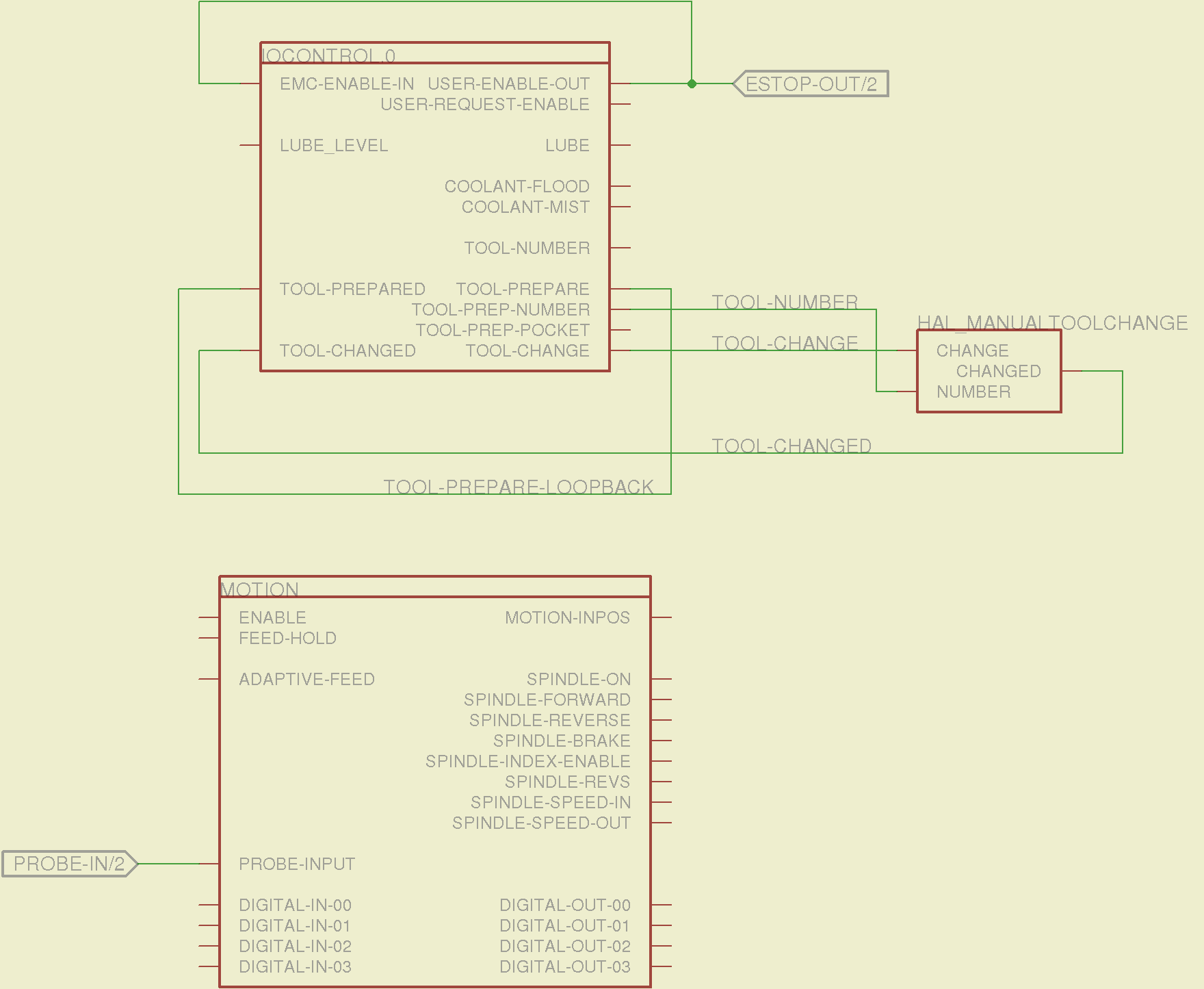
The tool height probe and manual tool change wiring:
Sherline Schematic – 3
I’m not convinced the Emergency Stop polarity is correct, but it matches what was in the original HAL file. As before, the Sherline driver box ignores that output, so none of that matters right now.
Four very similar pages define the XYZA step-and-direction generators. This is the X axis driver:
Sherline Schematic – 4
You can imagine what the next three pages for the YZA logic look like, right? There are also a few blank pages in the schematic, so the numbers jump abruptly.
The magic part of this is having Eagle manage all the tedious renumbering and counting. If you remember to adjust the name of the first module from, say, AXIS.1 to AXIS.0, then the rest get the proper numbers as you go along.
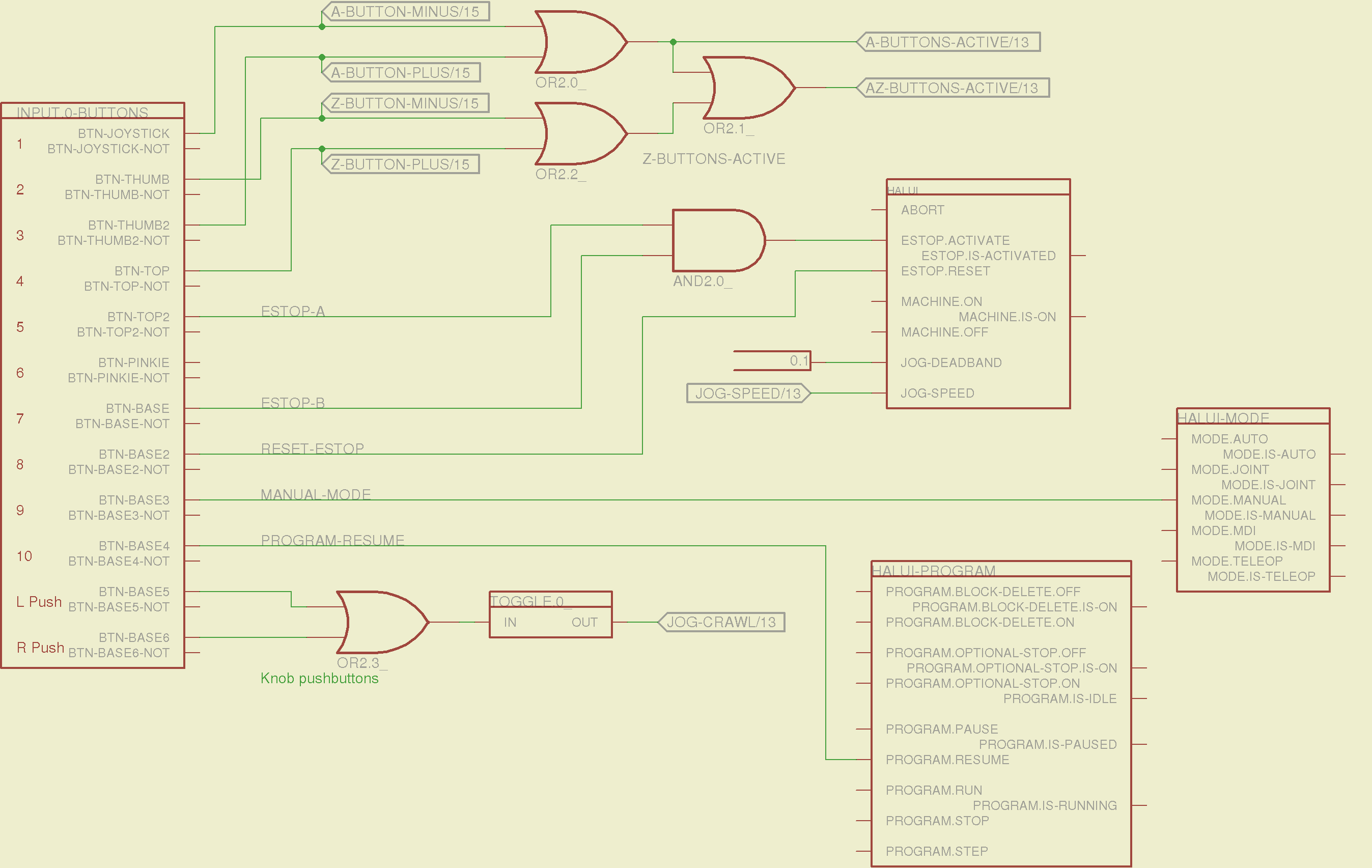
The remainder of the schematic implements the Joggy Thing’s logic, much as described there. I discovered, quite the hard way, that copy-and-pasting an entire schematic from elsewhere does horrible things to the device numbering, but I’m not sure how to combine two schematics to limit the damage. In any event, manually adjusting a few pages wasn’t the worst thing I’ve ever had to do; starting with a unified schematic should eliminate that task in the future.
The miscellaneous buttons:
Sherline Schematic – 11
The joystick and hat values:
Sherline Schematic – 12
The joystick deadband logic now uses the (new with HAL 2.5, I think) input.n.abs-x-flat pins, which eliminated a tangle of window comparator logic.
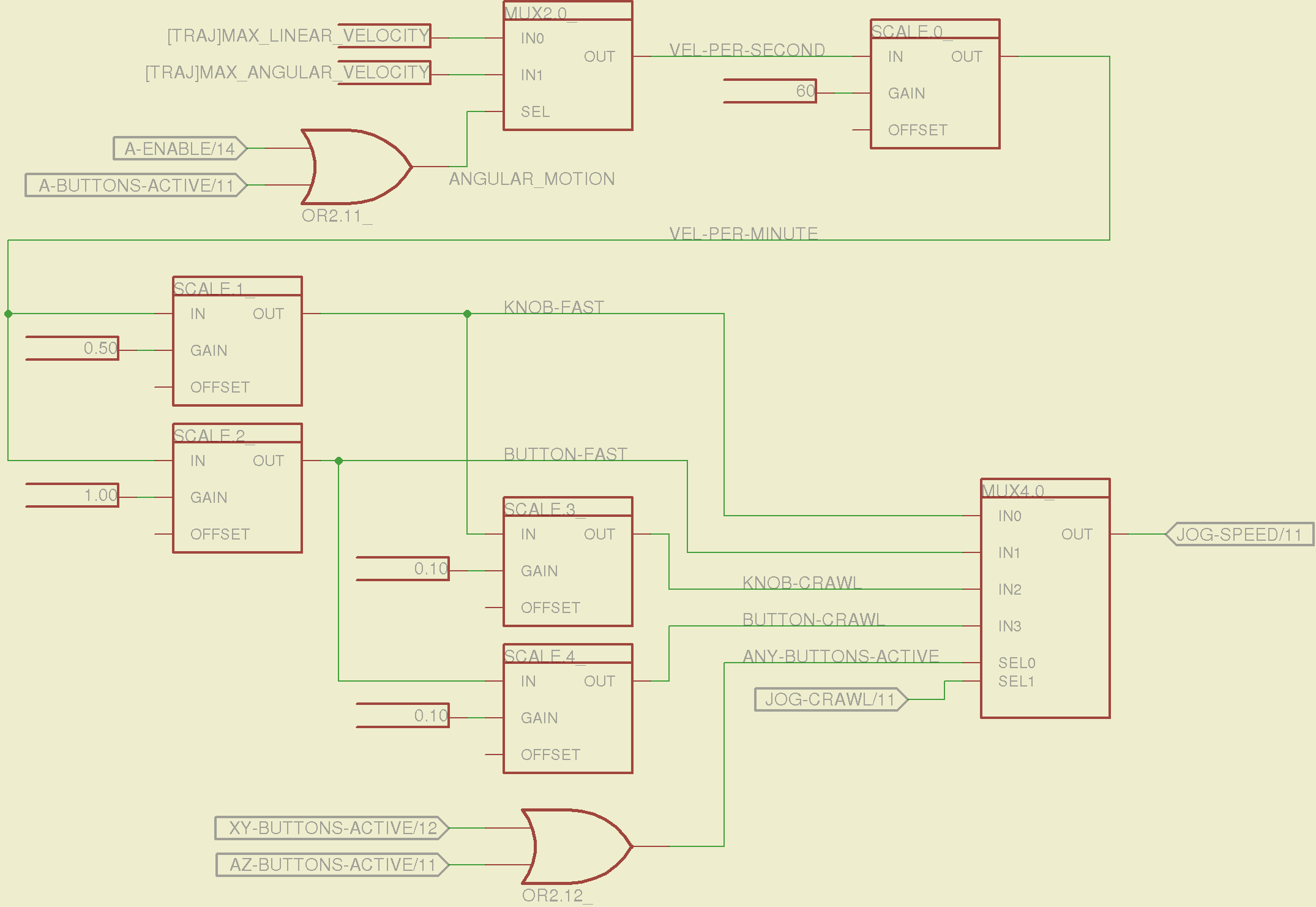
The jog speed adjustment logic that sets the fast and crawl speeds:
Sherline Schematic – 13
I should probably put the speed ratios in the INI file, but that’s in the nature of fine tuning.
The lockout logic that remembers which axis started moving first on a given joystick and locks out the other axis, which greatly simplifies jogging up to an edge without bashing into something else:
Sherline Schematic – 14
Combine all those signals into values that actually tell HAL to jog the axes:
Sherline Schematic – 15
The last page connects all the realtime function pins to the appropriate threads:
Sherline Schematic – 16
The LinuxCNC documentation diverges slightly from the implementation, but a few iterations resolved all the conflicts and had the additional benefit that I had to carefully think through what was actually going on.
A deep and sincere tip o’ the cycling helmet to the folks making LinuxCNC happen!
Although the Sherline mill doesn’t have more than a few minutes of power-on time with the new HAL file, the Joggy Thing behaves as it used to and the axes move correctly, so I think the schematic came out pretty close to the original HAL file.
The next step: draw a new schematic to bring up and exercise a different set of steppers…
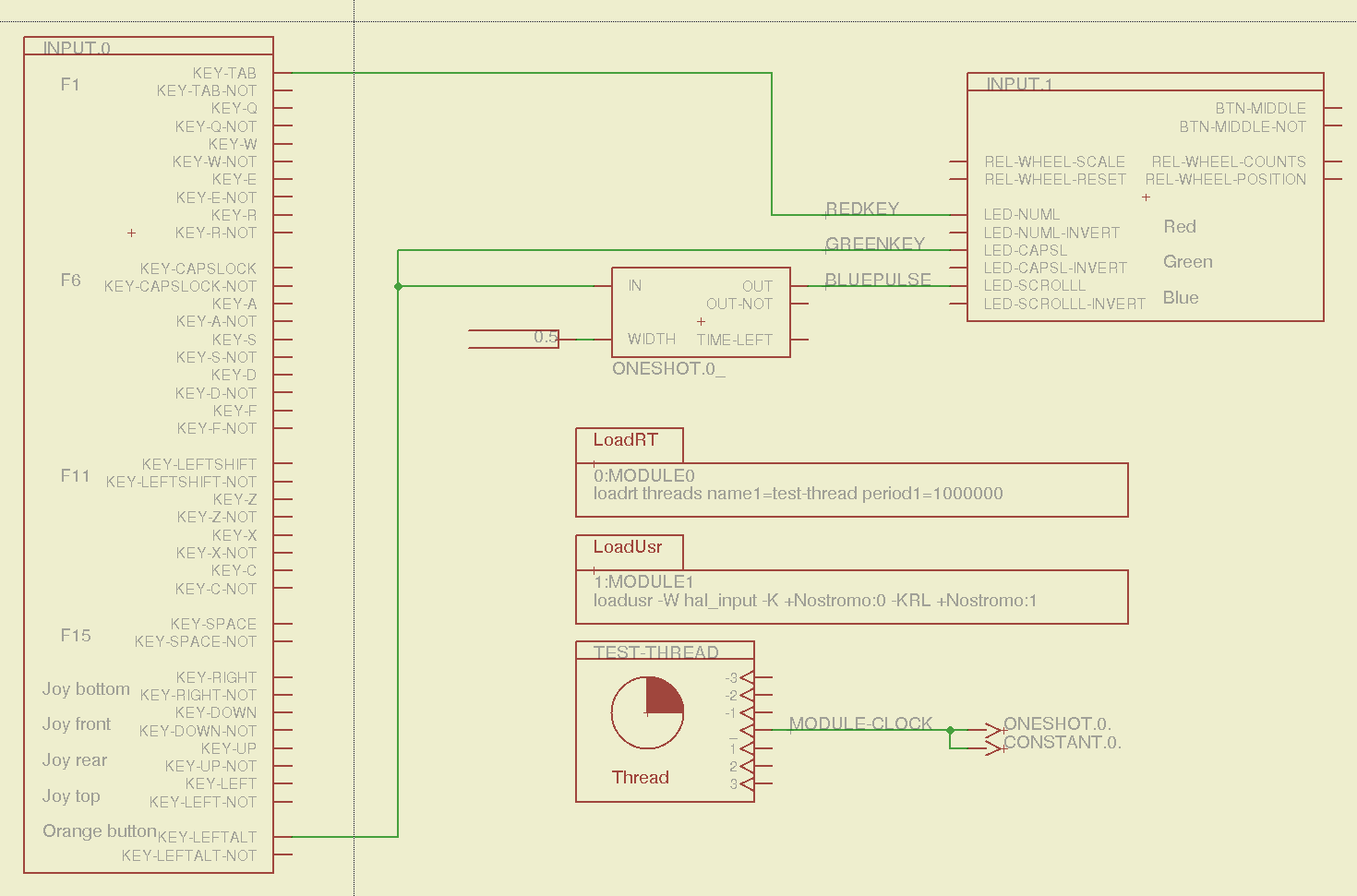
Combining some of the pin names generated by hal_input with the recipe for creating HAL devices, here’s a test configuration that hitches an old Nostromo N52 controller to a LinuxCNC system (clicky for more dots):
Nostromo N52 Controller – HAL config
The F01 key lights the red LED, the Orange Button lights the green LED, and a oneshot timer pulses the blue LED for half a second after the Button closes. The Thread block defines the connections from the functions to the main timing routine, and the loadrt block defines the thread timing. The hal_input module takes care of its own input sampling in userspace.
Now, for the classic embedded system “Hello, world!” test:
Nostromo N52 Controller – F01 test
It’s amazing how good an LED can make you feel…
A halscope shot shows the timing relation between the Orange Button (confusingly hitched to the greenkey signal) and the oneshot pulse:
HalScope – oneshot triggering
That schematic produces this HAL configuration file:
# HAL config file automatically generated by Eagle-CAD ULP:
# [/mnt/bulkdata/Project Files/eagle/ulp/hal-write-2.5.ulp]
# (C) Martin Schoeneck.de 2008
# Charalampos Alexopoulos 2011
# Mods Ed Nisley KE4ZNU 2010 2013
# Path        [/mnt/bulkdata/Project Files/eagle/projects/LinuxCNC HAL Configuration/]
# ProjectName [Nostromo]
# File name   [/mnt/bulkdata/Project Files/eagle/projects/LinuxCNC HAL Configuration/Nostromo.hal]
# Created     [12:28:04 14-Feb-2013]

####################################################
# Load realtime and userspace modules
loadrt threads name1=test-thread period1=1000000
loadusr -W hal_input -K +Nostromo:0 -KRL +Nostromo:1
loadrt constant		count=1
loadrt oneshot		count=1

####################################################
# Hook functions into threads
addf oneshot.0		test-thread
addf constant.0		test-thread

####################################################
# Set parameters

####################################################
# Set constants
setp constant.0.value	0.5

####################################################
# Connect Modules with nets
net bluepulse input.1.led-scrolll oneshot.0.out
net duration constant.0.out oneshot.0.width
net greenkey input.0.key-leftalt oneshot.0.in input.1.led-capsl
net redkey input.0.key-tab input.1.led-numl
A snapshot of the Nostromo.sch, Nostromo.hal, hal_config.lbr, and hal-write-2.5.ulp files is in Nostromo-N52.zip.odt. Rename it to get rid of the ODT suffix, unzip it, and there you go.
Yes, thank you so much! Everything you said was true. Apparently someone’s USB drive was infected and infected many computers here. We are very appreciative for your technological detective work. The head of IT was very incredulous because everything is deep frozen after it is shut down. But it was all true and I am very grateful
The part about “many computers here” seems worrisome; they’re apparently not running any defensive software at all.








 The Smell of Molten Projects in the Morning