The Smell of Molten Projects in the Morning

Ed Nisley's Blog: Shop notes, electronics, firmware, machinery, 3D printing, laser cuttery, and curiosities. Contents: 100% human thinking, 0% AI slop.

Month: May 2012

  • Dropbox vs. Little Bobby Tables

    The Android version of the Dropbox interface (on the Kindle, anyway) lets you create a password like this:

    ab&CDef{gHi

    Come to find out that, although the web-based Dropbox interface doesn’t reject that password, it kvetches that your userid and password don’t match. Yes, even if you cut-and-paste from a text file copied through the USB link.

    Fortunately, the web interface has a password reset mechanism that’s missing from the Kindle app.

    Little Bobby Tables rides again!

  • Kindle Fire: Palm Gnukeyring to KeePass

    My Zire 71 stores all my userids, passwords, credit card numbers, and similar sensitive bits in a convenient offline package, using the obsolete Palm gnukeyring app. The KeePass app on my Kindle Fire can, in principle, do the same thing. Minus the convenient and offline parts, that is.

    So the problem becomes how to export about 150 entries, each containing at least one character string carefully chosen for maximum obscurity and typing difficulty, from the Zire to the Kindle. Ideally, there’s no retyping involved and it’d be nice to not leave the unencrypted contents lying around for very long.

    This has a remarkable number of moving parts…

    It turns out gnukeyring can export each entry into an unencrypted Palm Notepad file through a manual operation, but the cough user experience on the Palm goes something like this:

    • Start gnukeyring, select entry-to-export
    • Select Options, pick export to Notepad
    • Notepad automagically starts up with the new note selected, so close it
    • Exit Notepad, return to Home
    • Iterate

    That gets old very quickly, not to mention that the Notepad file uploads to the PC in the Palm’s slightly binary PDB format that’s basically useless without further hackage and exposes the passwords in unencrypted form.

    Inter-app cutting and pasting on the Kindle is exceedingly tedious, because each app runs more-or-less independently in full-screen mode: it is not feasible to manually transfer the database one field at a time. So we’re looking at a PC-based solution.

    There’s a Java utility that can export the whole encrypted Palm file into spreadsheet CSV format, putting each entry into a separate row and each field into a separate column. OpenOffice / LibreOffice can read the resulting file with no problem. Ctrl-A will select the entire Comment field for each entry, which means I can transfer that in one shot.

    It can also export into an XML file, which seems more useful.

    The utility is a command line thing, with an invocation something like this (use .csv to get that type of output):

    java -jar export.jar Keys-Gtkr.pdb ‘password’ output.xml

    As it turns out, my password contains an exclamation mark and Bash requires fancy escaping (the usual single or double quotes don’t work, because the exclamation mark has higher priority):

    java -jar export.jar Keys-Gtkr.pdb Fancy\!PassWord\! output.xml

    The XML files have this overall structure:

    <U+FEFF><?xml version="1.0" encoding="UTF-8"?>
    <pwlist>
    <pwentry>
      <title>A useful name</title>
      <category>Web</category>
      <notes>The collection of
    notes, asides, and suchlike
    in a multi-line format.
    </notes>
      <lastmodtime>2000-01-01</lastmodtime>
    </pwentry>
    </pwlist>
    

    Notice that each entry contains its category, which makes a certain sense.

    On the KeePass side, there exist Windows and Linux versions of KeePass, although one must be careful to use the 1.x level of the database on Windows, because that’s all the Android and Linux versions know about. It can import XML files and turn them into a database with a unique password; it cannot add entries from an XML file to an existing database.

    KeePassX (the Linux version) XML files looks like this:

    <!DOCTYPE KEEPASSX_DATABASE>
    <database>
     <group>
      <title>Internet</title>
      <icon>1</icon>
      <entry>
       <title>The Entry Title</title>
       <username>your userid goes here</username>
       <password>the mystery password</password>
       <url>example.com</url>
       <comment>Presumably multiline comments work OK</comment>
       <icon>0</icon>
       <creation>2012-05-08T18:48:11</creation>
       <lastaccess>2012-05-08T19:00:49</lastaccess>
       <lastmod>2012-05-08T19:00:49</lastmod>
       <expire>2999-12-28T11:59:59</expire>
      </entry>
     </group>
    </database>
    

    KeePass puts the entries within overall groups, the inverse of the Palm gnukeyring structure. I suppose there’s a way to undo that manually, but … drat!

    So, back to CSV. Although OpenOffice Calc can’t export XML directly, there’s an extension for that. Given a spreadsheet like this:

    asdf dfg
    1 2
    3 4
    5 6

    The XML file looks like this:

    <?xml version="1.0" encoding="UTF-8"?>
    <ooo_calc_export scriptVersion="2.2.0" scriptUpdate="2010-12-19"
                     scriptURL="http://www.digitalimprint.com/misc/oooexport/"
                     scriptAuthor="vjl">
       <ooo_sheet num="1" name="Sheet1">
          <ooo_row><asdf>1</asdf><dfg>2</dfg></ooo_row>
          <ooo_row><asdf>3</asdf><dfg>4</dfg></ooo_row>
          <ooo_row><asdf>5</asdf><dfg>6</dfg></ooo_row>
       </ooo_sheet>
    </ooo_calc_export>
    

    Missing entries generate empty <column-name></column-name> sequences and embedded newlines produce multiline comments.

    So the overall plan:

    • Convert Palm database into CSV
    • Import into OpenOffice Calc
    • Change column names to match KeePass fields
    • Add creation field with current timestamp
    • Add expire field to celebrate the next millennium
    • Sort by Category, delete Category column
    • Export to XML, open in text editor
    • Clean up header & footer tags to suit
    • Insert group tags for category
    • Change ooo_row tags to entry tags
    • Import as new KeePass database
    • Transfer to Kindle Fire
    • Iterate until it works

    While I had the file pinned down in the text editor, I cleaned up some cruft and moved userids / passwords from comments to the appropriate fields.

    I hadn’t used the gnukeyring password field to avoid overwriting an existing password by mistake; that disaster always lay just two screen taps away. It’s a little harder to do on the Kindle, but …

    And then it Just Worked…
  • Credit Card Services: A Tinge Of Doubt Crosses His Mind

    This call from Credit Card Services lasted about a minute, but was highly informative. I pressed 1 to lower my interest rates, then …

    CCS: This call is regarding an issue with your Visa and Mastercard credit card accounts. Based on changes in your credit score and repayment history over the last twelve months, you may be eligible for a lower interest rate. In order to qualify, you must have a balance on at least one card of at least $4000. Is that the case?

    Me: Sure.

    CCS: The interest rate on that account must average more than 12 percent. Is that the case?

    Me: Sure.

    CCS: I must verify your phone number. Our records show that it is [reads off number].

    Me: Sure.

    CCS: And your name is [reads off my formal name, which shows he doesn’t know me from Adam Smith].

    Me: Sure.

    CCS: What is the total balance on all your credit cards?

    Me: Well, that’s hard to say.

    CCS: All we need is an estimate.

    Me: Let’s call it ten grand. [This is a lie. Next time, I’ll say twenty grand.]

    CCS: And how many credit cards do you have?

    Me: Four. [Also a lie. Next time, I’ll say eight.]

    CCS: [background chatter, loud crash, call disconnects.]

    Previous Credit Card Services contestants have sworn that they do not know what number they dialed. After you pass a minimum qualification, well, suddenly they do know your number and your name. Huh. Who’d’a thunk it?

    This contestant did not pass me to the CCS Level 2 Closer, the guy who attempts to tongue-wrestle victims into divulging a credit card number that he will instantly siphon money out of. We recently burned the balance in a gift card obtained for test-driving a Toyota (hey, I won’t pass up free money), so maybe I’ll feed those digits into the next call.

    If I sounded more enthusiastic, I’m sure I could reach the Closer!

    I used to think that a sensible person running a scam like CCS would make it a point to not re-call smartasses who jerk my reps around. Now, I’m sure the reps run on pure commission and the marginal cost of making a phone call sits right around zero, so the sensible person running CCS has nothing to lose.

    Search herein for Credit Card Services (or just CCS) to find previous installments of this continuing adventure.

    The title is a tip o’ the cycling helmet to Zappa:

    Motorcycle Man: Well, let’s make a deal if you think that’s true
    I mean, you’re the devil, so whatcha gonna do?

    Devil: Wait a minute. A tinge of doubt crosses my mind
    When you say that you want to make a deal with me.

    You find the rest on your own, OK?

  • Whirlpool Refrigerator Fan Noise: Cartridge Bearings?

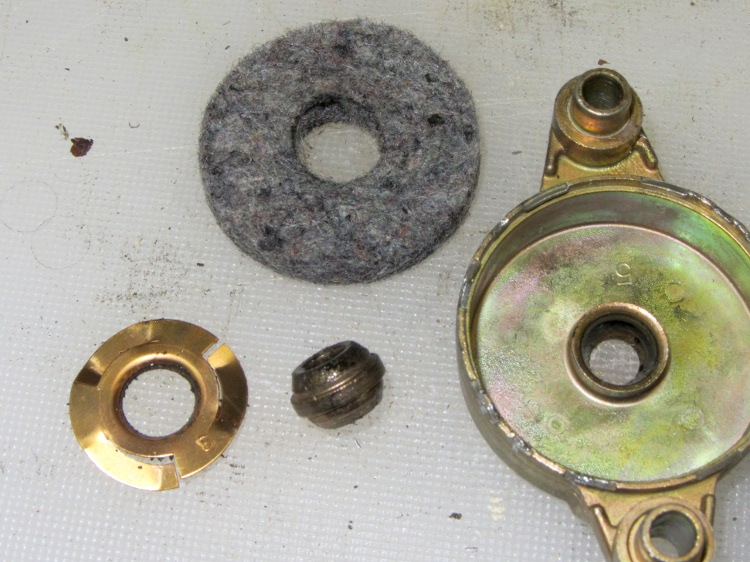
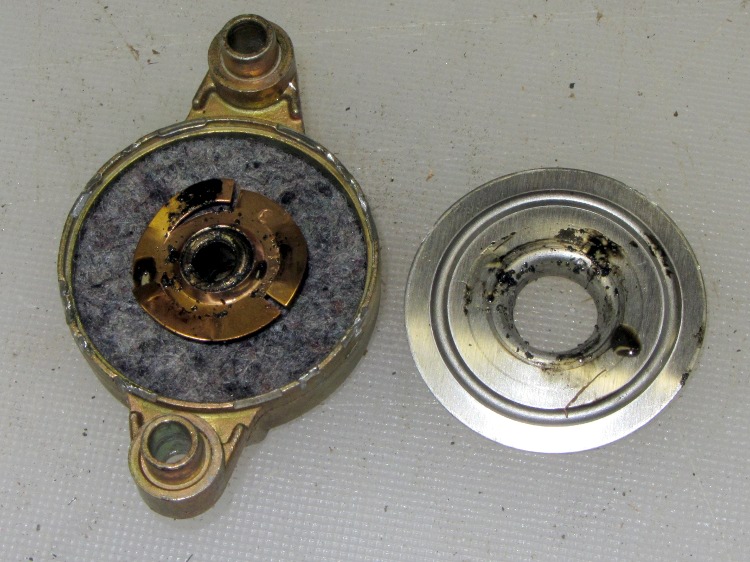
    The endcaps of that fan motor have a crimped-in-place aluminum disk capturing a felt washer that held oil and a circular spring that presses the spherical bronze bearing in place:

    Fan motor endcap - interior
    Fan motor endcap – interior

    Pulling all that out reveals the bearing (tilted on its side to show the spherical outer shape):

    Fan motor endcap - parts
    Fan motor endcap – parts

    The shaft is a scant 3/16 inch in diameter, about 0.181 instead of 0.1875 inch. I have some 3/16 inch ID cartridge bearings in the heap that are a sloppy fit on the shaft, but nothing that a wrap of 2 or 3 mil shimstock and a dab of green Loctite wouldn’t cure.

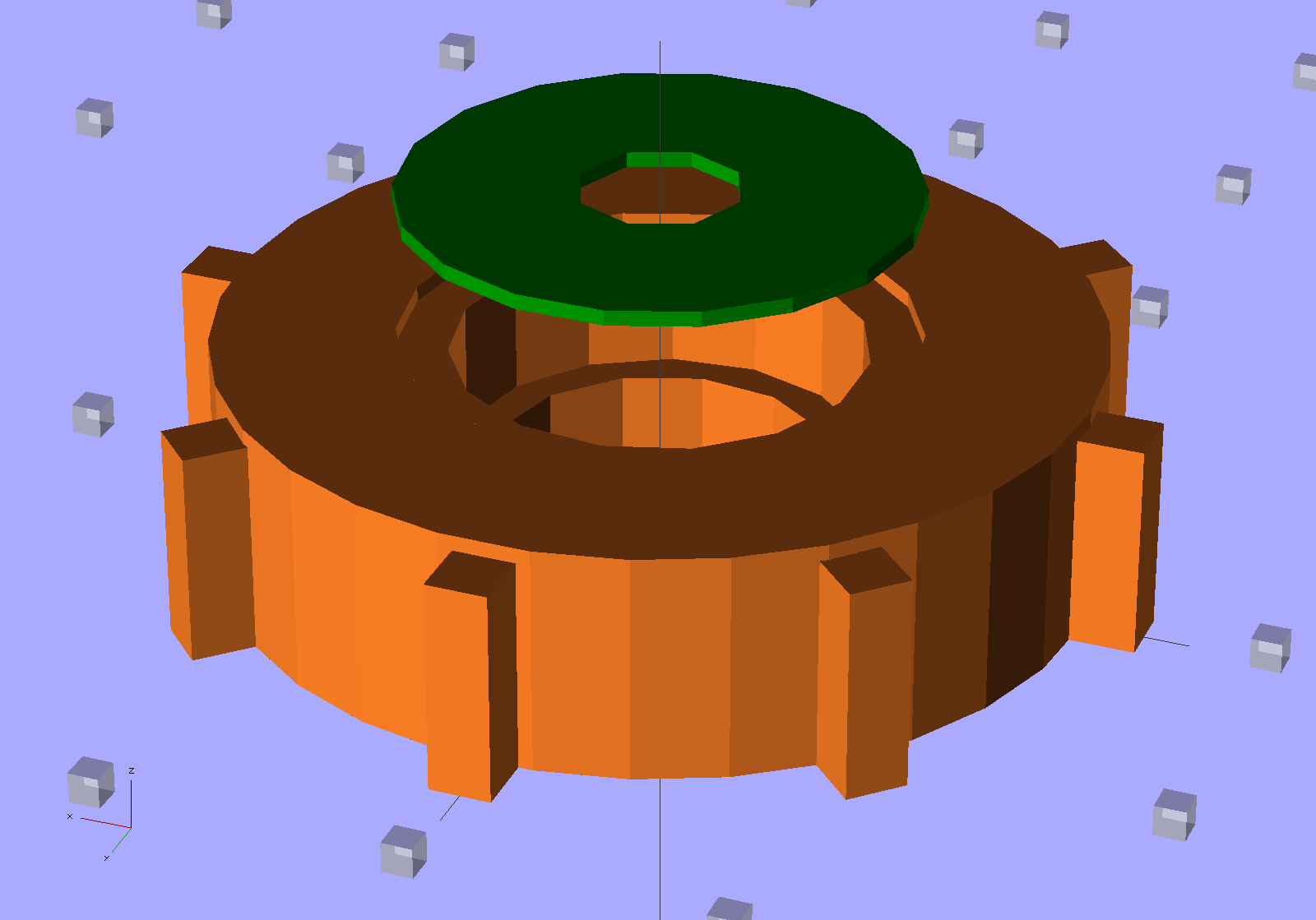
    A bit of doodling suggests two of these bearing holders should fit in the endcaps, stand over the spherical bearing mounts, capture the ball bearing OD, keep dust out of the balls, and perhaps have enough compliance to let the bearings self-adjust to the right fit:

    Fan Bearing Holder
    Fan Bearing Holder

    The fan tries to pull the rotor out of the frame, although I think the bearings & Loctite can handle that much axial load. I must try this out on the bench and see how long it takes for the Freezer Dog to return…

    It needs a trial print and some sizing adjustment, plus maybe an allowance for end play, but it’s close.

    The OpenSCAD source code:

    // Refrigerator Fan Bearing Support
    // Ed Nisley KE4ZNU - May 2012
    
    // Layouts
    
    Layout = "Show";			// Show Fit Build
    
    Gap = 5.0;					// between parts in Show mode
    
    BuildOffset = 5.0;			// offset between parts on build plate
    
    //- Extrusion parameters must match reality!
    //  Print with +1 shells and 3 solid layers
    
    ThreadThick = 0.25;
    ThreadWidth = 2.0 * ThreadThick;
    
    HoleWindage = 0.2;
    
    function IntegerMultiple(Size,Unit) = Unit * ceil(Size / Unit);
    
    Protrusion = 0.1;			// make holes end cleanly
    
    //----------------------
    // Dimensions
    
    CapID = 32.0;				// bearing endcap
    CapHeight = 7.0;			//  ... below aluminum cap recess
    
    SupportOD = 10.3;			// spherical bearing support
    SupportHeight = 3.0;
    
    BearingOD = 12.7;			// ball bearing race
    BearingID = 4.68;			//  ... shaft dia
    BearingThick = 4.0;
    
    Ribs = 8;					// number of support ribs
    RibLength = 2.0;			// length beyond cylinder
    RibWidth = 4*ThreadWidth;
    
    LidOD = CapID/2;			// bearing retainer lid
    LidThick = 2*ThreadThick;
    
    //----------------------
    // Useful routines
    
    module PolyCyl(Dia,Height,ForceSides=0) {			// based on nophead's polyholes
    
      Sides = (ForceSides != 0) ? ForceSides : (ceil(Dia) + 2);
    
      FixDia = Dia / cos(180/Sides);
    
      cylinder(r=(FixDia + HoleWindage)/2,
               h=Height,
    	   $fn=Sides);
    }
    
    module ShowPegGrid(Space = 10.0,Size = 1.0) {
    
      Range = floor(50 / Space);
    
    	for (x=[-Range:Range])
    	  for (y=[-Range:Range])
    		translate([x*Space,y*Space,Size/2])
    		  %cube(Size,center=true);
    
    }
    
    //-------------------
    // Objects
    
    module Retainer() {
      color("Green")
      difference() {
    	PolyCyl(LidOD,LidThick);
    	translate([0,0,-Protrusion])
    	  PolyCyl(BearingID,(LidThick + 2*Protrusion),8);
      }
    }
    
    module Holder() {
    
      color("Chocolate")
      difference() {
    
    	union() {
    	  cylinder(r=(CapID - 2*RibLength)/2,h=(CapHeight + LidThick));
    	  for (Index = [0:Ribs-1]) {
    		rotate(Index*360/Ribs)
    		  translate([0,-RibWidth/2,0])
    			cube([CapID/2,RibWidth,CapHeight],center=false);
    	  }
    	}
    
    	translate([0,0,-Protrusion])
    	  PolyCyl(SupportOD,(CapHeight + 2*Protrusion));		// clear old support
    
    	translate([0,0,SupportHeight])
    	  PolyCyl(BearingOD,CapHeight);						// bearing pocket
    
    	translate([0,0,(SupportHeight + BearingThick)])
    	  PolyCyl(LidOD,CapHeight);							// bearing retainer
    
      }
    }
    
    //-------------------
    // Build things...
    
    ShowPegGrid();
    
    if (Layout == "Show") {
      Holder();
      translate([0,0,(CapHeight + Gap)])
    	Retainer();
    }
    
    if (Layout == "Fit") {
      Holder();
      translate([0,0,CapHeight])
    	Retainer();
    }
    
    if (Layout == "Build") {
      translate([(CapID/2 + BuildOffset),0,0])
    	Holder();
      translate([-(LidOD/2 + BuildOffset),0,0])
    	Retainer();
    
    }


    Well, it’s a thought…

  • Blog Hits: Dirac Delta

    The admin pages for this blog have a “sparkle bar” along the top that shows the hourly hit rate, which is usually a simple diurnal cycle: most activity happens during the Western Hemisphere daylight hours.

    Yesterday was different:

    Blog Hourly Hits - 2012-05-19
    Blog Hourly Hits – 2012-05-19

    In the space of about 10 minutes, my sleepy post about a bicycle saddle advertisement received 207 hits from “bike riding” at Yahoo! image search. For the last two and a half years, it’s been ticking along at about 1 hit/day, so I think that spike represents a nice example of a Dirac Delta Function in action.

    I no longer even pretend to know what’s going on…


  • Ladybugs!

    These freshly hatched alligator-oid critters:

    Ladybug larvae
    Ladybug larvae

    …. quickly become something even more fearsome, at least to aphids smaller than they are:

    Ladybug Larva Eating Aphid
    Ladybug Larva Eating Aphid (by Cheryl Hearty – CCE/DC)

    Eventually they turn into Ladybugs who relentlessly stalk larger aphids on garden plants:

    Ladybug with aphids
    Ladybug with aphids

    And then they do this and the wheel goes around:

    Ladybugs mating
    Ladybugs mating

    Gardeners love them ever so much…

  • Presentation for Poughkeepsie ACM: DIY 3D Printing Hardware & Software

    Calibration - Thin wall box - extruding
    Calibration – Thin wall box – extruding

    Next Monday evening I’ll give a presentation on the hardware & software of DIY 3D printing for the Poughkeepsie chapter of the ACM. After reviewing some current printers and coordinate systems, I’ll explore the process of beating Constructive Solid Geometry into a solid model of a printable part, with attention to some gotchas along the way from a seemingly perfect CAD design to a tangible plastic part.

    The PDF file has the slides, but you gotta show up in person to get a tchotchke and hear the patter…