This one didn’t work out at all and, after a few attempts, I gave up:
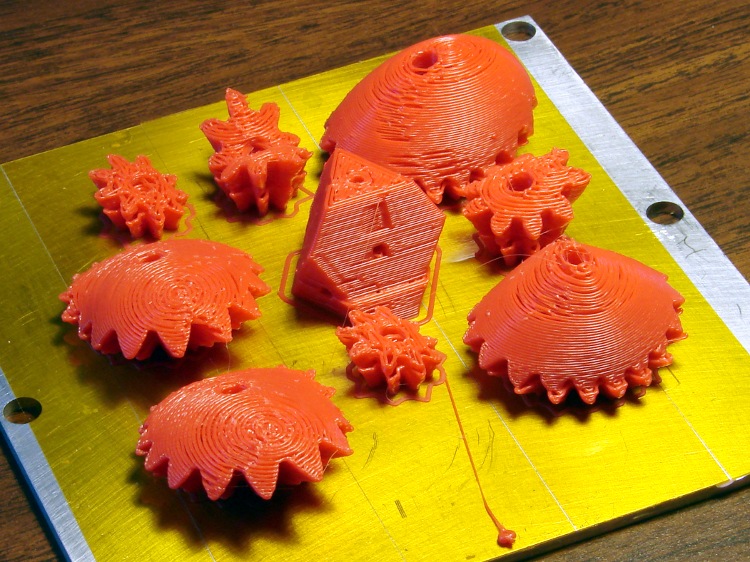
It turns out that the myriad gear teeth curl up slightly as they cool. At some point, one of them will snag the nozzle and, even with good steppers in full effect, yank the XY stage to a dead stop. The missed steps cause that ledge a few millimeters up from the plate and, of course, the gears don’t mesh at all.
I watched it happen and stopped the print as soon as I could, but I didn’t catch exactly which tooth did the damage. Then I extracted just the bottom few layers by importing the STL into OpenSCAD, subtracting a block from the top, exporting what’s left as another STL, then built just that chunk.
Of course, that worked perfectly:

Printing each object separately should eliminate the problem: the nozzle would remain within the outline at all times and, with a smaller part, the plastic would stay bendy.
Maybe next year…
 The Smell of Molten Projects in the Morning
Comments
5 responses to “Thing-O-Matic: Heart Gears FAIL”
If you haven’t already, you could try blocking off some or all of the ToM sides with some cardboard. That may be enough to compensate for motion-related cooling
Although it’s impossible to see, all three openings sport acrylic sheet windows, held on with blue masking tape. The front one must pivot when the XY stage pokes through the opening, but other than that they’re permanent fixtures. An early version is barely visible there, with a simple paper skirt sealing the filament feeder perched on the top.
The inside hovers around 35 C, which I’m not convinced is high enough to make any difference, but adding the windows did seem to cut down the number of snags. That was early on, before I had good control over the initial layer thickness, so I’m certain other problems got in the way, too.
What temperature are you extruding at? Perhaps lowering it will help.
When I was experimenting with the 1mm nozzle and old/wet ABS I had to drop the temperature right down to 190C to tame some really bad, basic 90 degree corner curling (never mind gear teeth). I switched back to the 0.4mm nozzle which is great at 220C with the same plastic.
I might have been able to get 1mm working better with significantly more skeinforge tweaks, but you know what that battle’s like!
I’ve been using 210 C while fiddling with everything else, which seems on the low end of what folks are using for ABS with a 0.5 mm nozzle. I suspect that’s slightly lower than the actual plastic temperature at the nozzle, but I don’t have any believable way to calibrate it any better.
Given the delamination in the grip of the Barbie Gun, I think 210 C about as low as it should go. Admittedly, nothing else pulled apart like that, so perhaps dropping it another 10 C on small parts would be instructive.
Maybe next year…
Gadzooks! Were you printing Lawn furniture? [grin]
[…] with printing this and that and those and some other things, we ran through a pound of red filament in short order. […]