Ed Nisley's Blog: Shop notes, electronics, firmware, machinery, 3D printing, laser cuttery, and curiosities. Contents: 100% human thinking, 0% AI slop.
Yes, yes, I know OpenOffice and its ilk have all the features you think you need. When you actually try to put together a book-length document, you find that the features don’t actually work / work together / behave reliably. Been there, done that. Enough times to be wary, indeed.
So LyX / LaTeX is the least-worst alternative and actually does a pretty good job after you get the various configurations beaten into shape. After that, you just type, add tags, and it’s all good.
Here’s a list of the settings I’m using… for future reference, natch, because figuring this stuff out from first principles takes a while.
Document settings
Document Class: report
Text Layout: MedSkip vertical, Single line, Two-column
Page Layout: US Letter, fancy headings
Page Margins: 0.75 inch all around, 0.3 inch separations</pre>
<strong>LaTeX Preamble</strong>
<pre>\usepackage{ragged2e}
\usepackage{lastpage}
\usepackage{url}
\usepackage{dvipost}
\usepackage{breakurl}
\usepackage[labelfont={bf,sf}]{caption}
\renewcommand{\bottomfraction}{0.7}
\pagestyle{fancyplain}
\fancyhf{}
\lhead{\fancyplain{}{Trinity College Home Robot Contests}}
\rhead{\fancyplain{}{2010 Rules}}
\lfoot{\fancyplain{Modified \today}{Modified \today}}
\cfoot{Copyright 2009 by Trinity College}
\rfoot{\fancyplain{\thepage\ of \pageref{LastPage}}{\thepage\ of \pageref{LastPage}}}
\RaggedRight
\dvipostlayout
\dvipost{cbstart color push Blue}
\dvipost{cbend color pop}
Trickery
Some of those packages aren’t part of the default LyX / LaTeX installation on Ubuntu. Searching for LaTeX in Synaptic is tedious, but works.
The three ways to export to PDF are not identical.
dvipdfm doesn’t produce clickable TOC links.
pdflatex, the default, doesn’t produce change bars, which is a crippling defect for a rules document under heavy revision. It’s OK for the final draft, though.
ps2pdf doesn’t produce searchable text; it’s all graphics. Ptooie!
So use dvipdfm during development (to get change bars) and use pdflatex for the final product (to get clickable links). There has got to be a way around that, but I haven’t a clue as to what’s going on under the hood.
In order to track changes:
Document -> Change Tracking -> Track Changes.
In order to print change bars and suchlike:
Document -> Change Tracking -> Show Changes in Output
Figures appear on-screen in dot-for-dot mode by default, so tweak the on-screen ratio to maybe 50%. Force the printed width of all figures to 3 inches for two-column layout. Insist that picture resolution bear some resemblance to reality: 3 inches at 300 dpi -> 1000 pixels across.
There seems to be no way to export LyX directly to ODT. Exporting to RTF strips off most of the formatting, as you’d expect, and change tracking Goes Away.
Exporting to HTML produces one honkin’ big lump of HTML with a bazillion image files in a separate directory. That’s probably OK for most purposes.
Memo to Self: Turn off change tracking for minor editorial tweakage, because nobody really cares.
The model has some limitations, discussed there, but seems practical. So far, the main gotcha is that the output voltage doesn’t center neatly at Vcc/2, but that’s in the nature of fine tuning.
The trick is getting the model & symbol into Linear Technology’s LTSpiceIV…
Running under WINE in Xubuntu, the emulated C drive is in your home directory at
.wine/drive_c/
with the Linear Tech LTSpiceIV files tucked inside that at
.wine/drive_c/Program\ Files/LTC/LTspiceIV/
Incidentally, WINE puts the program icon in
.local/share/icons/05f1_scad3.0.xpm
It’s not clear what the prefix means, but the actual executable is scad3.exe (I think that’s historical cruft, as the new overall name is LTSpiceIV).
Copy the LM386.sub file to lib/sub and the LM386.asy file to lib/sym, then restart LTSpiceIV.
After putting the symbol in the schematic, I had to edit its attributes (other-click the symbol), make both InstName & Value visible to see them on the schematic, then move them to somewhere other than dead-center in the symbol. I can’t figure out how to make that happen automagically, as it does with other symbols. Comparing the two files to ordinary components doesn’t show anything obviously missing.
Link rot being what it is, here’s the LM386.sub file:
* lm386 subcircuit model follows:

************************************original* IC pins:     2   3   7   1   8   5   6   4
* IC pins:     1   2   3   4   5   6   7   8
*              |   |   |   |   |   |   |   |
.subckt lm386 g1  inn inp gnd out  vs byp g8
************************************original*.subckt lm386 inn inp byp  g1  g8 out  vs gnd

* input emitter-follower buffers:

q1 gnd inn 10011 ddpnp
r1 inn gnd 50k
q2 gnd inp 10012 ddpnp
r2 inp gnd 50k

* differential input stage, gain-setting
* resistors, and internal feedback resistor:

q3 10013 10011 10008 ddpnp
q4 10014 10012 g1 ddpnp
r3 vs byp 15k
r4 byp 10008 15k
r5 10008 g8 150
r6 g8 g1 1.35k
r7 g1 out 15k

* input stage current mirror:

q5 10013 10013 gnd ddnpn
q6 10014 10013 gnd ddnpn

* voltage gain stage & rolloff cap:

q7 10017 10014 gnd ddnpn
c1 10014 10017 15pf

* current mirror source for gain stage:

i1 10002 vs dc 5m
q8 10004 10002 vs ddpnp
q9 10002 10002 vs ddpnp

* Sziklai-connected push-pull output stage:

q10 10018 10017 out ddpnp
q11 10004 10004 10009 ddnpn 100
q12 10009 10009 10017 ddnpn 100
q13 vs 10004 out ddnpn 100
q14 out 10018 gnd ddnpn 100

* generic transistor models generated
* with MicroSim's PARTs utility, using
* default parameters except Bf:

.model ddnpn NPN(Is=10f Xti=3 Eg=1.11 Vaf=100
+ Bf=400 Ise=0 Ne=1.5 Ikf=0 Nk=.5 Xtb=1.5 Var=100
+ Br=1 Isc=0 Nc=2 Ikr=0 Rc=0 Cjc=2p Mjc=.3333
+ Vjc=.75 Fc=.5 Cje=5p Mje=.3333 Vje=.75 Tr=10n
+ Tf=1n Itf=1 Xtf=0 Vtf=10)

.model ddpnp PNP(Is=10f Xti=3 Eg=1.11 Vaf=100
+ Bf=200 Ise=0 Ne=1.5 Ikf=0 Nk=.5 Xtb=1.5 Var=100
+ Br=1 Isc=0 Nc=2 Ikr=0 Rc=0 Cjc=2p Mjc=.3333
+ Vjc=.75 Fc=.5 Cje=5p Mje=.3333 Vje=.75 Tr=10n
+ Tf=1n Itf=1 Xtf=0 Vtf=10)

.ends
*----------end of subcircuit model-----------
And the corresponding LM386.asy file:
Version 4
SymbolType CELL
LINE Normal -64 -63 64 0
LINE Normal -64 65 64 0
LINE Normal -64 -63 -64 65
LINE Normal -60 -48 -52 -48
LINE Normal -60 48 -52 48
LINE Normal -56 52 -56 44
LINE Normal -48 -80 -48 -55
LINE Normal -48 80 -48 57
LINE Normal -44 -68 -36 -68
LINE Normal -40 -72 -40 -64
LINE Normal -44 68 -36 68
LINE Normal -16 -39 -16 -64
LINE Normal 0 32 0 48
LINE Normal 48 -8 48 -32
SYMATTR Value LM386
SYMATTR Prefix X
SYMATTR ModelFile LM386.sub
SYMATTR Value2 LM386
SYMATTR Description Low power audio amplifier
PIN -16 -64 LEFT 8
PINATTR PinName g1
PINATTR SpiceOrder 1
PIN -64 -48 NONE 0
PINATTR PinName In-
PINATTR SpiceOrder 2
PIN -64 48 NONE 0
PINATTR PinName In+
PINATTR SpiceOrder 3
PIN -48 80 NONE 0
PINATTR PinName V-
PINATTR SpiceOrder 4
PIN 64 0 NONE 0
PINATTR PinName OUT
PINATTR SpiceOrder 5
PIN -48 -80 NONE 0
PINATTR PinName V+
PINATTR SpiceOrder 6
PIN 0 48 LEFT 8
PINATTR PinName bp
PINATTR SpiceOrder 7
PIN 48 -32 LEFT 8
PINATTR PinName g8
PINATTR SpiceOrder 8
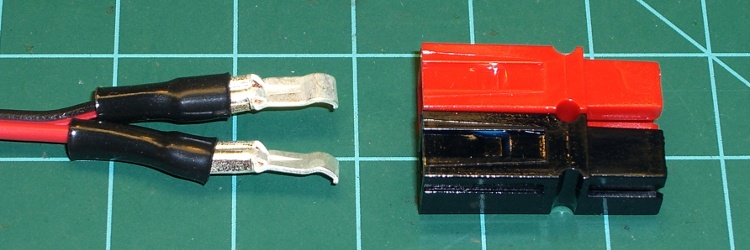
This is quick & easy. When you’re making a Powerpole connector, shrink a length of small heatshrink tubing over the end of the terminal after crimping.
Heatshrink tubing stress relief for Anderson Powerpole terminals
You can’t cover the entire crimped region, lest the terminal not snap into the housing, but halfway seems to work fine.
The goal is to keep the wires from flexing right at the end of the terminal, which is exactly where they’ll break.
I’ve also wrapped a length of self-vulcanizing rubber tape around the entire connector housing and the wire, which is appropriate for high-stress applications. Looks hideous, though, not that that matters much.
This Philips LumiLED app note gives some specs on automotive lighting. The one we bikies all tend to ignore is the surface area: greater than 37.5 square centimeters for rear combination stop-turn fixtures. Call it a scant 4 inches in diameter. You’ve never seen a bike light that large, have you?
LED combo tail stop light
Maybe the right thing to do is start with a street-legal truck light and build some electronics around it. This is a 4 inch diameter, 44 LED rear light with both taillight and brake light terminals. At 12 V, the taillight draws 10 mA and the brake light is 250 mA. Got it from Gemplers with a recent order, but they’re certainly not the optimum supplier if that’s all you’re buying.
Obviously, it’s unreasonable to run a 3 watt taillight on a bike, as the most recent crop of single-LED killer headlights are merely a watt or three. Battery life remains a problem.
At 10% duty cycle the brake LEDs would average 300 mW. That might be roughly comparable to the running lights on some cars these days.
With the taillight constantly energized and the brake flashing at 4 Hz, it’d be 120 + 0.5 * 300 = 270 mW.
That’s more reasonable. With a 50% efficient upconverter to 12 V, that’s half a watt. Start with 4 AA cells, triple the voltage, draw 100 mA, runtime is 1500 / 100 = 15 hours. Good enough.
And it ought to be attention-getting enough for anybody! The only trouble will be fitting the damn thing on the back of the bike; fortunately, ‘bents have plenty of room behind the seat, so maybe attaching it below the top seat rail will work.
Memo to Self: The rear reflector must be something like 3 inches in diameter, too. We ignore that spec, too.
Let’s quote that text so you can read it (or click the picture for a bigger one):
Yeah… we’re talking down there. With lots of supporting data that says prolonged riding while your boys are numb is a no-no, we decided to build a saddle you can fine-tune to fit… you.
Speaking of prolonged riding, the current hour records:
Upright bike: 30.882 miles
Recumbent: 56.2948 miles
Sam Whittingham (who also holds that recumbent hour record) recently set the new human-powered land speed record at Battle Mountain: 82.43 miles per hour. Yup, pedaling a bicycle, on level ground, in minimal wind.
Admittedly, he was riding a recumbent that bears as much relation to the Tour Easy I ride as a Formula One car bears to yours. On the other paw, those Tour de France bikes aren’t exactly factory stock, either.
If you want to go as fast as you can on a bike, you want a recumbent. Unless, of course, you’re doing UCI races, in which case you may go as fast as they’ll allow you and wreck your body in the process.
When you get back from a ride on a recumbent bike, no matter how long you rode the bike, not only do all your parts still work, but nothing hurts. What’s not to like?
My earlier musing on bike performance is there. Clicking on the “Recumbent Bicycling” category summons forth more posts…
A new fast NiMH pack charger that uses a thermistor to detect the abrupt temperature rise at full charge just arrived on my Electronics Workbench. The instructions say to tape (“Use rubberized fabric …”) the thermistor to a cell in the middle of the pack, a process which loses its charm fairly quickly.
The intent is to have the thermistor bead in intimate thermal contact with the cell, but air is a rather crappy thermal conductor. We can do better than that.
Sooo, off to the Basement Laboratory Adhesives Division we go…
NiMH cells have a steel shell, so holding the sensor in place with a magnet makes at least some sense. I used a pair of teeny rare-earth magnets (Electronic Goldmine G16913) bridged by a snippet of steel strap. One magnet points up, the other points down, the strap provides a magnetic path, and the whole assembly sticks to the cell like glue.
First epoxy setup
I trimmed the heatshrink tubing surrounding the thermistor back a bit, then applied enough epoxy to secure the magnets to the strap and smooth out the edges, leaving the thermistor sticking out in mid-air.
Although it looks risky, the epoxy doesn’t bond well to the (sacrificial, dead) cell. Doing it this way produces a nearly perfect AA-cell-shaped contour in the epoxy on the bottom of the magnets.
It’s JB-Kwik fast-curing epoxy, not quite so runny as its slower-setting and much stronger JB-Weld relative.
Epoxy covering thermistor
After the epoxy cured, I bent the thermistor down to contact the cell and dabbed epoxy over the bead. This puts the thermistor in good thermal contact with the cell. Epoxy isn’t a great thermal conductor, but it’s a lot better than air.
The alert reader will note that I wrapped a layer of masking tape around the cell for this operation. I wasn’t convinced I could pop the epoxy off the cell without cracking the thermistor leads, but that turned out not to be a problem.
Trimming the edges of the epoxy around the bead gave it a certain geeky charm.
And it works like a champ: get the assembly close to a cell and it snaps right in place. I align the thermistor more-or-less in the middle of the cell, although I suspect the temperature gradient from the middle to either end isn’t all that large.
Magnetically attached thermal sensor
Now, one could argue that this lump increases the thermal mass surrounding the thermistor, thus slowing the charger’s reaction time. That might be true, but the pack’s end-of-charge temperature rise seems considerably subdued now; the charger used to cook the living piss right out of the cells (with the thermistor taped down): I couldn’t hold them in my hand, so they were well over 150 °F.
Now they become just uncomfortably warm, which says they’re closer to 130 °F.
The charger’s single page instructions (two pages if you count the sheet illustrating the rubberized fabric taping thing) cautions “Stop charging when [the cell’s surface temperature] is over 70C or it feels very hot”.



 The Smell of Molten Projects in the Morning