Ed Nisley's Blog: Shop notes, electronics, firmware, machinery, 3D printing, laser cuttery, and curiosities. Contents: 100% human thinking, 0% AI slop.
Tag: Thing-O-Matic
Using and tweaking a Makerbot Thing-O-Matic 3D printer
The general idea: measure the Thermal Riser Tube temperatures, so as to figure out where to put the Thermal Cutout Switch that will kill the Thing-O-Matic if the cartridge heater drive circuitry gets stuck on. Ideally, there will be a location suitable for the 100 °C NC switch I have on hand, but you’d use the same technique to make sure any switch would work.
So, to begin.
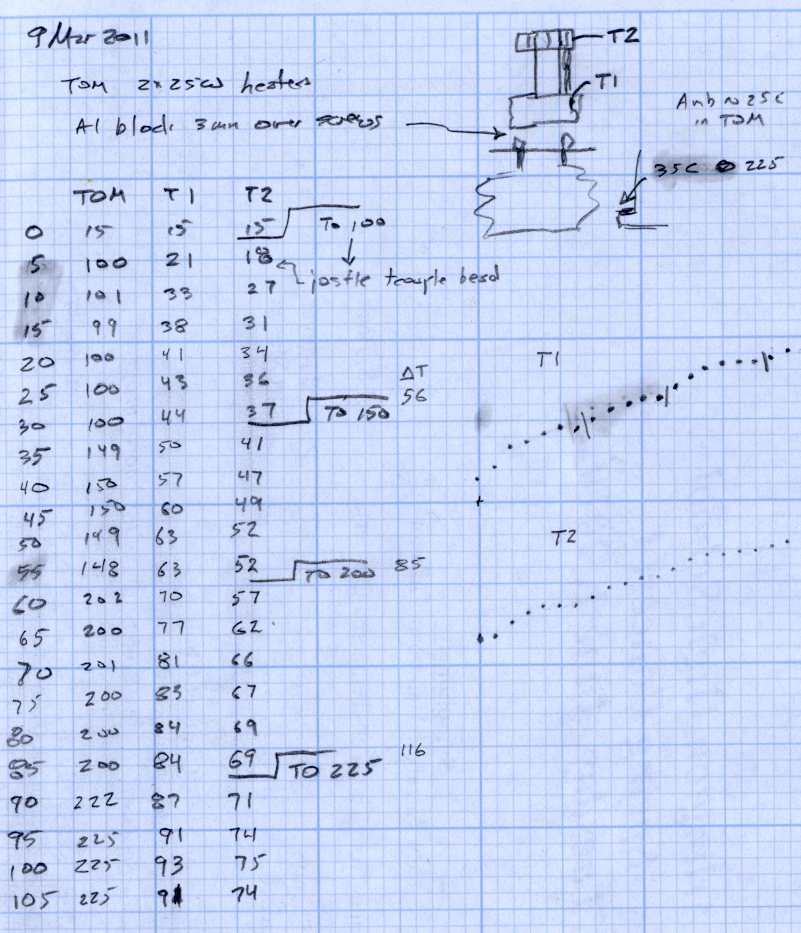
With the Thermal Switch Block just over the bolt heads and the small heatsink just under the acrylic sheet at the top, a pair of thermocouples attached to my old Fluke 52 meter reported temperatures.
The top thermocouple (T2 data) touches, ever so gently, the small heatsink, so it’s reporting mostly heatsink temperature and bit of the surrounding air. It moved slightly after the first measurement, despite the masking tape visible in the upper right corner of the picture.
The bottom thermocouple (T1 data) is tucked into the small hole in the Switch Block, so it’s reporting the real block temperature that the Thermal Switch will eventually experience.
A third thermocouple is taped in the corner of the Z axis stage against the acrylic arch, directly beside a cartridge heater inside the insulation wrap. During these proceedings that temperature rose from 25 °C ambient (due, most likely, to hand warmth while positioning all this stuff) to about 35 °C.
And, of course, the standard thermocouple on the MK5 Core reports the actual temperature inside the insulation wrap.
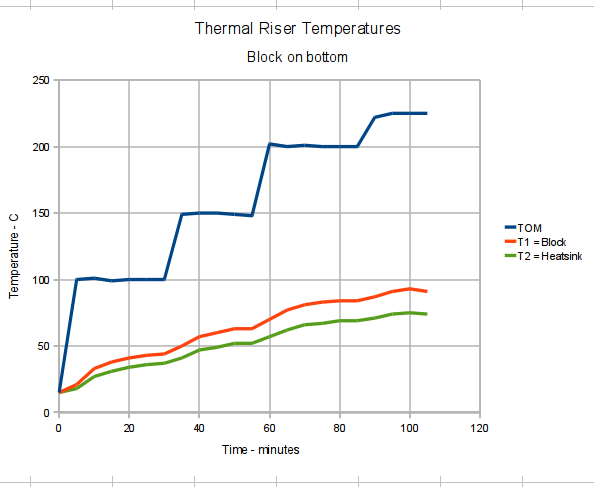
I raised the MK5 temperature in 50 °C steps, then 25 °C to 225 °C, waiting until the Block temperature more-or-less stabilized, while recording temperatures every 5 minutes. On this time scale, the Thermal Core temperature stabilized over the course of a single measurement.
With at that in mind, the results look like this:
Thermal Riser Tube Temperature Graph – block on bottom
At normal extruding temperatures above 200 °C, the red trace shows the Switch Block running about 15°C above green Heatsink trace and topping out at 91 °C. The top of the Riser Tube is somewhat cooler with that big Block hanging on the bottom, too: 70 to 74 °C, rather than the 83 °C I measured there.
The Block temperature increases by 7 °C when the Core increases by 25 °C, obviously depending on a bunch of nonlinear effects. A rash extrapolation suggests a 100 °C switch would trip before the Core hit 275 °C.
However, that Block gets uncomfortably close to 100 °C, which is the point where the Thermal Switch will go click and kill the whole show. I’d rather have a bit more headroom to allow for warm summer weather and a heated build chamber.
So the next experiment puts the Thermal Switch Block at the top of the Thermal Riser Tube…
The best place to mount a thermal switch (or a thermal sensor, depending on how much you trust your circuitry) is on the MK5 Thermal Core, but that’s far too hot for the switches I have in hand. As a compromise, I decided to mount the switch on the Thermal Riser tube leading vertically upward to the Filament Drive gear: good thermal contact, a solid mount, and out of harm’s way.
All the alternative locations seem worse. Tucking it inside the insulation wrap doesn’t provide a solid mechanical mount, so you don’t get a repeatable position and the leads get bent every time you move something. Bolting it to the plate over the Core looks solid, but that’s just a flat sheet of metal with four screws connecting it to the Core: no real thermal contact surrounded by lots of cooling air.
One good omen: with an operating temperature well under 100 °C, JB Industro Weld epoxy will work fine and eliminate any need for fussy clamps and fittings.
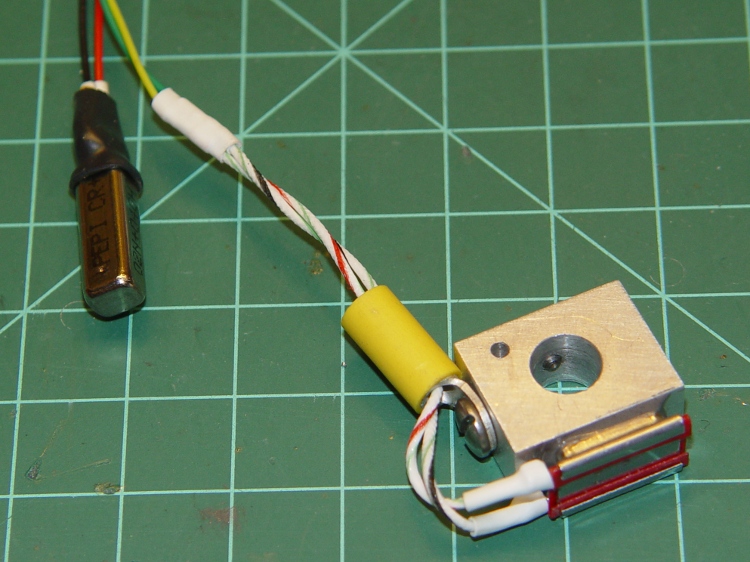
So I sawed off a random chunk of aluminum plate, squared it up in the Sherline mill, and poked a few holes in it. This doodle has dimensions roughly equivalent to the final object, but absolutely nothing is critical other than the 5/16 inch central hole:
Switch block sketch
The 4-40 setscrew secures the block to the Thermal Riser. Aluminum expands considerably more than stainless steel, so I dropped a snippet of PTFE wire insulation into the hole as a rubberdraulic plunger.
The lug on the top provides strain relief for the wires; it’s not an electrical connection. The modular phone cable trailing off to the Thermal Cutout box has wires insulated with low-temperature plastic, so a few inches of Teflon hookup wire keep them out of the Danger Zone.
The small hole is just big enough for a thermocouple bead.
This is what the thing eventually looked like, but I made some measurements before sticking that switch in place:
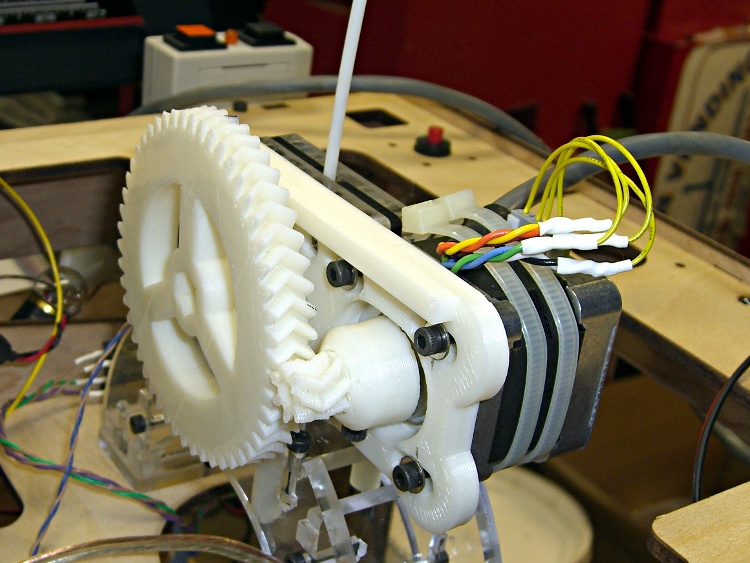
Over the past few weeks I’ve printed the gears and plate from TheRuttmeister’s Coloso-Gear MK5 extruder Thing and flatted the shaft on a moderately husky (but not hyperthyroid) NEMA 17 stepper motor. While tearing the Thing-O-Matic down to add thermal switches to the Extruder Head, I converted the MK5 Filament Drive into a stepper extruder. Much to my astonishment, when I plugged the cable in and fired up ReplicatorG … It Just Worked!
Even more amazing: the first pinout arrangement turned the motor in the correct direction!
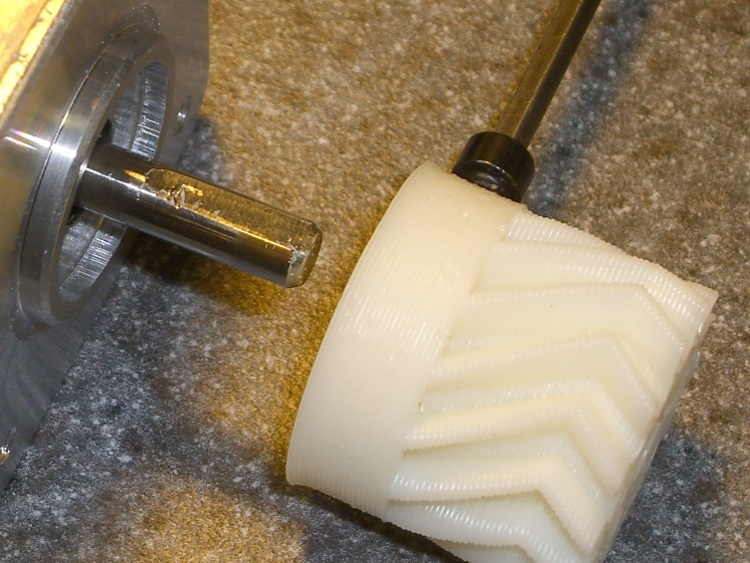
Coloso-Gear Stepper Extruder
Some nasty pincushion distortion makes the larger gear look misaligned, but it’s parallel to the mounting plate and correctly engaged with the drive gear.
The motors arrived with short stubs of thin yellow wire on the IDC motor connectors, which I soldered directly to a much longer cable. The Parts Heap disgorged a chubby 8-conductor signal cable; I used pairs of wires for each motor connection, although one conductor would have entirely enough copper. The two cable ties around the motor prevent flexing those delicate wires as the Z stage moves.
Two tweaks to the MK6 Stepstruder profile in thingomatic.xml produced the right answers:
Set motor_steps = 1456
Set stepspermm = 48.2
Running the motor at 2.0 rpm for 30 sec should produce exactly 1 revolution of the big gear. I marked and counted the teeth on the larger gear as it rotated, and came up with 56 teeth. It’s a 51 tooth gear, so reducing the default 1600 steps/rev by 51/56 produces 1457. A defunct MBI stepper driver board that now only does full steps provides power; I resoldered all the chip pins and the fault isn’t due to external causes like no-lead solder.
Then run it for 60 seconds at 2.0 rpm and it’s under by maybe 1/10 of the tooth-to-tooth spacing. Adjust 1457 x 101.9/102 = 1456. Run it for another minute and it’s spot on.
I measured 60.45 mm for two revolutions of the big gear, so it’s 30.23 for one rev, which requires the aforementioned 1456 steps. Averaging more revolutions would yield more digits, but given the rubbery nature of molten filament, three significant figures seems entirely sufficient. I suspect this depends greatly on how deeply the extruder drive embosses the filament, so it’ll require some fine tuning.
Back of the envelope for the DC extruder at 255 PWM: feed = 45 mm/s, 0.35 mm thickness, w/t = 1.7 = 0.56 mm width gives 6.9 mm3/s. The filament is about 2.9 mm dia = 6.6 mm3, so it passed through the extruder at a bit over 1 mm/sec. There’s some windage involved in all those numbers and the extruding rate obviously depends on the temperature.
The stepper (from the usual eBay seller) is a Minebea 17PM-K150, which doesn’t appear in their catalog listing, so it’s likely one of their many custom motors. The stack length resembles the 17PM-K3xx series, which means roughly 1 A rated current. Setting the driver current to 500 mA (VREF = 1 V) produces enough torque that I cannot pull the filament back hard enough to stop it.
The step rate at 2 rpm is:
48.6 step/s = (2 rev/min) x (51/7) x (1 min/60 s) x (200 step/rev)
At that lethargic pace, the K3xx motors have something like 0.250-0.300 N·m of torque at rated current. At half current, call it 0.100 N·m and multiply by 51/7 to get 0.700 N·m = 100 oz·in.
The effective drive diameter is 30.23/π = 9.6 mm, so the available force on the filament is 0.7 N·m / 0.01 m = 70 N ≈ 7 kgf = 15 lb. Yeah, but that little 7-tooth gear will snap right off …
The reversal plugin cranks the big gear backwards at 35 rpm, which works out to 850.5 step/s. That ought to work, particularly seeing as how it’s not actually pushing anything.
The NEMA 17 steppers I picked up from eBay as part of the stepper extruder upgrade project have round shafts; that’s not surprising, as they came with pressed-on timing gear pulleys. In their new application they’ll sport plastic herringbone gears and those have setscrews.
Herringbone gears with nut inserts
Both nuts have epoxy potting to prevent moving / rotating under duress. Remember to load the screw threads with beeswax and run it all the way through before you pot the nuts, lest the screw become one with the nut. Yes, the left gear fits a NEMA 23 stepper.
(Those are 14-tooth gears. I’ll actually use a 7-tooth gear, but I printed a bunch of gears to get the hang of it.)
Any time you tighten a setscrew on a motor shaft, it’ll raise a burr on the shaft. You can pull a plastic / printed gear off a ruined shaft because the burr will simply carve a gash through the plastic. A metal-hub gear or pulley will jam solid on the burr; you definitely don’t want that to happen.
The solution, which comes standard on many motor shafts, is a flatted section where the screw can raise a burr without causing a problem. In addition, the flat prevents the screw from sliding around the shaft and producing a circular scar that makes the gear impossible to remove.
Adding a flat requires a few minutes of Quality Shop Time, but will save you considerable hassle later on. Just Do It!
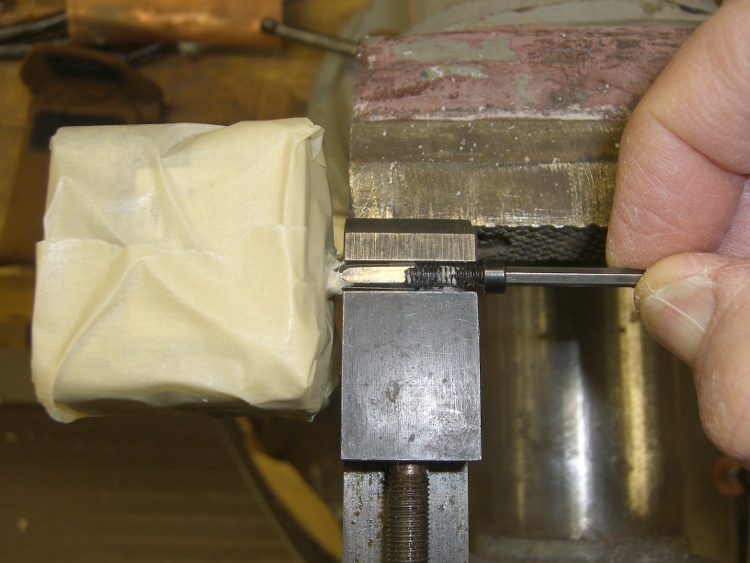
Mummify the motor in masking tape to keep grinding grit and metallic dust out of the shaft bearings, then grab the shaft in a smooth- or soft-jaw vise. I grabbed a machinist’s vise in the bench vise, but use what you have.
Masked motor in vise
Apply a Dremel grinding stone / cutoff wheel along the shaft to produce a flat about the same width as the tip of the screw. The object of the game is to make the flat wide enough to keep the burr on the flat, but not grind half the shaft away.
Don’t grind the shaft without clamping it, because the vibration will destroy the bearings. Clamp the shaft to stabilize it and isolate the motor, then do the grinding.
Flatted shaft with screw
Here’s the shaft after installing & removing the gear. Notice the burr:
Flatted shaft with screw scar
And a detail of the burr:
Flatted shaft scar – detail
It’s not like I’m over-tightening the screw, either: that’s what a hardened screw does to a soft motor shaft.
Printing those fairing mounting plates gave me an opportunity to explore the Oozebane parameter space. I wasn’t quite sure how it would work and now I’m certain that it can’t.
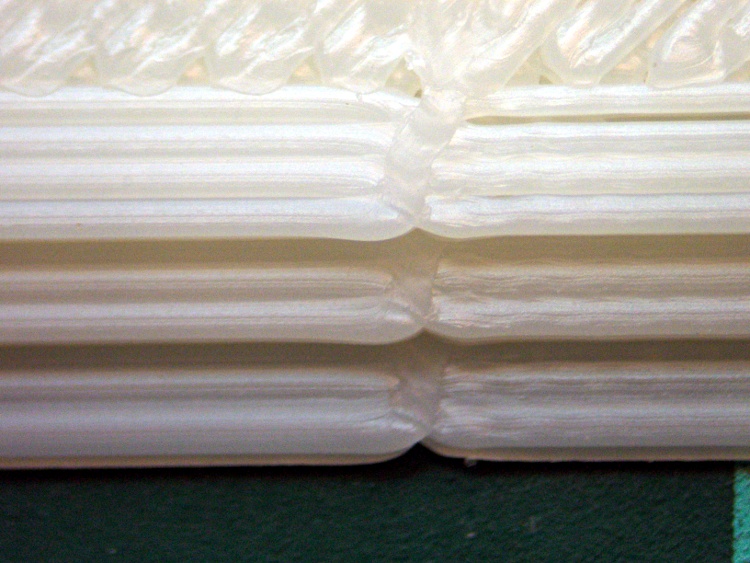
Here’s the joint at the start/end of the perimeter extrusion around one of the plates, with Oozebane set for a 4 mm early shutdown:
Perimeter joint – Oozebane
You’re looking straight down at three edges (bottom = 2 layers, middle & top = 3 layers), but the shadow obscures the vertical faces; they’re firmly joined. The nozzle enters the picture from the left, slows and stops at the joint, then departs for another location.
The turd appears on the far side of this picture, just above the left hole:
Fairing mount – outside
Here’s the same joint, but with Oozebane turned off:
Perimeter joint – normal
Any questions?
Ah: layer thickness 0.3 mm, w/t=1.7 → width =0.56 mm, 45 mm/s feed, 255 PWM flow.
As nearly as I can tell, Oozebane can’t possibly work the way it’s currently defined, at least for the DC extruder on my Thing-O-Matic. The problem is that Oozebane simultaneously shuts off the extruder and slows the feed rate, but the pressure on the molten plastic inside the extruder continues to force it out at about the same rate for quite some time.
Thus, with the feed rate reduced to some unknown (and unprogrammable) value and the flow continuing at the original rate, each thread endpoint accumulates an oversized turd.
Maybe Oozebane works for somebody else, but a stepper extruder is the right solution…
The stock Zzipper fairing handlebar mount consists of an aluminum bar with a plate welded to each end at more-or-less the correct angle to match the fairing curve. The plate has a 1/4 inch hole in one end, wherein a 1/4-20 nylon machine screw clamps the fairing to the plate, with a nylon washer distributing the stress. That doesn’t cope well with the vibrations caused by riding around here, let alone our summer vacation trips on crushed-stone rail trails, and the fairings tend to stress-crack at the holes.
These 3D printed plates are just the latest in a long series of attempts to distribute the stress over a larger area. The outside view:
Fairing mount – outside
The open hole gets another screw to hold the plates in position. The bump on the far side is an Oozebane turd, about which more later.
The view from inside the fairing:
Fairing mount – inside
You can’t see the layer of black foam rubber salvaged from a mouse pad between each plate and the fairing. That should prevent any local stress concentration at the screw and ease the transition to the tapered plate edges.
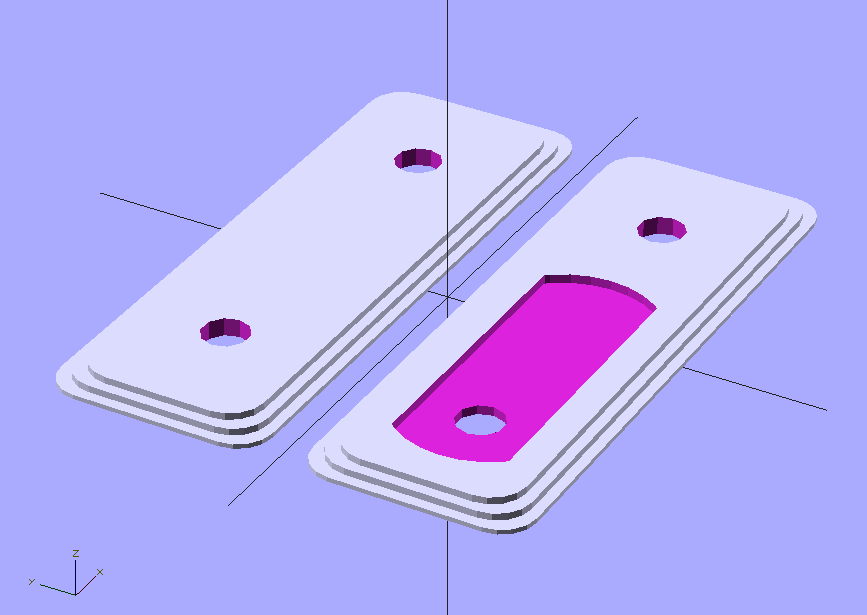
The solid model looks about like you’d expect:
Fairing Mount Plates – Upper
The hole position depends on the fairing position, as the fairings have three holes. The pictures show the fairing on my bike; it’s in the lowest position, with the screw in the topmost hole. The OpenSCAD file has an option to put the holes where you need them.
The plates are only 8 layers thick, printed with 4 solid layers top and bottom to eliminate any fill. You could do the same by setting the fill to 100%, I suppose. Using 4 outer shells (3 additional) makes the flanged edge nice and flat and uniform.
The layer height is 0.33 mm, with w/t=1.7 for a width of 0.56 mm. Feed rate = 43 mm/s and flow rate = 255. DC Extruder, alas.
Running the first layer at feed = 0.5 and flow = 0.75 produces some fluffing in the fill, but there’s no way to get a lower flow from the DC extruder motor. Flow = 0.75 corresponds to PWM=191; anything lower sometimes fails to start the motor. If it starts, it’ll run, but … that’s not dependable.
I printed them on an aluminum plate for a nice flat bottom surface.
The OpenSCAD source code:
// Clamp plates for Zzipper fairing on Tour Easy recumbents
// Ed Nisley - KE4ZNU - Mar 2011

// Build with...
//	extrusion parameters matching the values below
//	4 outer shells
//	4 solid surfaces at top + bottom
//  slow feeds to ensure hole perimeters stick to fill

include </home/ed/Thing-O-Matic/lib/MCAD/boxes.scad>
include </home/ed/Thing-O-Matic/lib/MCAD/units.scad>

// Select hole layout
// The if statement seems to work only for CSG object trees
// Fortunately, I need only two different layouts...

HoleSelect = 1;						// 0 = his, 1 = hers

HolesTop 	= (0 == HoleSelect) ? [0,1,1] : [1,0,1];
HolesBottom = (0 == HoleSelect) ? [0,1,1] : [1,0,1];

// Set these to match the extrusion parameters for successful building

ThreadZ = 0.33;						// extrusion thickness
ThreadWidth = 0.57;					// extrusion width = ThreadZ x w/t

HoleWindage = ThreadWidth;			// enlarge hole dia by extrusion width

// Plate dimensions

HoleDia = 0.25 * inch;				// these are 1/4-20 bolt holes
HoleSpace = (1) * inch;				// center-to-center spacing
									//  usually 1 inch, but 15/16 on one bike

CornerR = 5.0;						// corner rounding

Layer1X = 90;						// against fairing surface
Layer1Y = 32;
Layer1Z = 2*ThreadZ;

Layer2Margin = 1.5;					// uncovered edge
Layer2X = Layer1X - 2*Layer2Margin;
Layer2Y = Layer1Y - 2*Layer2Margin;
Layer2Z = 3*ThreadZ;

MountX = 46.3 + HoleWindage;		// handlebar mounting bracket end plate
MountHoleSpace = 13.0;				//  end to hole center
MountY = 16.3 + HoleWindage;
MountZ = 4*ThreadZ;					// recess depth
MountCap = 3.0;						// endcap arc height
MountR = (pow(MountCap,2) + 0.25*pow(MountY,2)) / (2*MountCap);	// ... radius

Layer3Margin = 1.5;
Layer3X = Layer2X - 2*Layer3Margin;
Layer3Y = max((Layer2Y - 2*Layer3Margin),(MountY + 8*ThreadWidth));
Layer3Z = 3*ThreadZ;

PlateZ = Layer1Z + Layer2Z + Layer3Z;

// Convenience settings

BuildOffset = 3.0 + Layer1Y/2;		// build Y spacing between top & bottom plates

Protrusion = 0.1;					// extend holes beyond surfaces for visibility

//---------------
// Create plate with selectable holes

module Plate(hs) {

  difference() {

	union() {
		translate([0,0,Layer1Z/2])
		  roundedBox([Layer1X,Layer1Y,Layer1Z],CornerR,true);
		translate([0,0,Layer1Z + Layer2Z/2])
			roundedBox([Layer2X,Layer2Y,Layer2Z],CornerR,true);
		translate([0,0,Layer1Z + Layer2Z + Layer3Z/2])
			roundedBox([Layer3X,Layer3Y,Layer3Z],CornerR,true);
	}

	if (0 != hs[0]) {
	  translate([-HoleSpace,0,PlateZ/2])
		  cylinder(r=(HoleDia + HoleWindage)/2,
					h=(PlateZ + 2*Protrusion),
					center=true,$fn=10);
	}

	if (0 != hs[1]) {
	  translate([0,0,PlateZ/2])
		  cylinder(r=(HoleDia + HoleWindage)/2,
					h=(PlateZ + 2*Protrusion),
					center=true,$fn=10);
	}

	if (0 != hs[2]) {
	  translate([HoleSpace,0,PlateZ/2])
		  cylinder(r=(HoleDia + HoleWindage)/2,
					h=(PlateZ + 2*Protrusion),
					center=true,$fn=10);
	}

  }

}

//---------------
//-- Build the things...

translate([0,BuildOffset,0]) Plate(HolesTop);

translate([0,-BuildOffset,0])
  difference() {
	Plate(HolesBottom);

	translate([-(HoleSpace + MountHoleSpace - MountX/2),0,PlateZ - MountZ/2 + Protrusion/2])
	  intersection() {
		cube([MountX,MountY,(MountZ + Protrusion)],center=true);
		union() {
		  cube([(MountX - 2*MountCap),MountY,(MountZ + Protrusion)],center=true);
		  translate([ (MountX/2 - MountR),0,0])
			cylinder(r=MountR,h=(MountZ + Protrusion),center=true);
		  translate([-(MountX/2 - MountR),0,0])
			cylinder(r=MountR,h=(MountZ + Protrusion),center=true);
		}
	  }
  }
I loves me my Thing-O-Matic, despite its annoyances…
[Update: Stepper extruder parameters and a tweak to make the mount plate track the hole position correctly.]
This is a proof-of-concept lashup of a circuit to shut off the Thing-O-Matic’s power should the Thermal Core overheat. It vaguely resembles those doodles, but with the thermal switch cases grounded and an indicator for the main thermal switch.
[Update: You should read the rant at the bottom of that post to understand why this isn’t a firmware mod and doesn’t contain a microcontroller.]
Operation is straightforward:
The black NO (Normally Open) momentary switch energizes the DPDT relay, one NO pole of which then holds the relay power on.
The red NC (Normally Closed) momentary switch interrupts that circuit and releases the relay.
An NC thermal switch detects an overheated Thermal Core, opens that circuit, and releases the relay.
The other NO relay pole connects / disconnects the ATX power supply’s -Power On line from the Thing-O-Matic Motherboard. That connection requires a circuit-board cut to splice the relay into the Motherboard.
The LEDs:
Lower Green = ATX AC power on (from +5VSB power)
Upper Green = +Power On signal active
Red = Test / Fault (on = relay inactive)
Yellow = low over-temperature alarm
Orange atop box = high over-temp switch active
I included a second NO thermal switch that activates at a lower temperature, mostly because I had one, but that’s certainly not required. The multitude of LEDs makes for a happy-looking box; labels would be a nice touch, I agree.
When you turn on the ATX power supply, the Lower Green and Red LEDs turn on: the “Test” part of the “Test / Fault” indicator. Push the black button, the Red LED goes off, the Upper Green LED goes on, and the Thing-O-Matic is up & running. Push the red button, the TOM shuts down, and you’re back to the starting condition.
The Yellow LED goes on when the lower temperature switch goes on.
Shortly thereafter, presumably, the higher temperature switch opens, the Orange LED goes on, the TOM shuts down, and you’re left with the Lower Green, Yellow, and Orange LEDs: zowie! When the high temp switch cools off a bit, the Orange LED goes off and the Red LED goes on. After a while, the Yellow LED will go off, and you’re back to Square One again.
What’s not yet done: mounting the thermal switches to the Thermal Core in a way that’s mechanically solid, electrically isolated, and thermally dependable. I just got a bag of 100 °C NC switches, which make more sense than the 65 °C NC switches I’d been fooling with.
The wiring uses 4P4C and 6P6C modular phone connectors and cables, which are cheap & readily available, if not exactly proof against high temperatures. In normal use, failures tend to be open-circuit that will shut off the heater power. Take care not to position the cables so they melt first; they’re not intended as thermal switches.
Achtung: modular cable color codes are not standardized, particularly on the jack side, so pay more attention to the pin numbers than the colors. If I ever meet the guys who rearranged the jack colors, There. Will. Be. Gibbage.
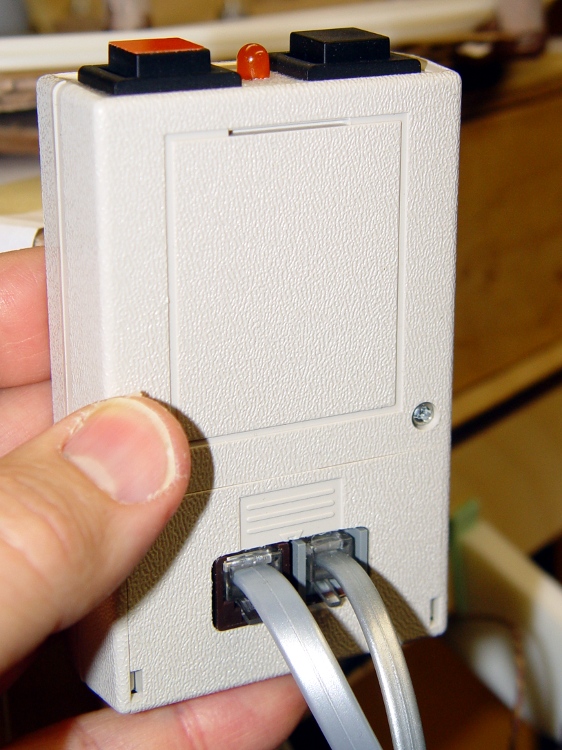
A back view of the box shows a nice rectangular hole that’s obviously a manual CNC job on the Sherline, with no corner filing whatsoever. Hot melt glue holds the connectors in place, so I’m not showing off the inside:
Thermal lockout box – rear
The -Power On connection to the Motherboard requires the single cut shown in yellow:
Motherboard PCB Modification
It looks like this in real life, with the wire soldered to the Arduino header pin. Another dab of my Shop Assistant’s orange nail polish seals the PCB wound:
Motherboard -Power On modification
The remaining wires attach to the ATX power connector pins on the bottom of the board. The yellow wire passes through an unused mounting hole on its way to the top side, as above. Use a cable tie to tie the cable to the board, through a pair of otherwise unused RS-485 connector mounting holes.
Motherboard Connections – Bottom
While you’re chopping away at the Motherboard, add that isolating diode to keep +5 V USB power from turning the ATX fan with the power off.
The overall schematic (clicky for more dots):
Thermal Lockout Schematic
There is no corresponding PCB layout, because the circuitry forms a point-to-point hairball inside the box. If you were doing this for real, you’d want a PCB with a bazillion connections, but …
For example, here’s the FET driver for the Orange (it just looks Red) high temperature LED before a liberal application of heat stink shrink tubing:
Overtemperature LED driver hairball
You can test the thermal switches using a butane lighter.











 The Smell of Molten Projects in the Morning