Ed Nisley's Blog: Shop notes, electronics, firmware, machinery, 3D printing, laser cuttery, and curiosities. Contents: 100% human thinking, 0% AI slop.
Tag: Thing-O-Matic
Using and tweaking a Makerbot Thing-O-Matic 3D printer
Various numbers that I’ve either measured or collected, scraped into one untidy heap, with the intent of figuring out the stepper motor torques. One significant figure will be entirely enough for what we’re doing; kg & g are really kg-force and g-force; you know what I mean.
Weights
X stage wood structure = 120 g
Aluminum build plate = 100 g
XY stage with plates & c =1.1 kg
Forces
Guide rod in two bushings = nil
X stage with four bushings = 0.8 lb = 0.4 kg
X stage with X rod follower = nil
X stage with X follower and motor = 1 lb = 0.5 kg
Y stage = 2 ounces = nil
Y stage with motor = 1.5 kg static, 1 kg moving
Distances
The ReplicatorG/machines/thingomatic.xml file lists the X and Y pulleys as 10.82 mm diameter. I measure 12.5 mm over the belt and the belt is 0.78 mm thick, sooo that makes it 10.9 at the pulley surface (which I can’t get to without taking everything apart again). Let’s call them 11 mm.
X and Y = 47.069852 step/mm. Let’s call that 47 step/mm → 0.021 mm/step
Z = 200 step/mm → 0.005 mm/step
[Update: see nophead’s comment for the right way to compute the X & Y distances. The answer is 47.0588 step/mm = 0.02125 mm/step, which is 0.1% off what I’d been using.]
The XML file lists the MK6 extruder at 50.235478806907409 step/mm. Measuring the results on my geared extruder, using the same filament drive doodad as they do, works out to 48.2 step/mm and 1456 step/rev.
The A3977 uses a pair of current-sense resistors (RS) to control the winding current. The REF trimpot sets a voltage level that the A3977 compares with the voltage (VREF) on the sense resistor, so the maximum current is directly proportional to the REF setting:
Max current = VREF / (8 * RS)
The MBI boards use 0.25 Ω resistors, so the equation reduces to
Max current = VREF / 2
So you can determine the maximum winding current by simply dividing the REF voltage in half.
However, keep in mind that the supply voltage and motor winding resistance also limit the current; additional voltage drops in the drivers and resistance in the wiring count against the maximum. The REF trimpot has no magic ability to force more current into the motor than Ohm’s Law will permit.
Having improved my Thing-O-Matic mechanics about as much as can be cough reasonably expected, the stepper motors driving the X and Y axes still seem to be running at about the limit of their ability. It’s time for some doodling on that subject; let’s start by collecting all the data in one spot.
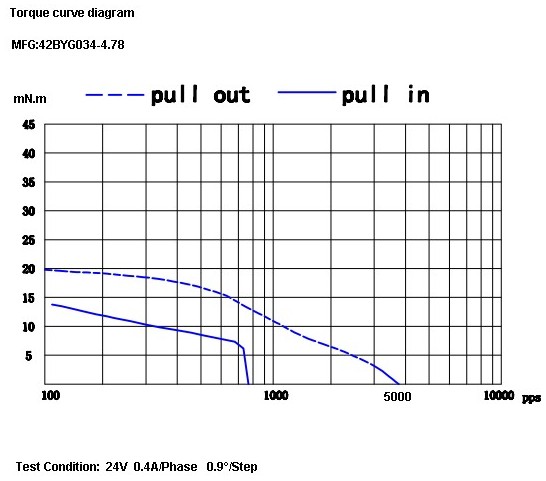
The X and Y motors are, as far as I can tell, inherited directly from the MBI Cupcake CNC. They seem to be Kysan 42BYG034-4.78 (aka SKU 1123029) described on that Kysan store product page as:
Note that, unlike most NEMA 17 steppers, this puppy does not have a 5 mm shaft (unlike the electrically identical Kysan 42BYG034, which does). A 5 mm pulley is a poor fit on a 4.78 mm shaft and, conversely, you must drill / bore MBI pulleys to fit other steppers.
If one was to buy a replacement pulley with a 5 mm bore, the A 6D51M018DF0605 from SDP might do the trick. Or you could apply a 0.199 inch (#8) drill to the bore and save twenty bucks.
The Z stepper has an integrated 4-start leadscrew, so it’s not suitable for a drop-in replacement without some Quality Shop Time. That comment leads to that Kysan store product page for Kysan 17HD011-200N (aka SKU 1040104), with this data:
12V
0.4A
200MM LEAD SCREW
1.8 DEGREE
30 OHM
37MH
260mN.m HOLDING TORQUE
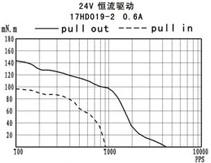
The Kysan Electronics product page has more data (although the proffered PDF datasheet is empty), including a low-res torque curve:
Thing-O-Matic Z Axis torque curve
The Z axis motor on my TOM is labeled “PN 1040103”, which leads to that Kysan Electronics product page for 17HD-8X150MM0.4A, with just a mechanical drawing. The electrical properties seem identical.
The MK6 Extruder (MBI assembly and setup doc there) stepper motor evidently arrives without ID, but that comment suggests it’s an Anaheim Automation 17Y402S-LW4-01 or something similar. That discussion indicates the motor has a 5 mm shaft, not the 6 mm that would match the standard MK5/MK6 filament drive gear, and that MBI did another custom order.
Following various links leads us to the data table there, wherein we find:
Coil resistance = 12 Ω
Coil inductance = 29 mH
Rated current = 850 mA
Rated voltage = 10.2 V
The torque curve:
Anaheim 17Y402S Torque Curve
One observation: these motors have extremely high winding resistance. That makes them suitable for low-speed H-bridge drivers without current control, not contemporary stepper drivers with chopper current control.
The prototype X Rod Follower turned out to be pretty good fit, after I filed a slot in the back for the belt clamp. The bearings wound up 1.5 mm too close to the centerline, but a pair of #4 washers on each post solved that problem. The tweaked OpenSCAD source below should produce a drop-in replacement.
X Axis follower in place
It’s important to center the bearings on the rod, because they’re designed to support only radial loads. In a normal application the bearings live in a slip-fit pocket that supports the entire outer race, but here an off-center point contact applies an axial force and misaligns the bearing races. They can’t handle axial forces at all: you (well, I) can easily feel the difference an axial millimeter makes.
With the follower in place, the force required to move the beltless X stage dropped from 0.75 pounds to zero: the stage slides back and forth across the entire length of the rods with a finger tap! The mechanical overconstraint on rods simply Went Away, pretty much as I expected.
[Update: In case it’s not obvious from the picture, you must remove both bronze bushings from the front of the X stage when you install this Follower. Leave the back pair in place.]
After installing and tensioning the drive belt, the stage still requires about 1 pound = 0.5 kg = 5 N to push along the rods, but now there’s no mechanical binding at any point along the way. That’s with the motor unplugged from the driver; you don’t want to count the effort required to light the LEDs!
Now, to reassemble and realign the rest of the build platform again.
The OpenSCAD source has only a few dimension numbers changed from the previous version, but here it is in one cut-n-paste lump:
[Update: You should use carmiac’s version, which prints better. The original code says “rear guide rod follower” but it turned out to fit better on the front of the X stage.]
// Thing-O-Matic X Stage front guide rod follower
// Ed Nisley - KE4ZNU - Mar 2011

include </home/ed/Thing-O-Matic/lib/MCAD/units.scad>

Build = false;						// set true to generate buildable layout

$fn = 8;							// default for holes

// Extrusion values
// Use 2 extra shells behind the perimeter
//  ... and 3 solid shells on the top & bottom

ThreadThickness = 0.33;
ThreadWT = 1.75;
ThreadWidth = ThreadThickness * ThreadWT;

HoleWindage = ThreadWidth;			// enlarge hole dia by extrusion width

Protrusion = 0.1;					// extend holes beyond surfaces for visibility

// Bearing dimensions

BearingOD = (3/8) * inch;			// I used a hard-inch bearing -- try a 603 or 693
BearingID = (1/8) * inch;
BearingThick = (5/32) * inch;

BearingBoltDia = 3.0;				// allow this to shrink: drill & tap the threads!
BearingBoltRadius = BearingBoltDia/2;

BearingStemOD = BearingBoltDia + 6*ThreadWidth;
BearingStemRadius = BearingStemOD/2;
BearingStemLength = 2.0;

// X guide rod dimensions

RodDia = (3/8) * inch;				// hard inch rod
RodRadius = RodDia/2;
RodLength = 75;						// for display convenience

RodClearTop = 12.6;					// clearance from HBP to rod
RodClearSide = 9.7;					//  ... idler to rod
RodClearBottom = 10.7;				//  ... rod to Y stage

RodClearCirc = 1.5;					//  ... around circumference

// Drive mounting piece (from ABP teardown)

DriveHolesX	= 16.0;					// on-center distance
DriveHolesZ = 9.0;					// on-center distance
DriveHoleZOffset = -5.0;			// below bottom of HBP platform

DriveHeight = 28.0;

DriveBoltDia = 3.0 + HoleWindage;	// bolt dia to hold follower in place
DriveBoltRadius = DriveBoltDia/2;

DriveBoltHeadDia = 6.0 + HoleWindage;
DriveBoltHeadRadius = DriveBoltHeadDia/2;
DriveBoltWeb = 4.5;					// leave this on block for 12 mm bolts

HBPNutDia = 4.0;					// HBP mounting nut in middle of idler
HBPNutRadius = HBPNutDia/2;
HBPNutRecess = 0.5;					//  ... pocket for corner of nut
HBPNutZOffset = -10.0;				//  ... below bottom of HBP platform

BeltWidth = 7.0;					// drive belt slots
BeltThick = 1.2;					//  ... backing only, without teeth
BeltZOffset = -22.5;				//  ... below bottom of HBP platform

// Bearing locations

Preload = 0.0;						// positive to add pressure on lower bearing

TopZ = RodRadius + BearingOD/2;
BottomZ = Preload - TopZ;

// Follower dimensions

BlockWidth = 28.0;					// along X axis, must clear bolts in idler
BlockHeight = RodDia + 2*BearingOD - Preload;
BlockThick = (RodClearSide + RodRadius) - BearingThick/2 - BearingStemLength;

BlockHeightPad =  RodClearTop - BearingOD;

echo(str("Block Height: ",BlockHeight));
echo(str("Block Height Pad: ",BlockHeightPad));
echo(str("Block Thick: ",BlockThick));

BottomPlateWidth = 10.0;
BottomPlateThick = 5.0;

BlockTop = RodRadius + RodClearTop;

BlockOffset = BlockThick/2 + BearingStemLength + BearingThick/2;

echo(str("Drive wall to rod center: ",BlockThick + BearingStemLength + BearingThick/2));

// Construct the follower block with

module Follower() {

  difference() {
	union() {
	  translate([0,BlockOffset,0])
		difference() {
		  union(){
			cube([BlockWidth,BlockThick,BlockHeight],center=true);
			translate([0,0,(BlockHeight + BlockHeightPad)/2])
			  cube([BlockWidth,BlockThick,BlockHeightPad],center=true);
		  }
		  for(x=[-1,1]) for(z=[0,1])
			  translate([x*DriveHolesX/2,
						Protrusion/2,
						(BlockHeight/2 + BlockHeightPad + DriveHoleZOffset - z*DriveHolesZ)])
				rotate([90,0,0])
				  cylinder(r=DriveBoltRadius,
							h=(BlockThick + Protrusion),
							center=true);
			for(x=[-1,1]) for(z=[0,1])
			  translate([x*DriveHolesX/2,
						(-(DriveBoltWeb + Protrusion)/2),
						(BlockHeight/2 + BlockHeightPad + DriveHoleZOffset - z*DriveHolesZ)])
				rotate([90,0,0])
				  cylinder(r=DriveBoltHeadRadius,
							h=(BlockThick - DriveBoltWeb + Protrusion),
							center=true);
		  translate([0,
					((BlockThick - BeltThick + Protrusion)/2),
					(BlockHeight/2 + BlockHeightPad + BeltZOffset)])
			cube([(BlockWidth + 2*Protrusion),
				 (BeltThick + Protrusion),
				 BeltWidth],center=true);
		  }

	  translate([0,BearingStemLength/2 + BearingThick/2,TopZ])
		rotate([90,0,0])
			cylinder(r=BearingStemRadius,h=BearingStemLength,center=true,$fn=10);
	  translate([0,BearingStemLength/2 + BearingThick/2,BottomZ])
		rotate([90,0,0])
		  cylinder(r=BearingStemRadius,h=BearingStemLength,center=true,$fn=10);
	}

	translate([0,(BlockOffset - BearingStemLength/2),TopZ])
	  rotate([90,0,0])
		cylinder(r=BearingBoltRadius,
				h=(BlockThick + BearingStemLength + 2*Protrusion),
				center=true);
	translate([0,(BlockOffset - BearingStemLength/2),BottomZ])
	  rotate([90,0,0])
		cylinder(r=BearingBoltRadius,
				h=(BlockThick + BearingStemLength + 2*Protrusion),
				center=true);

	translate([0,
			  (BlockThick + BearingStemLength + BearingThick/2 - (HBPNutRecess - Protrusion)/2),
			  (BlockHeightPad + BlockHeight/2 + HBPNutZOffset)])
	  rotate([90,0,0])
		cylinder(r=HBPNutRadius,h=(HBPNutRecess + Protrusion),center=true);

	rotate([0,90,0])
	  cylinder(r=(RodRadius + RodClearCirc),h=RodLength,center=true,$fn=32);

  }
}

// Arrange things for construction

if (Build)
	translate([0,(-BlockHeightPad/2),(BlockOffset + BlockThick/2)])
	  rotate([-90,0,0])
		Follower();

// Arrange things for convenient inspection

if (!Build) {

  Follower();

  translate([0,0,TopZ])
	rotate([90,0,0])
	  #cylinder(r=BearingOD/2,h=BearingThick,center=true,$fn=32);

  translate([0,0,BottomZ])
	rotate([90,0,0])
	  #cylinder(r=BearingOD/2,h=BearingThick,center=true,$fn=32);

  rotate([0,90,0])
	  #cylinder(r=RodDia/2,h=RodLength,center=true,$fn=32);

}
Wouldn’t it be great if you could export all that stuff to a text file in a readable format? The CSV files come close, but they’re not really meant for human consumption.
Subject to revision, your mileage may vary, past performance is no indication of future yield, perfectly safe when used exactly as directed, shake before using, don’t touch that dial!
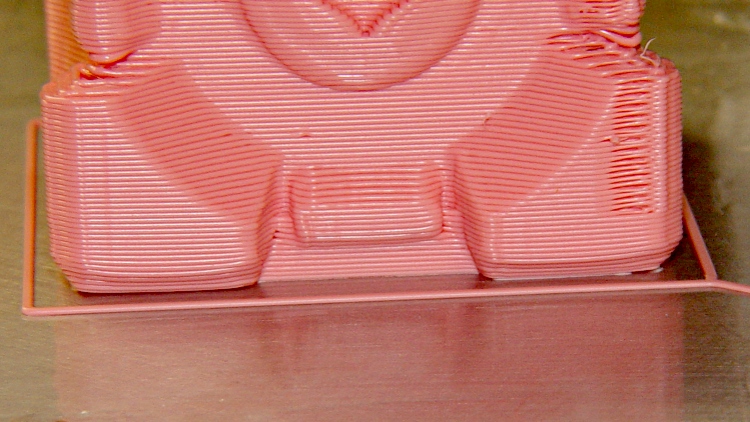
Companion cube, with a slightly warped right corner:
Companion Cube – build detail
Now, those objects may have other problems, but two things work really well:
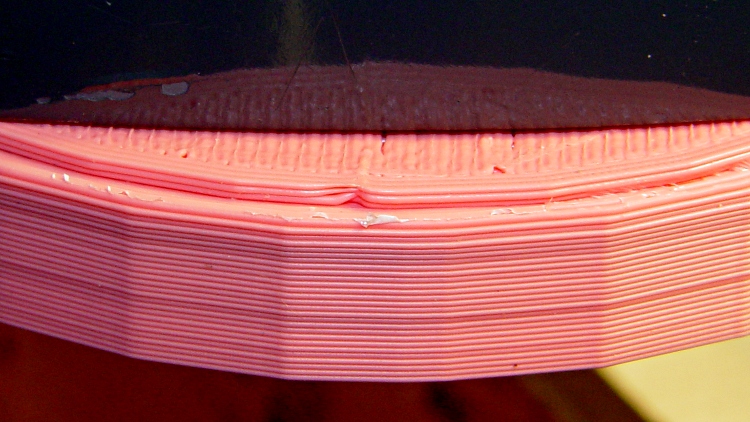
The first layer sticks like it was glued to the ABS film
The side walls build perfectly straight, without bulges or shrinkage
What’s important to me: this is dependable and repeatable.
It’s not yet a simple routine, because these objects were built while I was hacking away at the HBP + aluminum plate platform, some are on the old ABP + aluminum plate arrangement, and they’re not all first-attempt parts. However, given a proper setup, It. Just. Works.
Part of the process involves a very slow first-layer feed: about 10 mm/s. At that pace the molten ABS has enough time to bond with the layer on the plate, even around corners; much faster and it can pull free.
The Extruder runs at 210 °C, the HBP at 120 °C, feed is 40 mm/s, and traverse is around 50 mm/s.
It is yet to be seen if this lashup will remain stable, but the first indications seem pretty good.
My intent with the modified HBP and removable aluminum build plate: get a stable, repeatable first layer height. That is where it all starts…
The thin(ner) aluminum plate clamped to the Heater establishes the overall platform alignment. The G-Code routine at the bottom probes the height at nine locations across the plate, with me shoving a taper gage under the nozzle at each spot and writing down what I read. The accuracy seems to be around ±0.05 mm (pretty much / sorta kinda), based on the spread-out scale on the gage and a good feel for when the gage touches the nozzle.
The results in mm above the sub-platform, after leveling the HBP with the adjusting bolts:
3.5
3.4
3.3
3.5
3.5
3.4
3.4
3.5
3.6
The 3.6 mm in the front right comes from the wiper hitting the Thermal Core insulation. I must trim that thing a bit!
Apart from that, it’s as flat and level as you could possibly want.
Measuring identical Outline extrusions with a max Z height = 116.5 mm and a 0.33 mm layer thickness on the three build plates produces these numbers, with units of 0.01 mm to save some typing:
Plate 1
42
38
35
43
31
43
33
38
34
37
33
32
Plate 2
37
33
31
35
23
33
21
25
15
19
16
17
Plate 3
38
30
29
37
28
34
27
32
31
28
29
28
Plate 2 may have trapped a bit of grit underneath the near edge; sometimes the dissolved ABS oozes around the edge or down a bolt head clearance hole to the underside, despite my best efforts.
Apart from that, they’re about as flat and level as you could possibly want from a loose plate sitting atop a moving platform. While the difference between a 0.43 and a 0.31 mm layer is visibly obvious, I don’t know how to get the plate any more level than that… at least without an entirely different and much heavier mechanical structure.
The real question comes down to repeatability: will the platform behave the same way under each extrusion, day in and day out, without requiring height adjustment for every object?
I know a bit about tool height probing, but it’s not clear attaching a Z-minimum limit switch to the side of the HBP, perhaps under the Heater, would track the top surface of the plate with sufficient accuracy. I don’t like touching the nozzle to the build plate itself, because either one may have an insulating layer of ABS or a bit of grit or whatever that would prevent electrical contact. Ditto for optical sensing, which depends on not having any snot hanging from the nozzle.
It’s definitely true that the platform height depends strongly on the HBP temperature. As nearly as I can tell, the build platform rises by about 0.5 mm as the Heater stabilizes the plates at 120 °C.
More numbers to follow, as they accumulate.
The height probing routine, in which you must set a suitable Z height for your very own machine:
(Measure surface flatness)
(MakerBot Thing-O-Matic with ABP and aluminum plate)
(Tweaked for TOM 286)
(Ed Nisley - KE4ZNU - Mar 2011)
(-- The usual setup --)
G21		(set units to mm)
G90		(set positioning to absolute)
(**** home axes ****)
G162 Z F1500	(home Z to get nozzle out of danger zone)
G161 Y F4000	(retract Y to get X out of front opening)
G161 X F4000	(now safe to home X)
G92 X-53.0 Y-59.0	(set XY coordinate zeros)
G92 Z116.5    (set Z for HBP with aluminum sheet platform)
G0 X0 Y0 Z5.0
(-- Begin probing --)
G1 Z1.0		(center)
G4 P9000
G0 Z5.0
G0 X-40.0	(left center)
G1 Z1.0
G4 P9000
G0 Z5.0
G0 Y-50.0	(left front)
G1 Z1.0
G4 P9000
G0 Z5.0
G0 X0.0		(mid front)
G1 Z1.0
G4 P9000
G0 Z5.0
G0 X40.0	(right front)
G1 Z1.0
G4 P9000
G0 Z5.0
G0 Y0.0		(right center)
G1 Z1.0
G4 P9000
G0 Z5.0
G0 Y50.0	(right rear)
G1 Z1.0
G4 P9000
G0 Z5.0
G0 X0.0		(mid rear)
G1 Z1.0
G4 P9000
G0 Z5.0
G0 X-40.0	(left rear)
G1 Z1.0
G4 P9000
G0 Z5.0
G0 X0.0	Y0.0	(center again)
G1 Z1.0
G4 P9000
(G0 Z5)



 The Smell of Molten Projects in the Morning