The Smell of Molten Projects in the Morning

Ed Nisley's Blog: Shop notes, electronics, firmware, machinery, 3D printing, laser cuttery, and curiosities. Contents: 100% human thinking, 0% AI slop.

Tag: Rants

And kvetching, too

  • Security by Photographic Obscurity: FAIL

    Gas Storage Tank
    Gas Storage Tank

    We biked along the Poughkeepsie waterfront and spotted this stately gas storage tank. The shape tells you it’s a pressure vessel, not a simple fluid tank. I think Central Hudson has an underwater gas pipeline across the Hudson right about there; the waterfront is rife with oil storage tanks and suchlike, although less than in days of yore.

    As you might expect, I took the picture from a public area, pretty much in front of a house across the street. It’s not like this was a risky high-security red-flag penetration operation; we rode to the end of Dutchess Avenue (the better part of 600 feet), soaked up some of the decaying industrial-age vibe, turned around, and rode back up the hill.

    Dutchess Avenue - Google Obscured View
    Dutchess Avenue – Google Obscured View

    I made a ten-cent bet with myself that the Google-Eye view of the area would be blurred out “for security reasons” and, yup, won that sucker. This isn’t a case of JPG compression: notice how (relatively) crisp the railroad tracks are?

    Dutchess Ave - Topo Map
    Dutchess Ave – Topo Map

    The 1955 topographic map hanging on our wall (I’m a map junkie) was revised in 1981 and leaves very little to the imagination. It not only shows oil storage tanks standing on those now-empty concrete pads, but it also labels the area. Admittedly, it doesn’t show the gas tank, so the tank hasn’t been there for more than, oh, a quarter-century.

    I submit to you that the best way for an evildoer to pick a high-value target is to browse the maps and look for low-res areas. Here in mid-state New York, that’s an infallible way to find things like big petroleum storage facilities (or just look along the waterfront), airports with military-grade runways (the Dutchess County Airport evidently doesn’t count), oil / coal / nuke power plants, and good stuff like that. Then the bad guy gets in his car, drives over, gets some ground truth, and away they go.

    A lazy bad guy could even write a Google Maps app that quietly and slowly scanned a given area for low-res points of interest.

    That’s what Bruce Schneier calls a Movie Plot Threat. Ruining the resolution doesn’t change anything; you don’t need high-res imagery to blow something up.

    Sheesh & similar remarks.

  • Experian Triple-Alert Signup: FAIL

    So batteries.com had the usual security breach, lost the usual list of customer info, and sent out the usual letter advising the victims that they could get a free signup with Experian’s credit-report monitoring service.

    So I signed up, which involved the usual exposure of sensitive parts of my ID anatomy, and was eventually told (despite answering everything correctly, AFAICT) that they couldn’t verify that I was, in fact, me and would send a paper form to my (presumably known-to-them) USPS address for confirmation.

    The next day I get an email from “Triple Alert Redemption Customer Care <mumble-mumble@consumerinfo.com>” with this helpful offer:

    We employ a rigorous identity verification system in order to protect your personal information. Unfortunately, we could not validate your identity due to either technical difficulties with the system or information submitted that could not be confirmed.

    To continue the order process, please contact customer care at 1-866-mum-bles, Monday-Friday from 6 a.m. to 6 p.m., Saturday-Sunday 8 a.m. to 5 p.m. Pacific Time.  Please provide this Reference number (required):

    Reference number: make-up-your-own

    A representative will attempt to confirm your identity by asking you questions based on the information contained in your credit report.  Please be sure to familiarize yourself with data such as the names of your lenders and account balances before you call.  Once your identity has been confirmed, you will be provided access to your Triple Alert(SM) Credit Monitoring membership.

    Now, it’s highly likely that the email is on the up-and-up, but this seems to be precisely one of those situations they warn about:

    • you get an official-looking email
    • call the phone number
    • talk to the nice person
    • answer a bunch of probing questions
    • be assured that something pleasant will happen

    Instead, I called the “Contact Us” number from their website. The nice lady didn’t see anything wrong with them sending out an email like that. Nay, verily, she offered to do the deed right over the phone. I respectfully declined… I can wait.

    It’s worth noting that although it’s an Experian thing, the websites & email addresses involved include:

    • experian.com
    • consumerinfo.com
    • experiandirect.com

    It’s enough to make you think longingly of cutting up your cards, digging a hole, climbing down, and pulling it in after you.

    [Update: after a month or so, I got an email telling me that all was quiet on my Triple-Alert front and my delicate personal bits were in fine shape. A few days later, the long-awaited paper arrived with my confirmation numbers. So I suppose it’s working, but sheesh it doesn’t inspire much confidence.]

  • Electronic Ballast Shoplights: So Much For Efficiency

    Just picked up a batch of electronic-ballast shoplights from Lowe’s, motivated by a 10% off card they sent a while ago. Not a killer deal, but it evidently got plenty of folks into the store on a Sunday morning.

    The new lights don’t claim much about their abilities, other than “Electronic Cold Weather Start (0° F)” and that the reflector sizing requires T8 (1″ dia) fluorescent tubes. One would expect an electronic ballast to have a decent power factor and improved efficiency.

    Because I’m that sort of bear, I opened one up to see what was inside. Here’s the ballast:

    Electronic Ballast Dataplate
    Electronic Ballast Dataplate

    Although the fixture is sized for T8 tubes, the ballast would be perfectly happy with T12s. Similarly, the box insists on F32 tubes, but the ballast is OK with F40s.

    I thought a comparison with one of my old magnetic-ballast fixtures would be of interest, so I hitched up the Kill-A-Watt meter and ran some comparisons.

    The results…

    Amp Watt VoltAmp PF
    Old magnetic ballast
    F40T12 0.64 60 76 0.79
    F32T8 1.11 80 126 0.62
    New electronic ballast
    F40T12 0.75 47 89 0.53
    F32T8 0.77 49 91 0.54

    The electronic ballast has a much lower power factor and thus much higher current. The box & ballast don’t say anything about power factor correction and, wow, there sure isn’t any. The power company hates gadgets like this…

    I cannot compare the brightness because the F40 tubes are several years old, but it’s interesting that the electronic ballast runs both tube sizes at essentially the same power (just as the dataplate indicates, sorta-kinda). The magnetic ballast really cooks the piss out of the smaller tubes, though… or it’s dumping a lot of energy into the ballast. Hard to say.

    The T12 tubes are rated for 3000 lumens & 20 k hours. The new box of T8 tubes I got a while back are 2800 lumens and 24 k hours. Frankly, I don’t believe any of those numbers, particularly given the actual power consumption: it looks like either ballast runs them at just 75% of their rated power.

    Anyhow, these were the cheapest shoplights in stock; I bought eight of ’em, because I’ve been replacing one dead fixture every month or two for the last year. I’d like to think I’d get a better ballast if I spent twice as much, but to a good first approximation the additional cost seems to have gone into black plastic trim and a burnished-chrome exterior finish; not what I need in the Basement Laboratory.

    I wish the boxes were more forthcoming so you didn’t need to perform exploratory surgery.

  • Why Friends Don’t Let Friends Use Windows: Torpig

    For those of you still using Windows, here’s a sobering look at why you shouldn’t: an analysis of the Torpig botnet by an academic group that managed to take over its command & control structure for a few days.

    The report is tech-heavy, but well worth the effort to plow through.

    Here are some of the high points…

    Why do the bad guys do this? It’s all about the money, honey:

    In ten days, Torpig obtained the credentials of 8,310 accounts at 410 different institutions.

    … we extracted 1,660 unique credit and debit card numbers from our
    collected data.

    Does an antivirus program help?

    Torpig has been distributed to its victims as part of Mebroot. Mebroot is a rootkit that takes control of a machine by replacing the system’s Master Boot Record (MBR). This allows Mebroot to be executed at boot time, before the operating system is loaded, and to remain undetected by most anti-virus tools

    In these attacks, web pages on legitimate but vulnerable web sites are modified with the inclusion of HTML tags that cause the victim’s browser to request JavaScript code from a[nother] web site under control of the attackers. This JavaScript code launches a number of exploits against the browser or some of its components, such as ActiveX controls and plugins. If any exploit is successful, an executable is downloaded from the drive-by-download server to the victim machine, and it is executed.

    What happens next?

    Mebroot injects these modules […] into a number of applications. These applications include the Service Control Manager (services.exe), the file manager, and 29 other popular applications, such as web browsers (e.g., Internet Explorer, Firefox, Opera), FTP clients (Leech-FTP, CuteFTP), email clients (e.g., Thunderbird, Outlook, Eudora), instant messengers (e.g., Skype, ICQ), and system programs (e.g., the command line interpreter cmd.exe). After the injection, Torpig can inspect all the data handled by these programs and identify and store interesting pieces of information, such as credentials for online accounts and stored passwords.

    If you think hiding behind a firewall router will save you, you’re wrong:

    By looking at the IP addresses in the Torpig headers we are able to determine that 144,236 (78.9%) of the infected machines were behind a NAT, VPN, proxy, or firewall.

    If you think you’ve got a secure password, you’re wrong:

    Torpig bots stole 297,962 unique credentials (i.e., username and password pairs), sent by 52,540 different Torpig-infected machines over the ten days we controlled the botnet

    If you think a separate password manager will save you, you’re wrong.

    It is also interesting to observe that 38% of the credentials stolen by Torpig were obtained from the password manager of browsers, rather than by intercepting an actual login session.

    Somewhat more info on Mebroot from F-Secure.

    Remember, the virus / worm / Trojan / botnet attacks you read about all the time only affect Windows machines. Linux isn’t invulnerable, but it’s certainly safer right now. If you’re running Windows, it’s only a matter of time until your PC is not your own, no matter how smart you think you are.

    If you have one or two must-gotta-use Windows programs, set up a dedicated Token Windows Box and use it only for those programs. Network it (behind a firewall) if you like, but don’t do any email / Web browsing / messaging / VOIP on it. Just Say No!

    For everything else, run some version of Linux. It’ll do what you need to get done with less hassle and far less risk. It’s free for the download, free for the installation, and includes all the functions you’re used to paying money for. Just Do It!

    If you think using Linux is too much of a hassle, imagine what putting your finances back together will be like. Remember, the bad guys will steal everything you’ve ever put on your PC, destroy your identity, and never get caught.

    Now you know… why are you still stalling?

  • Mandatory Setup Slide for All Presentations

    Presentation Setup Slide
    Presentation Setup Slide

    When you put together a presentation, add this slide at the very end.

    Display it while you’re setting up the projector so you can make sure all the corners are on-screen, all the colors work, and that the circles are actually circular. Your audience will appreciate your consideration.

    The text font should be whatever you’re using for the main body text in the presentation. If you think the text I’ve used is too large, then you’ve never sat in the back of your own presentation…

    When you’re ready to start, whack the Home key and your regular title slide will appear.

    Here it is as a single-slide PowerPoint presentation, because WordPress doesn’t allow uploading OpenOffice ODP presentations. Copy the slide into your own file and let your audience move around accordingly.

  • Zero-dollar Power Screwdriver Repair

    I’m in the midst of cleaning up the shop after a winter of avoiding the too-cold basement. The best way I’ve found to pull this off is to pick up each object, do whatever’s needed to put it away, and move to the next object. Trying to be clever leads to paralysis, so I devote a few days to fixing up gadgets and putting tools back in their places. After a while, it gets to be rather soothing.

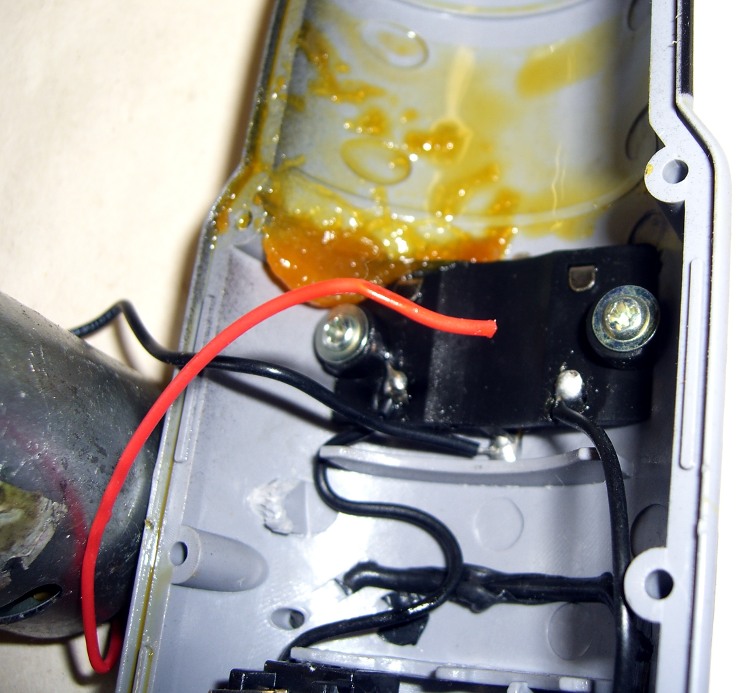
    Broken wire in power screwdriver
    Broken wire in power screwdriver

    Some months ago I snagged a power screwdriver from a discard pile; while it didn’t work, un-bending the battery pack connector solved that. It runs from a quartet of AA cells, which means I can use alkalines and it’ll always be ready to go. It’s not a high-torque unit, so I’m using it for case screws and similar easy tasks.

    But it quickly became intermittent and finally would turn only clockwise. Onto the to-do heap it went…

    Power screwdrivers consist of a battery, a motor with a planetary gear reduction transmission, and a cross-wired DPDT switch in between. Not much can go wrong and, if it turns at all, most likely the problem has something to do with the switch or wiring.

    Opened it up, pulled out the motor, and, lo and behold, one of the wires has broken off the switch. As nearly as I can tell, pushing the switch that-a-way forced the solder tab down on the wire and made the connection, pushing it the other way pulled the tab off the wire.

    While I had the hood up, I replaced the wires with slightly thicker and longer ones. Soldered everything back together, mushed the grease blobs back into the planetary gearing, and it works like a champ…

    Now, fairly obviously, there’s absolutely no economic sense to this sort of thing, given that the driver probably cost under ten bucks, but I just can’t stand to see a perfectly good gadget wind up in the trash.

    I’d love to do this sort of thing for a living, if only I could figure out how to avoid going broke while doing so. Maybe I can get me some of that my economic stimulus money that’s sloshing around these days?

  • Xubuntu Multimedia Keyboard Keys

    I still haven’t figured out why the audio volume & mute keys on my desktop box’s keyboard don’t work, but this process sets ’em up on my Dell Inspiron E1405 laptop… which I just reloaded with Xubuntu / XFCE 4.6 using more-or-less the procedure described starting there, including saving, blowing away, repartitioning, and restoring the Windows partition.

    If the audio mixer icon doesn’t show up on the top XFCE panel, other-click the panel -> Add New Items -> Mixer to get it there.

    Then do System Settings -> Keyboard -> Layout. Verify that you’re using the default system keyboard layout, as that’s what I’m doing on the laptop and it works. The desktop, now, that’s another matter; I think having two X sessions confuses it mightily.

    Then click the Application Shortcuts tab, click Add, and type in each of these…

    • amixer sset Master 10%+
    • amixer sset Master 10%-
    • amixer sset Master toggle

    For each command, click OK after typing. You’ll get another pop-up, at which point you press the corresponding volume / mute key.

    Note that the Master keyword is case-sensitive and may be something entirely different on your box. Use amixer to find out what you should be typing, thusly:

    amixer
    Simple mixer control 'Master',0
      Capabilities: pvolume pswitch
      Playback channels: Front Left - Front Right
      Limits: Playback 0 - 31
      Mono:
      Front Left: Playback 27 [87%] [-6.00dB] [on]
      Front Right: Playback 27 [87%] [-6.00dB] [on]
    Simple mixer control 'PCM',0
      Capabilities: pvolume
      Playback channels: Front Left - Front Right
      Limits: Playback 0 - 255
      Mono:
      Front Left: Playback 245 [96%] [-2.00dB]
      Front Right: Playback 245 [96%] [-2.00dB]
    ... snippage ...

    Shazam: audio control should then Just Work…

    The irony of having to futz around that much before having something Just Work is not lost on me. Really.