The Smell of Molten Projects in the Morning

Ed Nisley's Blog: Shop notes, electronics, firmware, machinery, 3D printing, laser cuttery, and curiosities. Contents: 100% human thinking, 0% AI slop.

Tag: Rants

And kvetching, too

  • Whirlpool Water Heater “Lifetime” Warranty: The Good and the Bad

    So our 6-year-old Whirlpool electric water heater tank failed and dribbled water on the floor. Fortunately, I spotted the leak before it flooded the basement: I look at the heater just about every time I venture into the Basement Laboratory Electronics Wing. Judging from the mildew & fungus growing on the wooden base I built for it, though, I haven’t been doing a good job of walk-by inspecting. In my defense, the visible wooden edge is 3/8″ thick below the dark rim of the heater.

    Grit drained from tank
    Grit drained from tank

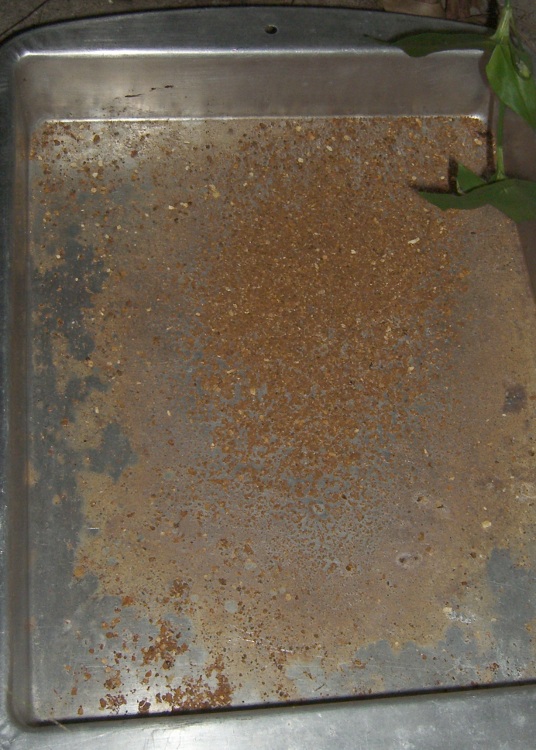
    I turned off the inlet & outlet ball valves, flipped the breaker off, routed a garden hose out the door, laid the end in an old cake pan, and drained the tank. The pan collected a fair amount of rusty grit (and more washed down the driveway), which means the glass-lined tank was suffering from internal rust.

    A call to the Warranty Hotline produced an Indian-subcontinent accented voice, who told me that I had to get a licensed plumber to tell them that it was, in fact, rusted out. “Any plumber in the phone book will do”, he said, “Just have them call this number and we will verify the situation with them.”

    My back of the envelope, confirmed by friends, is that it’d cost about $150 for a plumber to drop in. Oh, and this was on a Saturday morning, which means it might be a while later and bit more expensive than that. Paying somebody $75/hour to wait on hold didn’t seem attractive.

    A new heater of the same general nature is $400, give or take.

    Soooo, in round numbers, I’d be spending half the cost of the “free”  replacement just to find out if Whirlpool would honor the warranty.

    I was ready to just cut my losses and buy another heater when my friend Aitch suggested two simple alternatives:

    • Call the warranty line again, point out that this is the Internet Age, and offer to send them pictures of the problem, along with a statement that I was being truthful.
    • Spend the $150 to ship the dead heater to the office of the Whirlpool CEO with a note describing the situation

    I picked the first option and had a brief conversation along these general lines:

    • paying nearly half the price of a new heater for an “evaluation” is absurd
    • the leak was near the top; even the caps over the heating elements were rusted
    • the grit shows that tank has internal rust, so it’s not external corrosion
    • I’ll send pictures anywhere you want

    Much to my astonishment, the pleasant voice gave me a replacement authorization! No pictures needed.

    Knock me over with a feather…

    So I hauled the corpse back to Lowe’s, swapped it out for a new one, and away I went.

    Now, it’s worth noting that the new heater has a 12-year tank warranty, not the lifetime one that came with the original purchase. Given my experience with the first one, we’ll see what happens; I suppose they learned how expensive a lifetime warranty can be.

    Overall, a pleasant surprise, although the initial presentation wasn’t encouraging in the least.

    Memo to Self: Don’t ask, don’t get…

  • More Vital Firefox Privacy Add-ons

    If you’re still using IE, stop that.

    Start using Firefox. Then…

    Install some of those add-ons, then come back here.

    Did you remember to kill Flash cookies?

    Install TACO to magically opt-out from all of the advertisers who claim to honor opt-out requests. Won’t have much effect, but it’s worth trying.

    Install Ghostery to see which sites are tracking what.

    Now it’s time to delete your cookies again. You must then log into all your favorite websites again, but you’ll be accumulating less clutter.

    This should not be necessary…

  • Horrible Noises Inside Kenmore HE3 Washer: Fixed!

    So our whoop-dee-doo Sears Kenmore HE3 clothes washer started emitting horrible scratching & grinding noises, but only every now and then during the high-speed spin cycle or, more rarely, the washing agitation cycle.

    In an ordinary washer, you’d suspect the transmission was going bad, but the HE3 has a direct-drive 3-phase motor: no transmission to wear out.

    A bit of searching shows HE3 washer drums may fall apart at their welded (?) seams, but that didn’t seem to be the case here. So I press-ganged our daughter into a plumbing job; the machine is something over six years old, so it’s not as if we have any warranty to void.

    Move the washer out where you can get to the back without contortions. Pull the plug, turn off the water, unscrew the water supply hoses at the back panel, squash the hose clamp & remove the drain hose.

    Sediment buildup in hot water inlet
    Sediment buildup in hot water inlet

    One obvious, but unrelated, problem appeared when we disconnected the water hoses: plenty of black grit in the hot water inlet. Looks like it’s time to drain & flush the hot water heater again, which will turn into a major project because the anode rod has firmly rust-welded itself in place. That’s a project for another day…

    Disassembling the cabinet requires a Torx T-20 bit. There are a lot of screws, so fetch a stable container to hold them all.

    Take off the top cover (three screws, then slides back) to reveal the angle brace across the back that holds all the electronics and valves and suchlike. Pull the big vapor vent tube (on the right as you face the rear) out of that bracket, remove the eight (!) screws holding the bracket in place, and move it up out of the way.

    Remove the back cover, taking care to not loosen the screws holding the frame crossmembers in place; those are the screws in the U-shaped cutouts along the edges.

    Note: you can remove just the back cover by removing the lower screws in the angle brace, all the screws holding the cover, then sliding it down and out at the bottom. It’s easer to see what’s going on if you take the top cover off and moving the angle brace frees up a lot of gimcrackery that gets in your way. Your choice.

    Everything connects to the drum housing through exceedingly flexible rubber boots held on by circumferential wire clamps. Grab the ends with Vise-Grip pliers, squash ’em together, and the clamp should slide off the housing onto the boot. Peel the boot off and you can look inside.

    Foreign Object Sighted
    Foreign Object Sighted

    Peering in through the pressure sensor opening in the bottom rear of the housing revealed something odd: a loose black cylinder. A bit of deft tweezer and grabber work pulled out a much-the-worse-for-wear ballpoint pen housing, minus the cap, point, and pocket clip. The fiber-fill ink reservoir formed a tuft at one end.

    Mmmm, that would account for the blue water in the drain tube…

    Combine the number of missing parts with an inability to see any of them in the bottom of the housing: more surgery is indicated.

    Tub drain boot
    Tub drain boot

    The housing drains into the ejector pump through that huge black boot clamped onto the bottom of the drum housing. Put a pan underneath the pressure sensor hole, squeeze the boot, and water will bloosh out the sensor hole, generally landing in the pan. There’s a floating-ball check valve inside the boot that prevents backflow to the housing, so you may need some wiggly-jiggly action to work the water around the valve. A few reps will get most of the water out of the drain boot.

    Drain Boot Removed - Pump Inlet
    Drain Boot Removed – Pump Inlet

    Remove the boot from the housing and pump inlet, remove the ball, and admire the innards. We found most of the rest of the pen in the drain boot, plus a generous helping of slime and gunk. Oh, and a hairband and a big chunk of a pencil.

    The pump has a juice-can-size reservoir just inside its inlet, which I think is there to collect debris: a barrier keeps most of the big chunks out of the pump impeller. There’s no way to get stuff out other than lying flat on your stomach and sticking your finger into that slimy hole, so get over it. We extracted the remaining pen bits and most of the rest of the pencil.

    While you’re in there, roll over onto your back, reach up inside the drum housing and feel around to get anything else out. Your assistant can shine a flashlight down through the drum perforations; you’ll be able to see the shadows cast by any odds & ends that are lying on the housing.

    Wipe the slime off the rubber boots, reassemble in reverse order, and you’re done!

    However: the bottom of the washer consists of a big metal pan that will, most likely, start to rattle just after you push the washer back in position. Removal isn’t really an option because one of the front screws is under the motor drive box, but you can sort of pry up the edges and stuff thin cardboard, strips of duct tape, or other elastic stuff between the pan and the washer frame. It took me far too many iterations to figure out what was rattling around in there: it is not obvious!

    Debris From Washer
    Debris From Washer

    Here’s what we found in the drum housing, drain boot, and pump settling tank: the corpse of one of my favorite Uni-Ball Micro pens, a tiny screw, bits of a pencil that my assistant had been looking for, and one of her hairbands.

    That pretty much explains the intermittent grinding sounds: the drum would rotate normally until the swirling water swept the pen housing into contact with the drum, at which point the 800-some-odd RPM rotation would grind the pen against the housing for a few laps. Ditto for the pencil.

    Now, the mystery is how that stuff got from inside the drum past the rubber sealing gasket into the space between the drum and the housing. There doesn’t seem to be any way to get a long rigid object through there, but obviously it happens!

    Slime Behind Door Gasket
    Slime Behind Door Gasket

    After you move the washer back into position, take ten minutes and a generous handful of rags to wipe the abundant collection of mold & mildew from behind the rubber gasket. You can sort of evert the gasket, which simplifies access to the edge of the drum. As you can see, ours has a nice biofilm going on in there; not visible is the gunk growing on the back side of the gasket.

    It seems HE3 washers have a reputation for smelling bad, due to that sort of growth in hidden places. Oddly, we don’t have an odor problem, obviously not through any action on our part. Rumor has it that running a pure-bleach hot-water cycle helps, as does a product for dishwashers that removes their stink, but we don’t have any experience with those.

    As a mental math exercise, I had my assistant divide the $300 bucks a plumber would have billed for this repair by the $7/hr she’d get for a typical minimum-wage shit job. She’s thinking that becoming a plumber might beat smiling at retail customers in a dying mall… but I think she should concentrate more on her math & science.

    [Rant: Not that America seems to value tech jobs much these days, but she has the advantage of being female, so maybe she can still get a tech gig. Don’t get me started, you know how I get.]

    Anyhow, the washer runs just as quietly as it ever did, which is to say that like a turbojet engine spooling up during the spin cycle. At least it doesn’t sound like it’s ingesting a bird every now & again…

    [Update: And then the spider holding the drum in place failed, as it does with so many of these washers.]

  • Digital Concepts CH-3988S Charger and 4 each AA + AAA NiMH Cells: Craptastic!

    Got a Digital Concepts CH-3988S charger with quartets of AA & AAA cells from buy.com (which no longer sells it, no surprise, but it’s still available elsewhere) on closeout for about 12 bucks delivered, down from the “regular” price of something like $40; anybody who paid that much got well and truly hosed.

    I fully expected the cells to be crap and they were: they don’t even bear a manufacturer’s name. Tellingly, they weigh 25 grams each, lighter than the 28-30 grams of more cough reputable brands.

    No-name AA NiMH - Charge 1
    No-name AA NiMH – Charge 1

    The upper trace (click the graphs for readable pix) is the four AA NiMH after the charger said it was happy with them. The trace drops off the cliff at about 25 mAh. Call it 1% of nominal capacity.

    The four lower traces are the individual cells after another trip through the charger. The far-right end of those bottom curves is 70 mAh, with the cell voltage barely over 1 V for the entire discharge.

    Fairly obviously, they’re not accepting a charge.

    Charging the cells in a known-good 400 mA charger (roughly C/6) brought the best cell up to 160 mAh, with the rest around 100 mAh; the charger was happy with them after far less than 6 hours, so apparently the cells display a much higher terminal voltage than they should.

    So I plunked them in a dumb 250 mA slow charger and let ’em cook for the full 8 hours. That should, in principle, give them roughly 2 Ah of charge, no matter what the terminal voltage may be; I measured 1.8 V, which is far too high for that rate.

    No-name AA NiMH - Forced Charge 3
    No-name AA NiMH – Forced Charge 3

    So, here’s the result…

    Crap. Pure, utter, unadulterated crap. The cells supplied 500 mAh, much more than before, but that’s so far below their rating it’s not even funny. There’s obviously one cell in there that’s bad, but the others can’t possibly be far behind.

    I didn’t waste any time on the quartet of AAA cells, but I expect they’re pretty much the same.

    It’s faintly possible that exercising these turkeys will bring them up to maybe 50% of capacity, but it’s not like that’d make me ecstatic. The reviews you’ll find here and there support the conclusion that something is wrong with these cells.

    No-name AA NiMH - Charge 4
    No-name AA NiMH – Charge 4

    Here’s the result of the next cycle, after a night in their very own charger. The upper trace is all four of them together, once again failing after 500 mAh.

    The four lower traces labeled “Cell x” are the individual cells, tested without recharging. Three of the four have about 700 mAh left in them, which would bring their total capacity to 1200 mAh, roughly half of their nominal capacity.

    Cell B, the green trace, is obviously the weak link, as it failed almost instantly. Recharging it on a known-good charger got it back up to 530 mAh (the  “Cell B recharge” curve), roughly 25% of its nominal capacity. So much for the idea it’ll get better if you treat it right.

    Now, turning to the charger…

    The Digital Concepts CH-3988S charger is advertised on its package as a “2 Hour Charger”, but its manual / datasheet indicates that claim is, mmmm, not strictly correct:

    CH-3988S Charging Times
    CH-3988S Charging Times

    Remember that the nominal AA cell capacity is 2.3 Ah, so charging the four AA cells included with it requires three or four hours. Well, OK, only 2.5 hours if you do ’em pairwise, but that’s five hours total.

    On the other paw, the charger does (seem to) monitor the cell voltage and cut off automagically, on either negative delta-V or maybe just peak voltage. Unleashing it on a pair of partially discharged Tenergy RTU 2.3 Ah cells indicates that it cooks the piss right out of them, there toward the end.

    The charger is (probably) OK for low-rate charging of known-good cells, which is what I got it for; the cells accompanying it are crap. It’s not worth returning for twelve bucks, seeing as how the shipping would eat half of that.

    So, anyway, if you ever wondered what a bottom-dollar charger-with-cells offer gets you, now you know.

  • Sony DSC-H1 Shutter Button Repair: Damage Assessment

    Camera Body Damage
    Camera Body Damage

    My brother-in-law Tee dropped his Sony DSC-H1 camera, which landed atop its shutter button on the pavement.

    Bad news…

    • the shutter button broke off
    • the bezel popped out
    • the teeny little snap ring that held the shutter button stem in the bezel vanished, because…
    • the stem broke and the end vanished, too

    Good news…

    • apart from some scuffs, the camera still works
    • he managed to find the shutter button
    • and the button bezel
    • and the spring!
    Shutter Button - Spring - Bezel
    Shutter Button – Spring – Bezel

    A bit of browsing reveals that many, many Sony DSC-Hx (where x is an integer from 1 through 9, inclusive) owners have the same problem, minus the inconvenience & embarrassment of first dropping the camera. Turns out that the shutter button stem breaks at that notch in normal use.

    It seems the stem snaps while you’re taking pix, whereupon the spring launches itself and the button cap into the nearest river / drain grate / weedy area, never to be seen again. Tee is exceedingly fortunate to have found all the major pieces!

    Shutter Button Stem - End View
    Shutter Button Stem – End View.

    Here’s the broken end of the stem, with the button cap out of focus in the background. The stem is 1.5 mm in diameter, so the snap ring was surrounding, what, 0.75 mm of plastic? In what alternate universe did this design decision make sense?

    I think the snap ring contributed to the problem by eroding the stem in the notch; that little white stub isn’t half of the stem diameter; it may have stretched under impact, but surely not all that much.

    Yes, you can buy a replacement button for about 30 bucks direct from Sony, but it seems the new stem is subject to the same failure after a short while. They’re standing by the original design, marginal though it may be.

    Now, obviously, this stem failed from abuse, no argument there. Everybody else had their stem fail without provocation, though, so it really isn’t adequate to the task at hand.

    Bezel Socket View
    Bezel Socket View

    Anyhow, there’s also some damage at the bezel socket on the camera body, but nothing major. The dented silver areas on either side of the switch membrane are ESD shields, so that any static discharge from your finger will (most likely) dissipate on the external frame of the camera, rather than burrow into its guts via the switch.

    The bezel twist-locks into the camera body, which means that you can remove the bezel if you can get a good grip on it. It turns clockwise to remove.

    Shutter Switch Closeup
    Shutter Switch Closeup

    Peering closer at the membrane switch, it looks as though the button stem did some damage on its way out, although Tee admits to using various pointy objects to trigger the shutter while figuring out what to do with the camera.

    More good news: the switch still works correctly, including the focus function with the button half-pressed, That means the switch membrane and contacts are in good shape.

    Bezel - Top View
    Bezel – Top View

    The bezel itself is pretty well graunched, with a nest of cracks underneath that damaged arc to the left of the pictures. I think it’s in good enough condition that I can remove the bent plastic, ooze some solvent adhesive into the damage, and compress it enough to make everything stick together.

    Bezel - Side View
    Bezel – Side View

    Obviously, this calls for some Quality Shop Time!

    The overall plan is to remove the remaining stem from the button, drill-and-tap the button head for a miniature brass screw (1-72, I think), reshape the screw head into a membrane-friendly plunger (about 3 mm diameter and flat), then put it all back together with a nut in place of the snap ring.

    I should be able to install the bezel (without the button), then insert some drill rod through the hole to figure out how far the screw must protrude to trigger the focus & shutter switches. Perhaps a pin vise will grip the drill rod and bottom out on the bezel’s central ring, so I can do a trial-and-error fitting?

    Then I can adjust the screw to that overall length below the bezel with the button pressed, whack off anything that sticks out above the button, adjust the nut to limit the button’s outward travel, slobber Loctite over everything, and put it all together for the last time.

    That’s the plan, anyway. As the Yiddish proverb has it, “If you wish to hear G*d laugh, tell him your plans.”

    Some useful dimensions…

    Button Dimensions
    Button Dimensions

    The rest of the story…

    Rebuilding the button

    Putting it all back together again

  • War on the Unexpected: A Screenplay

    EXT.  UPSTATE NY APARTMENT COMPLEX — EARLY AFTERNOON

    Clouds
    Clouds

    A STRANGER emerges from an apartment and walks through the adjacent parking lot to the complex’s central roadway. A late-middle-age white male, he is dressed casually in black trousers, red t-shirt with STAFF in large white letters on the back, well-worn blue-and-white pinstriped locomotive driver (“engineer”) cap, and dark sunglasses. His graying beard is trimmed short, but he is obviously overdue for his quarterly haircut. He carries a bulky black prosumer digital camera.

    The bright blue sky is filled with large clouds from an approaching storm front and, opposite the sun, a cumulonimbus bank looms over the far horizon above a row of apartment buildings.

    The Stranger studies the clouds, moves to various vantage points, examines the rest of the sky. He braces the camera against a road sign pole and fiddles extensively with the knobs & buttons while taking several pictures.

    WOMAN #1 emerges from a building, enters a car, and drives along the central roadway. She slows, stops next to the Stranger, and rolls down her window.

    WOMAN #1

    What are you taking pictures of?

    STRANGER

    Those great clouds over there! Looks like we’re in for a real storm later today!

    WOMAN #1

    Oh. Have a nice day. (She rolls up the window and drives off)

    The Stranger is joined an elderly COUPLE, WOMAN #2 who is probably his wife, and a teenage GIRL who vaguely resembles all of them. The Girl is wrapped in a large towel. They walk slowly through the apartment complex to the pool, appear baffled by the childproof latch on the gate, and are finally admitted by WOMAN #3 who shows them how to operate it.

    INT.  IN-GROUND POOL PATIO

    They sit around a table in the corner, jockeying the uncomfortable plastic chairs for position in the shade cast by the table’s umbrella, while the Girl removes a towel to reveal a red swimsuit, enters the pool, and begins swimming laps.

    Coming up for air
    Coming up for air

    Various other PEOPLE occupy the area near the pool, including older couples, males of various ages, several curvaceous mid-twenty-ish females clad in revealing swim / sunbathing attire, and a group of middle-age couples.

    The Stranger takes several pictures of the Girl in the pool.

    Time passes.

    The Stranger, realizing that he’s about to spend the next three hours sitting on his well-flattened butt in the van while driving home, stands up, stretches, and walks to the gate. He intently studies the labels on the childproof latch, which is misinterpreted as being baffled, and leaves the pool area.

    EXT.  APARTMENT COMPLEX ROADS

    Manhole cover
    Manhole cover

    The Stranger strolls around the apartment complex to the side entrance road, and returns along a different route. He seems to take a particular interest in drain grates, manhole covers, garage doors, and infrastructure in general. He scuffs the dirt from one manhole cover and takes a picture of it. He continues walking around the complex and returns to the pool.

    His companions gather themselves together and emerge from the pool gate.

    EXT.  POOL AREA

    A New York State Police car drives slowly into the complex through the side entrance. The TROOPER scans the area, spots the Stranger, and pulls up beside him.

    TROOPER

    Good day. How are you doing?

    STRANGER

    (Smiling) So far, so good.

    TROOPER

    What brings you here today?

    STRANGER

    We’re visiting my wife’s parents. (Gestures to indicate the Couple among his companions)

    TROOPER

    (Eyes the group) We’ve had a report of someone in the area taking pictures of buildings and possibly people.

    STRANGER

    Well, I’ve been taking pictures of clouds, a manhole cover, and my daughter. (Smiles) I think it’s still permitted for me to take her picture.

    TROOPER

    (Getting down to business) Your name?

    STRANGER

    (gives name, helpfully spells last name)

    TROOPER

    What’s your birth date?

    STRANGER

    (Gives a date long in the past)

    TROOPER

    (Typing on laptop PC) And your address?

    STRANGER

    (Gives city and state)

    TROOPER

    (With emphasis) Your street address.

    STRANGER

    (Gives street address)

    TROOPER

    Phone number?

    STRANGER

    (Gives phone number, repeats when trooper misses last four digits)

    TROOPER

    (Types, pauses, types, reads screen) Enjoy your stay.

    Trooper drives off, leaving apartment complex through main entrance.

    STRANGER

    (To his companions) Well, I now have a police record tagged “suspicious behavior”.

    The group walks back to the apartment while discussing recent events and their plans for the remainder of the Independence Day weekend.

    EXT.  APARTMENT COMPLEX

    P.O.V. pulls back and ascends in Google-Earth fashion to show entire Adirondacks region. The Stranger assumes the role of voice-over INTERLOCUTOR. Fade to black during narration.

    INTERLOCUTOR

    Despite my pique, the Trooper performed his job properly and with decorum. While the opinions of my companions differ, I contend that once a 911 call has been received, the police must follow established procedures to resolve the complaint. The response depends on the initial report and what the Trooper finds during his approach.

    The fault, if any is to be found, thus resides with people who have been recently trained to suspect once-normal behavior: anything they wouldn’t do is considered threatening, if not hostile, when done by someone they don’t recognize.

    Photography, in particular, is now treated as reconnaissance for an assault. Unless it’s done by surveillance cameras, in which case it’s perfectly benign.

    –THE END–

    Perhaps you can tell a similar story.

    Extra Credit
    Explore these 27 parametric variations on the theme of Stranger:

    • Appearance: whitebread / black / Levantine
    • Dress: casual / ripped baggies / ersatz-military-wanker-camo
    • Conduct: friendly / avoids-meeting-of-eyes / arrogant

    Describe the Trooper’s likely approach to and interaction with these Strangers, assuming sufficient training to avoid racial profiling:

    • [white + military + friendly]
    • [black + military + arrogant]
    • [Levantine + ripped baggies + avoids-meeting-of-eyes]

    Double Bonus
    Consider the behaviour variation where a [white + casual + friendly] Stranger politely but firmly refuses to cooperate with the Trooper’s inquiries. Explore the range of perfectly legal and extremely unpleasant outcomes. Possible working title: “How to ruin the rest of your holiday weekend in five minutes flat”.

    Background information, all highly recommended:

    Update: Many internal links on Schneier’s blog are broken. As nearly as I can tell, all inter-word hyphens should now be underscores: the-war-on-the.html becomes the_war_on_the.html. Perhaps they switched the back-end database?

  • Fancy Scam-by-mail Offering

    Mail Spam
    Mail Spam

    Just got a letter from Canada, allegedly from the Readers Digest Sweepstakes, but with a letterhead address of 1125 Cornell Ave, Atlanta GA 33412. The phone/fax number is 912-480-0353, oddly not a toll-free business number. The letter has medium production values, pixellated Readers Digest logos, surprisingly few typos, and a painfully ersatz signature.

    I’m to believe I’ve won $255,069.00 in a contest I’ve never entered (the way I see constests, while you’ve got to play to win, entering doesn’t improve your chances of winning). The “69” is a nice touch, I’d say.

    Enclosed is an exceedingly valid-looking check for $3892.91 “to help you cover any charges that may be required before you receive your funds.” Check number 1100912681, if you can believe that. It has excellent production values, a genuine artificial watermark on the back, and is nominally drawn on an actual Canadian bank.

    Bogus check
    Bogus check

    Obviously, a fraud. International and postal, no less.

    I’m impressed at the level of effort they went to, but it seems that with an actual telephone number (the address is surely faked), some branch of law enforcement should be able to fly right into their ears. No, I am not going to call that number…

    I gave the FBI a tip, but I’m reasonably sure nothing will come of it.

    [Update: Well, maybe the FBI didn’t do anything, but there’s an absolutely wonderful riff based on this letter. I’ll only quibble about the 57 Chevy… it was really a Studebaker.]