The Smell of Molten Projects in the Morning

Ed Nisley's Blog: Shop notes, electronics, firmware, machinery, 3D printing, laser cuttery, and curiosities. Contents: 100% human thinking, 0% AI slop.

Tag: Rants

And kvetching, too

  • Left Turn on Red

    Coming out of Adams, we’re ready to make a left turn onto Rt 44:

    Left turn on red - 2014-07-24
    Left turn on red – 2014-07-24

    He was one car back in the left-turn storage lane when his light went yellow-to-red, crossed the stop line on the red, and was one car length over the stop line and accelerating when our light changed to green.

    We’re ready to start rolling on green, but we’ve learned to wait a few heartbeats for just such occasions; what counts as a fender-bender for you would be a fatality for us.

    Y’know how motorists get very, very angry at cyclists? I’ve always wondered why they don’t get that angry when motorists do those same stupid things, at higher speeds with much more energy.

    We ride as though we’re thin cars, which is how it’s supposed to be done, and generally don’t get too much hassle.

    One thing that is annoying, though: short-stroke yellow cycles that last maybe two seconds. We can cross the stop line on green, accelerating firmly through the intersection, and still get caught in the middle as the signal changes to green-to-yellow-to-red behind us and red-to-green for opposing traffic. No, we didn’t run the yellow, but that’s what it looks like.

  • Eco-Friendly Firewood?

    These seem to be ordinary birch logs, cut into short chunks, sporting a top crosscut loaded with fire starter:

    Light-n-Go Bonfire Log - stacked
    Light-n-Go Bonfire Log – stacked

    The front of the label makes them seem wonderfully eco-friendly, but the fine print on the back shows that they’re from the Old World:

    Light-n-Go Bonfire Log - origin label
    Light-n-Go Bonfire Log – origin label

    There’s surely a universe where shipping heat-treated firewood from Estonia to Poughkeepsie makes perfect sense. I just didn’t realize I was living in it.

  • Subaru Forester: Speed Demon!

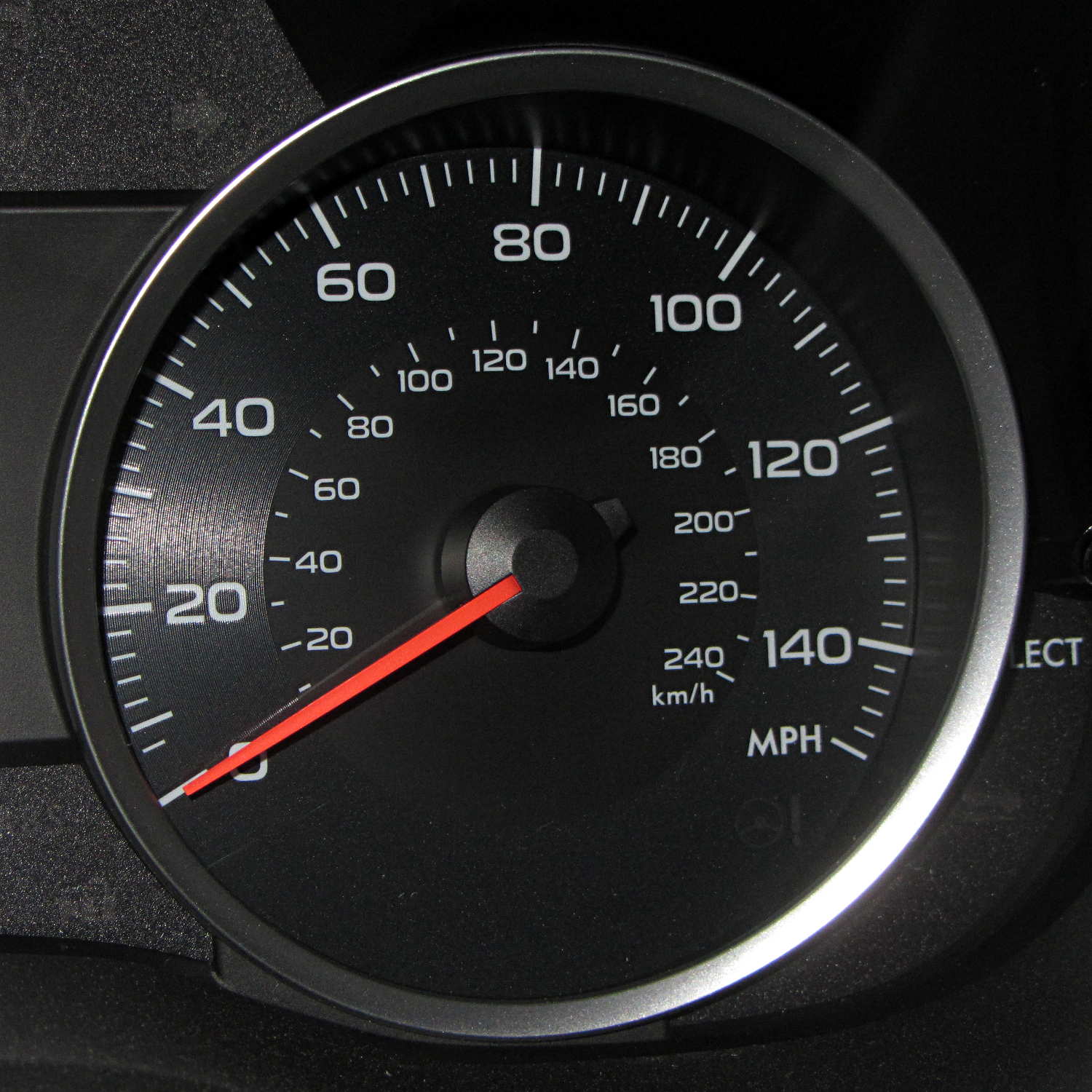
    I finally figured out why the Forester feels so slow:

    Subaru Forester - speedometer
    Subaru Forester – speedometer

    Here in the Northeast US, the maximum legal speed anywhere is 65 mph, less than half-scale, and typical around-town speeds hit 40 mph, barely 1/4 of full scale.

    For all practical purposes, that needle barely moves during our usual trips.

    I like analog gauges to represent smoothly varying quantities that you must read at a glance, but a big digital display would actually be more useful than that thing.

    A 150 mph speedometer scale makes no sense in what’s basically a shrunken all-wheel-drive SUV, even with minimal off-road capabilities. Yes, perhaps the Forester could hit 150 mph, but why not have the scale top out around, say, 100 mph? Above that, you shouldn’t be paying much attention to the speedo, anyway.

    The Sienna’s speedo went to 110 and, to the best of my knowledge, that needle never passed 85 mph, tops. However, ordinary (and legal) driving speeds filled the lower half of the scale, with the highest useful speeds in the next quadrant beyond vertical.

    Yes, I know why the speedos sport such absurd numbers. I don’t have to like it.

    There’s a servo motor (or some such) driving the needle; calibration has been a simple matter of software for a long, long time.

    For whatever it’s worth, the Forester and the Sienna have both tachometers and automatic transmissions, a combination that converts shifting into a spectator sport. The Forester’s continuously variable transmission moves the tach needle in smooth glides, rather than abrupt jumps.

  • Firefox Accounts: Total FAIL

    So I’m in the process of installing Xubuntu 14.04LTS on a box and get to the point where I’m ready to install various daemons and utilities, then tweak their settings, so it’s time to have the new Firefox inhale all my settings from the Firefox on my 13.10 desktop, which will let me find all my blog posts with that information. This used to be a simple matter of going into the new Firefox’s Preferences, getting a one-time pairing code, typing it into the other desktop, and away it went, synchronizing the two installations.

    But, no.

    While I wasn’t watching, Firefox crept up to Version 29 and, at some point, Mozilla introduced Firefox Accounts. Why would they do that? Here’s a hint:

    Firefox Accounts is a consumer account system which provides access to services run by Mozilla, such as Firefox Marketplace and the next version of Firefox Sync.

    Firefox Marketplace? Say no more: money changes everything!

    Oh, and the “next version of Firefox Sync” is totally incompatible with the “old version” used by all existing Firefox installations.

    But it gets worse (emphasis mine):

    What if I don’t want to update to the new Sync?

    • While the old version of Sync will continue to work, the latest version of Firefox doesn’t support adding new devices to the old version of Sync. This means that you won’t be able to sync with a new device.
    • Mozilla will continue to host the old version of Sync for a limited time to allow for migration to Firefox Accounts.

    In order to sync the 14.10 Firefox, I must upgrade the 13.10 Firefox, but after I do that, none of the other boxes will be able to sync with either of them. I haven’t checked whether Firefox Version 29 is offered for the 10.04LTS installation that’s running on the LinuxCNC boxes.

    My 13.10 desktop has endured many, many, many automatic Firefox upgrades during their recent version incrementing mania and, for whatever reason, it doesn’t offer “New Sync” as an option, despite being at the same Version 29 as the 14.04 installation. This is likely a problem with some Firefox extension or another, but I disabled them to no avail.

    When all else fails, you always create a new profile by starting the Firefox Profile Manager:

    firefox -profilemanager

    That works as expected; the new and completely bare profile let me create a new Firefox Account, which entails the usual to-ing and fro-ing with emailed one-time authorizations and suchlike. OK, now I can use the shiny new Firefox Marketplace, should I so desire. Be still, my heart!

    So, we progress.

    But my original intent was to get all the setup data into the 14.04 Firefox, so (on the 13.10 Firefox) I followed the directions about transferring the old settings into the new profile, which involves tediously hand-copying a bunch of files from one cryptic directory to another. This is a brutally user-hostile operation that only geeks should endure; there is absolutely no automation to be found.

    Having a new profile, albeit without any of the old extensions, I attempt to sync my settings, only to discover that the new Firefox Sync will not synchronize my stored passwords, which was pretty much the whole point of this exercise.

    Turns out that’s deliberate:

    Firefox Sync will not synchronize your passwords if a master password is set. If you would like to continue synchronizing your passwords, try removing your master password before synchronizing.

    Now, why would I have a master password? Because, long ago, the good folks at Mozilla highly recommended it (emphasis mine):

    It takes only fifteen seconds for a prying user sitting at your computer to see the list of all the passwords you have told Firefox or Thunderbird to save. The list is shown plain as day. It can include webmail and forum passwords or email server passwords. Using a Master Password is highly recommended, to prevent such prying users from seeing the list. By setting a Master Password, anyone using your profile will be prompted to enter the master password when access to your stored passwords is needed.

    So, the new Firefox Sync requires a Firefox Account that doesn’t do anything I need done and, in order to sync my 13.10 settings into the 14.04 box, I must have a new Firefox Account and make both Firefox installations less secure.

    I think it’s possible to remove the master password, sync the stored passwords, then restore the master password. When you remove the password, you get a confirmation message:

    You have deleted your Master Password. Your stored web and email passwords, form data, and private keys will not be protected.

    Firefox allegedly uses the Gnome keyring to get a master password protecting the whole Firefox session, but displaying all the stored passwords is just a few clicks away after that; needless to say, Firefox on 13.10 doesn’t use the keyring. Given that Chromium on Xubuntu 13.10 does not use the Gnome keyring, it’s entirely unprotected. Maybe the 14.04 box will use the keyring for both browsers?

    What the hell do those people smoke? I want some of that, right here, right now!

    Verily, money changes everything…

  • Family Energy Cold Call: The Key Number

    A cold call from Family Energy, completely in violation of our presence on the FTC Do Not Call registry, produced an offer: “lock in” a rate of 8.9 ¢/kWh for two years. My experience has been that anybody cold calling me does not have my best interest in mind and a few minutes of search-fu showed that, while Family Energy may not be a scam, they certainly employ unique marketing methods for an “energy supply company”.

    For reference, the last two years of Central Hudson supply charges:

    Central Hudson Gas & Electric  
    Dollars per kWh  
    Date MFC Supply Ch Market Price Market Pr Adj Net Supply Ch
    2012-03-08 0.00190 0.05982 0.00635 0.06807
    2012-05-09 0.00190 0.05665 0.00524 0.06379
    2012-07-12 0.00191 0.06396 0.00532 0.07119
    2012-09-10 0.00196 0.07805 0.00260 0.08261
    2012-11-08 0.00196 0.05206 -0.00100 0.05302
    2013-01-12 0.00196 0.05027 0.00322 0.05545
    2013-03-12 0.00196 0.08340 0.00241 0.08777
    2013-05-09 0.00196 0.07359 0.00116 0.07671
    2013-07-10 0.00197 0.05458 0.00397 0.06052
    2013-09-09 0.00203 0.08143 0.00420 0.08766
    2013-11-05 0.00203 0.06634 -0.00368 0.06469
    2014-01-08 0.00203 0.05816 0.00061 0.06080
    2014-03-12 0.00203 0.14779 -0.00534 0.14448
     
    Average 0.07514

    That’s the only part of the bill Family Energy (and other suppliers) can replace; the remainder pays for delivering the energy to our meter.

    Family Energy’s marketing obviously plays off the staggering price spike in the most recent bill, but the CHG&E rate is lower than their “locked in” offer. In fact, if you exclude the last line, the CHG&E average is 6.9 ¢/kWh. The price spike came from the 2014 midwinter natural gas shortage and, assuming no simultaneous equipment failures, prices should return to the normal pattern.

    We may be building / upgrading pipelines, but expect the usual stalling, because environment.

    Family Energy does offer a $25 cash-back if your annual bill exceeds the CHG&E rate, up to a maximum of $75, but that’s chump change compared to the size of our bills…

    All I know is what I read on the Intertubes, but it seems the Family Energy door-to-door sales droids have even less interest in overall customer satisfaction.

  • New Subaru Forester: Tire Pressure Check

    For reasons having to do with our Larval Engineer needing transportation, we just bought a Subaru Forester for us. While chewing through the 540 page Owners Manual, I discovered that, although the tire pressure monitoring system knows all five pressures, it can’t / won’t display them on the dashboard’s fancy LCD panel.

    All four road tires had about the same pressure:

    Subaru Forester - as-delivered tire pressure
    Subaru Forester – as-delivered tire pressure

    Yes, I cross-checked two other gauges, Just To Make Sure.

    That’s 7 or 8 psi over the spec found on the door frame placard: 30 psi front, 29 psi rear. The tire sidewalls implore you to never inflate them over 40 psi while seating the beads, although the absolute max rating of 51 psi at max load says they’re not really overstuffed.

    The doughnut spare tire should have 60 psi and carried 64 psi:

    Subaru Forester - as-delivered spare tire pressure
    Subaru Forester – as-delivered spare tire pressure

    Now, I’ve never had a cold tire gain pressure between checks (other than when the weather heats up), so I tend to run ’em on the high side of the recommended range. In this case, I left the spare alone and vented the road tires to 30 psi to see how it rides. If all goes well, then maybe I’ll puff ’em up a bit.

    It’s time to check the fluid levels to see what could possibly go wrong under the hood…

  • Pay Attention While Driving, Dammit

    I’m grinding uphill at about 5 mph on Jackson Drive, in the middle of the surprisingly good shoulder, with the bright-red Planet Bike taillight blinking away to the rear. I am not inconspicuous, but …

    You’ll never see the one that kills you:

    Near Miss - Jackson Drive - 2014-05-03 - 1
    Near Miss – Jackson Drive – 2014-05-03 – 1

    The speed limit is 40 mph = 60 ft/s. The door-to-shoulder clearance might have been the better part of a foot; the mirror didn’t quite clip my arm.

    The license plate is legible in the original image, although I’ve blurred it here:

    Near Miss - Jackson Drive - 2014-05-03 - 2
    Near Miss – Jackson Drive – 2014-05-03 – 2

    Adrenaline is wonderful stuff; I caught up with him at the next light … uphill and 1/3 mile later:

    Near Miss - Jackson Drive - 2014-05-03 - 3
    Near Miss – Jackson Drive – 2014-05-03 – 3

    I said “Hey!” When he looked over, I explained I needed a face to go with the plate and pointed to the camera. He said he was really, really, really sorry.

    I’ll not ascribe to malice what can be explained by distraction; if he wanted to hassle me, I’d be dead now. Most likely, it’s one of those distracted driving things that happens to all of us … to some, alas, far more frequently than to others.

    Took a while for the shakes to stop.

    Put down that damn phone / tablet / burger and pay attention!

    [Update: Still images captured from the Sony HDR-AS30V helmet camera, recorded at 1920×1080 60 fps.]