The Smell of Molten Projects in the Morning

Ed Nisley's Blog: Shop notes, electronics, firmware, machinery, 3D printing, laser cuttery, and curiosities. Contents: 100% human thinking, 0% AI slop.

Tag: Memo to Self

Maybe next time I’ll get it right

  • Changing the Arduino PWM Frequency

    The default PWM frequency for PWM 3, 9, 10, & 11, at least for the Diecimila running at 16 MHz, is 488 Hz. That’s OK for dimming LEDs where you’re depending on persistence of vision, but it’s much too low when you must filter it down to DC.

    The relevant file is hardware/cores/arduino/wiring.c, which is buried wherever your installation put it.

    Turns out that the Arduino runtime setup configures the timer clock prescalers to 64, so the timers tick at 16 MHz / 64 = 250 kHz.

    You can fix that by setting the Clock Select bits in the appropriate Timer Control Register B to 0x01, which gets you no prescaling and a 62.5 ns tick period:

    TCCR0B = 0x01;   // Timer 0: PWM 5 &  6 @ 16 kHz
    TCCR1B = 0x01;   // Timer 1: PWM 9 & 10 @ 32 kHz
    TCCR2B = 0x01;   // Timer 2: PWM 3 & 11 @ 32 kHz

    If you’re finicky, you’ll bit-bash the values rather than do broadside loads. However, it probably doesn’t matter, because Timer 0 runs in Fast PWM mode and Timers 1 & 2 run in Phase-Correct PWM mode, so WGMx2 = 0 in all cases.

    Fast PWM mode means Timer 0 produces PWM at 250 kHz / 256 = 976 Hz. However, the Arduino runtime runs the millis() function from the Timer 0 interrupt, so changing the Timer 0 prescaler pooches millis(), delay(), and any routines that depend on them.

    Phase-correct PWM mode means that Timers 1 & 2 count up to 0xff and down to 0x00 in each PWM cycle, so they run at 250 kHz / 512 = 488 Hz.

    Adroit TCCRxB setting can prescale by 1, 8, 64, 256, or 1024. Or stop the Timer stone cold dead, if you’re not careful.

    Before you fiddle with this stuff, you really should read the timer doc in the ATmega168 datasheet there.

    Memo to Self: don’t mess with Timer 0.
  • Finding Transformer Pi Model Parameters

    Given a random transformer, create a decent Spice model… I have to do this rarely enough that I’d better write it down so it’s easy to find. There’s no magic here; it’s all described in ON Semi (nee Motorola) App Note AN-1679/D. See page 4 for the grisly details; I’ve reordered things a bit here.

    Go to the basement lab and measure:

    1. Primary & secondary voltages with a sine-wave input: Vp & Vs.
    2. Primary inductance with secondary open: Lps(open)
    3. Primary inductance with secondary shorted: Lps(short)
    4. DC resistance of primary & secondary: Rp & Rs

    Then return to the Comfy Chair and calculate:

    1. Turns ratio N = Vp/Vs.
    2. Coupling coefficent k = sqrt(1 – Lps(short)/Lps(open))
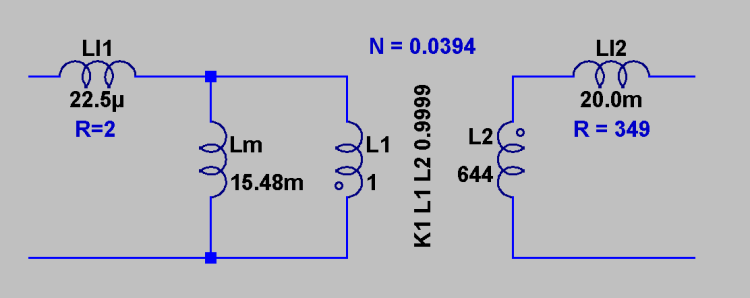
    3. Primary leakage inductance LI1 = (1 – k) · Lps(open)
    4. Secondary leakage inductance LI2 = (1 – k) · Lps(open) / N^2
    5. Magnetizing inductance Lm = k · Lps(open)

    To wit…

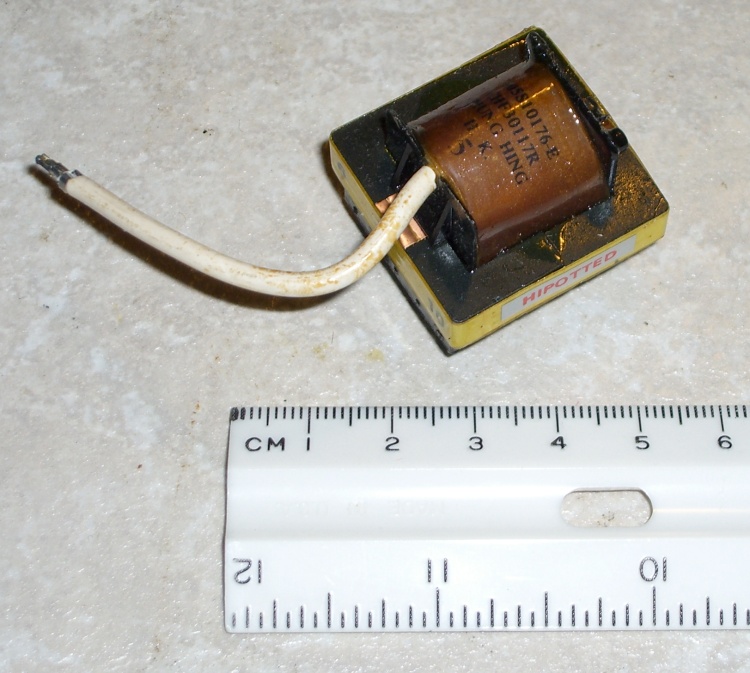
    A quick trip to the basement lab produces these numbers for this small high-voltage transformer:

    Small HV Transformer
    Small HV Transformer
    Primary Secondary
    Voltage 1.08 27.32
    DC resistance 2.03 349
    L other open 15.5 mH 9.68 H
    L other short 45.0 uH 31.3 mH

    You don’t actually need the secondary inductances, but while you have the meter out, you may as well write those down, too. Maybe someday you’ll use the transformer backwards?

    And a session with the calculator produces a Spice model:

    1. N = 1.076 / 27.32 = 0.0394
    2. k = sqrt(1 – 45.0 uH / 15.5 mH) = 0.998
    3. LI1 = (1 – 0.998) ·15.5 mH = 22.5 uH
    4. LI2 = (1 – 0.998) ·15.5 mH / 0.0394^2 = 20.0 mH
    5. Lm = 0.998 ·15.5 mH = 15.48 mH

    Note: the value of (1 – k) is the small difference of two nearly equal numbers, so you wind up with a bunch of significant figures that might not be all that significant. The values of LI1 and LI2 depend strongly on how many figures you carry in the calculations; if you don’t get the same numbers I did, that’s probably why.

    The coupled inductors L1 & L2 form an ideal transformer with a primary inductance L1 chosen so that its reactance is large with respect to anything else. I picked L1 = 1 H here, which is probably excessive.

    The coupling coefficient would be 1.0 if that were allowed in the Spice model, but it’s not, so use 0.9999. Notice that this is not the k you find from the real transformer: it’s as close to 1.0 as you can get. [Update: either I was mistaken about 1.0 not being allowed or something’s changed in a recent release; 1.0 works fine now.]

    Spice transformer pi model
    Spice transformer pi model

    The primary inductance and turns ratio determine the secondary inductance according to:

    Vp / Vs = N = sqrt(L1 / L2)

    So:

    L2 = L1 / (N^2) = 1 / 0.0394^2 = 644 H (!)

    The models for LI1 and LI2 include the DC resistance, so that’s not visible in the schematic.

    And now you can model a high-voltage DC supply…

    Memo to Self: It’s G16821 from Electronic Goldmine

    • Primary on pins 2 & 10
    • HV secondary on pin 8 & flying wire
    • Electrostatic shield on pin 3

    Note: You can compute the turns ratio either way, as long as you keep your wits about you. With any luck, I’ve done so… but always verify what you read!

  • New Theme

    Same content, different look…

    That monospace typewriter font was just too ugly for words.

    I figure you’d rather have the text flow as needed to fit your screen, rather than have me jam it in an arbitrary column down the middle of your monitor. Alas, WordPress has very few flexible-width themes, of which this (“Shocking Blue Green”) is the next-least-offensive.

    I just don’t want to fiddle with CSS…

    Memo to Self: the results of filtering the available themes excludes the one in use. Sort of makes sense, after you realize that’s what’s happening.

  • MAX4372 High-side Current Amp Gotcha

    MAX4372 output and boost transistor base drive
    MAX4372 output and boost transistor base drive

    Maxim’s MAX4372 is a high-side current sense amp that simplifies DC-DC converters, battery chargers / monitors, and stuff like that. It’s a nice gadget because it has a 28-V common-mode voltage rating that’s independent of the supply voltage. That means you can monitor the current from a relatively high voltage source with a low-resistance in series with the supply’s positive lead.

    I’m using it as part of a solar panel characterization circuit for a Circuit Cellar column, where it’s a key part of a simple DC-DC boost converter that will illustrate how maximum power point tracking works.

    The current sense resistor is a 0.5 Ω (that’s a capital Omega, if your browser just burped) resistor that produces 150 mV from the maximum 300 mA I’ll be drawing from the small panels in my collection. That’s the maximum rated full-scale sense voltage in the datasheet.

    The scope shot shows that it works like a champ, with the DC-DC converter’s transistor base drive toggling at the 100 and 200 mA setpoints. There’s a touch of deliberate hysteresis in the comparators, hence the overshoot.

    The datasheet has one Absolute Maximum Rating value that I’d managed to overlook:

    Differential Input Voltage (VRS+ - VRS-) ... ±0.3V

    What that means is that you must not, under any circumstances, apply more than 300 mV across the sense resistor. That translates into 600 mA for my circuit, which seems unlikely.

    I was bringing the board up with a bench power supply set to 4 V and connected through an 8-Ω resistor to simulate a solar panel’s declining voltage-vs-current characteristic, with the supply set to a 300 mA current limit. Worked fine until I managed to connect the power supply without the resistor, at which point the MAX4372 stopped working.

    What most likely happened was that the booster drive transistor stayed on a mite too long while the microcontroller was rebooting, which drove the inductor into saturation and put the supply directly across the sense resistor: 4 V / 0.5 Ω = 8 A, if the supply was up to it (which it isn’t). Not for very long, mind you, just long enough to kill the MAX4372 stone cold dead.

    The best solution, which doesn’t appear anywhere in the datasheet or the app notes, seems to be a Schottky diode across the sense resistor. When the sense voltage exceeds the more-or-less 300 mV diode forward threshold, it’s clamped to a (presumably) safe value.

    I haven’t tested this yet, but I don’t see any other way to prevent toasting the MAX4372 during the inevitable brief circuit glitches and faults. Even in an operational circuit, you might well see a brief short-to-ground that would apply the full supply voltage across the sense resistor: poof!

    Oh, yeah, if you’ve just blown your two samples, Maxim nails you with a $15 shipping charge (!) to order more. I picked up ten through DigiKey for 60% more per piece, but just $4 in USPS postage.

    I wanted to get some MAX4322 high-current op amps, but they’re non-stock items. Fooey!

    Memo to self: Use the diode, Ed!

    Update: see the comments for a better idea. More details later.

  • Dell GX270 Burn-in

    After describing the initial failure there, I’ve been having it boot at 6:15 am and shut down at 8:00 am; if it ever fails to shut down, I know it hasn’t started up correctly.

    As you might expect, it’s booted fine every morning for the last week. I think that’s good news…

    The /etc/crontab entry to make that happen is:

    00 08   * * *   root    shutdown -P now

    I suppose I should put a little script in /etc/cron.daily, rather than futzing with the main crontab file, but I’m lazy.

    The /etc/rc.local file starts up a few odds & ends:

    date >> /home/ed/startup.txt
    echo -n "starting rc.local ... " >> /home/ed/startup.txt
    ##-- update dyndns record of our external IP address
    echo -n "ddclient ... " >> /home/ed/startup.txt
    if [ -x /usr/sbin/ddclient ] ; then
             ddclient -force
    fi
    #-- fire off Primenet Mersenne Prime search
    echo -n "mprime ... " >> /home/ed/startup.txt
    /opt/primenet/mprime -t &
    echo -n "scanbuttond ... " >> /home/ed/startup.txt
    scanbuttond
    echo "done" >> /home/ed/startup.txt
    exit 0

    Most of that does some really crude logging to a file in my home directory. If it fails to start up, I’ll at least know when it last worked…

    As I mentioned earlier, I’ve disabled ddclient (to prevent it from snatching Mom’s current IP address out from under dyndns.com) by the simple expedient of renaming the file to ddclient.off. The script actually tests whether /usr/sbin/ddclient is executable, but changing the name makes it obvious why it’s not running.

    Just to keep the CPU heatsink warm, it runs GIMPS: The Great Internet Mersenne Prime Search. Admittedly, a 2.4 GHz Celeron isn’t exactly the ideal CPU for this task, but every little bit helps. Right now it’s running the torture test with all the memory it wants, but I’ll throttle that back when Mom gets it.

    Don’t know what I’ll do if it fails, to tell you the truth.

    Memo to self: remember to switch mprime back to normal mode with less memory.

  • USB Disconnects: Nobody Moves, Nobody Gets Hurt

    After grounding the obvious metal bits around the desk as shown there and taking some pains to zap the light switch on the wall (rather than the grounded objects) before sitting down and routing the USB cable away from everything else, the mysterious USB disconnects seem to have Gone Away.

    The USB hubs were reporting exactly what happened:

    hub 3-0:1.0: port 1 disabled by hub (EMI?), re-enabling...

    Which wasn’t much help in the beginning, because I couldn’t correlate a static zap with the disconnect. Quite often, it’d be something innocent like plugging a camera into its USB/charging cradle with no obvious discharge.

    The onset of 0 °F weather and the ensuing 0% relative humidity, plus my donning a synthetic fleece jacket while venturing into the rather too-chilly basement laboratory, brought the problem to the fore. An inch-long arc to a light switch gets your attention pretty quick!

    Hint: when you know you’re charged, pull a pen from your pocket, get a good grip on the metal pocket clip, and use that to draw the spark from the light switch. The larger surface area contacting your fingers reduces the current density to the mild tingle level, rather than leaving a charred pit on the end of your finger.

    In round numbers, the dielectric breakdown voltage of air is 1 kV / mm. That inch-long arc required upwards of 20 kV: not bad for an acrylic jacket!

    When we go riding in the winter, we dress in layers of acrylic this and synthetic that, to the extent that simply moving generates a nasty charge. Hence the punchline: nobody moves, nobody gets hurt.

  • Kubuntu “Server” Time Drift

    I just tried compiling a program (for an Arduino) and make grumped about a date in the future:

    make: Warning: File `Makefile' has modification time 1.4e+02 s in the future
    <<< usual compile output snipped >>>
    make: warning:  Clock skew detected.  Your build may be incomplete.

    Turns out that the timestamps really were screwy:

    [ed@shiitake Solar Data Logger]$ date
    Sun Jan 25 10:57:44 EST 2009
    [ed@shiitake Solar Data Logger]$ ll
    total 28
    drwxr-xr-x 2 ed ed 4096 2009-01-25 10:59 applet
    -rw-r--r-- 1 ed ed 1920 2009-01-25 10:35 Logger.pde
    -rwxr-xr-x 1 ed ed 7719 2009-01-25 10:59 Makefile
    -rwxr-xr-x 1 ed ed 7689 2009-01-25 10:53 Makefile~
    -rw-r--r-- 1 ed ed 1880 2009-01-25 10:08 Solar Data Logger.pde~

    Well, now, how can that be?

    The offending files are stored on a file server, not on the machine in front of my Comfy Char. The current dates for the two machines weren’t quite the same: the server was running just slightly in the future.

    I used an ordinary Kubuntu desktop install on our “file server”, which is basically a Dell Inspiron 531s running headless in the basement. All this is behind a firewall router, so I do not have an Internet-facing machine running X, OK?

    Kubuntu has an option that updates the clock automagically, but only once per boot.

    Right now, that box claims an uptime of just over 22 days. It’s run for months at a time without any intervention, which just one of the things I like about Linux:

    uptime
     11:07:08 up 22 days, 19:52,  1 user,  load average: 0.00, 0.02, 0.00

    I think you can see the problem: after three weeks the PC’s internal clock had drifted more than two minutes fast.

    I used the Big Hammer technique to whack the server’s clock upside the head:

    sudo ntpdate pool.ntp.org
    [sudo] password for ed: youwish
    25 Jan 11:01:22 ntpdate[23062]: step time server 66.7.96.2 offset -151.277185 sec

    That’s 7 seconds per day or 151 seconds out of 2 megaseconds: 77 parts per million. It’s in a basement at 55 F right now, so there may well be a temperature effect going on.

    You can set up ntp (www.ntp.org or, better, from a package in your distro) to run continuously in the background and keep the clock in time by slewing it ever so slightly as needed to make the average come out right. I just added an entry to /etc/crontab like this:

    00 01   * * *   root    ntpdate north-america.pool.ntp.org

    That way the clock gets whacked into line once a day when nobody’s looking.

    If you’re running a real server with heavy activity, ntp is the right hammer for the job because you don’t want ntpdate to give you mysterious gaps of a few seconds or, worse, duplicate timestamps. Leap year is bad enough.

    More about ntp at http://en.wikipedia.org/wiki/Network_Time_Protocol.

    Memo to Self: set up ntp on the server and then aim all the desktops at it.

    I used to do that when I was running a GPS-disciplined oscillator to produce a nearly Stratum 1 clock on my server, but then power got too expensive for that frippery.