The Smell of Molten Projects in the Morning

Ed Nisley's Blog: Shop notes, electronics, firmware, machinery, 3D printing, laser cuttery, and curiosities. Contents: 100% human thinking, 0% AI slop.

Tag: Memo to Self

Maybe next time I’ll get it right

  • Photography: Timing is Everything

    Over the Top
    Over the Top

    So we did the HersheyPark thing on the way back from our bicycling vacation and our young lady rode seven of their eleven roller coasters. Not being all that strong of stomach, I wimped out after two and contented myself with taking pictures.

    I had decided to not lug a Big Camera and the tele-adapter along, seeing as how we’d be camping for four nights. That turned out to be a wise decision: it rained every night and everything we carried was damp. So I took pix with my Casio Z-850 pocket camera, which had been sealed in a ziplock bag most of the time, and that had to be good enough.

    The Fahrenheit coaster is, they tell me, 121 feet tall and I was standing outside the fence about 100 feet from the base of the drop; the slant range was maybe 150 feet. I had plenty of time to set up and practice the shot, as the line was half an hour long. I filled the equivalent of two rolls of film with pix of people I don’t know while exploring a nine-dimensional parameter space & scrutinizing the results; pixels are cheap.

    Most digital cameras, this one included, have a long delay between pushing the button and getting results. However, it has several “continuous shutter” modes and I picked the “high-speed” version that records three images in quick succession. There’s no indication of how much time passes between exposures, which probably depends more on the SD Card’s speed than anything else. The timestamp resolution is 1 second, which isn’t much help.

    Anyhow, poking the shutter button when the train came over the top consistently produced one good picture as it descended.
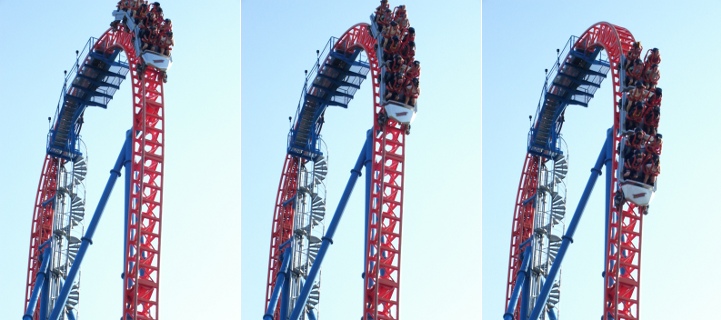
    Continuous Shutter Images
    Continuous Shutter Images

    I fought all the other automation to a standstill:

    • Infinity focus
    • Shutter speed 1/1000 sec
    • Aperture f/5.1

    The camera picked ISO 200, probably as a result of the “high speed” continuous shutter setting, and warned me that it wasn’t happy about doing that. This being a bright, sunlit day, the nominal exposure for that ISO speed would be 1/200 @ f/16. Two stops faster shutter and three stops bigger aperture should work out OK, as the subjects were on the down-sun side of the coaster. The camera has just two apertures (big and little) that, of course, vary with the zoom setting, so I didn’t have much leeway. I figured I could fix any minor exposure issues in the cough darkroom.

    The tele end of the zoom range is equivalent to a 114 mm lens with 35 mm film, which is better than the beer-can-sized zoom on the SLR I used to lug around back in the day.

    In round numbers:

    • the car is 30 feet long and the original image is two cars tall, call it 60 feet
    • the image is 2816 pixels tall
    • (60 * 12) / 2800 = maybe 1/4″ per pixel

    Cropping the interesting part from the frame, goosing the gamma a smidge, and applying a touch of Unsharp Mask says that’s about right: you can see the expressions on their grainy little faces. National Geographic quality, it ain’t, but it’s OK for a pocket camera and pix of relatives.

    Memo to Self: Would forcing the ISO down to 100 reduce the graininess a bit?

  • Tree Frog: The Video

    Frog walking on tent
    Frog walking on tent

    Watching the tree frogs crawl up the tent from inside let us see how they move: hand-over-hand up the fabric. A dozen of them crawling along was spooky…

    I took a movie with my pocket camera that turned into an 8 MB AVI, which I can’t upload here. Most of it isn’t all that interesting, anyway, an observation which hasn’t stopped YouTube dead in its tracks yet, but we can do better than that.

    A pair of Free Software programs extracts the interesting part and produces a (somewhat) smaller animated GIF that works with WordPress.

    First, shatter the AVI into separate JPG images:

    mkdir frames
    ffmpeg -i cimg3781.avi -sameq frames/frame-%03d.jpg

    A bit of browsing showed that I wanted frames 227 through 265 and that the frog was pretty much in the upper-middle of the image. So, crop a 320×240 image around the frog from those 640×480 frames:

    cd frames
    mkdir stills
    for f in `seq 227 265` ; do convert frame-$f.jpg -crop 320x240+160+60 stills/still-$f.jpg ; done

    Then convert them into an animated GIF with a 500-ms frame rate (the -delay ticker is 10 ms):

    cd stills
    convert -delay 50 still-2* frogwalk.gif

    It’s a 1.6 MB wad, but gets the message across: frogs keep three paws stuck to the floor.

    Remember, that little guy is moving at glacial speed in the GIF: those 40 frames of video last just over a second in real time.

    Memo to self: MPEG-1 and MPEG-2 only support video-style frame rates around 30 fps.

    Update: Regular reader Przemek Klosowski showed me how to generate those numeric sequences on the fly, without using a for loop:

    There's this neat Bash construct {1..10} that you can use directly after ffmpeg:
    convert -delay 50 still-{227..430}* result.gif
    
    You can even skip every nth frame:
    convert -delay 50 still-{227..430..5}* result.gif
    

    Thanks!

  • Tektronix 492 Spectrum Analyzer Backplane Pin Spacing

    Tek 492 Memory Board
    Tek 492 Memory Board

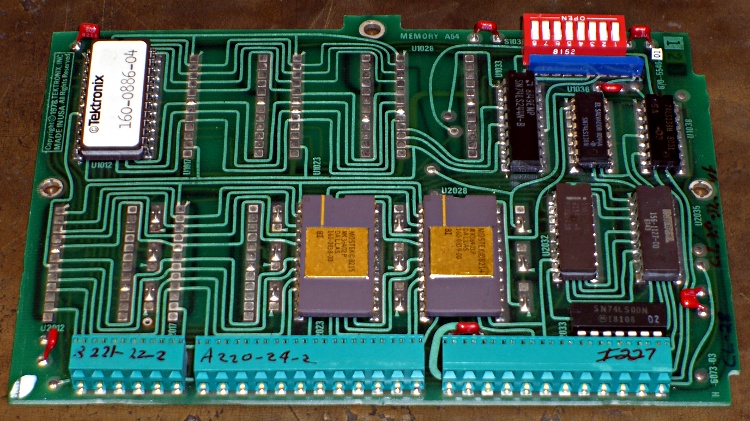
    My buddy Eks asked me to help fix his new-to-him and guaranteed broken Tek 492 spectrum analyzer, which turned into a tour-de-force effort. One sub-project involved sucking the bits out of an existing “known-good” Tek memory card, which meant building a backplane connector and a circuit that behaved like a 6800 microcontroller… fortunately, it could be a lot slower.

    [Update: It seems searches involving “Tektronix 492” produce this page. You may also be interested in these posts…

    If those aren’t what you’re looking for, note that the correct spelling is “Tektronix“.

    Good luck fixing that gadget: it’s a great instrument when it works!]

    You can tell just by looking that this board was designed back in the day when PCB layout involved flexible adhesive tape traces and little sticky donut pads. Ground plane? We don’t need no stinkin’ ground plane!

    Actually, it’s a four-layer board done with the usual Tek attention to detail. They didn’t need a ground plane because they knew what they were doing. Remember, this is in a spectrum analyzer with an 18-GHz bandwidth and 80 dB dynamic range; a little digital hum and buzz just wouldn’t go unnoticed.

    Tek 492 Backplane Geometry
    Tek 492 Backplane Geometry

    Anyhow, the backplane pins are on a 0.150-inch grid within each block. The center block (pins 13-36) is 0.200 inches from the left block (pins 1-12) and 0.250 from the right block (pins 37-60).

    That means the left and right blocks are neatly aligned on the same 0.150-inch grid, with the middle block offset by 50 mils. You can’t plug the board in backwards unless you really work at it.

    Of course, Eks had some genuine gold-plated Tek pins in his stash: 24 mils square and 32 mils across the diagonal. They have 1/4″ clear above the crimped area that anchors them to the black plastic spacer and are 1/2″ tall overall. They’re not standard header pins, but I suspect you could use some newfangled pins in a pinch.

    Here’s what the reader board finally looked like, hacked traces and all, with the board connector to the rear. The memory board didn’t use all the backplane pins, so I only populated the ones that did something useful. The power-and-ground pins (left side of right pin block) stand separately from the other because I had to solder them to both the top and the bottom of the board: no plated-through holes!

    Tek 492 Memory Board Reader
    Tek 492 Memory Board Reader

    I cannot imagine this being useful to anybody else, but I defined an Eagle part for the connector so I could CNC-drill the board. Drop me a note and I’ll send it to you.

    [Update: this turned into a Circuit Cellar column, so you can fetch a ZIP file from their FTP site that has all manner of useful stuff.]

    Memo to Self: The drill size follows the pin’s diagonal measurement… not the side! Duh.

  • Pressure-washing the Gas Grill: Mind the Overspray

    The instructions for our Weber gas grill would have us lavish more care on it than we do on our car, which isn’t actually saying much. Nonetheless, once a year I gotta clean the crud out, whether it needs it or not, because not even I believe heat kills that stuff.

    Used to be, that was a thoroughly disgusting job of hand-scraping carbonized gunk and scrubbing gooey muck in cramped quarters. Having acquired a pressure washer, cleaning the grill is almost enough fun that I might do it more often. It even gets the mildew (or whatever that schmutz might be) off the wood handles & platforms, which I would have bet was impossible.

    Pressure washer side effects
    Pressure washer side effects

    However, if you’re even a teensy bit fussier than we are about the looks of your castle, you might want to not lay the grates & “flavorizer bars” on the driveway to blast ’em clean. Turns out that the overspray strips the grunge right out of the top layer of asphalt, leaving a white trail behind.

    Looks a lot like those Nasca peteroglyphs, doesn’t it?

    The pressure washer does a great job on the white resin plastic chairs, too, which go from really grubby to chalk-white in one pass.

    Can’t imagine how I got along without it…

    Memo to Self: Next time, use the sawhorses.

  • Batteries.com Alkaline AA Cells: Early Failures Thereof

    Swollen vs normal alkaline AA cells
    Swollen vs normal alkaline AA cells

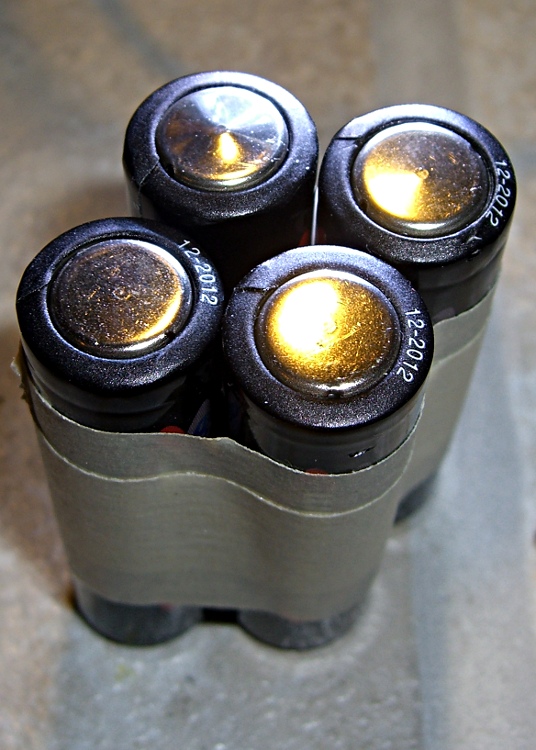
    I’ve bought plenty of batteries from batteries.com over the years, but the alkaline AA cells I picked up last year have been a real disappointment: some had very short service lives. It took quite a while to figure this out, as I mentioned there, and when I finally got around to checking the rest of the package, most of them were dead… in Spring 2009 with a 12-2012 date code.

    One characteristic of the weak / dead cells is that the negative terminal is swollen, even on the deaders direct from the package. This picture shows four cells removed from service: the front two are used with some remaining charge, the rear two are dead.

    When I checked the package, most of the dead-on-delivery cells had swollen bottoms, so I suspect they had a manufacturing problem with at least one batch of cells.

    A query to batteries.com asking about this got no reply. Perhaps they were busy dealing with the aftermath of their security breach?

    A 48-pack of alkaline cells from the late Circuit City, bought about the same time, seems just fine.

    Memo to self: check the bottom!

  • Simpleminded EPROM Programming Power Supply

    My buddy Eks recently acquired a “guaranteed broke” Tektronix 492 spectrum analyzer that turned out to have a defunct memory board: the ROM holding the initial boot firmware has a bad checksum. He verified that by swapping in a memory board from another 492 and found it worked perfectly.

    The original board used Mostek MK36400 8Kx8 masked ROMs, but they can be replaced by either 27HC641 or (in a pinch) a quartet of 2716 EPROMs. Being a stickler for authenticity, Eks picked up some 27HC641 chips. That means we need a device programmer, as none of the burners we have know anything about 27HC641s. There are other ways of getting the job done, but this has the advantage of getting me some face time with my role model for being a Renaissance Man.

    Tek EPROM Power Supply Breadboard
    Tek EPROM Power Supply Breadboard

    To make a long story somewhat shorter, the 27HC641 is a 8Kx8 EPROM in a 24-pin package with the usual 12 address lines, 8 data lines, power, ground, and a single chip-select / output-enable / programming-voltage pin. Normal EPROMs in 28-pin packages have separate pins for all those functions to make life easier.

    Anyhow, the CE/VPP supply must provide 30 mA at 12.5 V as well as the usual minuscule FET logic currents at 5 V and 0 V. The VCC supply must cough up a staggering 90 mA during normal operation at 5 V and 30 mA at 6 V during programming. Both supply voltages must switch between three levels: unnaturally high during programming, 5 V for normal operation, and 0 V for output-enable and during chip removal / installation in the programming socket.

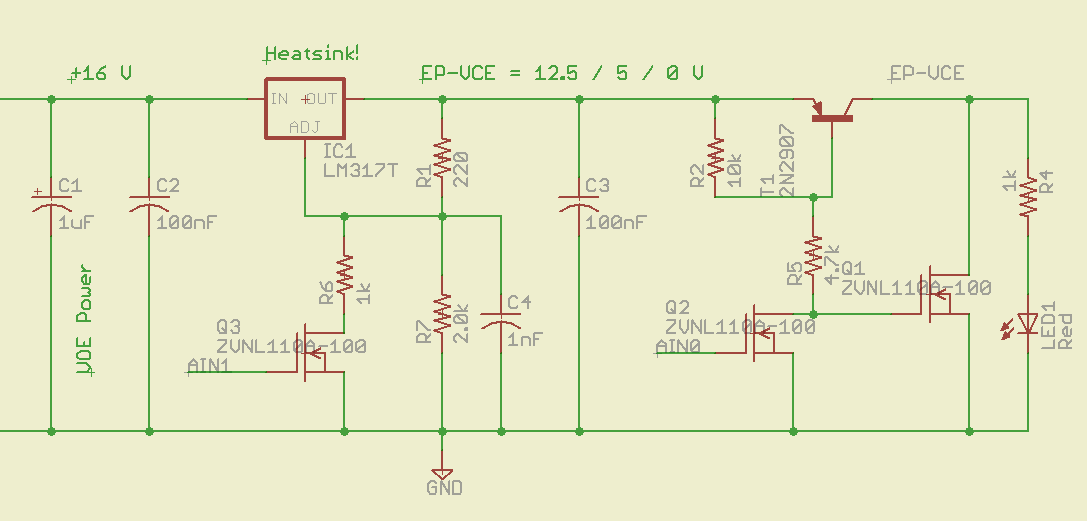
    This being an entirely one-off project, I used good old LM317T regulators with a handful of transistor switches to vary the voltage and clamp the output to ground. The CE/VPP supply looks like this:

    Schematic of VPP-VCE pin supply
    Schematic of VPP-VCE pin supply

    An Arduino will drive the gates of Q2 & Q3, with all the programming logic and timing handled by software. The shortest VPP pulse is a millisecond long, so that’s not a real restriction, and the verification can happen at nose-pickin’ speed. That simplifies a lot of other things about the project, too.

    Switch: 12.5 to 5 V
    Switch: 12.5 to 5 V

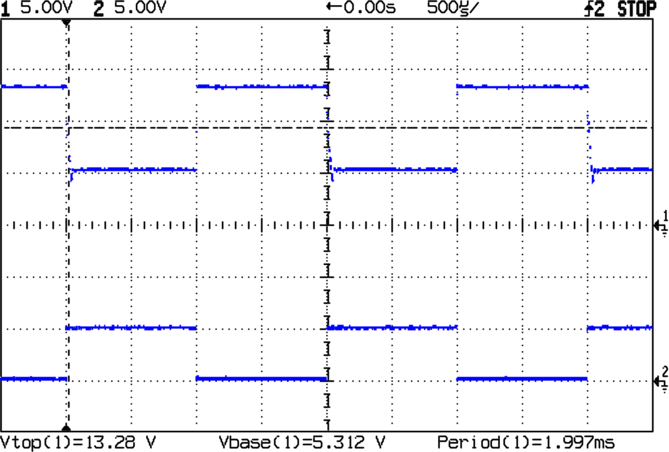
    Q3 selects the output voltage: gate high = 5 V, gate low = 12.5 V. The scope shot shows the gate driven with a 500-Hz square wave, which is about the right width for the programming pulse.

    I prototyped this on a solderless breadboard (ptooie) as shown above with 5% resistors, so the actual voltages aren’t quite nominal. The readout says 13.28 and 5.3 V, which will need some trimming to get inside the EPROM’s 5% spec.

    The 1 nF cap at the LM317 Adjust terminal encourages stablity by knocking off the high-frequency stuff and slowing down the transitions just a smidge. The datasheet suggests up to 10 µF, which turns the transitions into triangles.

    The LM317 can only supply current to its load, so reducing the output voltage requires the load to draw current from C3. Because this is essentially a DC application, C3 can be quite small: there won’t be any other switching going on during the programming pulse. The datasheet recommends 1 – 10 µF, but definitely more than 5 nF.

    The LED is actually a key part of the circuit, as it draws current to pull the output voltage downward: more LED current = faster transition time. However, higher C3 = slower transitions.

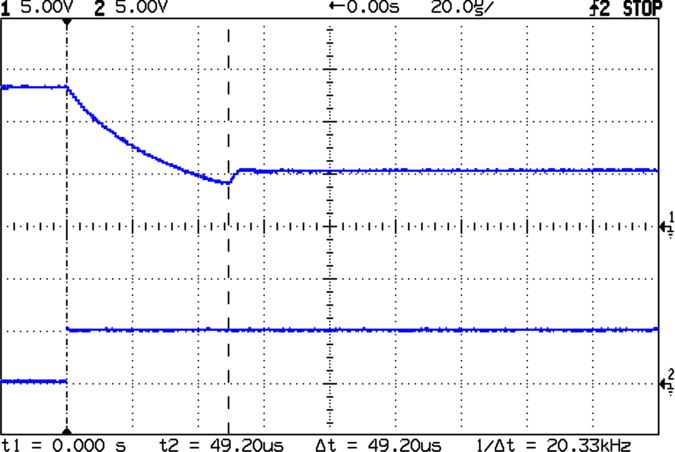
    Fall time: 12.5 to  5 V
    Fall time: 12.5 to 5 V

    Seen at a higher magnification, the falling edge of the output waveform shows a decay that lasts 50 µs or so. The LED draws maybe 12 mA at 13 V, so the voltage across C3 should drop at

    (1/100 nF) x (12 mA) = 120 V/ms

    Applying a straightedge to the early part of that curve looks like 25 V in 100 µs; call it 250 V/ms, maybe a bit less.

    What’s a factor of two among friends, particularly given the tolerances on ceramic caps?

    T1 and Q1 (I don’t know why Eagle’s models use both T and Q as transistor prefixes, it’s probably an international thing) switch the output line between the LM317 and ground; I suspect just turning T1 off would work as well, but this way the chip pin is firmly held to 0 V, where it should be, regardless of leakage and other oddities.

    Switch: 5 to 0 V
    Switch: 5 to 0 V

    Because Q1 crops both sides of the transistion, the rise and fall happen in nanoseconds rather than microseconds.

    So, now that I know this will actually work, I can build a PCB and write some firmware…

    Memo to Self: make sure the code waits for the output transitions. Methinks delayMicroseconds() will be a constant companion.

  • Bicycle Mobile Mic Amp Debug: It’s the Connector

    The radio on Mary’s bike has been misbehaving over the last few months: the PTT button on the handlebars occasionally had no effect. Debugging this sort of intermittent problem is quite difficult, as it would sometimes fail and repair itself before we could get stopped in a safe place where I could poke around in the wiring.

    After months of this nonsense, I narrowed the failure down to the short cable from the HT’s mic jack to the interface board: by positioning the cable just so, the radio would work fine for days or weeks at a time. I taped the thing in position and all was well, at least for a few days or weeks at a time.

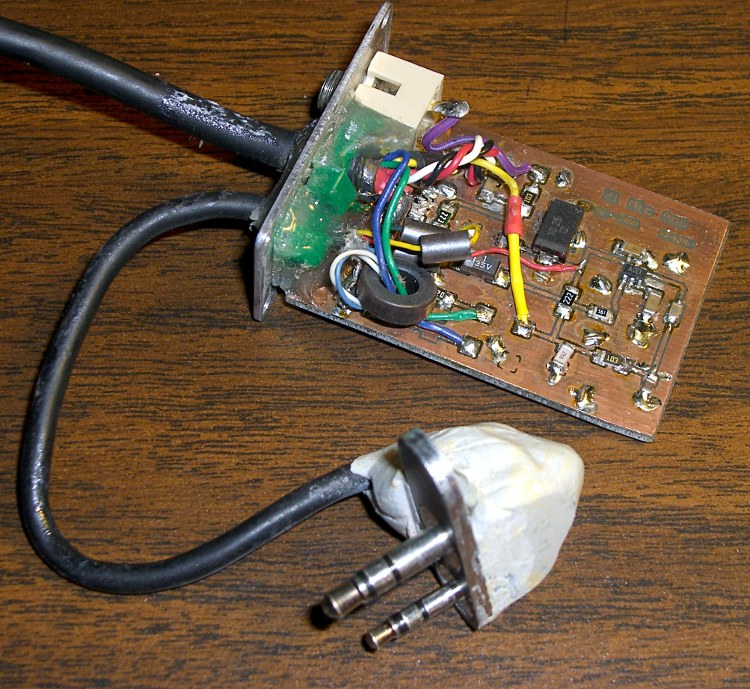
    HT audio interface - 2001
    HT audio interface – 2001
    HT audio interface - 2009
    HT audio interface – 2009

    These two pictures show what the interface looked like back in 2001 when I put it together (modified from another version I did in 1997!) and what it looks like today. The most significant change is in the plugs connecting the whole affair to the HT: a CNC-machined plate holds them perfectly parallel at the proper spacing and an epoxy-putty turd fuses them into a rigid mass. More on that sub-project tomorrow…

    Loose plugs, it turns out, vibrate the HT’s jacks right off the circuit board in short order and those jacks are a major pain to replace. Ask me how I know…

    The wire break seemed to be precisely where the mic cable exits the epoxy turd. You’d expect a fatigue fracture to occur at that spot, so I wasn’t particularly surprised, although I was amazed that the thing hadn’t failed completely over the months I spend fiddling with it. I finally resolved to fix this once and for all, which meant either flaying the cable and patching the wire in situ or rebuilding the whole connector assembly. Either choice requires enough fiddly work to discourage even me.

    Sooo, disconnect everything & haul it to the Basement Laboratory, Electronics Workbench Division…

    Before cutting into the cable, I measured the mic voltage on the PCB and tried to make the thing fail on the bench. The HT (an ancient ICOM IC-Z1A) normally presents 3.5 V DC on the mic wire and the external PTT switch pulls it to ground through a 22 kΩ (or 33 kΩ or thereabouts) resistor. The mic audio is a small AC signal riding a volt or so of DC bias with the PTT active.

    The wire measured maybe 0.25 volts and the PTT dragged it flat dead to ground. Yup, through that honkin’ big resistor. Well, maybe the last conductor in that mic wire had finally broken, right there on the bench?

    Measured from the 2.5 mm plug tip conductor (tip = mic, ring = 3.5 V DC, sleeve = mic common) to the PCB pad on the PC, the mic wire stubbornly read 0.0 Ω, regardless of any wiggling & jiggling I applied to the cable. But no voltage got through from the radio to the board…

    Sticking a bare 2.5 mm plug into the HT mic jack produced a steady 3.5 V on the tip lug. Reinstalling my epoxy-turd plug assembly produced either 0.25 or 3.5 V, depending on whether I twisted the thing this way or that way.

    Ah-ha! Gotcha!

    Pulled out my lifetime supply of Caig DeoxIT Red, applied a minute drop to the end of the mic plug, rammed it home & yanked it out several times, wiped off the residue, and the PTT now works perfectly. Did the same thing to the adjacent speaker plug, just on general principles, and I suspect that’ll be all good, too.

    Diagnosis: oxidation or accumulated crud on the mic jack inside the radio.

    Now, to try it out on the bike and see how long this fix lasts. Anything will work fine on the bench, but very few things survive for long on a bicycle.

    Memo to Self: It’s always the connectors. Unless it’s the wires.

    Here’s the schematic, just in case you’re wondering. I wouldn’t do it this way today, but that’s because I’ve learned a bit over the last decade or so…

    [Update: A more recent attempt is there.]

    IC-Z1A Mic Amp Schematic
    IC-Z1A Mic Amp Schematic