The Smell of Molten Projects in the Morning

Ed Nisley's Blog: Shop notes, electronics, firmware, machinery, 3D printing, laser cuttery, and curiosities. Contents: 100% human thinking, 0% AI slop.

Tag: Memo to Self

Maybe next time I’ll get it right

  • Converting Day-of-Year to Month and Day-of-Month, Then Back Again

    I needed the conversions for a WWVB simulator, so it knows when to twiddle the leap-year and leap-second bits.

    The general notion is a table with the Day-of-Year values for the last day of each month. The most expedient way of doing this is with two columns: one for normal years and the other for leap years, thusly…

    Month EOM EOM-LY DOY DOY-LY
    0 0 0 0 0
    1 31 31 31 31
    2 28 29 59 60
    3 31 31 90 91
    4 30 30 120 121
    5 31 31 151 152
    6 30 30 181 182
    7 31 31 212 213
    8 31 31 243 244
    9 30 30 273 274
    10 31 31 304 305
    11 30 30 334 335
    12 31 31 365 366

    Hint: even if you can recite the “Thirty days hath November …” jingle, it’s much better to build a spreadsheet so the additions all work out. It’s even better if you don’t attempt any of this with a late-summer head cold. You might want to check all my work, because I’m still stuffy.

    With table in hand, the code is straightforward.

    Define a structure with all the various bits & pieces of the current time, much of which isn’t used here. It’s all needed in the WWVB simulator:

    enum EVENTSTATE {EVENT_INACTIVE,EVENT_PENDING,EVENT_ACTIVE};
    
    struct timecode_ {			// The current moment in time...
      byte Year;				// 0 - 99
      word DayOfYear;			// 1 - 366
      byte Hour;				// 0 - 23
      byte Minute;				// 0 - 59
      byte Second;				// 0 - 60 (yes!)
      byte Tenth;				// 0 - 9
      enum EVENTSTATE LeapYear;		// 0 = no, 1 = pending, 2 = active
      enum EVENTSTATE LeapSecond;		// 0 = no, 1 = pending, 2 = active in this minute
      enum EVENTSTATE DaylightSavingTime;	// 0 = no, 1 = pending, 2 = active
      char UT1Correction;			// 100 ms units, -10 to +10 range (+/- 1 second)
      byte MinuteLength;			// 60 or 61
      byte Month;				// 1 - 12 (not sent in frame)
      byte DayOfMonth;			// 1 - 28..31	(not sent in frame)
    };
    

    That’s obviously overspecified, because DayOfYear with LeapYear uniquely determines Month and DayOfMonth. It’s handy to have both forms around, sooo there they are.


    Then set up the table, glossing over the quick matrix transposition that turns the entries for each year into rows rather than columns:

    prog_uint16_t PROGMEM MonthEnds[2][13] = {
      0,31,59,90,120,151,181,212,243,273,304,334,365,
      0,31,60,91,121,152,182,213,244,274,305,335,366
    };
    

    Conversion from DayOfYear to Month and DayOfMonth requires searching backwards through the appropriate table row until you find the entry that’s smaller than the DayOfYear value, at which point you’ve found the right month.

    void ConvertDOYtoDOM(struct timecode_ *pTime) {
    byte Index,LY;
    word EndOfMonth;
      LY = (EVENT_INACTIVE != pTime->LeapYear) ? 1 : 0;
      Index = 12;
      while ((EndOfMonth = pgm_read_word(&MonthEnds[LY][Index])) >= pTime->DayOfYear) {
    	--Index;
      };
      pTime->Month = Index + 1;									// months start with 1, not 0
      pTime->DayOfMonth = (byte)(pTime->DayOfYear - EndOfMonth);
    }
    

    Converting from Month and DayOfMonth to DayOfYear is much easier, as it’s pretty much just a table lookup:

    word ConvertDOMtoDOY(struct timecode_ *pTime) {
    word EndOfMonth;
      EndOfMonth = pgm_read_word(&MonthEnds[(EVENT_INACTIVE != pTime->LeapYear) ? 1 : 0][pTime->Month - 1]);
      return EndOfMonth + pTime->DayOfMonth;
    }
    

    This code might actually work, but if I were you, I’d test it pretty thoroughly before lashing it into your project…


    The PROGMEM and pgm_read_word() stuff is the Arduino mechanism that puts the lookup table into Flash program memory rather than the ATMega168’s exceedingly limited RAM space. The definitive word about that process resides there.

    Memo to Self: Using const simply makes the variable kinda-sorta read-only, but still initializes RAM from Flash. The PROGMEM routines delete the RAM copy entirely.

  • Sherline Z-axis Backlash: Check the Bearing Preload Nut!

    Loose bearing nut
    Loose bearing nut

    I don’t do any fancy 3D milling, so it takes a lot of Z-axis backlash to get my attention. While setting up for some circuit-board drilling, I finally noticed that the backlash far exceeded even my slovenly specs: something like 20 mils.

    The Z-axis backlash adjusting nut on the saddle was as snug as it usually is. Heaving on the saddle, though, pulled it up & down and moved the handwheel on the top of the Z-axis motor.

    Ah-ha! That says the leadscrew itself is moving, which shouldn’t be possible because it’s captured at the bearings in the stepper motor mount.

    Some tedious disassembly later, the top picture shows the Z-axis leadscrew and motor mount, with the nut obviously too far away from the lower ball bearing housing. The nut was finger-loose and I moved it while extracting the leadscrew; it’s supposed to be snug against the bearing in normal operation.

    The solution is a drop of Loctite, which should be applied to the canonical “clean and dry” threads. Hosing this part of the leadscrew down with solvents isn’t a good idea, because you don’t want any inside the lower bearing in the motor mount, so I spent some Quality Shop Time spinning the threads against a (dry) rag, running the nut to the other end (all of a few millimeters), and repeating until most of the oil was gone.

    Properly adjusted nut
    Properly adjusted nut

    Sherline documents how to assemble & install the motor mounts, so there’s not much mystery involved. I loosened the preload nut until the housing spun freely on the shaft, then tightened it a teensy bit; the housing still spun freely and there’s no detectable end play.

    Reinstallation requires putting the motor mount at the same spot on the Z-axis column as before. I moved the saddle to the top of the column, ran the leadscrew into the saddle nut, and then tightened the motor mount screws. That allows the mount to move to suit the saddle nut’s position, rather than going through the tedious saddle alignment process I mentioned as part of the gib adjustment.

    It’s all good… call it 3 mils of backlash on all three axes.

    Memo to Self: It’s possible to run the Z-axis backlash adjusting nut off the top of the leadscrew thread, then re-engage it without removing the motor mount. The trick is to hold the anti-backlash nut firmly against the saddle nut while turning the leadscrew to engage the thread. Remember that it’s a left-hand thread…

  • Arduino: Dividing an External Frequency

    A friend asked for a Totally Featureless Clock (it’s a long story) and in order to build that, I must concoct a WWVB simulator. Not needing really precise atomic time, I can use ordinary bench-grade crystals and suchlike; microsecond-level jitter isn’t a big problem.

    Anyhow, I must divide down an external 60 kHz signal to produce a 10-Hz interrupt to drive the modulator. The 60 kHz comes from a 12 MHz crystal, through a divide-by-200 counter, and feeds the ATmega T1 input (aka Arduino pin 5, normally the PWM5 output).

    The key is setting up Timer1 to divide T1 inputs by 6000 (count 0 through 5999), then have it produce an interrupt when the maximum count occurs. You’ll want to read Chapter 15 of The Fine Manual to learn how the hardware works.

    I used CTC Mode 12, so that the counts occur on the falling edge of the signal on T1 with the maximum value stored in ICR1. That causes the Input Capture Interrupt to occur when ICR1 == TCNT1.

    Review the avr-lib interrupt doc to get the proper interrupt vector names. You want the ICF interrupt, enabled with ICIE1.

    Note that Table 15-4 is misleading. The TOV1 Flag may be set when TCNT == MAX, but unless ICR1 == MAX it’ll never get there. You (well, I) can spend a distressing amount of time figuring out why TOV1 doesn’t happen.

    With that in mind, Timer1 setup is straightforward:

    TCCR1B = 0;                // stop Timer 1 by shutting off the clock
    TCNT1 = 0;                 // force count to start from scratch
    TCCR1A = 0;                // no compare outputs to OC1A OC1B, WGM1 1:0 = 00
    TCCR1C = 0;                // no forced compares
    ICR1 = 5999;               // count 0 through 5999 = divide by 6000
    TIMSK1 = 1 << ICIE1; // allow interrupt on capture event (TCNT == ICF)
    TCCR1B = B00011110;        // start Timer 1: CTC mode = 12, TOP=ICR1, ext clock on T1, falling edge
    

    The interrupt handler can do whatever you want. This one just flips an output bit (ultimately connected to the modulator) to show it’s arrived:

    ISR(TIMER1_CAPT_vect) {
       PINB |= _BV(1);
    }
    

    That weird-looking line takes advantage of an Arduino hardware feature: if you write a 1 to a bit in the PIN register, the corresponding PORT value toggles. It’s documented in The Fine Manual on page 74, section 13.2.2 and mentioned there.

    Then the rest of the simulator is just a simple matter of software…

  • Arduino: Be Careful With the Preprocessor

    This trips me up every damn time…

    Although the Arduino language looks like C and parses like C and runs like C, it’s not really C. It’s a specialized language gnawed on by a vast conversion monster and eventually shat out as executable ATmega-style instructions.

    Here’s a (rather contrived) trivial working program…

    #define PIN_ARDUINOLED    13     // standard LED
    
    typedef struct {
     int initial;
     int on;
     int off;
     int reps;
    } timeout_ ;
    
    timeout_ Trial = {2000,100,1000,5};
    
    void setup() {
     pinMode(PIN_ARDUINOLED,OUTPUT);
    }
    
    void loop() {
    
    int counter;
    
     digitalWrite(PIN_ARDUINOLED,LOW);
     delay(Trial.initial);
    
     for (counter = 0; counter < Trial.reps; ++counter) {
     digitalWrite(PIN_ARDUINOLED,HIGH);
     delay(Trial.on);
     digitalWrite(PIN_ARDUINOLED,LOW);
     delay(Trial.off);
     }
    
    }

    That compiles and runs just like you’d expect: a long delay, followed by five blinks, repeating endlessly.

    Now, use some preprocessor conditionals to gut-and-replace the code, with a bit of garish colorization to make things more obvious. This is Bad Programming Practice, but work with me…

    #define PIN_ARDUINOLED    13        // standard LED
    
    #if 0
    typedef struct {
     int initial;
     int on;
     int off;
     int reps;
    } timeout_ ;
    #endif
    
    #if 0
    timeout_ Trial = {2000,100,1000,5};
    #else
    int LoopCount = 50;
    #endif
    
    void setup() {
     pinMode(PIN_ARDUINOLED,OUTPUT);
    }
    
    void loop() {
    
    int counter;
    
    #if 0
     digitalWrite(PIN_ARDUINOLED,LOW);
     delay(Trial.initial);
    
     for (counter = 0; counter < Trial.reps; ++counter) {
     digitalWrite(PIN_ARDUINOLED,HIGH);
     delay(Trial.on);
     digitalWrite(PIN_ARDUINOLED,LOW);
     delay(Trial.off);
     }
    #else
     digitalWrite(PIN_ARDUINOLED,LOW);
     for (counter = 0; counter < LoopCount; ++counter) {
     digitalWrite(PIN_ARDUINOLED,HIGH);
     delay(250);
     digitalWrite(PIN_ARDUINOLED,LOW);
     delay(500);
     }
    
    #endif
    
    }

    The error message lump resulting from compiling that looks like:

    In function ‘void setup()’:
    error: ‘OUTPUT’ was not declared in this scope In function ‘void loop()’:
     In function ‘int main()’:

    Really?

    Delete the lines already removed by the preprocessor, the lines that shouldn’t be there when the code reaches the compiler, and you have:

    #define PIN_ARDUINOLED        13              // standard LED
    
    int LoopCount = 50;
    
    void setup() {
     pinMode(PIN_ARDUINOLED,OUTPUT);
    }
    
    void loop() {
    
    int counter;
    
     digitalWrite(PIN_ARDUINOLED,LOW);
     for (counter = 0; counter < LoopCount; ++counter) {
     digitalWrite(PIN_ARDUINOLED,HIGH);
     delay(250);
     digitalWrite(PIN_ARDUINOLED,LOW);
     delay(500);
     }
    
    }

    Which compiles and runs like a champ, of course. It blinks merrily away, more off than on, forever. The LoopCount variable doesn’t do much for us, but it’s the thought that counts.

    Put the original lines back, comment out the new stuff, and you get:

    #define PIN_ARDUINOLED        13              // standard LED
    
    typedef struct {
     int initial;
     int on;
     int off;
     int reps;
    } timeout_ ;
    
    timeout_ Trial = {2000,100,1000,5};
    
    #if 0
    int LoopCount = 50;
    #endif
    
    void setup() {
     pinMode(PIN_ARDUINOLED,OUTPUT);
    }
    
    void loop() {
    
    int counter;
    
     digitalWrite(PIN_ARDUINOLED,LOW);
     delay(Trial.initial);
    
     for (counter = 0; counter < Trial.reps; ++counter) {
     digitalWrite(PIN_ARDUINOLED,HIGH);
     delay(Trial.on);
     digitalWrite(PIN_ARDUINOLED,LOW);
     delay(Trial.off);
     }
    
    #if 0
     digitalWrite(PIN_ARDUINOLED,LOW);
     for (counter = 0; counter < LoopCount; ++counter) {
     digitalWrite(PIN_ARDUINOLED,HIGH);
     delay(250);
     digitalWrite(PIN_ARDUINOLED,LOW);
     delay(500);
     }
    
    #endif
    
    }

    And that compiles and runs perfectly, just like you’d expect. Uh-huh. Right.

    Basically, there’s a complex interaction between ordinary C preprocessor directives, ordinary C language elements, and the inscrutable innards of the Arduino IDE & compiler chain.

    As nearly as I can tell, you can wrap #if whatever around simple declarations and most executable code with impunity, but putting anything more elaborate than that, like a simple typedef struct, inside the conditionals causes bizarre problems.

    In fact, just typedef can cause problems, particularly if you attempt to use the ensuing tag in a function declaration. Don’t even think about anything along these lines:

    typedef struct {whatever} taggit_;
    ... snippage ...
    void SomeFunction(taggit_ *pThing) {
    ... snippage ...
    }

    However, this seems to work fine:

    struct taggit_ {whatever};
    ... snippage ...
    void SomeFunction(struct taggit_ *pThing) {
    ... snippage ...
    }

    Trying to make sense of this will drive you mad (well, it drives me mad), but when you get bizarre error messages that can’t be explained by the usual operator screwups, well, most likely you’re being too clever with the preprocessor.

    Or you’ve (also) made a trivial typo that cannot be discovered by inspection.

    It seems the right (only?) way to handle typedef definitions is to put ’em in a separate header file, as described there, then add the header file to your sketch in a separate tab. That seems to insert the definitions in the proper order within the *.cpp file that actually goes into the compiler.

    However, some limited fiddling reveals that I don’t understand the nuances or I’m screwing it up. Probably both.

    Memo to Self: define the structs & variables without typedefs, then prepare for some protracted tweakage…

  • Digital Photography: Sometimes Underexposure Is Your Friend

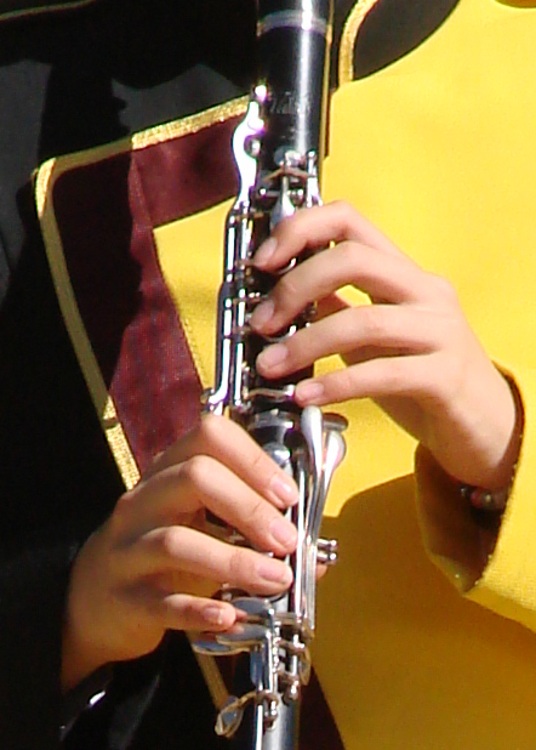
    Took some pix of the high school marching band yesterday and the whole lot came out one stop underexposed… exactly as I intended.

    Their uniforms are dead black wool with a yellow left-shoulder flap. The camera looks at all that black, desperately attempts to make it neutral gray, and blows out all the highlights. Given that the only highlights are the face and hands, the absolutely critical part of the image looks awful.

    Auto Exposure
    Auto Exposure

    The first picture (a small crop from a much bigger image) shows what the auto-exposure algorithm comes up with:

    Exposure Bias : 0
    Exposure Mode : Auto
    Exposure Program : Auto
    Exposure Time : 1/1000 s
    FNumber : F4
    Flash : No, auto
    Focal Length : 60.1 mm
    ISO Speed Ratings : 125
    Light Source : Daylight
    Metering Mode : Center weighted average

    Notice the burned-out highlights: the left hand is flat, the clarinet keys reflect retina-burn white, and the yellow shoulder is monochrome.

    Under those circumstances, the only thing to do is override the camera’s opinion and force some underexposure. You can either meter each shot manually or just tell it to knock the auto-exposure back a bit. I generally choose the latter, if only because the camera comes up with a reasonable approximation of a good exposure faster than I can. If I don’t lay the center-weighted spot on the black side of a uniform, that is.

    Minus 1 stop
    Minus 1 stop

    So the second picture (another small crop) is “underexposed” by a stop:

    Exposure Bias : -1
    Exposure Mode : Manual
    Exposure Program : Auto
    Exposure Time : 1/1250 s
    FNumber : F5.6
    Flash : No, auto
    Focal Length : 60.1 mm
    ISO Speed Ratings : 125
    Light Source : Daylight
    Metering Mode : Center weighted average

    Much better.

    We can quibble about the color quality, but at least the highlights aren’t blown out and there’s some texture to the uniform. The black part of the uniform is a dead loss, but that’s pretty much the way it’s got to be: the camera simply doesn’t have enough dynamic range to handle a dead-black uniform and glare-white reflections.

    One of the band members has absolutely gorgeous deep-dark-brown skin that I have yet to get right. Either the highlights burn out or her skin blends into the shadows. Twiddling the gamma doesn’t help much.

    More on the details of why you want underexposure, even in what look like evenly illuminated scenes is there.

    Sometimes, though, you just gotta fix it in the mix, as described there.

    Memo to Self: Set the color balance to “daylight”, too, because bright primary colors against black can be confusing.

  • TCFFHRC Rules Document: LyX / LaTeX Settings

    I’m editing the Trinity College Home Firefighting Robot Contest rules document using the LyX GUI front end to LaTeX to handle the formatting.

    Yes, yes, I know OpenOffice and its ilk have all the features you think you need. When you actually try to put together a book-length document, you find that the features don’t actually work / work together / behave reliably. Been there, done that. Enough times to be wary, indeed.

    So LyX / LaTeX is the least-worst alternative and actually does a pretty good job after you get the various configurations beaten into shape. After that, you just type, add tags, and it’s all good.

    Here’s a list of the settings I’m using… for future reference, natch, because figuring this stuff out from first principles takes a while.

    Document settings

    Document Class: report
    Text Layout: MedSkip vertical, Single line, Two-column
    Page Layout: US Letter, fancy headings
    Page Margins: 0.75 inch all around, 0.3 inch separations</pre>
    <strong>LaTeX Preamble</strong>
    <pre>\usepackage{ragged2e}
    \usepackage{lastpage}
    \usepackage{url}
    \usepackage{dvipost}
    \usepackage{breakurl}
    \usepackage[labelfont={bf,sf}]{caption}
    \renewcommand{\bottomfraction}{0.7}
    \pagestyle{fancyplain}
    \fancyhf{}
    \lhead{\fancyplain{}{Trinity College Home Robot Contests}}
    \rhead{\fancyplain{}{2010 Rules}}
    \lfoot{\fancyplain{Modified \today}{Modified \today}}
    \cfoot{Copyright 2009 by Trinity College}
    \rfoot{\fancyplain{\thepage\ of \pageref{LastPage}}{\thepage\ of \pageref{LastPage}}}
    \RaggedRight
    \dvipostlayout
    \dvipost{cbstart color push Blue}
    \dvipost{cbend color pop}
    

    Trickery


    Some of those packages aren’t part of the default LyX / LaTeX installation on Ubuntu. Searching for LaTeX in Synaptic is tedious, but works.

    The three ways to export to PDF are not identical.

    • dvipdfm doesn’t produce clickable TOC links.
    • pdflatex, the default, doesn’t produce change bars, which is a crippling defect for a rules document under heavy revision. It’s OK for the final draft, though.
    • ps2pdf doesn’t produce searchable text; it’s all graphics. Ptooie!

    So use dvipdfm during development (to get change bars) and use pdflatex for the final product (to get clickable links). There has got to be a way around that, but I haven’t a clue as to what’s going on under the hood.

    In order to track changes:

    Document -> Change Tracking -> Track Changes.

    In order to print change bars and suchlike:

    Document -> Change Tracking -> Show Changes in Output

    Figures appear on-screen in dot-for-dot mode by default, so tweak the on-screen ratio to maybe 50%. Force the printed width of all figures to 3 inches for two-column layout. Insist that picture resolution bear some resemblance to reality: 3 inches at 300 dpi -> 1000 pixels across.

    There seems to be no way to export LyX directly to ODT. Exporting to RTF strips off most of the formatting, as you’d expect, and change tracking Goes Away.

    Exporting to HTML produces one honkin’ big lump of HTML with a bazillion image files in a separate directory. That’s probably OK for most purposes.

    Memo to Self: Turn off change tracking for minor editorial tweakage, because nobody really cares.

  • Bike Lighting: Automotive Specs

    Having recently taken a thorough drubbing on the ‘Bentrider forums for having a rear-facing white light on my bike, I should accelerate my plans for a red / amber taillight.

    This Philips LumiLED app note gives some specs on automotive lighting. The one we bikies all tend to ignore is the surface area: greater than 37.5 square centimeters for rear combination stop-turn fixtures. Call it a scant 4 inches in diameter. You’ve never seen a bike light that large, have you?

    LED combo tail stop light
    LED combo tail stop light

    Maybe the right thing to do is start with a street-legal truck light and build some electronics around it. This is a 4 inch diameter, 44 LED rear light with both taillight and brake light terminals. At 12 V, the taillight draws 10 mA and the brake light is 250 mA. Got it from Gemplers with a recent order, but they’re certainly not the optimum supplier if that’s all you’re buying.

    Obviously, it’s unreasonable to run a 3 watt taillight on a bike, as the most recent crop of single-LED killer headlights are merely a watt or three. Battery life remains a problem.

    At 10% duty cycle the brake LEDs would average 300 mW. That might be roughly comparable to the running lights on some cars these days.

    With the taillight constantly energized and the brake flashing at 4 Hz, it’d be 120 + 0.5 * 300 = 270 mW.

    That’s more reasonable. With a 50% efficient upconverter to 12 V, that’s half a watt. Start with 4 AA cells, triple the voltage, draw 100 mA, runtime is 1500 / 100 = 15 hours. Good enough.

    And it ought to be attention-getting enough for anybody! The only trouble will be fitting the damn thing on the back of the bike; fortunately, ‘bents have plenty of room behind the seat, so maybe attaching it below the top seat rail will work.

    Memo to Self: The rear reflector must be something like 3 inches in diameter, too. We ignore that spec, too.