Ed Nisley's Blog: Shop notes, electronics, firmware, machinery, 3D printing, laser cuttery, and curiosities. Contents: 100% human thinking, 0% AI slop.
Problem: I needed a shielding plane under a sensitive gizmo that was separated from the ground plane covering the rest of the board. EAGLE poured the ground plane atop the smaller shield polygon, despite the two signals having different names.
Solution: set the ground plane’s Rank to 2, which means it’s less “important” than the smaller plane. Thus, the smaller plane gets drawn first and the ground plane surrounds it.
The Official TI TLC5916 Datasheet is far more confusing on the subject of calculating the external current-setting resistor than it really needs to be.
The basic relations appear on page 17, but the detailed discussion on page 22 will make your head explode. Here’s how I see it …
VRext, the voltage across Rext, the reference resistor, is controlled by a 1.26 V band gap reference multiplied by VG, the voltage gain of a 7-bit DAC.
VRext = 1.26 V * VG
The DAC produces VG from the HC (High Current) bit and the six CC0..CC5 (Configuration Code register) bits. HC selects a range and CC0..CC5 are a binary multiplier.
VG = ((1 + HC) * (1 + CC/64) ) / 4
The minimum VG value for HC = 0 is 1/4 and the max is 1/4 + 63/256 = 127/256:
VG = (1 + CC/64)/4 = 1/4 + CC/256
The minimum VG value for HC = 1 is 1/2 and the max is 1/2 + 63/128 = 127/128:
VG = (1 + CC/64)/2 = 1/2 + CC/128
The absolute minimum VG = 0.25 happens when HG and CC0..5 are all zero. Conversely, absolute maximum VG = 0.992 happens when they’re all one.
That means VRext varies from
VRext (min) = 1.26 * 0.25 = 0.315 V
to
VRext (max) = 1.26 * 0.992 = 1.25 V
There’s a kink in the middle of that range, as shown in the graph on page 23, where HC shifts gears to the high range.
Rext then converts that voltage into Iref, the LED reference current:
Iref = VRext / Rext
The CG (Current Gain) multiplies Iref to set the actual LED current. The CM bit controls CG. You can either use the weird exponential formula in the datasheet or just remember:
CM = 0 selects CG = 5
CM = 1 selects CG = 15
Sooo, finally, Iout (LED current) is just:
Iout = CG * Iref
Knowing all that, you can choose Rext so that the absolute maximum current doesn’t exceed the LED rating:
Iout (max) = 20 mA = 15 * (1.25 V / Rext)
Which tells you that Rext must be no less than
Rext = (15 * 1.25 V) / (0.02 A) = 938 Ω
Then you can find the minimum current through the LEDs:
Iout (min) = 5 * (0.315 V / 938 Ω) = 1.68 mA
Now, given that the chip’s specs seem to indicate that the minimum regulated current is 5 mA, I suspect that all bets are off as regards linearity and matching and all that. Given that my friend wants a really dim clock, I think this will work out just fine…
Memo to Self: For whatever reason (and it must be a real stinker), TI numbers the CC bits backwards. CC0 is the Most Significant Bit, CC5 is the Least Significant Bit.
And because CC5 is the first bit shifted into the TLC5916’s shift register, you must run the Arduino hardware-assisted SPI in LSB-first mode.
Having cooked up a simpleminded 12.000 MHz crystal oscillator for the WWVB simulator and gotten something close-to-but-not-spot-on the right frequency, I thought it’d be interesting to measure some of my 12 MHz crystal grab-bag collection.
This is in the nature of exploratory surgery to see if anything more complex is warranted.
The general procedure is covered in excellent detail by K8IQY there. His method includes building a precision oscillator and a very nice test fixture, plus a bit of straightforward commercial instrumentation. Well worth perusing.
I have the good fortune to own an HP8591E spectrum analyzer (hereinafter, the SA) with a tracking generator (ditto, TG) that can calibrate itself to a fare-thee-well. I had to let it warm up for a few hours, as the Basement Laboratory is a wee bit colder than it really likes. Heck, it’s a lot colder than I really like, for whatever that’s worth.
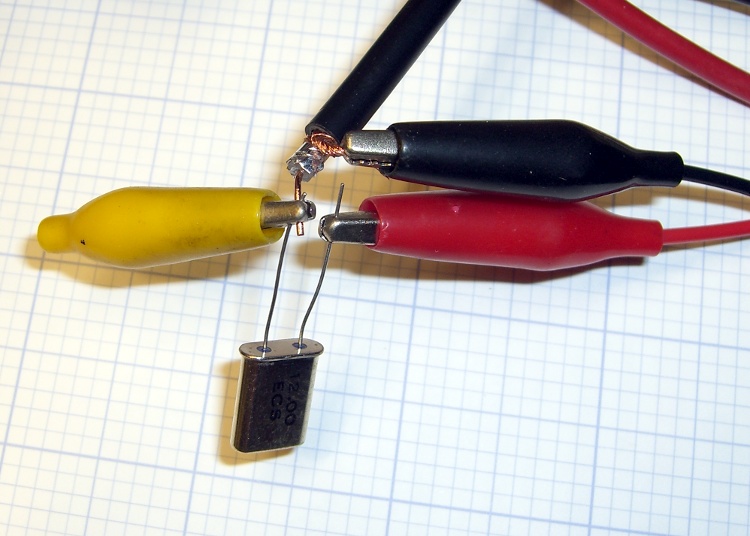
Alligator-clip crystal connections
I bodged up some random coax and a few clip leads into a fur-ball circuit in front of the SA. This is not the right way to do it; a fixture with mechanical stability is the first step toward solid numbers.
The tracking generator & analyzer present 50 Ω impedances to the outside world, which is much too high for the expected crystal series resistance, but it’ll do for a start. You want to measure the crystal in an environment that’s pretty close to what it’ll be built into, so as to get meaningful numbers.
The crystal sits in series between the TG and the SA, looking a lot like a simpleminded (and badly terminated) crystal filter. Write down the sum of the crystal’s source (TG) and load (SA) termination resistances: 50+50 = 100.
12 MHz Crystal – Fs and Fp
Center frequency to 12 MHz (or whatever the crystal’s nominal frequency might be), span to 200 kHz, TG at -10 dBm, get a display of the series resonance peak and the parallel resonance dip, poke the Auto Tracking Adjust button to get the TG lined up with the SA. Span to 100 kHz, tune center frequency for best picture.
That shows the series resonant peak and parallel resonance notch, but it’s way too broad for any decent resolution in the measurements.
Soooo…
Poke marker peak search to find the series peak, poke marker to center frequency to slap the peak to the middle of the screen.
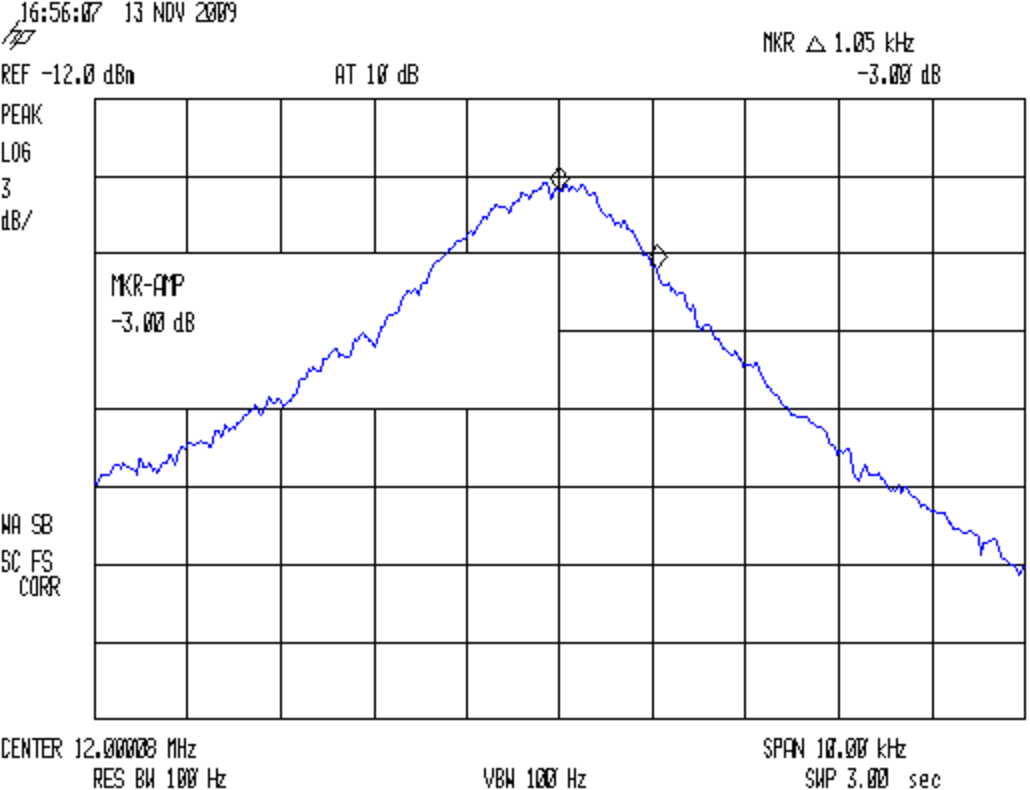
12 MHz Crystal – Fs Bandwidth
Span down to 5 kHz, which sets the resolution bandwidth to 100 Hz. Poke auto tracking adjust again, because it’ll be way off. Manual adjust moves in too-large steps.
Marker peak search, marker to center frequency. Tick the reference level down enough to get the peak near the top of the graticule, set 3 dB/div to get enough vertical resolution. Another peak search, to center, then write down the peak frequency Fs. Single sweep to freeze the display.
Marker delta, dial up the marker frequency, poke marker amplitude, set -3 dB, read off the marker delta frequency. Dial the marker frequency down to the other side of the peak, set amplitude -3 dB again, read off the frequency again. Compute the crystal’s 3-dB bandwidth BW as the sum of those two values.
Marker normal, auto-sweep to get a live trace again, auto tracking adjust again as needed. Display line on, set to peak for amplitude reference.
Replace the crystal with a 50-Ω (or so) non-inductive twiddlepot, twiddle to set level to the display line. Measure twiddlepot resistance, which will be equal to the crystal’s series resistance. Write down Rs (a.k.a, the ESR).
Measure crystal capacitance: short both leads, measure to case. Write down C0. I used an Autek RF-1 with a homebrew fixture, which has 1 pF resolution at RF frequencies; obviously, you pick a frequency well below Fs.
With all those numbers in hand, compute the crystal’s motional parameters…
Lm = (100 + Rs) / (2π BW)
Cm = 1 / ( (2π Fs)^2 Lm)
Q = (2π Fs Lm) / Rs
The three crystals from the grab bag are all reasonably close to what you’d expect.
12 MHz Crystal Parameters
50
Ohm Term
Marking
Fs
-3 dB Lo
-3 dB Hi
Fp-Fs
Rs
C0
BW
Lm
Cm
Q
MHz
Hz
Hz
kHz
Ω
pF
Hz
mH
fF
TEW 5C
11.996962
1030
920
24.8
8.9
3
1950
8.16
21.56
69133
HCI 1200
11.997500
1087
1025
26.8
5.0
2
2112
7.54
23.35
113618
ECS 12.00
11.999975
1162
1125
26.3
6.2
2
2287
6.96
25.28
84635
Memo to Self:
The Lm equation shows why you really need lower termination resistances. The K8IQY fixture involves 4:1 matching transformers on each side of the crystal to get the generator down to 12.5-ish Ω and the output back up to 50 Ω. Time to rummage through my pile of ferrite toroids.
An accurate BW with excellent (1 Hz) resolution feeds directly into better Lm values. I’m not convinced I have the SA set up for that much resolution.
Absolute Fs accuracy isn’t needed, but high resolution is. With that many digits, thermal drift is a real issue, hence the repeated TG tweakage.
I also need better resolution for Rs and C0. The former needs a smaller twiddlepot. Both could use a better meter with more resolution and zero-offset for low values. Measuring pF caps requires a good fixture.
A few days ago I rode off to an eye doctor appointment and my ladies rode off later to meet me at the grocery store after they stopped in the garden to harvest root crops. This sort of thing is easy enough to synchronize with amateur radio, but this morning I didn’t hear a thing until they rolled up beside me in the store parking lot.
It seemed they could hear each other and me, but I couldn’t hear either of them. We’re all on 144.39 MHz, the APRS data frequency, with 100 Hz tone squelch to keep the robots out of our ears. Our daughter has the GPS APRS tracker feeding data into the mic input, which is why we’re using a data channel for tactical comm.
This has happened once or twice before, but it’s very intermittent. I now had sufficient motivation to disconnect the radio, an ancient ICOM IC-Z1A, from the bike and pith it on the Electronics Workbench for examination. The UT-93 Tone Squelch board is unplugged & flipped over, resting on the front half of the radio body at the lower-left of the photo.
Turns out that there’s nothing visibly wrong in there. I suspect it’s a molecule or two of oxidation on the (gold-plated!) connector between the UT-93 and the main board, because the UT-93’s held firmly in position by the black foam square you can see in the lower-left of the photo. The small white plug near the top of the UT-93 mates with the equally small socket on the main board, just to the left of the lithium secondary cell in the middle.
It’s all CMOS logic, of course, and there’s no actual load current involved. That’s the worst condition for contacts, as a dry connection simply doesn’t produce enough energy to burn through the least hint of oxidation. That’s why they use gold plating on connectors, but it’s been a long time since that board has moved at all; the foam square is deeply indented.
So I wiggled & jiggled all the ribbon-cable connectors while I was in there, buttoned everything back up, and the tone decoding works again. I hope this will continue…
Memo to Self: remove only the four black corner screws on the upper case, plus the two silver screws near the very bottom inside the battery compartment, and the two halves pop apart. No need to remove the mic and earphone plugs, whew!
Setting up a new (well, new to me, it’s that old GX270) PC gave me reason to rummage in the Video Cable box and come up with this VGA-class cable. Half the connector shell had worked its way off, giving a nice view of the handiwork. Easily snapped back on with no permanent damage.
The cable works OK at 1280×1024, although the image seems a bit soft, and higher screen resolutions are out of its reach. There are no obvious signal reflections visible on the screen, so the impedance bumps are not as bad as you might think.
The VGA connector includes common returns for the Red, Green, and Blue signals, and the two wires for each color should be twisted together. That obviously hasn’t happened here, but crosstalk doesn’t seem to be much of a problem.
To their credit, they did solder the cable shield to the connector shell, which is a really nice touch. Alas, the impedance of a one-inch pigtail pretty much chokes off the high-frequency stuff you really want to drain to the shell.
Memo to Self: One of these days, run a bandwidth check with the spectrum analyzer. Use 6-dB pads to get nice 75-Ω terminations.
Linear Technology’s LTSpice generic capacitor model has all the parts you need to synthesize a crystal, which is pointed out in the help file and various spots around the web. What’s missing is the relation between all the parts and the values you have in hand for an arbitrary crystal.
SPICE Capacitor Model
The crystal capacitor model looks like this…
Cpar (usually C0) along the right edge is the inter-electrode capacitance, on the order of a few pF.
Rpar (usually R0) along the left edge is the parasitic resistance across the case, on the order of hundreds of MΩ.
The RCL string in the middle is the “motional” part of the crystal model, generally found with a subscript “m” in the specs.
Rser (Rm or ESR) is on the order of 100 Ω
Capacitance (Cm) is the motional capacitance, on the order of fF (that’s femtofarad: 10-15)
Lser (Lm) is tens to thousands of mH
RLshunt is something I haven’t seen in any other model and, in fact, it doesn’t appear in the properties panel.
Crystal Properties
Now, the part I screwed up is that the capacitor’s value (the number appearing on the schematic) is Capacitance (in the angle brackets that royally screw up WordPress HTML), not Cpar. So the crystal capacitor properties panel looks like this…
That models a 10 MHz crystal, taken directly from a sidebar in Refinements in Crystal Ladder Filter Design by the legendary Wes Hayward W7ZOI, in the June 1995 issue of QEX.
Guess what? Plug it into a model of his crystal-measuring circuit and it works exactly like he says it should. No surprise there…
SPICE has a bit of trouble simulating high-Q oscillators; they tend to not start up properly. If nothing seems to be happening, wait for a few tens-to-hundreds of milliseconds before despairing. Try chopping Rser down by a factor of two or four to see if that improves its disposition.
You could try injecting a few (hundred thousand) cycles of a kickstart signal, but that’s fraught with peril: you’re simulating something even further from reality than usual.
Memo to Self: You can rename the cap from C2 (or whatever) to X1 (or whatever) and everything still works fine.
Back in the early 90s I bought a Hewlett Packard 54602B digital oscilloscope: 150 MHz bandwidth, 4 channels. By and large, a fine piece of gear that’s been worth every penny.
Over the objections of the HP sales force, I got the HP 54651A RS-232 interface rather than the HP 54650A HPIB (aka GPIB, aka IEEE-488) interface. Reasoning: I’d need a matching interface on the PC side and PC architecture is anything but stable. Turns out that was a good decision, as you’ll realize if you count up the number of different buses since those days and factor in the cost of an IEEE-488 interface for each iteration. RS-232 is slow and not well-suited for complex arrays of test gear, but mostly I needed the scope for screen shots to go with my Circuit Cellar columns.
Here’s how that works…
Configure the scope by poking the RS-232 softkey in Print/Utility:
Connect to: HP Plot
Factors: On (this is absolutely vital)
Resolution: High
Baud Rate: 19200 (yes, “baud rate” is an oxymoron)
Handshake: DTR
Now the scope will dump HPGL to what it thinks is a plotter, so the trick is to make the PC look like a plotter. Turns out that’s not particularly difficult.
Despite the name, DTR handshaking does not use the scope’s DTR pin. The relevant manual section looks like this (click the thumbnail for full-size image):
HP54602B Oscilloscope Serial Port Pin Functions
So DTR remains high and the flow-control signaling actually uses the RTS/CTS pins. The cable I’ve been is basically a null modem connection with the appropriate gender on each end:
PC RS-232
HP 54602B Oscilloscope
9-pin F
Signal
25-pin M
Signal
1
DCD
20
DTR
2
RxD
2
TxD
3
TxD
3
RxD
4
DTR
6
DSR
also->
8
DCD
5
Gnd
7
GND
6
DSR
20
DTR
7
RTS
5
CTS
8
CTS
4
RTS
9
RI
n/c
Note:
PC 1 and 6 <- scope 20
PC 4 -> scope 6 and 8
I wired the cable like that mostly because I have a lifetime supply of nice 9-conductor shielded cable lying around. You could connect the scope’s DTR to its own DSR and DCD pins, apply similar trickery on the PC end, and everybody would be perfectly happy with 5-conductor cable, maybe even 4-conductor if you ran the ground through the shield.
Using XON/XOFF flow control seems to not work well, although I admit to not trying too hard to figure it out.
These days, I use a USB-to-RS-232 converter with the now-standard 9-pin connector. The port identifier may be nearly anything after udev/hotplug has its way with the hardware, but it usually works out to /dev/ttyUSB0.
The script requires C-Kermit (likely the ckermit package), ImageMagick, sed, and hp2xx (yes, spelled exactly like that), all of which should be packages in your favorite Linux distro. Haven’t a clue how this might work with Windows.
With all that in hand, copy-n-paste the following text into a file (I used gethp54602, for lack of anything more original), make it executable (chmod u+x gethp54602) and run it with a file name (./gethp54602 test). Poke the Print Screen softkey on the scope and settle back for a bit. The scope can’t keep up a steady flow of data at 19200 b/s, so the whole affair takes a minute or three for the 50-ish kB of text in a dual-trace image.
You’ll end up with three files:
test.hgl — raw HPGL text from the ‘scope
test.eps — raster conversion from HPGL
test.png — bitmapped screen-capture image
The magic script…
#!/usr/bin/kermit +
# Fetches screen shot from HP54602B oscilloscope
# Presumes it's set up for plotter output...
# Converts HPGL to PNG image

set modem none
set line /dev/ttyUSB0
set speed 19200
set flow rts/cts
set carrier-watch off

# Make sure we have a param
if not defined \%1 ask \%1 {File name? }

set input echo off
set input buffer-length 200000

# Wait for PRINT button to send the plot
echo Set HP54602B for HP Plotter, FACTORS OFF, 19200, DTR
echo Press PRINT SCREEN button on HP54602B...

log session "\%1.hgl"

# Wait for final character
input 480 \x03

close session
close

echo Converting HPGL in
echo --\%1.hgl
echo to PNG in
echo --\%1.png

# Without factors
#run hp2xx -m png -a 1.762 -h 91 -c 14 "\%1.hgl"
#run mogrify -density 300 -resize 200% "\%1.png"

# With factors
run sed '/lb/!d' "\%1.hgl" > "\%1-1.hgl"
run hp2xx -q -m eps -r 270 -a 0.447 -d 300 -w 130 -c 14 -p 34 -f "\%1.eps" "\%1-1.hgl"
run rm "\%1-1.hgl"
run convert -density 300 -resize 675x452+2+2 "\%1.eps" "\%1.png"

echo Finished!
exit 0
[Update: WordPress unpredictably and ruthlessly mangles source code by incorrectly escaping some symbols. The line with sed should have a greater-than symbol to pipe the result into the .hgl file. A more recent version (albeit using my SENA PS410 serial server) hosted as a GitHub gist may help.]
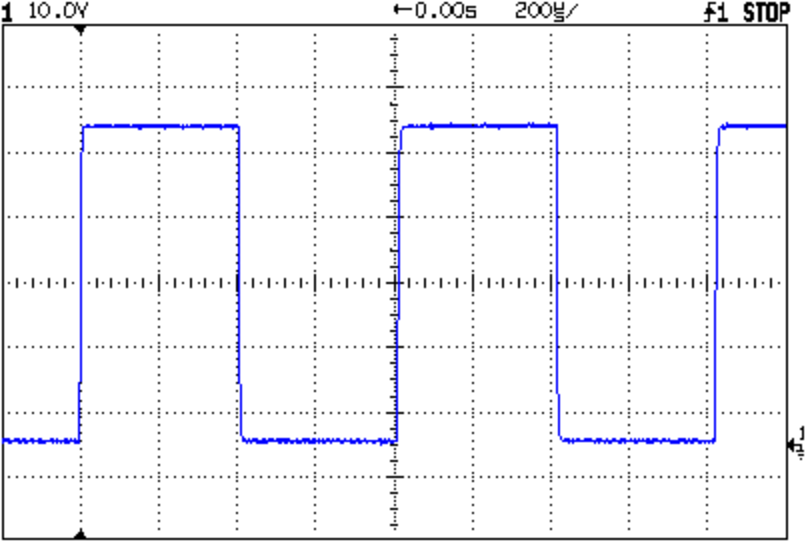
Here’s a sample of what pops out; it’s the scope’s own calibrator waveform, nothing exciting, but you get the general idea.
Screen Capture of Calibrator Signal
The commented-out section labeled “Without Factors” converts the format you get with Factors Off. Turns out that there’s no unique ending string without factors, which puts a real crimp in getting the data. The advantage is that the HPGL converts directly to PNG and looks good. The only way I’ve found to capture the scope data is to just time out after a while.
With Factors On, however, the image data has a unique ending character (ASCII ETX, 0x03) after the label text, but the layout is rotated to plot in landscape mode. A direct conversion to PNG looks awful, perhaps because hp2xx must do software character generation, and I eventually figured out that making a bank shot off EPS vector format produced much better results.
However, hp2xx dutifully renders the text into the EPS image, but it doesn’t inject a carriage return after each linefeed: the text dribbles off to the far right of the actual screen image. To fix that, the sed editor hacks off the label text following the lb command. Mercifully, hp2xx doesn’t choke on the incomplete command.
And then convert does its usual magic. The image size is just right to drop into my Circuit Cellar columns; you may want something different for your purposes.
[Update: The PNG has an alpha channel that selects only the traces, so the background color depends on where you put it. A small tweak is there.]
For reasons that I absolutely do not understand, I cannot control the oscilloscope through the serial interface. The scope sends data to the PC just fine and I can get the scope to complain about the character format if I send truly bogus junk (like, mismatching the baud settings), but it simply will not respond to commands. Maybe the interface is broken or, more likely, I’m screwing something up. Hasn’t been a problem, though, for my simple needs.
Memo to Self: One of these days, eBay will have a 54652B serial/parallel interface that might work better.




 The Smell of Molten Projects in the Morning