The Smell of Molten Projects in the Morning

Ed Nisley's Blog: Shop notes, electronics, firmware, machinery, 3D printing, laser cuttery, and curiosities. Contents: 100% human thinking, 0% AI slop.

Tag: Memo to Self

Maybe next time I’ll get it right

  • WWVB Antenna: Location, Location, Location

    Given that the wavelength of WWVB’s 60 kHz carrier is 5 kilometers, you’d think that the position of a receiver’s ferrite bar antenna isn’t all that critical. I’ve been running a receiver hitched to a laptop atop a file cabinet, with the bar antenna a few feet away atop an adjoining bookcase.

    Putting the antenna 12 cm over the top shelf surface (in a kludged cardboard holder to keep it off the wood), located on the left side of a mechanical mantel clock, produces these samples:

    
    Glitchiness:  276 Histogram: N!qdNMKE8B8A133111..12.....1.......................
    Glitchiness:  256 Histogram: O!iSMLLCC9A52215111121...1.........................
    Glitchiness:  243 Histogram: V!RfKOF88D977213212...2.3..2...1...................
    Glitchiness:  227 Histogram: NrfaQG6595AI66.222411.1..2.....11..................
    Glitchiness:  249 Histogram: S!eXNIFB76E5432.122.1.11111........................
    Glitchiness:  258 Histogram: SulWLKIIBB68433212113.1......1.....................
    Glitchiness:  119 Histogram: DWJG78753AEB52.711.....23.1.....1.....11.1.........
    Glitchiness:  159 Histogram: McULIE7835H72..1........332............23..........


    Moving it 40 cm to the other side of the clock, the next few consecutive samples look like this:

    
    Glitchiness:    4 Histogram: .21......3RD11..........332............223.........
    Glitchiness:    4 Histogram: 11..1....3SB3.........1.63.............51..........
    Glitchiness:    3 Histogram: .2.......CJC11..........251............34..........
    Glitchiness:    5 Histogram: 121......9KC3...........18.........1...15..........
    Glitchiness:    5 Histogram: .22......8KD3...........36.........1...33..........
    Glitchiness:   11 Histogram: 131....1.3W71...........451....1.......411........4
    Glitchiness:   21 Histogram: 351......6X231..1.....1.233....2....1..23.........6
    Glitchiness:    6 Histogram: .21..1...7OD1......1....23211..........33..........


    The first position is roughly equidistant from the apex of the corner, so the antenna is on the diagonal of a corner reflector made from the metalized aluminum foil of the exterior insulation.

    I’m not sure what to make of this, other than that location is everything.

    More on the histogram format there.

    Memo to self: maybe display the Glitchiness on the clock before the first sync to help find a good position?
  • Printing from QCAD in Xubuntu

    Went to print up a bunch of cards & pocket stationery again. Alas, QCAD wasn’t showing any of the printers. The obligatory search unearthed a discussion that solved some of the problem. The hack:

    sudo ln -s /var/run/cups/printcap /etc/printcap

    That’s recommended for KDE printing in Gnome, which is close enough to the situation: a QT app in Xubuntu. Maybe that’s solved in 9.10; I’m still using 8.10.

    The print dialog now shows all three CUPS printers on the file server downstairs.

    Can’t select Borderless paper, which means the crop lines don’t all appear.

    The Copies field doesn’t work: only one copy prints. That’s not a killer flaw, but it’s annoying when you need half a dozen copies of the biz card sheet.

    But it’s close enough for something I do once in a blue moon.

    Why print biz cards? One year they changed our house number and street name, changed the street name back, changed the area code, and then tweaked the ZIP code. I swore a mighty oath on the bones of my ancestors to never ever buy a commercial card again.

    Memo to Self: Trim the stationery in this order…

    • vertical edges
    • horizontal edges
    • vertical cuts
    • horizontal cut
  • WWVB Time Code Format Diagram

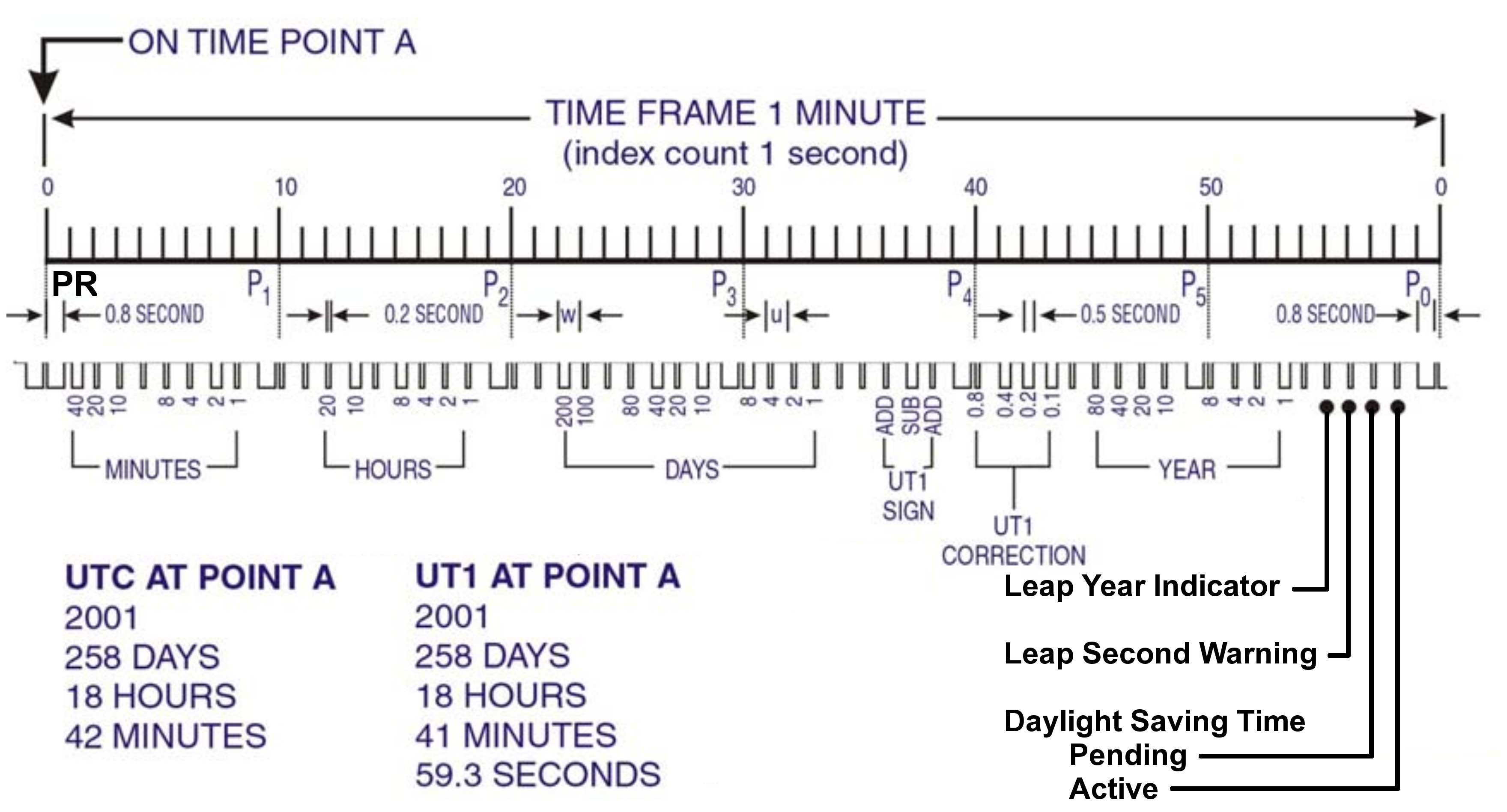
    This is by-and-large the same diagram of the WWVB Time Code Format that you’ll find there, but with:

    • the PR frame reference pulse identified
    • the last four bits clearly labeled
    • some verbiage chopped out
    WWVB Time Code Format - with PR marker
    WWVB Time Code Format – with PR marker

    Memo to Self: Remember that…

    • The time code applies to the minute that’s currently happening, so …
    • The PR pulse happens before the rest of the time code arrives
    • You must know the end-of-month date to apply the leap second bit, but EOM isn’t part of the data stream
  • WWVB Reception Quality: Time From Last Synch

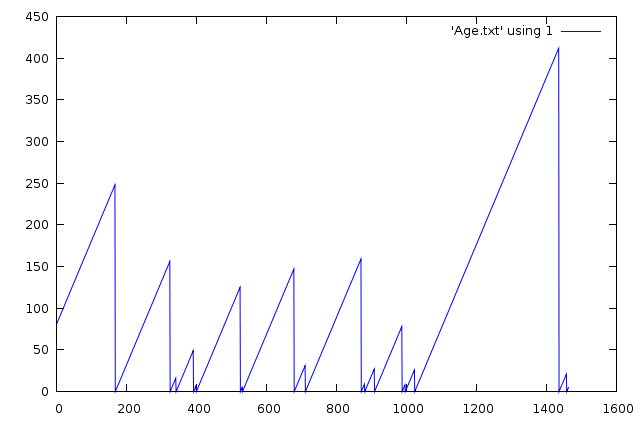
    It occurred to me that a better measure of the WWVB reception quality is the time since the last synch, because that measures the number of consecutive glitch-free minutes, which is a number that’s very difficult to pick out of the Glitchiness vs Time plots.

    A synch occurs only after four consecutive glitch-free frames, with the last three differing only by having properly incrementing minutes based on the first synch. That eliminates successive frames that span hours, as the minutes don’t increment properly from 59 to 00.

    This is the number of minutes since the most recent synch, versus the number of elapsed minutes, for a 24-hour period starting at UTC 0257 on 25 Dec 2009 (9:57 EST Christmas Eve 2009).

    Synch Age - 24 hrs - 2009-12-24
    Synch Age – 24 hrs – 2009-12-24

    Here’s the spline-smoothed Glitchiness graph I put up yesterday for comparison:

    Glitchiness - splines - 24 hrs - 2009-12-24
    Glitchiness – splines – 24 hrs – 2009-12-24

    An eyeballometric comparison shows my conclusion that synchs happen at the downward spikes in that plot is totally bogus.

    Memo to Self: If you haven’t graphed it, it’s not science yet.

    Useful Bash command:

    grep Age WWVB_2009-12-24a.log | cut -d '=' -f 3 > Age.txt
  • WWVB Reception Quality

    Here on the East Coast of the US, WWVB reception is iffy during the day, due to low signal strength and high ambient noise. Actual data seems hard to come by, so here’s a small contribution.

    This is a plot of the number of glitches per minute, where a glitch is any pulse that’s not within ±60 ms of the expected pulse durations (200, 500, and 800 ms), for a 24-hour period starting at UTC 0257 on 25 Dec 2009 (9:57 EST Christmas Eve 2009). There are 1448 data points, each representing the glitches during the previous minute; each minute starts within 2 seconds of the WWVB on-time frame marker.

    Here’s the raw data, log-scaled on the Y axis to cover the dynamic range. Log scaling can’t handle 0-valued points, so I forced counts of 0 to 0.1 to make them visible.

    Glitchiness - raw - 24 hrs - 2009-12-24
    Glitchiness – raw – 24 hrs – 2009-12-24

    Here’s the same data, Bezier smoothed to make the trends more obvious;  all the points below 1.0 are approximations of a trend toward counts of 0.

    Glitchiness - smoothed - 24 hrs - 2009-12-24
    Glitchiness – smoothed – 24 hrs – 2009-12-24

    Even better, splines show the glitch-free minutes without forcing the data points.

    Glitchiness - splines - 24 hrs - 2009-12-24
    Glitchiness – splines – 24 hrs – 2009-12-24

    My firmware requires four successive glitch-free minutes of reception (plus some additional verification) before synching its local time to WWVB, so it’s exceedingly fussy. Despite that, it still synched 17 times during those 24 hours. The longest free-running time between synchs was 6.8 hours.

    Note that there are 17 downward peaks below 1.0 in that last graph.

    Winter is, of course, the time of best ground-wave propagation from WWVB, so this is about as good as it’s ever going to get.

    Memo to Self: useful Bash and Gnuplot commands…

    
    grep Glitch WWVB_2009-12-24a.log | cut -d H -f 1 > Glitches.txt
    
    set logscale y
    
    set samples 250
    
    plot 'Glitches.txt' using ($2<1?0.1:$2) with points lt 3 pt 2
    
    plot 'Glitches.txt' using 2 smooth csplines with linespoints lt 3 pt 0
    
    
    log-scaled on the Y axis to cover the dynamic range. Log scaling can’t handle 0-valued points, so I forced them to 0.1;
  • 7400-Family IC Stash

    Over the years I’ve accumulated a bunch of obsolete ICs; all I can say is they weren’t obsolete at the time. Sometimes I need one, so here’s a list of the jelly-bean collection where I can find & update it as parts emerge from their hidey-holes in the Heap.

    All hulking through-hole

    • 138 1-to-8 demux
    • 221 monstable (!)
    • 139 1-to-4 decoder
    • 156 2-to-4 dual demux / decoder
    • F521 8-bit comparator
    • 373 8-bit latch (transparent)
    • 374 8-bit latch (clocked)
    • 74 dual D flipflop
    • 244 8-bit buffer
    • 393 dual 4-bit counter (ripple)
    • AS869 8-bit up/down counter
    • 191 4-bit up/down counter
    • 157 quad 2-to-1 mux
    • 164 8-bit parallel output shift register
    • 245 8-bit bus transceiver
    • 151 8-in multiplexer

    Memo to Self: What horror lurks in the box labeled “Old ICs”?

  • Measuring Photoresistor Voltage vs Resistance

    Cadmium sulfide photoresistor
    Cadmium sulfide photoresistor

    A friend wants a digital clock that’s dim when the house lights are low; standard clocks aren’t nearly dim enough. I know how she feels, having added a primary-red filter in front of a blue vacuum-fluorescent clock display to get rid of those garish digits in the middle of the night.

    This job calls for a photosensor of some kind, as you can’t figure it out by time alone.

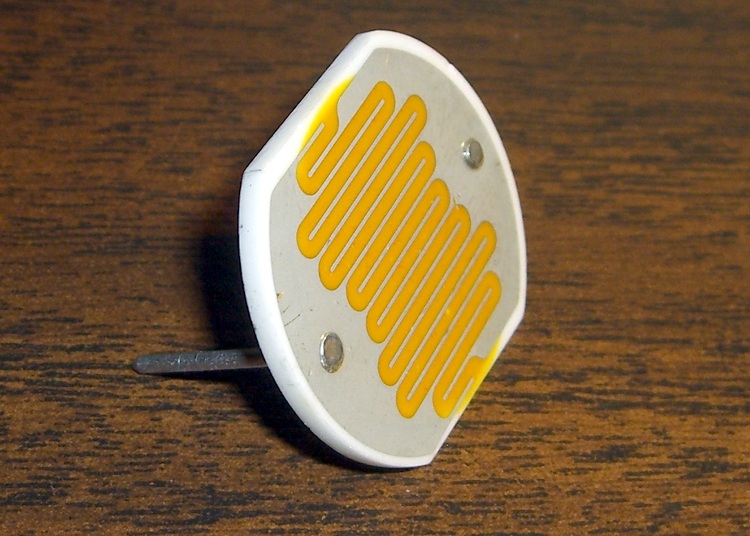
    After a brief struggle, the parts heap disgorged a 1-inch diameter CdS (cadmium sulfide) photoresistor with a dark resistance over 500 kΩ and a full-sunlight resistance around 50 Ω. Ordinary room light, at least around here, is in the 1-10 kΩ range, more or less, kinda sorta. Down the Basement Laboratory, it’s tens of kΩ.

    Photoresistor circuit and equation
    Photoresistor circuit and equation

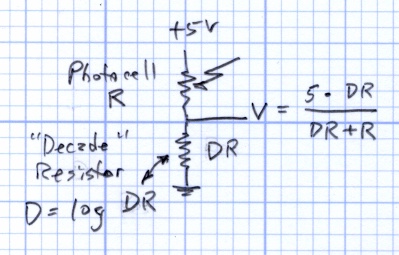
    The canonical sensing circuit is a simple voltage divider, with the photoresistor either on the top or the bottom. Putting it on the top means the voltage increases as the light gets brighter, which has a lot to recommend it.

    The resistance varies more or less linearly with the light intensity, to the extent that you can make a very nice linearly variable isolated resistor by bottling up an LED (which has linear intensity with current) with a CdS photoresistor in a light-tight enclosure.

    Anyhow, although the resistance R varies linearly, having the R in the denominator means that the voltage V varies inversely. Worse, because the value of R spans about four decades, there’s a serious range & resolution problem.

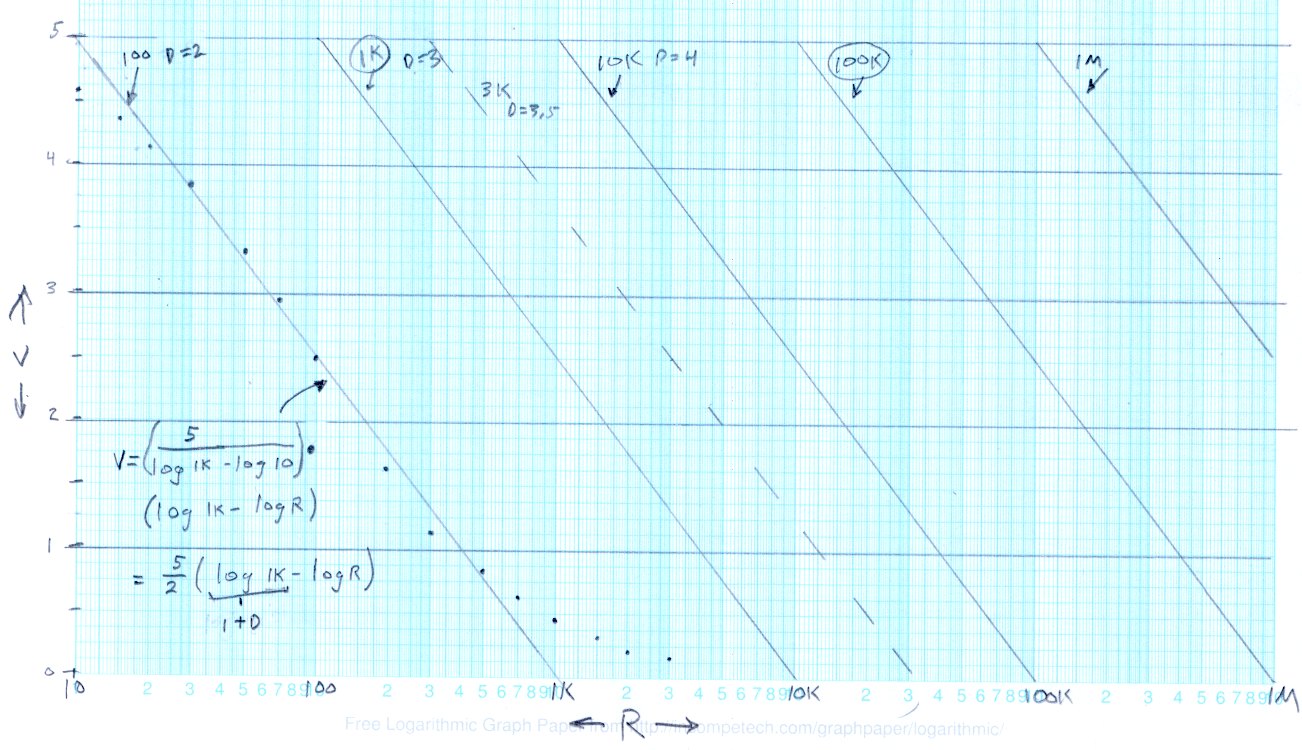
    This graph of V against log R shows the situation.

    Output voltage vs log resistance
    Output voltage vs log resistance

    The dots between R=10 Ω and R=1 kΩ are what the circuit spits out, with the “decade resistor” DR = 100 Ω and R values chosen for nice dot spacing. The long tail beyond 1 kΩ shows that for R greater than 1 kΩ, V doesn’t change by very much at all. Ditto for R less than 20 Ω or so, which is beyond the limit for this photocell.

    The straight line through those points is an eyeballometric curve fit to the range from about 20 to 700 and (most crucially) passing through (10 Ω,5 V) and (1000 Ω,0 V). The equation for that line is the usual y = mx + b, albeit with (log R) where you’d expect x. The equation in the lower-left corner is pretty  close to what you want, with D = log DR

    V = (5/2) * ((1+D) – log R)

    Running the photosensor circuit with DR = 1 kΩ would produce an identical series of dots snuggled up along the second line as R varies from 100 Ω to 10 kΩ. Each factor-of-10 change in DR handles another chunk of R’s range, with identical output voltages: when the voltage gets above about 4.5 or below 0.5, just switch to the next value of DR and continue merrily along.

    So that’s a low-budget (if you have cheap relays, like MOSFET analog switches), high-dynamic-range (if you have a good buffer amplifier) light sensor.

    More on how to turn this into a brightness control tomorrow…

    Memo to Self: Can we correlate a digital camera’s exposure at a known ISO with the cell resistance, so I can get some remote light level values?