The Smell of Molten Projects in the Morning

Ed Nisley's Blog: Shop notes, electronics, firmware, machinery, 3D printing, laser cuttery, and curiosities. Contents: 100% human thinking, 0% AI slop.

Tag: Improvements

Making the world a better place, one piece at a time

  • Tour Easy Rear Brake Noodle Extension

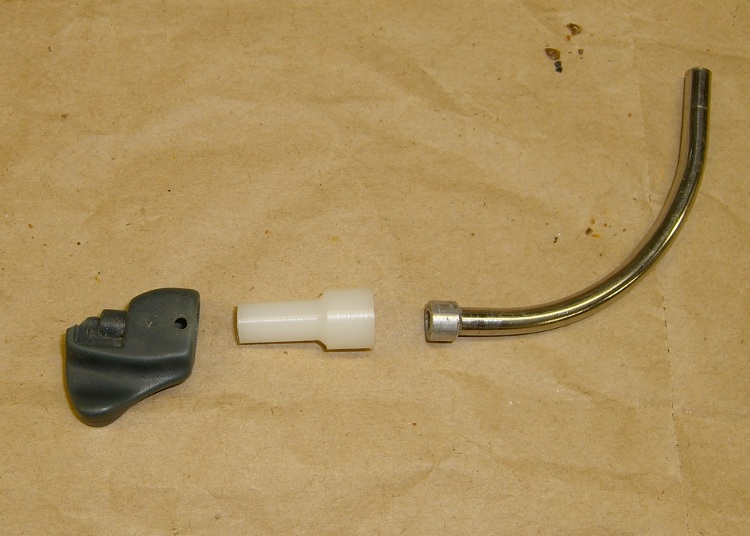
    Noodle Extension and Parts
    Noodle Extension and Parts

    Our Tour Easy recumbents have linear-pull brakes on the rear and, for some reason, the noodle on Mary’s bike didn’t quite clear the frame: the cable bent slightly around the frame when the brake was active.

    That made the brake difficult to adjust, as linear-pull brakes depend on an exact balance between the restoring springs on each side. With the cable pulling to the right, the left-side pad would contact the rim first and give the brake lever a mushy pull until the right-side pad clamped down.

    A quick lathe session applied to some nylon scrap turned out an extension tube that fit between the steel noodle and the (slightly broken) plastic hoodickie that engages the brake arm. I used nylon (or something slippery like that) to make sure the cable wasn’t going to bind on it.

    Epoxy Potting
    Epoxy Potting

    The noodle originally fastened into the plastic hoodickie with a small collar that snapped into a pair of holes, but I took a shortcut: JB Kwik Epoxy. The shank end of a small drill slip-fit into the hoodickie’s cable passage kept the extension aligned while the epoxy set up. The masking tape prevented the epoxy from drooling out through the two small holes: the cured epoxy plug will have a pair of retaining posts in exactly the right places. The smears on the plastic parts chipped right off, not that anybody will ever notice.

    I’m depending on spring force to hold the noodle in the extension, which seems to be working just fine. This is one of those jobs where everything’s under compression all the time and the cable tension ensures good alignment.

    The socket on the extension’s fat end is a snug fit to the collar swaged on the noodle; other noodle varieties seem to have other sorts of ends, so check to make sure this will work for you.

    Noodle Extension Installed
    Noodle Extension Installed
    Added Brake Cable Clearance
    Added Brake Cable Clearance

    These pix show the brake assembly from below (the paint failed on the frame cross-member early on and I’ve been meaning to slather some rust converter on that spot for years. Sigh.) and the now-positive clearance between the brake cable and the frame with the brake applied.

    And, for future reference, the dimensions…
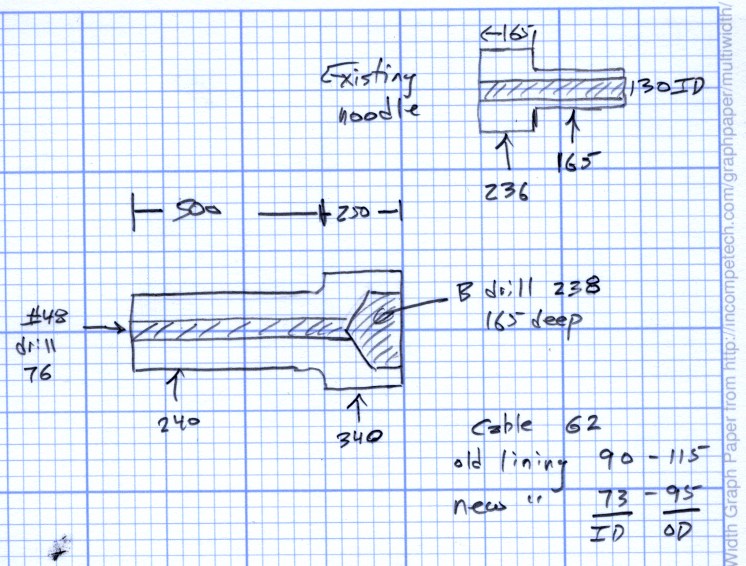
    Noodle and Extension Dimensions
    Noodle and Extension Dimensions
  • Bird Box Entrance Reducer

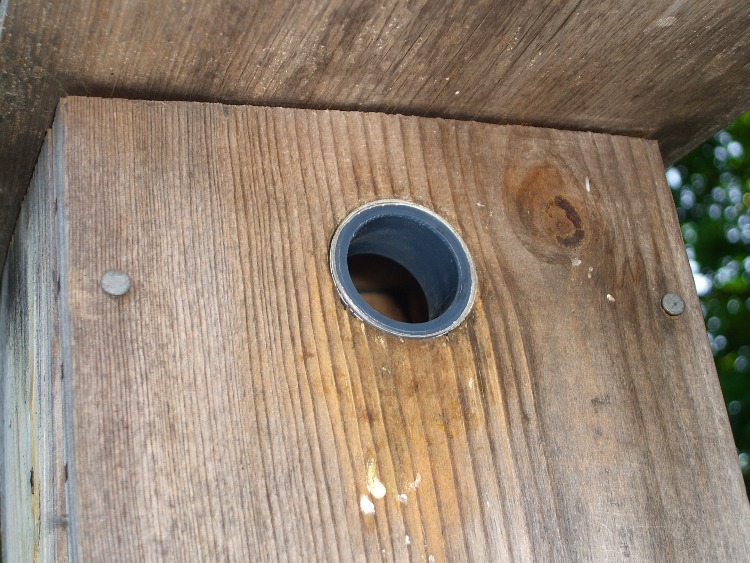
    Wren-sized entrance reducer in place
    Wren-sized entrance reducer in place

    We put out bird boxes to encourage more House Wrens, but House Sparrows often take over the boxes. This year we kept the boxes down until the sparrows had already started their nests in the bushes, hoping that the wrens would get a head start on their nests. Two days after we put the boxes up, we had a nesting pair of wrens… and two days later a pair of sparrows had evicted them and were installing their own nest.

    Rechecking the box specs, it seems wrens prefer a hole somewhere between 7/8″ and 1-1/8″, but I’d drilled 1-1/2″ holes for bluebirds (a long time ago, before we knew bluebirds vastly preferred the edges of open fields). Making a hole larger is easy, making one smaller is more difficult.

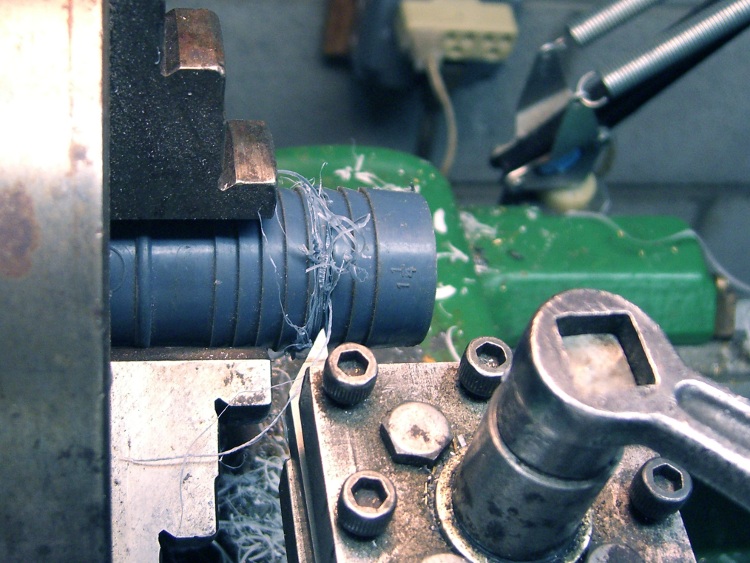
    Cutting off the barb
    Cutting off the barb

    I thought of making a wood bushing, then came to my senses: a 3/4″ thick wood ring with 1/4″ walls just wasn’t going to work. Given that the wrens (or their ancestors or relatives) have already tried nesting in our gardening boots, bicycle helmets, and tool trays, I figured they wouldn’t be too fussy about the material around their entrance hole.

    To the Basement Laboratory Machine Shop Wing!

    The parts heap disgorged a box of huge hose barb fittings, one of which had a 1.1″ ID and a 1.4″ OD: close enough. I parted off 3/4″ from the end of the barb, using a bit not really suited for the purpose that gave a nearly perfect edge in the soft plastic. One swipe with a deburring tool and it’s done.

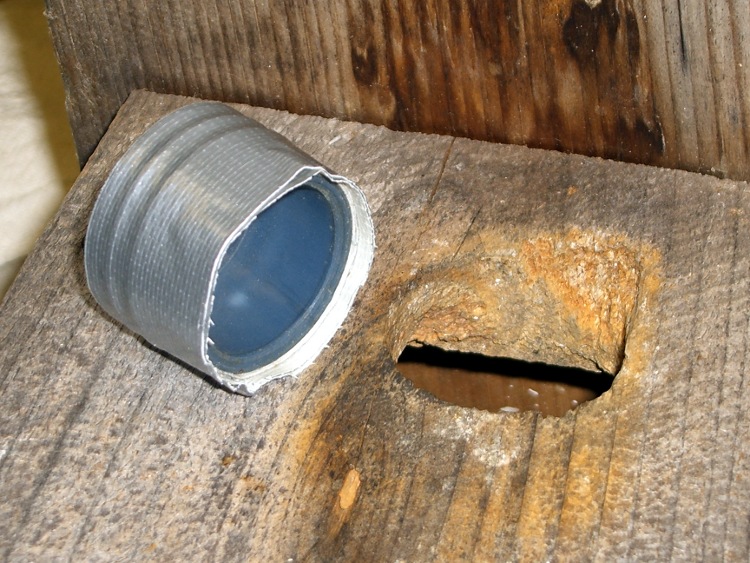
    Bushing ready to install
    Bushing ready to install

    A few wraps of duct tape provided a nice press fit and a springy retaining force without gluing the barb in place. This is pretty, mmmm, barbaric, but if it survives one nesting cycle I’ll do something much nicer.

    Time is definitely of the essence here, as we fear the wrens have been driven away: we haven’t heard them since their eviction. I did three boxes in about half an hour; we’ll see what transpires.

    The bottom pic shows the box from the front yard, where Downy Woodpeckers nested for a few years. They thought the hole needed a bit of renovation… and they have the tools for the job!

  • Quieter Luggage

    Muted zipper pull tabs
    Muted zipper pull tabs

    Luggage now comes with a pair of sliders on each zipper, which means that the two sliders come together when the zipper is closed. That allows you to lock the slider pulls together, which is a nice touch for those of you who think luggage locks actually improve security.

    It also means that the metallic pull tabs jingle and jangle merrily together in the back of the van all the way to grandmother’s house as we go, we go.

    Not to be tolerated, sez I.

    Apply a length of heat shrink tubing to each tab. If you’re a locking kind of person, leave the holes on the end exposed. If you’re a real cheapskate, you could get away with shrinking just one tube per pair, but even I’m not that far gone.

  • Phone Charger: PowerPole-to-USB Adapter

    I have a Virgin Mobile Kyocera Marbl phone, for reasons discussed there. It’s sufficiently nonstandard that the “fits most phones” headsets and chargers don’t. In particular, I have yet to see a charger with the proper adapter dingus for this phone.

    Fortunately, the charger is rated at 5 V @ 350 mA… that’s easy enough.

    Phone charger with Powerpoles
    Phone charger with Powerpoles

    Cut the charger’s cable in the middle, more or less, and install Anderson Powerpole connectors. The standard color code for 5 V is white / black; don’t use red / black for fear you’ll eventually plug it into a 12 V source and toast the phone.

    The charger wires are most likely a far smaller gauge than the 15 A (!) connector pins prefer, so strip the conductors twice as long, double the ’em over and perhaps add a short length of multistrand hookup wire to fill out the barrel before you crimp it.

    Check the polarity before you poke the pins in the housings: you want the +5 V pin in the white housing!

    I aligned the housings to match the ARES / RACES standard, as described there, as that’s what I’ve done with all my other Powerpole connectors. If your phone expects some weird-ass voltage, maybe you want to make certain it can’t possibly mate with anything that’ll kill it stone cold dead. Oh, and in that case pick a suitably different color. Blue seems to be the standard for 9 V, at least in the ham radio arena, for whatever that’s worth.

    Add heatshrink tubing for strain relief (it might slip over the finished pins if you forget), wrap cold-vulcanizing rubber tape around the whole connector for more strain relief, and you’re done. It’ll make your charger cable resemble an anaconda eating a pig, but that’s OK with me.

    USB charger to phone cable
    USB charger to phone cable

    Now the phone can commune with a bench power supply, a bulk 5 V supply, or nearly anything that you’ve hacked into using Powerpoles. It’s your job to make sure the voltage matches up!

    Now, if you haven’t already, make a USB-to-Powerpole adapter. Alas, even though the phone uses 5 V, it draws too much current to charge directly from a standard USB port. However, I have a Black & Decker Pocket Power battery pack with a regulated USB outlet that can allegedly supply 250 mA and seems to handle the phone just fine.

    So: cut a spare USB cable, verify that the red conductor is 5 V and the black is common (hell hath no fury like that of an unjustified assumption and we’re dealing with bottom-dollar suppliers here), crimp, align housings, add strain relief, and try it out.

    This should work for any phone with a dumb, bulk-power charger. If you cut the cable and find three conductors, solder that devil back together again; there’s no telling what’s passing along that third rail!

  • Where To Put Too Many Clamps

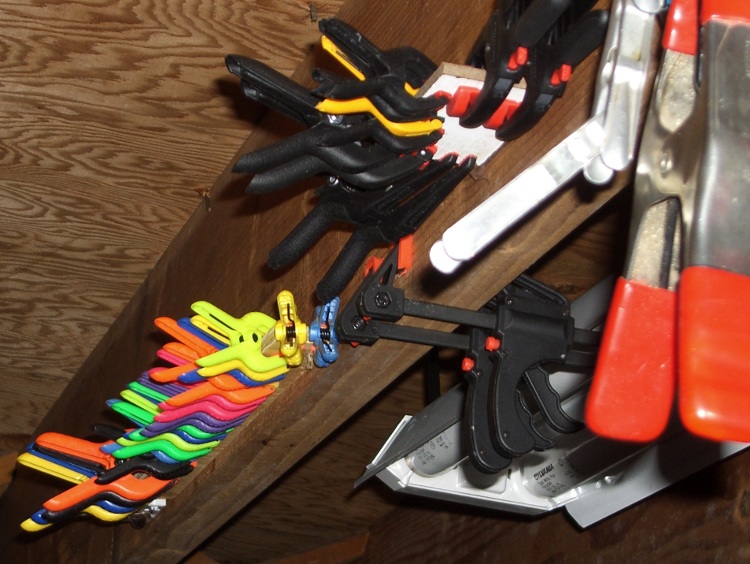
    Clamp storage plates on floor joist
    Clamp storage plates on floor joist

    Not in a drawer, that’s for sure…

    Whack a narrow rectangle from some random scrap of thin wood-like substance, squirt hot-melt glue along one edge, stick it to the floor joist over your tool chest, align it pretty much horizontally, take two deep breaths while the glue solidifies, then neatly affix your clamps.

    Repeat as needed when you get more clamps: you can never have enough clamps!

    The red-handled spring clamps on the far right hang from a row of nails where, this being directly in front of my tool cabinet, they don’t quite knock me on the head. I really wish the original owner of this house had sprung for one more course of concrete block; another nine inches of headroom would have been just ducky.

  • Byonics TinyTrak3+ GPS Power Control

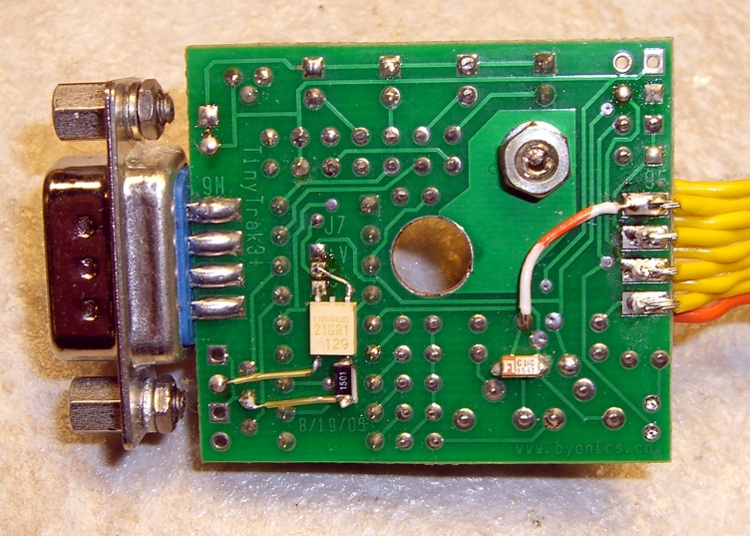
    GPS power from MOSFET relay
    GPS power from MOSFET relay

    The Byonics TinyTrak3+ GPS encoder has a “Power Control” output that can switch the power to a radio or GPS interface. J6 provides the interface: pin 1 = common, pin 2 = high active.

    With the “Power Switch” option enabled in the config program, you can set the number of seconds to allow the GPS unit to get up to speed before the next scheduled transmission.

    I glued a surface-mount MOSFET relay to the back of the PCB with urethane adhesive; it fits neatly between the DIP microcontroller’s pins with one output lead soldered to the 5V pad of J7. The other lead goes to the center +V pad; because the relay uses back-to-back MOSFETs, the polarity doesn’t matter.

    That replaces the normal solder bridge across J7 that provides power (on pin 4) to the GPS2 plugged into the DB9 connector. When the relay’s on, it connects the GPS to the power supply. When it’s off, the GPS goes dark.

    The relay input is an LED with a forward drop of 1.3 V max and requires 4 mA to turn on: figure 3.7 V / 4 mA = 925 Ω max. I kludged an 890 Ω resistor by paralleling (stacking!) 1.5 k and 2.2 k resistors; you could probably use anything near that and it’d work fine.

    The relay is an OMRON G3VM-21GR1, part number A11171 from Electronics Goldmine, but I suspect any teeny little solid-state relay would work. The max on resistance is about 1 Ω and the receiver draws about 65 mA. I measured about 20 mV of drop, so the actual resistance is a lot lower than the spec.

    I initially set the power-on delay to 10 seconds, which seemed to be OK: the GPS (green) LED would blink a few times, then go solid. Alas, the warm-start spec for the Byonics GPS2 (see the GPS3 for details) receiver is really 38 seconds, average, and it was definitely producing bogus position data. So I set the delay to 60 seconds and we’ll see how that works; early reports indicate the coordinates still have plenty of jitter.

    [Update: 60 seconds is iffy. 90 seconds seems to work pretty well. A bit of rummaging says that the satellites broadcast their ephemeris data every 30 seconds, so 90 seconds allows for two complete update cycles. Maybe 100 seconds would be even better. Some old background info for Garmin hand-held receivers is there.]

    It’s obviously a tradeoff between accuracy and battery life. This is for use on a bicycle and, believe me, I don’t want to tote a huge battery!

    If the control signal was low-active, then you could use a cheap PNP transistor as a high-side power switch.

    The white/orange wire routes regulated 5 V through an otherwise unused pin to the homebrew interface that combines the GPS data with helmet mic audio. The tiny rectangle is a 1 µF cap that helps cut down digital noise. There’s no need for a connector on that end, as it’s wired directly to the interface circuit board inside a small enclosure.

  • Rattle-free Sherline Handwheels

    Knobless Sherline handwheel
    Knobless Sherline handwheel

    The standard Sherline mill comes with tapered plastic knobs on the handwheels, which is exactly what you want for a manual mill and what you don’t want on a CNC machine: they rattle like crazy during computer-controlled moves.

    Some folks contend the knob unbalances the handwheel, but I’m not convinced that’s a real problem. Their advice is to remove the entire knob assembly, leaving a bare shaft sticking out of the motor. Seems a bit extreme to me.

    In any event, shortly after I got the mill, I unscrewed the little retaining screw from the end of each knob, put all the parts in a ziplock bag, tucked it in my tool box, and have been rattle-free ever since.

    The metal shaft is entirely adequate for those rare occasions when I turn the knob manually, the graduated settings let me detect when if I’ve screwed up the acceleration (on a new installation) to the point where the motor is losing steps, and all is right with the world.

    Oh, that orange-barred white tape in front of the motor? That’s a reminder to keep the usual pile of crap away from the spinning knob. That little shaft can fling small objects a fair distance and makes a nasty tangle out of a misplaced red rag…