Ed Nisley's Blog: Shop notes, electronics, firmware, machinery, 3D printing, laser cuttery, and curiosities. Contents: 100% human thinking, 0% AI slop.
I needed a shoulder around the inside of a hole, upon which to mount a big fat 10-mm white LED. The intent was that the LED leads go through the hole, the edge of its case sits on the shoulder, and a blob of hot-melt glue (epoxy for the final version) holds everything in place.
I was all set for some CNC milling when it occurred to me that there was an easier way.
The bottom flange on the LED case was scant of 11 mm, so a 13/32″ bit would be just just slightly too small and a 7/16″ bit would be just slightly too large. One of my step bits has 1/32″ increments in that range, sooo…
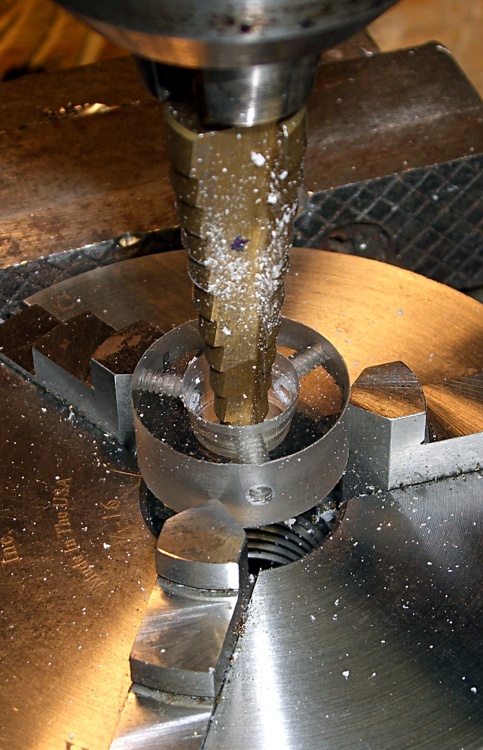
I grabbed the part in a Sherline 3-jaw chuck (I’d just drilled & tapped the three radial holes using that chuck), centered it in the drill press using a 5/16″ drill that just fit the existing center hole, crunched the chuck (lightly!) in the vise with the hole over the gap in the middle of the vise body (thus leaving room for the step bit), and drilled the hole 7/16″ about 1 mm down.
(It’s not that I’ve never drilled right into the vise body, but I try to avoid doing that sort of thing more often than absolutely necessary.)
The LED flange sat on 13/32″ annulus like I’d bored it to the exact measurements, with the leads passing through the hole as if I intended it to be that way.
It doesn’t always work out this neatly…
The Sherline chuck is resting on a pair of 5/16″ lathe bits that hold it up off the vise body, because its threaded hub isn’t quite large enough to make a stable base. Similarly, I used a pair of 1/4″ bits to space that plastic ring up from the chuck and get it level, but removed them lest I chew up the step bit. Yes, I took the drilling slow & easy.
Those little Sherline chucks come in handy around the shop, not just on the Sherline mill, for little jobs like this!
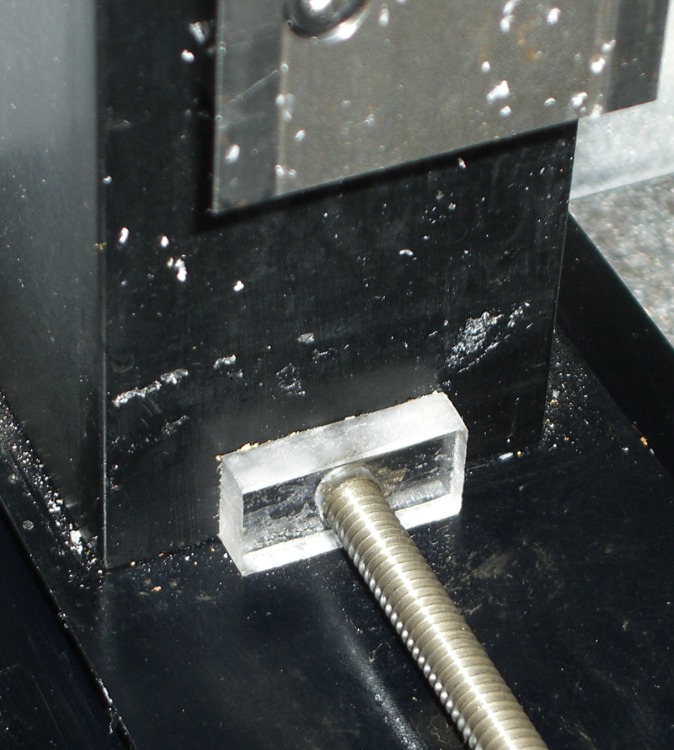
The far end of the Sherline Y-axis leadscrew isn’t supported, which really doesn’t matter much because the motors can’t drive the screws all that fast. But, if you’re like me, you think about dropping something heavy on the screw and maybe bending it just enough so it doesn’t work.
What to do?
Sherline Y-axis leadscrew bushing
The next time you replace the bellows covering the leadscrew, add a scrap of plastic with a suitable hole bored in it. Measure your leadscrew (metric & inch diameters differ!), poke a hole with enough clearance to make you happy, then cover one side of the block with double-stick tape.
Run the Y axis to about 30 mm from the far end, unbolt the motor mount, slide the table forward, put the bushing on the screw, slide the table back, affix the bushing to the column, screw the motor mount in place, and you’re done.
If you’re really fussy, make sure the bottom of the plastic block bears on the frame, but that’s in the nature of fine tuning.
This will cost you a bit of precious Y-axis travel, but the bellows need about that much space to fold up and you’re not losing much more than you already have.
The end of the X-axis leadscrew isn’t supported, either, but you can’t drop anything on it.
Sherline hot-rodders with super-fast high-torque nitro-breathing motors run the risk of bending the leadscrew by having it whip around, but that’s a whole ‘nother subject.
I use Cadsoft’s Eagle for schematics & circuit board layouts, then build the boards in my basement laboratory using Pulsar’s laser toner transfer and ferric-chloride etching. My Sherline CNC milling machine pokes the holes in the board, which means they actually wind up in the right places. I don’t mill the outline into any fancy shapes, generally using a tin snip and maybe a little filing; glass-fiber dust is a nuisance.
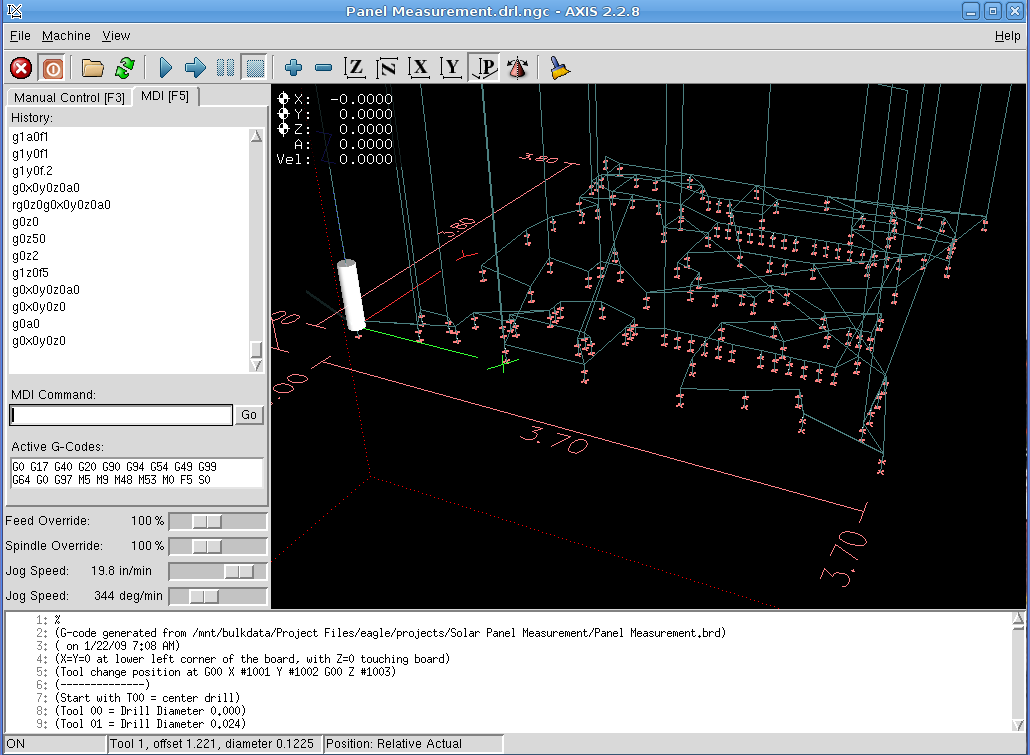
AXIS hole-drilling screenshot
My Eagle ulp routine (in the Useful Stuff page) extracts the holes from the circuit board layout, sorts by drill size, then visits each hole in nearest-neighbor order. It starts by touching each hole with a center drill, which probably isn’t necessary, but it makes me feel good and provides a last-minute check that everything is lined up properly.
Figuring the tool path is obviously the traveling-salesman problem in disguise, but a strict nearest-neighbor order is close enough for boards of this size. You could probably optimize it by brute-force exhaustion and that would be appropriate for production use, but I rarely make more than one version of each board.
Eagle’s standard part libraries use a weird set of hole diameters, which my routine rounds off to the nearest mil. I don’t have a vast array of drills, so I don’t pay much attention to the differences between, say, 0.024, 0.025, and 0.027 inch drills. Tool changes are strictly manual and I don’t have to change the drill if I don’t want to!
Got a bunch of teeny carbide drills as resharps from DrillBitCity a long time ago.
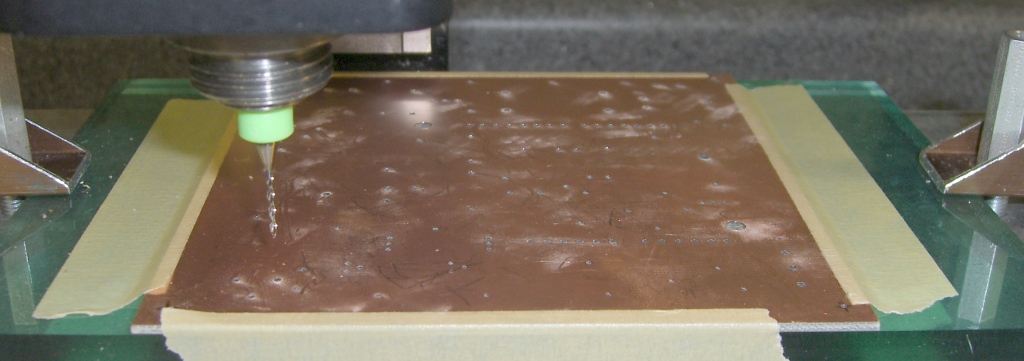
I double-stick-tape the board (center and corners) to a flycut sacrificial plate, which makes it flat enough for these purposes.The pic below shows a 60-mil board held down with masking tape; it’s the same layout as in the screen shot above.
Tool changes use a 2-inch block (plus a sheet of paper) as a height reference. You can tweak the ulp file for your setup.
My board layouts have a giant via at each corner, with the lower-left corner at (0,0). Drilling doesn’t require any fussy alignment, because I etch the board after drilling: the holes serve as bright lights to line up the pads & vias. I’ll have more to say about this elsewhere.
Speeds and feeds are on the sissy side; I crank the 10k rpm head up to a dangerous chattering whine and feed the drills at 5 inches/min (call it 125 mm/min). Both of those are far too slow, but work OK.
Run a shop vac to suck up the dust as you drill! I doubt that a typical shopvac filter removes the fines, but it’s better than letting all the dust settle on the mill and in my lungs.
Circuit board drilling
The clamps are these, mounted on studs screwed into the tooling plate.
Incidentally, the Sherline mill’s throat depth and Y-axis travel limits the board to about 4 inches along the Y axis; yes, with the spacer block installed. That’s just about exactly the maximum size the low-end version of Eagle can produce, so it’s a nice match.
There are other ways of doing PCBs. I haven’t tried trace-isolation milling, but PCB-Gcode looks like the ticket if you want to generate a breathtaking amount of glass-fiber dust. My quick check shows that it inserts semicolon-delimited comments into the tool-change commands, which EMC 2.2.8 promptly chokes upon, but that’s probably a quick configuration tweak and will change with EMC 2.3 anyway.
If you’ve got the scratch, there are commercial solutions: Chris Daniel (who was also at the Cabin Fever EMC booth) uses a T-Tech gantry router at work.
Memo to Self: Expect a call from a patent lawyer either telling me that I’m infringing somebody’s Nearest Neighbor Algorithm claims or asking me for my design notebooks to establish me as the Prior Artist.
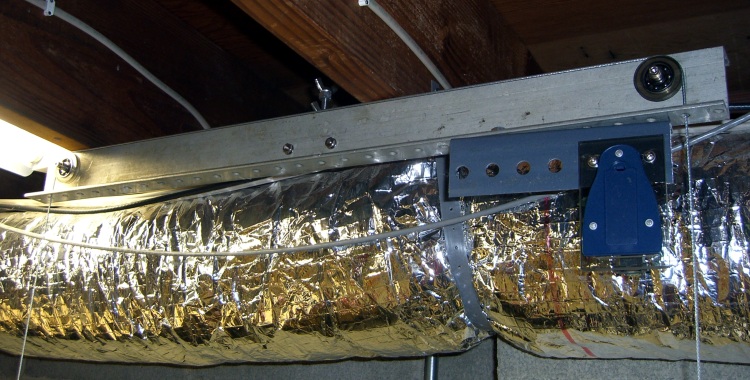
I’d planned to whack the ends off the counterweight gantry I made for Cabin Fever Expo and mount them to a plywood plate, but I hate cutting stuff up. Turns out that the entire beam fit very nicely on the floor joists over the mill and the counterweight even hangs in a reasonable location.
Sherline counterweight gantry on ceiling
I used a plumb bob to get the pulley pretty close to the right location, then simply moved the beam around until the cable hung down through the middle of the hole. Securing it to two joists means it’s pretty nearly perfectly level along both axes, so the cable’s close enough to being vertical.
Of course, holding it overhead, aligning it, and then drilling the holes in the joists required three or four hands.
The blue doodad on the right end is the laser aligner on its new bracket. The crinkly silver tube is an exhaust duct for the never-sufficiently-to-be-damned radon mitigation air exchanger, a topic I refuse to discuss.
The observant reader will note that I still haven’t made dust shields for those open ball bearings.
I mentioned my cheap laser alignment gizmo for my Sherline milling machine at Cabin Fever and several folks wondered how I aligned the aligner. Having just mounted the counterweight gantry and bashed out a bracket for the pointer, here’s how it went down.
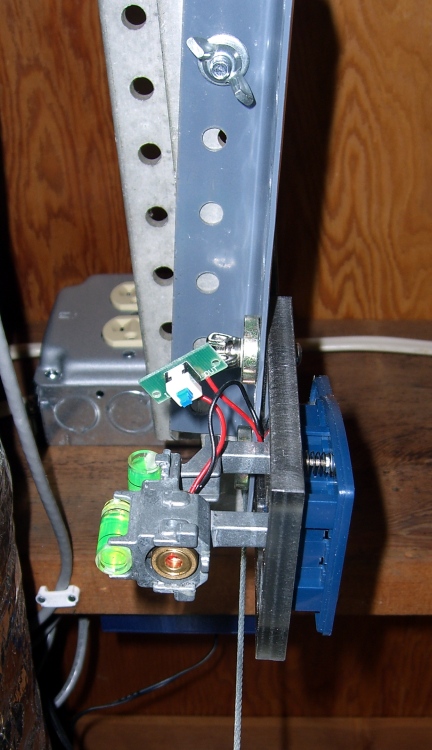
Laser pointer on bracket on counterweight gantry
The blue-gray bracket started life as a shelving support strut. I machined the web from between two holes so I could slide the pointer along the strut, filed off some sharp edges, and mounted the laser pointer with an assortment of machine screws & wing nuts.
I used a plumb bob to figure out roughly where the laser beam must start in order to go straight down the milling machine’s bore, then wiggled & jiggled the strut and pointer to get it more-or-less there. None of this is very precise, but it provides a starting point.
Here’s the trick: put a mirror flat on the mill table. When the reflected spot hits the bezel around the laser’s outbound lens, you know the beam is (pretty nearly) perpendicular to the table. Tweak the pointer’s mounting screws to make that come out right.
Use the plumb bob to figure out where the pointer is in relation to where it should be, wiggle & jiggle & slide everything until it’s there, then tighten & re-jigger everything to tweak the spot location.
Takes about 15 minutes, doesn’t involve any cussing, and works like a champ!
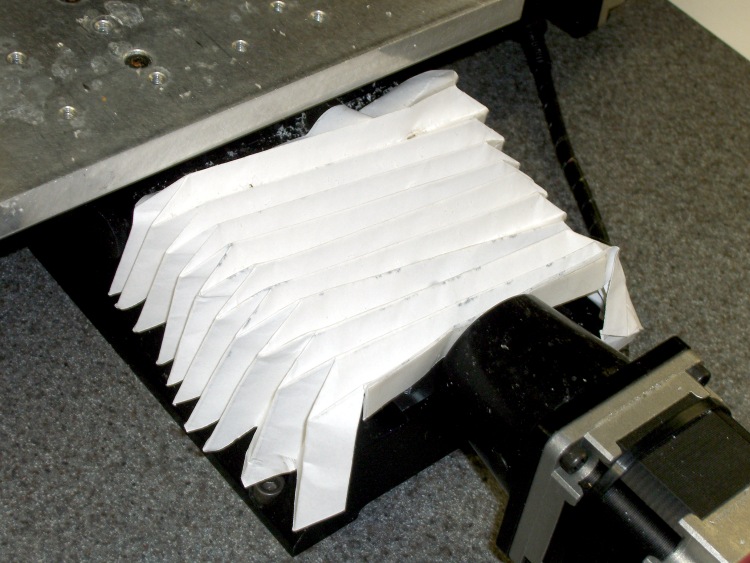
The Y-axis leadscrew on a Sherline milling machine sits exposed to all the crap blowing off the cutter; maybe it doesn’t matter, but it seems nasty.
Throw them out when they're this dirty!
So I made a set of way covers from the template available here or here, except I used plain old printer paper, stuck in place with double-sided tape. The picture shows what one looks like after surviving the rigors of a trip to Cabin Fever Expo.
The key feature is that, when they get too schmutzig, you just throw them away and fold up a new set. It’s easier than dismounting and cleaning something more substantial that you can’t just discard because you’ve developed a serious, deep, long-term emotional attachment.
Everybody at Cabin Fever Expo liked them and wanted the template. If those links have rotted out, I have a copy of the file in the Useful Stuff section: here.
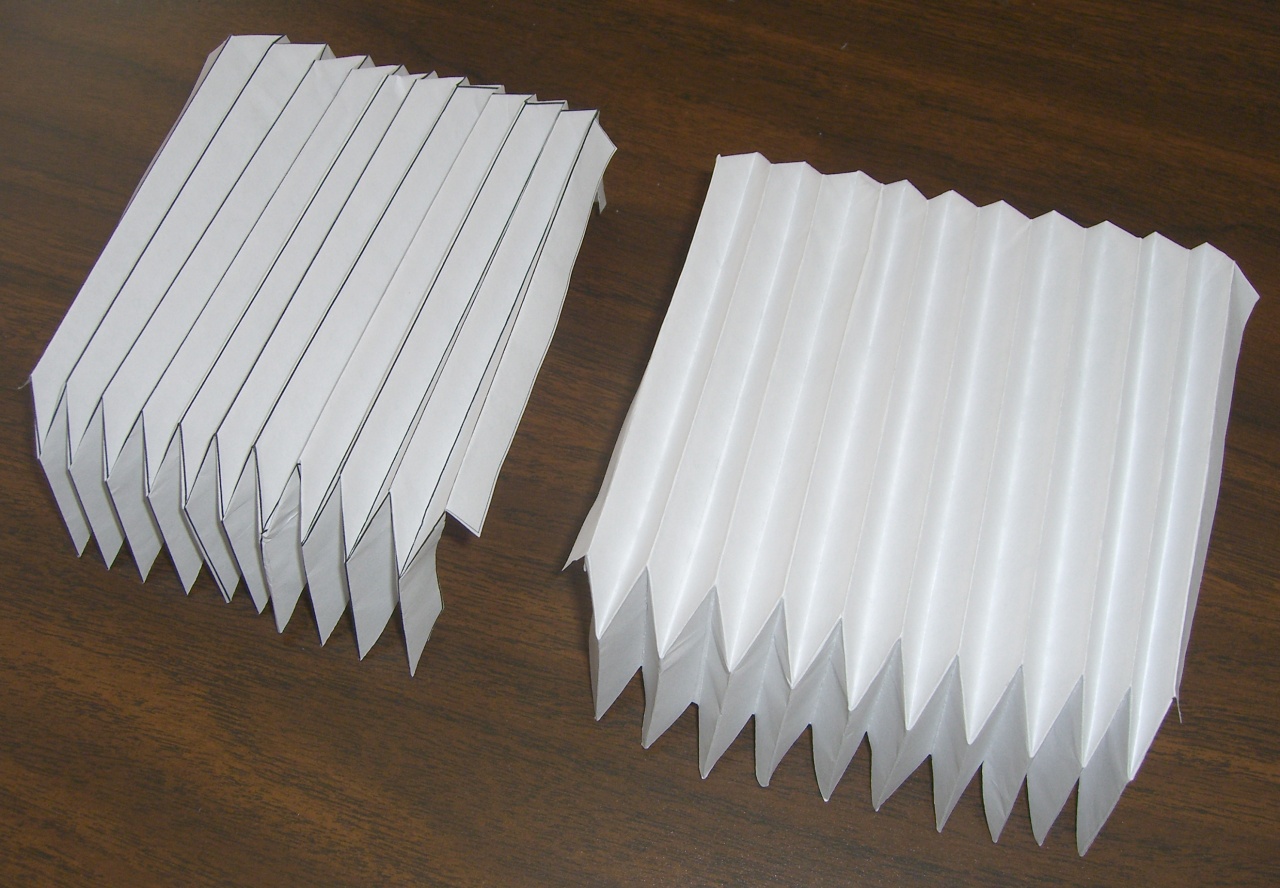
Bellows Folding
Update: Here’s a closeup of a new set. Start with the printed lines up, then fold the end tabs up: the printed side will be down (as in the bellows on the right) and nobody will know how poorly you followed the lines. Click to get a big pic with decent resolution if you need more detail.
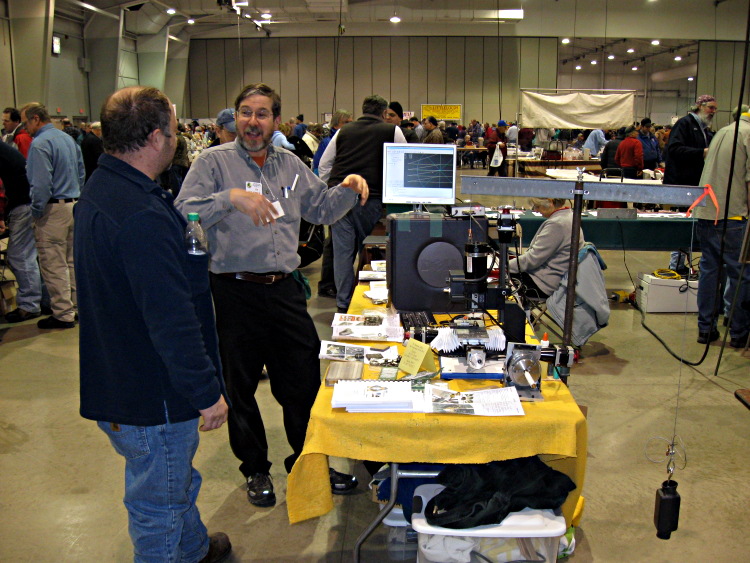
So I hauled my Sherline CNC milling machine gadgetry, an assortment of trivial projects, a stack of handouts with pix & G-code, and a pile o’ EMC2 doc to Cabin Fever Expo for two days of Performance Art…
Ed Nisley Demo-ing CNC at Cabin Fever. Picture courtesy of Brian Glackin.
The key is to have the knobs turning: an inactive machine is just background clutter that everyone walks right past. It’s not nearly as interesting as miniature tools or a chuffing steam engine.
There’s something to be said for being on the crowd side of the table, as that lets both of you see the monitor. A bigger display might be more helpful; I duct-taped a 14-inch 1024×768 LCD panel to the top of the desktop PC box.
Although I brought some blank stock along, it quickly became obvious that live-fire milling under show conditions is a Bad Idea: far too many distractions and far too many things can go wrong. So I contented myself with cutting air; nobody really minded and I could switch programs in mid-stride to show folks the G-code program they really wanted to see.
Plenty of folks stopped by, many of whom either have CNC running or are in the throes of getting started. A surprising number of conversations started with “I have this old Bridgeport …” and went on from there.
There’s a crying need for a comprehensive machine design tutorial that explains how all the pieces fit together, with sort of a flowchart outlining the choices (I know it’s more complex than that, but a diagram would be a starting point for discussion). I don’t know enough of the servo end of the biz, but someone should show how the machine’s size determines the motor size and, thus, the motor driver size, with plenty of examples. There’s a misconception that you can run a big machine on little steppers or puny servos, with the controller making up the difference.
Many people do not understand the difference between CAD, CAM, and what EMC2 provides. I described the process as three layers: CAD makes the pretty pictures, CAM digests those pictures and emits G-code, EMC2 converts G-code into motion. That seemed to help.
The single most attention-getting part of the exhibit was, to my astonishment, my Orc Engineering counterweight (described here and here) supporting the Sherline’s milling head. I had to explain just exactly why you need a counterweight in the first place (heavy offset motor, short Z-axis ways) and how much it weighs (13 pounds, a bit too much). Some folks commented that they put similar counterweights on their much larger machines and after a while I stopped feeling inadequate.
EMC Penguin Mascot
At least a dozen people picked up my EMC doc and asked if I was selling it; took me a while to realize they wanted to buy the booklets. I don’t know if you could make any money at it, but there’s a definite market for ink-on-paper books with no plot and weak character development. Now, if Chips were was way more shapely, we could have a real bodice-ripper cover. Somebody get on that, OK?
I make booklets using Adobe Reader’s print-as-booklet feature, a printer with continuous-flow inking, and an Ibico comb binding machine, but there’s enough fiddling that doing much of it for anybody else just doesn’t make sense. Something like Lulu might work, but there’s a stiff (to me, anyway) up-front charge and the EMC doc changes often enough that you’d have to run plenty fast to stay in the same place.
Other people picked up the books and asked if I was selling the software. They seemed puzzled when I said it was free for the download and that not only was the software free, but the GPL meant that they were, too. I need to work on that part of the schtick… should’a had a few CDs to pass out, too.
I remembered to bring a bag of cough drops, ate ’em like candy, talked almost continuously, and wound up hoarse anyway. Probably convinced a few folks to try EMC, didn’t terrify many children, and a good time was had by all.
Although live-fire milling is scary, it’d be fun to make something like a finger ring (as in Dan Statman’s gorgeous designs, but plastic) as a hand-out freebie. The whole process should take no more than five minutes, tops, which might be tough. Running a rotary table and the mill would be a real crowd-pleaser; my 4th axis attracted some questions. Perhaps an EMC tag-team would suffice: one to mind the mill while the other works the crowd?
As always, Cabin Fever is stuffed with gorgeous examples of machine-shop work. Those guys actually know what they’re doing; I can write G-code, but it’ll take many more years of experience before that code actually makes passably pretty parts.

 The Smell of Molten Projects in the Morning