The Smell of Molten Projects in the Morning

Ed Nisley's Blog: Shop notes, electronics, firmware, machinery, 3D printing, laser cuttery, and curiosities. Contents: 100% human thinking, 0% AI slop.

Tag: Arduino

All things Arduino

  • Gnuplot Datafile Formatting

    The MOSFET tester spits out datasets using this tedious Arduino code:

    void PrintHeader(void) {
      Serial.println();                         // Gnuplot group break
      Serial.println("#-----------------------------");
      Serial.print("# VGate: ");
      Serial.print(VGateSet,3);
      Serial.println();
      Serial.print("# TSetpoint: ");
      Serial.print(TSetpoint,1);
      Serial.println(" C");
      Serial.println("# VGS \tVDS \tID  \tRDS \tC   \tTime");
    }
    
    void PrintTempHeader() {
      Serial.println();                                    // Gnuplot index break
      Serial.println();
      Serial.print("#T=");                                //  ... index name
      Serial.println(TSetpoint,1);
      Serial.println("#=============================");
      Serial.print("# Setting temperature to: ");        // human-readable annotation
      Serial.print(TSetpoint,1);
      Serial.println(" C ...");
    }
    
    ... later, deep inside the main loop ...
    
        Serial.print(VGateSet,3);
        Serial.print('\t');
        Serial.print(VDrainSense,3);
        Serial.print('\t');
        Serial.print(IDrainSense,3);
        Serial.print('\t');
        Serial.print((IDrainSense == 0.0) ? 0.0 : (VDrainSense / IDrainSense),3);
        Serial.print('\t');
        Serial.print(Temperature,1);
        Serial.print('\t');
        Serial.print(millis() - StartTime);
        Serial.println();


    All that produces a text file formatted to work with Gnuplot, including a blank line between successive gate voltage groups to produce separate plot traces:

    #T=0.0
    #=============================
    # Setting temperature to: 0.0 C ...
    
    #-----------------------------
    # VGate: 4.250
    # TSetpoint: 0.0 C
    # VGS 	VDS 	ID  	RDS 	C   	Time
    4.250	1.200	0.000	0.000	1.0	1757
    4.250	1.665	0.044	37.851	1.0	1861
    
    #-----------------------------
    # VGate: 4.500
    # TSetpoint: 0.0 C
    # VGS 	VDS 	ID  	RDS 	C   	Time
    4.500	0.003	0.000	0.000	1.0	2038
    4.500	0.016	0.044	0.370	1.0	2143
    ... snippage ...
    4.500	0.212	1.953	0.108	0.9	6105
    4.500	0.216	2.001	0.108	0.9	6210


    Which produces a plot like this:

    IRFZ44
    IRFZ44

    It’d be handy to automatically generate labels for the gate voltages, but I haven’t been able to figure out how to read values from the dataset and plunk them into the label strings. You can, however, select blocks of gate voltage and superblocks of temperature with a bit of effort.

    The Bash script that feeds Gnuplot looks something like this:

    #!/bin/sh
    #-- set plot limits
    tx=3
    vgs_min="4.0"
    vds_max="0.2"
    rds_max=100
    rds_tics=$((${rds_max} / 4))
    id_max="2.0"
    #-- overhead
    export GDFONTPATH="/usr/share/fonts/truetype/"
    base="${1%.*}"
    echo Base name: ${base}
    ofile=${base}.png
    echo Output file: ${ofile}
    #-- do it
    gnuplot << EOF
    #set term x11
    set term png font "arialbd.ttf" 18 size 950,600
    set output "${ofile}"
    set title "${base}"
    set key noautotitles
    unset mouse
    set bmargin 4
    set grid xtics ytics
    set xlabel "Drain-Source Voltage - VDS - V"
    set format x "%4.2f"
    set xrange [0:${vds_max}]
    #set xtics 0,5
    set mxtics 2
    set ytics nomirror autofreq
    set ylabel "Drain Current - ID - A"
    set format y "%4.1f"
    set yrange [0:${id_max}]
    #set mytics 2
    set y2label "Drain Resistance - RDS - mohm"
    set y2tics nomirror autofreq ${rds_tics}
    set format y2 "%3.0f"
    set y2range [0:${rds_max}]
    #set y2tics 32
    #set rmargin 9
    set datafile separator "\t"
    #set label 1 "Temp index = ${tx}" at 0.81,0.55 font "arialbd,18"
    set label 2 "VGS >= ${vgs_min} V" at 0.11,0.55 font "arialbd,18"
    plot    \
    "$1" using 2:((\$1 >= ${vgs_min})?\$3:NaN)            index $tx:$tx           with lines lt 3 lw 2 title "ID" ,\
    ""   using 2:((\$1 >= ${vgs_min})?(\$4*1000):NaN)    index $tx:$tx axes x1y2 with lines lt 4 lw 2 title "RDS"
    EOF
    

    The variables up near the top control the plot limits; it’d be nice to have a complex Bash script that prompted for values, had useful defaults, and fed all that into Gnuplot. Given what I’m doing, it’s easier to just keep the Bash script open in the portrait monitor, watch the results on the landscape monitor, and twiddle until it looks right.

    This script produces a plot for a single temperature range based on the superblock index tx; you can select a single block using index name (along the lines of “T=0.0”), but you can’t select multiple such blocks in a single plot statement.

    Selecting gate voltages requires testing the first column for a match with the trinary operator and assigning the data value for lines that don’t match to the not-a-number value NaN to prevent it from appearing in the plot:

    ((\$1 >= ${vgs_min})?\$3:NaN)

    All in all, the whole apparat makes for a fairly brittle set of code, but the plots come out ready for printing and that makes up for a lot.

  • MOSFET RDS Bestiary

    Some results from the MOSFET tester project!

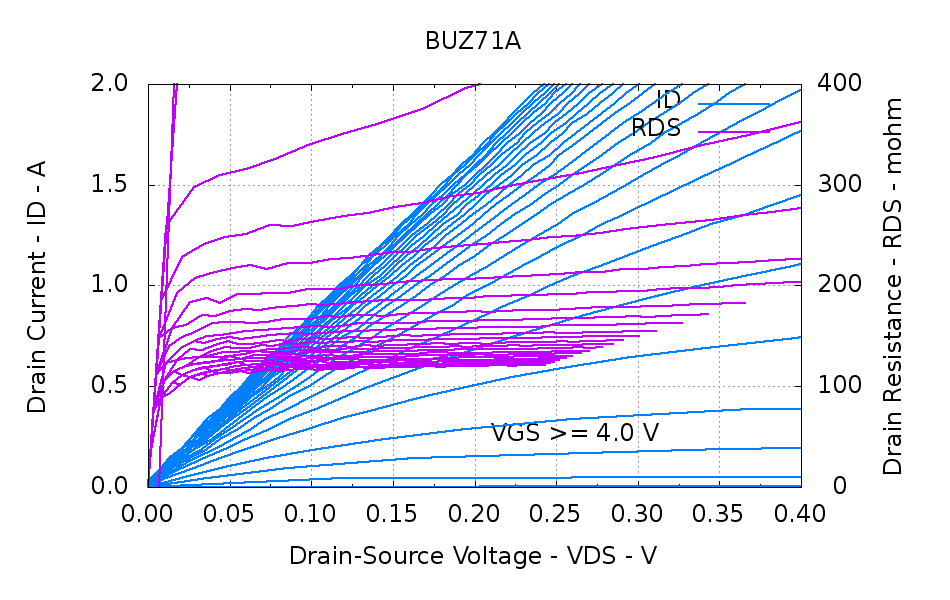
    The 120 m 50 V BUZ71A that served as the crash test dummy while I got the thing working:

    BUZ71A-overview
    BUZ71A-overview

    A detail of the interesting area near the origin:

    BUZ71A-detail
    BUZ71A-detail

    The datasheet drain resistance values are the maximum values, so they’ll generally be higher than what I measure.

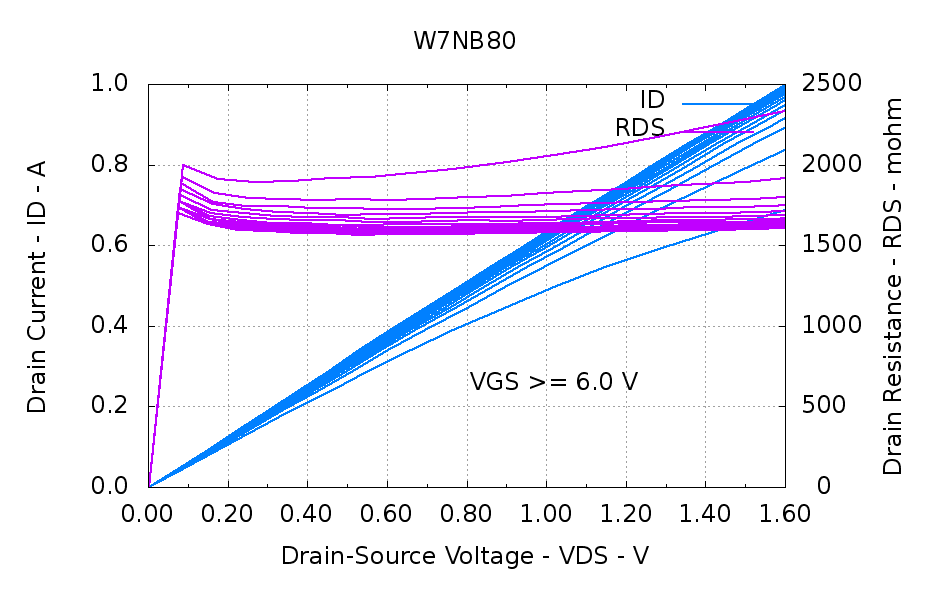
    A plastic-encapsulated W7NB80 with a 1.9  (!)  drain resistance, due to its 800 V (!) rating:

    W7NB80-overview
    W7NB80-overview

    Hold the gate voltage constant at 10.0 V and step the temperature from 0 °C to 50 °C:

    W7NB80-Temp
    W7NB80-Temp

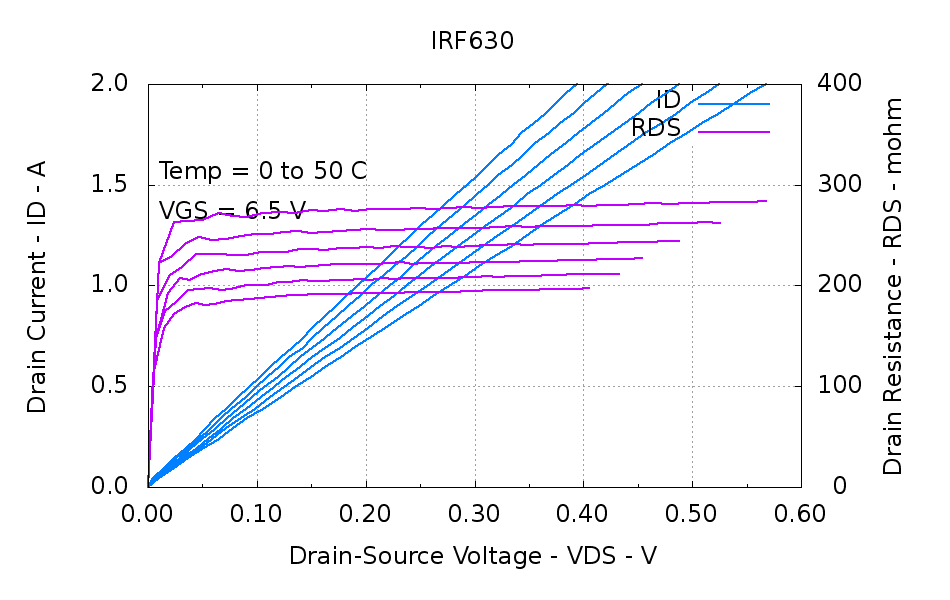
    I haven’t figured out how to get the actual temperatures from the Gnuplot input dataset to the graph without knowing them in advance. The “index” is simply the 0-origin block number, which conveniently (and coincidentally) lines up with the 0 °C to 50 °C temperature range.

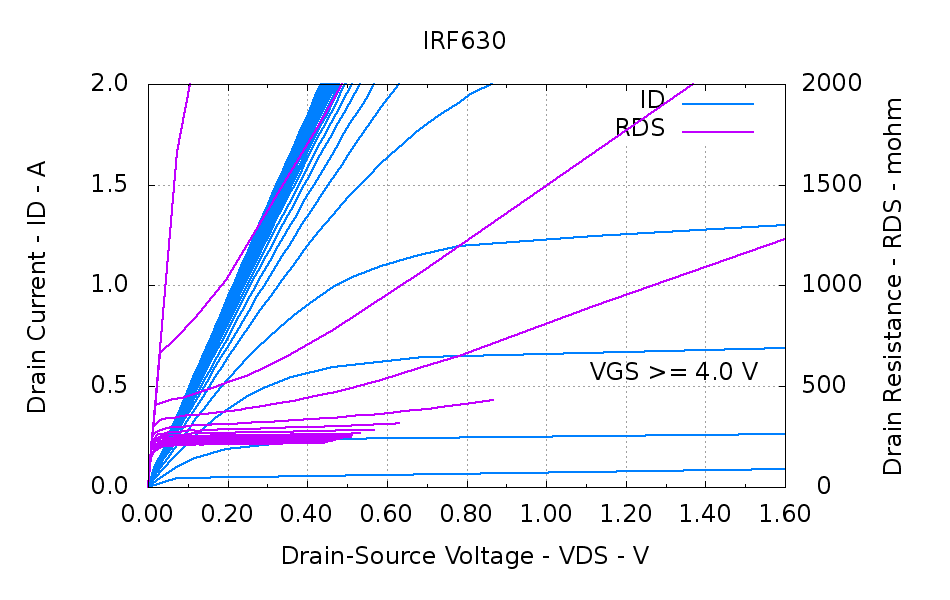
    An overview of a 400 m 200 V IRF630:

    IRF630-overview
    IRF630-overview

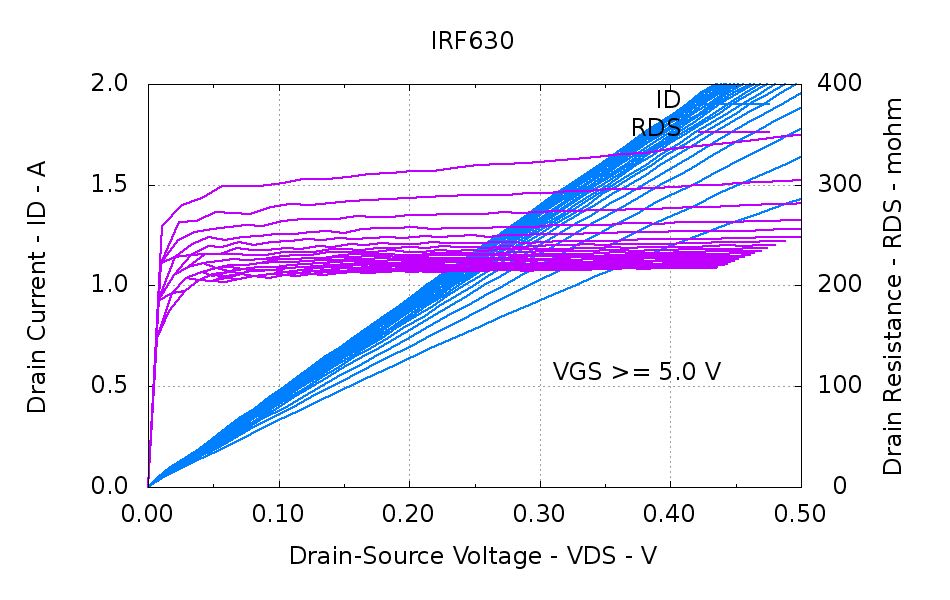
    The juicy part:

    IRF630-detail
    IRF630-detail

    And the variations with temperature:

    IRF630-Temp
    IRF630-Temp

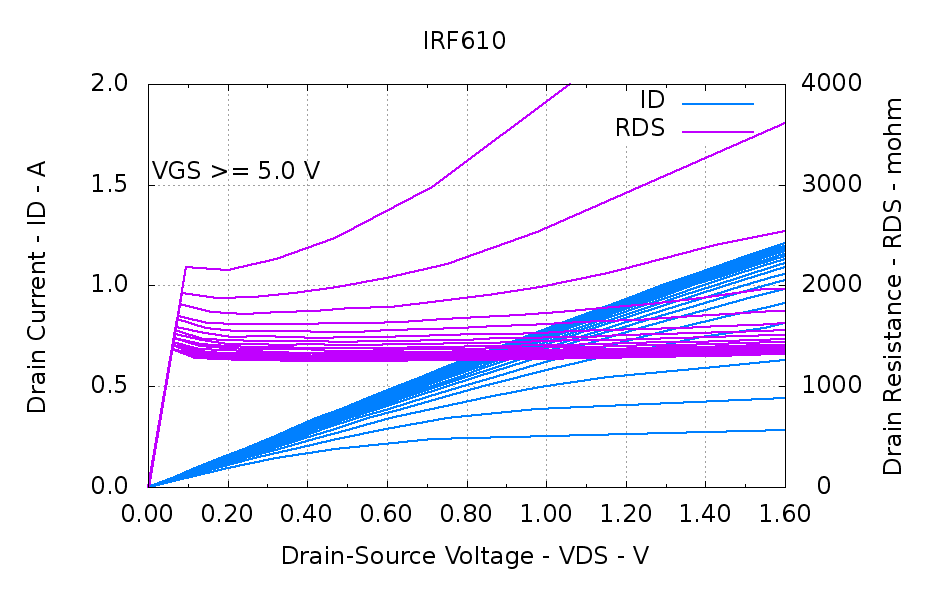
    A 1.5  200 V IRF610, another high-resistance transistor:

    IRF610-overview
    IRF610-overview

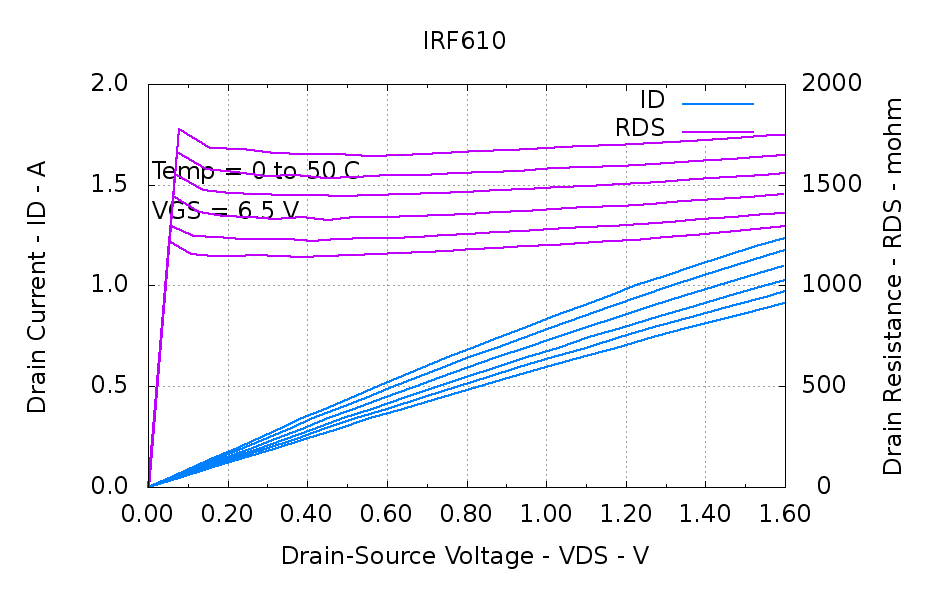
    The temperature variations:

    IRF610-Temp
    IRF610-Temp

    The winning entry for high resistance, though, is the 500 Ω (!!!) BSS127 that emerged from a paper on current sensing using mirror FETs for temperature compensation. It has a 600 V rating, but I have no idea why such a high drain resistance makes any sense in a SOT-23 package. They’re obsolescent and I won’t buy any just to have ’em around.

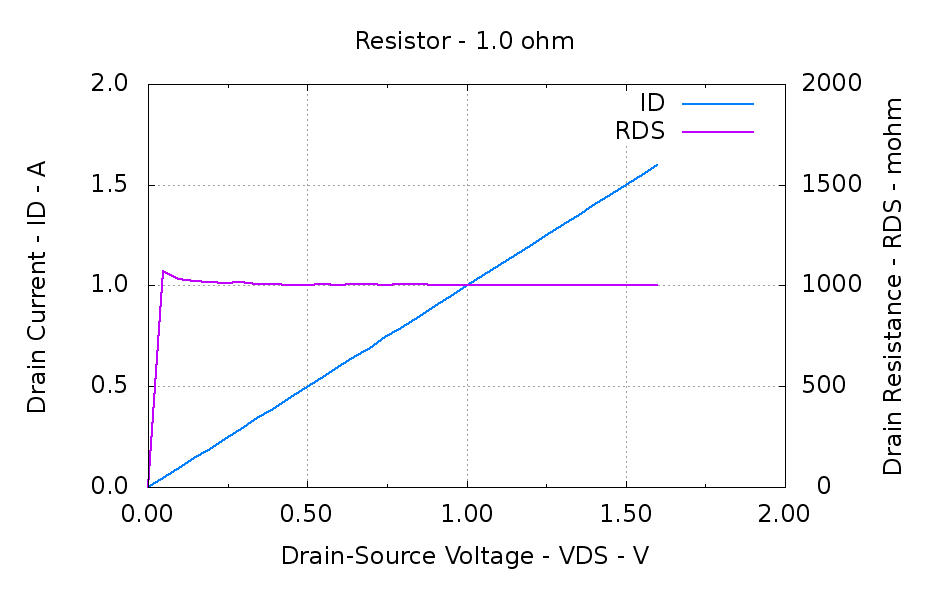
    Just for completeness, a 1  1% resistor:

    Resistor - 1.0 ohm
    Resistor – 1.0 ohm

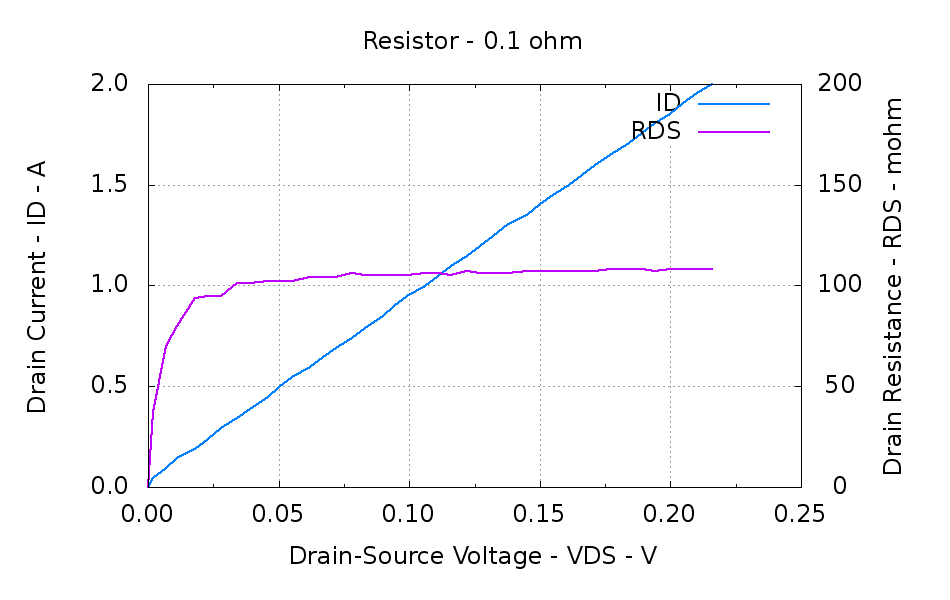
    And a 100 m 1% resistor:

    Resistor - 0.1 ohm
    Resistor – 0.1 ohm

    It turns out that the wire leads I soldered on contributed 6 m to the total, so the tester actually reports the truth! I checked that by passing 1.000 A through the resistor, which put 100 mV at the base of the resistor pins, then measuring 106 mV at the end of the wire leads. One can quibble about voltmeter accuracy, but it’s pretty close and much better than the ohmmeter accuracy at that resistance.

    The firmware forces 0.0  for drain current identically equal to 0.0 (it’s a floating point number cast from a 10-bit unsigned integer) to avoid numeric explosions. The next few points away from the origin show the effect of small errors on small measurements; the voltage resolution is 15 mV and the current resolution is 2.5 mA; you can actually see the steps near the origin.

    All in all, a fun project…

    Need the datasheets? Ask your favorite search engine for, say, IRF610 datasheet. That should do the trick.

  • MOSFET RDS Tester: First Light

    Well, truth be known, it took a bit of tweaking to get to this point, but this was the first dependable & repeatable measurement:

    BUZ71A-overview
    BUZ71A-overview

    Rescaling the graph to show just the interesting part down near the origin:

    BUZ71A-detail
    BUZ71A-detail

    The VGS output steps from 4.0 to 10.0 V by 0.25 V, which is too fine until I get the Gnuplot script sorted out. The ID output runs from 0.0 A to 2.0 A in steps of 50 mA, which makes for smooth curves. These are all at 30 °C.

    The drain resistance flattens out nicely for VGS beyond 7 V, which is well over the BUZ71A max threshold of 4.0 V. That means you really need more than the usual 5 V supply to control the thing; I’ll eventually try some “logic level” MOSFETs. Part of the trick will be to find a logic-level MOSFET with a relatively high drain resistance suitable for current sensing.

    The board looks like this, with the foam shako for the thermal block and some MOSFET victims off to the side:

    MOSFET RDS Tester - overview
    MOSFET RDS Tester – overview

    The key part of the schematic:

    Schematic - MOSFET path
    Schematic – MOSFET path

    Two Arduino PWM outputs set the gate voltage and maximum drain current. The three jumpers near the middle allow various feedback paths, although the only one that really makes sense is closing the current loop. The trimpot is unused and the analog output directly sets the drain current limit at 0.5 A/V: 4 V → 2 A. The PWM outputs must run at 32 kHz, not the Arduino-standard 500-ish Hz.

    The MAX4544 SPDT analog multiplexers switch between ground and the PWM voltages. That’s a simple way to turn the outputs off and on without waiting for the PWM values to ramp up and down. The LEDs on those control signals provide an indication that the firmware hasn’t fallen off the rails.

    Three Arduino analog inputs report the drain voltage, actual drain current, and temperature input. The LM324 op amps run from ±12 V, so a pair of BAT54S dual diodes clamp the analog inputs at one Schottky diode drop below ground and above 5 V. That should be close enough to prevent any damage without rounding off the values near the extremes, given the fairly high op-amp output resistors; the analog inputs present a reasonably high impedance and it seems to not matter much.

    The measuring sequence amounts to a pair of nested loops:

    • Step the gate voltage
    • Step the drain current limit

    The inner loop ends when the current limit, the actual current, or the drain voltage exceeds the corresponding maximum value. The outer loop ends when the gate voltage exceeds its limit.

    A 100 ms delay after changing any analog output allows time for the voltages to settle before taking the next set of inputs.

    Each pass of the loop updates the PI loop controlling the thermal block temperature. That’s certainly sub-optimal, but works well enough for my simple needs.

    The Arduino source code for the measurement loop:

    void loop() {
    
        digitalWrite(PIN_HEARTBEAT,HIGH);           // show that we've arrived
    
    //--- Stabilize temperature
    
        Temperature = ReadTemperature();
        SetPeltier(Temperature,TSetpoint);
    
        if (abs(Temperature - TSetpoint) > T_ACCEPT) {
    
          Serial.print("# Exceed T limit: ");
          Serial.print(Temperature,1);
          Serial.print(" C ");
    
          while (abs(Temperature - TSetpoint) > T_DEADBAND) {
            Temperature = ReadTemperature();
            SetPeltier(Temperature,TSetpoint);
            TogglePin(PIN_HEARTBEAT);
            delay(SETTLING_TIME);
            Serial.print('.');
          }
          Serial.print(" Now at: ");
          Serial.print(Temperature,1);
          Serial.println(" C");
        }
    
    //--- Record current data point
    
        IDrainSense = GetIDrain();
        VDrainSense = GetVDrain();
    
        Serial.print(VGateSet,3);
        Serial.print('\t');
        Serial.print(VDrainSense,3);
        Serial.print('\t');
        Serial.print(IDrainSense,3);
        Serial.print('\t');
        Serial.print((IDrainSense == 0.0) ? 0.0 : (VDrainSense / IDrainSense),3);
        Serial.print('\t');
        Serial.print(Temperature,1);
        Serial.print('\t');
        Serial.print(millis() - StartTime);
        Serial.println();
    
    //--- Step to next point
    
        if ((IDrainLimit > MAX_DRAIN_CURRENT) ||        // beyond last current increment
            (IDrainSense > MAX_DRAIN_CURRENT) ||        // power supply current limit
            (VDrainSense > MAX_DRAIN_VOLTAGE)) {        // beyond linear voltage measurement
          IDrainLimit = 0.0;
          VGateSet += VGATE_STEP;
          if (VGateSet <= MAX_GATE_VOLTAGE) {
            PrintHeader();
          }
        }
        else {
          IDrainLimit += IDRAIN_STEP;
        }
    
        SetIDrain(IDrainLimit);
        SetVGate(VGateSet);
    
        TogglePin(PIN_HEARTBEAT);
        delay(SETTLING_TIME);                           // wait for settling
    
        if (VGateSet > MAX_GATE_VOLTAGE) {
          Serial.print("# Done! Elapsed: ");
          Serial.print((millis() - StartTime)/1000);
          Serial.println(" sec");
    
          SetIDrain(0.0);
          SetVGate(0.0);
          digitalWrite(PIN_DISABLE_IDRAIN,HIGH);
          digitalWrite(PIN_DISABLE_VGATE,HIGH);
          digitalWrite(PIN_ENABLE_HEAT,LOW);
          analogWrite(PIN_SET_IPELTIER,0);
    
          while (true) {
            TogglePin(PIN_HEARTBEAT);
            delay(25);
          }
        }
    
    }
    

    Everything is a compile-time option, which is certainly user-hostile. On the other paw, that allows me to get on with writing column instead of putzing around with the user interface… [grin]

  • Peltier PWM Temperature Control: Noise Blanking

    The MOSFET tester I’m building controls the MOSFET’s gate voltage and drain current, while measuring the drain voltage. That, however, puts the drain terminal at a relatively high-impedance node between two current sources: the limiter and the MOSFET-under-test. When they’re both set to nearly the same value, the drain terminal picks up a generous helping of 32 kHz noise from the 3 A PWM Peltier module current. When either current source is set much larger than the other, the higher one serves as a relatively low impedance path that reduces the pickup.

    I thought about grounding the thermal block, but that means adding an insulating washer under every MOSFET-under-test, which means an even greater thermal control problem. So the easiest solution is to just turn off the PWM during measurements:

    Peltier Noise - VDS - PWM Shutdown
    Peltier Noise – VDS – PWM Shutdown

    The lower trace (at 5 V/div, not 500 mV as shown) is a digital output marking the duration of the three analog reads: temperature, drain voltage, and drain current. The upper trace shows the absolute worst case for the noise, which looks rather awful.

    The Peltier PWM comes from Arduino digital output 10, which is lashed to hardware Timer 1. Turning off the PWM requires setting the corresponding clock prescaler to “no input”, then setting it back to select the appropriate clock input after the measurement.

    Just on general principles, I average three successive analog inputs, so the Arduino source code for the analog reads looks like this:

    #define TCCRxB                  0x01        // set prescaler to 1:1 for 32 kHz PWM
    #define NUM_T_SAMPLES    3
    
    float ReadAI(byte PinNum) {
    word RawAverage;
    
        digitalWrite(PIN_SYNC,HIGH);                // scope sync
        TCCR1B = 0x00;                              // turn off Peltier module PWM
    
        RawAverage = analogRead(PinNum);            // prime the averaging pump
    
        for (int i=2; i <= NUM_T_SAMPLES; i++) {
            RawAverage += (word)analogRead(PinNum);
        }
    
        TCCR1B = TCCRxB;                            // restart Peltier PWM
        digitalWrite(PIN_SYNC,LOW);
    
        RawAverage /= NUM_T_SAMPLES;
    
        return (float)RawAverage;
    }
    
  • Peltier PWM Temperature Control: Power Supply Improvement

    Adding a touch of bulk local capacitance dramatically improved the Peltier power supply’s transient performance when the MOSFET turns on:

    Peltier Supply - 30 uF
    Peltier Supply – 30 uF

    That’s a 33 uF 300 V electrolytic that started life as a surface-mount kludge, simply soldered to the Peltier supply’s screw terminal pins on the bottom of the board.

    With the cap in place, the supply drops to 4 V at turn-on and bumps to 6 V at turn-off, with the transients much better-behaved now.

    Those spikes at the turn-off transient are also somewhat better, even if the MOSFET drain rings for another cycle before dying out. The peak is down to 35 V, which I think comes from the other end of the circuit being more reluctant to instantly jump 70 V, and the width has decreased, too:

    Peltier Drain Ringing - 30 uF Supply
    Peltier Drain Ringing – 30 uF Supply

    The ringing jumped to 15 MHz, rather than 5 MHz, which means it’s over faster even if there’s another cycle. If it were any worse, I’d be forced to re-figure the snubber RC numbers…

    The Miller capacitance effect still shows up clearly on the gate drive in the lower trace. There’s a reason why you really need higher-performance drivers for faster circuits!

  • Peltier PWM Temperature Control: Thermistor Brick

    Having figured out the dual-thermistor circuit, I made a small mold from cut-up credit card-ish things, laid down a layer of JB Weld epoxy, and positioned the thermistor assembly just above it:

    Thermistor brick - mold layout
    Thermistor brick – mold layout

    A generous dollop of epoxy filled in the rest of the mold and it cured overnight:

    Thermistor brick - curing
    Thermistor brick – curing

    Extract the final result, file off the rough edges, and then epoxy it to the thermal block:

    MOSFET thermal block
    MOSFET thermal block

    And then it’s all good!

    The thermal resistance from aluminum-to-thermistor seems to be no big deal compared with the thermal inertia of the block and Peltier module.

  • Peltier PWM Temperature Control: Better PI Loop

    As I feared, P control can’t push the platform into the deadband all by itself at high temperatures, so I rewrote the loop the way it should have been all along:

    • PWM=1 beyond a limit well beyond the deadband, set integral=0 to avoid windup
    • Proportional + integral control inside that limit
    • Not worrying about relay chatter

    Holding PWM=1 until the PI loop kicks in ensures that the P control won’t lose traction along the way, but full throttle must give way to PI control outside the deadband to avoid a massive overshoot. Relay chatter could be a problem around room temperature where the heating/cooling threshold falls within the deadband, but that won’t shouldn’t be a problem in this application.

    Without much tuning, the results looked like this:

    PI-Loop-Temps
    PI-Loop-Temps

    Each temperature plateau lasts 3 minutes, the steps are 10 °C, starting at 30 °C and going upward to 50 °C, then downward to 0 °C, and upward to 20 °C. These are screenshots from OpenOffice Calc, so the resolution isn’t all that great.

    Two internal variables show what’s going on:

    PI-Loop-ErrDrive
    PI-Loop-ErrDrive

    The blue trace is the temperature error (actual – setpoint: negative = too cold = more heat needed), the purple trace is the signed PWM drive (-1.0 = full heat, +1.0 = full cool) summed from the P and I terms.

    Overlaying all the plateaus with their starting edges aligned on the left, then zooming in on the interesting part, shows the detailed timing:

    PI-Loop-ErrDrive-Overlay
    PI-Loop-ErrDrive-Overlay

    These X axis units are in samples = calls to the PI function, which happened about every 100 ms, which is roughly what the main loop will require for the MOSFET measurements.

    The Peltier module just barely reaches 0 °C with a 14 °C ambient: the drive exceeds +1.0 (output PWM = 255) as the temperature gradually stabilized at 0 °C with the module at full throttle; it’s dissipating 15 W to pump the temperature down. The heatsink reached 20 °C, with a simple foam hat surrounding the Peltier module and aluminum MOSFET mount. Any power dissipation from a MOSFET would add heat inside the insulation, but a bit more attention to detail should make 0 °C workable.

    On the high end, it looks like the module might barely reach 60 °C.

    Increasing the power supply voltage to increase the Peltier current would extend the temperature range, although a concerted stack probe didn’t produce anything like an 8 V 5A supply in the Basement Laboratory Parts Warehouse. If one turns up I’ll give it a go.

    There’s a bit of overshoot that might get tuned away by fiddling with the P gain or squelching the integral windup beyond the deadband. The temperature changes will be the most time-consuming part of the MOSFET measurement routine no matter what, so it probably doesn’t make much difference: just stall 45 s to get past most of the transient overshoot, then sample the temperature until it enters the deadband if it hasn’t already gotten there. Reducing the initial overshoot wouldn’t improve the overall time by much, anyway, as it’d just increase the time to enter the deadband. Given that the initial change takes maybe 30 seconds at full throttle, what’s the point?

    The PI loop Arduino source code, with some cruft left over from the last attempt, and some tweaks left to do:

    #define T_LIMIT         3.0                 // delta for full PWM=1 action
    #define T_ACCEPT        1.5                 // delta for good data (must be &gt; deadband)
    #define T_DEADBAND      1.0                 // delta for integral-only control
    #define T_PGAIN         (1.0 / T_LIMIT)     // proportional control gain: PWM/degree
    #define T_IGAIN         0.001               // integral control gain: PWM/degree*sample
    
    #define sign(x) ((x>0.0)-(x<0.0))           // adapted from old Utility.h library
    
    //-- Temperature control
    //      returns true for temperature within deadband
    
    int SetPeltier(float TNow, float TSet) {
    
    float TErr, TErrMag;
    int TSign;
    float PelDrive;
    
    int EnableHeat,OldEnableHeat;
    static float Integral;
    int TZone;
    int PWM;
    int PWMSigned;
    
        TErr = TNow - TSet;                  // what is the temperature error
        TErrMag = abs(TErr);                 //  ... magnitude
        TSign = sign(TErr);                  //  ... direction
    
        if (TErrMag >= T_LIMIT)                 // beyond outer limit
          TZone = 3;
        else if (TErrMag >= T_DEADBAND)         // beyond deadband
          TZone = 2;
        else if (TErrMag >= T_DEADBAND/2)       // within deadband
          TZone = 1;
        else                                    // pretty close to spot on
          TZone = 0;
    
        switch (TZone) {
          case 3:                                   // beyond outer limit
            PelDrive = TSign;                       //  drive hard: -1 heat +1 cool
            Integral = 0.0;                         //  no integration this far out
            break;
          case 2:                                   // beyond deadband
          case 1:                                   // within deadband
          case 0:                                   // inner deadband
            PelDrive = T_PGAIN*TErr + T_IGAIN*Integral;             // use PI control
            Integral += TErr;                                       // integrate the offset
           break;
          default:                                  // huh? should not happen...
            PelDrive = 0.0;
            break;
        }
    
        EnableHeat = (PelDrive > 0.0) ? LOW : HIGH;             // need cooling or heating?
        OldEnableHeat = digitalRead(PIN_ENABLE_HEAT);           // where is the relay now?
    
        if (OldEnableHeat != EnableHeat) {          // change from heating to cooling?
          analogWrite(PIN_SET_IPELTIER,0);          // disable PWM to flip relay
          digitalWrite(PIN_ENABLE_HEAT,EnableHeat);
          delay(15);                                // relay operation + bounce
        }
    
        PWM = constrain(((abs(PelDrive) * AO_PEL_SCALE) + AO_PEL_OFFSET),0.0,255.0);
        analogWrite(PIN_SET_IPELTIER,PWM);
    
        if (true) {
          PWMSigned = (EnableHeat == HIGH) ? -PWM : PWM;
          Serial.print(TSet,1);
          Serial.print("\t");
          Serial.print(TNow,1);
          Serial.print("\t");
          Serial.print(TZone,DEC);
          Serial.print("\t");
          Serial.print(TErr);
    
          Serial.print("\t");
          Serial.print(Integral,3);
          Serial.print("\t");
          Serial.print(PelDrive,3);
          Serial.print("\t");
          Serial.print(PWMSigned,DEC);
          Serial.print("\t");
          Serial.print(NowTime - StartTime);
          Serial.println();
        }
    
        return (TZone <= 1);