-
Removing a Water Heater Anode Rod
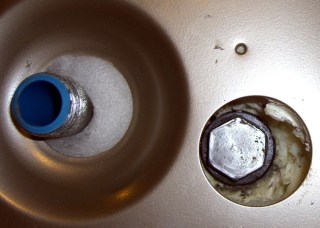
Offset Tank – 2009 While draining the water heater tank, I extracted the anode rod. Well, that was the plan; it took longer to drain the tank than I expected and much longer to get the anode rod out.
The anode rod is basically an aluminum cylinder around a steel-wire core, attached to a steel bolt that screws into the top of the water heater. It has a 1-1/16″ hex head that calls for a rather large socket.
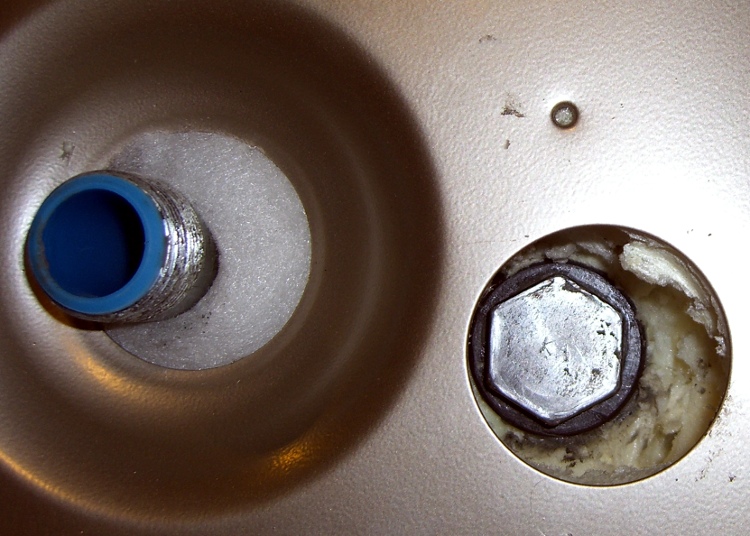
You can see one problem right away: the anode rod’s head is offset in its opening atop the water heater, making it essentially impossible to get an ordinary 1-1/16″ socket onto the thing. No, they didn’t mis-punch the hole… notice that the cold water inlet nipple is offset in its opening. The hot-water nipple is offset, too, just in case you were wondering.
Why is that? Well, the one thing that isn’t offset is the temperature & pressure relief valve on the right-front side of the tank. It seems when Whirlpool’s engineers were tasked with adding more insulation to the shell to get a better efficiency rating, they forgot that T&P valves don’t have arbitrarily long stems. Thus, the inner tank is offset within the shell so the T&P valve can reach outside.
Of course, that means the insulation is thinner on the right-front than the left-rear, you can’t extract the anode rod, and the inlet & outlet nipples rub against the top cover, but so what?
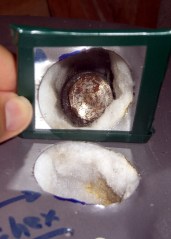
Offset Tank – 2003 The photo is of the Whirlpool water heater I just installed, but it’s identical to this one installed back in 2002 and another installed in 2001 (the one that recently failed). They haven’t seen fit to correct the holes in the top cover in the last seven or eight years:
This on a $400 water heater. “Made with pride in the USA”, indeed.
Anyway, when I installed the heater, I applied a nibbling tool to the top cover and gnawed an opening sufficient to get the socket in and the anode rod out. When I checked the rod in 2004 (after two years), it was corroding, but that’s the way it’s supposed to be: it’s working!
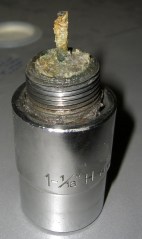
Missing Anode Rod The recommended inspection interval is three years, but I admit I let it slide for five, based on what I saw earlier. Well, this time the anode rod was well and truly stuck. I eventually clicked an 18-inch breaker bar into the socket and wailed on the end with a two-pound hammer; after far more beating that I really liked, the bolt head loosened and the whole affair unscrewed easily and came out without further protest.
Behold, there’s no rod attached to the head!
I used a 12-point socket for this operation, but I have a six-point impact socket arriving shortly ($0.99 from eBay, plus $2 shipping). A 6-pointer has the advantage of applying force along the sides of the hex head, rather than just the vertices, which reduces the risk of stripping the head. Been there, done that, you’d think I’d learn from my experience, but I needed to get that thing out so I could proceed with the sediment extraction.
[Update: More about why you really want a 6-point socket there.]
There was an ominous clank inside the tank while I was massaging the breaker bar with the hammer. Peering down inside the tank through the rod hole, I spy the remains of the rod standing against the lower heating element, atop the expected pile of sediment in the bottom which is clogging the piddly little drain valve. It’s like looking into the Titanic’s dining room through a rivet hole.
Turns out that the rod had broken off quite some time earlier. After better than an hour of laparoscopic surgery through the lower heating element port, I finally extracted the rod: it was bent double, which means it had been standing upright for a while and eventually folded over. The long section to the right is actually two rod cores folded against each other; the far right end has a neat U-bend.

Corroded anode rod core OK, I shouldn’t have left it slide for that long…
So it goes. Leaving the rod across the heating element seems like a Bad Thing, plus I should get the rest of the sediment out of the bottom. That’ll be easier if I can flush the tank through the lower element’s port.
I picked up a new magnesium rod at JD Johnson, a local plumbing outlet, for $28. That’s far less than at Water Heater Rescue, an invaluable source of information on the subject. The rod is 36 inches long, half a foot less than the 42 inch original, but that’s close enough; given the limited headroom, it’s easier to get into the tank.
Removing the lower heating element requires a 1-1/2″ socket and the courage to cut back the insulation packed into the element port. More on that tomorrow…


-
Subscribe
Subscribed
Already have a WordPress.com account? Log in now.
 The Smell of Molten Projects in the Morning