-
Kenmore 158 UI: Automatic Button Builder
Given the glacially slow Arduino touch-screen TFT display as a first pass UI for the Kenmore 158 sewing machine, I need some UI elements.
I need buttons. Lots of buttons.
Each button will have several different states that must be visually distinct:
- Disabled – not available for pressing
- Released – can be pressed and is inactive
- Pressed – has been pressed and is now active
There may be other states, but those should be enough to get started.
I’d rather not draw that detail by hand for each button, so some tinkering with the Bash script driving the Imagemagick routines produced these results:
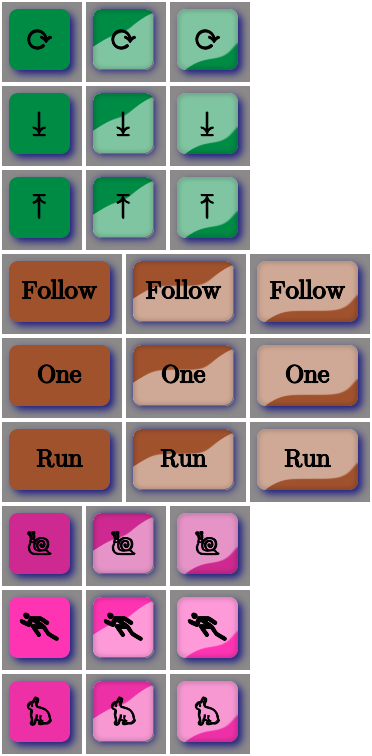
Buttons Aren’t those just the ugliest buttons you’ve ever seen?
The garish colors identify different functions, the crude shading does a (rather poor) job of identifying the states, and the text & glyphs should be unambiguous in context. Obviously, there’s room for improvement.
The point is that I can begin building the UI code that will slap those bitmaps on the Arduino’s touch-panel LCD while responding to touches, then come back and prettify the buttons as needed. With a bit of attention to detail, I should be able to re-skin the entire UI without building the data into the Arduino sketch, but I’ll start crude.
The
mkAll.shscript that defines the button characteristics and calls the generator script:./mkBFam.sh NdDn springgreen4 ⤓ ./mkBFam.sh NdUp springgreen4 ⤒ ./mkBFam.sh NdAny springgreen4 ⟳ 80 80 40 ./mkBFam.sh PdOne sienna One 120 80 ./mkBFam.sh PdFol sienna Follow 120 80 ./mkBFam.sh PdRun sienna Run 120 80 ./mkBFam.sh SpMax maroon1 🏃 80 80 40 ./mkBFam.sh SpMed maroon2 🐇 80 80 40 ./mkBFam.sh SpLow maroon3 🐌 montage *bmp -tile 3x -geometry +2+2 Buttons.png display Buttons.png
As before, if you don’t see rabbit and snail glyphs, then your fonts don’t cover those Unicode blocks.
The quick-and-dirty
mkBFam.shscript that produces three related buttons for each set of parameters:# create family of simple beveled buttons # Ed Nisley - KE4ZNU # January 2015 [ -z $1 ] && FN=Test || FN=$1 [ -z $2 ] && CLR=red || CLR=$2 [ -z $3 ] && TXT=x || TXT=$3 [ -z $4 ] && SX=80 || SX=$4 [ -z $5 ] && SY=80 || SY=$5 [ -z $6 ] && PT=25 || PT=$6 [ -z $7 ] && BDR=10 || BDR=$7 echo fn=$FN clr=$CLR txt=$TXT sx=$SX sy=$SY pt=$PT bdr=$BDR echo Working ... echo Shape convert -size ${SX}x${SY} xc:none \ -fill $CLR -draw "roundrectangle $BDR,$BDR $((SX-BDR)),$((SY-BDR)) $((BDR-2)),$((BDR-2))" \ ${FN}_s.png echo Highlights convert ${FN}_s.png \ \( +clone -alpha extract -blur 0x12 -shade 110x2 \ -normalize -sigmoidal-contrast 16,60% -evaluate multiply .5\ -roll +4+8 +clone -compose Screen -composite \) \ -compose In -composite \ ${FN}_h.png convert ${FN}_s.png \ \( +clone -alpha extract -blur 0x12 -shade 110x0 \ -normalize -sigmoidal-contrast 16,60% -evaluate multiply .5\ -roll +4+8 +clone -flip -flop -compose Screen -composite \) \ -compose In -composite \ ${FN}_l.png echo Borders convert ${FN}_h.png \ \( +clone -alpha extract -blur 0x2 -shade 0x90 -normalize \ -blur 0x2 +level 60,100% -alpha On \) \ -compose Multiply -composite \ ${FN}_bh.png convert ${FN}_l.png \ \( +clone -alpha extract -blur 0x2 -shade 0x90 -normalize \ -blur 0x2 +level 60,100% -alpha On \) \ -compose Multiply -composite \ ${FN}_bl.png echo Buttons convert ${FN}_s.png \ -font /usr/share/fonts/custom/Symbola.ttf -pointsize ${PT} -fill black -stroke black \ -gravity Center -annotate 0 "${TXT}" -trim -repage 0x0+7+7 \ \( +clone -background navy -shadow 80x4+4+4 \) +swap \ -background snow4 -flatten \ ${FN}0.png convert ${FN}_bl.png \ -font /usr/share/fonts/custom/Symbola.ttf -pointsize ${PT} -fill black -stroke black \ -gravity Center -annotate 0 "${TXT}" -trim -repage 0x0+7+7 \ \( +clone -background navy -shadow 80x4+4+4 -flip -flop \) +swap \ -background snow4 -flatten \ ${FN}1.png convert ${FN}_bh.png \ -font /usr/share/fonts/custom/Symbola.ttf -pointsize $PT -fill black -stroke black \ -gravity Center -annotate 0 "${TXT}" -trim -repage 0x0+7+7 \ \( +clone -background navy -shadow 80x4+4+4 \) +swap \ -background snow4 -flatten \ ${FN}2.png echo BMPs for ((i=0 ; i <= 2 ; i++)) do convert ${FN}${i}.png -type truecolor ${FN}${i}.bmp # display -resize 300% ${FN}${i}.bmp done echo Done!Now, to get those bitmaps from the SD card into the proper place on the LCD panel…
-
Subscribe
Subscribed
Have a WordPress.com account? Log in now.

