-
USB-to-SATA Drive Adapter Performance
The discussion about scrubbing hard drives suggested I really should be using larger block sizes to wring better performance from the hardware.
So I ran variations on this theme:
time sudo dd if=/dev/urandom of=/dev/sdc bs=4K count=32K
For the
BS(“block size”) parameter,1K= 1024 and1KB= 1000. Similarly for1Mvs.1MB.The results, viewed as a picture because WordPress seems unable to import a formatted spreadsheet from LibreOffice like it used to:
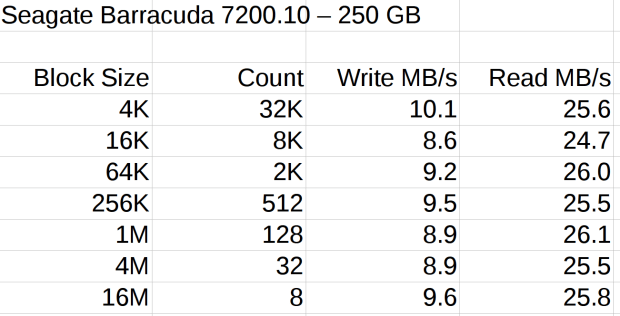
USB-SATA Adapter – Barracuda 7200.10 drive Each operation transfers 128 MB (128 x 220 = 131 x 106) bytes. The variations probably come from other stuff going on, most notably the USB-to-serial adapter driving the plotter while I’m testing a tweak to the Superformula demo code.
Reads ever so much faster than writes, so the USB adapter definitely isn’t getting in the way; I assume the drive accepts the commands & data as fast as its little heads can carry them away. The data, being relentlessly pseudo-random, won’t get compressed along the way.
So, in round numbers, the block size just absolutely does not make any difference.
Update: Based on an early comment from Edward Berner to a previous post, I was looking in the wrong place:
dd if=/dev/urandom of=/dev/zero bs=4K count=32K
32768+0 records in
32768+0 records out
134217728 bytes (134 MB) copied, 9.63064 s, 13.9 MB/s
dd if=/dev/urandom of=test.bin bs=4K count=32K
32768+0 records in
32768+0 records out
134217728 bytes (134 MB) copied, 10.018 s, 13.4 MB/s
dd if=test.bin of=/dev/zero bs=4K count=32K
32768+0 records in
32768+0 records out
134217728 bytes (134 MB) copied, 0.0385358 s, 3.5 GB/s
dd if=test.bin of=test2.bin bs=4K count=32K
32768+0 records in
32768+0 records out
134217728 bytes (134 MB) copied, 0.45044 s, 298 MB/s
I installed an SSD on this box a while ago, so the 3.5 GB/s disk-to-discard speed represents the SSD’s read rate. The 298 MB/s disk-to-disk speed would be its write speed, probably with some clever buffering going on.
So the real bandwidth limitation in wiping a disk comes from the pseudo-random generator behind
/dev/urandom, not the disk or USB interface. It would probably be faster to fill a 1 GB (or more) file with noise at 14 MB/s, then copy it enough times to fill the drive at whatever speed the drive can handle it.Thanks, Edward, for figuring that out!

-
Subscribe
Subscribed
Have a WordPress.com account? Log in now.

