-
Logitech M305 Mouse Switch Cleaning
While installing Mint on the Lenovo Q150, I discovered that the right button on the (long disused) Logitech M305 wireless mouse wasn’t working. After replacing the batteries (always check the batteries), it still didn’t work, so I peeled the four slippery feet off the bottom, removed the screws, and confronted the interior:
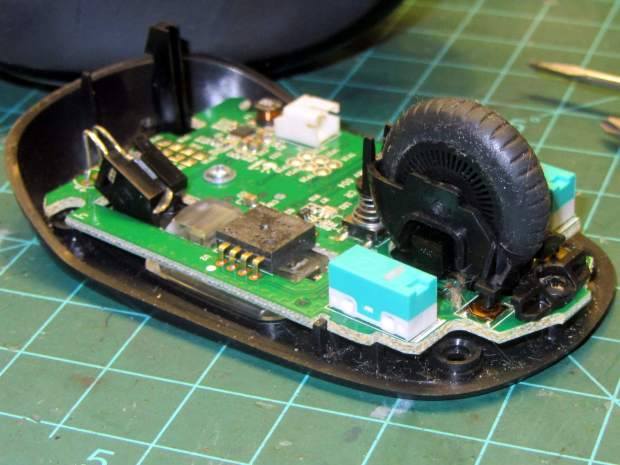
Logitech M305 mouse – interior Much to my surprise, the button switches had removable covers:
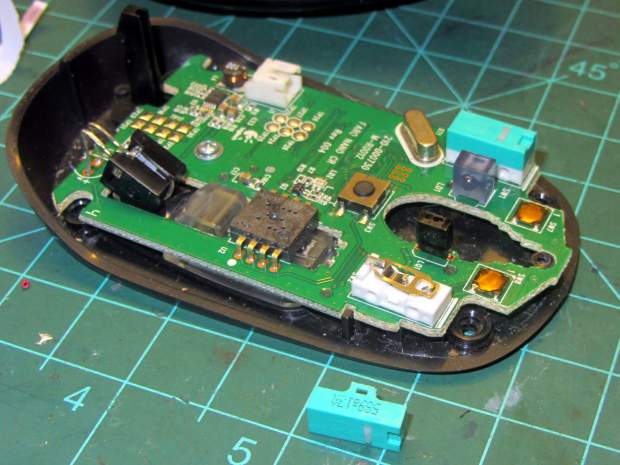
Logitech M305 mouse – switch disassembly I put a minute drop of DeoxIT Red on a slip of paper, ran it between both pairs of contacts, removed a considerable amount of tarnish, reassembled in reverse order, and it’s all good again.
The glue on the back of the slippery feet didn’t like being peeled off, so I expect they’ll fall off at some point.
It’s much easier to drive a GUI with three functional buttons…
[Update: Long-time commenter Raj notes:
I always had problem with the middle button. I have replaced them a few times and learnt that they come with different operating pressures. The soft ones are hard to come by. I found an alternate in the PTT switches on Yaesu handies in my junk.
That’s the blocky switch to the left of the shapely wheel cutout.]


-
Subscribe
Subscribed
Have a WordPress.com account? Log in now.

