-
Vacuum Tube LEDS: Neopixel Plate Cap
[Edit: Welcome Hackaday! You might prefer real vacuum tubes; searching for “vacuum tube leds” will turn up more posts about this long-running project. And, yes, I lit up a tube, just for old time’s sake, and have some plans for that huge triode.]
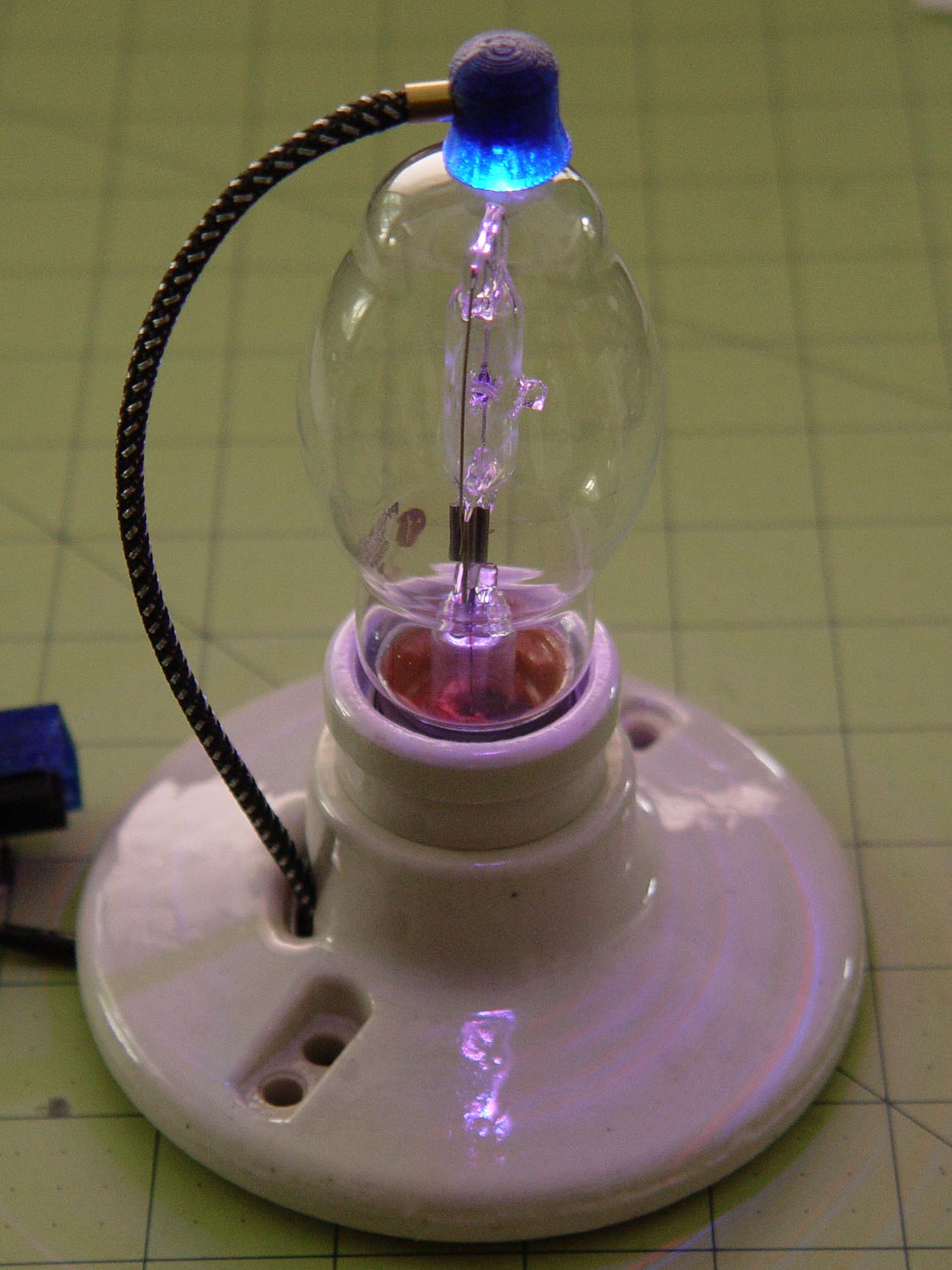
A single (knockoff) Neopixel hovers over a defunct halogen bulb:

Vacuum Tube LEDs – plate lead – overview The Arduino code comes from stripping down the Hard Drive Platter Mood Light to suit just one Neopixel, with the maximum PWM values favoring the red-blue-purple end of the color wheel:
	Pixels[RED].Prime = 3;
	Pixels[GREEN].Prime = 5;
	Pixels[BLUE].Prime = 7;
	printf("Primes: (%d,%d,%d)\r\n",Pixels[RED].Prime,Pixels[GREEN].Prime,Pixels[BLUE].Prime);

	Pixels[RED].MaxPWM = 255;
	Pixels[GREEN].MaxPWM = 64;
	Pixels[BLUE].MaxPWM = 255;
Unlike the Mood Light’s dozen Neopixels jammed into the platter’s hub ring, running one Neopixel at full throttle atop the tube doesn’t overheat the poor controller. In a 22 °C room, PWM 255 white raises the cap’s interior temperature to 35 °C, which looks like a horrific 40 °C/W thermal coefficient if you figure the dissipation at 300 mW = 5 V x 60 mA.
Feeding those parameters into the raised sine wave equation causes the cap to tick along at 27 °C for an average dissipation of 120 mW, which sounds about right:
113 mW = 5 V x (20 + 20 + 5 mA) / 2The effect is striking in a dark room, but it’s hard to photograph; the halogen capsule inside the bulb resembles a Steampunk glass jellyfish:
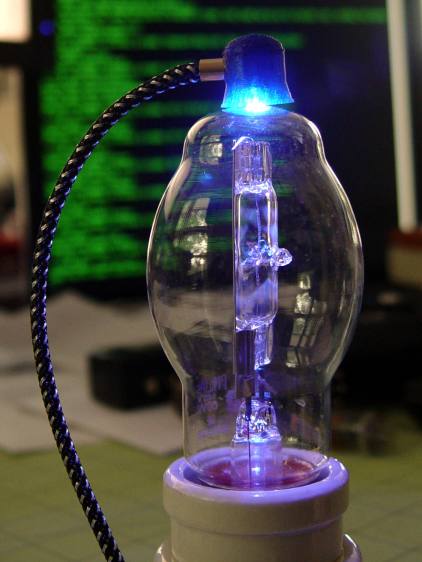
Vacuum Tube LEDs – plate lead – detail That ceramic light socket should stand on a round base with room for the Arduino controller. I think powering it from a wall wart through a USB cable makes sense, with a USB-to-serial converter epoxied inside the box for reprogramming.
It looks pretty good, methinks, should you like that sort of thing.
The Arduino source code as a GitHub gist:
This file contains hidden or bidirectional Unicode text that may be interpreted or compiled differently than what appears below. To review, open the file in an editor that reveals hidden Unicode characters. Learn more about bidirectional Unicode characters// Neopixel mood lighting for vacuum tubes // Ed Nisley – KE4ANU – January 2016 #include <Adafruit_NeoPixel.h> //———- // Pin assignments const byte PIN_NEO = 6; // DO – data out to first Neopixel const byte PIN_HEARTBEAT = 13; // DO – Arduino LED //———- // Constants #define UPDATEINTERVAL 25ul const unsigned long UpdateMS = UPDATEINTERVAL – 1ul; // update LEDs only this many ms apart minus loop() overhead // number of steps per cycle, before applying prime factors #define RESOLUTION 100 // want to randomize the startup a little? #define RANDOMIZE true //———- // Globals // instantiate the Neopixel buffer array Adafruit_NeoPixel strip = Adafruit_NeoPixel(1, PIN_NEO, NEO_GRB + NEO_KHZ800); uint32_t FullWhite = strip.Color(255,255,255); uint32_t FullOff = strip.Color(0,0,0); struct pixcolor_t { byte Prime; unsigned int NumSteps; unsigned int Step; float StepSize; byte MaxPWM; }; unsigned int PlatterSteps; // colors in each LED enum pixcolors {RED, GREEN, BLUE, PIXELSIZE}; struct pixcolor_t Pixels[PIXELSIZE]; // all the data for each pixel color intensity unsigned long MillisNow; unsigned long MillisThen; //– Figure PWM based on current state byte StepColor(byte Color, float Phi) { byte Value; Value = (Pixels[Color].MaxPWM / 2.0) * (1.0 + sin(Pixels[Color].Step * Pixels[Color].StepSize + Phi)); // Value = (Value) ? Value : Pixels[Color].MaxPWM; // flash at dimmest points return Value; } //– Helper routine for printf() int s_putc(char c, FILE *t) { Serial.write(c); } //—————— // Set the mood void setup() { pinMode(PIN_HEARTBEAT,OUTPUT); digitalWrite(PIN_HEARTBEAT,LOW); // show we arrived Serial.begin(57600); fdevopen(&s_putc,0); // set up serial output for printf() printf("Vacuum Tube Mood Light with Neopixels\r\nEd Nisley – KE4ZNU – January 2016\r\n"); /// set up Neopixels strip.begin(); strip.show(); // lamp test: a brilliant white dot printf("Lamp test: flash white\r\n"); for (byte i=0; i<3 ; i++) { for (int j=0; j < strip.numPixels(); j++) { // fill LEDs with white strip.setPixelColor(j,FullWhite); } strip.show(); delay(500); for (int j=0; j < strip.numPixels(); j++) { // fill LEDs with black strip.setPixelColor(j,FullOff); } strip.show(); delay(500); } // set up the color generators MillisNow = MillisThen = millis(); if (RANDOMIZE) randomSeed(MillisNow + analogRead(7)); else printf("Start not randomized\r\n"); printf("First random number: %ld\r\n",random(10)); Pixels[RED].Prime = 3; Pixels[GREEN].Prime = 5; Pixels[BLUE].Prime = 7; printf("Primes: (%d,%d,%d)\r\n",Pixels[RED].Prime,Pixels[GREEN].Prime,Pixels[BLUE].Prime); Pixels[RED].MaxPWM = 255; Pixels[GREEN].MaxPWM = 64; Pixels[BLUE].MaxPWM = 255; for (byte c=0; c < PIXELSIZE; c++) { Pixels[c].NumSteps = RESOLUTION * (unsigned int) Pixels[c].Prime; Pixels[c].Step = (RANDOMIZE) ? random(Pixels[c].NumSteps) : (3*Pixels[c].NumSteps)/4; Pixels[c].StepSize = TWO_PI / Pixels[c].NumSteps; // in radians per step printf("c: %d Steps: %d Init: %d",c,Pixels[c].NumSteps,Pixels[c].Step); printf(" PWM: %d\r\n",Pixels[c].MaxPWM); } } //—————— // Run the mood void loop() { MillisNow = millis(); if ((MillisNow – MillisThen) > UpdateMS) { digitalWrite(PIN_HEARTBEAT,HIGH); for (byte c=0; c < PIXELSIZE; c++) { // step to next increment in each color if (++Pixels[c].Step >= Pixels[c].NumSteps) { Pixels[c].Step = 0; printf("Cycle %d steps %d at %8ld delta %ld ms\r\n",c,Pixels[c].NumSteps,MillisNow,(MillisNow – MillisThen)); } } byte Value[PIXELSIZE]; for (byte c=0; c < PIXELSIZE; c++) { // … for each color Value[c] = StepColor(c,0.0); // figure new PWM value // Value[c] = (c == RED && Value[c] == 0) ? Pixels[c].MaxPWM : Value[c]; // flash highlight for tracking } uint32_t UniColor = strip.Color(Value[RED],Value[GREEN],Value[BLUE]); for (int j=0; j < strip.numPixels(); j++) { // fill LEDs with color strip.setPixelColor(j,UniColor); } strip.show(); MillisThen = MillisNow; digitalWrite(PIN_HEARTBEAT,LOW); } }

-
Subscribe
Subscribed
Have a WordPress.com account? Log in now.

