-
Raspberry Pi: USB Keypad Via evdev
The general idea is to use keystrokes plucked from a cheap numeric keypad to control
mplayer, with the intent of replacing some defunct CD players and radios and suchlike. The keypads look about like you’d expect: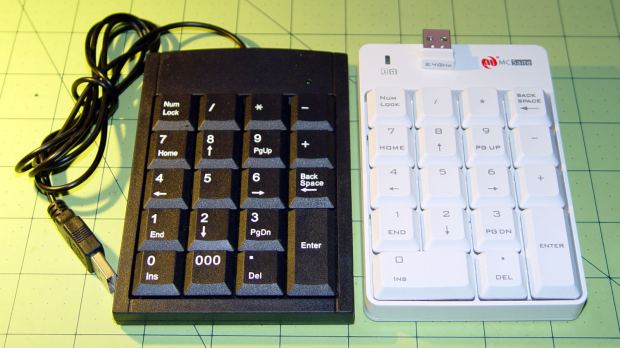
Numeric keypads The keypad layouts are, of course, slightly different (19 vs 18 keys!) and they behave differently with regard to their
NumLockstate, but at least they produce the same scancodes for the corresponding keys. The black (wired) keypad has a000button that sends three0events in quick succession, which isn’t particularly useful in this application.With the appropriate udev rule in full effect, this Python program chews its way through incoming events and reports only the key-down events that will eventually be useful:
This file contains hidden or bidirectional Unicode text that may be interpreted or compiled differently than what appears below. To review, open the file in an editor that reveals hidden Unicode characters. Learn more about bidirectional Unicode charactersfrom evdev import InputDevice,ecodes,KeyEvent k=InputDevice('/dev/input/keypad') for e in k.read_loop(): if (e.type == ecodes.EV_KEY) and (KeyEvent(e).keystate == 1): if (KeyEvent(e).keycode == 'KEY_NUMLOCK'): continue # we don't care about the NumLock state else: print KeyEvent(e).scancode, KeyEvent(e).keycode Pressing the keys on the white keypad in an obvious sequence produces the expected result:
82 KEY_KP0
79 KEY_KP1
80 KEY_KP2
81 KEY_KP3
75 KEY_KP4
76 KEY_KP5
77 KEY_KP6
71 KEY_KP7
72 KEY_KP8
73 KEY_KP9
98 KEY_KPSLASH
55 KEY_KPASTERISK
14 KEY_BACKSPACE
74 KEY_KPMINUS
78 KEY_KPPLUS
96 KEY_KPENTER
83 KEY_KPDOT
Observations
KeyEvent(e).keycodeis a string:'KEY_KP0'e.typeis numeric, so just compare againstevcodes.EV_KEYKeyEvent(e).scancodeis the numeric key identifierKeyEvent(e).keystate= 1 for the initial press- Those
KeyEvent(e).key_down/up/holdvalues don’t change
If you can type
KEY_KP0correctly, wrapping it in quotes isn’t such a big stretch, so I don’t see much point to running scancodes throughecodes.KEY[KeyEvent(e).scancode]just to compare the enumerations.I’m surely missing something Pythonic, but I don’t get the point of attaching
key_down/up/holdconstants to the key event class. I suppose that accounts for changed numeric values inside inherited classes, but … sheesh.Anyhow, that loop looks like a good starting point.

-
Subscribe
Subscribed
Have a WordPress.com account? Log in now.

