-
Pickett 110-ES Circular Slide Rule Manual: Scanning Thereof
Having mostly finished futzing with the Homage Tektronix Circuit Computer, my Pickett 110-ES Circular Slide Rule once again came to mind:

Homage Tek CC vs Pickett 110ES colors Casual searching didn’t reveal an online copy of its manual, so here ya go:
After a cluestick whack, here’s a better-looking version made with ScanTailor, as installed from the normal Ubuntu repo:
There’s some backstory, of course …
I gimmicked a scanner fixture to align a pair of pages:
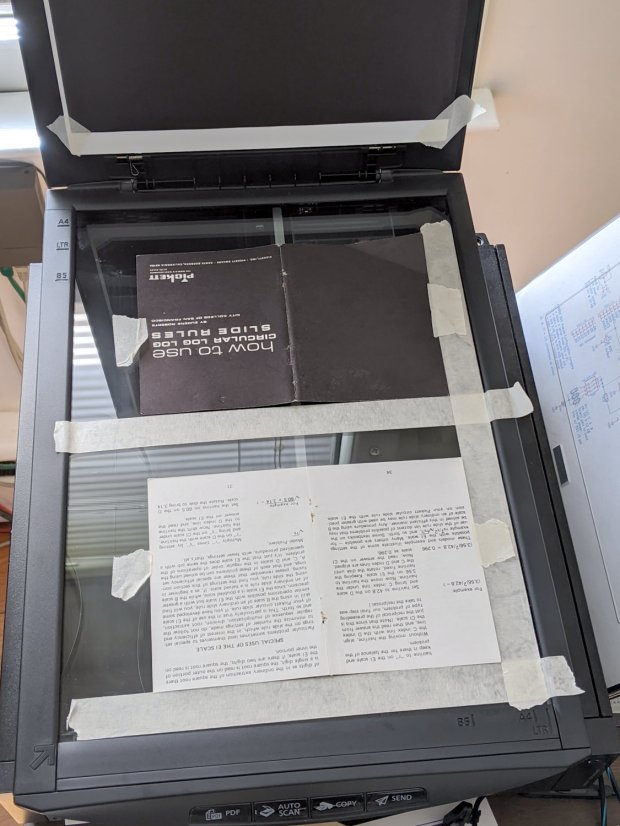
Pickett 110-ES Scanning Fixture Yes, I destroyed the collectible value of my manual by removing two slightly rusted staples.
The black paper taped to the scanner lid prevents the type on the upper surface of the paper from producing dark blurs.
Set up XSane for batch scanning (one selection over each two-page spread), get a pipeline going (disassembly → face up → face down → reassembly), and eventually create 34 images named
Scan-??.jpg. They’re in color, although it matters only for the rust stains around the staple holes, with the contrast stretched enough to make them mostly B&W.Somehow, Pickett printed / cut half the sheets slightly off-kilter, so I rotated them -1° rotation to re-align the text. To simplify plucking the rotated pages out of the image, composite the spread atop a blank white background:
for i in $(seq -w 3 2 33) ; do composite -compose atop Scan-$i.jpg -size 2200x1400 -geometry +100+100 canvas:white -rotate -1 Comp-$i.jpg ; doneRather than thinking too hard, do exactly the same thing to the other pages without rotation:
for i in $(seq -w 2 2 34) ; do composite -compose atop Scan-$i.jpg -size 2200x1400 -geometry +100+100 canvas:white -rotate 0 Comp-$i.jpg ; doneEach scanned image has two pages, so crop it into two files with names corresponding to the actual page numbers:
for i in $(seq 2 2 34) ; do convert -crop 960x1240+1050+110 Comp-$i.jpg Crop-$(( $i - 1 )).jpg ; done
for i in $(seq 3 2 34) ; do convert -crop 960x1240+130+110 Comp-$i.jpg Crop-$(( $i - 1 )).jpg ; done
for i in $(seq 3 2 33) ; do convert -crop 960x1240+1050+110 Comp-$i.jpg Crop-$(( 66 - $i )).jpg ; done
for i in $(seq 2 2 32) ; do convert -crop 960x1240+110+110 Comp-$i.jpg Crop-$(( 66 - $i )).jpg ; done
Fix the single-digit pages to simplify globbing later on:
rename 's/-/-0/' Crop-[1-9].jpgA bit of tedious fixup for some truly misaligned sheets produced images with slightly different sizes, so composite all of them onto slightly larger backgrounds to avoid screwing up the PDF conversion:
mkdir Final
for f in Crop* ; do composite -compose atop $f -size 1000x1300 -geometry +10+10 canvas:white -Final/$f ; done
Then jam them into a PDF for convenience:
cd Final
convert Crop-C[12].jpg Crop-[0-6]*.jpg Crop-C[34].jpg "Pickett 110-ES Circular Slide Rule Manual.pdf"
You can print it six-up to a sheet to produce text just about the same size as the original manual. If you omit (blank) cover pages 2, 67, and 68, the whole thing fits neatly on 11 sheets of paper.
Someone with better facilities and more attention to detail can surely produce a better-looking result, but this will be better than nothing.
-
Subscribe
Subscribed
Have a WordPress.com account? Log in now.

