-
Kicad-to-HAL: HALUI Components
The LinuxCNC
HALUI“component” has so many pins that I divided them among about 18 Kicad symbols, each collecting the pins related to one function: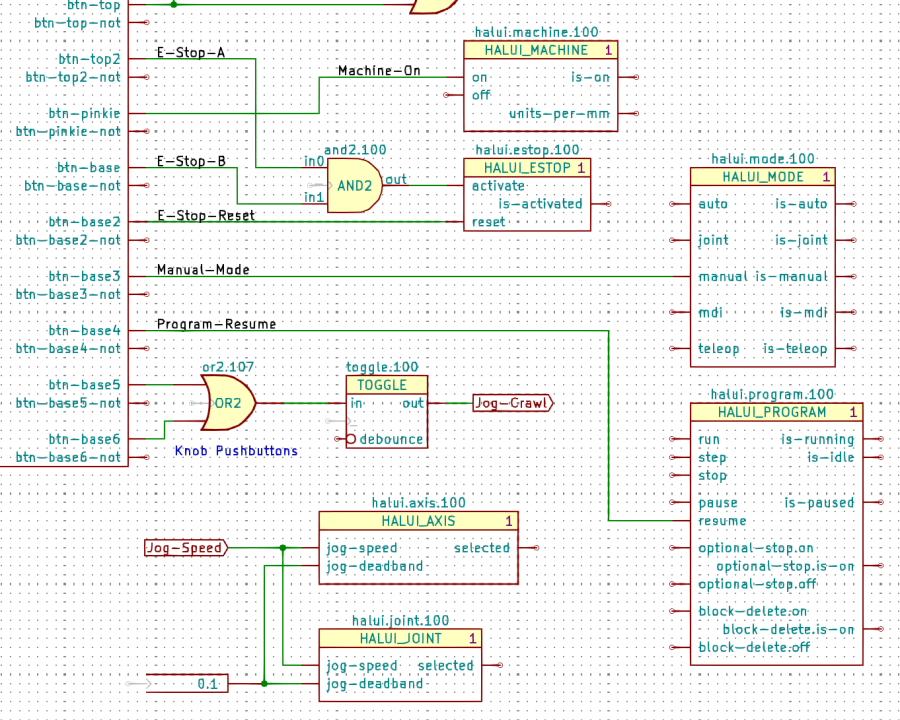
Gamepad Button logic – HALUI components The Kicad references (
halui.mode.100) use periods as separators, not dashes, becauseHALUIruns automagically and has no thread functions.The symbol name (
HALUI_MODE) serves as a unique identifier that should match the reference stem. I used underscores just for pretty, but it doesn’t make any difference.All of the Kicad symbols include the
StripAnnofield to remove the Kicad annotation, as described earlier. The Kicad annotations now start from 100, because I’m in the midst of tinkering an automagic way to produce the proper start-from-zero HAL numbering with everything properly sorted; this is very much a work in progress.So the full name of the
resumepin on theHALUI_PROGRAMcomponent sporting Kicad referencehalui.program.100is just:halui.program.resumeThis corresponds to the description of that pin in the
HALUIdoc, without a numeric identifier: there is only oneHALUI.The net connecting the gamepad button to that pin:
net _Gamepad_Buttons_Program-Resume <= input.0.btn-base4 => halui.program.resume
A few more examples from the nets near the AND2 gate:
net _Gamepad_Buttons_E-Stop-A <= input.0.btn-top2 => and2.0.in0
net _Gamepad_Buttons_E-Stop-B <= input.0.btn-base => and2.0.in1
net _Gamepad_Buttons_E-Stop-Reset <= input.0.btn-base2 => halui.estop.reset
net _Gamepad_Buttons_Machine-On <= input.0.btn-pinkie => halui.machine.on
net _Gamepad_Buttons_Manual-Mode <= input.0.btn-base3 => halui.mode.manual
Some
HALUIcomponent references include numbers and letters identifying specific joints / axes / spindles, all of which you must edit as needed and none of which should be subjected to Kicad’s renumbering whims: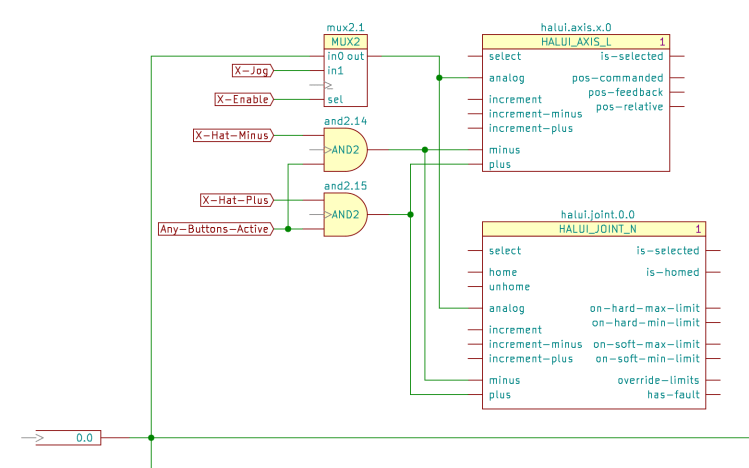
X Axis jogging schematic The HAL commands producing the nets connecting the
AND2gates to theHALUIpins:net N_065 <= and2.14.out => halui.axis.x.minus halui.joint.0.minus net N_066 <= and2.15.out => halui.axis.x.plus halui.joint.0.plus
The nets lack any specific name, so
Kicad-to-HALreplaces Kicad’s default gibberish with the next integer from an ascending series. If your HAL configuration requires more than three digits worth of anonymous nets, feel free to tweak the format string.
-
Subscribe
Subscribed
Have a WordPress.com account? Log in now.

