Ed Nisley's Blog: Shop notes, electronics, firmware, machinery, 3D printing, laser cuttery, and curiosities. Contents: 100% human thinking, 0% AI slop.
This is pretty much the same general idea and setup as the one I described there, but with the panel flat against the tooling plate.
Milling rabbet on top panel
The cutter sits at the far right end of its maximum travel. I made the rabbet in three manual CNC passes.
To set up for the rest of the cut:
G0 X-4.25 to clear the left end of the panel
Loosen the three clamps, slide the panel leftward
Push the panel against the brass tubes
Tighten the clamps
And away we go…
Complete rabbet
One disadvantage: you can’t do a final finishing pass along the entire length of the cut. There are tool marks at the stopping point, but nothing really objectionable on the back of a clock where a panel will cover the rather ugly guts.
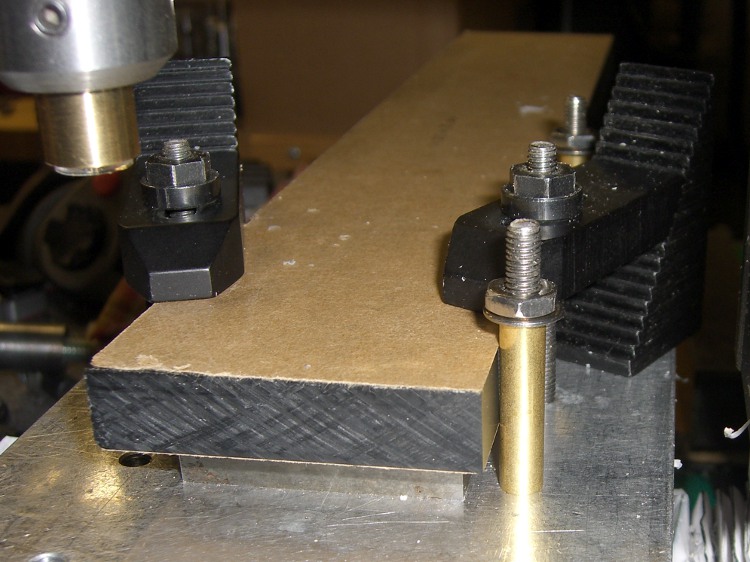
The brass tube “locating pins” work surprisingly well.
About 2000 rpm with 3/8 inch end mill. Cut 1/8 inch wide and 0.25 inch deep @ 10 ipm in three passes. Finish pass 15 ipm at 0.257 deep to make it pretty.
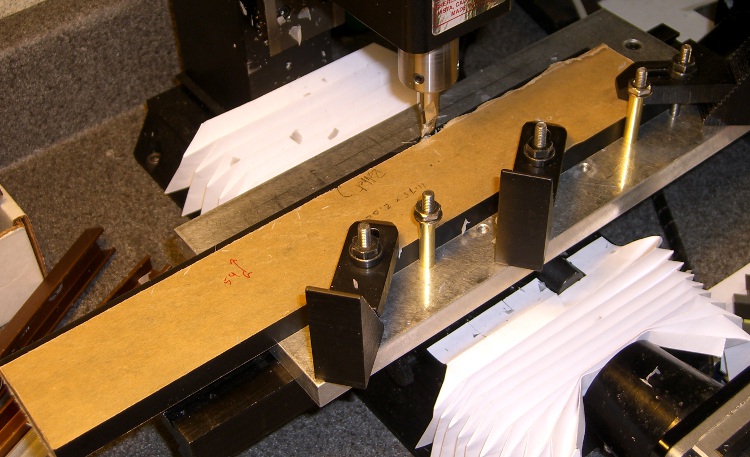
Having flycut the acrylic panels to the proper width, I had to cut them to the proper length, too. This picture shows the lashup I used to hold them down during the operation…
Clock top panel fixture
The brown bar sticking out to the left is one of the bookshelf struts that held the toolmaker’s vises down during the flycutting; it’s now secured to the Sherline table with a T-nut. A vise clamped to the bar serves as an end stop for the panels.
Brass tubing locating posts
A pair of brass tubes around studs serve as locating pins. To get the things lined up:
Loosely clamp a panel down atop a spacing plate
Push it back against the loose tubes: crudely parallel to X axis
Snug the clamps
Align the panel to the X axis using the laser
Push the tubes against the panel
Tighten their nuts
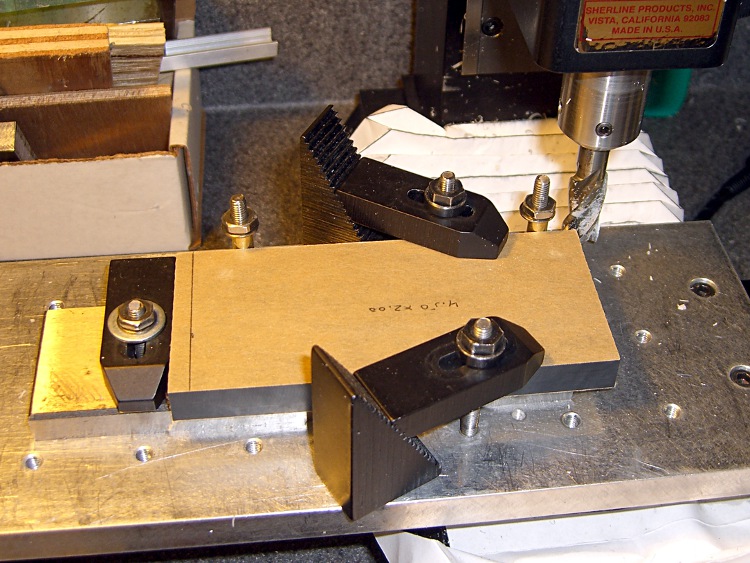
Top panel end trimming detail
Crude, but good enough for this purpose.
Then a bit of manual CNC to shave off the end. Half-inch mill, 1500 rpm, 150 mm/min, more-or-less 0.5 mm cuts. The panels don’t have to be any exact length, as long as the clock circuit boards fit inside, but the ends must be perpendicular and smooth for good gluing.
The exact part will come when I rabbet the side panels…
The side panel setup was much simpler: same brass posts, same spacer, no need for the long bar hanging off to the left.
The Totally Featureless Clock will have a black acrylic case with a Graylite Lexan faceplate. The top & bottom panels are 11.75 inches long, which is much too large for the Sherline’s 9-inch maximum X travel.
Fortunately, in this case I can cheat.
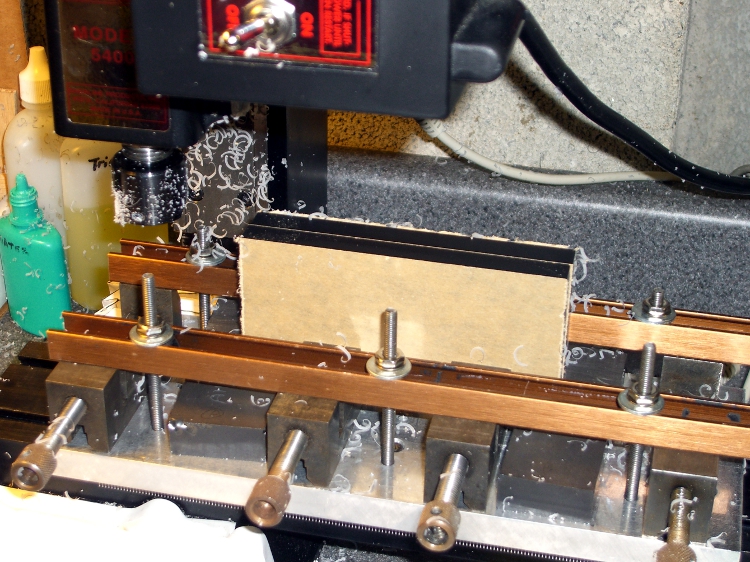
This setup cut the panels to the proper width. A pair of parallel blocks, made from some mysterious glass-like material and ground very nicely flat, support the panel just over the body of the four toolmaker’s vises lined up along the tooling plate. I drilled the brown bookshelf rails to match the tooling plate and secured them with 10-32 studs.
The front rail secures the vise bodies to the tooling plate; they’re aligned parallel to the X axis by the simple expedient of laying a parallel along the back edge and matching that to the tooling plate. No real precision is in order here; the flycut is across the whole top edge.
The rear rail holds the movable vise jaws down; they tend to rise up just slightly when tightened, but the difference amounts to barely enough to release pressure on the parallel blocks. Not enough to matter, as it turned out.
The general notion is to flycut about 2/3 of the length of the panel, then slide it far enough to cut the remainder. Flip it over and flycut the other side the same way.
About 1000 rpm and 150 mm /min, cutting 0.5 mm or so on each pass.
This worked surprisingly well. I expected to find a bow in the middle due to an uneven bandsaw cut on the initial downward side, but it was all good; evidently the blocks were wide enough to average things out.
The joint where the two cuts meet turns out to be visible, but barely detectable with a fingernail: entirely suitable for this application. I’ll hit the sides with sandpaper on a sheet of plate glass before bonding them to the faceplate.
Flycutting the end panels was much simpler: one pass clears their entire length. I moved the clamping rails to simplify the whole process; turned out that clamping the movable jaw didn’t really gain very much at all while complexicating the slide-the-stock process beyond belief.
Flycutting end panels
Overall, the width varies by about two mils along the length of the long panels and they’re perfectly straight as measured against a surface plate. Definitely close enough!
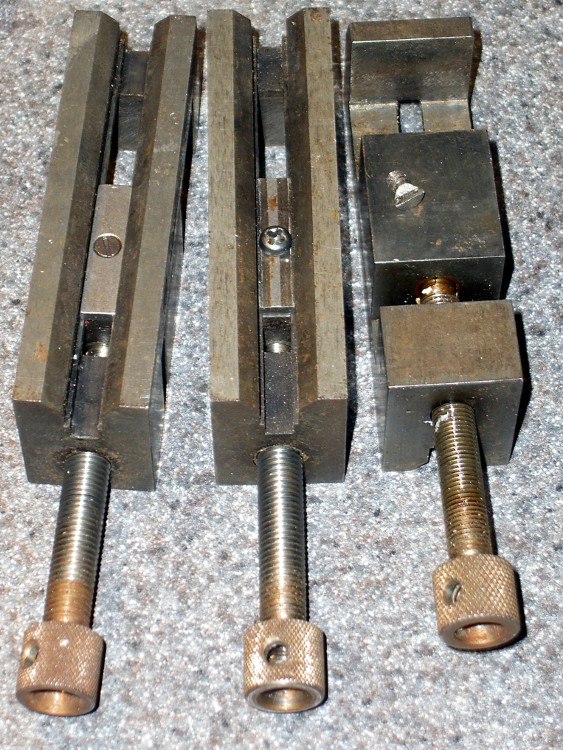
Discovered that one of my toolmaker’s vises had a defunct screw securing the jaw to the body: one side of the head simply vanished over the years. Hadn’t mattered up until now, but I really wanted the jaw to not ride up when clamping the workpiece and the screw was rather loose.
It’s difficult to tighten a screw with half a slot…
Eventually I figured out that the screw has a 6-40 thread. My Brownells Gunsmith screw assortment (which they no longer offer) has, among others, 6-48 and 8-40 screws in flat, fillister, socket, and round head, but nothing in 6-40.
After exhausting all other possibilities, I looked in the assortment box again and found four round-head crosspoint screws with captive lockwashers that I must have salvaged from some dead piece of gear.
Of course, they turned out to be 6-40. Whew!
Chopped off the lockwasher, added a dab of Loctite, and it fit perfectly. I flipped the sliding plate over, as it appeared somewhat worn, but I’m certain that didn’t make any difference.
The screw must have a flat head (and you can’t flip the plate over) if you mount the vise on a machined V-way, but that’s not anything I’m likely to do. In that event, maybe I’ll just file the top off the screw and be done with it.
What with all the milling going on lately, I decided to replace the crusty bellows on the Sherline mill. The previous design worked reasonably well, but I’ve had a few tweaks in mind for a while.
Color coded lines so you know which way to fold them!
Unlined side up for a neat look
Fits on Letter and A4 sheets
Taping cuts and hints
The PDF page size is about 8×10 inches; call it 204×280 mm. Print it without scaling and it should just barely squeak onto the sheet. If you don’t have a full-bleed printer, the tips of the sides may get cropped off, but you can extrapolate easily enough.
Some assembly required:
Cut it out
Fold the central valleys (red) first, flatten it out again
Fold the central ridges (blue) next
Pleat the whole thing into a half-inch tall stack
Squash it into a neat package to harden the folds
Fold the tips along one side
Fold the tips along the other side
Squash the folds again
Make the saddle cuts & fold the tabs
Apply double-stick tape as noted (some on back)
Install on your cleaned-up mill
Admire!
The tip folding is the trickiest part. Basically, flip the first tip from a ridge to a valley, then chase the little transition folds into place. Repeat for each tip along that side, then do the other side.
It gets easier after you fumble around for a while.
My nimble-fingered daughter has offered to fold ’em for you. Stick a few bucks in an envelope and mail it to me; we’ll mail back two folded sets (two each, front and rear bellows) for your amusement. Kid’s gotta earn her college money somehow…
Address? Go to the QRZ.com database and search for my amateur radio callsign: KE4ZNU. Cut, paste, that was easy.
For the do-it-yourselfers, start with the PDF file in the link above. That’s the easiest way to get the correct scaling. The tabs on the ends should be 4.0 inches across on the printed page.
Rear BellowsFront Bellows
Here are some 300 dpi PNG files, but you’re on your own for scaling.
If you want the original Inkscape SVG files, drop me a note.
The drain in our black bathroom(*) stopped working: the pop-up drain seal didn’t pop up.
I finally wedged myself under the sink, with my feet in the shower stall, and removed the operating rod. Turns out that we replaced the countertop and sink (nine years ago; nothing lasts) and the drain used plastic pipe.
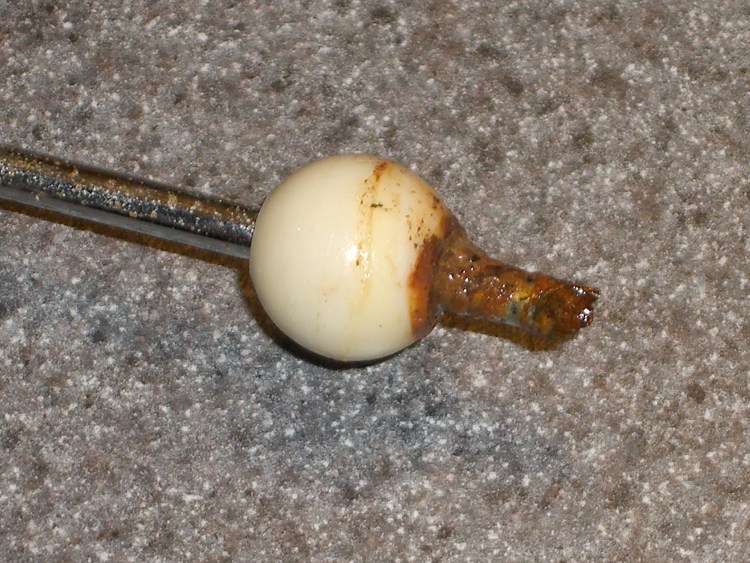
Except, of course, for the operating rod that sticks out into the drain. That’s chrome-plated steel, evidently with a few plating imperfections, and the end had simply rotted away. I suppose there’s a small chunk of steel decomposing in the trap.
How much would it have cost to use stainless steel in this corrosion-prone application? Or good old brass (“contains an ingredient known to the State of California to cause cancer or birth defects”)?
After a brief moment of consideration, with my feet still in the shower, I pushed the rod through the bearing ball so the other end stuck out by about the right amount and replaced it in the drain.
Swapped Rod
Yeah, there’s an icky rusted end hanging out there in mid-air, but the next person under that sink will understand exactly what’s going on…
(*) It’s the size of a large closet with wraparound black ceramic tile, a white tile shower stall, and a wall-sized mirror over the sink. We painted the walls and ceiling white, installed an ersatz gray granite counter top (it’s laminate, not anything spendy) with a shiny white sink, and it’s all good. The original half-century-old grout is in fine shape: some things really do last!
After putting Mary’s newly covered seat on her Tour Easy, I replaced the tire liner in the front wheel; the previous tube had gone flat, as mentioned there, due to erosion from the end of the liner.
Here’s what the taped liner looked like: smashed as flat as you’d expect from 100 psi applied evenly over the surface. The tube had a rectangular imprint on it, with what looked like minute abrasions, around the outline of the tape. Nothing major, but it shouldn’t ought to look that way.
Taped tire liner
I rolled that liner up, popped it in the Bike Tire Stuff drawer and replaced it with a Slime liner. This picture shows the ends of the two liners: the brown one (bottom) is about 90 mils thick in the center, the Slime liner (top, fluorescent green) is 60-ish.
Tire liner comparison
As nearly as I can tell, I’ve never had an abrasion flat with a Slime liner, while various other brands have caused troubles.
I broke the edges of the Slime liner with a bit of sandpaper, just to see what that’ll do. Most likely, bad things, seeing as how I’ve never done that before…








 The Smell of Molten Projects in the Morning