The Smell of Molten Projects in the Morning

Ed Nisley's Blog: Shop notes, electronics, firmware, machinery, 3D printing, laser cuttery, and curiosities. Contents: 100% human thinking, 0% AI slop.

Category: Machine Shop

Mechanical widgetry

  • Whirlpool Refrigerator Shelf: Drawer Slide Repair

    Refrigerator shelf bracket - inside
    Refrigerator shelf bracket – inside

    The bottom glass shelf in our Whirlpool refrigerator (the “Crisper Cover”) rests on an elaborate plastic structure that includes slides for the two Crisper drawers. Perhaps we store far more veggies than they anticipated, we’re rough on our toys, or the drawer slides came out a whole lot weaker than the designers expected. I’m betting on the latter, but whatever the cause, the two outside slides broke some years ago.

    I don’t know what function the rectangular hole above the flattened part of the slide might serve, but it acted as a stress raiser that fractured the column toward the front. With that end broken loose, another crack propagated toward the rear, so the entire front end of the slide drooped when the drawer slid forward.

    The minimum FRU (Field Replacement Unit) is the entire plastic shelf assembly, a giant plastic thing that fills the entire bottom of the refrigerator. You could, of course, buy a whole new shelf assembly, perhaps from www.appliancepartspros.com, but it’s no longer available. Back when it was, I recall it being something on the far side of $100, which made what you see here look downright attractive.

    My first attempt at a repair was an aluminum bracket epoxied to the outside of the slide, filling the rectangular opening with JB Industro-Weld epoxy to encourage things to stay put. The plastic cannot be solvent-bonded with anything in my armory, so I depended on epoxy’s griptivity to lock the aluminum into the shelf. That worked for maybe five years for the right side (shown above) and is still working fine on the left side.

    Refrigerator shelf bracket - bottom
    Refrigerator shelf bracket – bottom

    The right-side bracket eventually broke loose, so I did what I should have done in the first place: screw the bracket to the shelf. Alas, my original bracket remained firmly bonded to the bottom part of the shelf and secured to the block of epoxy in the rectangular hole. Remember, the broken piece didn’t completely separate from the shelf.

    So I cut another angle bracket to fit around the first, drilled holes in the shelf, transfer-punched the bracket, and match-drilled the holes. Some short(ened) stainless-steel screws and nuts held the new bracket in place and a few dabs of epoxy putty filled the gaps to make everything rigid.

    That’s been working for the last few years. The refrigerator is going on 16 years with only one major repair (a jammed-open defrost switch), so I’ll call it good enough.

  • Improvised Snowthrower Skid Shoes

    Our snowthrower rests the entire weight of the front end on a pair of skid shoes, which erode against the asphalt driveway. Replacements cost nigh onto eleven bucks each, which activates my cheapskate gene.

    Worn OEM skid shoes
    Worn OEM skid shoes

    You can see from the markings that the slots are about twice as long as they need to be, so I figured I could replace them with some random angle iron. Might not last as long, but far less expensive.

    Bedframe skid shoe
    Bedframe skid shoe

    Having a nearly infinite supply of bedframe steel in the heap, I chopped off two suitable lengths, poked 3/8″ holes into the appropriate spots, then milled short slots to get some adjustability.

    Bedframe steel is about the nastiest stuff you (well, I) can still machine: high carbon, fine blue-hot chips, and hard edges. It might actually be better-suited for skid shoes than the soft steel OEM parts.

    They’re not pretty, but the driveway hasn’t complained yet.

    The only real problem is that those sharp corners snag on the edges of what we loosely term “the lawn”. I should apply the smoke wrench, miter the corners, and bend the edges upward. If I’m going to all that trouble, I should also hitch up the buzz box and wave some hardfacing ‘trodes over the bottom.

    But that’s in the nature of fine tuning and sounds a lot like work.

  • Stainless Steel Rule vs Ferric Chloride: Oops

    This is truly embarassing: I managed to leave a steel rule (not a ruler in the shop) atop a sploosh of ferric chloride for far too long. I eventually noticed the corrosion creeping around the edges.

    Top corrosion
    Top corrosion

    The bottom was hideous.

    Bottom corrosion
    Bottom corrosion

    So I sprayed it down with TopSaver, applied fine sandpaper, applied a Scotchbrite pad, and it came out surprisingly well.

    After treatment
    After treatment

    The ferric chloride, of course, came from a circuit board etching project. How you’re supposed to prevent that is to cover everything for about six feet around the spot marked X, but I don’t do that nearly as often as I should.

    Mostly I lay a sheet of packing paper atop the workbench and whisk it into the trash when I’m done, but this time I’d left it in place because my resistance soldering gizmo wound up anchoring the far end. Soooo, a drop or two soaked into the paper and of course the ruler wound up exactly atop that spot.

    The stuff is murder on stainless steel sinks, too…

  • Fixing an MTD Gas Cap Splash Shield

    OEM plastic post
    OEM plastic post

    MTD used the same design for the gasoline tank caps on our leaf shredder and snow thrower: an aluminum cone (which evidently serves to keep splashes away from the tank vent) mounted on a heat-staked plastic rod molded into the cap. It’s straightforward, but a bit suboptimal for high-vibration yard gadgets.

    The aluminum cone eventually worries its way through the plastic post and falls into the tank, taking the heat-formed button from the post along with it. Trust me on this, fishing those things out of the tank is an exquisite little inconvenience.

    4-40 screw post - inside
    4-40 screw post – inside
    4-40 screw post - exterior
    4-40 screw post – exterior

    The fix is straightforward.

    Chop off the remains of the post, drill a snug 4-40 tapping hole straight through the cap, and tap it accordingly. Secure the cone to the screw with a nut tightened against the head, run the screw through the cap, run a pair of nuts onto it, trim to length, then jam the nuts together so the cone is about where it started out. Loctite on the nuts is a Good Thing, but I don’t know how it feels about gasoline immersion.

    The snowblower cone is getting wobbly; I must make a preemptive strike on it to avoid fishing the debris out of the tank.

  • Slitting Brass Tubing

    Casting Wood's Metal in brass tube
    Casting Wood's Metal in brass tube

    I needed a brass tube with a lengthwise slit to serve as an electrostatic shield around a ferrite bar antenna. There are many wrong ways to do this, all of which produce terrible results, pose a serious risk of personal injury, or both. I say that with some confidence, having tried some of them over the years.

    Here’s one right way: fill the tube with Wood’s Metal, thus turning it into a solid rod, then cut the slit with a slitting saw.

    Wood’s Metal is a moderately toxic alloy that melts in hot water, which turns casting into a simple workbench operation. You might not want to cast it in the kitchen, but that’s your call. Clean up the scraps, wash the counter even though you used newspaper, wash your hands, and don’t suck your thumb.

    As shown, I just poured the molten metal into the brass tube atop a steel block, broke off whatever seeped out, and remelted the scraps. Turns out I had just barely enough for the job.

    Slitting brass tubing - overview
    Slitting brass tubing – overview

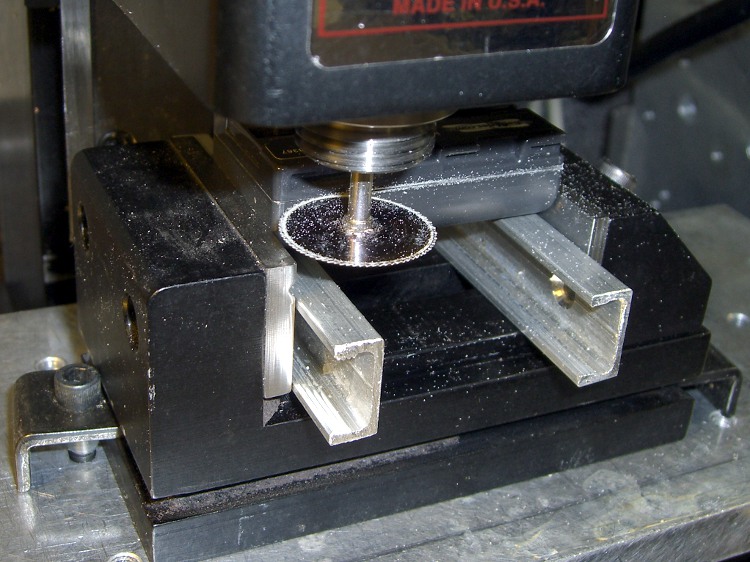
    My buddy Eks gave me a stack of slitting saws a while ago and I modified a standard Sherline holder to fit them. Turns out there’s just barely enough room for everything within the mill’s working envelope; the saws are a bit over 3 inches in diameter.

    So I cut the back of the tubing, making the pictures somewhat disorienting.

    The tubing fit neatly into an old V-block (evidently homebrewed by a better machinist than I), held down by ordinary Sherline clamps on perilously long studs screwed into the tooling plate. The saw had just enough reach to clear the rather broad V-block’s shoulder.

    The tubing is 0.630 OD with a 15-mil wall and the saw blade is pretty nearly 32 mils thick. I touched off Z=0.331 (630/2 + 32/2) with the blade atop the tubing, then jogged away to Y=+1 and drove down to Z=0 to cut exactly through the middle of the tube.

    Slit 0.015 inch deep
    Slit 0.015 inch deep

    The V-block is aligned with the front of the table, but I did a bit of nudging to persuade it into final alignment. Of course, the saw wasn’t quite centered on the holder, so a blade or three tinged on the tubing when I did a Y=0 trial pass at low RPM.

    For lack of anything smarter, I cut at 500 RPM and fed at 5 inch/min. That’s painfully slow, but correspondingly boring… remember, in machine shop work, boring is good.

    I did five passes: one trial at Y=0, three cuts at 5-mil steps, and a cleanup cut. The picture shows the 15-mil pass left a very thin web at the far end. A final 2-mil cut removed that web, leaving only a few burrs. You could do it in one pass, but I wanted to minimize the depth-of-cut into the Wood’s Metal.

    Unclamp, discover that the cast metal rod slides right out, touch up the edges with a file, and it’s all good. A lovely slit, perfectly aligned, without bent metal or bloodshed.

    As a bonus, I get a nice Wood’s Metal ingot out of the operation. The line along the rod is just barely perceptible with a fingernail; it’s more of a polished line than an actual cut.

    Slit tube with Wood's Metal ingot
    Slit tube with Wood's Metal ingot

    Turns out the shield works a bit too well: it cuts out the WWVB signal, too. I think the tubing is too close a fit to the ferrite rod and detunes the winding. More experimentation is in order…

  • EAGLE vs Sherline CNC Mill: Maximum-size PCB Platen

    I use the Standard edition of Cadsoft’s EAGLE schematic capture & PCB layout program, which puts a 160×100 mm upper limit on circuit boards. That meshes nicely with the capabilities of my Sherline CNC mill, which I use to drill component holes.

    I’m currently making a set of PCBs that are pretty close to that maximum size. They’re awkward to clamp, difficult to peel off from double-sided tape, and require careful positioning to ensure they don’t hit the mill column. Been there, done that, time for something better.

    The simple acrylic sheet platen shown here seems to work well. The PCB is a 5×8-inch sheet, clamped along three sides with some aluminum U-channel from the heap. That’s why two of the rails have random holes: it came pre-drilled for something else.

    Platen with 5x8-inch PCB
    Platen with 5×8-inch PCB

    The rear edge (closest to the mill column) has three screws that serve multiple purposes:

    • They clamp the edge of the sheet firmly to the platen
    • The two end screws protrude through the platen and align it along the rear edge of the mill table
    • The middle screw is an origin alignment marker
    Rear clearance
    Rear clearance

    My mill has slightly less than the absolute maximum Y-axis travel because I added a bushing to capture the end of the leadscrew, as described there. The picture shows the clearance between the back of the platen and the mill column: 2 mm, more or less. The 6-32 screw head is flush with the rear edge of the platen.

    Alignment along the Y-axis is easy: jog rearward until the stepper motor stalls, ease away a smidge, then touch off at Y=3.8 inches. Stalling the motor is bad practice with servos or husky steppers, but on this sort of low-power machine it’s perfectly OK. (One could argue for limit switches, but in vain.)

    Slap the platen on the mill table tooling plate (turns out that the Z-axis reach is marginal for the shortest carbide drill when it’s in a collet, oops), adjust more-or-less to the middle of the X-axis scale on the front of the table, line up the hold-down clamps, then crunch the U-channels down on the circuit board. That holds everything in place very firmly; the front overhang doesn’t get much torque because the mill can only reach 4 inches from the rear edge, just beyond the mill table underneath.

    That center screw is eyeballometrically in the middle of the platen’s width, so X-axis alignment is also easy: put the laser dot (visible in the top picture if you squint) on the near-side edge of the screw and touch off X=3.2 inches.

    That alignment puts the X=Y=0 origin at the front-left corner, about 1/4″ in from the left-side clamp and an inch behind the front clamp.

    The mill’s X axis reach goes beyond the clamps, but the 160 mm = 6.30 inch extent of an EAGLE board fits neatly inside.

    The Y-axis reach is barely over 3.8 inches, just shy of EAGLE’s 100 mm = 3.94 inches, but that’s close enough for what I need to do. Getting that last 0.14 inch would require a very, very thin clamp at the rear, minus the Y-axis bushing. There wouldn’t be much clearance from the holes to the edge of the board, either.

    The generous Y-axis clearance on the front allows for the trickery needed to run toner-transfer sheets through the fuser; you want margins all around the drilled area. More about that there, plus search for PCB to unearth other posts.

    Remember that the way I make PCBs, the holes act as alignment points for the toner transfer sheet. That means I don’t really care about absolute alignment with respect to the raw PCB sheet: just clamp it down and start drilling.

  • Holding Machine Screws for Trimming

    Screw in slotted nut
    Screw in slotted nut

    Some years back, I bought a lifetime supply of stainless steel machine screws in the usual sizes, all in 1- and 2-inch lengths. I was always cutting the things to length anyway, so why not start with nice screws?

    The problem with cutting a screw is holding it securely enough that it doesn’t fly off into a far corner of the shop, but without goobering either the threads or the head.

    The secret, at least as far as I can tell, is slitting a nut to make a secure clamp for sawing, filing, and grinding. I ran a slitting saw through a nut to get the result you see here. Although it’s awkward, a slit through a point means grabbing the nut on two parallel sides squeezes the slot closed: exactly what you want.

    Screw firmly under control
    Screw firmly under control

    Slit a bunch of nuts whenever you get set up to do this, because those ugly thread ends on the cut screws tend to chew ’em up. If you have any foresight, you’ll thread the nut on the screw before you cut it, but that doesn’t work for really short screws.

    Yeah, a lifetime supply of all different screw sizes and all different lengths would be nice, but I really don’t spend a whole lot of my life cutting screws…