Ed Nisley's Blog: Shop notes, electronics, firmware, machinery, 3D printing, laser cuttery, and curiosities. Contents: 100% human thinking, 0% AI slop.
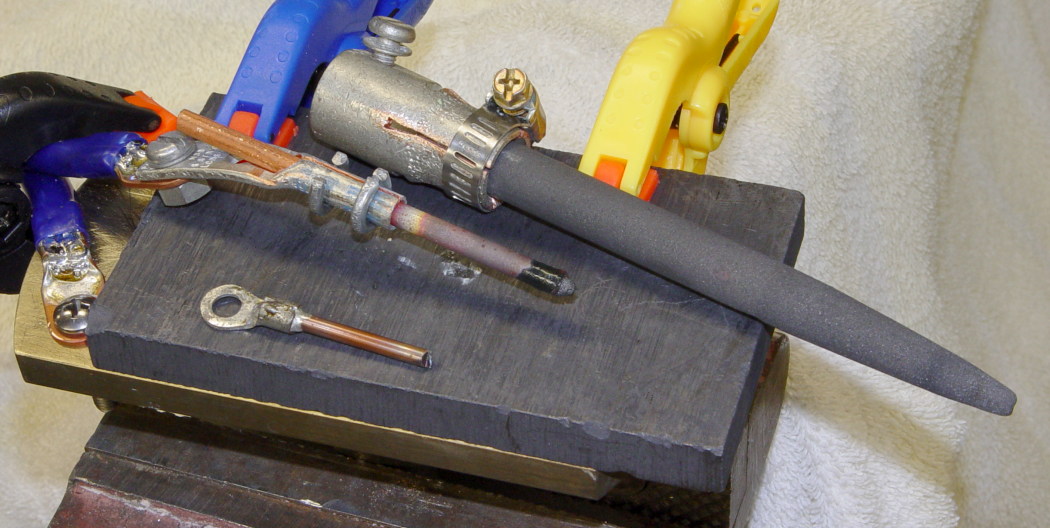
I need this pipe center maybe twice a year and have hitherto managed to work around some nasty gouges and runout that came with it. But I finally cleaned it up by the simple expedient of dialing the compound to match the average angle (it was badly out of true) and skimming off enough to clear the surface.
The trick was realizing that the teeny little shoulder between the taper and the cone was concentric with both. I grabbed it tight (yeah, in a three-jaw chuck), took sissy cuts, and hit the end result with a file to smooth things out.
The remaining gouges are just fine by me.
Cleaned-up Pipe Center
It had been center-drilled in the small end, but the opening had taken a real beating at some point. Neither the live nor the dead center sat correctly and I couldn’t figure out how to hold the thing to re-drill the end.
I needed some black plastic tubes with several different IDs, which usually calls for some tedious machining. Then I realized I could just shrink some heat-shrink tubing around mandrels.
Drill rod worked fine, as did a socket wrench. The only catch was avoiding the engraved lettering, which tends to lock the tubing firmly in place.
In a pinch, I suppose you could turn a rod to the right OD and make a mandrel. That would likely be faster than machining a tube from solid stock, at least for me.
Chuck the mandrel in the lathe, lean a box cutter against the tubing, turn it by hand, and cut to the right length with nice flat ends. Pry it off by sliding a fine needle between the tubing and the mandrel.
Had the occasion to run the flexy snake through a kitchen drain that turned out to be not as plugged up as I expected, which is always good news. Replaced the cleanout plug, hosed off the snake, coiled it up, and applied the usual three nylon cable ties to keep the snake together.
It took me years to figure out that last step. None of the old-school tricks work for me; I can’t tie knots in string / twine / rope while simultaneously holding those coils together and the snake resists any attempt to weave the loose ends into the bundle.
Mercifully, I don’t use the snake all that often and I don’t feel at all bad about tossing three cable ties each time.
I grabbed the screw in the Sherline vise, touched off XY on the head (close enough to being concentric for this purpose), and touched off Z on the nut supporting the screw. For the next few, I’ll eyeball the Z touchoff at the bottom of the head, rather than the nut, because the heads don’t quite sit flush on the nut.
They dropped right into place, without any filing or fiddling! Well, the second one did. I had to tweak the dimensions slightly to make the answer come out right. But that’s one of the advantage of hammering out simple G-Code like this: change two lines and wham you’re done.
Contacts in place
The heads show some tool marks, but that’ll just make the silver solder stick better. Right?
Herewith, the G-Code…
(ICOM IC-Z1A battery pack shell)
(Battery pack contacts)
(Ed Nisley - KE4ZNU - June 2010)
(Vise clamping on threads, XY orgin on central axis, Z=0 at *bottom* of screw head)
(Tool table used just for Axis previews and to activate "manual" changer via M6)
(Tool change @ G30 position above length probe)
(-- Global dimensions & locations)
#<_Traverse_Z> = 5.0
#<_Cutting_Z> = 0.0
(-- Get started ...)
G40 G49 G54 G80 G90 G92.1 G94 G97 G98 (reset many things)
M5
(msg,Verify XY=0 on screw axis)
M0
(msg,Verify tool touched off at Z=0 on *bottom* of head)
M0
(debug,Verify vise clearance around head)
M0
#<Contact_Width> = 4.1 (X axis metallic contact - minus a smidge)
#<Contact_Head_Dia> = 5.5 (recess for 4-40 head)
#<Contact_Head_Radius> = [#<Contact_Head_Dia> / 2]
#<Contact_Head_Depth> = 0.7 (recess depth - plus smidge)
#<Mill_Dia> = 1.98 (end mill diameter)
#<Tool_Num> = 20
#<Mill_Radius> = [#<Mill_Dia> / 2]
#<Mill_RPM> = 5000
#<Mill_Feed> = 50
(debug,Verify #<Mill_Dia> mm end mill)
M0
(debug,Set spindle to #<Mill_RPM>)
M0
F#<Mill_Feed>
(--- Flatten the head)
G0 Z#<_Traverse_Z>
#<X_Step> = [0.5 * #<Mill_Dia>]
#<X_Limit> = [3 * #<Mill_Radius>]
#<Y_Limit> = [#<Contact_Head_Radius> + #<Mill_Radius>]
#<X_Coord> = [0 - #<X_Limit>]
G0 X#<X_Coord> Y[0 - #<Y_Limit>]
G0 Z#<Contact_Head_Depth>
O<Head_Trim> DO
G1 Y#<Y_Limit>
#<X_Coord> = [#<X_Coord> + #<X_Step>]
G1 X#<X_Coord>
G1 Y[0 - #<Y_Limit>]
#<X_Coord> = [#<X_Coord> + #<X_Step>]
G1 X#<X_Coord>
O<Head_Trim> WHILE [#<X_Coord> LT [3 * #<Mill_Radius>]]
G0 Z#<_Traverse_Z>
(--- Trim the sides)
#<Arc_Radius> = [#<Contact_Head_Radius>]
#<Half_Width> = [#<Contact_Width> / 2]
#<Angle> = ACOS [#<Half_Width> / #<Arc_Radius>]
#<Half_Height> = [#<Arc_Radius> * SIN [#<Angle>]]
G0 Z#<_Traverse_Z>
G0 X[0 - #<Half_Width>] Y[0 - #<Contact_Head_Radius> - 3 * #<Mill_Dia>]
G0 Z#<_Cutting_Z>
G41.1 D#<Mill_Dia>
G1 X[0 - #<Half_Width>] Y[0 - #<Half_Height>]
G1 Y#<Half_Height>
G2 X#<Half_Width> I[#<Half_Width>] J[-#<Half_Height>]
G1 Y[0 - #<Half_Height>]
G2 X[0 - #<Half_Width>] I[-#<Half_Width>] J[#<Half_Height>]
G1 Y#<Half_Height>
G0 Z#<_Traverse_Z>
G40
G30 (back to tool change position)
(msg,Done!)
M2
Mary wanted to convert some old tomato cages into flower supports and deer protectors (until the flowers get big enough), by the simple expedient of flipping the cages over with the large end down. She figured we could chop off the wire ends that normally anchor the cages to the ground, then bend them into hooks for secure ground anchors.
I deployed the linesman’s pliers, which only showed that my wire size estimation is grossly underdeveloped. The high-carbon steel wires required bolt cutters… but a few minutes of twang effort scattered two dozen really stiff wires across the patio.
I ran a marker across the pile at the bend point, grabbed two random steel rods in the vise and, in short order, bent up a stack of ground anchors.
I carry around an ancient Zire 71, from the time before PDAs merged with phones and PCs to become fashionable objects of desire.
Anyway, it turns out that the buttons on the front are remarkably easy to squash in your pocket: the poor thing spends a lot of time turning itself on and off. I machined a plate with two holes for the four buttons and a lengthwise recess with two notches for the joystick selector. The whole affair slides into the pouch Mary made for it and works fine.
I tweaked the thing a bit when I got a replacement Zire a few months ago; the grippy tape I put on the sides seemed to be just large enough to force the joystick against the protector while sliding it into the pouch. Now that’s not a problem.
Zire 71 protector in place
This is in the nature of documentation, just in case I need something like this ever again. I found these pix while looking for something else …
Having obtained eyeballometric measurements from the case, the next step was to doodle some shapes on graph paper and pencil in the dimensions. My motivation for not using CAD is simple: it’s easier (for me, at least) to doodle using a pencil.
The outside of the case had pretty much the same features.
Pack Layout – External
The inside, of course, bore no resemblance to the battery pack; the shoulder and whatnot will support the circuit board.
Pack Layout – Internal
The original battle plan was to build the case in at least two layers, simply because it had to be so deep the Sherline couldn’t reach to the bottom with any rational end mill. It would probably make more sense to glue up four sides on a machined bottom, but that requires actual skill.
This became the Front layer, with Front and Rear faces. The Rear layer attaches to the back of this one. In this picture, the Front layer is on the bottom, taped to the radio.
ICOM IC-Z1A with GPS+Audio Interface
The two layers peeled apart, with the Front layer to the right. You can barely see the internal shoulder and external tabs.